Installing new Insider’s build Windows Server vnext NVMeoF, host initiator

Installing new Insider’s build Windows Server vnext NVMeoF, host initiator

A few weeks ago, Microsoft released a new Insider’s build of Windows Server vnext with NVMeoF host initiator. This post looks at installing and setting up the new initiator for testing. Granted, this is for testing and evaluating the NVMe over Fabric (NVMeoF) that supports TCP and RDMA for networked block storage with a Windows Server vnext host, and a Linux test target. Given that this is for a simple test and trying things out, you will want to adjust some of the security and access control settings on both the initiator and target sides.

Whats Needed

For the host NVMeoF initiator, you will need a current version of the insider build release of Windows Server vnext available here. You will also need some type of NVMeoF target, such as a storage system or platform that supports NVMeoF via TCP or RDMA, or a test initiator, for example, on a Linux system. For my test target, I set up an Ubuntu 25 Linux server with a small 50GB device to export as an NVMeoF device.

On the Ubuntu Linux server (e.g NVMeoF target)

sudo apt install nvme-cli -y
sudo modprobe nvmet
sudo modprobe nvmet-tcp
lsmod | grep nvmet

You should then see something like the following:

nvmet_tcp 45056 1
nvmet 249856 7 nvmet_tcp
nvme_core 241664 4 nvmet,nvme_tcp,nvme,nvme_fabrics
nvme_keyring 20480 5 nvmet,nvme_tcp,nvmet_tcp,nvme_core,nvme_fabrics
nvme_auth 28672 2 nvmet,nvme_core

Continue with the NVMeoF target setup:

sudo mount -t configfs none /sys/kernel/config
cd /sys/kernel/config/nvmet

# define your nqn which can be what ever you like, or have

sudo mkdir subsystems/nqn-2026-03.com:nvme.storageio01

# since this is for testing, this is being loose with access control

echo 1 | sudo tee subsystems/nqn-2026-03.com:nvme.storageio01/attr_allow_any_host
sudo mkdir subsystems/nqn-2026-03.com:nvme.storageio01/namespaces/1

# specify device to use as target, the device could be a partition, volume, file, etc

echo /dev/sdb | sudo tee subsystems/nqn-2026-03.com:nvme.storageio01/namespaces/1/device_path
echo 1 | sudo tee subsystems/nqn-2026-03.com:nvme.storageio01/namespaces/1/enable

# You can select what port you want to use. For testing, used 4420

sudo mkdir ports/4420
echo tcp | sudo tee ports/4420/addr_trtype
echo 192.168.1.205 | sudo tee ports/4420/addr_traddr
echo 4420 | sudo tee ports/4420/addr_trsvcid
echo ipv4 | sudo tee ports/4420/addr_adrfam

# For non-testing, you can adjust access to suit your needs

sudo ufw allow 4420/tcp

# now make the target accessible

sudo ln -s /sys/kernel/config/nvmet/subsystems/nqn-2026-03.com:nvme.storageio01 /sys/kernel/config/nvmet/ports/4420/subsystems/nqn-2026-03.com:nvme.storageio01

# now lets see if there is a listener

sudo ss -ltnp | grep 4420

# Should see something like this:

LISTEN 0 128 192.168.1.205:4420 0.0.0.0:*

# now lets discover whats out there based on what we have setup

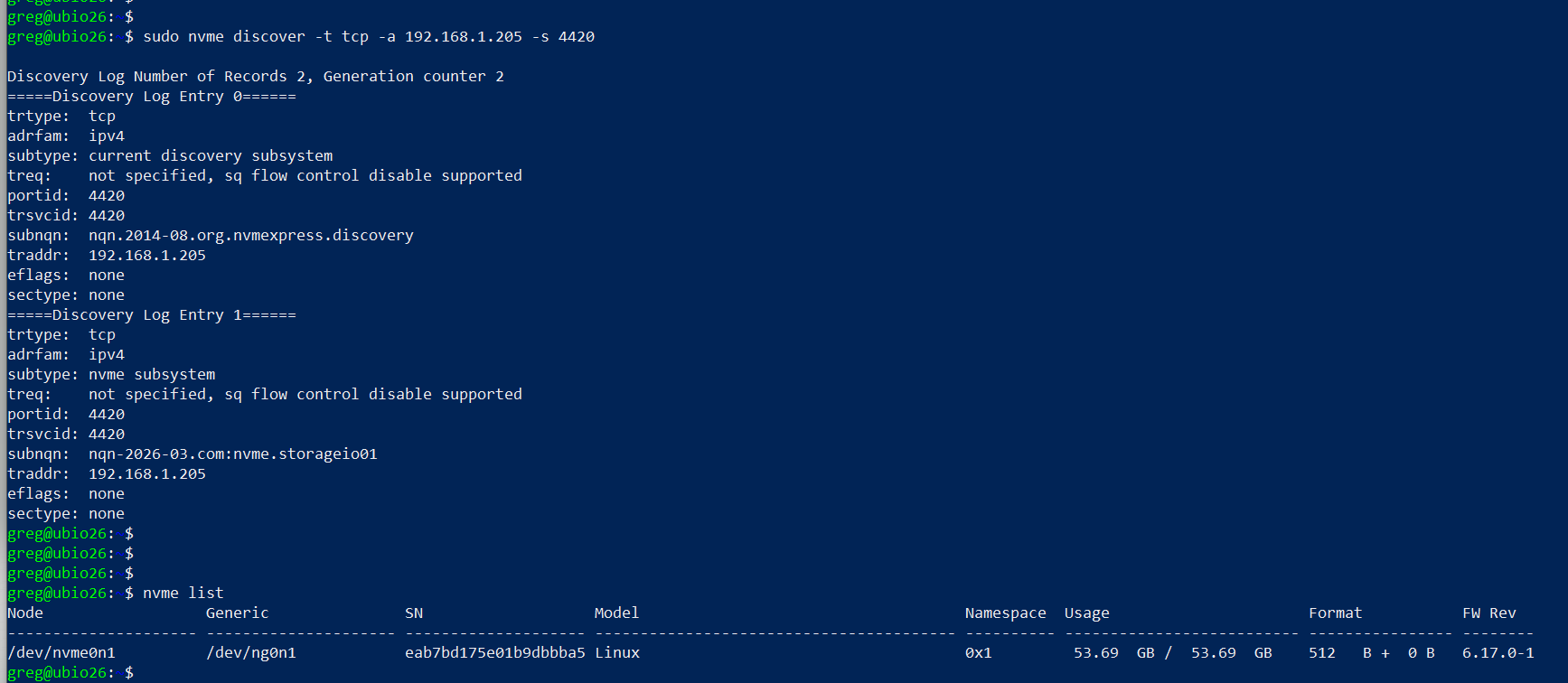
sudo nvme discover -t tcp -a 192.168.1.205 -s 4420

# should see something like this:

Discovery Log Number of Records 2, Generation counter 2
=====Discovery Log Entry 0======
trtype: tcp
adrfam: ipv4
subtype: current discovery subsystem
treq: not specified, sq flow control disable supported
portid: 4420
trsvcid: 4420
subnqn: nqn.2014-08.org.nvmexpress.discovery
traddr: 192.168.1.205
eflags: none
sectype: none
=====Discovery Log Entry 1======
trtype: tcp
adrfam: ipv4
subtype: nvme subsystem
treq: not specified, sq flow control disable supported
portid: 4420
trsvcid: 4420
subnqn: nqn-2026-03.com:nvme.storageio01
traddr: 192.168.1.205
eflags: none
sectype: none

# if you want to connect from the Linux server

sudo nvme connect -t tcp -a 192.168.1.205 -s 4420 -n nqn-2026-03.com:nvme.storageio01

# and then list the targets

nvme list

# you should see something like this:

Node Generic SN Model Namespace Usage Format FW Rev
——————— ——————— ——————– —————————————- ———- ————————– —————- ——–
/dev/nvme0n1 /dev/ng0n1 eab7bd175e01b9dbbba5 Linux 0x1 53.69 GB / 53.69 GB 512 B + 0 B 6.17.0-1
setting up linux nvmeof target

On Windows Server vnext (NVMeoF Initiator)

Now, on your Windows Server vnext, open a command window with elevated access (e.g., Run as Administrator) and use the following, making note of the parameters from the target (e.g., IP address, port 4420, nqn).

Here is a screen shot of the host initiator before the NVMeoF target appears.
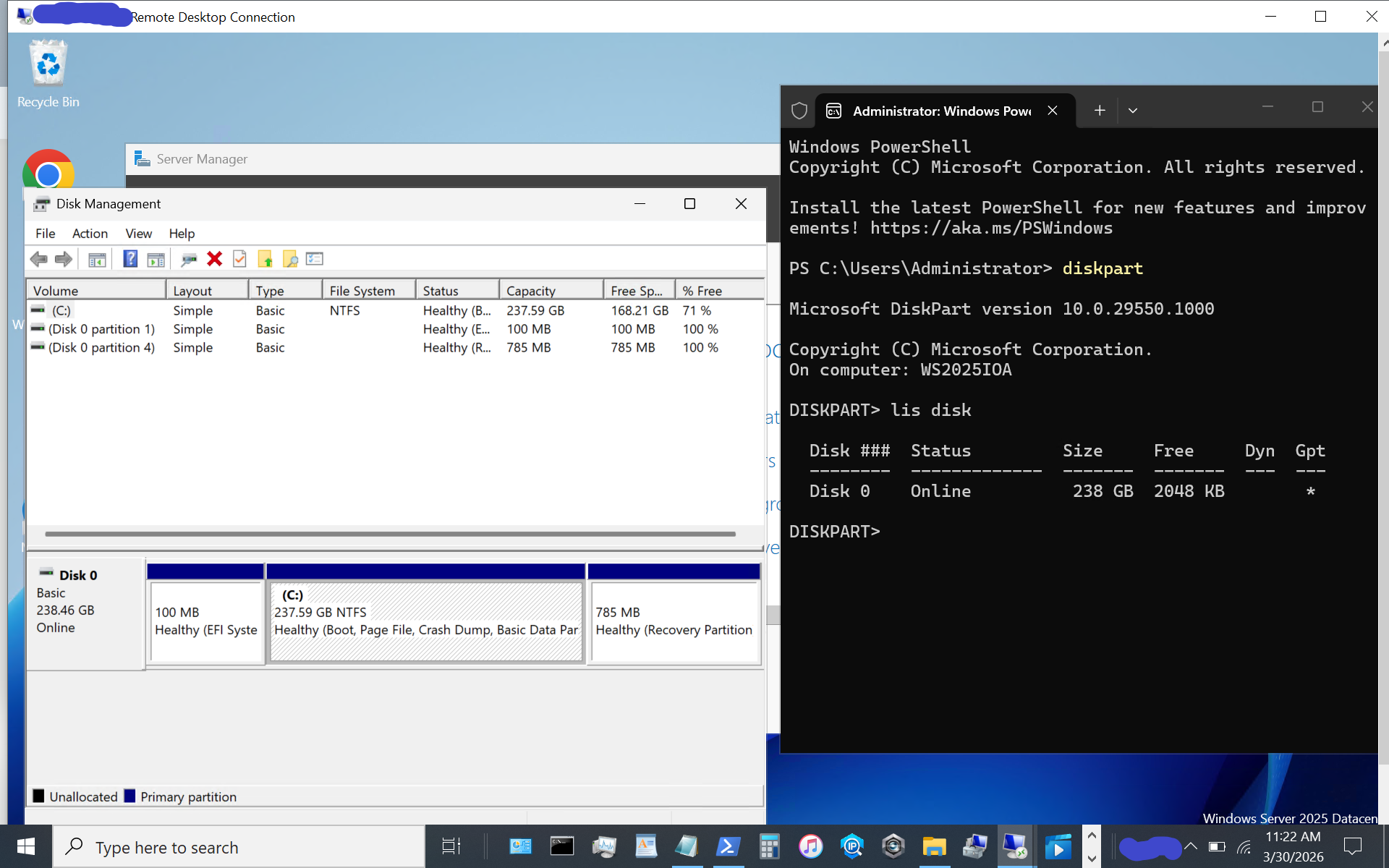
windows server vnext nvmeof host initiator setup

Now display available NVMeoF initiators using this command:

nvmeofutil.exe list -t ia
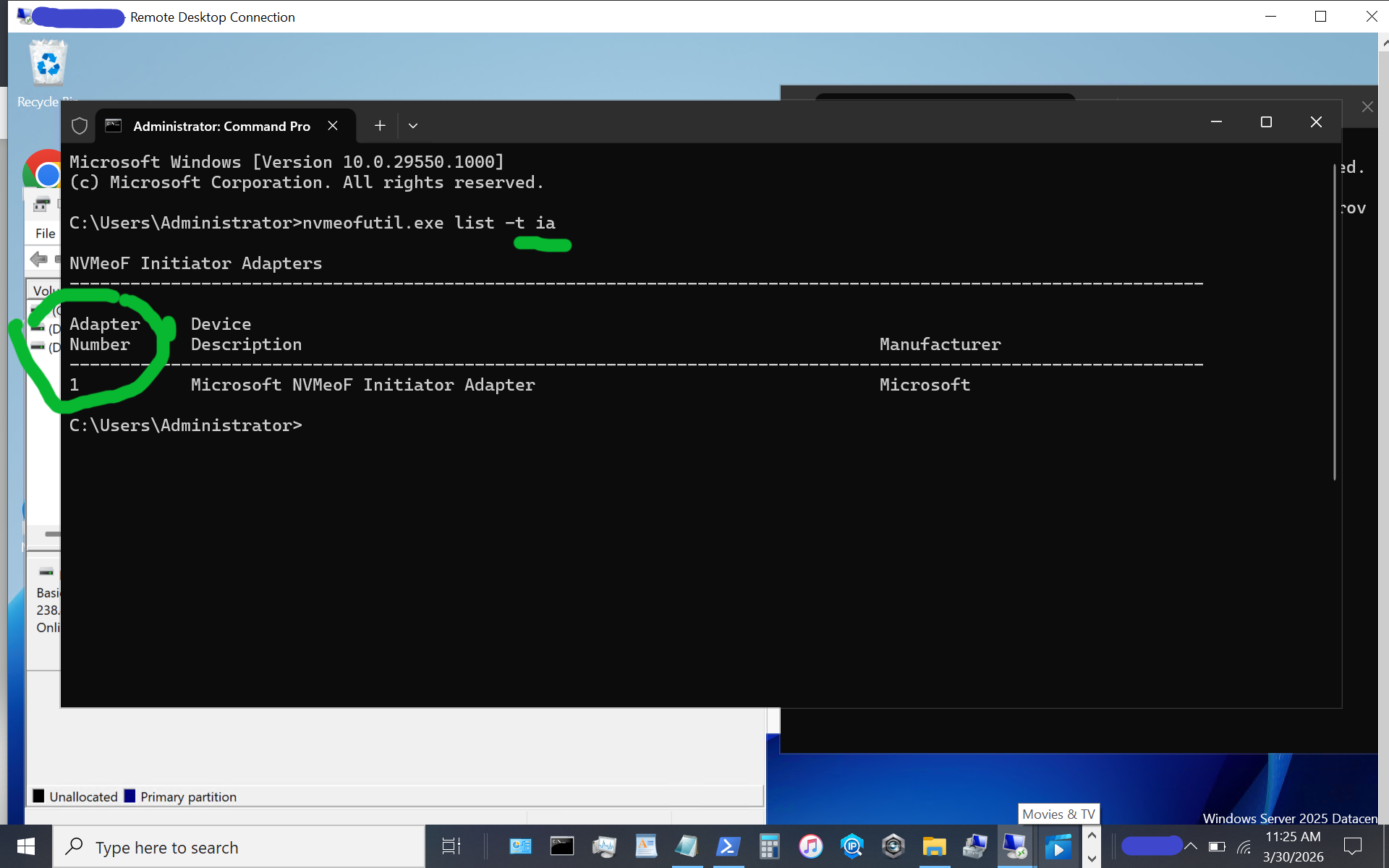
windows server vnext nvmeof host initiator setup

Note the host adapter number (e.g., 1) which will be used in the next step to get host gateway information.

nvmeofutil.exe list -t sp -ia 1
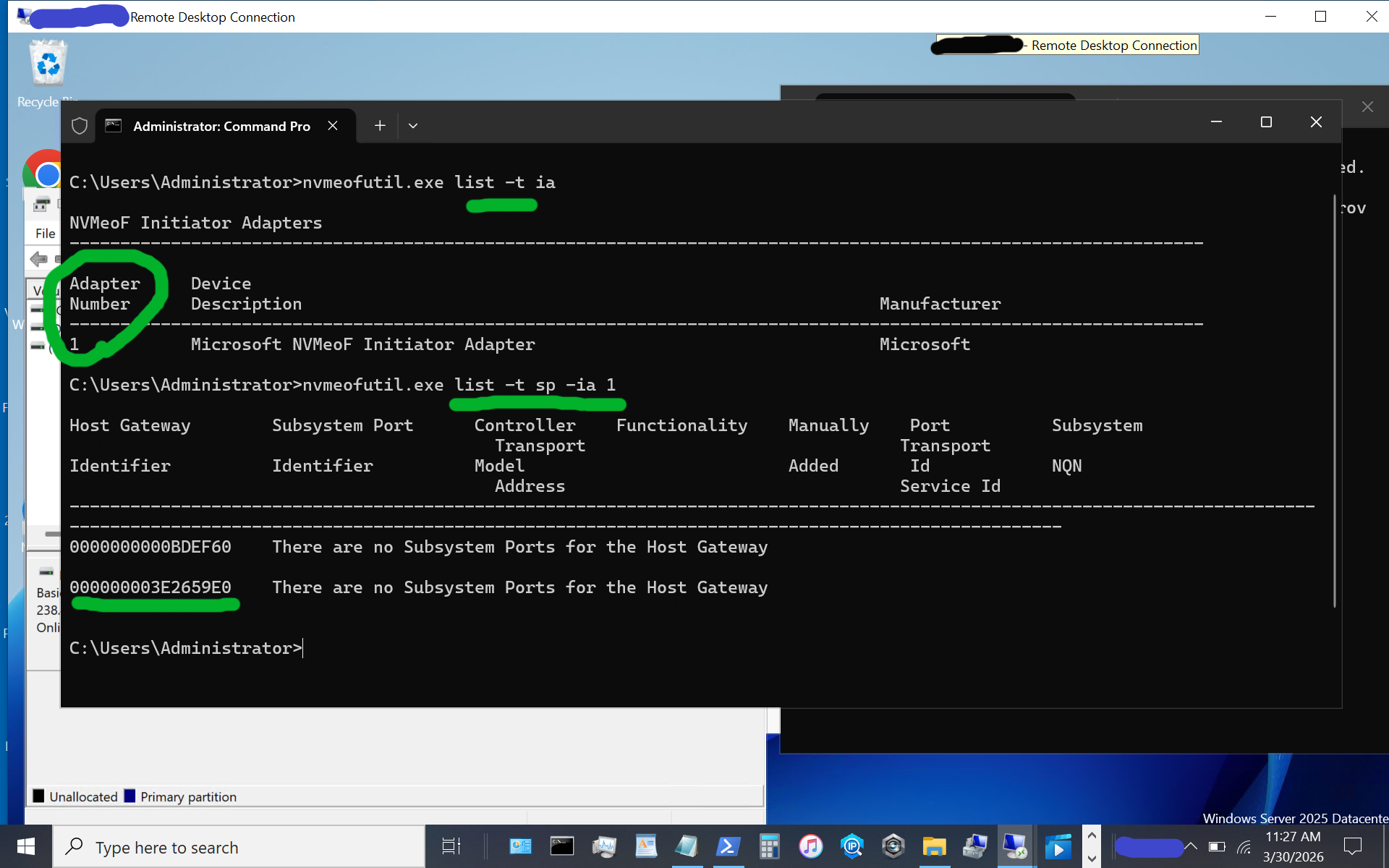
windows server vnext nvmeof host initiator setup display host gateway

Note the host gateway, target IP address, target port, and target nqn. Also note that there is an IPV6 and IPV4, in this example there is no IPV6 being used, so we are using the 2nd item (e.g. IPV4).

nvmeofutil.exe add -t sp -ia 1 -hg -dy true -pi 1 -nq nqn-2026-03.com:nvme.storageio01 -ta 192.168.1.205 -ts 4420
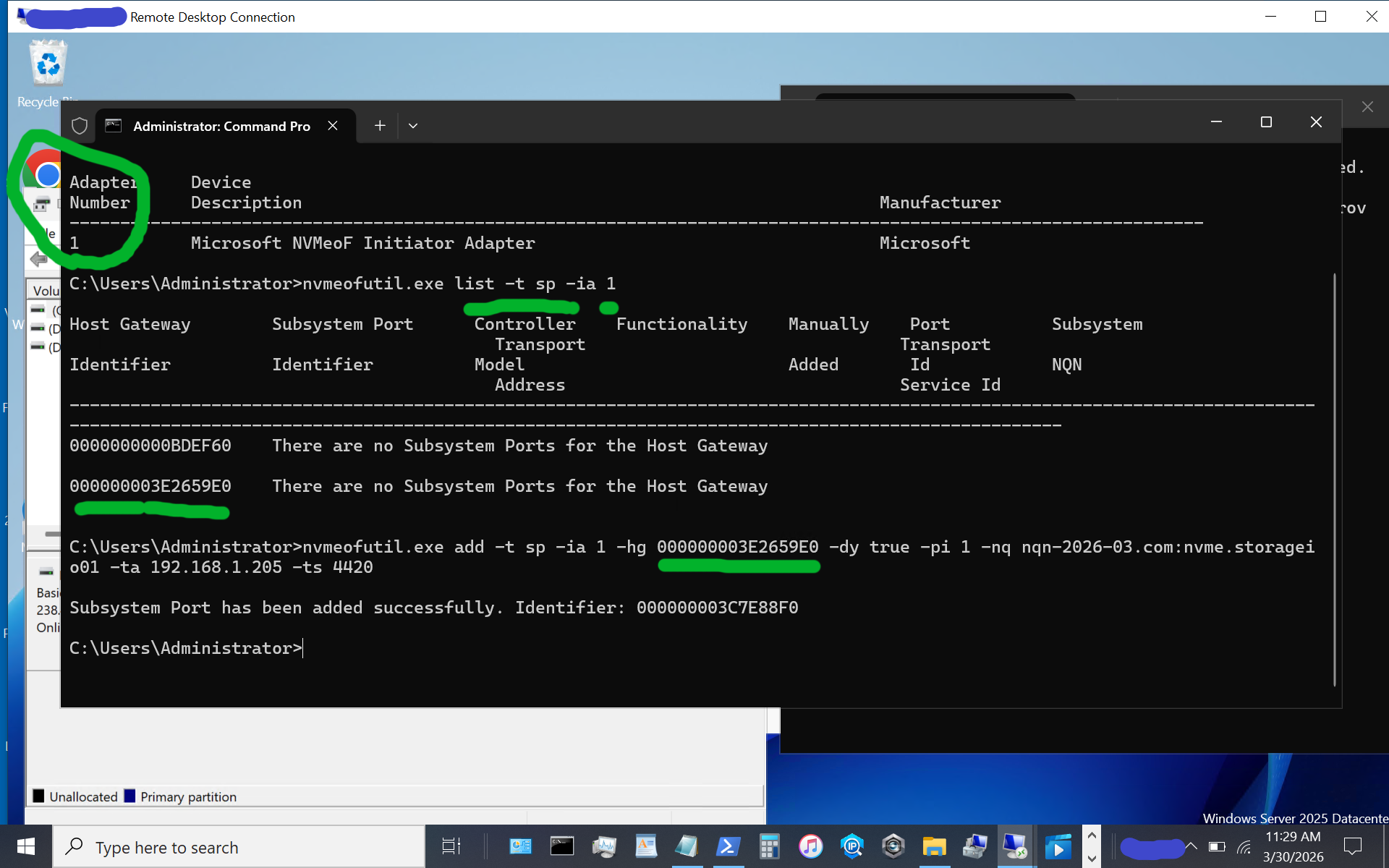
windows server vnext nvmeof host initiator setup showing host gateway and other information

Now, let’s identify the target subsystem ID.

nvmeofutil.exe list -t sp -ia 1
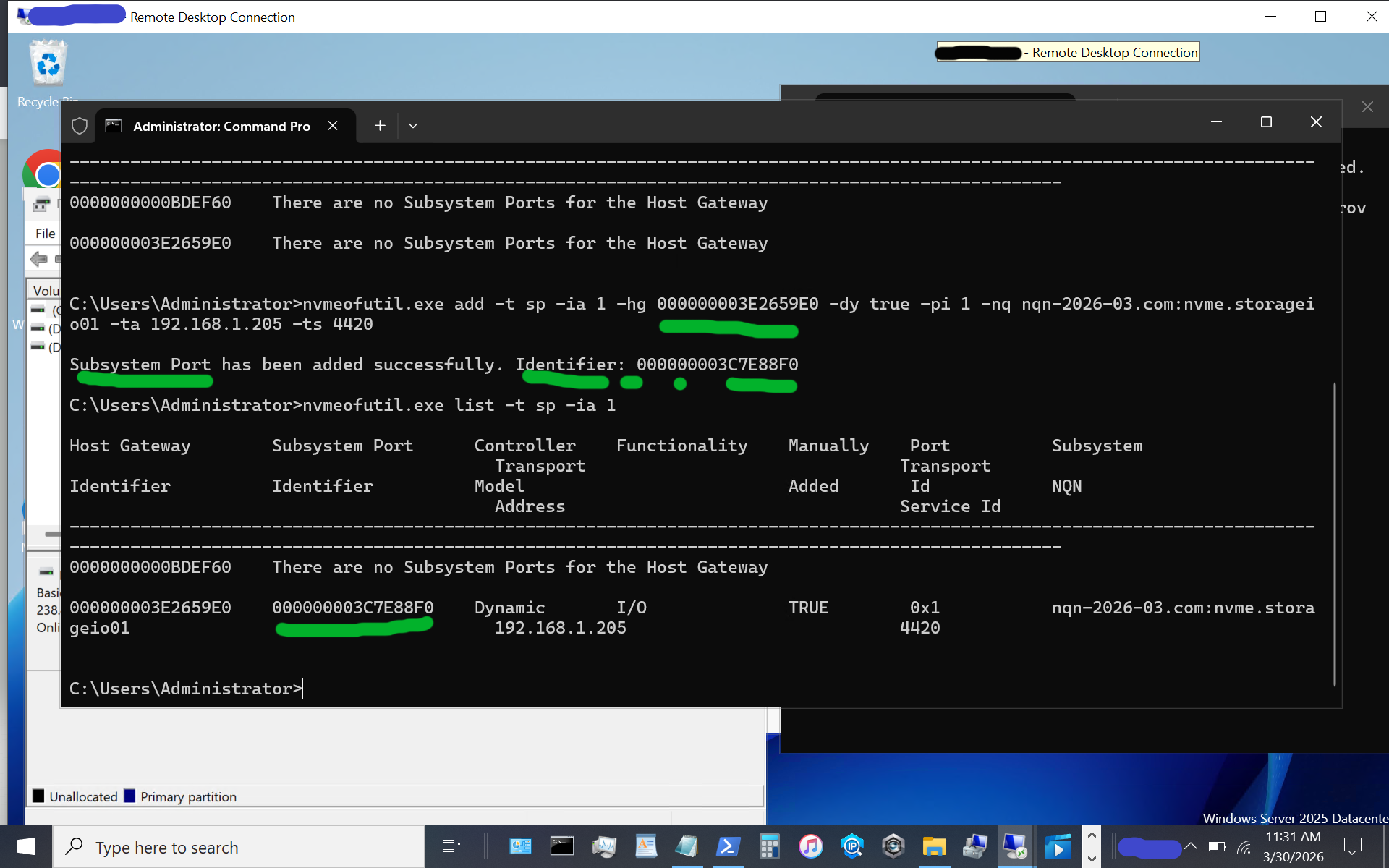
windows server vnext nvmeof host initiator setup showing subsystem information of available targets

Now, let’s use the subsystem port from above to connect to the target. Note that in some of the instructions I have seen, there is a reference to sp without an sp shown; thus, the previous steps help identify the sp to use.

nvmeofutil.exe connect -ia 1 -sp 000000003C7E88F0
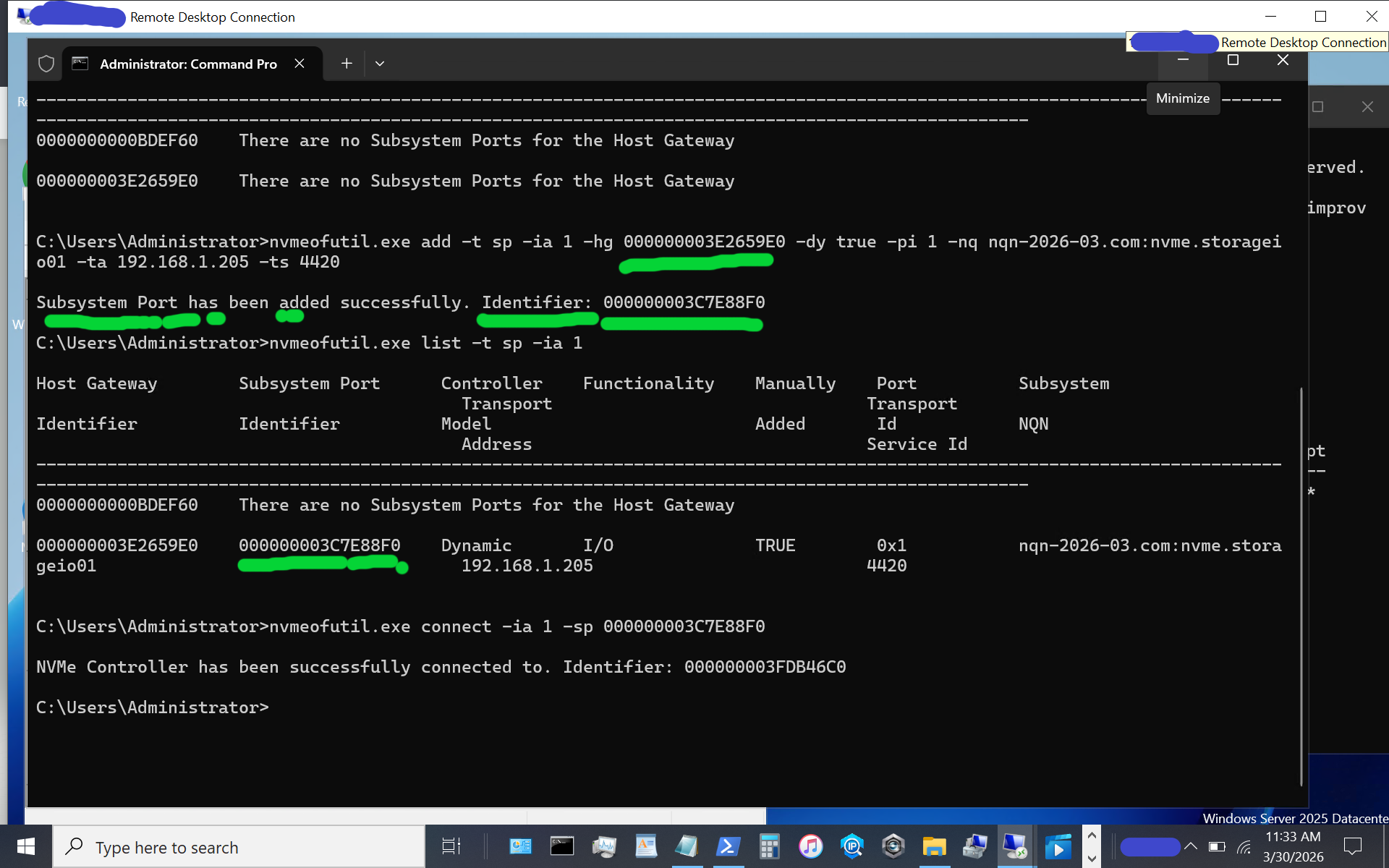
windows server vnext nvmeof host initiator setup

Congratulations, at this point, you should see a new disk or volume appear on your Windows Server vnext host system.
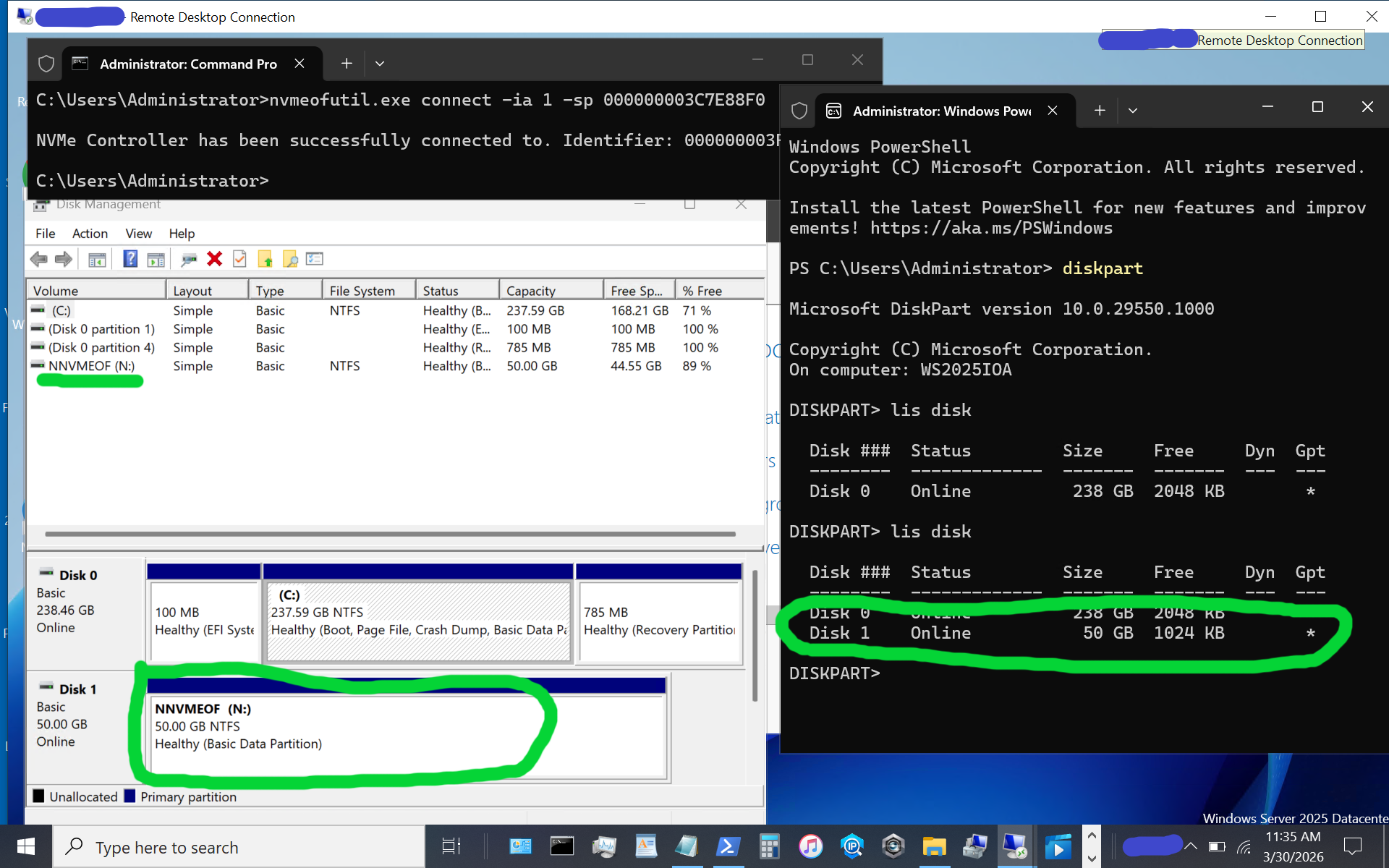
windows server vnext nvmeof host initiator setup

The above image shows what appears when using diskpart, as well as the disk format utility, or use your preferred command, PowerShell script, or tool. If the disk or volume has not yet been used, it must be initialized and formatted. Otoh, as in this example, the disk volume had previously been initialized and formatted as a simple NTFS volume.

Again, reiterating, the above is for simple testing and evaluation, with loose security and persistence that you will want to tighten up as needed. The whole process is pretty easy as long as you don’t make any typos, for example, with nqn or other items.

Additional Resources Where to learn more

Microsoft Windows Server Insider Build NVMeoF Initiator (Blog post)
NVMe Linux Driver and related info
Announcing Native NVMe in Windows Server 2025 (Microsoft Post)
Introducing the Windows NVMe-oF Initiator Preview in Windows Server Insiders Builds (Microsoft Post)
Windows Server Insider Builds (Microsoft Downloads)
ToE NVMeoF TCP Performance Boost Performance Reduce Costs (blog post)
TheNVMeplace.com (Various NVMe resources)
Azure Cloud Storage here (Microsoft Post)
Microsoft Azure Data Box (Blog Post)
Azure Elastic SAN from Cloud to On-Prem here (Blog Post)
Cloud and Software Defined Data Infrastructure topics here

Additional learning experiences along with common questions (and answers) pertaining to SCSI, Fibre Channel, NVMe, Cloud, Hardware, Software, Services, techniques, server, storage, I/O networking, data protection among other topics are found in my Software Defined Data Infrastructure Essentials book.
Software Defined Data Infrastructure Essentials (CRC Press) by Greg Schulz

What this all means

With the insiders preview of Windows Server vnext you have the opportunity to try out the new NVMeoF initiator using TCP and RDMA including on Ethernet based fabric networks. The current insiders build utilizes the nvmeofutility.exe for initial testing, evaluations and experiments while future releases should see other management tools and interfaces such as Powershell cmdlets among others.

Ok, nuff said.

Cheers Gs

Greg Schulz – Ten time Microsoft MVP Cloud and Data Center Management and Azure Storage, along with previous ten-time VMware vExpert. Author of Software Defined Data Infrastructure Essentials (CRC Press), as well as Cloud and Virtual Data Storage Networking (CRC Press), The Green and Virtual Data Center (CRC Press), Resilient Storage Networks (Elsevier) and twitter @storageio. Courteous comments are welcome for consideration. First published on https://storageioblog.com any reproduction in whole, in part, with changes to content, without source attribution under title or without permission is forbidden.

All Comments, (C) and (TM) belong to their owners/posters, Other content (C) Copyright 2006-2026 Server StorageIO and UnlimitedIO. All Rights Reserved. StorageIO is a registered Trade Mark (TM) of UnlimitedIO LLC.

Its Time for NVMeoF to let iSCSI begin its slow retirement journey

Why Its Time for NVMeoF

Its Time for NVMeoF to let iSCSI begin its slow retirement journey for networked shared block storage. Dating back to the late 1990s and early 2000s, iSCSI encapsulates the SCSI command set over a TCP/IP (IP)- based fabric network, or as an alternative to SCSI on Fibre Channel (SCSI_FCP aka FCP aka FC). The SCSI command set dates back to the 1980s, having been deployed on physical parallel cabling and later on other transports, including Fibre Channel, Serial Attached SCSI (SAS), and iSCSI.

The reason it’s time for NVMe over Fabric (NVMeoF), and specifically NVMeoF using TCP and RDMA, to let iSCSI begin its slow retirement journey, is the evolution of the NVMe protocol command set and the expansion of its ecosystem as a modern, ground-up, streamlined server storage I/O protocol command set.

Keep in mind that there are two aspects in play with NVMeoF, which are similar to iSCSI and Fibre Channel-based FCP: the upper layer or protocol command set (e.g., NVMe and SCSI), and media through which these command sets are implemented via various interfaces such as TCP or RDMA on Ethernet, via InfiniBand, Fibre Channel, or physical PCIe, among others.

Ethernet has established itself as the dominant network interface, supporting various upper layers, such as TCP, and increasing its speed. Likewise, InfiniBand and Fibre Channel continue to increase their speeds and maintain their deployment roles in some environments.

Besides supporting faster networks, the NVMe command set was architected and has been deployed to support the current and evolving generations of processors with multiple cores, enabling more concurrent I/O operations and compute threads with less CPU overhead due to a modern, streamlined I/O stack and associated native drivers.

Why NVMeoF (over TCP or RDMA)

Leverage the combined improved benefits of NVMe as a server storage I/O communications protocol, along with TCP networking and industry-standard Ethernet as a communications fabric. With the NVMe command protocol server storage, I/O processing is streamlined and optimized for modern high-speed, low-latency network fabrics, such as Ethernet, as the transport.

The NVMe command set, compared to the SCSI command set, enables faster I/O processing with lower latency, higher IOPs, greater bandwidth, and more transactions, while increasing concurrency and the number of threads and reducing CPU usage per I/O operation. Similar to the SCSI command set, which has been deployed on various industry-standard transport interfaces, the NVMe command set is also deployed across various transports. For example, SCSI has been supported on IP (iSCSI), Fibre Channel (SCSI_FCP, e.g., FCP), Serial Attached SCSI (SAS), and Parallel SCSI, among others.

Likewise, the NVMe command set has been implemented via PCIe, including U.2, as well as over fabrics (e.g., NVMe over Fabric, aka NVMeoF), most notably with TCP and RDMA, along with some NVMe over Fibre Channel. In addition to being a modern, streamlined command set, NVMe also supports more devices, queues, and sessions, and is optimized with host-server initiator and target-side stacks.
An example of how NVMe is being embraced from a software support standpoint is Microsoft’s production release of a new, re-architected, optimized I/O stack as part of Windows Server 2025 in December 2025. Recently, Microsoft released, as part of the latest vnext insiders preview build, an all-new NVMeoF (TCP & RDMA) initiator for testing and evaluation.

NVMe has proven itself as a command set using various transports for use as a target for various SSD and flash storage devices (e.g., back-end) in servers, clients, and storage systems, as well as a front-end alternative to SCSI_FCP (e.g., FCP or FC) and iSCSI among others on storage systems, and software-defined storage solutions. Also, keep in mind that while the SCSI command set dates back to at least the early 1990s for general-purpose access of Magnetic Tape, CD/DVD, HDD, and later SSD, NVMe developed in the last decade was created from the ground up for solid-state devices (SSDs), including flash, among other persistent storage mediums.

Why NVMeoF (TCP) vs iSCSI

It would be, and is, too easy to say the 2000s called and want iSCSI back; however, tongue-in-cheek, there is some reality to that. However, looking closer, iSCSI evolved in the early 2000s as a low-cost SCSI command set alternative to Fibre Channel (SCSI_FCP, e.g., FCP or FC), as well as the survivor of the block IP storage wars (e.g., iFCP, FCIP, iSCSI, etc.) for general-purpose IP-based SCSI storage access.

Fibre Channel-based SCSI (FCP) went on to dominate higher-performance fabric- or networked-storage, aka storage area networks (SANs), with iSCSI having some success in other areas alongside file-based IP storage access via NFS & SMB, among others.

Now that we are in the mid-2020s, the ecosystem around NVMe has matured and continues to do so, with full-stack NVMe solutions, hardware- and software-based initiators, native NVMe drivers, target-based storage systems, and storage devices using various transports. NVMe has evolved from direct-attached PCIe card slots to PCIe U.2 & U.3, M.2 and EDSFF slots, as well as NVMe over Fabrics including TCP and RDMA, among others.

The benefit of using NVMeoF vs iSCSI is lower latency, due to native NVMe commands over TCP being streamlined, vs older SCSI encapsulation and associated cumbersome driver stacks. Besides the streamlined drivers and transports, NVMeoF also provides massive parallelism and multi-threading to boost server storage I/O while leveraging today’s multi-core processors and offload capabilities.

The net result is more I/O operations supporting higher IOPs, bandwidth, and transactions per second, with lower latency and lower CPU usage, resulting in greater productivity and better economics for databases, virtualization, AI/ML, and other block-based workloads.

Who supports NVMe and NVMeoF?

Most host and client operating systems support NVMe or NVMeoF initiators (e.g., Linux, VMware, Microsoft Windows [in the current Insider build], among others). There are also hardware adapter-based NVMe initiators, such as those from Broadcom, Chelsio, and NVIDIA. There are software NVMe and NVMe target packages for many platforms, such as Linux-based NVMe, nvme-tcp, nvme-rdma, nvme-fc, nvmet, nvmet-tcp, and SPDK (Storage Performance Development Kit), among others.

Besides server- or client-side support, there are storage and server hardware chassis building blocks that support NVMe, as well as storage system solutions from Dell, HPE, Hitachi, NetApp, Pure, among others. Within large cloud service providers such as AWS, Microsoft Azure, and Google Cloud Platform (GCP), NVMe is also widely used across their platform ecosystems.

Why it’s time for NVMeoF to let iSCSI begin its slow retirement journey
This is not to say that iSCSI is dead or that it has no future; rather, NVMeoF and its ecosystem have evolved and are ready to do more. Likewise, the SCSI command set is not dead; it’s still used with SAS, Fibre Channel (FCP), iSCSI, etc. However, NVMe has evolved and is seeing broad adoption from server and client attachment to storage devices and storage systems over various transport interfaces and media (PCIe, U.2/U.3, M.2, EDSFF, Ethernet, and fabrics).

Storage systems have also evolved, adding front-end support for NVMeoF and back-end attachment of NVMe flash and SSDs. With the combination of server, client and other software platforms having or in public release review, new streamlined native NVMe drivers and I/O stacks along with NVMeoF initiators (or targets), now is the time to look at NVMeoF as a replacement or alternative to iSCSI, and perhaps even Fibre Channel in the future to support existing and legacy workloads as well as new and emerging application landscapes and their demanding server storage I/O and compute needs (e.g. AI among others).

Additional Resources Where to learn more

Microsoft Windows Server Insider Build NVMeoF Initiator (Blog post)
Installing new Insider’s build Windows Server vnext NVMeoF, host initiator (blog post)
NVMe Linux Driver and related info
Announcing Native NVMe in Windows Server 2025 (Microsoft Post)
Introducing the Windows NVMe-oF Initiator Preview in Windows Server Insiders Builds (Microsoft Post)
Windows Server Insider Builds (Microsoft Downloads)
ToE NVMeoF TCP Performance Line Boost Performance Reduce Costs (blog post)
TheNVMeplace.com (Various NVMe resources)
Azure Cloud Storage here (Microsoft Post)
Microsoft Azure Data Box (Blog Post)
Azure Elastic SAN from Cloud to On-Prem here (Blog Post)
Cloud and Software Defined Data Infrastructure topics here

Additional learning experiences along with common questions (and answers) pertaining to SCSI, Fibre Channel, NVMe, Cloud, Hardware, Software, Services, techniques, server, storage, I/O networking, data protection among other topics are found in my Software Defined Data Infrastructure Essentials book.

Software Defined Data Infrastructure Essentials (CRC Press) by Greg Schulz

What this all means

Now is a good time to look into NVMe and, specifically, NVMe over Fabric (NVMeoF) if you have not recently done so, to refresh or learn what it can do. Likewise, if you are using iSCSI or Fibre Channel-based SCSI_FCP (e.g., not FICON), now is a good time to review or refresh your understanding of NVMeoF and where it fits into future plans for block storage. For those who say block storage is dead and everything is object storage, file storage, or even table storage, that’s fine, as those are all companions to block storage in a balanced ecosystem, each with its own uses, roles, and fits.

Ok, nuff said.

Cheers Gs

Greg Schulz – Ten time Microsoft MVP Cloud and Data Center Management and Azure Storage, along with previous ten-time VMware vExpert. Author of Software Defined Data Infrastructure Essentials (CRC Press), as well as Cloud and Virtual Data Storage Networking (CRC Press), The Green and Virtual Data Center (CRC Press), Resilient Storage Networks (Elsevier) and twitter @storageio. Courteous comments are welcome for consideration. First published on https://storageioblog.com any reproduction in whole, in part, with changes to content, without source attribution under title or without permission is forbidden.

All Comments, (C) and (TM) belong to their owners/posters, Other content (C) Copyright 2006-2026 Server StorageIO and UnlimitedIO. All Rights Reserved. StorageIO is a registered Trade Mark (TM) of UnlimitedIO LLC.

Microsoft Windows Server Insider Build NVMeoF Initiator

Microsoft Windows Server Insider Build NVMeoF Initiator

In case you haven’t heard, in addition to recently announcing a new NVMe native driver for Windows Server 2025 back in December 2025, Microsoft has now introduced a new Windows NVMe over Fabrics (NVMeoF, aka NVMe-oF) Initiator Preview in the latest Windows Server Insiders Builds.

With the preview of this new NVMeoF initiator, Microsoft is moving closer to delivering enhanced server storage I/O performance by embracing NVMe as both a native storage target and a native NVMe host server initiator. While the new NVMe native storage stack driver was released for production back in December 2025, this new host initiator capability is available as a preview in the latest Windows Server insider build.

By adding a native NVMeoF initiator, Microsoft is enabling organizations to use shared networked block software-defined and SAN storage using the faster NVMe protocol, rather than traditional SCSI/iSCSI/SCSI_FCP(FC) protocol-based interfaces. In addition to supporting native direct-attached NVMe storage, Microsoft Windows servers (insider build) now support the streamlined NVMe server storage I/O stack over networks, including Ethernet and RDMA fabrics.

Additional Resources Where to learn more

ToE NVMeoF TCP Performance Line Boost Performance Reduce Costs (blog post)
NVMe Linux Driver and related info
Its Time for NVMeoF to let iSCSI begin its slow retirement journey (blog post)
Announcing Native NVMe in Windows Server 2025 (Microsoft Post)
Installing new Insider’s build Windows Server vnext NVMeoF, host initiator (blog post)
Introducing the Windows NVMe-oF Initiator Preview in Windows Server Insiders Builds (Microsoft Post)
Windows Server Insider Builds (Microsoft Downloads)
TheNVMeplace.com (Various NVMe resources)
Azure Cloud Storage here (Microsoft Post)
Microsoft Azure Data Box (Blog Post)
Azure Elastic SAN from Cloud to On-Prem here (Blog Post)
Cloud and Software Defined Data Infrastructure topics here

Additional learning experiences along with common questions (and answers) pertaining to Cloud, Hardware, Software, Services, techniques, server, storage, I/O networking, data protection among other topics are found in my Software Defined Data Infrastructure Essentials book.

Software Defined Data Infrastructure Essentials (CRC Press) by Greg Schulz

What this all means

While this new Windows Server host NVMe over Fabric (NVMeoF aka NVMe-oF) initiator for block storage is currently available as part of a Windows Server insiders build, it provides a means for organizations to begin testing native NVMe connectivity via Windows Servers to their existing SAN and other networked software defined storage servers via fabrics including Ethernet along with RDMA based. Learn more about this new initiator, along with how to try it out for yourself via this Microsoft blog post that includes instructions on how to setup your own NVMeoF storage target if you dont have one.

Ok, nuff said.

Cheers Gs

Greg Schulz – Ten time Microsoft MVP Cloud and Data Center Management and Azure Storage, along with previous ten-time VMware vExpert. Author of Software Defined Data Infrastructure Essentials (CRC Press), as well as Cloud and Virtual Data Storage Networking (CRC Press), The Green and Virtual Data Center (CRC Press), Resilient Storage Networks (Elsevier) and twitter @storageio. Courteous comments are welcome for consideration. First published on https://storageioblog.com any reproduction in whole, in part, with changes to content, without source attribution under title or without permission is forbidden.

All Comments, (C) and (TM) belong to their owners/posters, Other content (C) Copyright 2006-2026 Server StorageIO and UnlimitedIO. All Rights Reserved. StorageIO is a registered Trade Mark (TM) of UnlimitedIO LLC.

RTO Context Matters

RTO Context Matters

With RTO context matters similar to many things in and around Information Technology (IT) among other industries. Various three (or more) letter acronyms (TLAs) have different meanings based on their context. An example of a TLA is RTO which has different meanings. For  instance, RTO can mean:

    • Return To Office
    • Recovery Time Objective
    • Ready To Operate
    • Return To Operations
    • Among others…

From the data protection and cyber resilience context, RTO has traditionally been thought of as a Recovery Time Objective or the amount of time that something should be able to be restored, recovered, rebuilt, reset, or returned to service, aka being usable. Another way of looking at Recovery Time Objective is the goal or requirement that something is ready to operate, enabling an organization and its IT services apps, data, and information to return to operations.

Data Infrastructures and Recovery Time Objectives (RTO)
Figure 1 Data Infrastructures and Recovery Time Objectives (RTO)

RTO Recovery Time Object Context

Where context is needed is not just simply what RTO is being discussed, e.g., recovery time objective; also, what is the scope of the recovery time objective? Is it all-inclusive for a specific component, layer, or focus point? A holistic RTO is when everything in the stack, vertical up and down all layers of hardware, software, services, and, if applicable, also horizontal across different systems, platforms, and locations, is usable. For example, when a user can access an app from various places, and everything is functioning, perhaps not at full or regular speed, it is functioning.

Data Infrastructures and Recovery Time Objectives (RTO) layers
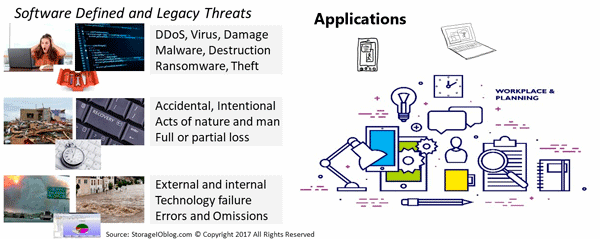
Figure 2 Various Threats and Data Infrastructure Layers

Recovery Time Objective Focus

On the other hand, component RTO refers to a specific focus area, point, or location in the stack (figure 2). For example, a lower-level server, network, storage device, physical or virtual machine, container, file system, database repository, or application is restored or returned to readiness and operation. The individual components may be restored to operating; however, what about the sum of all the parts that make up the holistic solution or service the user sees and expects to be in working condition?

Additional Resources Where to learn more

The following links are additional resources to learn more about Recovery Time Objectives (RTO)  and related data infrastructures, tradecraft, and metrics that matter topics.

Various excerpts from Chapter 9 Software Defined Data Infrastructure book
Modernizing Data Protection (Blog Post)
Data Protection Diaries (Blog Post)
Azure Cloud Storage Options (Blog Post)
Availability and Accessibility (Article)

Additional learning experiences along with common questions (and answers), are found in my Software Defined Data Infrastructure Essentials book.

Software Defined Data Infrastructure Essentials (CRC Press) by Greg Schulz

What this all means

RTO context matters, not only for which RTO but also if it refers to a holistic compound aggregate scope or that of a component. While component RTOs are essential, so is the holistic focus of when things are usable.

Ok, nuff said.

Cheers Gs

Greg Schulz – Nine time Microsoft MVP Cloud and Data Center Management and Azure Storage, along with previous ten-time VMware vExpert. Author of Software Defined Data Infrastructure Essentials (CRC Press), as well as Cloud and Virtual Data Storage Networking (CRC Press), The Green and Virtual Data Center (CRC Press), Resilient Storage Networks (Elsevier) and twitter @storageio. Courteous comments are welcome for consideration. First published on https://storageioblog.com any reproduction in whole, in part, with changes to content, without source attribution under title or without permission is forbidden.

All Comments, (C) and (TM) belong to their owners/posters, Other content (C) Copyright 2006-2026 Server StorageIO and UnlimitedIO. All Rights Reserved. StorageIO is a registered Trade Mark (TM) of UnlimitedIO LLC.

PACE your Server Storage I/O decision making, its about application requirements

PACE your Server Storage I/O decision making, its about application requirements

PACE your Server Storage I/O decision-making, it’s about application requirements. Regardless of if you are looking for physical, software-defined virtual, cloud or container storage, block, file or object, primary, secondary or protection copies, standalone, converged, hyper-converged, cluster in a box or other forms of storage and packaging, when it comes to server storage I/O decision-making, it’s about the applications.

I often see people deciding on the best storage before the questions of requirements, needs and wants are even mentioned. Sure the technology is important, so too are the techniques and trends including using new things in new ways, as well as old things in new ways. There are lots of buzzwords on the storage scene these days. But don’t even think about buying it until you truly understand your business’ storage needs.

However when it comes down to it unless you have a unique need, most environments server, and storage I/O resources exist to protect preserve and serve applications and their information or data. Recently I did a couple of articles over at Network Computing; these are tied to server and storage I/O decision-making balancing technology buzzwords with business and application requirements.

PACE and common applications characteristics

PACE your server storage decisions

A theme I mention in the above two articles as well as elsewhere on server, storage I/O and applications is PACE. That is, application Performance Availability Capacity Economics (PACE). Different applications will have various attributes, in general, as well as how they are used. For example database transaction activity vs. reporting or analytics, logs and journals vs. redo logs, indices, tables, indices, import/export, scratch and temp space. PACE (figure 2.7) describes the applications and data characters and needs.

Server Storage I/O PACE

Common Application Pace Attributes

All applications have PACE attributes

  • Those PACE attributes vary by application and usage
  • Some applications and their data are more active vs. others
  • PACE characteristics will vary within different parts of an application

Think of an application along with associated data PACE as its personality or how it behaves, what it does, how it does it and when along with value, benefit or cost along with Quality of Service (QoS) attributes. Understanding the applications in different environments, data value and associated PACE attributes is essential for making informed server, storage I/O decisions from configuration to acquisitions or upgrades, when, where, why and how to protect, or performance optimization along with capacity planning, reporting, and troubleshooting, not to mention addressing budget concerns.

Data and Application PACE

Primary PACE attributes for active and inactive applications and data:
P – Performance and activity (how things get used)
AAvailability and durability (resiliency and protection)
C – Capacity and space (what things use or occupy)
EEnergy and Economics (people, budgets and other barriers)

Some applications need more performance (server computer, or storage and network I/O) while others need space capacity (storage, memory, network or I/O connectivity). Likewise, some applications have different availability needs (data protection, durability, security, resiliency, backup, BC, DR) that determine various tools, technologies and techniques to use. Budgets are also a concern which for some applications meaning enabling more performance per cost while others are focused on maximizing space capacity and protection level per cost. PACE attributes also define or influence policies for QoS (performance, availability, capacity), as well as thresholds, limits, quotas, retention and disposition among others.

Where to learn more

Learn more about data infrastructures and tradecraft related trends, tools, technologies and topics via the following links:

Additional learning experiences along with common questions (and answers), as well as tips can be found in Software Defined Data Infrastructure Essentials book.

Software Defined Data Infrastructure Essentials Book SDDC

What this all means

The best storage will be the one that meets or exceeds your application requirements instead of the solution that meets somebody else’s needs or wants. Keep in mind, PACE your Server Storage I/O decision making, it is about application requirements

Ok, nuff said, for now.

Cheers Gs

Greg Schulz – Microsoft MVP Cloud and Data Center Management, VMware vExpert 2010-2018. Author of Software Defined Data Infrastructure Essentials (CRC Press), as well as Cloud and Virtual Data Storage Networking (CRC Press), The Green and Virtual Data Center (CRC Press), Resilient Storage Networks (Elsevier) and twitter @storageio. Courteous comments are welcome for consideration. First published on https://storageioblog.com any reproduction in whole, in part, with changes to content, without source attribution under title or without permission is forbidden.

All Comments, (C) and (TM) belong to their owners/posters, Other content (C) Copyright 2006-2026 Server StorageIO and UnlimitedIO. All Rights Reserved. StorageIO is a registered Trade Mark (TM) of Server StorageIO.

ToE NVMeoF TCP Performance Line Boost Performance Reduce Costs

The ToE NVMeoF TCP Performance Line Boost Performance Reduce Costs

ToE NVMeoF TCP Performance Line Boost Performance Reduce Costs.

Yes, you read that correct; leverage TCP offload Engines (TOE) to boost the performance of TCP-based NVMeoF (e.g., NVMe over Fabrics) while reducing costs. Keep in mind that there is a difference between cutting costs (something that causes or moves problems and complexities elsewhere) and reducing and removing costs (e.g., finding, fixing, removing complexities).

Reducing or cutting costs can be easy by simply removing items for lower-priced items and introducing performance bottlenecks or some other compromise. Likewise, boosting performance can be addressed by throwing (deploying) more hardware (and or software) at the problem resulting in higher costs or some other compromise.

On the other hand, as mentioned above, finding, fixing, removing the complexity and overhead results in cost savings while doing the same work or enabling more work done via the same costs, maximizing hardware, software, and network costs. In other words, a better return on investment (ROI) and a lower total cost of ownership (TCO).

Software Defined Storage and Networks Need Hardware

With the continued shift towards software-defined data centers, software-defined data infrastructures, software-defined storage, software-defined networking, and software-defined everything, those all need something in common, and that is hardware-based compute processing.

In the case of software-defined storage, including standalone, shared fabric or networked-based, converged infrastructure (CI) or hyper-converged infrastructure (HCI) deployment models, there is the need for CPU compute, memory, and I/O, in addition to storage devices. This means that the software to create, manage, and perform storage tasks needs to run on a server’s CPU, along with I/O networking software stacks.

However, it should be evident that sometimes the obvious needs to be restarted, which is that software-defined anything requires hardware somewhere in the solution stack. Likewise, depending on how the software is implemented, it may require more hardware resources, including server compute, memory, I/O, and network and storage capabilities.

Keep in mind that networking stacks, including upper and lower-level protocols and interfaces, leverage software to implement their functionality. Therefore, the value proposition of using standard networks such as Ethernet and TCP is the ability to leverage lower-cost network interface cards (or chips), also known as NICs combined with server-based software stacks.

On the one hand, costs can be reduced by using less expensive NICs and using the generally available server CPU compute capabilities to run the TCP and other networking stack software. On systems with a lower application or other software performance demands, this can work out ok. However, for workloads and systems using software-defined storage and other applications that compete for server resources (CPU, memory, I/O), this can result in performance bottlenecks and problems.

Many Server Storage I/O Networking Bottlenecks Are CPU Problems

There is a classic saying that the best I/O is the one that you do not have to do. Likewise, the second-best I/O is the one with the most negligible overhead (and cost) as well as best performance. Another saying is that many application, database, server, and storage I/O problems are actually due to CPU bottlenecks. Fast storage devices need fast applications on fast servers with fast networks. This means finding and removing blockages, including offloading server CPU from performing network I/O processing using TOEs.

Wait a minute, isn’t the value proposition of using software-defined storage or networking to use low-cost general-purpose servers instead of more expensive hardware devices? With some caveats, Yup understands how much server CPU us being used to run the software-defined storage and software stacks and handle upper-level functionality. To support higher performance or larger workloads can be putting in more extensive (scale-up) and more (scale-out) servers and their increased connectivity and management overhead.

This is where the TOEs come into play by leveraging the best of both worlds to run software-defined storage (and networking) stacks, and other software and applications on general-purpose compute servers. The benefit is the TCP network I/O processing gets offloaded from the server CPU to the TOE, thereby freeing up the server CPU to do more work or enabling a smaller, lower-cost CPU to be used.

After all, many servers, storage, and I/O networking problems are often server CPU problems. An example of this is running the TCP networking software stack using CPU cycles on a host server that competes with the other software and applications. In addition, as an application does more I/O, for example, issuing reads and write requests to network and fabric-based storage, the server’s CPUs are also becoming busier with more overhead of running the lower-layer TCP and networking stack.

The result is server resources (CPU, memory) are running at higher utilization; however, there is more overhead. Higher resource utilization with low or no overhead, low latency, and high productivity are good things resulting in lower cost per work done. On the other hand, high CPU utilization, server operating system or kernel mode overhead, poor latency, and low productivity are not good things resulting in host per work done.

This means there is a loss of productivity as more time is spent waiting, and the cost to do a unit of work, for example, an I/O or transaction, increases (there is more overhead). Thus, offload engines (chips, cards, adapters) come into play to shift some software processing from the server CPU to a specialized processor. The result is lower server CPU overhead leaving more server resources for the main application or software-defined storage (and networking) while boosting performance and lowering overall costs.

Graphics, Compute, Network, TCP Offload Engines

Offload engines are not new, they have been around for a while, and in some cases, more common than some realize going by different names. For example, graphical Processing Units (GPUs) are used for offloading graphic and compute-intensive tasks to special chips and adapter cards. Other examples of offload processors include networks such as TCP Offload Engine (TOE), compression, and storage processing, among others.

The basic premise of offload engines is to move or shift processing of specific functions from having their software running on a general-purpose server CPU to a specialized processor (ASIC, FPGA, adapter, or mezzanine card). By moving the processing of functions to the offload or unique processing device, performance can be boosted while freeing up a server’s primary processor (CPU) to do other useful (and productive) work.

There is a cost associated with leveraging offloads and specialized processors; however, the business benefit should be offset by reducing primary server compute expenses or doing more work with available resources and driving network bandwidth line rates performance. The above should result in a net TCO reduction and boost your ROI for a given system or bill of material, including hardware, software, networking, and management.

Cloud File Data Storage Consolidation and Economic Comparison Model

Fast Storage Needs Fast Servers and I/O Networks

Ethernet network TOEs became popular in the industry back in the early 2000s, focusing on networked storage and storage networks that relied on TCP (e.g., iSCSI).

Fast forward to today, and there is continued use of networked (ok, fabric) storage over various interfaces, including Ethernet supporting different protocols. One of those protocols is NVMe in NVMe over Fabrics (NVMeoF) using TCP and underlying Ethernet-based networks for accessing fast Solid State Devices (SSDs).

Chelsio Communications T6 TOE for NVMeoF

An example of server storage I/O network TOEs, including those to support NVMeoF, are those from Chelsio Communications, such as the T6 25/100Gb devices. Chelsio announced today server storage I/O benchmark proof points for TCP based NVMe over Fabric (NVMeoF) TOE accelerated performance. StorageIO had the opportunity to look at the performance-boosting ability and CPU savings benefit of the Chelsio T6 prior to todays announcement.

After reviewing and validating the Chelsio proof points, test methodology, and results, it is clear that the T6 TOE enabled solution boosts server storage I/O performance while reducing host server CPU usage. The Chelsio T6 solution combined with Storage Performance Development Kit (SPDK) software, provides local-like performance of network fabric distributed NVMe (using TCP based NVMeoF) attached SSD storage while reducing host server CPU consumption.

“Boosting application performance, efficiency, and effectiveness of server CPUs are key priorities for legacy and software defined datacenter environments,” said Greg Schulz, Sr. Analyst Server Storage. “The Chelsio NVMe over Fabrics 100GbE NVMe/TCP (TOE) demonstration provides solid proof of how high-performance NVMe SSDs can help datacenters boost performance and productivity, while getting the best return on investment of datacenter infrastructure assets, not to mention optimize cost-of-ownership at the same time. It’s like getting a three for one bonus value from your server CPUs, your network, and your application perform better, now that’s a trifecta!”

You can read more about the technical and business benefits of the Chelsio T6 TOE enabled solution along with associated proof points (benchmarks) in the PDF white paper found here and their Press Release here. Note that the best measure, benchmark, proof point, or test is your application and workload, so contact Chelsio to arrange an evaluation of the T6 using your workload, software, and platform.

Where to learn more

Learn more about TOE, server, compute, GPU, ASIC, FPGA, storage, I/O networking, TCP, data infrastructure and software defined and related topics, trends, techniques, tools via the following links:

Chelsio Communications T6 Performance Press Release (PDF)
Chelsio Communications T6 TOE White Paper (PDF)
NVMe Linux Driver and related info
Announcing Native NVMe in Windows Server 2025 (Microsoft Post)
Introducing the Windows NVMe-oF Initiator Preview in Windows Server Insiders Builds (Microsoft Post)
Its Time for NVMeoF to let iSCSI begin its slow retirement journey (blog post)
Application Data Value Characteristics Everything Is Not the Same
PACE your Infrastructure decision-making, it’s about application requirements
Data Infrastructure Server Storage I/O Tradecraft Trends
Data Infrastructure Overview, Its What’s Inside of Data Centers
Data Infrastructure Management (Insight and Strategies)
Hyper-V and Windows Server 2025 Enhancements

Additional learning experiences along with common questions (and answers), as well as tips can be found in Software Defined Data Infrastructure Essentials book.

Software Defined Data Infrastructure Essentials Book SDDC

What this all means

The large superscalar web services and other large environments leverage offload engines and specialized processing technologies (chips, ASICs, FPGAs, GPUs, adapters) to boost performance while reducing server compute costs or getting more value out of a given server platform. If it works for the large superscalars, it can also work for your environment or your software-defined platform.

The benefits are reducing the number and cost of your software-defined platform bill of materials (BoM). Another benefit is to free up server CPU cycles to run your storage or network or other software to get more performance and work done. Yet another benefit is the ability to further stretch your software license investments, getting more work done per software license unit.

Have a look at the Chelsio Communications T6 line of TOE for NVMeoF and other workloads to boost performance, reduce CPU usage and lower costs. See for yourself The TOE NVMeoF TCP Performance Line Boost Performance Reduce Costs benefit.

Ok, nuff said, for now.

Cheers GS

Greg Schulz – Microsoft MVP Cloud and Data Center Management, previous 10 time VMware vExpert. Author of Software Defined Data Infrastructure Essentials (CRC Press), Data Infrastructure Management (CRC Press), as well as Cloud and Virtual Data Storage Networking (CRC Press), The Green and Virtual Data Center (CRC Press), Resilient Storage Networks (Elsevier) and twitter @storageio. Courteous comments are welcome for consideration. First published on https://storageioblog.com any reproduction in whole, in part, with changes to content, without source attribution under title or without permission is forbidden.

All Comments, (C) and (TM) belong to their owners/posters, Other content (C) Copyright 2006-2026 Server StorageIO and UnlimitedIO. All Rights Reserved. StorageIO is a registered Trade Mark (TM) of Server StorageIO.

Cloud Ready Data Protection for Hybrid Data Centers Are In Your Future

Cloud Ready Data Protection for Hybrid Data Centers Are In Your Future

Cloud Ready Data Protection for Hybrid Data Centers

Join me for a free webinar Cloud Ready Data Protection for Hybrid Data Centers and Data Infrastructures 11AM PT Thursday July 11th produced by Redmond Magazine sponsored by Quest Software.

Hybrid Data Infrastructure Data Center Cloud Container Software Defined Next Generation Cloud Ready Data Protection for Hybrid Data Centers

Hybrid Data Infrastructures and Data Centers

Hybrid cloud and on-prem data centers are in your future if not already a reality. In addition to using public cloud and on-prem resources, your environment is likely a mix of many different operating systems, applications and servers (virtual and physical), along with multiple backup and recovery technologies.

Cloud Ready Data Protection for Hybrid Data Centers

In this engaging, interactive webinar, we will look at trends, issues, and challenges, as well as provide best practices in what you can do to address them today. You’ll learn how to simplify and streamline your system, application and data protection in both the cloud and data center without compromise, all while removing complexity and cost.

What You Will Learn

Join Microsoft MVP, VMware vExpert and IT analyst Greg Schulz of Server StorageIO along with Michael Gogos, Data Protection expert from Quest, as they discuss how to:

  • Become hybrid and cloud data protection ready
  • Use the cloud for backup and disaster recovery
  • Protecting cloud applications and their data
  • Address different hybrid data protection scenarios
  • Take action today to prepare for tomorrow


Where to learn more

Learn more about world backup day, recovery and data protection along with other related topics via the following links:

Additional learning experiences along with common questions (and answers), as well as tips can be found in Software Defined Data Infrastructure Essentials book.

Software Defined Data Infrastructure Essentials Book SDDC

What this all means

I look forward to you joining Michael Gogos of Quest Software and myself on Thursday July 11th 11AM PT for our interactive discussion (bring your questions) around Cloud Ready Data Protection for Hybrid Data Centers and what you can do today (Register here).

Ok, nuff said, for now.

Cheers GS

Greg Schulz – Multi-year Microsoft MVP Cloud and Data Center Management, ten-time VMware vExpert. Author of Data Infrastructure Insights (CRC Press), Software Defined Data Infrastructure Essentials (CRC Press), as well as Cloud and Virtual Data Storage Networking (CRC Press), The Green and Virtual Data Center (CRC Press), Resilient Storage Networks (Elsevier) and twitter @storageio. Also visit www.picturesoverstillwater.com to view various UAS/UAV e.g. drone based aerial content created by Greg Schulz. Courteous comments are welcome for consideration. First published on https://storageioblog.com any reproduction in whole, in part, with changes to content, without source attribution under title or without permission is forbidden.

All Comments, (C) and (TM) belong to their owners/posters, Other content (C) Copyright 2006-2019 Server StorageIO and UnlimitedIO. Visit our companion site https://picturesoverstillwater.com to view drone based aerial photography and video related topics. All Rights Reserved. StorageIO is a registered Trade Mark (TM) of Server StorageIO.

Driving ROI with Cloud Storage Consolidation Seminars

Driving ROI with Cloud Storage Consolidation Seminars

Driving ROI with Cloud Storage Consolidation Seminars

Driving ROI with Cloud Storage Consolidation Seminars

Join me in a series of in-person seminars driving ROI with cloud storage consolidation for unstructured file data.

driving roi with cloud storage consolidation seminars
Various Data Infrastructure options from on-prem to edge to cloud and beyond

These initial seminars are being held at Amazon Web Services (AWS) locations April 30 in New York City, May 1 in Chicago and May 2 in Houston Amazon. At each of these three cities, I will be joined by experts from NetApp, Talon and AWS as we look at issues, trends and what can be done today (including hands on demos) driving ROI with cloud storage consolidation for unstructured file data.

What The Seminars Are About

These seminars look at how remove cost and complexity while boosting productivity for distributed sites with unstructured data and NAS file servers. The seminars look at making informed decisions balancing technical considerations with a business return on investment (ROI) model, along with return on innovation (the other ROI) from boosting productivity. It’s not about simply cutting costs that can create chaos or compromise elsewhere, it’s about removing complexity and cost while boosting productivity with smart cloud storage consolidation for unstructured file data.

distributed file server cloud storage consolidation

Distributed File Server Cloud Storage Consolidation ROI Economic Comparison

During these seminars I will discuss various industry and customer trends, challenges as well as solutions, particular for environments with distributed file servers for unstructured file data. As part of my discussion, we will look at both technical, as well as ROI business based model for distributed file server cloud storage consolidation based on the Server StorageIO white paper report titled Cloud File Data Storage Consolidation and Economic Comparison Model (Free PDF download here).

Where When and How to Register

New York City Tuesday April 30, 2019 9:00AM
Amazon Web Services
7 West 34th St.
6th Floor
Learn more and register here.

Chicago Illinois  Wednesday May 1, 2019 9:00AM
Amazon Web Services
222 West Adams Street
Suite 1400
Learn more and register here

Houston Texas Thursday May 2, 2019 9:00AM
Amazon Web Services
825 Town and Country Lane
Suite 1000
Learn more and register here

Where to learn more

Learn more about world backup day, recovery and data protection along with other related topics via the following links:

Additional learning experiences along with common questions (and answers), as well as tips can be found in Software Defined Data Infrastructure Essentials book.

Software Defined Data Infrastructure Essentials Book SDDC

What this all means

Making informed decisions for data infrastructure resources including cloud storage consolidation and distributed file servers involves technical, application workload as well as business economic analysis. Which of the three (technical, application workload, financial) is more important for enabling a business benefit will depend on your perspective, as well as area of focus. However, all the above need to be considered in the balance as part of making an informed data infrastructure resource decision. That is where a discussion about a business financial ROI model (pro forma if you prefer) comes into play as part of cloud storage consolidation, including for distributed file server of unstructured file data.

I look forward to meeting with attendees and hope to see you at the events April 30th in New York City, May 1 in Chicago, and Houston May 2nd as we discuss driving ROI with cloud storage consolidation at these seminars.

Ok, nuff said, for now.

Cheers GS

Greg Schulz – Multi-year Microsoft MVP Cloud and Data Center Management, ten-time VMware vExpert. Author of Data Infrastructure Insights (CRC Press), Software Defined Data Infrastructure Essentials (CRC Press), as well as Cloud and Virtual Data Storage Networking (CRC Press), The Green and Virtual Data Center (CRC Press), Resilient Storage Networks (Elsevier) and twitter @storageio. Also visit www.picturesoverstillwater.com to view various UAS/UAV e.g. drone based aerial content created by Greg Schulz. Courteous comments are welcome for consideration. First published on https://storageioblog.com any reproduction in whole, in part, with changes to content, without source attribution under title or without permission is forbidden.

All Comments, (C) and (TM) belong to their owners/posters, Other content (C) Copyright 2006-2026 Server StorageIO and UnlimitedIO. Visit our companion site https://picturesoverstillwater.com to view drone based aerial photography and video related topics. All Rights Reserved. StorageIO is a registered Trade Mark (TM) of Server StorageIO.

World Backup Day Reminder Don’t Be an April Fool Test Your Data Recovery

World Backup Day Reminder Don’t Be an April Fool Test Your Data Recovery

World Backup Day Reminder Don't Be an April Fool Plan Your Data Recovery

World Backup Day Reminder Don’t Be an April Fool Test Your Data Recovery.

March 31 is the annual world backup day to spotlight awareness around the importance of protecting your data and test your data recovery. The focus of world backup and recovery day spans from the largest enterprise and cloud service providers (e.g., super scalars) to the smallest SMB, SOHO, ROBO and home consumers (including your photos) or other valuable items.

Granted the technology, tools, techniques, trends will differ with a scope as well as scale.

However, the fundamental data protection approaches apply to all. That is, having multiple copies of different points in time spread across separate storage (systems, servers, devices, media, cloud services) as well as offsite (and off-line).

world backup day data protection cloud

Why The Need For Data Protection And Recovery

Data Protection encompasses many different things, from accessibility, durability, resiliency, reliability, and serviceability ( RAS) to security and data protection along with consistency. Availability includes basic, high availability ( HA), business continuance ( BC), business resiliency ( BR), disaster recovery ( DR), archivingbackup, logical and physical security, fault tolerance, isolation and containment spanning systems, applications, data, metadata, settings, and configurations.

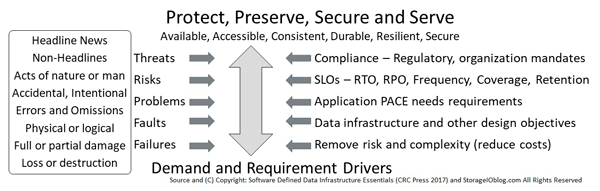
From a data infrastructure perspective, availability of data services spans from local to remote, physical to logical and software-defined, virtual, container, and cloud, as well as mobile devices. On the left side of the following figure are various data protection and security threat risks and scenarios that can impact availability, or result in a data loss event ( DLE), data loss access ( DLA), or disaster. The following figure shows various techniques, tools, technologies, and best practices to protect data infrastructures, applications, and data from threat risks.

the need for data protection backup bc dr

Don’t Become An April 1st Recovery Fool

April 1st also known as April Fool’s day should be a reminder to plan as well as test your recovery, so the joke is not on you. Data protection including backup, archiving, security, disaster recovery (DR), business continuance (BC) as well as business resiliency (BR) are not a once a year focus, instead of a 365 day a year continuum. Likewise, the focus needs to expand from just making sure you backed up or made copies of your data to recover. After all, what good is a check box that you did a backup on world backup day only to find out the next day you cannot recover, or, what you thought was protected is not there.

If you already have good backups and data protection copies, verify that they are in fact good-by restoring their contents to a different location. It should go without saying, however all too often common sense needs to be repeated, make sure in the course of testing data protection including restoring that you do not inadvertently cause a disaster. Also, go a step beyond verifying that you can read the data stored on disk, tape, SSD, optical, that is, actually try to use, or open the data. What this does is verify that you can both access and restore the data from the protection medium or cloud location, as well as unlock, decrypt, uncompressed or re-inflate deduped data.

Evolving Data Protection Including Backup and Recovery

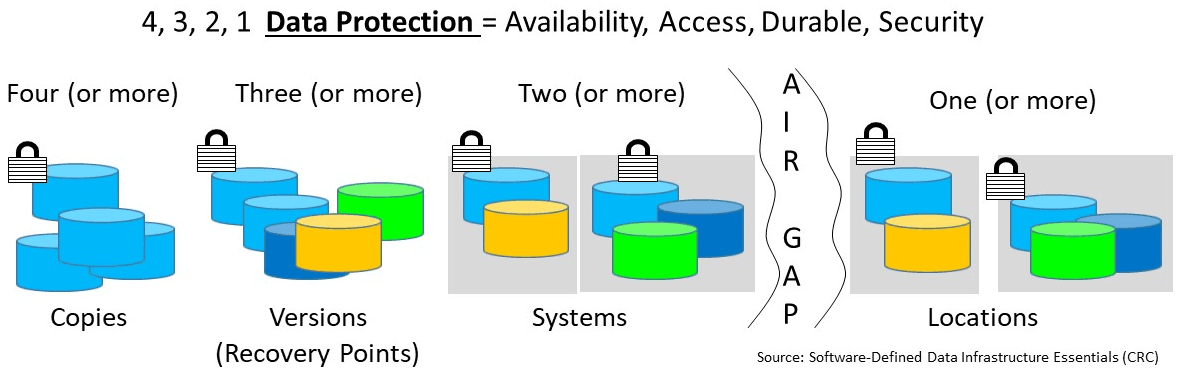
While the emphasis of world backup is on the importance of data protection including having backup copies, there also needs to be an emphasis on recovering. It is essential to make sure data is protected which means having multiple copies of different time intervals stored on several mediums or systems across one or more locations. The previous is the basis of 4 3 2 1 data protection, having four or more copies with three or more-time interval versions spread across two or more different systems or storage mediums.

server storageio data infrastructure data protection 4 3 2 1
4 3 2 1 data protection (via Software Defined Data Infrastructure Essentials)

4    At least four copies of data (or more), Enables durability in case a copy goes bad, deleted, corrupted, failed device, or site.
3    The number (or more) versions of the data to retain, Enables various recovery points in time to restore, resume, restart from.
2    Data located on two or more systems (devices or media/mediums), Enables protection against device, system, server, file system, or other fault/failure.
1    With at least one of those copies being off-premise and not live (isolated from active primary copy), Enables resiliency across sites, as well as space, time, distance gap for protection.

Also, make sure that at least one of those offsite preferably offline. Likewise, it is crucial that whatever is protected, backed up, copied, cloned, snapshot, checkpoint, consistency point, replicated is also usable. In addition to having multiple copies and versions, those data protection copies should also include occurring at various altitude or layers in the data infrastructure stack from applications to database, file systems to virtual machines or containers among others.

What About Individual Data Protection at Home

For consumers and individuals, as well as small business, make sure that you are copying your essential data from your computer to some other storage medium (or multiple). For example, have a local copy on an external hard disk drive (HDD) or a solid-state device (SSD). Better yet, have a couple of copies for different time intervals both on-site as well as off-site. Anything important you have stored on site including copies of photos, images, video, audio, records, spreadsheets, and other documents should have extra copies including off-site or in the cloud.

Likewise, anything you store in the cloud should have at least one other copy stored elsewhere. Don’t be scared of the cloud, however, do your homework to be prepared. Similar to only having one copy of your data on site, the other extreme only has one copy in the cloud. Instead, put a copy in the cloud as well as have one on-site (or on-prem if you prefer) or elsewhere.

Don’t Forget Your Home Photos and Movies

Speaking of photos and other documents, for those that are not yet digitized, scanned or electronic copies made, get them converted.  Get in touch with data protection and backup professional, as well as a photo (and digital asset) organizer. They can provide advice on best practices, techniques, as well as tools, technologies, and services to keep your digital data safe and secure. Some photo organizer professionals also can help with converting your old photos, movies, videos to new digital formats. For example, get in touch with Holly Corbid at Capture Your Photos (www.captureyourphotos.com) who is a certified professional photo organizer and member of Association of Professional Photo Organizers.

Where to learn more

Learn more about world backup day, recovery and data protection along with other related topics via the following links:

Additional learning experiences along with common questions (and answers), as well as tips can be found in Software Defined Data Infrastructure Essentials book.

Software Defined Data Infrastructure Essentials Book SDDC

What this all means

March 31 world backup day is more than an annual event for vendors to send out press releases on the importance of data protection. The focus should also expand to world recovery day or something similar as well as span 365 days a year. Now is a good time to review and verify your existing data protection including backup and recovery works as expected. Keep in mind, world backup day reminder don’t be an April fool test your data recovery before you need it.

Ok, nuff said, for now.

Cheers GS

Greg Schulz – Multi-year Microsoft MVP Cloud and Data Center Management, ten-time VMware vExpert. Author of Data Infrastructure Insights (CRC Press), Software Defined Data Infrastructure Essentials (CRC Press), as well as Cloud and Virtual Data Storage Networking (CRC Press), The Green and Virtual Data Center (CRC Press), Resilient Storage Networks (Elsevier) and twitter @storageio. Also visit www.picturesoverstillwater.com to view various UAS/UAV e.g. drone based aerial content created by Greg Schulz. Courteous comments are welcome for consideration. First published on https://storageioblog.com any reproduction in whole, in part, with changes to content, without source attribution under title or without permission is forbidden.

All Comments, (C) and (TM) belong to their owners/posters, Other content (C) Copyright 2006-2026 Server StorageIO and UnlimitedIO. Visit our companion site https://picturesoverstillwater.com to view drone based aerial photography and video related topics. All Rights Reserved. StorageIO is a registered Trade Mark (TM) of Server StorageIO.

Deliver Data Management Availability For Multi Cloud Environments Webinar

Deliver Data Management Availability For Multi Cloud Environments Webinar

Deliver Data Management Availability For Multi Cloud Environments Webinar

Join me on Thursday March 14th 11AM PT when I host a webinar with topic Deliver Data Management Availability For Multi Cloud Environments. This is free webinar (will also be available for replay) sponsored by Veeam, produced by Redmond Magazine where I will be joined by Dave Russell, Vice President of Enterprise Strategy at Veeam Software for an interactive engaging discussion.

Our discussion including questions for attendees will look at how IT landscapes are evolving, hybrid and multi-cloud have become the new normal and what can be done to protect, preserve, secure and serve data spread across on-prem and different public clouds. Topics will include what to do today to prepare for tomorrow, minimizing risk of hybrid environments, changing environments along with their requirements, identify strategies for sound data management, data protection including backup for hybrid environments.

Register for the Deliver Data Management Availability For Multi Cloud Environments Webinar here (Live Thursday March 14th 11AM PT).

Where to learn more

Learn more about cloud, multi-cloud, hybrid and data protection via the following links:

Additional learning experiences along with common questions (and answers), as well as tips can be found in Software Defined Data Infrastructure Essentials book.

Software Defined Data Infrastructure Essentials Book SDDC

What this all means

Remember to register here for the live March 14, 2019 event. Join me for an interactive discussion with Dave Russell as we discuss the trends, issues, challenges and what can be done to put a strategy in place for data protection and to Deliver Data Management Availability For Multi Cloud Environments.

Ok, nuff said, for now.

Cheers Gs

Greg Schulz – Multi-year Microsoft MVP Cloud and Data Center Management, ten-time VMware vExpert. Author of Data Infrastructure Insights (CRC Press), Software Defined Data Infrastructure Essentials (CRC Press), as well as Cloud and Virtual Data Storage Networking (CRC Press), The Green and Virtual Data Center (CRC Press), Resilient Storage Networks (Elsevier) and twitter @storageio. Also visit www.picturesoverstillwater.com to view various UAS/UAV e.g. drone based aerial content created by Greg Schulz. Courteous comments are welcome for consideration. First published on https://storageioblog.com any reproduction in whole, in part, with changes to content, without source attribution under title or without permission is forbidden.

All Comments, (C) and (TM) belong to their owners/posters, Other content (C) Copyright 2006-2026 Server StorageIO and UnlimitedIO. Visit our companion site https://picturesoverstillwater.com to view drone based aerial photography and video related topics. All Rights Reserved. StorageIO is a registered Trade Mark (TM) of Server StorageIO.

Announcing My New Book Data Infrastructure Management Insight Strategies

Announcing My New Book Data Infrastructure Management Insight Strategies

Announcing My New Book Data Infrastructure Management Insight Strategies

Announcing my new book Data Infrastructure Management Insight Strategies published via Auerbach/CRC Press is now available via CRC Press and Amazon.com among other global venues.

My Fifth Solo Book Project – Data Infrastructure Management

Data Infrastructure Management Insight Strategies (e.g. the white book) is my fifth solo published book in addition to several other collaborative works. Given its title, the focus of this new book is around Data Infrastructures, the tools, technologies, techniques, trends including hardware, software, services, people, policies inside data centers that get defined to support business and application services delivery. The book (ISBN 9781138486423) is soft covered (also electronic kindle versions available) with 250 pages, over a 100 figures, tables, tips and examples. You can explore the contents via Google Books here.

Data Infrastructure Books by Greg Schulz
Stack of my solo books with common theme around Data Infrastructure topics

Data Infrastructure Management Book
Data Infrastructure Management – Insight and Strategies e.g. the White book (CRC Press 2019)

Some of My Other Books Include

Click on the following book images to learn more about, as well as order your copy.

Software Defined Data Infrastructure Essentials BookSNIA Recommended Reading List
Software Defined Data Infrastructure Essentials (SDDI) – Cloud, Converged, and Virtual Fundamental Server Storage I/O Tradecraft e.g. the Blue book covers software defined, sddc, sddi, hybrid, among other topics including serverless containers, NVMe, SSD, flash, pmem, scm as well as others. (CRC Press 2017) available at Amazon.com among other global venues.

Cloud and Virtual Data Storage Networking Intel recommended reading listIntel recommended reading list
Cloud and Virtual Data Storage Networking (CVDSN) – Your Journey to efficient and effective Information Services e.g. the Yellow or Gold Book (CRC Press 2011) available at Amazon.com among other global venues.


The Green and Virtual Data Center BookIntel Recommended Reading List
The Green and Virtual Data Center (TGVDC) – Enabling Efficient, Effective and Productive Data Infrastructures e.g. the Green Book (CRC Press 2009) available at Amazon.com among other venues.

Resilient Storage Networks Book
Resilient Storage Networks (RSN) – Designing Flexible scalable Data Infrastructures (Elsevier 2004) e.g. the Red Book is SNIA Education Endorsed Reading available at Amazon.com among other venues. I have some free copies of RSN for anybody who is willing to pay shipping and handling, send me a note and we will go from there.

Where to learn more

Learn more via the following links:

Additional learning experiences along with common questions (and answers), as well as tips can be found in Software Defined Data Infrastructure Essentials book.

Software Defined Data Infrastructure Essentials Book SDDC

What this all means

Today more than ever there tends to be a focus on the date something was created or published as there is a lot of temporal content with short shelf life. This means that there is a lot of content including books being created that are short temporal usually focused on a particular technology, tool, trend that has a life span or attention focus of a couple of years at best.

On the other hand, there is also content that is still being created today that combines new and emerging technology, tools, trends with time-tested strategies, techniques as well as processes, some of whose names or buzzwords will evolve. My books fit into the latter category of combing current as well as emerging technologies, tools, trends, techniques that support longer shelf life, just insert your new favorite buzzword, buzz trend or buzz topic as needed.

Data Infrastructure Books by Greg Schulz

You will also notice looking at the stack of books, Data Infrastructure Management Insight and Strategies is a smaller soft covered book compared to others in my collection. The reason is that this new book can be a quick read to address what you need, as well as be a companion to others in the stack depending on what your focus or requirements are.

Common questions I get having written several books, not to mention the thousands of articles, tips, reports, blogs, columns, white papers, videos, webinars among other content is what’s is next? Good question, see what’s next, as well as check out some other things I’m doing over at www.picturesoverstillwater.com where I’m generating big data that gets stored and processed in various data infrastructures including cloud ;) .

Will there be another book and if so on or about what? As I mentioned, there are some projects I’m exploring, will they get finished or take different directions, wait and see what’s next.

How do I find the time to create these books and how long does it take? The time required varies as does the amount of work, what else I’m doing. I try to leverage the book (and other content creation projects) with other things I’m doing to maximize time. Some book projects have been very fast, a year or less. Some take longer such as Software Defined Data Infrastructure Essentials as it is a big book with lots of material that will have a long shelf life.

Do I write and illustrate the books or do I have somebody do them for me? For my books I do the writing and illustrating (drawings, figures, images) myself along with some of the layouts relying on external copy editors and production folks.

What do I recommend or give advice to those wanting to write a book? Understand that publishing a book is a project, there’s the actual writing, editing, reviews, art work, research, labs or other support items as book companions. Also understand why are you writing a book, for fame, fortune, acclaim, to share with others or some other reason. I also recommend before you write your entire book to talk with others who have been published to test the waters, get feedback. You might find it easier to shop an extended outline than a completed manuscript, that is unless you are writing a novel or similar.

Want to learn more about writing a book (or other content), get feedback, have other questions, drop me a note and will do what I can to help out.

Data Infrastructure Management Book

There is an old saying, publish or perish, well, I just published my fifth solo book Data Infrastructure Management Insight Strategies that you can buy at Amazon.com among other venues.

Ok, nuff said, for now.

Cheers Gs

Greg Schulz – Microsoft MVP Cloud and Data Center Management, VMware vExpert 2010-2019. Author of Data Infrastructure Insights (CRC Press), Software Defined Data Infrastructure Essentials (CRC Press), as well as Cloud and Virtual Data Storage Networking (CRC Press), The Green and Virtual Data Center (CRC Press), Resilient Storage Networks (Elsevier) and twitter @storageio. Also visit www.picturesoverstillwater.com to view various UAS/UAV e.g. drone based aerial content created by Greg Schulz. Courteous comments are welcome for consideration. First published on https://storageioblog.com any reproduction in whole, in part, with changes to content, without source attribution under title or without permission is forbidden.

All Comments, (C) and (TM) belong to their owners/posters, Other content (C) Copyright 2006-2019 Server StorageIO and UnlimitedIO. All Rights Reserved. StorageIO is a registered Trade Mark (TM) of Server StorageIO.

Fall 2018 Dutch Data Infrastructure Industry Trends Decision Making Seminars

Fall 2018 Dutch Data Infrastructure Industry Trends Decision Making Seminars

Fall 2018 Dutch Data Infrastructure Industry Trends Decision Making Seminars

Fall 2018 Dutch Data Infrastructure Industry Trends Decision Making Seminars.

There is still time to register for the fall 2018 Dutch data infrastructure industry trends decision-making seminars November 27th and 28th. The workshops are being organized by Brouwer Storage Consultancy of Holland and will be held in Nijkerk.

On Tuesday, November 27th, there will be an advanced education workshop seminar covering data infrastructure industry trends and technology update presented by myself. On Wednesday, November 28th, there will be a deeper dive workgroup seminar session addressing data infrastructure related strategy, planning, and decision-making.

xxxx

Data Infrastructures Industry Trends November 27

Whats New, Whats the buzz, what you need to know about, From Speeds and Feeds, Slots and Watts to Whos doing what, from interesting to What’s relevant for your environment.

This one-day seminar is a new and improved version of the popular speeds and feeds session where we look at what’s new and emerging in the industry as well as applicable to your environments. You will be updated about the latest trends and emerging data infrastructure technologies to support digital transformation, little and big data analytics, AI/ML/DL, GDPR, data protection, edge/fog compute, and IoT among others. From legacy to the software-defined cloud, container converged and virtual to composable. The seminar is a mix of presentation and engaging discussion as we look into details of favorite or new technologies for both those who are old-school, new-school and current or future school.

Part I – Industry Trends, Applications, and Workload
Part II – Server Compute, Memory, I/O, hardware and software
Part III – Storage and Data protection for on-prem and cloud
Part IV – Bringing it all together, managing and decision making

Topics to be covered include among others:

  • What these trends, tools, technologies mean for different environments of various size.
  • Tips on evaluating legacy and startup or newer vendors as well as technologies.
  • Updates on vendors, services, technologies, products you may or may not have heard of.
  • Cloud (public/private/multi-cloud/hybrid) compute, storage and management.
  • Containers (including docker, windows, kubernetes, FaaS, serverless, lambda).
  • Converged and hyper-converged; Gen-Z and composable; NVMe and NVMeoF.
  • Persistent Memory (PMEM), Storage Class Memory (SCM), 3D XPoint, NAND Flash SSD.
  • Legacy vs. software-defined, appliances, storage systems, block, NAS file, object, table.
  • Bulk cloud data migration appliances, storage for the edge, file sync and share.
  • Role and importance of context (what’s applicable, what something means).
  • Who’s doing what, what to look for today for the future.

This seminar is for those involved with ICT/IT servers, storage, storage, I/O networking, and associated management activities including data protection, of legacy, as well as software-defined cloud, containers, converged hyper-converged and virtualization. This seminar is for professionals who manage, architect or are otherwise involved with data infrastructure related topic strategy and acquisitions.

Data Infrastructures Deep Dive Decision Making November 28

Enabling Informed Strategy and Decision Making, moving from what are the tools, trends and technologies evolving to what to use, when, where, why, how, along with strategy, planning, decision-making, and ongoing management.

If the answer is a cloud, converged, container, composable, edge, fog, digital transformation, on-prem, hybrid, software-defined, what were or are the questions to plan as well as prepare for deployment today, along with in the future? This workshop format seminar provides answers to fundamental questions, with essential insight into software-defined data infrastructures (SDDI) and software-defined data centers (SDDC). For ICT/IT professionals (architects, strategists, administrators, managers) currently or planning on being involved with servers, storage, I/O networking, hardware, software, converged, containers, cloud backup/data protection, and associated topics, this seminar is for you.

Clouds converged, and containers will be a primary focus along with related themes and topics that you need to know more about. Don’t be scared of clouds, be prepared, and this includes for on-prem, public, hybrid and multi-cloud. As part of our deeper dive decision-making strategy focus, we look at cloud cost considerations including are you paying too much or not enough (e.g., are you depriving your applications of performance to save money?). We will explore various decision-making and strategy topics spanning AWS, Microsoft Azure, Azure Stack, Windows and Hyper-V, VMware (including on AWS) and OpenStack, is it still open for business?

Additional topics, trends, themes include:

  • Everything is not the same across cloud services, converged, or containers.
  • Different environments have various data infrastructure resource needs.
  • How to balance legacy on-prem application needs with emerging technology options.
  • Different comparison criteria for smaller environments remote office vs. Larger enterprise
  • Do it yourself (DiY) vs. Turnkey software vs. Bundled tin wrapped software solution
  • Strategy, planning, decision-making, and ongoing management

How To Register For Seminar Workshops

Learn more about fall 2018 Dutch Server StorageIO Data Infrastructure Tuesday trends workshop seminar here (PDF), and Wednesday deeper dive decision-making workshop session here (PDF).

To register and obtain more information, contact event organizers Brouwer Storage consultancy at +31-33-246-6825 or +31-652-601-309 and info at brouwerconsultancy.com.

Where to learn more

Learn more about Data Infrastructure and related trends, tools, technologies and topics via the following links:

Additional learning experiences along with common questions (and answers), as well as tips can be found in Software Defined Data Infrastructure Essentials book.

Software Defined Data Infrastructure Essentials Book SDDC

What this all means

Everything is not the same across different organizations, environments, application workloads, data, technology, tools, trends. These two one day interactive workshop seminars provide timely insight into what’s going on in the data infrastructure related industry, along with common IT organization challenges as well as how to address them. Moving from the what to what to use when, where, why, how along with alternatives, gaining insight and awareness to avoid flying blind enables effective strategy, decision-making, planning and ongoing management. Learn more and sign up for Fall 2018 Dutch Data Infrastructure Industry Trends Decision Making Seminars, see you in Nijkerk.

Ok, nuff said, for now.

Cheers Gs

Greg Schulz – Microsoft MVP Cloud and Data Center Management, VMware vExpert 2010-2018. Author of Software Defined Data Infrastructure Essentials (CRC Press), as well as Cloud and Virtual Data Storage Networking (CRC Press), The Green and Virtual Data Center (CRC Press), Resilient Storage Networks (Elsevier) and twitter @storageio. Courteous comments are welcome for consideration. First published on https://storageioblog.com any reproduction in whole, in part, with changes to content, without source attribution under title or without permission is forbidden.

All Comments, (C) and (TM) belong to their owners/posters, Other content (C) Copyright 2006-2026 Server StorageIO and UnlimitedIO. All Rights Reserved. StorageIO is a registered Trade Mark (TM) of Server StorageIO.

Microsoft Azure Data Box Disk Impressions #blogtobertech

Microsoft Azure Data Box Disk Test Drive Impressions #blogtobertech

Microsoft Azure Data Box Disk Test Drive Impressions #blogtobertech

Data Box Disk Test Drive Impressions is the last of a four-post series looking at Microsoft Azure Data Box. View Part 1 Microsoft announced Azure Data Box updates, Part 2 Microsoft Azure Data Box Family, and Part 3 Microsoft Azure Data Box Disk Test Drive Review.

Overall, I liked the Azure Data Box experience along with a range of options to select the best fit solution for my needs. A common trend among the major cloud service providers such as AWS, Microsoft Azure and Google is that one size fits all approach solution does not meet different customer needs.

The only things that I did not like about and would like to see improved with Azure Data Box are two items one at the beginning, the other at the end of the process. Granted with Data Box Disks still in preview, there is time for those items to be addressed before general availability, and I have passed on the feedback to Microsoft.

At the beginning of the process, things are pretty straightforward with good tools along with resources to help you navigate which type of Data Box to order, how to order, specify your account details and other information.

What I did not like with the up front experience was after the quick ordering and notification process, the time delay of a week or more until notified when a Data Box would be arriving. Granted I was not in a rush and Microsoft did indicate that it could take about ten days to be informed of availability, this is something that should be done quickly as resources become available. Another option is for Microsoft to add an ordering option for priority or low-priority in the future.

The other experience that I did not like was at the very end, in that perhaps its stuck in an email spam trap (checked, could not find it), the final notification could be better. Not only a final email note saying your data is copied, but also a reminder of where your block or page blobs were copied to (e.g., what your setup when ordering).

Monitoring the progress of the process, I knew when Data Box drives arrived at Microsoft, copy started and completed including with error status. Having gotten used to receiving update notifications from Azure, not receiving one at the end saying congratulations your data has been copied, check here for any errors or other info, as well as a reminder where the data was copied to would be useful.

Likewise, a follow-up note from Microsoft saying that the Azure Data Box drives used as part of the transfer were securely erased along with a certificate of digital destruction would be useful for compliance purposes.

As mentioned above, overall, I found the Data Box Disk experience very positive and a great way to move bulk data faster than what could be done with available networks. My next step is now to migrate some of the transferred data to cold long-term archive storage, and some others to Azure Files, with some staying in block blobs. There are also a couple of VHD and VHDX that will be moved and attached to VMs for additional testing.

Where to learn more

Learn more about Microsoft Azure Data Box, Clouds and Data Infrastructure related trends, tools, technologies and topics via the following links:

Additional learning experiences along with common questions (and answers), as well as tips can be found in Software Defined Data Infrastructure Essentials book.

Software Defined Data Infrastructure Essentials Book SDDC

What this all means

For those who have a need to move large amounts of data including structured, unstructured, semi-structured, little or big data to a cloud resource, solutions such as Azure Data Box may be in your future. Likewise, for those looking to support remote and edge workloads from AI, ML, DL inferencing, to large-scale data pre-processing, data collection and acquisition, video, telemetry, IoT among others Data Box type solutions may be in your future. Overall I found Microsoft Azure Data Box Disk Impressions Favorable and was able to address a project I had on the to-do list for some time.

Ok, nuff said, for now.

Cheers Gs

Greg Schulz – Microsoft MVP Cloud and Data Center Management, VMware vExpert 2010-2018. Author of Software Defined Data Infrastructure Essentials (CRC Press), as well as Cloud and Virtual Data Storage Networking (CRC Press), The Green and Virtual Data Center (CRC Press), Resilient Storage Networks (Elsevier) and twitter @storageio. Courteous comments are welcome for consideration. First published on https://storageioblog.com any reproduction in whole, in part, with changes to content, without source attribution under title or without permission is forbidden.

All Comments, (C) and (TM) belong to their owners/posters, Other content (C) Copyright 2006-2026 Server StorageIO and UnlimitedIO. All Rights Reserved. StorageIO is a registered Trade Mark (TM) of Server StorageIO.

Microsoft Azure Data Box Disk Test Drive Review #blogtobertech

Microsoft Azure Data Box Test Drive #blogtobertech

Microsoft Azure Data Box Test Drive #blogtobertech

Microsoft Azure Data Box Test Drive is part three of four series looking at Data Box. View Part 1 Microsoft announced Azure Data Box updatesPart 2 Microsoft Azure Data Box Family, and Part 4 Microsoft Azure Data Box Disk Impressions.

Getting Started

The workflow for using Data Box involves selecting with the type of Data Box to use via the Microsoft Azure portal (here), or Data Box Family page (here).

Getting Started via the Microsoft Azure Data Box Family Page image via Microsoft.com

First step of ordering a Data Box is to specify your Azure subscription, type of operation (e.g., import data into Azure, or export out), source country/region and destination Azure region.

Selecting Data Box from Azure Portal

The next step is to determine what type of Data Box, in this test I choose 40 TB Data Box Disks. Make a note of fees to avoid any surprises.

Selecting Data Box Disks (40 TB) From Azure Portal

After selecting the type of Data Box, fill in storage account information using an existing resource, or create new ones as needed. Make a note of these selections as you will need them after the copy is done as this is where your data will be located.

Specify Azure Storage Account Information Where Data Will Transfer To

Once the order is placed, an email is received confirming the order and also being a preview, indicating that it might take ten days to hear a status update or availability of the devices.

Email notification received after the order is placed

After about ten days, I was contacted by Microsoft via an email (not shown) confirming the amount of data to be copied to determine how many disks would be needed. Once this was confirmed with Microsoft, a status update was noted on the Azure dashboard.

Azure Data Box Dashboard Status after order placed

After a few days, a box arrived with the Data Box disks, cables and return shipping labels enclosed. Also received was an email notification indicating the disks had arrived.

Email notice Data Box has arrived on site
Email notice Data Box has arrived on site (on-prem if you prefer)

The following is the physical box that contains the Data Box disks that I received from Microsoft.

The shipping box with Data Box Disks arrives

Once you get the Data Box, go to the Azure portal for Data Box and access the tools. There are tools and commands for Windows as well as Linux that are needed for accessing and unlocking the disks. This is where you also obtain device IDs. You will also need to have the access key phrase you specified in an earlier step as part of placing the order.

Access Data Box Software Tools and Keys from Azure Portal

Inside the shipping box was a pair of 8 TB SATA SSDs, SATA to USB cables, along with return shipping labels.

Contents inside the shipping box, two Data Box 8 TB disks

From the Azure portal, access the device IDs that will be needed along with passphrase for obtaining and unlocking the Data Box disks. You will also want to download the tools as well as follow other instructions on the portal for accessing disks.

Azure Data Box tools, device IDs and Keys

The Windows system I used for testing is a virtual machine hosted on a VMware vSphere ESXi 6.7 host. After physically attaching the Data Box Disks to the VM host, a virtual or software attachment was done by adding USB devices to the VM.

Virtual Attach of Data Box Disks to VMware vSphere ESXi host and guest VM

Once the VM had the Data Box disks attached and mapped, they appeared to Windows. After downloading the Data Box software tools and unlocking the devices, they were ready to copy data to. Note that the disks appear as a regular Windows device once unlocked. Simply using bit locker does not unlock the drives, you need to use the Data Box tools. Speaking of Windows disks, there are a couple of folders on the Data Box disk when shipped including one for Block Blob and Page Blob along with verification items.

View of Data Box Disks (8 TB each) after attaching to Windows system

Note that you are given several days as part of the base transfer cost, then extra days apply. Since I had a few extra days, I used some of the excess capacity to do some staging and reorganization of data before the actual copy.

Data copy is done using your choice of tools, for example, Robocopy among many others. I used a combination of Robocopy, Retrospect among others. Also, note that for most data place them in the folder or directory structure of your choice in the Block Blob folder. Page Blobs are for VHDX to be used with virtual machines on Azure. After spending a few days to copy the data I wanted to move along with performing verification, it was time to pack up the devices.

As a reminder, blobs are analogous to and what Microsoft Azure refers to instead of objects (e.g., object storage). Also remember that Azure blobs include block, page (512-byte page aligned for VHDX) and append (similar to other vendors object storage). Microsoft Azure in addition to blobs, supports file (SMB and NFS) access, along with table (database) and queue storage services.

The following shows the return label attached to the shipping box that contains the Data Box disks and cables. I also included a copy of the shipping label inside the box just in case something happened during shipment. Once prepared for delivery, I took the box to a local UPS store where I received a shipment receipt (not shown). Later that day I also received an email from Microsoft indicating the shipment was in-progress.

Data Box disks packaged with return receipt (was in the box)

The Azure portal shows status of Data Box shipment being sent to Microsoft, along with a follow-up email notification.

Azure Data Box portal status

Email notification of Data Box on the way to Microsoft.

Notice data box is on the way to Azure

After a few days’ ways, checking the Azure Portal shows the Data Box arrived at Microsoft and copied operations underway. Remember the storage account you specified back in the early steps is where you will look for your data. This is something I think Microsoft can improve on by providing a link, or some reminder of where the data is being copied to in the status. Likewise, a copy completion email notice would be handy after getting used to the other alerts previous in the process.

Azure Data Box portal showing disk copy operation status

Looking at the Azure storage account specified during the ordering process in the Blob storage resources the contents of the Data Box Disks can be found.

Contents of Data Box disks copied into specified Azure Blobs and storage account

The following shows folders that I had copied from on-prem systems to the Data Box now located in the proper Azure Block Blobs. Not shown are Page blobs where I moved some VHDXs.

xMission accomplished, data folders now stored in Azure block blobs
Mission accomplished, data folders now stored in Azure block blobs

Where to learn more

Learn more about Microsoft Azure Data Box, Clouds and Data Infrastructure related trends, tools, technologies and topics via the following links:

Additional learning experiences along with common questions (and answers), as well as tips can be found in Software Defined Data Infrastructure Essentials book.

Software Defined Data Infrastructure Essentials Book SDDC

What this all means

Overall the test drive of the Azure Data Box Disk solution was positive, and look forward to trying out some of the other Data Box solutions, both offline and online options in the future. Continue reading Part 4 Microsoft Azure Data Box Disk Impressions as part of this series including Microsoft Azure Data Box Disk Test Drive Review.

Ok, nuff said, for now.

Cheers Gs

Greg Schulz – Microsoft MVP Cloud and Data Center Management, VMware vExpert 2010-2018. Author of Software Defined Data Infrastructure Essentials (CRC Press), as well as Cloud and Virtual Data Storage Networking (CRC Press), The Green and Virtual Data Center (CRC Press), Resilient Storage Networks (Elsevier) and twitter @storageio. Courteous comments are welcome for consideration. First published on https://storageioblog.com any reproduction in whole, in part, with changes to content, without source attribution under title or without permission is forbidden.

All Comments, (C) and (TM) belong to their owners/posters, Other content (C) Copyright 2006-2026 Server StorageIO and UnlimitedIO. All Rights Reserved. StorageIO is a registered Trade Mark (TM) of Server StorageIO.