Modernizing Data Protection = Using new and old things in new ways

Server Storage I/O trends

Modernizing Data Protection = Using new and old things in new ways

This is part of an ongoing series of posts that part of www.storageioblog.com/data-protection-diaries-main/ on data protection including archiving, backup/restore, business continuance (BC), business resiliency (BC), data footprint reduction (DFR), disaster recovery (DR), High Availability (HA) along with related themes, tools, technologies, techniques, trends and strategies.

data protection trends

Keep in mind that a fundamental goal of an Information Technology (IT) organization is to protect, preserve and serve data and information in a cost-effective as well as productive way when needed. There is no such thing as an information recession with more data being generated and processed. In addition to more of it, data is also getting larger, having more dependencies on it being available as well as living longer (e.g. retention).

Proof Points, No Data or Information Recession

A quick easy proof point of more data and it getting larger is your cell phone and the pictures it take. Compare the size of those photos today to what you had in your previous generation of smart phone or even digital camera as the Mega Pixels (e.g. resolution and size of data) increased, along with the size of media (e.g. storage) to save those to also grew. Another proof point is look at your presentations, documents, web sites and other mediums with how the amount of rich or unstructured content (e.g. photos, videos) exists on those now vs. a few years ago. Yet another proof-point is to look at your structured little data databases and how there are more rows and columns, as well as how some of those columns have gotten larger or are point to external "blobs" or "objects" that have also gotten larger.

Industry trend and challenges

There has been industry buzz the past several years around data protection modernizing, modernizing data protection or simply modernizing backup along with modernizing your data and information infrastructure. Many of these conversations focus around swapping out an older technology in favor of whatever the new industry buzzword trend is (e.g. swap tape for disk, disk for cloud) or perhaps from one data protection, backup, archive or copy tool for another. Some of these conversations also focus around swapping legacy for virtual, cloud or some other variation of software defined marketing.
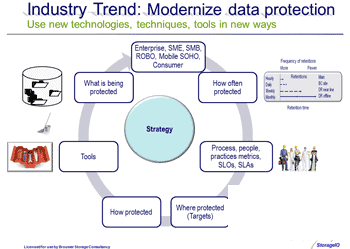
Data protection strategy

The Opportunity to do new things

What is common with all the above is basically swapping out one technology, tool, medium or technique for another new one yet using it in old ways. For example tape gets swapped for disk, yet the same approach to when, where, why, how often and what gets copied or protected is left the same. Sure some new tools and technologies get introduced.  However when was the last time you put the tools down, took a step back and revisited the fundamental questions of how and why you are doing data protection the way it is being done? When was the last time you thought about data protection as an asset or business enabler as opposed to a cost center, overhead or after thought?

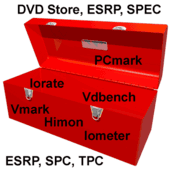
Data protection tool box
What’s in your data protection toolbox, do you know what to use when?

What about modernizing beyond the tools

One of the challenges with modernizing is that there is a cost involved including people time, staff skills as well as budgets not to mention keeping things running, so how do you go about paying for any improvements? Sure you can go get a data infrastructure or habitat for technology aka data home improvement loan, however there are costs associated to that.

Big data garbage in = big data garbage out

What about reducing data protection costs?

So why not self-fund the improvements and modernization activities by finding and removing costs, eliminating complexity vs. moving and masking issues? Part of this can be accomplished by simply revisiting if you are treating all your applications and data the same from a data protection perspective. Are you providing a data protection service ability to your organization that is based on business wants or business needs? For example, does the business want recovery time objective (RTO) 0 and recovery point objective (RPO) 0 for all applications, while it needs RTO 4 hours and RPO 15 minutes for application-a while application-b requires RTO 12 hours and RPO of 2 hours and application must have RTO 24 hours with RPO of 12 hours?

As a reminder RTO is how much time, or how quickly you need your applications and data to be restored and made ready for use. RPO is the point in time to where data needs to be protected as of, or the amount of data or time frame data could be lost or missing. Thus RTO = 0 means instant recovery no downtime and RPO = 0 means no loss of data. RTO one day and RPO of ten (10) minutes means applications and their data are ready for use within 24 hours and no more than 10 minutes of data can be lost (e.g. the granularity of protection coverage)., Also keep in mind that you can have various RTO and RPO combinations to meet your specific application along with business needs as part of a tiered data protection strategy implementation.

With RTO and RPO in mind, when was the last time you sat down with the business and applications people to revisit what they want vs. what they must have? From these conversation you can easily Transition into how long to keep, how many copies in what place among other things which in turn allows you to review data protection as well as start using both old and new technologies, tools and techniques in new ways.

Where to learn more

Learn more about data protection and related topics, themes, trends, tools and technologies via the following links:

Server Storage I/O trends

What this all means and wrap-up

Data protection is a broad topic that spans from logical and physical security to HA, BC, BR, DR, archiving (including life beyond compliance) along with various tools, technologies, techniques. Key is aligning those to the needs of the business or organization for today’s as well as tomorrows requirements. Instead of doing things what has been done in the past that may have been based on what was known or possible due to technology capabilities, why not start using new and old things in new ways. Let’s start using all the tools in the data protection toolbox regardless of if they are new or old, cloud, virtual, physical, software defined product or service in new ways while keeping the requirements of the business in focus.

Keeping with the theme of protect preserve and serve, data protection to be modernized needs to become and be seen as a business asset or enabler vs. an after thought or cost over-head topic. Also, keep in mind that only you can prevent data loss, are your restores ready for when you need them? as well as one of the fundamental goals of IT is to protect, preserve and serve information including its applications as well as data when, where needed in a cost-effective way.

What say you?

Ok, nuff said for now

Cheers
Gs

Greg Schulz – Author Cloud and Virtual Data Storage Networking (CRC Press), The Green and Virtual Data Center (CRC Press) and Resilient Storage Networks (Elsevier)
twitter @storageio

All Comments, (C) and (TM) belong to their owners/posters, Other content (C) Copyright 2006-2026 Server StorageIO and UnlimitedIO LLC All Rights Reserved

April 2015 Server StorageIO Update Newsletter

Volume 15, Issue IV

Hello and welcome to this April 2015 Server and StorageIO update newsletter.

This months newsletter has a focus on cloud and object storage for bulk data, unstructured data, big data, archiving among other scenarios.

Enjoy this edition of the Server and StorageIO update newsletter and watch for new tips, articles, StorageIO lab report reviews, blog posts, videos and Podcasts along with in the news commentary appearing soon.

Storage I/O trends

StorageIOblog posts

April StorageIOblog posts include:

View other recent as well as past blog posts here

April Newsletter Feature Theme
Cloud and Object Storage Fundamentals

There are many facets to object storage including technology implementation, products, services, access and architectures for various applications and use scenarios. The following is a short synopsis of some basic terms and concepts associated with cloud and object storage.

Common cloud and object storage terms

  • Account or project – Top of the hierarchy that represent owner or billing information for a service that where buckets are also attached.
  • Availability Zone (AZ) can be rack of servers and storage or data center where data is spread across for storage and durability.
  • AWS regions and availability zones (AZ)
    Example of some AWS Regions and AZ’s

  • Bucket or Container – Where objects or sub-folders containing objects are attached and accessed. Note in some environments such as AWS S3 you can have sub-folders in a bucket.
  • Connector or how your applications access the cloud or object storage such as via an API, S3, Swift, Rest, CDMI, Torrent, JSON, NAS file, block of other access gateway or software.
  • Durability – Data dispersed with copies in multiple locations to survive failure of storage or server hardware, software, zone or even region. Availability = Access + Durability.
  • End-point – Where or what your software, application or tool and utilities or gateways attach to for accessing buckets and objects.
  • Ephemeral – Temporary or non-persistent
  • Eventual consistency – Data is eventually made consistency, think in terms of asynchronous or deferred writes where there is a time lag vs. synchronous or real-time updates.
  • Immutable – Persistent, non-altered or write once read many copy of data. Objects generally are not updated, rather new objects created.
  • Object storage and cloud
    Via Cloud Virtual Data Storage (CRC)

  • Object – Byte (or bit) stream that can be as small as one byte to as large as several TBytes (some solutions and services support up to 5TByte sized objects). The object contains what ever data in any organization along with meta data. Different solutions and services support from a couple hundred KBytes of meta-data to MBytes worth of meta-data. In terms of what can be stored in an object, anything from files, videos, images, virtual disks (VMDK’s, VHDX), ZIP or tar files, backup and archive save sets, executable images or ISO’s, anything you want.
  • OPS – Objects per second or how many objects accessed similar to a IOP. Access includes gets, puts, list, head, deletes for a CRUD interface e.g. Created, Read, Update, Delete.
  • Region – Location where data is stored that can include one or more data centers also known as Availability Zones.
  • Sub-folder – While object storage can be accessed in a flat name space for commonality and organization some solutions and service support the notion of sub-folder that resemble traditional directory hierarchy.

Learn more in Cloud Virtual Storage Networking (CRC) and www.objectstoragecenter.com

Storage I/O trends

OpenStack Manila (e.g. Folders and Files)

AWS recently announced their new cloud based Elastic File Storage (EFS) to compliment their existing Elastic Block Storage (EBS) offerings. However are you aware of what is going on with cloud files within OpenStack?

For those who are familiar with OpenStack or simply talk about it and Swift object storage, or perhaps Cinder block storage, are you aware that there is also a file (NAS or Network Attached Storage) component called Manila?

In concept Manila should provide a similar capability to what AWS has recently announce with their Elastic File Service (EFS), or depending on your perspective, perhaps the other way around. If you are familiar and have done anything with Manila what are your initial thoughts and perspectives.

What this all means

People routinely tell me this is the most exciting and interesting times ever in servers, storage, I/O networking, hardware, software, backup or data protection, performance, cloud and virtual or take your pick too which I would not disagree.

However, for the past several years (no, make that decade), there is new and more interesting things including in adjacent areas.

I predict that at least for the next few years (no, make that decades), we will continue to see plenty of new and interesting things, questions include.

However, what’s applicable to you and your environment vs. simply fun and interesting to watch?

Ok, nuff said, for now

Cheers gs


In This Issue

  • Industry Trends Perspectives News
  • Commentary in the news
  • Tips and Articles
  • StorageIOblog posts
  • Events and Webinars
  • StorageIOblog posts
  • Server StorageIO Lab reports
  • Resources and Links
  • Industry News and Activity

    Recent Industry news and activity

    View other recent industry activity here

    StorageIO Commentary in the news


    Recent Server StorageIO commentary and industry trends perspectives about news, activities and announcements.

    CyberTrend: Comments on Software Defined Data Center and Virtualization

    View more trends comments here

    StorageIO Tips and Articles

    Check out these resources and links on server storage I/O performance and benchmarking tools. View more tips and articles here

    Various Industry Events

    EMCworld – May 4-6 2015 (Las Vegas)

    Interop – April 29 2015 (Las Vegas)
    Presenting
    Smart Shopping for Your Enterprise Storage Strategy

    View other recent and upcoming events here

    Webinars


    BrightTalk Webinar – June 23 2015
    Server Storage I/O Innovation Update

    View other webinars here

    Videos and Podcasts

    Data Protection Gumbo Podcast
    Protect Preserve and Serve Data

    In this episode, Greg Schulz is a guest on Data Protection Gumbo hosted by Demetrius Malbrough(@dmalbrough). The conversation covers various aspects of data protection which has a focus of protect preserve and serve information, applications and data across different environments and customer segments.

    While we discuss enterprise and SMB data protection, we also talk about trends from Mobile to the cloud among many others tools, technologies and techniques. Check out the podcast here.

    Springtime in Kentucky
    With Kendrick Coleman of EMCcode
    Cloud Object Storage S3motion and more

    In this episode, @EMCcode (Part of EMC) developer advocate Kendrick Coleman (@KendrickColeman) joins me (e.g. Greg Schulz) for a conversation.

    Conversation covers what is EMCcode, EMC Federation, Cloud Foundryclouds, object storage, buckets, containers, objects, node.jsDocker, OpenStack, AWS S3, micro services, and the S3motion tool Kendrick developed.

    S3motion is a good tool to have in your server storage I/O tool box for working with cloud and object storage along with others such as Cloudberry, S3fs, Cyberduck, S3 browser among many others. You can get S3motion for free from git hub here Check out the companion blog post for this podcast here.

    StorageIO podcast’s are also available via Server Storage I/O audio podcastServer Storage I/O video & at StorageIO.tv

    From StorageIO Labs

    Research, Reviews and Reports

    AWS S3 Cross-Region Replication

    AWS S3 Cross region replication
    Moving and Replicating Buckets/Containers, Sub folders and Objects (Click on Image to read about AWS Cross-Region Replication)

    View other StorageIO lab review reports here

    Resources and Links

    Greg Schulz – Author Cloud and Virtual Data Storage Networking (CRC Press), The Green and Virtual Data Center (CRC Press) and Resilient Storage Networks (Elsevier)
    twitter @storageio

    All Comments, (C) and (TM) belong to their owners/posters, Other content (C) Copyright 2006-2026 Server StorageIO and UnlimitedIO LLC All Rights Reserved

    March 2015 Server StorageIO Update Newsletter


    Volume 15, Issue III

    Hello and welcome to this March 2015 Server and StorageIO update newsletter. Here in the northern hemisphere at least by the calendar spring is here, weather wise winter continues to linger in some areas. March also means in the US college university sports tournaments with many focused on their NCAA men’s basketball championship brackets.

    Besides various college championships, March also has a connection to back up and data protection. Thus this months newsletter has a focus on data protection, after all March 31 is World Backup Day which means it should also be World Restore test day!

    Focus on Data Protection

    Data protection including backup/restore, business continuance (BC), disaster recovery (DR), business resiliency (BR) and archiving across physical, virtual and cloud environments.

    Data Protection Fundamentals

    A reminder on the importance of data protection including backup, BC, DR and related technologies is to make sure they are occuring as planned. Also test your copies and remember the 4 3 2 1 rule or guide.

    4 – Versions (different time intervals)
    3 – Copies of critical data (including versions)
    2 – Different media, devices or systems
    1 – Off-site (cloud or elsewhere)

    The above means having at least four (4) different versions from various points in time of your data. Having three (3) copies including various versions protects against one or more copies being corrupt or damaged. Placing those versions and copies on at least two (2) different storage systems, devices or media if something happens.

    While it might be common sense, a bad April Fools recovery joke would be finding out all of your copies were on the same device which is damaged. That might seem obvious however sometimes the obvious needs to be stated. Also make sure that at least one (1) of your copies is off-site either on off-line media (tape, disk, ssd, optical) or cloud.

    Take a few moments and to verify that your data protection strategy is being implemented and practiced as intended. Also test what is being copied including not only restore the data from cloud, disk, ssd or tape, also make sure you can actually read or use the data being protected. This means make sure that your security credentials including access certificates and decryption occur as expected.

    Watch for more news, updates industry trends perspectives commentary, tips, articles and other information at Storageio.com, StorageIOblog.com, various partner venues as well as in future newsletters.

    StorageIOblog posts

    Data Protection Diaries
    Are restores ready for World Backup Day?
    In case you forgot or did not know, World Backup Day is March 31 2015 (@worldbackupday) so now is a good time to be ready. The only challenge that I have with the World Backup Day (view their site here) that has gone on for a few years know is that it is a good way to call out the importance of backing up or protecting data.
    world backup day test your restore

    However it’s also time to put more emphasis and focus on being able to make sure those backups or protection copies actually work.

    By this I mean doing more than making sure that your data can be read from tape, disk, SSD or cloud service actually going a step further and verifying that restored data can actually be used (read, written, etc).

    The problem, issue and challenges are simple, are your applications, systems and data protected as well as can you use those protection copies (e.g. backups, snapshots, replicas or archives) when as well as were needed? Read more here about World Backup Day and what I’m doing as well as various tips to be ready for successful recovery and avoid being an April 1st fool ;).

    Cloud Conversations
    AWS S3 Cross Region Replication
    Amazon Web Services (AWS) announced several enhancements including a new Simple Storage Service (S3) cross-region replication of objects from a bucket (e.g. container) in one region to a bucket in another region.

    AWS also recently enhanced Elastic Block Storage (EBS) increasing maximum performance and size of Provisioned IOPS (SSD) and General Purpose (SSD) volumes. EBS enhancements included ability to store up to 16 TBytes of data in a single volume and do 20,000 input/output operations per second (IOPS). Read more about EBS and other AWS server, storage I/O  enhancements here.
    AWS regions and availability zones (AZ)
    Example of some AWS Regions and AZs

    AWS S3 buckets and objects are stored in a specific region designated by the customer or user (AWS S3, EBS, EC2, Glacier, Regions and Availability Zone primer can be found here). The challenge being addressed by AWS with S3 replication is being able to move data (e.g. objects) stored in AWS buckets in one region to another in a safe, secure, timely, automated, cost-effective way.

    Continue reading more here about AWS S3 bucket and object replication feature along with related material.

    Additional March StorageIOblog posts include:

    Server Storage I/O performance (Image licensed from Shutterstock by StorageIO)


    View other recent as well as past blog posts here

    In This Issue

    • Industry Trends Perspectives News
    • Commentary in the news
    • Tips and Articles
    • StorageIOblog posts
    • Events and Webinars
    • Recommended Reading List
    • StorageIOblog posts
    • Server StorageIO Lab reports
    • Resources and Links


    Industry News and Activity

    Recent Industry news and activity

    EMC sets up cloudfoundry Dojo
    AWS S3, EBS IOPs and other updates
    New backup/data protection vendor Rubrik
    Google adds nearline Cloud Storage
    AWS and Microsoft Cloud Price battle

    View other recent and upcoming events here

    StorageIO Commentary in the news

    Recent Server StorageIO commentary and industry trends perspectives about news, activities and announcements.

    Processor: Enterprise Backup Solution Tips
    Processor: Failed & Old Drives
    EnterpriseStorageForum: Disk Buying Guide
    ChannelProNetwork: 2015 Tech and SSD
    Processor: Detect & Avoid Drive Failures

    View more trends comments here

    StorageIO Tips and Articles

    So you have a new storage device or system. How will you test or find its performance? Check out this quick-read tip on storage benchmark and testing fundamentals over at BizTech.

    Keeping with this months theme of data protection including backup/restore, BC, DR, BR and archiving, here are some more tips. These tips span server storage I/O networking hardware, software, cloud, virtual, performance, data protection applications and related themes including:

    • Test your data restores, can you read and actually use the data? Is you data decrypted, proper security certificates applied?
    • Remember to back up or protect your security encryption keys, certificates and application settings!
    • Revisit what format your data is being saved in including how will you be able to use data saved to the cloud. Will you be able to do a restore to a cloud server or do you need to make sure a copy of your backup tools are on your cloud server instances?

    Check out these resources and links on server storage I/O performance and benchmarking tools. View more tips and articles here

    Various Industry Events

    EMCworld – May 4-6 2015

    Interop – April 29 2015 (Las Vegas)

    Presenting Smart Shopping for Your Storage Strategy

    NAB – April 14-15 2015

    SNIA DSI Event – April 7-9

    View other recent and upcoming events here

    Webinars

    December 11, 2014 – BrightTalk
    Server & Storage I/O Performance

    December 10, 2014 – BrightTalk
    Server & Storage I/O Decision Making

    December 9, 2014 – BrightTalk
    Virtual Server and Storage Decision Making

    December 3, 2014 – BrightTalk
    Data Protection Modernization

    Videos and Podcasts

    StorageIO podcasts are also available via and at StorageIO.tv

    From StorageIO Labs

    Research, Reviews and Reports

    Datadynamics StorageX
    Datadynamics StorageX

    More than a data mover migration tool, StorageX is a tool for adding management and automation around unstructured local and distributed NAS (NFS, CIFS, DFS) file data. Read more here.

    View other StorageIO lab review reports here

    Recommended Reading List

    This is a new section being introduced in this edition of the Server StorageIO update mentioning various books, websites, blogs, articles, tips, tools, videos, podcasts along with other things I have found interesting and want to share with you.

      • Introducing s3motion (via EMCcode e.g. opensource) a tool for copying buckets and objects between public, private and hybrid clouds (e.g. AWS S3, GCS, Microsoft Azure and others) as well as object storage systems. This is a great tool which I have added to my server storage I/O cloud, virtual and physical toolbox. If you are not familiar with EMCcode check it out to learn more…
    • Running Hadoop on Ubuntu Linux (Series of tutorials) for those who want to get their hands dirty vs. using one of the All In One (AIO) appliances.
      • Yellow-bricks (Good blog focused on virtualization, VMware and other related themes) by Duncan Epping @duncanyb

    Resources and Links

    Check out these useful links and pages:
    storageio.com/links
    objectstoragecenter.com
    storageioblog.com/data-protection-diaries-main/

    storageperformance.us
    thessdplace.com
    storageio.com/raid
    storageio.com/ssd

    Enjoy this edition of the Server and StorageIO update newsletter and watch for new tips, articles, StorageIO lab report reviews, blog posts, videos and podcasts along with in the news commentary appearing soon.

    Cheers gs

    Greg Schulz – Author Cloud and Virtual Data Storage Networking (CRC Press), The Green and Virtual Data Center (CRC Press) and Resilient Storage Networks (Elsevier)
    twitter @storageio

    All Comments, (C) and (TM) belong to their owners/posters, Other content (C) Copyright 2006-2026 Server StorageIO and UnlimitedIO LLC All Rights Reserved

    Data Protection Diaries: Are your restores ready for World Backup Day 2015?

    Data Protection Diaries: Are your restores ready for World Backup Day 2015?

    This is part of an ongoing data protection diaries series of post about, well, cloud and data protection and what I’m doing pertaining to World Backup Day 2015 along with related topics.

    In case you forgot or did not know, World Backup Day is March 31 2015 (@worldbackupday) so now is a good time to be ready. The only challenge that I have with the World Backup Day (view their site here) that has gone on for a few years know is that it is a good way to call out the importance of backing up or protecting data. However its time to also put more emphasis and focus on being able to make sure those backups or protection copies actually work.

    By this I mean doing more than making sure that your data can be read from tape, disk, SSD or cloud service actually going a step further and verifying that restored data can actually be used (read, written, etc).

    The Problem, Issue, Challenge, Opportunity and Need

    The problem, issue and challenges are simple, are your applications, systems and data protected as well as can you use those protection copies (e.g. backups, snapshots, replicas or archives) when as well as were needed?

    storage I/O data protection

    The opportunity is simple, avoiding downtime or impact to your business or organization by being proactive.

    Understanding the challenge and designing a strategy

    The following is my preparation checklist for World Backup Data 2015 (e.g. March 31 2015) which includes what I need or want to protect, as well as some other things to be done including testing, verification, address (remediate or fix) known issues while identifying other areas for future enhancements. Thus perhaps like yours, data protection for my environment which includes physical, virtual along with cloud spanning servers to mobile devices is constantly evolving.

    collect TPM metrics from SQL Server with hammerdb
    My data protection preparation, checklist and to do list

    Finding a solution

    While I already have a strategy, plan and solution that encompasses different tools, technologies and techniques, they are also evolving. Part of the evolving is to improve while also exploring options to use new and old things in new ways as well as eat my down dog food or walk the talk vs. talk the talk. The following figure provides a representation of my environment that spans physical, virtual and clouds (more than one) and how different applications along with systems are protected against various threats or risks. Key is that not all applications and data are the same thus enabling them to be protected in different ways as well as over various intervals. Needless to say there is more to how, when, where and with what different applications and systems are protected in my environment than show, perhaps more on that in the future.

    server storageio and unlimitedio data protection
    Some of what my data protection involves for Server StorageIO

    Taking action

    What I’m doing is going through my checklist to verify and confirm the various items on the checklist as well as find areas for improvement which is actually an ongoing process.

    Do I find things that need to be corrected?

    Yup, in fact found something that while it was not a problem, identified a way to improve on a process that will once fully implemented enabler more flexibility both if a restoration is needed, as well as for general everyday use not to mention remove some complexity and cost.

    Speaking of lessons learned, check this out that ties into why you want 4 3 2 1 based data protection strategies.

    Storage I/O trends

    Where to learn more

    Here are some extra links to have a look at:

    Data Protection Diaries
    Cloud conversations: If focused on cost you might miss other cloud storage benefits
    5 Tips for Factoring Software into Disaster Recovery Plans
    Remote office backup, archiving and disaster recovery for networking pros
    Cloud conversations: Gaining cloud confidence from insights into AWS outages (Part II)
    Given outages, are you concerned with the security of the cloud?
    Data Archiving: Life Beyond Compliance
    My copies were corrupted: The 3-2-1 rule
    Take a 4-3-2-1 approach to backing up data
    Cloud and Virtual Data Storage Networks – Chapter 8 (CRC/Taylor and Francis)

    What this all means and wrap-up

    Be prepared, be proactive when it comes to data protection and business resiliency vs. simply relying reacting and recovering hoping that all will be ok (or works).

    Take a few minutes (or longer) and test your data protection including backup to make sure that you can:

    a) Verify that in fact they are working protecting applications and data in the way expected

    b) Restore data to an alternate place (verify functionality as well as prevent a problem)

    c) Actually use the data meaning it is decrypted, inflated (un-compressed, un-de duped) and security certificates along with ownership properties properly applied

    d) Look at different versions or generations of protection copies if you need to go back further in time

    e) Identify area of improvement or find and isolate problem issues in advance vs. finding out after the fact

    Time to get back to work checking and verifying things as well as attending to some other items.

    Ok, nuff said, for now…

    Cheers gs

    Greg Schulz – Author Cloud and Virtual Data Storage Networking (CRC Press), The Green and Virtual Data Center (CRC Press) and Resilient Storage Networks (Elsevier)
    twitter @storageio

    All Comments, (C) and (TM) belong to their owners/posters, Other content (C) Copyright 2006-2026 Server StorageIO and UnlimitedIO LLC All Rights Reserved

    Cloud conversations: If focused on cost you might miss other cloud storage benefits

    Storage I/O trends

    Cloud conversations: If focused on cost you might miss other cloud storage benefits

    Drew Robb (@robbdrew) has a good piece (e.g. article) over at InfoStor titled Eight Ways to Avoid Cloud Storage Pricing Surprises that you can read here.
    Drew start’s his piece out with this nice analogy or story:

    Let’s begin with a cautionary tale about pricing: a friend hired a moving company as they quoted a very attractive price for a complex move. They lured her in with a low-ball price then added more and more “extras” to the point where their price ended up higher than many of the other bids she passed up. And to make matters worse, they are already two weeks late with delivery of the furniture and are saying it might take another two weeks.

    Drew extends his example in his piece to compare how some cloud providers may start with pricing as low as some amount only for the customer to be surprised when they did not do their homework to learn about the various fees.

    Note that most reputable cloud providers do not hide their fees even though there are myths that all cloud vendors have hidden fees, instead they list what those costs are on their sites. However that means the smart shopper or person procuring cloud services needs to go look for those fee’s and what they mean to avoid surprises. On the other hand if you can not find what extra fee’s would be along with what is or is not included in a cloud service price, to quote Jenny’s line in the movie Forest Gump, "…Run, Forest! Run!…".

    In Drew’s piece he mentions five general areas to keep an eye on pertaining cloud storage costs including:

    • Be Duly Diligent
    • Trace Out Application Interaction
    • Avoid Fixed Usage Rates
    • Beware Lowballing
    • Demand Enterprise Visibility

    Beware Lowballing

    In Drew’s piece, he includes a comment from myself shown below.

    Just as in the moving business, lowballing is alive and well in cloud pricing. Greg Schulz, an analyst with StorageIO Group, warned users to pay attention to services that have very low-cost per GByte/TByte yet have extra fees and charges for use, activity or place service caps. Compare those with other services that have higher base fees and attempt to price it based on your real storage and usage patterns.

    “Watch out for usage and activity fees with lower cost services where you may get charged for looking at or visiting your data, not to mention for when you actually need to use it,” said Schulz. “Also be aware of limits or caps on performance that may apply to a particular class of service.”

    As a follow-up to Drew’s good article, I put together the following thoughts that appeared earlier this year over at InfoStor titled Cloud storage: Is It All About Cost? that you can read here. In that article I start out with the basic question of:

    So what is your take on cloud storage, and in what context?

    Is cloud storage all about removing cost, cost cutting, free storage?

    Or perhaps even getting something else in addition to free storage?

    I routinely talk with different people from various backgrounds, environments from around the world, and the one consistency I hear when it comes to cloud services including storage is that there is no consistency.

    What I mean by this is that there are the cloud crowd cheerleaders who view or cheer for anything cloud related, some of them actually use the cloud vs. simply cheering.

    What does this have to do with cloud costs

    Simple, how do you know if cloud is cheaper or more expensive if you do not know your own costs?

    How do you know if cloud storage is available, reliable, durable if you do not have a handle on your environment?

    Are you making apples to oranges comparisons or simple trading or leveraging hype and fud for or against?

    Similar to regular storage, how you choose to use and configure on-site traditional storage for high-availability, performance, security among other best practices should be applied to cloud solutions. After all, only you can prevent cloud (or on premise) data loss, granted it is a shared responsibility. Shared responsibility means your service provider or system vendor needs to deliver quality robust solution that you can then take responsibility for configure to use with resiliency.

    For some of you perhaps cloud might be about lowering, reducing or cutting storage costs, perhaps even getting some other service(s) in addition to free storage.

    On the other hand, some of you might be

    Yet another class of cloud storage (e.g. AWS EBS) are those intended or optimized to be accessed from within a cloud via cloud servers or compute instances (e.g. AWS EC2 among others) vs. those that are optimized for both inside the cloud as well as outside the cloud access (e.g. AWS S3 or Glacier with costs shown here). I am using AWS examples; however, you could use Microsoft Azure (pricing shown here), Google (including their new Nearline service with costs shown here), Rackspace, (calculator here or other cloud files pricing here), HP Cloud (costs shown here), IBM Softlayer (object storage costs here) and many others.

    Not all types of cloud storage are the same, which is similar to traditional storage you may be using or have used in your environment in the past. For example, there is high-capacity low-cost storage, including magnetic tape for data protection, archiving of in-active data along with near-line hard disk drives (HDD). There are different types of HDDs, as well as fast solid-state devices (SSD) along with hybrid or SSHD storage used for different purposes. This is where some would say the topic of cloud storage is highly complex.

    Where to learn more

    Data Protection Diaries
    Cloud Conversations: AWS overview and primer)
    Only you can prevent cloud data loss
    Is Computer Data Storage Complex? It Depends
    Eight Ways to Avoid Cloud Storage Pricing Surprises
    Cloud and Object Storage Center
    Cloud Storage: Is It All About Cost?
    Cloud conversations: Gaining cloud confidence from insights into AWS outages (Part II)
    Given outages, are you concerned with the security of the cloud?
    Is the cost of cloud storage really cheaper than traditional storage?
    Are more than five nines of availability really possible?
    What should I look for in an enterprise file sync-and-share app?
    How do primary storage clouds and cloud for backup differ?
    What should I consider when using SSD cloud?
    What’s most important to know about my cloud privacy policy?
    Data Archiving: Life Beyond Compliance
    My copies were corrupted: The 3-2-1 rule
    Take a 4-3-2-1 approach to backing up data

    What this means

    In my opinion there are cheap clouds (products, services, solutions) and there are low-cost options as well as there are value and premium offerings. Avoid confusing value with cheap or low-cost as something might have a higher cost, however including more capabilities or fees included that if useful can be more value. Look beyond the up-front cost aspects of clouds also considering ongoing recurring fees for actually using a server or solution.

    If you can find low-cost storage at or below a penny per GByte per month that could be a good value if it also includes many free access, retrieval GETS head and lists for management or reporting. On the other hand, if you find a service that is at or below a penny per GByte per month however charges for any access including retrieval, as well as network bandwidth fees along with reporting, that might not be as good of a value.

    Look beyond the basic price and watch out for statements like "…as low as…" to understand what is required to get that "..as low as.." price. Also understand what the extra fee’s are which most of the reputable providers list these on their sites, granted you have to look for them. If you are already using cloud services, pay attention to your monthly invoices and track what you are paying for to avoid surprises.

    From my InfoStor piece:

    For cloud storage, instead of simply focusing on lowest cost of storage per capacity, look for value, along with ability to configure or use with as much resiliency as you need. Value will mean different things depending on your needs and cloud storage servers, yet the solution should be cost-effective with availability including durability, secure and applicable performance.

    Shopping for cloud servers and storage is similar to acquiring regular servers and storage in that you need to understand what you are acquiring along with up-front and recurring fee’s to understand the total cost of ownership and cost of operations not to mention making apples to apples vs. apples to oranges comparisons.

    Btw, instead of simply using lower cost cloud services to cut cost, why not also use those capabilities to create or park another copy of your important data somewhere else just to be safe…

    What say you about cloud costs?

    Ok, nuff said, for now…

    Cheers gs

    Greg Schulz – Author Cloud and Virtual Data Storage Networking (CRC Press), The Green and Virtual Data Center (CRC Press) and Resilient Storage Networks (Elsevier)
    twitter @storageio

    All Comments, (C) and (TM) belong to their owners/posters, Other content (C) Copyright 2006-2026 Server StorageIO and UnlimitedIO LLC All Rights Reserved

    Top vblog voting V2.015 (Its IT award season, cast your votes)

    Top vblog voting V2.015 (Its IT award season, cast your votes)

    Storage I/O trends

    It’s that time of the year again for award season:

    • The motion picture association Academy awards (e.g. the Oscars)
    • The Grammys and other entertainment awards
    • As well as Eric Siebert (aka @ericsiebert) vsphere-land.com top vblog

    Vsphere-land.com top vblog

    Eric has run for several years now an annual top VMware, Virtualization, Storage and related blogs voting now taking place until March 16th 2015 (click on the image below). You will find a nice mix of new school, old school and a few current or future school theme blogs represented with some being more VMware specific. However there are also many blogs at the vpad site that have a cloud, virtual, server, storage, networking, software defined, development and other related themes.

    Click on the above image to cast your vote for favorite:

    • Ten blogs (e.g. select up to ten and then rank 1 through 10)
    • Storage blog
    • Scripting blog
    • VDI blog
    • New Blogger
    • Independent Blogger (e.g. non-vendor)
    • News/Information Web site
    • Podcast

    Call to action, take a moment to cast your vote

    My StorageIOblog.com has been on the vLaunchPad site for several years now as well as having syndicated content that also appears via some of the other venues listed there.

    Six time VMware vExpert

    In addition to my StorageIOblog and podcast, you will also find many of my fellow VMware vExperts among others at the vLaunchpad site so check them out as well.

    What this means

    This is a people’s choice process (yes it is a popularity process of sorts as well) however also a way of rewarding or thanking those who take time to create and share content with you and others. If you take time to read various blogs, listen to podcasts as well as consume other content, please take a few moments and cast your vote here (thank you in advance) which I hope includes StorageIOblog.com as part of the top ten, as well as being nominated in the Storage, Podcast and Independent blogger categories.

    Ok, nuff said, for now…

    Cheers gs

    Greg Schulz – Author Cloud and Virtual Data Storage Networking (CRC Press), The Green and Virtual Data Center (CRC Press) and Resilient Storage Networks (Elsevier)
    twitter @storageio

    All Comments, (C) and (TM) belong to their owners/posters, Other content (C) Copyright 2006-2026 Server StorageIO and UnlimitedIO LLC All Rights Reserved

    How to test your HDD SSD or all flash array (AFA) storage fundamentals

    How to test your HDD SSD AFA Hybrid or cloud storage

    server storage data infrastructure i/o hdd ssd all flash array afa fundamentals

    Updated 2/14/2018

    Over at BizTech Magazine I have a new article 4 Ways to Performance Test Your New HDD or SSD that provides a quick guide to verifying or learning what the speed characteristic of your new storage device are capable of.

    An out-take from the article used by BizTech as a "tease" is:

    These four steps will help you evaluate new storage drives. And … psst … we included the metrics that matter.

    Building off the basics, server storage I/O benchmark fundamentals

    The four basic steps in the article are:

    • Plan what and how you are going to test (what’s applicable for you)
    • Decide on a benchmarking tool (learn about various tools here)
    • Test the test (find bugs, errors before a long running test)
    • Focus on metrics that matter (what’s important for your environment)

    Server Storage I/O performance

    Where To Learn More

    View additional NAS, NVMe, SSD, NVM, SCM, Data Infrastructure and HDD related topics via the following links.

    Additional learning experiences along with common questions (and answers), as well as tips can be found in Software Defined Data Infrastructure Essentials book.

    Software Defined Data Infrastructure Essentials Book SDDC

    What This All Means

    To some the above (read the full article here) may seem like common sense tips and things everybody should know otoh there are many people who are new to servers storage I/O networking hardware software cloud virtual along with various applications, not to mention different tools.

    Thus the above is a refresher for some (e.g. Dejavu) while for others it might be new and revolutionary or simply helpful. Interested in HDD’s, SSD’s as well as other server storage I/O performance along with benchmarking tools, techniques and trends check out the collection of links here (Server and Storage I/O Benchmarking and Performance Resources).

    Ok, nuff said, for now.

    Gs

    Greg Schulz – Microsoft MVP Cloud and Data Center Management, VMware vExpert 2010-2017 (vSAN and vCloud). Author of Software Defined Data Infrastructure Essentials (CRC Press), as well as Cloud and Virtual Data Storage Networking (CRC Press), The Green and Virtual Data Center (CRC Press), Resilient Storage Networks (Elsevier) and twitter @storageio. Courteous comments are welcome for consideration. First published on https://storageioblog.com any reproduction in whole, in part, with changes to content, without source attribution under title or without permission is forbidden.

    All Comments, (C) and (TM) belong to their owners/posters, Other content (C) Copyright 2006-2026 Server StorageIO and UnlimitedIO. All Rights Reserved. StorageIO is a registered Trade Mark (TM) of Server StorageIO.

    February 2015 Server StorageIO Update Newsletter

    Volume 15, Issue II

    Hello and welcome to this February 2015 Server and StorageIO update newsletter. The new year is off and running with many events already underway including the recent USENIX FAST conference and others on the docket over the next few months.

    Speaking of FAST (File and Storage Technologies) event which I attended last week, here is a link to where you can download the conference proceedings.

    In other events, VMware announced version 6 of their vSphere ESXi hypervisor and associated management tools including VSAN, VVOL among other items.

    This months newsletter has a focus on server storage I/O performance topics with various articles, tips, commentary and blog posts.

    Watch for more news, updates and industry trends perspectives coming soon.

    Commentary In The News

    Following are some StorageIO industry trends perspectives comments that have appeared in various print and on-line venues. Over at Processor there are comments on resilient & highly available, underutilized or unused servers, what abandoned data Is costing your company, align application needs with your infrastructure (server, storage, networking) resources.

    Also at processor explore flash based (SSD) storage, enterprise backup buying tips, re-evaluate server security, new tech advancements for server upgrades, and understand cost of acquiring storage.

    Meanwhile over at CyberTrend there are some perspectives on enterprise backup and better servers mean better business.

    View more trends comments here

    Tips and Articles

    So you have a new storage device or system.

    How will you test or find its performance?

    Check out this quick-read tip on storage benchmark and testing fundamentals over at BizTech. Also check out these resources and links on server storage I/O performance and benchmarking tools.

    View recent as well as past tips and articles here

    StorageIOblog posts

    Recent StorageIOblog posts include:

    View other recent as well as past blog posts here

    In This Issue

  • Industry Trends Perspectives
  • Commentary in the news
  • Tips and Articles
  • StorageIOblog posts
  • Events & Activities

    EMCworld – May 4-6 2015

    Interop – April 29 2015

    NAB – April 14-15 2015

    Deltaware Event – March 3 2015

    Feb. 18 – FAST 2015 – Santa Clara CA

    View other recent and upcoming events here

    Webinars

    December 11, 2014 – BrightTalk
    Server & Storage I/O Performance

    December 10, 2014 – BrightTalk
    Server & Storage I/O Decision Making

    December 9, 2014 – BrightTalk
    Virtual Server and Storage Decision Making

    December 3, 2014 – BrightTalk
    Data Protection Modernization

    November 13 9AM PT – BrightTalk
    Software Defined Storage

    Videos and Podcasts

    StorageIO podcasts are also available via and at StorageIO.tv

    From StorageIO Labs

    Research, Reviews and Reports

    StarWind Virtual SAN
    starwind virtual san

    Using less hardware with software defined storage management. This looks at the needs of Microsoft Hyper-V ROBO and SMB environments with software defined storage less hardware. Read more here.

    View other StorageIO lab review reports here.

    Resources and Links

    Check out these useful links and pages:
    storageio.com/links
    objectstoragecenter.com
    storageioblog.com/data-protection-diaries-main/

    storageperformance.us
    thessdplace.com
    storageio.com/raid
    storageio.com/ssd

    Enjoy this edition of the Server and StorageIO update newsletter and watch for new tips, articles, StorageIO lab report reviews, blog posts, videos and podcasts along with in the news commentary appearing soon.

    Cheers gs

    Greg Schulz – Author Cloud and Virtual Data Storage Networking (CRC Press), The Green and Virtual Data Center (CRC Press) and Resilient Storage Networks (Elsevier)
    twitter @storageio

    All Comments, (C) and (TM) belong to their owners/posters, Other content (C) Copyright 2006-2026 Server StorageIO and UnlimitedIO LLC All Rights Reserved

    VMware announces vSphere V6 and associated virtualization technologies

    VMware announces vSphere V6 and associated virtualization technologies

    server storage I/O trends

    VMware has announced version 6 (V6) of its software defined data center (SDDC) server virtualization hypervisor called vSphere aka ESXi. In addition to a new version of its software defined server hypervisor along with companion software defined management and convergence tools.

    VMware

    VMware vSphere Refresh

    As a refresh for those whose world does not revolve around VMware, vSphere and software defined data centers (believe it or not there are some who exist ;), ESXi is the hypervisor that virtualizes underlying physical machines (PM’s) known as hosts.

    software defined data center convergence
    The path to software defined data center convergence

    Guest operating systems (or other hypervisors using nesting) run as virtual machines (VM’s) on top of the vSphere hypervisor host (e.g. ESXi software). Various VMware management tools (or third-party) are used for managing the virtualized data center from initial configuration, configuration, conversion from physical to virtual (P2V) or virtual to virtual (V2V) along with data protection, performance, capacity planning across servers, storage and networks.

    virtual machines

    VMware vSphere is flexible and can adapt to different sized environments from small office home office (SOHO) or small SMB, to large SMB, SME, enterprise or cloud service provider. There are a free version of ESXi along with paid versions that include support and added management tool features. Besides the ESXi vSphere hypervisor, other commonly deployed modules include the vCenter administration along with Infrastructure Controller services platform among others. In addition, there are optional solution bundles to add support for virtual networking, cloud (public and private), data protection (backup/restore, replication, HA, BC, DR), big data among other capabilities.

    What is new with vSphere V6

    VMware has streamlined the installation, configuration and deployment of vSphere along with associated tools which for smaller environments makes things simply easier. For the larger environments, having to do less means being able to do more in the same amount of time which results in cost savings. In addition to easier to use, deploy and configure, VMware has extended the scaling capabilities of vSphere in terms of scaling-out (larger clusters), scaling-up (more and larger servers), as well as scaling-down (smaller environments and ease of use).

    cloud virtual software defined servers

    • Compute: Expanded support for new hardware, guest operating systems and general scalability in terms of physical, and virtual resources. For example increasing the number of virtual CPU (vCPUs), number of cluster nodes among other speeds and feeds enhancements.

    server storage I/O vsan

    • Storage: This is an area where several enhancements were made including updates for Storage I/O controls (Storage QoS and performance optimizations) with per VM reservations, NFS v4.1 with Kerberos client, Virtual SAN (VSAN) improvements (new back-end underlying file system) as well as new Virtual Volumes (vVOLs) for Storage Policy Based Management.
    • Availability: Improvements for vMotion (ability to live move virtual machines between physical servers (vmware hosts) including long distance fault-tolerance. Other improvements include faster replication, vMotion across vCenter servers, and long distance vMotion (up to 100ms round trip time latency).
    • Network: Network I/O Control (NIOC) provides per VM and dat (VM and data repository) bandwidth reservations for quality of service (QoS) performance optimization.
    • Management: Improvements for multi-site, virtual data centers, content-library (storage and versioning of files and objects including ISOs and OVFs (Open Virtualization Format files) that can be on a VMFS (VMware File System) dat or NFS volume, policy-based management and web-client performance enhancements.

    What is vVOL?

    The quick synopsis of VMware vVOL’s overview:

    • Higher level of abstraction of storage vs. traditional SCSI LUN’s or NAS NFS mount points
    • Tighter level of integration and awareness between VMware hypervisors and storage systems
    • Simplified management for storage and virtualization administrators
    • Removing complexity to support increased scaling
    • Enable automation and service managed storage aka software defined storage management

    server storage I/O volumes
    How data storage access and managed via VMware today (read more here)

    vVOL’s are not LUN’s like regular block (e.g. DAS or SAN) storage that use SAS, iSCSI, FC, FCoE, IBA/SRP, nor are they NAS volumes like NFS mount points. Likewise vVOL’s are not accessed using any of the various object storage access methods mentioned above (e.g. AWS S3, Rest, CDMI, etc) instead they are an application specific implementation. For some of you this approach of an applications specific or unique storage access method may be new, perhaps revolutionary, otoh, some of you might be having a DejaVu moment right about now.

    vVOL is not a LUN in the context of what you may know and like (or hate, even if you have never worked with them), likewise it is not a NAS volume like you know (or have heard of), neither are they objects in the context of what you might have seen or heard such as S3 among others.

    Keep in mind that what makes up a VMware virtual machine are the VMK, VMDK and some other files (shown in the figure below), and if enough information is known about where those blocks of data are or can be found, they can be worked upon. Also keep in mind that at least near-term, block is the lowest common denominator that all file systems and object repositories get built-up.

    server storage I/O vVOL basics
    How VMware data storage accessed and managed with vVOLs (read more here)

    Here is the thing, while vVOL’s will be accessible via a block interface such as iSCSI, FC or FCoE or for that matter, over Ethernet based IP using NFS. Think of these storage interfaces and access mechanisms as the general transport for how vSphere ESXi will communicate with the storage system (e.g. their data path) under vCenter management.

    What is happening inside the storage system that will be presented back to ESXi will be different than a normal SCSI LUN contents and only understood by VMware hypervisor. ESXi will still tell the storage system what it wants to do including moving blocks of data. The storage system however will have more insight and awareness into the context of what those blocks of data mean. This is how the storage systems will be able to more closely integrate snapshots, replication, cloning and other functions by having awareness into which data to move, as opposed to moving or working with an entire LUN where a VMDK may live.

    Keep in mind that the storage system will still function as it normally would, just think of vVOL as another or new personality and access mechanism used for VMware to communicate and manage storage. Watch for vVOL storage provider support from the who’s who of existing and startup storage system providers including Cisco, Dell, EMC, Fujitsu, HDS, HP, IBM, NetApp, Nimble and many others. Read more about Storage I/O fundamentals here and vVOLs here and here.

    What this announcement means

    Depending on your experiences, you might use revolutionary to describe some of the VMware vSphere V6 features and functionalities. Otoh, if you have some Dejavu moments looking pragmatically at what VMware is delivering with V6 of vSphere executing on their vision, evolutionary might be more applicable. I will leave it up to you do decide if you are having a Dejavu moment and what that might pertain to, or if this is all new and revolutionary, or something more along the lines of technolutionary.

    VMware continues to execute delivering on the Virtual Data Center aka Software Defined Data Center paradigm by increasing functionality, as well as enhancing existing capabilities with performance along with resiliency improvements. These abilities enable the aggregation of compute, storage, networking, management and policies for enabling a global virtual data center while supporting existing along with new emerging applications.

    Where to learn more

    If you were not part of the beta to gain early hands-on experience with VMware vSphere V6 and associated technologies, download a copy to check it out as part of making your upgrade or migration plans.

    Check out the various VMware resources including communities links here
    VMware vSphere Hypervisor getting started and general vSphere information (including download)
    VMware vSphere data sheet, compatibility guide along with speeds and feeds (size and other limits)
    VMware vExpert
    VMware Blogs and VMware vExpert page

    Various fellow VMware vExpert blogs including among many others vsphere-land, scott lowe, virtuallyghetto and yellow-bricks among many others found at the vpad here.

    StorageIO Out and About Update – VMworld 2014 (with Video)
    VMware vVOL’s and storage I/O fundamentals (Storage I/O overview and vVOL, details Part I and Part II)
    How many IOPs can a HDD or SSD do in a VMware environment (Part I and Part II)
    VMware VSAN overview and primer, DIY converged software defined storage on a budget

    Wrap up and summary

    Overall VMware vSphere V6 has a great set of features that support both ease of management for small environments as well as the scaling needs of larger organizations.

    Ok, nuff said, for now…

    Cheers gs

    Greg Schulz – Author Cloud and Virtual Data Storage Networking (CRC Press), The Green and Virtual Data Center (CRC Press) and Resilient Storage Networks (Elsevier)
    twitter @storageio

    All Comments, (C) and (TM) belong to their owners/posters, Other content (C) Copyright 2006-2026 Server StorageIO and UnlimitedIO LLC All Rights Reserved

    Server and Storage I/O Benchmarking 101 for Smarties

    Server Storage I/O Benchmarking 101 for Smarties or dummies ;)

    server storage I/O trends

    This is the first of a series of posts and links to resources on server storage I/O performance and benchmarking (view more and follow-up posts here).

    The best I/O is the I/O that you do not have to do, the second best is the one with the least impact as well as low overhead.

    server storage I/O performance

    Drew Robb (@robbdrew) has a Data Storage Benchmarking Guide article over at Enterprise Storage Forum that provides a good framework and summary quick guide to server storage I/O benchmarking.

    Via Drew:

    Data storage benchmarking can be quite esoteric in that vast complexity awaits anyone attempting to get to the heart of a particular benchmark.

    Case in point: The Storage Networking Industry Association (SNIA) has developed the Emerald benchmark to measure power consumption. This invaluable benchmark has a vast amount of supporting literature. That so much could be written about one benchmark test tells you just how technical a subject this is. And in SNIA’s defense, it is creating a Quick Reference Guide for Emerald (coming soon).

    But rather than getting into the nitty-gritty nuances of the tests, the purpose of this article is to provide a high-level overview of a few basic storage benchmarks, what value they might have and where you can find out more. 

    Read more here including some of my comments, tips and recommendations.

    Drew’s provides a good summary and overview in his article which is a great opener for this first post in a series on server storage I/O benchmarking and related resources.

    You can think of this series (along with Drew’s article) as server storage I/O benchmarking fundamentals (e.g. 101) for smarties (e.g. non-dummies ;) ).

    Note that even if you are not a server, storage or I/O expert, you can still be considered a smarty vs. a dummy if you found the need or interest to read as well as learn more about benchmarking, metrics that matter, tools, technology and related topics.

    Server and Storage I/O benchmarking 101

    There are different reasons for benchmarking, such as, you might be asked or want to know how many IOPs per disk, Solid State Device (SSD), device or storage system such as for a 15K RPM (revolutions per minute) 146GB SAS Hard Disk Drive (HDD). Sure you can go to a manufactures website and look at the speeds and feeds (technical performance numbers) however are those metrics applicable to your environments applications or workload?

    You might get higher IOPs with smaller IO size on sequential reads vs. random writes which will also depend on what the HDD is attached to. For example are you going to attach the HDD to a storage system or appliance with RAID and caching? Are you going to attach the HDD to a PCIe RAID card or will it be part of a server or storage system. Or are you simply going to put the HDD into a server or workstation and use as a drive without any RAID or performance acceleration.

    What this all means is understanding what it is that you want to benchmark test to learn what the system, solution, service or specific device can do under different workload conditions.

    Some benchmark and related topics include

    • What are you trying to benchmark
    • Why do you need to benchmark something
    • What are some server storage I/O benchmark tools
    • What is the best benchmark tool
    • What to benchmark, how to use tools
    • What are the metrics that matter
    • What is benchmark context why does it matter
    • What are marketing hero benchmark results
    • What to do with your benchmark results
    • server storage I/O benchmark step test
      Example of a step test results with various workers and workload

    • What do the various metrics mean (can we get a side of context with them metrics?)
    • Why look at server CPU if doing storage and I/O networking tests
    • Where and how to profile your application workloads
    • What about physical vs. virtual vs. cloud and software defined benchmarking
    • How to benchmark block DAS or SAN, file NAS, object, cloud, databases and other things
    • Avoiding common benchmark mistakes
    • Tips, recommendations, things to watch out for
    • What to do next

    server storage I/O trends

    Where to learn more

    The following are related links to read more about server (cloud, virtual and physical) storage I/O benchmarking tools, technologies and techniques.

    Drew Robb’s benchmarking quick reference guide
    Server storage I/O benchmarking tools, technologies and techniques resource page
    Server and Storage I/O Benchmarking 101 for Smarties.
    Microsoft Diskspd download and Microsoft Diskspd overview (via Technet)
    I/O, I/O how well do you know about good or bad server and storage I/Os?
    Server and Storage I/O Benchmark Tools: Microsoft Diskspd (Part I and Part II)

    Wrap up and summary

    We have just scratched the surface when it comes to benchmarking cloud, virtual and physical server storage I/O and networking hardware, software along with associated tools, techniques and technologies. However hopefully this and the links for more reading mentioned above give a basis for connecting the dots of what you already know or enable learning more about workloads, synthetic generation and real-world workloads, benchmarks and associated topics. Needless to say there are many more things that we will cover in future posts (e.g. keep an eye on and bookmark the server storage I/O benchmark tools and resources page here).

    Ok, nuff said, for now…

    Cheers gs

    Greg Schulz – Author Cloud and Virtual Data Storage Networking (CRC Press), The Green and Virtual Data Center (CRC Press) and Resilient Storage Networks (Elsevier)
    twitter @storageio

    All Comments, (C) and (TM) belong to their owners/posters, Other content (C) Copyright 2006-2026 Server StorageIO and UnlimitedIO LLC All Rights Reserved

    Server Storage I/O Benchmark Tools: Microsoft Diskspd (Part I)

    Server Storage I/O Benchmark Tools: Microsoft Diskspd (Part I)

    server storage I/O trends

    This is part-one of a two-part post pertaining Microsoft Diskspd.that is also part of a broader series focused on server storage I/O benchmarking, performance, capacity planning, tools and related technologies. You can view part-two of this post here, along with companion links here.

    Background

    Many people use Iometer for creating synthetic (artificial) workloads to support benchmarking for testing, validation and other activities. While Iometer with its GUI is relatively easy to use and available across many operating system (OS) environments, the tool also has its limits. One of the bigger limits for Iometer is that it has become dated with little to no new development for a long time, while other tools including some new ones continue to evolve in functionality, along with extensibility. Some of these tools have optional GUI for easy of use or configuration, while others simple have extensive scripting and command parameter capabilities. Many tools are supported across different OS including physical, virtual and cloud, while others such as Microsoft Diskspd are OS specific.

    Instead of focusing on Iometer and other tools as well as benchmarking techniques (we cover those elsewhere), lets focus on Microsoft Diskspd.


    server storage I/O performance

    What is Microsoft Diskspd?

    Microsoft Diskspd is a synthetic workload generation (e.g. benchmark) tool that runs on various Windows systems as an alternative to Iometer, vdbench, iozone, iorate, fio, sqlio among other tools. Diskspd is a command line tool which means it can easily be scripted to do reads and writes of various I/O size including random as well as sequential activity. Server and storage I/O can be buffered file system as well non-buffered across different types of storage and interfaces. Various performance and CPU usage information is provided to gauge the impact on a system when doing a given number of IOP’s, amount of bandwidth along with response time latency.

    What can Diskspd do?

    Microsoft Diskspd creates synthetic benchmark workload activity with ability to define various options to simulate different application characteristics. This includes specifying read and writes, random, sequential, IO size along with number of threads to simulate concurrent activity. Diskspd can be used for testing or validating server and storage I/O systems along with associated software, tools and components. In addition to being able to specify different workloads, Diskspd can also be told which processors to use (e.g. CPU affinity), buffering or non-buffered IO among other things.

    What type of storage does Diskspd work with?

    Physical and virtual storage including hard disk drive (HDD), solid state devices (SSD), solid state hybrid drives (SSHD) in various systems or solutions. Storage can be physical as well as partitions or file systems. As with any workload tool when doing writes, exercise caution to prevent accidental deletion or destruction of your data.


    What information does Diskspd produce?

    Diskspd provides output in text as well as XML formats. See an example of Diskspd output further down in this post.

    Where to get Diskspd?

    You can download your free copy of Diskspd from the Microsoft site here.

    The download and installation are quick and easy, just remember to select the proper version for your Windows system and type of processor.

    Another tip is to remember to set path environment variables point to where you put the Diskspd image.

    Also stating what should be obvious, don’t forget that if you are going to be doing any benchmark or workload generation activity on a system where the potential for a data to be over-written or deleted, make sure you have a good backup and tested restore before you begin, if something goes wrong.


    New to server storage I/O benchmarking or tools?

    If you are not familiar with server storage I/O performance benchmarking or using various workload generation tools (e.g. benchmark tools), Drew Robb (@robbdrew) has a Data Storage Benchmarking Guide article over at Enterprise Storage Forum that provides a good framework and summary quick guide to server storage I/O benchmarking.


    Via Drew:

    Data storage benchmarking can be quite esoteric in that vast complexity awaits anyone attempting to get to the heart of a particular benchmark.

    Case in point: The Storage Networking Industry Association (SNIA) has developed the Emerald benchmark to measure power consumption. This invaluable benchmark has a vast amount of supporting literature. That so much could be written about one benchmark test tells you just how technical a subject this is. And in SNIA’s defense, it is creating a Quick Reference Guide for Emerald (coming soon).


    But rather than getting into the nitty-gritty nuances of the tests, the purpose of this article is to provide a high-level overview of a few basic storage benchmarks, what value they might have and where you can find out more. 

    Read more here including some of my comments, tips and recommendations.


    In addition to Drew’s benchmarking quick reference guide, along with the server storage I/O benchmarking tools, technologies and techniques resource page (Server and Storage I/O Benchmarking 101 for Smarties.

    How do you use Diskspd?


    Tip: When you run Microsoft Diskspd it will create a file or data set on the device or volume being tested that it will do its I/O to, make sure that you have enough disk space for what will be tested (e.g. if you are going to test 1TB you need to have more than 1TB of disk space free for use). Another tip is to speed up the initializing (e.g. when Diskspd creates the file that I/Os will be done to) run as administrator.

    Tip: In case you forgot, a couple of other useful Microsoft tools (besides Perfmon) for working with and displaying server storage I/O devices including disks (HDD and SSDs) are the commands "wmic diskdrive list [brief]" and "diskpart". With diskpart exercise caution as it can get you in trouble just as fast as it can get you out of trouble.

    You can view the Diskspd commands after installing the tool and from a Windows command prompt type:

    C:\Users\Username> Diskspd


    The above command will display Diskspd help and information about the commands as follows.

    Usage: diskspd [options] target1 [ target2 [ target3 …] ]
    version 2.0.12 (2014/09/17)

    Available targets:
    file_path
    # :

    Available options:


    -?display usage information
    -a#[,#[…]]advanced CPU affinity – affinitize threads to CPUs provided after -a in a round-robin manner within current KGroup (CPU count starts with 0); the same CPU can be listed more than once and the number of CPUs can be different than the number of files or threads (cannot be used with -n)

    -ag

    group affinity – affinitize threads in a round-robin manner across KGroups
    -b[K|M|G]block size in bytes/KB/MB/GB [default=64K]

    -B[K|M|G|b]

    base file offset in bytes/KB/MB/GB/blocks [default=0] (offset from the beginning of the file)
    -c[K|M|G|b]create files of the given size. Size can be stated in bytes/KB/MB/GB/blocks

    -Ccool down time – duration of the test after measurements finished [default=0s].

    -DPrint IOPS standard deviations. The deviations are calculated for samples of duration . is given in milliseconds and the default value is 1000.
    -dduration (in seconds) to run test [default=10s]
    -f[K|M|G|b]

    file size – this parameter can be used to use only the part of the file/disk/partition for example to test only the first sectors of disk
    -fropen file with the FILE_FLAG_RANDOM_ACCESS hint
    -fsopen file with the FILE_FLAG_SEQUENTIAL_SCAN hint
    -Ftotal number of threads (cannot be used with -t)
    -gthroughput per thread is throttled to given bytes per millisecond note that this can not be specified when using completion routines
    -hdisable both software and hardware caching
    -inumber of IOs (burst size) before thinking. must be specified with -j
    -jtime to think in ms before issuing a burst of IOs (burst size). must be specified with -i
    -ISet IO priority to . Available values are: 1-very low, 2-low, 3-normal (default)
    -lUse large pages for IO buffers

    -Lmeasure latency statistics
    -ndisable affinity (cannot be used with -a)
    -onumber of overlapped I/O requests per file per thread (1=synchronous I/O, unless more than 1 thread is specified with -F) [default=2]
    -pstart async (overlapped) I/O operations with the same offset (makes sense only with -o2 or grater)
    -Penable printing a progress dot after each completed I/O operations (counted separately by each thread) [default count=65536]
    -r[K|M|G|b]random I/O aligned to bytes (doesn’t make sense with -s). can be stated in bytes/KB/MB/GB/blocks [default access=sequential, default alignment=block size]
    -R

    output format. Default is text.
    -s[K|M|G|b]stride size (offset between starting positions of subsequent I/O operations)
    -Sdisable OS caching
    -tnumber of threads per file (cannot be used with -F)
    -T[K|M|G|b]stride between I/O operations performed on the same file by different threads [default=0] (starting offset = base file offset + (thread number * ) it makes sense only with -t or -F
    -vverbose mode
    -wpercentage of write requests (-w and -w0 are equivalent). absence of this switch indicates 100% reads IMPORTANT: Your data will be destroyed without a warning
    -W

    warm up time – duration of the test before measurements start [default=5s].
    -xuse completion routines instead of I/O Completion Ports
    -Xuse an XML file for configuring the workload. Cannot be used with other parameters.
    -zset random seed [default=0 if parameter not provided, GetTickCount() if value not provided]


    Write buffers command options. By default, the write buffers are filled with a repeating pattern (0, 1, 2, …, 255, 0, 1, …)
    -Z

    zero buffers used for write tests
    -Z[K|M|G|b]use a global buffer filled with random data as a source for write operations.
    -Z[K|M|G|b],

    use a global buffer filled with data from as a source for write operations. If is smaller than , its content will be repeated multiple times in the buffer. By default, the write buffers are filled with a repeating pattern (0, 1, 2, …, 255, 0, 1, …)


     Synchronization command options
    -ys
    signals event
    before starting the actual run (no warmup) (creates a notification event if does not exist)
    -yfsignals event after the actual run finishes (no cooldown) (creates a notification event if does not exist)
    -yrwaits on event before starting the run (including warmup) (creates a notification event if does not exist)
    -ypallows to stop the run when event is set; it also binds CTRL+C to this event (creates a notification event if does not exist)
    -yesets event and quits


    Event Tracing command options

    -epuse paged memory for NT Kernel Logger (by default it uses non-paged memory)
    -equse perf timer
    -esuse system timer (default)
    -ecuse cycle count
    -ePROCESSprocess start & end
    -eTHREADthread start & end
    -eIMAGE_LOADimage load
    -eDISK_IOphysical disk IO
    -eMEMORY_PAGE_FAULTSall page faults
    -eMEMORY_HARD_FAULTShard faults only
    -eNETWORK

    TCP/IP, UDP/IP send & receive
    -eREGISTRYregistry calls


    Examples:

    Create 8192KB file and run read test on it for 1 second:

    diskspd -c8192K -d1 testfile.dat

    Set block size to 4KB, create 2 threads per file, 32 overlapped (outstanding)
    I/O operations per thread, disable all caching mechanisms and run block-aligned random
    access read test lasting 10 seconds:

    diskspd -b4K -t2 -r -o32 -d10 -h testfile.dat

    Create two 1GB files, set block size to 4KB, create 2 threads per file, affinitize threads
    to CPUs 0 and 1 (each file will have threads affinitized to both CPUs) and run read test
    lasting 10 seconds:

    diskspd -c1G -b4K -t2 -d10 -a0,1 testfile1.dat testfile2.dat

    Where to learn more


    The following are related links to read more about servver (cloud, virtual and physical) storage I/O benchmarking tools, technologies and techniques.
    resource page

    Server and Storage I/O Benchmarking 101 for Smarties.

    Microsoft Diskspd download and Microsoft Diskspd overview (via Technet)

    I/O, I/O how well do you know about good or bad server and storage I/Os?

    Server and Storage I/O Benchmark Tools: Microsoft Diskspd (Part I and Part II)

    Wrap up and summary, for now…


    This wraps up part-one of this two-part post taking a look at Microsoft Diskspd benchmark and workload generation tool. In part-two (here) of this post series we take a closer look including a test drive using Microsoft Diskspd.

    Ok, nuff said (for now)

    Cheers gs

    Greg Schulz – Author Cloud and Virtual Data Storage Networking (CRC Press), The Green and Virtual Data Center (CRC Press) and Resilient Storage Networks (Elsevier)

    twitter @storageio


    All Comments, (C) and (TM) belong to their owners/posters, Other content (C) Copyright 2006-2026 Server StorageIO and UnlimitedIO LLC All Rights Reserved

    Microsoft Diskspd (Part II): Server Storage I/O Benchmark Tools

    Microsoft Diskspd (Part II): Server Storage I/O Benchmark Tools

    server storage I/O trends

    This is part-two of a two-part post pertaining Microsoft Diskspd.that is also part of a broader series focused on server storage I/O benchmarking, performance, capacity planning, tools and related technologies. You can view part-one of this post here, along with companion links here.

    Microsoft Diskspd StorageIO lab test drive

    Server and StorageIO lab

    Talking about tools and technologies is one thing, installing as well as trying them is the next step for gaining experience so how about some quick hands-on time with Microsoft Diskspd (download your copy here).

    The following commands all specify an I/O size of 8Kbytes doing I/O to a 45GByte file called diskspd.dat located on the F: drive. Note that a 45GByte file is on the small size for general performance testing, however it was used for simplicity in this example. Ideally a larger target storage area (file, partition, device) would be used, otoh, if your application uses a small storage device or volume, then tune accordingly.

    In this test, the F: drive is an iSCSI RAID protected volume, however you could use other storage interfaces supported by Windows including other block DAS or SAN (e.g. SATA, SAS, USB, iSCSI, FC, FCoE, etc) as well as NAS. Also common to the following commands is using 16 threads and 32 outstanding I/Os to simulate concurrent activity of many users, or application processing threads.
    server storage I/O performance
    Another common parameter used in the following was -r for random, 7200 seconds (e.g. two hour) test duration time, display latency ( -L ) disable hardware and software cache ( -h), forcing cpu affinity (-a0,1,2,3). Since the test ran on a server with four cores I wanted to see if I could use those for helping to keep the threads and storage busy. What varies in the commands below is the percentage of reads vs. writes, as well as the results output file. Some of the workload below also had the -S option specified to disable OS I/O buffering (to view how buffering helps when enabled or disabled). Depending on the goal, or type of test, validation, or workload being run, I would choose to set some of these parameters differently.

    diskspd -c45g -b8K -t16 -o32 -r -d7200 -h -w0 -L -a0,1,2,3 F:\diskspd.dat >> SIOWS2012R203_Eiscsi_145_noh_write000.txt

    diskspd -c45g -b8K -t16 -o32 -r -d7200 -h -w50 -L -a0,1,2,3 F:\diskspd.dat >> SIOWS2012R203_Eiscsi_145_noh_write050.txt

    diskspd -c45g -b8K -t16 -o32 -r -d7200 -h -w100 -L -a0,1,2,3 F:\diskspd.dat >> SIOWS2012R203_Eiscsi_145_noh_write100.txt

    diskspd -c45g -b8K -t16 -o32 -r -d7200 -h -S -w0 -L -a0,1,2,3 F:\diskspd.dat >> SIOWS2012R203_Eiscsi_145_noSh_test_write000.txt

    diskspd -c45g -b8K -t16 -o32 -r -d7200 -h -S -w50 -L -a0,1,2,3 F:\diskspd.dat >> SIOWS2012R203_Eiscsi_145_noSh_write050.txt

    diskspd -c45g -b8K -t16 -o32 -r -d7200 -h -S -w100 -L -a0,1,2,3 F:\diskspd.dat >> SIOWS2012R203_Eiscsi_145_noSh_write100.txt

    The following is the output from the above workload command.
    Microsoft Diskspd sample output
    Microsoft Diskspd sample output part 2
    Microsoft Diskspd sample output part 3

    Note that as with any benchmark, workload test or simulation your results will vary. In the above the server, storage and I/O system were not tuned as the focus was on working with the tool, determining its capabilities. Thus do not focus on the performance results per say, rather what you can do with Diskspd as a tool to try different things. Btw, fwiw, in the above example in addition to using an iSCSI target, the Windows 2012 R2 server was a guest on a VMware ESXi 5.5 system.

    Where to learn more

    The following are related links to read more about server (cloud, virtual and physical) storage I/O benchmarking tools, technologies and techniques.

    Drew Robb’s benchmarking quick reference guide
    Server storage I/O benchmarking tools, technologies and techniques resource page
    Server and Storage I/O Benchmarking 101 for Smarties.
    Microsoft Diskspd download and Microsoft Diskspd overview (via Technet)
    I/O, I/O how well do you know about good or bad server and storage I/Os?
    Server and Storage I/O Benchmark Tools: Microsoft Diskspd (Part I and Part II)

    Comments and wrap-up

    What I like about Diskspd (Pros)

    Reporting including CPU usage (you can’t do server and storage I/O without CPU) along with IOP’s (activity), bandwidth (throughout or amount of data being moved), per thread and total results along with optional reporting. While a GUI would be nice particular for beginners, I’m used to setting up scripts for different workloads so having an extensive options for setting up different workloads is welcome. Being associated with a specific OS (e.g. Windows) the CPU affinity and buffer management controls will be handy for some projects.

    Diskspd has the flexibility to use different storage interfaces and types of storage including files or partitions should be taken for granted, however with some tools don’t take things for granted. I like the flexibility to easily specify various IO sizes including large 1MByte, 10MByte, 20MByte, 100MByte and 500MByte to simulate application workloads that do large sequential (or random) activity. I tried some IO sizes (e.g. specified by -b parameter larger than 500MB however, I received various errors including "Could not allocate a buffer bytes for target" which means that Diskspd can do IO sizes smaller than that. While not able to do IO sizes larger than 500MB, this is actually impressive. Several other tools I have used or with have IO size limits down around 10MByte which makes it difficult for creating workloads that do large IOP’s (note this is the IOP size, not the number of IOP’s).

    Oh, something else that should be obvious however will state it, Diskspd is free unlike some industry de-facto standard tools or workload generators that need a fee to get and use.

    Where Diskspd could be improved (Cons)

    For some users a GUI or configuration wizard would make the tool easier to get started with, on the other hand (oth), I tend to use the command capabilities of tools. Would also be nice to specify ranges as part of a single command such as stepping through an IO size range (e.g. 4K, 8K, 16K, 1MB, 10MB) as well as read write percentages along with varying random sequential mixes. Granted this can easily be done by having a series of commands, however I have become spoiled by using other tools such as vdbench.

    Summary

    Server and storage I/O performance toolbox

    Overall I like Diskspd and have added it to my Server Storage I/O workload and benchmark tool-box

    Keep in mind that the best benchmark or workload generation technology tool will be your own application(s) configured to run as close as possible to production activity levels.

    However when that is not possible, the an alternative is to use tools that have the flexibility to be configured as close as possible to your application(s) workload characteristics. This means that the focus should not be as much on the tool, as opposed to how flexible is a tool to work for you, granted the tool needs to be robust.

    Having said that, Microsoft Diskspd is a good and extensible tool for benchmarking, simulation, validation and comparisons, however it will only be as good as the parameters and configuration you set it up to use.

    Check out Microsoft Diskspd and add it to your benchmark and server storage I/O tool-box like I have done.

    Ok, nuff said (for now)

    Cheers gs

    Greg Schulz – Author Cloud and Virtual Data Storage Networking (CRC Press), The Green and Virtual Data Center (CRC Press) and Resilient Storage Networks (Elsevier)
    twitter @storageio

    All Comments, (C) and (TM) belong to their owners/posters, Other content (C) Copyright 2006-2026 Server StorageIO and UnlimitedIO LLC All Rights Reserved

    I/O, I/O how well do you know good bad ugly server storage I/O iops?

    How well do you know good bad ugly I/O iops?

    server storage i/o iops activity data infrastructure trends

    Updated 2/10/2018

    There are many different types of server storage I/O iops associated with various environments, applications and workloads. Some I/Os activity are iops, others are transactions per second (TPS), files or messages per time (hour, minute, second), gets, puts or other operations. The best IO is one you do not have to do.

    What about all the cloud, virtual, software defined and legacy based application that still need to do I/O?

    If no IO operation is the best IO, then the second best IO is the one that can be done as close to the application and processor as possible with the best locality of reference.

    Also keep in mind that aggregation (e.g. consolidation) can cause aggravation (server storage I/O performance bottlenecks).

    aggregation causes aggravation
    Example of aggregation (consolidation) causing aggravation (server storage i/o blender bottlenecks)

    And the third best?

    It’s the one that can be done in less time or at least cost or effect to the requesting application, which means moving further down the memory and storage stack.

    solving server storage i/o blender and other bottlenecks
    Leveraging flash SSD and cache technologies to find and fix server storage I/O bottlenecks

    On the other hand, any IOP regardless of if for block, file or object storage that involves some context is better than those without, particular involving metrics that matter (here, here and here [webinar] )

    Server Storage I/O optimization and effectiveness

    The problem with IO’s is that they are a basic operations to get data into and out of a computer or processor, so there’s no way to avoid all of them, unless you have a very large budget. Even if you have a large budget that can afford an all flash SSD solution, you may still meet bottlenecks or other barriers.

    IO’s require CPU or processor time and memory to set up and then process the results as well as IO and networking resources to move data too their destination or retrieve them from where they are stored. While IO’s cannot be eliminated, their impact can be greatly improved or optimized by, among other techniques, doing fewer of them via caching and by grouping reads or writes (pre-fetch, write-behind).

    server storage I/O STI and SUT

    Think of it this way: Instead of going on multiple errands, sometimes you can group multiple destinations together making for a shorter, more efficient trip. However, that optimization may also mean your drive will take longer. So, sometimes it makes sense to go on a couple of quick, short, low-latency trips instead of one larger one that takes half a day even as it accomplishes many tasks. Of course, how far you have to go on those trips (i.e., their locality) makes a difference about how many you can do in a given amount of time.

    Locality of reference (or proximity)

    What is locality of reference?

    This refers to how close (i.e., its place) data exists to where it is needed (being referenced) for use. For example, the best locality of reference in a computer would be registers in the processor core, ready to be acted on immediately. This would be followed by levels 1, 2, and 3 (L1, L2, and L3) onboard caches, followed by main memory, or DRAM. After that comes solid-state memory typically NAND flash either on PCIe cards or accessible on a direct attached storage (DAS), SAN, or NAS device. 

    server storage I/O locality of reference

    Even though a PCIe NAND flash card is close to the processor, there still remains the overhead of traversing the PCIe bus and associated drivers. To help offset that impact, PCIe cards use DRAM as cache or buffers for data along with meta or control information to further optimize and improve locality of reference. In other words, this information is used to help with cache hits, cache use, and cache effectiveness vs. simply boosting cache use.

    SSD to the rescue?

    What can you do the cut the impact of IO’s?

    There are many steps one can take, starting with establishing baseline performance and availability metrics.

    The metrics that matter include IOP’s, latency, bandwidth, and availability. Then, leverage metrics to gain insight into your application’s performance.

    Understand that IO’s are a fact of applications doing work (storing, retrieving, managing data) no matter whether systems are virtual, physical, or running up in the cloud. But it’s important to understand just what a bad IO is, along with its impact on performance. Try to identify those that are bad, and then find and fix the problem, either with software, application, or database changes. Perhaps you need to throw more software caching tools, hypervisors, or hardware at the problem. Hardware may include faster processors with more DRAM and faster internal busses.

    Leveraging local PCIe flash SSD cards for caching or as targets is another option.

    You may want to use storage systems or appliances that rely on intelligent caching and storage optimization capabilities to help with performance, availability, and capacity.

    Where to gain insight into your server storage I/O environment

    There are many tools that you can be used to gain insight into your server storage I/O environment across cloud, virtual, software defined and legacy as well as from different layers (e.g. applications, database, file systems, operating systems, hypervisors, server, storage, I/O networking). Many applications along with databases have either built-in or optional tools from their provider, third-party, or via other sources that can give information about work activity being done. Likewise there are tools to dig down deeper into the various data information infrastructure to see what is happening at the various layers as shown in the following figures.

    application storage I/O performance
    Gaining application and operating system level performance insight via different tools

    windows and linux storage I/O performance
    Insight and awareness via operating system tools on Windows and Linux

    In the above example, Spotlight on Windows (SoW) which you can download for free from Dell here along with Ubuntu utilities are shown, You could also use other tools to look at server storage I/O performance including Windows Perfmon among others.

    vmware server storage I/O
    Hypervisor performance using VMware ESXi / vsphere built-in tools

    vmware server storage I/O performance
    Using Visual ESXtop to dig deeper into virtual server storage I/O performance

    vmware server storage i/o cache
    Gaining insight into virtual server storage I/O cache performance

    Wrap up and summary

    There are many approaches to address (e.g. find and fix) vs. simply move or mask data center and server storage I/O bottlenecks. Having insight and awareness into how your environment along with applications is important to know to focus resources. Also keep in mind that a bit of flash SSD or DRAM cache in the applicable place can go along way while a lot of cache will also cost you cash. Even if you cant eliminate I/Os, look for ways to decrease their impact on your applications and systems.

    Where To Learn More

    View additional NAS, NVMe, SSD, NVM, SCM, Data Infrastructure and HDD related topics via the following links.

    Additional learning experiences along with common questions (and answers), as well as tips can be found in Software Defined Data Infrastructure Essentials book.

    Software Defined Data Infrastructure Essentials Book SDDC

    What This All Means

    >Keep in mind: SSD including flash and DRAM among others are in your future, the question is where, when, with what, how much and whose technology or packaging.

    Ok, nuff said, for now.

    Gs

    Greg Schulz – Microsoft MVP Cloud and Data Center Management, VMware vExpert 2010-2017 (vSAN and vCloud). Author of Software Defined Data Infrastructure Essentials (CRC Press), as well as Cloud and Virtual Data Storage Networking (CRC Press), The Green and Virtual Data Center (CRC Press), Resilient Storage Networks (Elsevier) and twitter @storageio. Courteous comments are welcome for consideration. First published on https://storageioblog.com any reproduction in whole, in part, with changes to content, without source attribution under title or without permission is forbidden.

    All Comments, (C) and (TM) belong to their owners/posters, Other content (C) Copyright 2006-2026 Server StorageIO and UnlimitedIO. All Rights Reserved. StorageIO is a registered Trade Mark (TM) of Server StorageIO.

    Green and Virtual IT Data Center Primer

    Green and Virtual Data Center Primer

    Moving beyond Green Hype and Green washing

    Green IT is about enabling efficient, effective and productive information services delivery. There is a growing green gap between green hype messaging or green washing and IT pain point issues including limits on availability or rising costs of power, cooling, floor-space as well as e-waste and environmental health and safety (PCFE). To close the gap will involve addressing green messaging and rhetoric closer to where IT organizations pain points are and where budget dollars exists that can address PCFE and other green related issues as a by-product. The green gap will also be narrowed as awareness of broader green related topics coincide with IT data center pain points, in other words, alignment of messaging with IT issues that have or will have budget dollars allocated towards them to sustain business and economic growth via IT resource usage efficiency. Read more here.

    There are many aspects to "Green" Information Technology including servers, storage, networks and associated management tools and techniques. The reasons and focus of "Green IT" including "Green Data Storage ", "Green Computing" and related focus areas are varied to discuss diverse needs, issues and requirements including among others:

    • Power, Cooling, Floor-space, Environmental (PCFE) related issues or constraints
    • Reduction of carbon dioxide (CO2) emissions and other green house gases (GHGs)
    • Business growth and economic sustain in an environmental friendly manner
    • Proper disposal or recycling of environmental harmful retired technology components
    • Reduction or better efficiency of electrical power consumption used for IT equipment
    • Cost avoidance or savings from lower energy fees and cooling costs
    • Support data center and application consolidation to cut cost and management
    • Enable growth and enhancements to application service level objectives
    • Maximize the usage of available power and cooling resources available in your region
    • Compliance with local or federal government mandates and regulations
    • Economic sustain and ability to support business growth and service improvements
    • General environmental awareness and stewardship to save and protect the earth

    While much of the IT industry focuses on CO2 emissions footprints, data management software and electrical power consumption, cooling and ventilation of IT data centers is an area of focus associated with "Green IT" as well as a means to discuss more effective use of electrical energy that can yield rapid results for many environments. Large tier-1 vendors including HP and IBM among others who have an IT and data center wide focus have services designed to do quick assessments as well as detailed analysis and re-organization of IT data center physical facilities to improve air flow and power consumption for more effective cooling of IT technologies including servers, storage, networks and other equipment.

    Similar to your own residence, basic steps to improve your cooling effectiveness can lead to use of less energy to cut your budget impact, or, enable you to do more with what you already have with your cooling capacity to support growth, acquisitions and or consolidation initiatives. Vendors are also looking at means and alternatives for cooling IT equipment ranging from computer assisted computational fluid dynamics (CFD) software analysis of data center cooling and ventilation to refrigerated cooling racks some leveraging water or inert liquid cooling.

    Various metrics exists and others are evolving for measuring, estimating, reporting, analyzing and discussing IT Data Center infrastructure resource topics including servers, storage, networks, facilities and associated software management tools from a power, cooling and green environmental standpoint. The importance of metrics is to focus on the larger impact of a piece of IT equipment that includes its cost and energy consumption that factors in cooling and other hosting or site environmental costs. Naturally energy costs and CO2 (carbon offsets) will vary by geography and region along with type of electrical power being used (Coal, Natural Gas, Nuclear, Wind, Thermo, Solar, etc) and other factors that should be kept in perspective as part of the big picture.

    Consequently your view and needs or interests around "Green" IT may be from an electrical power conservation perspective to maximize your power consumption or to adapt to a given power footprint or ceiling. Your focus around "Green" Data Centers and Green Storage may be from a carbon savings standpoint or proper disposition of old and retired IT equipment or from a data center cooling standpoint. Another area of focus may be that you are looking to cut your data footprint to align with your power, cooling and green footprint while enhancing application and data service delivery to your customers.

    Where to learn more

    The following are useful links to related efficient, effective, productive, flexible, scalable and resilient IT data center along with server storage I/O networking hardware and software that supports cloud and virtual green data centers.

    Various IT industry vendor and service provider links
    Green and Virtual Data Center: Productive Economical Efficient Effective Flexible
    Green and Virtual Data Center links
    Are large storage arrays dead at the hands of SSD?
    Closing the Green Gap
    Energy efficient technology sales depend on the pitch

    What this all means

    The result of a green and virtual data center is that of a flexible, agile, resilient, scalable information factory that is also economical, productive, efficient, productive as well as sustainable.

    Ok, nuff said (for now)

    Cheers gs

    Greg Schulz – Author Cloud and Virtual Data Storage Networking (CRC Press), The Green and Virtual Data Center (CRC Press) and Resilient Storage Networks (Elsevier)
    twitter @storageio

    All Comments, (C) and (TM) belong to their owners/posters, Other content (C) Copyright 2006-2026 Server StorageIO and UnlimitedIO LLC All Rights Reserved