Part II: EMC announces XtremIO General Availability, speeds and feeds

Storage I/O trends

XtremIO flash SSD more than storage I/O speed

Following up part I of this two-part series, here are more more details, insights and perspectives about EMC XtremIO and it’s generally availability that were announced today.

XtremIO the basics

  • All flash Solid State Device (SSD) based solution
  • Cluster of up to four X-Brick nodes today
  • X-Bricks available in 10TB increments today, 20TB in January 2014
  • 25 eMLC SSD drives per X-Brick with redundant dual processor controllers
  • Provides server-side iSCSI and Fibre Channel block attachment
  • Integrated data footprint reduction (DFR) including global dedupe and thin provisioning
  • Designed for extending duty cycle, minimizing wear of SSD
  • Removes need for dedicated hot spare drives
  • Capable of sustained performance and availability with multiple drive failure
  • Only unique data blocks are saved, others tracked via in-memory meta data pointers
  • Reduces overhead of data protection vs. traditional small RAID 5 or RAID 6 configurations
  • Eliminates overhead of back-end functions performance impact on applications
  • Deterministic  storage I/O performance (IOPs, latency, bandwidth) over life of system

When would you use XtremIO vs. another storage system?

If you need all enterprise like data services including thin provisioning, dedupe, resiliency with deterministic performance on an all-flash system with raw capacity from 10-40TB (today) then XtremIO could be a good fit. On the other hand, if you need a mix of SSD based storage I/O performance (IOPS, latency or bandwidth) along with some HDD based space capacity, then a hybrid or traditional storage system could be the solution. Then there are hybrid scenarios where a hybrid storage system, array or appliance (mix of SSD and HDD) are used for most of the applications and data, with an XtremIO handling more tasks that are demanding.

How does XtremIO compare to others?

EMC with XtremIO is taking a different approach than some of their competitors whose model is to compare their faster flash-based solutions vs. traditional mid-market and enterprise arrays, appliances or storage systems on a storage I/O IOP performance basis. With XtremIO there is improved performance measured in IOPs or database transactions among other metrics that matter. However there is also an emphasis on consistent, predictable, quality of service (QoS) or what is known as deterministic storage I/O performance basis. This means both higher IOPs with lower latency while doing normal workload along with background data services (snapshots, data footprint reduction, etc).

Some of the competitors focus on how many IOPs or work they can do, however without context or showing impact to applications when back-ground tasks or other data services are in use. Other differences include how cluster nodes are interconnected (for scale out solutions) such as use of Ethernet and IP-based networks vs dedicated InfiniBand or PCIe fabrics. Host server attachment will also differ as some are only iSCSI or Fibre Channel block, or NAS file, or give a mix of different protocols and interfaces.

An industry trend however is to expand beyond the flash SSD need for speed focus by adding context along with QoS, deterministic behavior and addition of data services including snapshots, local and remote replication, multi-tenancy, metering and metrics, security among other items.

Storage I/O trends

Who or what are XtremIO competition?

To some degree vendors who only have PCIe flash SSD cards might place themselves as the alternative to all SSD or hybrid mixed SSD and HDD based solutions. FusionIO used to take that approach until they acquired NexGen (a storage system) and now have taken a broader more solution balanced approach of use the applicable tool for the task or application at hand.

Other competitors include the all SSD based storage arrays, systems or appliance vendors which includes legacy existing as well as startups vendors that include among others IBM who bought TMS (flashsystems), NetApp (EF540), Solidfire, Pure, Violin (who did a recent IPO) and Whiptail (bought by Cisco).  Then there are the hybrid which is a long list including Cloudbyte (software), Dell, EMCs other products, HDS, HP, IBM, NetApp, Nexenta (Software), Nimble, Nutanix, Oracle, Simplivity and Tintri among others.

What’s new with this XtremIO announcement

10TB X-Bricks enable 10 to 40TB (physical space capacity) per cluster (available on 11/19/13). 20TB X-Bricks (larger capacity drives) will double the space capacity in January 2014. If you are doing the math, that means either a single brick (dual controller) system, or up to four bricks (nodes, each with dual controllers) configurations. Common across all system configurations are data features such as thin provisioning, inline data footprint reduction (e.g. dedupe) and XtremIO Data Protection (XDP).

What does XtremIO look like?

XtremIO consists of up to four nodes (today) based on what EMC calls X-Bricks.
EMC XtremIO X-Brick
25 SSD drive X-Brick

Each 4U X-Brick has 25 eMLC SSD drives in a standard EMC 2U DAE (disk enclosure) like those used with the VNX and VMAX for SSD and Hard Disk Drives (HDD). In addition to the 2U drive shelve, there are a pair of 1U storage processors (e.g. controllers) that give redundancy and shared access to the storage shelve.
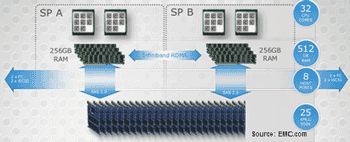
XtremIO Architecture
XtremIO X-Brick block diagram

XtremIO storage processors (controllers) and drive shelve block diagram. Each X-Brick and their storage processors or controllers communicate with each other and other X-Bricks via a dedicated InfiniBand using Remote Direct Memory Access (RDMA) fabric for memory to memory data transfers. The controllers or storage processors (two per X-Brick) each have dual processors with eight cores for compute, along with 256GB of DRAM memory. Part of each controllers DRAM memory is set aside as a mirror its partner or peer and vise versa with access being over the InfiniBand fabric.

XtremIO fabric
XtremIO X-Brick four node fabric cluster or instance

How XtremIO works

Servers access XtremIO X-Bricks using iSCSI and Fibre Channel for block access. A responding X-Brick node handles the storage I/O request and in the case of a write updates other nodes. In the case of a write, the handling node or controller (aka storage processor) checks its meta data map in memory to see if the data is new and unique. If so, the data gets saved to SSD along with meta data information updated across all nodes. Note that data gets ingested and chunked or sharded into 4KB blocks. So for example if a 32KB storage I/O request from the server arrives, that is broken (e.g. chunk or shard) into 8 4KB pieces each with a mathematical unique fingerprint created. This fingerprint is compared to what is known in the in memory meta data tables (this is a hexadecimal number compare so a quick operation). Based on the comparisons if unique the data is saved and pointers created, if already exists, then pointers are updated.

In addition to determining if unique data, the fingerprint is also used for generate a balanced data dispersal plan across the nodes and SSD devices. Thus there is the benefit of reducing duplicate data during ingestion, while also reducing back-end IOs within the XtremIO storage system. Another byproduct is the reduction in time spent on garbage collection or other background tasks commonly associated with SSD and other storage systems.

Meta data is kept in memory with a persistent copied written to reserved area on the flash SSD drives (think of as a vault area) to support and keep system state and consistency. In between data consistency points the meta data is kept in a log journal like how a database handles log writes. What’s different from a typical database is that XtremIO XIOS platform software does these consistency point writes for persistence on a granularity of seconds vs. hours or minutes.

Storage I/O trends

What about rumor that XtremIO can only do 4KB IOPs?

Does this mean that the smallest storage I/O or IOP that XtremIO can do is 4GB?

That is a rumor or some fud I have heard floated by a competitor (or two or three) that assumes if only 4KB internal chunk or shard being used for processing, that must mean no IOPs smaller than 4KB from a server.

XtremIO can do storage I/O IOP sizes of 512 bytes (e.g. the standard block size) as do other systems. Note that the standard server storage I/O block or IO size is 512 bytes or multiples of that unless the new 4KB advanced format (AF) block size being used which based on my conversations with EMC, AF is not supported, yet. (Updated 11/15/13 EMC has indicated that host (front-end) 4K AF support, along with 512 byte emulation modes are available now with XIOS). Also keep in mind that since XtremIO XIOS internally is working with 4KB chunks or shards, that is a stepping stone for being able to eventually leverage back-end AF drive support in the future should EMC decide to do so (Updated 11/15/13 Waiting for confirmation from EMC about if back-end AF support is now enabled or not, will give more clarity as it is recieved).

What else is EMC doing with XtremIO?

  • VCE Vblock XtremIO systems for SAP HANA (and other databases) in memory databases along with VDI optimized solutions.
  • VPLEX and XtremIO for extended distance local, metro and wide area HA, BC and DR.
  • EMC PowerPath XtremIO storage I/O path optimization and resiliency.
  • Secure Remote Support (aka phone home) and auto support integration.

Boosting your available software license minutes (ASLM) with SSD

Another use of SSD has been in the past the opportunity to make better use of servers stretching their usefulness or delaying purchase of new ones by improving their effective use to do more work. In the past this technique of using SSDs to delay a server or CPU upgrade was used when systems when hardware was more expensive, or during the dot com bubble to fill surge demand gaps.  This has the added benefit of stretching database and other expensive software licenses to go further or do more work. The less time servers spend waiting for IOP’s means more time for doing useful work and bringing value of the software license. Otoh, the more time spent waiting is lot available software minutes which is cost overhead.

Think of available software licence minutes (ASLM) in terms of available software license minutes where if doing useful work your software is providing value. On the other hand if those minutes are not used for useful work (e.g. spent waiting or lost due to CPU or server or IO wait, then they are lost). This is like airlines and available seat miles (ASM) metric where if left empty it’s a lost opportunity, however if used, then value, not to mention if yield management applied to price that seat differently. To make up for that loss many organizations have to add extra servers and thus more software licensing costs.

Storage I/O trends

Can we get a side of context with them metrics?

EMC along with some other vendors are starting to give more context with their storage I/O performance metrics that matter than simple IOP’s or Hero Marketing Metrics. However context extends beyond performance to also availability and space capacity which means data protection overhead. As an example, EMC claims 25% for RAID 5 and 20% for RAID 6 or 30% for RAID 5/RAID 6 combo where a 25 drive (SSD) XDP has a 8% overhead. However this assumes a 4+1 (5 drive) RAID , not apples to apples comparison on a space overhead basis. For example a 25 drive RAID 5 (24+1) would have around an 4% parity protection space overhead or a RAID 6 (23+2) about 8%.

Granted while the space protection overhead might be more apples to apples with the earlier examples to XDP, there are other differences. For example solutions such as XDP can be more tolerant to multiple drive failures with faster rebuilds than some of the standard or basic RAID implementations. Thus more context and clarity would be helpful.

StorageIO would like see vendors including EMC along with startups who give data protection space overhead comparisons without context to do so (and applaud those who provide context). This means providing the context for data protection space overhead comparisons similar to performance metrics that matter. For example simply state with an asterisk or footnote comparing a 4+1 RAID 5 vs. a 25 drive erasure or forward error correction or dispersal or XDP or wide stripe RAID for that matter (e.g. can we get a side of context). Note this is in no way unique to EMC and in fact quite common with many of the smaller startups as well as established vendors.

General comments

My laundry list of items which for now would be nice to have’s, however for you might be need to have would include native replication (today leverages Recover Point), Advanced Format (4KB) support for servers (Updated 11/15/13 Per above, EMC has confirmed that host/server-side (front-end) AF along with 512 byte emulation modes exist today), as well as SSD based drives, DIF (Data Integrity Feature), and Microsoft ODX among others. While 12Gb SAS server to X-Brick attachment for small in the cabinet connectivity might be nice for some, more practical on a go forward basis would be 40GbE support.

Now let us see what EMC does with XtremIO and how it competes in the market. One indicator to watch in the industry and market of the impact or presence of EMC XtremIO is the amount of fud and mud that will be tossed around. Perhaps time to make a big bowl of popcorn, sit back and enjoy the show…

Ok, nuff said (for now).

Cheers
Gs

Greg Schulz – Author Cloud and Virtual Data Storage Networking (CRC Press), The Green and Virtual Data Center (CRC Press) and Resilient Storage Networks (Elsevier)

All Comments, (C) and (TM) belong to their owners/posters, Other content (C) Copyright 2006-2026 Server StorageIO and UnlimitedIO LLC All Rights Reserved

Cisco buys Whiptail continuing the SSD storage I/O flash cash cache dash

Storage I/O trends

Cisco buys Whiptail continuing the Storage storage I/O flash cash cache dash

Congratulations to Virident for being bought today for $645 Million USD by Western Digital (WD). Virident a nand flash PCIe card startup vendor has been around for several years and in the last year or two has gain more industry awareness as a competitor to FusionIO among others.

There is a nand flash solid state devices (SSD) cash-dash occurring, not to mention fast cache dances that is occurring the IT and data infrastructure (e.g. storage and IO) sector specifically.

Why the nand flash SSD cash dash and cache dance?

Yesterday hard disk drive (HDD) vendor Western Digital (WD) bought Virident a nand flash PCIe Solid State Device (SSD) card vendor for $650M, and today networking and server vendor Cisco bought Whiptail a SSD based storage system startup for a little over $400M. Here is an industry trends perspective post that I did yesterday on WD and Virident.

Obviously this begs a couple of questions, some of which I raised in my post yesterday about WD, Virident, Seagate, FusionIO and others.

Questions include

Does this mean Cisco is getting ready to take on EMC, NetApp, HDS and its other storage partners who leverage the Cisco UCS server?

IMHO at least near term no more than they have in the past, nor any more than EMCs partnership with Lenovo indicates a shift in what is done with vBlocks. On the other hand, some partners or customers may be as nervous as a long-tailed cat next to a rocking chair (Google it if you don’t know what it means ;).

Is Cisco going to continue to offer Whiptail SSD storage solutions on a standalone basis, or pull them in as part of solutions similar to what it has done on other acquisitions?

Storage I/O trends

IMHO this is one of the most fundamental questions and despite the press release and statements about this being a UCS focus, a clear sign of proof for Cisco is how they reign in (if they go that route) Whiptail from being sold as a general storage solution (with SSD) as opposed to being part of a solution bundle.

How will Cisco manage its relationship in a coopitition manner cooperating with the likes of EMC in the joint VCE initiative along with FlexPod partner NetApp among others? Again time will tell.

Also while most of the discussions about NetApp have been around the UCS based FlexPod business, there is the other side of the discussion which is what about NetApp E Series storage including the SSD based EF540 that competes with Whiptail (among others).

Many people may not realize how much DAS storage including fast SAS, high-capacity SAS and SATA or PCIe SSD cards Cisco sells as part of UCS solutions that are not vBlock, FlexPod or other partner systems.

NetApp and Cisco have partnerships that go beyond the FlexPod (UCS and ONTAP based FAS) so will be interesting to see what happens in that space (if anything). This is where Cisco and their UCS acquiring Whiptail is not that different from IBM buying TMS to complement their servers (and storage) while also partnering with other suppliers, same holds true for server vendors Dell, HP, IBM and Oracle among others.

Can Cisco articulate and convince their partners, customers, prospects and others that the whiptail acquisition is more about direct attached storage
(DAS) which includes both internal dedicated and external shared device?

Keep in mind that DAS does not have to mean Dumb A$$ Storage as some might have you believe.

Then there are the more popular questions of who is going to get bought next, what will NetApp, Dell, Seagate, Huawei and a few others do?

Oh, btw, funny how have not seen any of the pubs mention that Whiptail CEO Dan Crain is a former Brocadian (e.g. former Brocade CTO) who happens to be a Cisco competitor, just saying.

Congratulations to Dan and his crew and enjoy life at Cisco.

Stay tuned as the fall 2013 nand flash SSD cache dash and cash dance activities are well underway.

Ok, nuff said (for now).

Cheers
Gs

Greg Schulz – Author Cloud and Virtual Data Storage Networking (CRC Press), The Green and Virtual Data Center (CRC Press) and Resilient Storage Networks (Elsevier)

All Comments, (C) and (TM) belong to their owners/posters, Other content (C) Copyright 2006-2026 Server StorageIO and UnlimitedIO LLC All Rights Reserved

WD buys nand flash SSD storage I/O cache vendor Virident

Storage I/O trends

WD buys nand flash SSD storage I/O cache vendor Virident

Congratulations to Virident for being bought today for $645 Million USD by Western Digital (WD). Virident a nand flash PCIe card startup vendor has been around for several years and in the last year or two has gain more industry awareness as a competitor to FusionIO among others.

There is a nand flash solid state devices (SSD) cash dash occurring, not to mention fast cache dances that is occurring the IT and data infrastructure (e.g. storage and IO) sector specifically.

Why the nand flash SSD cash dash and cache dance?

Here is a piece that I did today over at InfoStor on a related theme that sets the basis of why the nand flash-based SSD market is popular for storage and as a cache. Hence there is a flash cash dash and by some dance for increased storage I/O performance.

Like the hard disk drive (HDD) industry before it which despite what some pundits and profits have declared (for years if not decades) as being dead (it is still alive), there were many startups, shutdowns, mergers and acquisitions along with some transformations. Granted solid-state memories is part of the presence and future being deployed in new and different ways.

The same thing has occurred in the nand flash-based SSD sector with LSI acquiring SANDforce, SANdisk picking up Pliant and Flashsoft among others. Then there is Western Digital (WD) that recently has danced with their cash as they dash to buy up all things flash including Stec (drives & PCIe cards), Velobit (cache software), Virident (PCIe cards), along with Arkeia (backup) and an investment in Skyera.

Storage I/O trends

What about industry trends and market dynamics?

Meanwhile there have been some other changes with former industry darling and highflying stock post IPO FusionIO hitting as market reality and sudden CEO departure a few months ago. However after a few months of their stock being pummeled, today it bounced back perhaps as people now speculate who will buy FusionIO with WD picking up Virident. Note that one of Viridents OEM customers is EMC for their PCIe flash card XtremSF as are Micron and LSI.

Meanwhile Stec, also  now own by WD was also EMCs original flash SSD drive supplier or what they refer to as a EFDs (Electronic Flash Devices), not to mention having also supplied HDDs to them (also keep in mind WD bought HGST a year or so back).

There are some early signs as well as their stock price jumping today which was probably oversold. Perhaps people are now speculating that maybe Seagate who had been an investor in Virident which was bought by WD for $645 million today might be in the market for somebody else? Alternatively, that perhaps WD didn’t see the value in a FusionIO, or willing to make big flash cache cash grabs dash of that size? Also note Seagate won a $630 million (and the next appeal was recently upheld) infringement lawsuit vs. WD (here and here).

Does that mean FusionIO could become Seagate’s target or that of NetApp, Oracle or somebody else with the cash and willingness to dash, grab a chunk of the nand flash, and cache market?

Likewise, there are the software I/O and caching tool vendors some of which are tied to VMware and virtual servers vs. others that are more flexible that are gaining popularity. What about the systems or solution appliances play, could that be in the hunt for a Seagate?

Anything is possible however IMHO that would be a risky move, one that many at Seagate probably still remember from their experiment with Xiotech, not to mention stepping on the toes of their major OEM customer partners.

Storage I/O trends

Thus I would expect Seagate if they do anything would be more along the lines of a component type suppler meaning a FusionIO (yes they have Nexgen, however that could be easily dealt with), OCZ, perhaps even a LSI or Micron however some of those start to get rather expensive for a quick flash cache grab for some stock and cash.

Also, keep in mind that FusionIO in addition to having their PCIe flash cards also have the ioturbine software-caching tool that if you are not familiar with, IBM recently made an announcement of their Flash Cache Storage Accelerator (FCSA) that has an affiliation to guess who?

Closing comments (for now)

Some of the systems or solutions players will survive, perhaps even being acquired as XtremIO was by EMC, or file for IPO like Violin, or express their wish to IPO and or be bought such as all the others (e.g. Skyera, Whiptail, Pure, Solidfire, Cloudbyte, Nimbus, Nimble, Nutanix, Tegile, Kaminario, Greenbyte, and Simplivity among others).

Here’s the thing, those who really do know what is going to happen are not and probably cannot say, and those who are talking what will happen are like the rest of us, just speculating or providing perspectives or stirring the pot among other things.

So who will be next in the flash cache ssd cash dash dance?

Ok, nuff said (for now).

Cheers
Gs

Greg Schulz – Author Cloud and Virtual Data Storage Networking (CRC Press), The Green and Virtual Data Center (CRC Press) and Resilient Storage Networks (Elsevier)

All Comments, (C) and (TM) belong to their owners/posters, Other content (C) Copyright 2006-2026 Server StorageIO and UnlimitedIO LLC All Rights Reserved

IBM Server Side Storage I/O SSD Flash Cache Software

Storage I/O trends

IBM Server Side Storage I/O SSD Flash Cache Software

As I often say, the best server storage I/O or IOP is the one that you do not have to do. The second best storage I/O or IOP is the one with least impact or that can be done in a cost-effective way. Likewise the question is not if solid-state device (SSD) including nand flash are in your future, rather when, where, why, with what, how much along with from whom. Also location matters when it comes to SSD including nand flash with different environments and applications leveraging different placement (locality) options, not to mention how much performance do you need vs. want?

As part of their $1 billion USD (to be spent over three years, or $333.3333 million per year) flash ahead initiative IBM has announced their Flash Cache Storage Accelerator (FCSA) server software. While IBM did not use the term, (congratulations and thank you btw) some creative marketer might want to try calling this Software Defined Cache (SDC) or Software Defined SSD (SDSSD) which if that occurs, apologies in advance ;). Keep in mind that it was about a year ago this time when IBM announced that they were acquiring SSD industry veteran Texas Memory Systems (TMS).

What was announced, introducing Flash Cache Storage Acceleration or FCSA

With this announcement of FCSA slated for customer general availability by end of August, IBM joins EMC and NetApp among other storage systems vendors who developed their own, or have collaborated on server-side IO optimization and cache software. Some of the other startup and established vendors who have IO optimization, performance acceleration and caching software include DataRam (Ramdisk), FusionIO, Infinio (NFS for VMware), Pernix (block for VMware), Proximal and SANdisk (bought flashsoft) among others.

Read more about IBM Flash Cache Software (FCSA) including various questions and perspectives in part two of this two-part post located here.

Ok, nuff said (for now)

Cheers
Gs

Greg Schulz – Author Cloud and Virtual Data Storage Networking (CRC Press), The Green and Virtual Data Center (CRC Press) and Resilient Storage Networks (Elsevier)

All Comments, (C) and (TM) belong to their owners/posters, Other content (C) Copyright 2006-2026 Server StorageIO and UnlimitedIO LLC All Rights Reserved
Part II: IBM Server Side Storage I/O SSD Flash Cache Software

Storage I/O trends

Part II IBM Server Flash Cache Storage I/O accelerator for SSD

This is the second in a two-part post series on IBM’s Flash Cache Storage Accelerator (FCSA) for Solid State Device (SSD) storage announced today. You can view part I of the IBM FCSA announcement synopsis here.

Some FCSA ssd cache questions and perspectives

What is FCSA?
FCSA is a server-side storage I/O or IOP caching software tool that makes use of local (server-side) nand flash SSD (PCIe cards or drives). As a cache tool (view IBM flash site here) FCSA provides persistent read caching on IBM servers (xSeries, Flex and Blade x86 based systems) with write through cache (e.g. data cached for later reads) while write data is written directly to block attached storage including SANs. back-end storage can be iSCSI, SAS, FC or FCoE based block systems from IBM or others including all SSD, hybrid SSD or traditional HDD based solutions from IBM and others.

How is this different from just using a dedicated PCIe nand flash SSD card?
FCSA complements those by using them as a persistent storage to cache storage I/O reads to boost performance. By using the PCIe nand flash card or SSD drives, FCSA and other storage I/O cache optimization tools free up valuable server-side DRAM from having to be used as a read cache on the servers. On the other hand, caching tools such as FCSA also keep local cached reads closer to the applications on the servers (e.g. locality of reference) reducing the impact on backed shared block storage systems.

What is FCSA for?
With storage I/O or IOPS and application performance in general, location matters due to locality of reference hence the need for using different approaches for various environments. IBM FCSA is a storage I/O caching software technology that reduces the impact of applications having to do random read operations. In addition to caching reads, FCSA also has a write-through cache, which means that while data written to back-end block storage including on iSCSI, SAS, FC or FCoE based storage (IBM or other vendors), a copy of the data is cached for later reads. Thus while the best storage I/O is the one that does not have to be done (e.g. can be resolved from cache), the second best would be writes that go to a storage system that are not competing with read requests (handled via cache).

Storage I/O trends

Who else is doing this?
This is similar to what EMC initially announced and released in February 2012 with VFcache now renamed to be XtremSW along with other caching and IO optimization software from others (e.g. SANdisk, Proximal and Pernix among others.

Does this replace IBM EasyTier?
Simple answer is no, one is for tiering (e.g. EasyTier), the other is for IO caching and optimization (e.g. FCSA).

Does this replace or compete with other IBM SSD technologies?
With anything, it is possible to find a way to make or view it as competitive. However in general FCSA complements other IBM storage I/O optimization and management software tools such as EasyTier as well as leverage and coexist with their various SSD products (from PCIe cards to drives to drive shelves to all SSD and hybrid SSD solutions).

How does FCSA work?
The FCSA software works in either a physical machine (PM) bare metal mode with Microsoft Windows operating systems (OS) such as Server 2008, 2012 among others. There is also *nix support for RedHat Linux, along with in a VMware virtual machine (VM) environment. In a VMware environment High Availability (HA), DRS and VMotion services and capabilities are supported. Hopefully it will be sooner vs. later that we hear IBM do a follow-up announcement (pure speculation and wishful thinking) on more hypervisors (e.g. Hyper-V, Xen, KVM) support along with Centos, Ubuntu or Power based systems including IBM pSeries. Read more about IBM Pure and Flex systems here.

What about server CPU and DRAM overhead?
As should be expected, a minimal amount of server DRAM (e.g. main memory) and CPU processing cycles are used to support the FCSA software and its drivers. Note the reason I say as should be expected is how you can have software running on a server doing any type of work that does not need some amount of DRAM and processing cycles. Granted some vendors will try to spin and say that there is no server-side DRAM or CPU consumed which would be true if they are completely external to the server (VM or PM). The important thing is to understand how much of an impact in terms of CPU along with DRAM consumed along with their corresponding effectiveness benefit that are derived.

Storage I/O trends

Does FCSA work with NAS (NFS or CIFS) back-end storage?
No this is a server-side block only cache solution. However having said that, if your applications or server are presenting shared storage to others (e.g. out the front-end) as NAS (NFS, CIFS, HDFS) using block storage (back-end), then FCSA can cache the storage I/O going to those back-end block devices.

Is this an appliance?
Short and simple answer is no, however I would not be surprised to hear some creative software defined marketer try to spin it as a flash cache software appliance. What this means is that FCSA is simply IO and storage optimization software for caching to boost read performance for VM and PM servers.

What is this hardware or storage agnostic stuff mean?
Simple, it means that FCSA can work with various nand flash PCIe cards or flash SSD drives installed in servers, as well as with various back-end block storage including SAN from IBM or others. This includes being able to use block storage using iSCSI, SAS, FC or FCoE attached storage.

What is the difference between Easytier and FCSA?
Simple, FCSA is providing read acceleration via caching which in turn should offload some reads from affecting storage systems so that they can focus on handling writes or read ahead operations. Easytier on the other hand is for as its name implies tiering or movement of data in a more deterministic fashion.

How do you get FCSA?
It is software that you buy from IBM that runs on an IBM x86 based server. It is licensed on a per server basis including one-year service and support. IBM has also indicated that they have volume or multiple servers based licensing options.

Storage I/O trends

Does this mean IBM is competing with other software based IO optimization and cache tool vendors?
IBM is focusing on selling and adding value to their server solutions. Thus while you can buy the software from IBM for their servers (e.g. no bundling required), you cannot buy the software to run on your AMD/Seamicro, Cisco (including EMC/VCE and NetApp) , Dell, Fujitsu, HDS, HP, Lenovo, Oracle, SuperMicro among other vendors servers.

Will this work on non-IBM servers?
IBM is only supporting FCSA on IBM x86 based servers; however, you can buy the software without having to buy a solution bundle (e.g. servers or storage).

What is this Cooperative Caching stuff?
Cooperative caching takes the next step from simple read cache with write-through to also support chance coherency in a shared environment, as well as leverage tighter application or guest operating system and storage system integration. For example, applications can work with storage systems to make intelligent predictive informed decisions on what to pre-fetch or read ahead and cached, as well as enable cache warming on restart. Another example is where in a shared storage environment if one server makes a change to a shared LUN or volume that the local server-side caches are also updated to prevent stale or inconsistent reads from occurring.

Can FCSA use multiple nand flash SSD devices on the same server?
Yes, IBM FCSA supports use of multiple server-side PCIe and or drive based SSD devices.

How is cache coherency maintained including during a reboot?
While data stored in the nand flash SSD device is persistent, it’s up to the server and applications working with the storage systems to decide if there is coherent or stale data that needs to be refreshed. Likewise, since FCSA is server-side and back-end storage system or SAN agnostic, without cooperative caching it will not know if the underlying data for a storage volume changed without being notified from another server that modified it. Thus if using shared back-end including SAN storage, do your due diligence to make sure multi-host access to the same LUN’s or volumes is being coordinated with some server-side software to support cache coherency, something that would apply to all vendors.

Storage I/O trends

What about cache warming or reloading of the read cache?
Some vendors who have tightly interested caching software and storage systems, something IBM refers to as cooperative caching that can have the ability to re-warm the cache. With solutions that support cache re-warming, the cache software and storage systems work together to main cache coherency while pre-loading data from the underlying storage system based on hot bands or other profiles and experience. As of this announcement, FCSA does not support cache warming on its own.

Does IBM have service or tools to complement FCSA?
Yes, IBM has an assessment, profile and planning tool that are available on a free consultation services basis with a technician to check your environment. Of course, the next logical step would be for IBM to make the tool available via free download or on some other basis as well.

Do I recommend and have I tried FCSA?
On paper, or WebEx, YouTube or other venue FCSA looks interesting and capable, a good fit for some environments particular if IBM server-based. However since my PM and VMware VM based servers are from other vendors, along with the fact that FCSA only runs on IBM servers, have not actually given it a hands on test drive yet. Thus if you are looking at storage I/O optimization and caching software tools for your VM or PM environment, checkout IBM FCSA to see if it meets your needs.

Storage I/O trends

General comments

It is great to see server and storage systems vendors add value to their solutions with I/O and performance optimization as well as caching software tools. However, I am also concerned with the growing numbers of different software tools that only work with one vendor’s servers or storage systems, or at least are supported as such.

This reminds me of a time not all that long ago (ok, for some longer than others) when we had a proliferation of different host bus adapter (HBA) driver and pathing drivers from various vendors. The result is a hodge podge (a technical term) of software running on different operating systems, hypervisors, PM’s, VMs, and storage systems, all of which need to be managed. On the other hand, for the time being perhaps the benefit will outweigh the pain of having different tools. That is where there are options from server-side vendor centric, storage system focused, or third-party software tool providers.

Another consideration is that some tools work in VMware environments; others support multiple hypervisors while others also support bare metal servers or PMs. Which applies to your environment will of course depend. After all, if you are an all VMware environment given that many of the caching tools tend to be VMware focused, that gives more options vs. for those who are still predominately PM environments.

Ok, nuff said (for now)

Cheers
Gs

Greg Schulz – Author Cloud and Virtual Data Storage Networking (CRC Press), The Green and Virtual Data Center (CRC Press) and Resilient Storage Networks (Elsevier)

All Comments, (C) and (TM) belong to their owners/posters, Other content (C) Copyright 2006-2026 Server StorageIO and UnlimitedIO LLC All Rights Reserved
Viking SATADIMM: Nand flash SATA SSD in DDR3 DIMM slot?

Storage I/O trends

Today computer and data storage memory vendor Viking announced that SSD vendor Solidfire has deployed their SATADIMM modules in DDR3 DIMM (e.g. Random Access Memory (RAM) main memory) slots of their SF SSD based storage solution.

solidfire ssd storage with satadimm
Solidfire SD solution with SATADIMM via Viking

Nand flash SATA SSD in a DDR3 DIMM slot?

Per Viking, Solidfire uses the SATADIMM as boot devices and cache to complement the normal SSD drives used in their SF SSD storage grid or cluster. For those not familiar, Solidfire SF storage systems or appliances are based on industry standard servers that are populated with SSD devices which in turn are interconnected with other nodes (servers) to create a grid or cluster of SSD performance and space capacity. Thus as nodes are added, more performance, availability and capacity are also increased all of which are accessed via iSCSI. Learn more about Solidfire SD solutions on their website here.

Here is the press release that Viking put out today:

Viking Technology SATADIMM Increases SSD Capacity in SolidFire’s Storage System (Press Release)

Viking Technology’s SATADIMM enables higher total SSD capacity for SolidFire systems, offering cloud infrastructure providers an optimized and more powerful solution

FOOTHILL RANCH, Calif., August 12, 2013 – Viking Technology, an industry leading supplier of Solid State Drives (SSDs), Non-Volatile Dual In-line Memory Module (NVDIMMs), and DRAM, today announced that SolidFire has selected its SATADIMM SSD as both the cache SSD and boot volume SSD for their storage nodes. Viking Technology’s SATADIMM SSD enables SolidFire to offer enhanced products by increasing both the number and the total capacity of SSDs in their solution.

“The Viking SATADIMM gives us an additional SSD within the chassis allowing us to dedicate more drives towards storage capacity, while storing boot and metadata information securely inside the system,” says Adam Carter, Director of Product Management at SolidFire. “Viking’s SATADIMM technology is unique in the market and an important part of our hardware design.”

SATADIMM is an enterprise-class SSD in a Dual In-line Memory Module (DIMM) form factor that resides within any empty DDR3 DIMM socket. The drive enables SSD caching and boot capabilities without using a hard disk drive bay. The integration of Viking Technology’s SATADIMM not only boosts overall system performance but allows SolidFire to minimize potential human errors associated with data center management, such as accidentally removing a boot or cache drive when replacing an adjacent failed drive.

“We are excited to support SolidFire with an optimal solid state solution that delivers increased value to their customers compared to traditional SSDs,” says Adrian Proctor, VP of Marketing, Viking Technology. “SATADIMM is a solid state drive that takes advantage of existing empty DDR3 sockets and provides a valuable increase in both performance and capacity.”

SATADIMM is a 6Gb SATA SSD with capacities up to 512GB. A next generation SAS solution with capacities of 1TB & 2TB will be available early in 2014. For more information, visit our website www.vikingtechnology.com or email us at sales@vikingtechnology.com.

Sales information is available at: www.vikingtechnology.com, via email at sales@vikingtechnology.com or by calling (949) 643-7255.

About Viking Technology Viking Technology is recognized as a leader in NVDIMM technology. Supporting a broad range of memory solutions that bridge DRAM and SSD, Viking delivers solutions to OEMs in the enterprise, high-performance computing, industrial and the telecommunications markets. Viking Technology is a division of Sanmina Corporation (Nasdaq: SANM), a leading Electronics Manufacturing Services (EMS) provider. More information is available at www.vikingtechnology.com.

About SolidFire SolidFire is the market leader in high-performance data storage systems designed for large-scale public and private cloud infrastructure. Leveraging an all-flash scale-out architecture with patented volume-level quality of service (QoS) control, providers can now guarantee storage performance to thousands of applications within a shared infrastructure. In-line data reduction techniques along with system-wide automation are fueling new block-storage services and advancing the way the world uses the cloud.

What’s inside the press release

On the surface this might cause some to jump to the conclusion that the nand flash SSD is being accessed via the fast memory bus normally used for DRAM (e.g. main memory) of a server or storage system controller. For some this might even cause a jump to conclusion that Viking has figured out a way to use nand flash for reads and writes not only via a DDR3 DIMM memory location, as well as doing so with the Serial ATA (SATA) protocol enabling server boot and use by any operating system or hypervisors (e.g. VMware vSphere or ESXi, Microsoft Hyper-V, Xen or KVM among others).

Note for those not familiar or needing a refresh on DRAM, DIMM and related items, here is an excerpt from Chapter 7 (Servers – Physical, Virtual and Software) from my book "The Green and Virtual Data Center" (CRC Press).

7.2.2 Memory

Computers rely on some form of memory ranging from internal registers, local on-board processor Level 1 (L1) and Level 2 (L2) caches, random accessible memory (RAM), non-volatile RAM (NVRAM) or Flash along with external disk storage. Memory, which includes external disk storage, is used for storing operating system software along with associated tools or utilities, application programs and data. Read more of the excerpt here…

Is SATADIMM memory bus nand flash SSD storage?

In short no.

Some vendors or their surrogates might be tempted to spin such a story by masking some details to allow your imagination to run wild a bit. When I saw the press release announcement I reached out to Tinh Ngo (Director Marketing Communications) over at Viking with some questions. I was expecting the usual marketing spin story, dancing around the questions with long answers or simply not responding with anything of substance (or that requires some substance to believe). Again what I found was the opposite and thus want to share with you some of the types of questions and answers.

So what actually is SATADIMM? See for yourself in the following image (click on it to view or Viking site).

Via Viking website, click on image or here to learn more about SATADIMM

Does SATADIMM actually move data via DDR3 and memory bus? No, SATADIMM only draws power from it (yes nand flash does need power when in use contrary to a myth I was told about).

Wait, then how is data moved and how does it get to and through the SATA IO stack (hardware and software)?

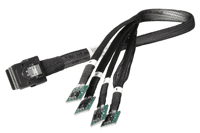
Simple, there is a cable connector that attached to the SATADIMM that in turn attached to an internal SATA port. Or using a different connector cable attach the SATADIMM (up to four) to a standard SAS internal port such as on a main board, HBA, RAID or caching adapter.

industry trend

Does that mean that Viking and who ever uses SATADIMM is not actually moving data or implementing SATA via the memory bus and DDR3 DIMM sockets? That would be correct, data movement occurs via cable connection to standard SATA or SAS ports.

Wait, why would I give up a DDR3 DIMM socket in my server that could be used for more DRAM? Great question and one that should be it depends on if you need more DRAM or more nand flash? If you are out of drive slots or PCIe card slots and have enough DRAM for your needs along with available DDR3 slots, you can stuff more nand flash into those locations assuming you have SAS or SATA connectivity.

satadimm
SATADIMM with SATA connector top right via Viking

satadimm sata connector
SATADIMM SATA connector via Viking

satadimm sas connector
SATADIMM SAS (Internal) connector via Viking

Why not just use the onboard USB ports and plug-in some high-capacity USB thumb drives to cut cost? If that is your primary objective it would probably work and I can also think of some other ways to cut cost. However those are also probably not the primary tenants that people looking to deploy something like SATADIMM would be looking for.

What are the storage capacities that can be placed on the SATADIMM? They are available in different sizes up to 400GB for SLC and 480GB for MLC. Viking indicated that there are larger capacities and faster 12Gb SAS interfaces in the works which would be more of a surprise if there were not. Learn more about current product specifications here.

Good questions. Attached are three images that sort of illustrates the connector. As well, why not a USB drive; well, there are customers that put 12 of these in the system (with up to 480GB usable capacity) that equates to roughly an added 5.7TBs inside the box without touching the drive bays (left for mass HDD’s). You will then need to raid/connect) all the SATADIMM via a HBA.

How fast is the SATADIMM and does putting it into a DDR3 slot speed things up or slow them down? Viking has some basic performance information on their site (here). However generally should be the same or similar to reach a SAS or SATA SSD drive, although keep SSD metrics and performance in the proper context. Also keep in mind that the DDR3 DIMM slot is only being used for power and not real data movement.

Is the SATADIMM using 3Gbs or 6Gbs SATA? Good questions, today is 6Gb SATA (remember that SATA can attach to a SAS port however not vise versa). Lets see if Viking responds in the comments with more including RAID support (hardware or software) along with other insight such as UNMAP, TRIM, Advanced Format (AF) 4KByte blocks among other things.

Have I actually tried SATADIMM yet? No, not yet. However would like to give it a test drive and workout if one were to show up on my doorstep along with disclosure and share the results if applicable.

industry trend

Future of nand flash in DRAM DIMM sockets

Keep in mind that someday nand flash will actually seem not only in a Webex or Powerpoint demo preso (e.g. similar to what Diablo Technology is previewing), as well as in real use for example what Micron earlier this year predicted for flash on DDR4 (more DDR3 vs. DDR4 here).

Is SATADIMM the best nand flash SSD approach for every solution or environment? No, however it does give some interesting options for those who are PCIe card, or HDD and SSD drive slot constrained that also have available DDR3 DIMM sockets. As to price, check with Viking, wish I could say tell them Greg from StorageIO sent you for a good value, however not sure what they would say or do.

Related more reading:
How much storage performance do you want vs. need?
Can RAID extend the life of nand flash SSD?
Can we get a side of context with them IOPS and other storage metrics?
SSD & Real Estate: Location, Location, Location
What is the best kind of IO? The one you do not have to do
SSD, flash and DRAM, DejaVu or something new?

Ok, nuff said (for now).

Cheers
Gs

Greg Schulz – Author Cloud and Virtual Data Storage Networking (CRC Press), The Green and Virtual Data Center (CRC Press) and Resilient Storage Networks (Elsevier)

twitter @storageio

All Comments, (C) and (TM) belong to their owners/posters, Other content (C) Copyright 2006-2026 Server StorageIO and UnlimitedIO LLC All Rights Reserved

Server and Storage IO Memory: DRAM and nand flash

Storage I/O trends

DRAM, DIMM, DDR3, nand flash memory, SSD, stating what’s often assumed

Often what’s assumed is not always the case. For example in along with around server, storage and IO networking circles including virtual as well as cloud environments terms such as nand (Negated AND or NOT And) flash memory aka (Solid State Device or SSD), DRAM (Dynamic Random Access Memory), DDR3 (Double Data Rate 3) not to mention DIMM (Dual Inline Memory Module) get tossed around with the assumption everybody must know what they mean.

On the other hand, I find plenty of people who are not sure what those among other terms or things are, sometimes they are even embarrassed to ask, particular if they are a self-proclaimed expert.

So for those who need a refresh or primer, here you go, an excerpt from Chapter 7 (Servers – Physical, Virtual and Software) from my book "The Green and Virtual Data Center" (CRC Press) available at Amazon.com and other global venues in print and ebook formats.

7.2.2 Memory

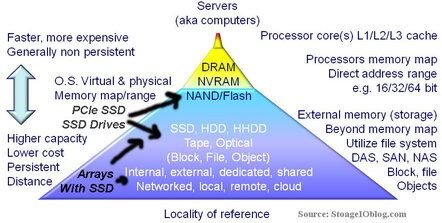
Computers rely on some form of memory ranging from internal registers, local on-board processor Level 1 (L1) and Level 2 (L2) caches, random accessible memory (RAM), non-volatile RAM (NVRAM) or nand Flash (SSD) along with external disk storage. Memory, which includes external disk storage, is used for storing operating system software along with associated tools or utilities, application programs and data. Main memory or RAM, also known as dynamic RAM (DRAM) chips, is packaged in different ways with a common form being dual inline memory modules (DIMMs) for notebook or laptop, desktop PC and servers.

RAM main memory on a server is the fastest form of memory, second only to internal processor or chip based registers, L1, L2 or local memory. RAM and processor based memories are volatile and non-persistent in that when power is removed, the contents of memory are lost. As a result, some form of persistent memory is needed to keep programs and data when power is removed. Read only memory (ROM) and NVRAM are both persistent forms of memory in that their contents are not lost when power is removed. The amount of RAM that can be installed into a server will vary with specific architecture implementation and operating software being used. In addition to memory capacity and packaging format, the speed of memory is also important to be able to move data and programs quickly to avoid internal bottlenecks. Memory bandwidth performance increases with the width of the memory bus in bits and frequency in MHz. For example, moving 8 bytes on a 64 bit buss in parallel at the same time at 100MHz provides a theoretical 800MByte/sec speed.

To improve availability and increase the level of persistence, some servers include battery backed up RAM or cache to protect data in the event of a power loss. Another technique to protect memory data on some servers is memory mirroring where twice the amount of memory is installed and divided into two groups. Each group of memory has a copy of data being stored so that in the event of a memory failure beyond those correctable with standard parity and error correction code (ECC) no data is lost. In addition to being fast, RAM based memories are also more expensive and used in smaller quantities compared to external persistent memories such as magnetic hard disk drives, magnetic tape or optical based memory medias.

Memory diagram
Memory and Storage Pyramid

The above shows a tiered memory model that may look familiar as the bottom part is often expanded to show tiered storage. At the top of the memory pyramid is high-speed processor memory followed by RAM, ROM, NVRAM and FLASH along with many forms of external memory commonly called storage. More detail about tiered storage is covered in chapter 8 (Data Storage – Data Storage – Disk, Tape, Optical, and Memory). In addition to being slower and lower cost than RAM based memories, disk storage along with NVRAM and FLASH based memory devices are also persistent.

By being persistent, when power is removed, data is retained on the storage or memory device. Also shown in the above figure is that on a relative basis, less energy is used for power storage or memory at the bottom of the pyramid than for upper levels where performance increases. From a PCFE (Power, Cooling, Floor space, Economic) perspective, balancing memory and storage performance, availability, capacity and energy to a given function, quality of service and service level objective for a given cost needs to be kept in perspective and not considering simply the lowest cost for the most amount of memory or storage. In addition to gauging memory on capacity, other metrics include percent used, operating system page faults and page read/write operations along with memory swap activity as well memory errors.

Base 2 versus base 10 numbering systems can account for some storage capacity that appears to “missing” when real storage is compared to what is expected to be seen. Disk drive manufacturers use base 10 (decimal) to count bytes of data while memory chip, server and operating system vendors typically use base 2 (binary) to count bytes of data. This has led to confusion when comparing a disk drive base 10 GB with a chip memory base 2 GB of memory capacity, such as 1,000,000,000 (10^9) bytes versus 1,073,741,824 (2^30) bytes. Nomenclature based on the International System of Units uses MiB, GiB and TiB to denote million, billion and trillion bytes for base 2 numbering with base 10 using MB, TB and GB . Most vendors do document how many bytes, sometimes in both base 2 and base 10, as well as the number of 512 byte sectors supported on their storage devices and storage systems, though it might be in the small print.

Related more reading:
How much storage performance do you want vs. need?
Can RAID extend the life of nand flash SSD?
Can we get a side of context with them IOPS and other storage metrics?
SSD & Real Estate: Location, Location, Location
What is the best kind of IO? The one you do not have to do
SSD, flash and DRAM, DejaVu or something new?

Ok, nuff said (for now).

Cheers
Gs

Greg Schulz – Author Cloud and Virtual Data Storage Networking (CRC Press), The Green and Virtual Data Center (CRC Press) and Resilient Storage Networks (Elsevier).

All Comments, (C) and (TM) belong to their owners/posters, Other content (C) Copyright 2006-2026 Server StorageIO and UnlimitedIO LLC All Rights Reserved

Non Disruptive Updates, Needs vs. Wants

Storage I/O trends

Do you want non disruptive updates or do you need non disruptive upgrades?

First there is a bit of play on words going on here with needs vs. wants, as well as what is meant by non disruptive.

Regarding needs vs. wants, they are often used interchangeably particular in IT when discussing requirements or what the customer would like to have. The key differentiator is that a need is something that is required and somehow cost justified, or hopefully easier than a want item. A want or like to have item is simply that, its not a need however it could add value being a benefit although may be seen as discretionary.

There is also a bit of play on words with non disruptive updates or upgrades that can take on different meanings or assumptions. For example my Windows 7 laptop has automatic Microsoft updates enabled some of which can be applied while I work. On the other hand, some of those updates may be applied while I work however they may not take effect until I reboot or exit and restart an application.

This is not unique to Windows as my Ubuntu and Centos Linux systems can also apply updates, and in some cases a reboot might be required, same with my VMware environment. Lets not forget about applying new firmware to a server, or workstation, laptop or other device, along with networking routers, switches and related devices. Storage is also not immune as new software or firmware can be applied to a HDD or SSD (traditional or NVMe), either by your workstation, laptop, server or storage system. Speaking of storage systems, they too have new software or firmware that gets updated.

Storage I/O trends

The common theme here though is if the code (e.g. software, firmware, microcode, flash update, etc) can be applied non disruptive something known as non disruptive code load, followed by activation. With activation, the code may have been applied while the device or software was in use, however may need a reboot or restart. With non disruptive code activation, there should not be a disruption to what is being done when the new software takes effect.

This means that if a device supports non disruptive code load (NDCL) updates along with non disruptive code activation (NDCA), the upgrade can occur without disruption or having to wait for a reboot.

Which is better?

That depends, I want NDCA, however for many things I only need NDCL.

On the other hand, depending on what you need, perhaps it is both NDCL and NDCA, however also keep in mind needs vs. wants.

Ok, nuff said (for now).

Cheers gs

Greg Schulz – Author Cloud and Virtual Data Storage Networking (CRC Press), The Green and Virtual Data Center (CRC Press) and Resilient Storage Networks (Elsevier)
twitter @storageio

All Comments, (C) and (TM) belong to their owners/posters, Other content (C) Copyright 2006-2026 Server StorageIO and UnlimitedIO LLC All Rights Reserved

Can we get a side of context with them IOPS server storage metrics?

Can we get a side of context with them server storage metrics?

Whats the best server storage I/O network metric or benchmark? It depends as there needs to be some context with them IOPS and other server storage I/O metrics that matter.

There is an old saying that the best I/O (Input/Output) is the one that you do not have to do.

In the meantime, let’s get a side of some context with them IOPS from vendors, marketers and their pundits who are tossing them around for server, storage and IO metrics that matter.

Expanding the conversation, the need for more context

The good news is that people are beginning to discuss storage beyond space capacity and cost per GByte, TByte or PByte for both DRAM or nand flash Solid State Devices (SSD), Hard Disk Drives (HDD) along with Hybrid HDD (HHDD) and Solid State Hybrid Drive (SSHD) based solutions. This applies to traditional enterprise or SMB IT data center with physical, virtual or cloud based infrastructures.

hdd and ssd iops

This is good because it expands the conversation beyond just cost for space capacity into other aspects including performance (IOPS, latency, bandwidth) for various workload scenarios along with availability, energy effective and management.

Adding a side of context

The catch is that IOPS while part of the equation are just one aspect of performance and by themselves without context, may have little meaning if not misleading in some situations.

Granted it can be entertaining, fun to talk about or simply make good press copy for a million IOPS. IOPS vary in size depending on the type of work being done, not to mention reads or writes, random and sequential which also have a bearing on data throughout or bandwidth (Mbytes per second) along with response time. Not to mention block, file, object or blob as well as table.

However, are those million IOP’s applicable to your environment or needs?

Likewise, what do those million or more IOPS represent about type of work being done? For example, are they small 64 byte or large 64 Kbyte sized, random or sequential, cached reads or lazy writes (deferred or buffered) on a SSD or HDD?

How about the response time or latency for achieving them IOPS?

In other words, what is the context of those metrics and why do they matter?

storage i/o iops
Click on image to view more metrics that matter including IOP’s for HDD and SSD’s

Metrics that matter give context for example IO sizes closer to what your real needs are, reads and writes, mixed workloads, random or sequential, sustained or bursty, in other words, real world reflective.

As with any benchmark take them with a grain (or more) of salt, they key is use them as an indicator then align to your needs. The tool or technology should work for you, not the other way around.

Here are some examples of context that can be added to help make IOP’s and other metrics matter:

  • What is the IOP size, are they 512 byte (or smaller) vs. 4K bytes (or larger)?
  • Are they reads, writes, random, sequential or mixed and what percentage?
  • How was the storage configured including RAID, replication, erasure or dispersal codes?
  • Then there is the latency or response time and IO queue depths for the given number of IOPS.
  • Let us not forget if the storage systems (and servers) were busy with other work or not.
  • If there is a cost per IOP, is that list price or discount (hint, if discount start negotiations from there)
  • What was the number of threads or workers, along with how many servers?
  • What tool was used, its configuration, as well as raw or cooked (aka file system) IO?
  • Was the IOP’s number with one worker or multiple workers on a single or multiple servers?
  • Did the IOP’s number come from a single storage system or total of multiple systems?
  • Fast storage needs fast serves and networks, what was their configuration?
  • Was the performance a short burst, or long sustained period?
  • What was the size of the test data used; did it all fit into cache?
  • Were short stroking for IOPS or long stroking for bandwidth techniques used?
  • Data footprint reduction (DFR) techniques (thin provisioned, compression or dedupe) used?
  • Were write data committed synchronously to storage, or deferred (aka lazy writes used)?

The above are just a sampling and not all may be relevant to your particular needs, however they help to put IOP’s into more contexts. Another consideration around IOPS are the configuration of the environment, from an actual running application using some measurement tool, or are they generated from a workload tool such as IOmeter, IOrate, VDbench among others.

Sure, there are more contexts and information that would be interesting as well, however learning to walk before running will help prevent falling down.

Storage I/O trends

Does size or age of vendors make a difference when it comes to context?

Some vendors are doing a good job of going for out of this world record-setting marketing hero numbers.

Meanwhile other vendors are doing a good job of adding context to their IOP or response time or bandwidth among other metrics that matter. There is a mix of startup and established that give context with their IOP’s or other metrics, likewise size or age does not seem to matter for those who lack context.

Some vendors may not offer metrics or information publicly, so fine, go under NDA to learn more and see if the results are applicable to your environments.

Likewise, if they do not want to provide the context, then ask some tough yet fair questions to decide if their solution is applicable for your needs.

Storage I/O trends

Where To Learn More

View additional NAS, NVMe, SSD, NVM, SCM, Data Infrastructure and HDD related topics via the following links.

Additional learning experiences along with common questions (and answers), as well as tips can be found in Software Defined Data Infrastructure Essentials book.

Software Defined Data Infrastructure Essentials Book SDDC

What This All Means

What this means is let us start putting and asking for metrics that matter such as IOP’s with context.

If you have a great IOP metric, if you want it to matter than include some context such as what size (e.g. 4K, 8K, 16K, 32K, etc.), percentage of reads vs. writes, latency or response time, random or sequential.

IMHO the most interesting or applicable metrics that matter are those relevant to your environment and application. For example if your main application that needs SSD does about 75% reads (random) and 25% writes (sequential) with an average size of 32K, while fun to hear about, how relevant is a million 64 byte read IOPS? Likewise when looking at IOPS, pay attention to the latency, particular if SSD or performance is your main concern.

Get in the habit of asking or telling vendors or their surrogates to provide some context with them metrics if you want them to matter.

So how about some context around them IOP’s (or latency and bandwidth or availability for that matter)?

Ok, nuff said, for now.

Gs

Greg Schulz – Microsoft MVP Cloud and Data Center Management, VMware vExpert 2010-2017 (vSAN and vCloud). Author of Software Defined Data Infrastructure Essentials (CRC Press), as well as Cloud and Virtual Data Storage Networking (CRC Press), The Green and Virtual Data Center (CRC Press), Resilient Storage Networks (Elsevier) and twitter @storageio. Courteous comments are welcome for consideration. First published on https://storageioblog.com any reproduction in whole, in part, with changes to content, without source attribution under title or without permission is forbidden.

All Comments, (C) and (TM) belong to their owners/posters, Other content (C) Copyright 2006-2026 Server StorageIO and UnlimitedIO. All Rights Reserved. StorageIO is a registered Trade Mark (TM) of Server StorageIO.

Part II: How many IOPS can a HDD HHDD SSD do with VMware?

How many IOPS can a HDD HHDD SSD do with VMware?

server storage data infrastructure i/o iop hdd ssd trends

Updated 2/10/2018

This is the second post of a two-part series looking at storage performance, specifically in the context of drive or device (e.g. mediums) characteristics of How many IOPS can a HDD HHDD SSD do with VMware. In the first post the focus was around putting some context around drive or device performance with the second part looking at some workload characteristics (e.g. benchmarks).

A common question is how many IOPS (IO Operations Per Second) can a storage device or system do?

The answer is or should be it depends.

Here are some examples to give you some more insight.

For example, the following shows how IOPS vary by changing the percent of reads, writes, random and sequential for a 4K (4,096 bytes or 4 KBytes) IO size with each test step (4 minutes each).

IO Size for test
Workload Pattern of test
Avg. Resp (R+W) ms
Avg. IOP Sec (R+W)
Bandwidth KB Sec (R+W)
4KB
100% Seq 100% Read
0.0
29,736
118,944
4KB
60% Seq 100% Read
4.2
236
947
4KB
30% Seq 100% Read
7.1
140
563
4KB
0% Seq 100% Read
10.0
100
400
4KB
100% Seq 60% Read
3.4
293
1,174
4KB
60% Seq 60% Read
7.2
138
554
4KB
30% Seq 60% Read
9.1
109
439
4KB
0% Seq 60% Read
10.9
91
366
4KB
100% Seq 30% Read
5.9
168
675
4KB
60% Seq 30% Read
9.1
109
439
4KB
30% Seq 30% Read
10.7
93
373
4KB
0% Seq 30% Read
11.5
86
346
4KB
100% Seq 0% Read
8.4
118
474
4KB
60% Seq 0% Read
13.0
76
307
4KB
30% Seq 0% Read
11.6
86
344
4KB
0% Seq 0% Read
12.1
82
330

Dell/Western Digital (WD) 1TB 7200 RPM SATA HDD (Raw IO) thread count 1 4K IO size

In the above example the drive is a 1TB 7200 RPM 3.5 inch Dell (Western Digital) 3Gb SATA device doing raw (non file system) IO. Note the high IOP rate with 100 percent sequential reads and a small IO size which might be a result of locality of reference due to drive level cache or buffering.

Some drives have larger buffers than others from a couple to 16MB (or more) of DRAM that can be used for read ahead caching. Note that this level of cache is independent of a storage system, RAID adapter or controller or other forms and levels of buffering.

Does this mean you can expect or plan on getting those levels of performance?

I would not make that assumption, and thus this serves as an example of using metrics like these in the proper context.

Building off of the previous example, the following is using the same drive however with a 16K IO size.

IO Size for test
Workload Pattern of test
Avg. Resp (R+W) ms
Avg. IOP Sec (R+W)
Bandwidth KB Sec (R+W)
16KB
100% Seq 100% Read
0.1
7,658
122,537
16KB
60% Seq 100% Read
4.7
210
3,370
16KB
30% Seq 100% Read
7.7
130
2,080
16KB
0% Seq 100% Read
10.1
98
1,580
16KB
100% Seq 60% Read
3.5
282
4,522
16KB
60% Seq 60% Read
7.7
130
2,090
16KB
30% Seq 60% Read
9.3
107
1,715
16KB
0% Seq 60% Read
11.1
90
1,443
16KB
100% Seq 30% Read
6.0
165
2,644
16KB
60% Seq 30% Read
9.2
109
1,745
16KB
30% Seq 30% Read
11.0
90
1,450
16KB
0% Seq 30% Read
11.7
85
1,364
16KB
100% Seq 0% Read
8.5
117
1,874
16KB
60% Seq 0% Read
10.9
92
1,472
16KB
30% Seq 0% Read
11.8
84
1,353
16KB
0% Seq 0% Read
12.2
81
1,310

Dell/Western Digital (WD) 1TB 7200 RPM SATA HDD (Raw IO) thread count 1 16K IO size

The previous two examples are excerpts of a series of workload simulation tests (ok, you can call them benchmarks) that I have done to collect information, as well as try some different things out.

The following is an example of the summary for each test output that includes the IO size, workload pattern (reads, writes, random, sequential), duration for each workload step, totals for reads and writes, along with averages including IOP’s, bandwidth and latency or response time.

disk iops

Want to see more numbers, speeds and feeds, check out the following table which will be updated with extra results as they become available.

Device
Vendor
Make

Model

Form Factor
Capacity
Interface
RPM Speed
Raw
Test Result
HDD
HGST
Desktop
HK250-160
2.5
160GB
SATA
5.4K
HDD
Seagate
Mobile
ST2000LM003
2.5
2TB
SATA
5.4K
HDD
Fujitsu
Desktop
MHWZ160BH
2.5
160GB
SATA
7.2K
HDD
Seagate
Momentus
ST9160823AS
2.5
160GB
SATA
7.2K
HDD
Seagate
MomentusXT
ST95005620AS
2.5
500GB
SATA
7.2K(1)
HDD
Seagate
Barracuda
ST3500320AS
3.5
500GB
SATA
7.2K
HDD
WD/Dell
Enterprise
WD1003FBYX
3.5
1TB
SATA
7.2K
HDD
Seagate
Barracuda
ST3000DM01
3.5
3TB
SATA
7.2K
HDD
Seagate
Desktop
ST4000DM000
3.5
4TB
SATA
HDD
HDD
Seagate
Capacity
ST6000NM00
3.5
6TB
SATA
HDD
HDD
Seagate
Capacity
ST6000NM00
3.5
6TB
12GSAS
HDD
HDD
Seagate
Savio 10K.3
ST9300603SS
2.5
300GB
SAS
10K
HDD
Seagate
Cheetah
ST3146855SS
3.5
146GB
SAS
15K
HDD
Seagate
Savio 15K.2
ST9146852SS
2.5
146GB
SAS
15K
HDD
Seagate
Ent. 15K
ST600MP0003
2.5
600GB
SAS
15K
SSHD
Seagate
Ent. Turbo
ST600MX0004
2.5
600GB
SAS
SSHD
SSD
Samsung
840 PRo
MZ-7PD256
2.5
256GB
SATA
SSD
HDD
Seagate
600 SSD
ST480HM000
2.5
480GB
SATA
SSD
SSD
Seagate
1200 SSD
ST400FM0073
2.5
400GB
12GSAS
SSD

Performance characteristics 1 worker (thread count) for RAW IO (non-file system)

Note: (1) Seagate Momentus XT is a Hybrid Hard Disk Drive (HHDD) based on a 7.2K 2.5 HDD with SLC nand flash integrated for read buffer in addition to normal DRAM buffer. This model is a XT I (4GB SLC nand flash), may add an XT II (8GB SLC nand flash) at some future time.

As a starting point, these results are raw IO with file system based information to be added soon along with more devices. These results are for tests with one worker or thread count, other results will be added with such as 16 workers or thread counts to show how those differ.

The above results include all reads, all writes, mix of reads and writes, along with all random, sequential and mixed for each IO size. IO sizes include 4K, 8K, 16K, 32K, 64K, 128K, 256K, 512K, 1024K and 2048K. As with any workload simulation, benchmark or comparison test, take these results with a grain of salt as your mileage can and will vary. For example you will see some what I consider very high IO rates with sequential reads even without file system buffering. These results might be due to locality of reference of IO’s being resolved out of the drives DRAM cache (read ahead) which vary in size for different devices. Use the vendor model numbers in the table above to check the manufactures specs on drive DRAM and other attributes.

If you are used to seeing 4K or 8K and wonder why anybody would be interested in some of the larger sizes take a look at big fast data or cloud and object storage. For some of those applications 2048K may not seem all that big. Likewise if you are used to the larger sizes, there are still applications doing smaller sizes. Sorry for those who like 512 byte or smaller IO’s as they are not included. Note that for all of these unless indicated a 512 byte standard sector or drive format is used as opposed to emerging Advanced Format (AF) 4KB sector or block size. Watch for some more drive and device types to be added to the above, along with results for more workers or thread counts, along with file system and other scenarios.

Using VMware as part of a Server, Storage and IO (aka StorageIO) test platform

vmware vexpert

The above performance results were generated on Ubuntu 12.04 (since upgraded to 14.04 which was hosted on a VMware vSphere 5.1 (upgraded to 5.5U2) purchased version (you can get the ESXi free version here) with vCenter enabled system. I also have VMware workstation installed on some of my Windows-based laptops for doing preliminary testing of scripts and other activity prior to running them on the larger server-based VMware environment. Other VMware tools include vCenter Converter, vSphere Client and CLI. Note that other guest virtual machines (VMs) were idle during the tests (e.g. other guest VMs were quiet). You may experience different results if you ran Ubuntu native on a physical machine or with different adapters, processors and device configurations among many other variables (that was a disclaimer btw ;) ).

Storage I/O trends

All of the devices (HDD, HHDD, SSD’s including those not shown or published yet) were Raw Device Mapped (RDM) to the Ubuntu VM bypassing VMware file system.

Example of creating an RDM for local SAS or SATA direct attached device.

vmkfstools -z /vmfs/devices/disks/naa.600605b0005f125018e923064cc17e7c /vmfs/volumes/dat1/RDM_ST1500Z110S6M5.vmdk

The above uses the drives address (find by doing a ls -l /dev/disks via VMware shell command line) to then create a vmdk container stored in a dat. Note that the RDM being created does not actually store data in the .vmdk, it’s there for VMware management operations.

If you are not familiar with how to create a RDM of a local SAS or SATA device, check out this post to learn how.This is important to note in that while VMware was used as a platform to support the guest operating systems (e.g. Ubuntu or Windows), the real devices are not being mapped through or via VMware virtual drives.

vmware iops

The above shows examples of RDM SAS and SATA devices along with other VMware devices and dats. In the next figure is an example of a workload being run in the test environment.

vmware iops

One of the advantages of using VMware (or other hypervisor) with RDM’s is that I can quickly define via software commands where a device gets attached to different operating systems (e.g. the other aspect of software defined storage). This means that after a test run, I can quickly simply shutdown Ubuntu, remove the RDM device from that guests settings, move the device just tested to a Windows guest if needed and restart those VMs. All of that from where ever I happen to be working from without physically changing things or dealing with multi-boot or cabling issues.

Where To Learn More

View additional NAS, NVMe, SSD, NVM, SCM, Data Infrastructure and HDD related topics via the following links.

Additional learning experiences along with common questions (and answers), as well as tips can be found in Software Defined Data Infrastructure Essentials book.

Software Defined Data Infrastructure Essentials Book SDDC

What This All Means

So how many IOPs can a device do?

That depends, however have a look at the above information and results.

Check back from time to time here to see what is new or has been added including more drives, devices and other related themes.

Ok, nuff said, for now.

Gs

Greg Schulz – Microsoft MVP Cloud and Data Center Management, VMware vExpert 2010-2017 (vSAN and vCloud). Author of Software Defined Data Infrastructure Essentials (CRC Press), as well as Cloud and Virtual Data Storage Networking (CRC Press), The Green and Virtual Data Center (CRC Press), Resilient Storage Networks (Elsevier) and twitter @storageio. Courteous comments are welcome for consideration. First published on https://storageioblog.com any reproduction in whole, in part, with changes to content, without source attribution under title or without permission is forbidden.

All Comments, (C) and (TM) belong to their owners/posters, Other content (C) Copyright 2006-2026 Server StorageIO and UnlimitedIO. All Rights Reserved. StorageIO is a registered Trade Mark (TM) of Server StorageIO.

How many I/O iops can flash SSD or HDD do?

How many i/o iops can flash ssd or hdd do with vmware?

sddc data infrastructure Storage I/O ssd trends

Updated 2/10/2018

A common question I run across is how many I/O iopsS can flash SSD or HDD storage device or system do or give.

The answer is or should be it depends.

This is the first of a two-part series looking at storage performance, and in context specifically around drive or device (e.g. mediums) characteristics across HDD, HHDD and SSD that can be found in cloud, virtual, and legacy environments. In this first part the focus is around putting some context around drive or device performance with the second part looking at some workload characteristics (e.g. benchmarks).

What about cloud, tape summit resources, storage systems or appliance?

Lets leave those for a different discussion at another time.

Getting started

Part of my interest in tools, metrics that matter, measurements, analyst, forecasting ties back to having been a server, storage and IO performance and capacity planning analyst when I worked in IT. Another aspect ties back to also having been a sys admin as well as business applications developer when on the IT customer side of things. This was followed by switching over to the vendor world involved with among other things competitive positioning, customer design configuration, validation, simulation and benchmarking HDD and SSD based solutions (e.g. life before becoming an analyst and advisory consultant).

Btw, if you happen to be interested in learn more about server, storage and IO performance and capacity planning, check out my first book Resilient Storage Networks (Elsevier) that has a bit of information on it. There is also coverage of metrics and planning in my two other books The Green and Virtual Data Center (CRC Press) and Cloud and Virtual Data Storage Networking (CRC Press). I have some copies of Resilient Storage Networks available at a special reader or viewer rate (essentially shipping and handling). If interested drop me a note and can fill you in on the details.

There are many rules of thumb (RUT) when it comes to metrics that matter such as IOPS, some that are older while others may be guess or measured in different ways. However the answer is that it depends on many things ranging from if a standalone hard disk drive (HDD), Hybrid HDD (HHDD), Solid State Device (SSD) or if attached to a storage system, appliance, or RAID adapter card among others.

Taking a step back, the big picture

hdd image
Various HDD, HHDD and SSD’s

Server, storage and I/O performance and benchmark fundamentals

Even if just looking at a HDD, there are many variables ranging from the rotational speed or Revolutions Per Minute (RPM), interface including 1.5Gb, 3.0Gb, 6Gb or 12Gb SAS or SATA or 4Gb Fibre Channel. If simply using a RUT or number based on RPM can cause issues particular with 2.5 vs. 3.5 or enterprise and desktop. For example, some current generation 10K 2.5 HDD can deliver the same or better performance than an older generation 3.5 15K. Other drive factors (see this link for HDD fundamentals) including physical size such as 3.5 inch or 2.5 inch small form factor (SFF), enterprise or desktop or consumer, amount of drive level cache (DRAM). Space capacity of a drive can also have an impact such as if all or just a portion of a large or small capacity devices is used. Not to mention what the drive is attached to ranging from in internal SAS or SATA drive bay, USB port, or a HBA or RAID adapter card or in a storage system.

disk iops
HDD fundamentals

How about benchmark and performance for marketing or comparison tricks including delayed, deferred or asynchronous writes vs. synchronous or actually committed data to devices? Lets not forget about short stroking (only using a portion of a drive for better IOP’s) or even long stroking (to get better bandwidth leveraging spiral transfers) among others.

Almost forgot, there are also thick, standard, thin and ultra thin drives in 2.5 and 3.5 inch form factors. What’s the difference? The number of platters and read write heads. Look at the following image showing various thickness 2.5 inch drives that have various numbers of platters to increase space capacity in a given density. Want to take a wild guess as to which one has the most space capacity in a given footprint? Also want to guess which type I use for removable disk based archives along with for onsite disk based backup targets (compliments my offsite cloud backups)?

types of disks
Thick, thin and ultra thin devices

Beyond physical and configuration items, then there are logical configuration including the type of workload, large or small IOPS, random, sequential, reads, writes or mixed (various random, sequential, read, write, large and small IO). Other considerations include file system or raw device, number of workers or concurrent IO threads, size of the target storage space area to decide impact of any locality of reference or buffering. Some other items include how long the test or workload simulation ran for, was the device new or worn in before use among other items.

Tools and the performance toolbox

Then there are the various tools for generating IO’s or workloads along with recording metrics such as reads, writes, response time and other information. Some examples (mix of free or for fee) include Bonnie, Iometer, Iorate, IOzone, Vdbench, TPC, SPC, Microsoft ESRP, SPEC and netmist, Swifttest, Vmark, DVDstore and PCmark 7 among many others. Some are focused just on the storage system and IO path while others are application specific thus exercising servers, storage and IO paths.

performance tools
Server, storage and IO performance toolbox

Having used Iometer since the late 90s, it has its place and is popular given its ease of use. Iometer is also long in the tooth and has its limits including not much if any new development, never the less, I have it in the toolbox. I also have Futremark PCmark 7 (full version) which turns out has some interesting abilities to do more than exercise an entire Windows PC. For example PCmark can use a secondary drive for doing IO to.

PCmark can be handy for spinning up with VMware (or other tools) lots of virtual Windows systems pointing to a NAS or other shared storage device doing real world type activity. Something that could be handy for testing or stressing virtual desktop infrastructures (VDI) along with other storage systems, servers and solutions. I also have Vdbench among others tools in the toolbox including Iorate which was used to drive the workloads shown below.

What I look for in a tool are how extensible are the scripting capabilities to define various workloads along with capabilities of the test engine. A nice GUI is handy which makes Iometer popular and yes there are script capabilities with Iometer. That is also where Iometer is long in the tooth compared to some of the newer generation of tools that have more emphasis on extensibility vs. ease of use interfaces. This also assumes knowing what workloads to generate vs. simply kicking off some IOPs using default settings to see what happens.

Another handy tool is for recording what’s going on with a running system including IO’s, reads, writes, bandwidth or transfers, random and sequential among other things. This is where when needed I turn to something like HiMon from HyperIO, if you have not tried it, get in touch with Tom West over at HyperIO and tell him StorageIO sent you to get a demo or trial. HiMon is what I used for doing start, stop and boot among other testing being able to see IO’s at the Windows file system level (or below) including very early in the boot or shutdown phase.

Here is a link to some other things I did awhile back with HiMon to profile some Windows and VDI activity test profiling.

What’s the best tool or benchmark or workload generator?

The one that meets your needs, usually your applications or something as close as possible to it.

disk iops
Various 2.5 and 3.5 inch HDD, HHDD, SSD with different performance

Where To Learn More

View additional NAS, NVMe, SSD, NVM, SCM, Data Infrastructure and HDD related topics via the following links.

Additional learning experiences along with common questions (and answers), as well as tips can be found in Software Defined Data Infrastructure Essentials book.

Software Defined Data Infrastructure Essentials Book SDDC

What This All Means

That depends, however continue reading part II of this series to see some results for various types of drives and workloads.

Ok, nuff said, for now.

Gs

Greg Schulz – Microsoft MVP Cloud and Data Center Management, VMware vExpert 2010-2017 (vSAN and vCloud). Author of Software Defined Data Infrastructure Essentials (CRC Press), as well as Cloud and Virtual Data Storage Networking (CRC Press), The Green and Virtual Data Center (CRC Press), Resilient Storage Networks (Elsevier) and twitter @storageio. Courteous comments are welcome for consideration. First published on https://storageioblog.com any reproduction in whole, in part, with changes to content, without source attribution under title or without permission is forbidden.

All Comments, (C) and (TM) belong to their owners/posters, Other content (C) Copyright 2006-2026 Server StorageIO and UnlimitedIO. All Rights Reserved. StorageIO is a registered Trade Mark (TM) of Server StorageIO.

HP Moonshot 1500 software defined capable compute servers

Storage I/O cloud virtual and big data perspectives

Riding the current software defined data center (SDC) wave being led by the likes of VMware and software defined networking (SDN) also championed by VMware via their acquisition of Nicira last year, Software Defined Marketing (SDM) is in full force. HP being a player in providing the core building blocks for traditional little data and big data, along with physical, virtual, converged, cloud and software defined has announced a new compute, processor or server platform called the Moonshot 1500.

HP Moonshot software defined server image

Software defined marketing aside, there are some real and interesting things from a technology standpoint that HP is doing with the Moonshot 1500 along with other vendors who are offering micro server based solutions.

First, for those who see server (processor and compute) improvements as being more and faster cores (and threads) per socket, along with extra memory, not to mention 10GbE or 40GbE networking and PCIe expansion or IO connectivity, hang on to your hats.

HP Moonshot software defined server image individual server blade

Moonshot is in the model of the micro servers or micro blades such as what HP has offered in the past along with the likes of Dell and Sea Micro (now part of AMD). The micro servers are almost the opposite of the configuration found on regular servers or blades where the focus is putting more ability on a motherboard or blade.

With micro servers the approach support those applications and environments that do not need lots of CPU processing capability, large amount of storage or IO or memory. These include some web hosting or cloud application environments that can leverage more smaller, lower power, less performance or resource intensive platforms. For example big data (or little data) applications whose software or tools benefit from many low-cost, low power, and lower performance with distributed, clustered, grid, RAIN or ring based architectures can benefit from this type of solution.

HP Moonshot software defined server image and components

What is the Moonshot 1500 system?

  • 4.3U high rack mount chassis that holds up to 45 micro servers
  • Each hot-swap micro server is its own self-contained module similar to blade server
  • Server modules install vertically from the top into the chassis similar to some high-density storage enclosures
  • Compute or processors are Intel Atom S1260 2.0GHz based processors with 1 MB of cache memory
  • Single S0-DIMM slot (unbuffered ECC at 1333 MHz) supports 8GB (1 x 8GB DIMM) DRAM
  • Each server module has a single 2.5″ SATA 200GB SSD, 500GB or 1TB HDD onboard
  • A dual port Broadcom 5720 1 Gb Ethernet LAn per server module that connects to chassis switches
  • Marvel 9125 storage controller integrated onboard each server module
  • Chassis and enclosure management along with ACPI 2.0b, SMBIOS 2.6.1 and PXE support
  • A pair of Ethernet switches each give up to six x 10GbE uplinks for the Moonshot chassis
  • Dual RJ-45 connectors for iLO chassis management are also included
  • Status LEDs on the front of each chassis providers status of the servers and network switches
  • Support for Canonical Ubuntu 12.04, RHEL 6.4, SUSE Linux LES 11 SP2

Storage I/O cloud virtual and big data perspectives

Notice a common theme with moonshot along with other micro server-based systems and architectures?

If not, it is simple, I mean literally simple and flexible is the value proposition.

Simple is the theme (with software defined for marketing) along with low-cost, lower energy power demand, lower performance, less of what is not needed to remove cost.

Granted not all applications will be a good fit for micro servers (excuse me, software defined servers) as some will need the more robust resources of traditional servers. With solutions such as HP Moonshot, system architects and designers have more options available to them as to what resources or solution options to use. For example, a cloud or object storage system based solutions that does not need a lot of processing performance per node or memory, and a low amount of storage per node might find this as an interesting option for mid to entry-level needs.

Will HP release a version of their Lefthand or IBRIX (both since renamed) based storage management software on these systems for some market or application needs?

How about deploying NoSQL type tools including Cassandra or Mongo, how about CloudStack, OpenStack Swift, Basho Riak (or Riak CS) or other software including object storage, on these types of solutions, or web servers and other applications that do not need the fastest processors or most memory per node?

Thus micro server-based solutions such as Moonshot enable return on innovation (the new ROI) by enabling customers to leverage the right tool (e.g. hard product) to create their soft product allowing their users or customers to in turn innovate in a cost-effective way.

Will the Moonshot servers be the software defined turnaround for HP, click here to see what Bloomberg has to say, or Forbes here.

Learn more about Moonshot servers at HP here, here or data sheets found here.

Btw, HP claims that this is the industries first software defined server, hmm.

Ok, nuff said (for now).

Cheers gs

Greg Schulz – Author Cloud and Virtual Data Storage Networking (CRC Press), The Green and Virtual Data Center (CRC Press) and Resilient Storage Networks (Elsevier)
twitter @storageio

All Comments, (C) and (TM) belong to their owners/posters, Other content (C) Copyright 2006-2026 Server StorageIO and UnlimitedIO LLC All Rights Reserved

Vote for top 2013 vblogs, thanks for your continued support

Eric Siebert (@Ericsiebert) author of the book Maximum vSphere (get your copy on Amazon.com here) has opened up voting for the annual top vBlog over at his site (vSphere-land).

While there is a focus on VMware and Virtualization blogs, there are also other categories such as Storage, Scripting, pod casting as well as independent for the non vendors and VARs.

VMware vExpert

It is an honor to be included in the polling along with my many 2012 fellow vExperts on the list.

Last year I made Eric’s 2012 top 50 list as well as appearing in the storage and some other categories in those rankings (thanks to all who voted last year).

This year I forgot to nominate myself (it’s a self nomination process) so while I am not on the storage, independent bloggers, pod cast sub-categories, I am however included in the general voting having made the top 50 list last year (#46).

A summary of Eric’s recommended voting criteria vs. basic popularity are:

  • Longevity: How long has somebody been blogging and posting for vs. starting and stopping.
  • Length: Short quick snippet posts vs more original content, time and effort vs. just posting.
  • Frequency: How often do posts appear, lots of short pieces vs. regular longer ones vs. an occasional post.
  • Quality: What’s in the post, original ideas, tips, information, insight, analysis, thought perspectives vs. reposting or reporting what others are doing.

Voting is now open (click here on the vote image) and closes on March 1, 2013 so if you read this or any of my other posts, comments and content or listen to our new pod casts at storageio.tv (also on iTunes).

Thank you in advance for your continued support and watch for more posts, comments, perspectives and pod casts about data and information infrastructure topics, trends, tools and techniques including servers, storage, IO networking, cloud, virtualization, backup/recovery, BC, DR and data protection along with big and little data (among other things).

Ok, nuff said.

Cheers gs

Greg Schulz – Author Cloud and Virtual Data Storage Networking (CRC Press, 2011), The Green and Virtual Data Center (CRC Press, 2009), and Resilient Storage Networks (Elsevier, 2004)

twitter @storageio

All Comments, (C) and (TM) belong to their owners/posters, Other content (C) Copyright 2006-2026 Server StorageIO and UnlimitedIO LLC All Rights Reserved
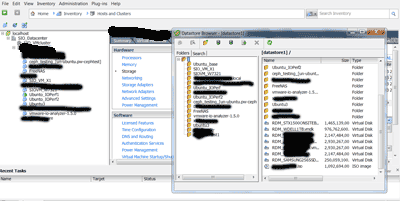
VCE revisited, now & zen

StorageIO Industry trends and perspectives image

Yesterday VCE and their proud parents announced revenues had reached an annual run rate of a billion dollars. Today VCE announced some new products along with enhancements to others.

Before going forward though, lets take go back for a moment to help set the stage to see where things might be going in the future. A little over a three years ago, back in November 2009 VCE was born and initially named ACADIA by its proud parents (Cisco, EMC, Intel and VMware). Here is a post that I did back then.

Btw the reference to Zen might cause some to think that I don’t how to properly refer to the Xen hypervisor. It is really a play from Robert Plants album Now & Zen and its song Tall Cool One. For those not familiar, click on the link and listen (some will have DejaVu, others might think its new and cool) as it takes a look back as well as present, similar to VCE.

Robert plant now & zen vs. Xen hypervisor

On the other hand, this might prompt the question of when will Xen be available on a Vblock? For that I defer you to VCE CTO Trey Layton (@treylayton).

VCE stands for Virtual Computing Environment and was launched as a joint initiative including products and a company (since renamed from Acadia to VCE) to bring all the pieces together. As a company, VCE is based in Plano (Richardson) Texas just north of downtown Dallas and down the road from EDS or what is now left of it after the HP acquisition  The primary product of VCE has been the Vblock. The Vblock is a converged solution comprising components from their parents such as VMware virtualization and management software tools, Cisco servers, EMC storage and software tools and Intel processors.

Not surprisingly there are many ex-EDS personal at VCE along with some Cisco, EMC, VMware and many other people from other organizations in Plano as well as other cites. Also interesting to note that unlike other youngsters that grow up and stay in touch with their parents via technology or social media tools, VCE is also more than a few miles (try hundreds to thousands) from the proud parent headquarters on the San Jose California and Boston areas.

As part of a momentum update, VCE and their parents (Cisco, EMC, VMware and Intel) announced annual revenue run rate of a billion dollars in just three years. In addition the proud parents and VCE announced that they have over 1,000 revenue shipped and installed Vblock systems (also here) based on Cisco compute servers, and EMC storage solutions.

The VCE announcement consists of:

  • SAP HANA database application optimized Vblocks (two modes, 4 node and 8 node)
  • VCE Vision management tools and middleware or what I have refered to as Valueware
  • Entry level Vblock (100 and 200) with Cisco C servers and EMC (VNXe and VNX) storage
  • Performance and functionality enhancements to existing Vblock models 300 and 700
  • Statement of direction for more specialized Vblocks besides SAP HANA


Images courtesy with permission of VCE.com

While VCE is known for their Vblock converged, stack, integrated, data center in a box, private cloud or among other descriptors, there is more to the story. VCE is addressing convergence of common IT building blocks for cloud, virtual, and traditional physical environments. Common core building blocks include servers (compute or processors), networking (IO and connectivity), storage, hardware, software, management tools along with people, processes, metrics, policies and protocols.

Storage I/O image of cloud and virtual IT building blocks

I like the visual image that VCE is using (see below) as it aligns with and has themes common to what I have discussing in the past.


Images courtesy with permission of VCE.com

VCE Vision is software with APIs that collects information about Vblock hardware and software components to give insight to other tools and management frameworks. For example VMware vCenter plug-in and vCenter Operations Manager Adapter which should not be a surprise. Customers will also be able to write to the Vision API to meet their custom needs. Let us watch and see what VCE does to add support for other software and management tools, along with gain support from others.


Images courtesy with permission of VCE.com

Vision is more than just an information source feed for VMware vCenter or VASA or tools and frameworks from others. Vision is software developed by VCE that will enable insight and awareness into the Vblock and applications, however also confirm and give status of physical and logical component configuration. This means the basis for setting up automated or programmatic remediation such as determining what software or firmware to update based on different guidelines.


Images courtesy with permission of VCE.com

Initially VCE Vision provides (information) inventory and perspective of how those components are in compliance with firmware or software releases, so stay tuned. VCE is indicating that Vision will continue to evolve after all this is the V1.0 release with future enhancements targeted towards taking action, controlling or active management.

StorageIO Industry trends and perspectives image

Some trends, thoughts and perspectives

The industry adoption buzz is around software defined X where X can be data center (SDDC), or storage (SDS) or networking (SDN), or marketing (SDM) or other things. The hype and noise around software defined which in the case of some technologies is good. On the marketing hype side, this has led to some Software Defined BS (SDBS).

Thus, it was refreshing at least in the briefing session I was involved in to hear a minimum focus around software defined and more around customer and IT business enablement with technology that is shipping today.

VCE Vision is a good example of adding value hence what I refer to as Valueware around converged components. For those vendors who have similar solutions, I urge them to streamline, simplify and more clearly articulate their value proposition if they have valueware.

Vendors including VCE continue to evolve their platform based converged solutions by adding more valueware, management tools, interfaces, APIs, interoperability and support for more applications. The support for applications is also moving beyond simple line item ordering or part number skews to ease acquisition and purchasing. Some solutions include VCE Vblock, NetApp FlexPod that also uses Cisco compute servers, IBM PureSystems (PureFlex etc) and Dell vStart among others are extending their support and optimization for various software solutions. These software solutions range from SAP (including HANA), Microsoft (Exchange, SQLserver, Sharepoint), Citrix desktop (VDI), Oracle, OpenStack, Hadoop map reduce along with other little-data, big-data and big-bandwidth applications to name a few.

Additional and related reading:
Acadia VCE: VMware + Cisco + EMC = Virtual Computing Environment
Cloud conversations: Public, Private, Hybrid what about Community Clouds?
Cloud, virtualization, Storage I/O trends for 2013 and beyond
Convergence: People, Processes, Policies and Products
Hard product vs. soft product
Hardware, Software, what about Valueware?
Industry adoption vs. industry deployment, is there a difference?
Many faces of storage hypervisor, virtual storage or storage virtualization
The Human Face of Big Data, a Book Review
Why VASA is important to have in your VMware CASA

Congratulations to VCE, along with their proud parents, family, friends and partners, now how long will it take to reach your next billion dollars in annual run rate revenue. Hopefully it wont be three years until the next VCE revisited now and Zen ;).

Disclosure: EMC and Cisco have been StorageIO clients, I am a VMware vExpert that gets me a free beer after I pay for VMworld and Intel has named two of my books listed on their Recommended Reading List for Developers.

Ok, nuff said, time to head off to vBeers over in Minneapolis.

Cheers gs

Greg Schulz – Author Cloud and Virtual Data Storage Networking (CRC Press, 2011), The Green and Virtual Data Center (CRC Press, 2009), and Resilient Storage Networks (Elsevier, 2004)

twitter @storageio

All Comments, (C) and (TM) belong to their owners/posters, Other content (C) Copyright 2006-2026 Server StorageIO and UnlimitedIO LLC All Rights Reserved