Server and Storage IO Memory: DRAM and nand flash

Storage I/O trends

DRAM, DIMM, DDR3, nand flash memory, SSD, stating what’s often assumed

Often what’s assumed is not always the case. For example in along with around server, storage and IO networking circles including virtual as well as cloud environments terms such as nand (Negated AND or NOT And) flash memory aka (Solid State Device or SSD), DRAM (Dynamic Random Access Memory), DDR3 (Double Data Rate 3) not to mention DIMM (Dual Inline Memory Module) get tossed around with the assumption everybody must know what they mean.

On the other hand, I find plenty of people who are not sure what those among other terms or things are, sometimes they are even embarrassed to ask, particular if they are a self-proclaimed expert.

So for those who need a refresh or primer, here you go, an excerpt from Chapter 7 (Servers – Physical, Virtual and Software) from my book "The Green and Virtual Data Center" (CRC Press) available at Amazon.com and other global venues in print and ebook formats.

7.2.2 Memory

Computers rely on some form of memory ranging from internal registers, local on-board processor Level 1 (L1) and Level 2 (L2) caches, random accessible memory (RAM), non-volatile RAM (NVRAM) or nand Flash (SSD) along with external disk storage. Memory, which includes external disk storage, is used for storing operating system software along with associated tools or utilities, application programs and data. Main memory or RAM, also known as dynamic RAM (DRAM) chips, is packaged in different ways with a common form being dual inline memory modules (DIMMs) for notebook or laptop, desktop PC and servers.

RAM main memory on a server is the fastest form of memory, second only to internal processor or chip based registers, L1, L2 or local memory. RAM and processor based memories are volatile and non-persistent in that when power is removed, the contents of memory are lost. As a result, some form of persistent memory is needed to keep programs and data when power is removed. Read only memory (ROM) and NVRAM are both persistent forms of memory in that their contents are not lost when power is removed. The amount of RAM that can be installed into a server will vary with specific architecture implementation and operating software being used. In addition to memory capacity and packaging format, the speed of memory is also important to be able to move data and programs quickly to avoid internal bottlenecks. Memory bandwidth performance increases with the width of the memory bus in bits and frequency in MHz. For example, moving 8 bytes on a 64 bit buss in parallel at the same time at 100MHz provides a theoretical 800MByte/sec speed.

To improve availability and increase the level of persistence, some servers include battery backed up RAM or cache to protect data in the event of a power loss. Another technique to protect memory data on some servers is memory mirroring where twice the amount of memory is installed and divided into two groups. Each group of memory has a copy of data being stored so that in the event of a memory failure beyond those correctable with standard parity and error correction code (ECC) no data is lost. In addition to being fast, RAM based memories are also more expensive and used in smaller quantities compared to external persistent memories such as magnetic hard disk drives, magnetic tape or optical based memory medias.

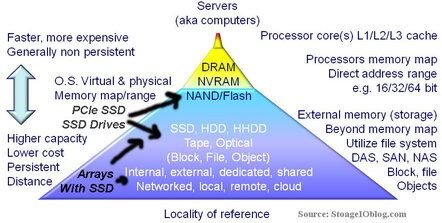
Memory diagram
Memory and Storage Pyramid

The above shows a tiered memory model that may look familiar as the bottom part is often expanded to show tiered storage. At the top of the memory pyramid is high-speed processor memory followed by RAM, ROM, NVRAM and FLASH along with many forms of external memory commonly called storage. More detail about tiered storage is covered in chapter 8 (Data Storage – Data Storage – Disk, Tape, Optical, and Memory). In addition to being slower and lower cost than RAM based memories, disk storage along with NVRAM and FLASH based memory devices are also persistent.

By being persistent, when power is removed, data is retained on the storage or memory device. Also shown in the above figure is that on a relative basis, less energy is used for power storage or memory at the bottom of the pyramid than for upper levels where performance increases. From a PCFE (Power, Cooling, Floor space, Economic) perspective, balancing memory and storage performance, availability, capacity and energy to a given function, quality of service and service level objective for a given cost needs to be kept in perspective and not considering simply the lowest cost for the most amount of memory or storage. In addition to gauging memory on capacity, other metrics include percent used, operating system page faults and page read/write operations along with memory swap activity as well memory errors.

Base 2 versus base 10 numbering systems can account for some storage capacity that appears to “missing” when real storage is compared to what is expected to be seen. Disk drive manufacturers use base 10 (decimal) to count bytes of data while memory chip, server and operating system vendors typically use base 2 (binary) to count bytes of data. This has led to confusion when comparing a disk drive base 10 GB with a chip memory base 2 GB of memory capacity, such as 1,000,000,000 (10^9) bytes versus 1,073,741,824 (2^30) bytes. Nomenclature based on the International System of Units uses MiB, GiB and TiB to denote million, billion and trillion bytes for base 2 numbering with base 10 using MB, TB and GB . Most vendors do document how many bytes, sometimes in both base 2 and base 10, as well as the number of 512 byte sectors supported on their storage devices and storage systems, though it might be in the small print.

Related more reading:
How much storage performance do you want vs. need?
Can RAID extend the life of nand flash SSD?
Can we get a side of context with them IOPS and other storage metrics?
SSD & Real Estate: Location, Location, Location
What is the best kind of IO? The one you do not have to do
SSD, flash and DRAM, DejaVu or something new?

Ok, nuff said (for now).

Cheers
Gs

Greg Schulz – Author Cloud and Virtual Data Storage Networking (CRC Press), The Green and Virtual Data Center (CRC Press) and Resilient Storage Networks (Elsevier).

All Comments, (C) and (TM) belong to their owners/posters, Other content (C) Copyright 2006-2026 Server StorageIO and UnlimitedIO LLC All Rights Reserved

How much storage performance do you want vs. need?

Storage I/O trends

How much storage I/O performance do you want vs. need?

The answer to how much storage I/O performance you need vs. want probably depends on cost, for which applications along with benefit among other things.

Storage I/O performance
View Part II: How many IOPS can a HDD, HHDD or SSD do with VMware?

I did a piece over at 21cit titled Parsing the Need for Speed in Storage that looks at those and other related themes including metrics that matter across tiered storage.

Here is an excerpt:

Can storage speed be too fast? Or, put another away, how do you decide a return on investments or innovation from the financial resources you spend on storage and the various technologies that go into storage performance.

Think about it: Fast storage needs fast servers, IO and networking interfaces, software, firmware, hypervisors, operating systems, drivers, and a file system or database, along with applications. Then there are the other buzzword bingo technologies that are also factors, among them fast storage DRAM and flash Solid State Devices (SSD).

Some questions to ask about storage I/O performance include among others:

  • How do response time, latency, and think or wait-times effect your environment and applications?
  • Do you know the location of your storage or data center performance bottlenecks?
  • If you remove bottlenecks in storage systems or appliances as well as in the data path, how will your application or the CPU in the server it runs on behave?
  • If your application server is currently showing high CPU due to the system overhead of having to wait for storage I/Os, you may see a positive improvement.
  • If more real work can be done now, will all of the components be ready to support each other without creating a new bottleneck?
  • Also speaking of storage I/O performance, how about can we get a side of context with them IOPs and other metrics that matter!

So how about it, how much performance, for primary, secondary, backup, cloud or virtual storage do you want vs. need?

Ok, nuff said for now.

Cheers
Gs

Greg Schulz – Author Cloud and Virtual Data Storage Networking (CRC Press), The Green and Virtual Data Center (CRC Press) and Resilient Storage Networks (Elsevier)
twitter @storageio

All Comments, (C) and (TM) belong to their owners/posters, Other content (C) Copyright 2006-2026 Server StorageIO and UnlimitedIO LLC All Rights Reserved

Non Disruptive Updates, Needs vs. Wants

Storage I/O trends

Do you want non disruptive updates or do you need non disruptive upgrades?

First there is a bit of play on words going on here with needs vs. wants, as well as what is meant by non disruptive.

Regarding needs vs. wants, they are often used interchangeably particular in IT when discussing requirements or what the customer would like to have. The key differentiator is that a need is something that is required and somehow cost justified, or hopefully easier than a want item. A want or like to have item is simply that, its not a need however it could add value being a benefit although may be seen as discretionary.

There is also a bit of play on words with non disruptive updates or upgrades that can take on different meanings or assumptions. For example my Windows 7 laptop has automatic Microsoft updates enabled some of which can be applied while I work. On the other hand, some of those updates may be applied while I work however they may not take effect until I reboot or exit and restart an application.

This is not unique to Windows as my Ubuntu and Centos Linux systems can also apply updates, and in some cases a reboot might be required, same with my VMware environment. Lets not forget about applying new firmware to a server, or workstation, laptop or other device, along with networking routers, switches and related devices. Storage is also not immune as new software or firmware can be applied to a HDD or SSD (traditional or NVMe), either by your workstation, laptop, server or storage system. Speaking of storage systems, they too have new software or firmware that gets updated.

Storage I/O trends

The common theme here though is if the code (e.g. software, firmware, microcode, flash update, etc) can be applied non disruptive something known as non disruptive code load, followed by activation. With activation, the code may have been applied while the device or software was in use, however may need a reboot or restart. With non disruptive code activation, there should not be a disruption to what is being done when the new software takes effect.

This means that if a device supports non disruptive code load (NDCL) updates along with non disruptive code activation (NDCA), the upgrade can occur without disruption or having to wait for a reboot.

Which is better?

That depends, I want NDCA, however for many things I only need NDCL.

On the other hand, depending on what you need, perhaps it is both NDCL and NDCA, however also keep in mind needs vs. wants.

Ok, nuff said (for now).

Cheers gs

Greg Schulz – Author Cloud and Virtual Data Storage Networking (CRC Press), The Green and Virtual Data Center (CRC Press) and Resilient Storage Networks (Elsevier)
twitter @storageio

All Comments, (C) and (TM) belong to their owners/posters, Other content (C) Copyright 2006-2026 Server StorageIO and UnlimitedIO LLC All Rights Reserved

How many I/O iops can flash SSD or HDD do?

How many i/o iops can flash ssd or hdd do with vmware?

sddc data infrastructure Storage I/O ssd trends

Updated 2/10/2018

A common question I run across is how many I/O iopsS can flash SSD or HDD storage device or system do or give.

The answer is or should be it depends.

This is the first of a two-part series looking at storage performance, and in context specifically around drive or device (e.g. mediums) characteristics across HDD, HHDD and SSD that can be found in cloud, virtual, and legacy environments. In this first part the focus is around putting some context around drive or device performance with the second part looking at some workload characteristics (e.g. benchmarks).

What about cloud, tape summit resources, storage systems or appliance?

Lets leave those for a different discussion at another time.

Getting started

Part of my interest in tools, metrics that matter, measurements, analyst, forecasting ties back to having been a server, storage and IO performance and capacity planning analyst when I worked in IT. Another aspect ties back to also having been a sys admin as well as business applications developer when on the IT customer side of things. This was followed by switching over to the vendor world involved with among other things competitive positioning, customer design configuration, validation, simulation and benchmarking HDD and SSD based solutions (e.g. life before becoming an analyst and advisory consultant).

Btw, if you happen to be interested in learn more about server, storage and IO performance and capacity planning, check out my first book Resilient Storage Networks (Elsevier) that has a bit of information on it. There is also coverage of metrics and planning in my two other books The Green and Virtual Data Center (CRC Press) and Cloud and Virtual Data Storage Networking (CRC Press). I have some copies of Resilient Storage Networks available at a special reader or viewer rate (essentially shipping and handling). If interested drop me a note and can fill you in on the details.

There are many rules of thumb (RUT) when it comes to metrics that matter such as IOPS, some that are older while others may be guess or measured in different ways. However the answer is that it depends on many things ranging from if a standalone hard disk drive (HDD), Hybrid HDD (HHDD), Solid State Device (SSD) or if attached to a storage system, appliance, or RAID adapter card among others.

Taking a step back, the big picture

hdd image
Various HDD, HHDD and SSD’s

Server, storage and I/O performance and benchmark fundamentals

Even if just looking at a HDD, there are many variables ranging from the rotational speed or Revolutions Per Minute (RPM), interface including 1.5Gb, 3.0Gb, 6Gb or 12Gb SAS or SATA or 4Gb Fibre Channel. If simply using a RUT or number based on RPM can cause issues particular with 2.5 vs. 3.5 or enterprise and desktop. For example, some current generation 10K 2.5 HDD can deliver the same or better performance than an older generation 3.5 15K. Other drive factors (see this link for HDD fundamentals) including physical size such as 3.5 inch or 2.5 inch small form factor (SFF), enterprise or desktop or consumer, amount of drive level cache (DRAM). Space capacity of a drive can also have an impact such as if all or just a portion of a large or small capacity devices is used. Not to mention what the drive is attached to ranging from in internal SAS or SATA drive bay, USB port, or a HBA or RAID adapter card or in a storage system.

disk iops
HDD fundamentals

How about benchmark and performance for marketing or comparison tricks including delayed, deferred or asynchronous writes vs. synchronous or actually committed data to devices? Lets not forget about short stroking (only using a portion of a drive for better IOP’s) or even long stroking (to get better bandwidth leveraging spiral transfers) among others.

Almost forgot, there are also thick, standard, thin and ultra thin drives in 2.5 and 3.5 inch form factors. What’s the difference? The number of platters and read write heads. Look at the following image showing various thickness 2.5 inch drives that have various numbers of platters to increase space capacity in a given density. Want to take a wild guess as to which one has the most space capacity in a given footprint? Also want to guess which type I use for removable disk based archives along with for onsite disk based backup targets (compliments my offsite cloud backups)?

types of disks
Thick, thin and ultra thin devices

Beyond physical and configuration items, then there are logical configuration including the type of workload, large or small IOPS, random, sequential, reads, writes or mixed (various random, sequential, read, write, large and small IO). Other considerations include file system or raw device, number of workers or concurrent IO threads, size of the target storage space area to decide impact of any locality of reference or buffering. Some other items include how long the test or workload simulation ran for, was the device new or worn in before use among other items.

Tools and the performance toolbox

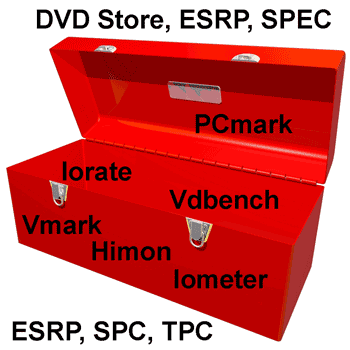
Then there are the various tools for generating IO’s or workloads along with recording metrics such as reads, writes, response time and other information. Some examples (mix of free or for fee) include Bonnie, Iometer, Iorate, IOzone, Vdbench, TPC, SPC, Microsoft ESRP, SPEC and netmist, Swifttest, Vmark, DVDstore and PCmark 7 among many others. Some are focused just on the storage system and IO path while others are application specific thus exercising servers, storage and IO paths.

performance tools
Server, storage and IO performance toolbox

Having used Iometer since the late 90s, it has its place and is popular given its ease of use. Iometer is also long in the tooth and has its limits including not much if any new development, never the less, I have it in the toolbox. I also have Futremark PCmark 7 (full version) which turns out has some interesting abilities to do more than exercise an entire Windows PC. For example PCmark can use a secondary drive for doing IO to.

PCmark can be handy for spinning up with VMware (or other tools) lots of virtual Windows systems pointing to a NAS or other shared storage device doing real world type activity. Something that could be handy for testing or stressing virtual desktop infrastructures (VDI) along with other storage systems, servers and solutions. I also have Vdbench among others tools in the toolbox including Iorate which was used to drive the workloads shown below.

What I look for in a tool are how extensible are the scripting capabilities to define various workloads along with capabilities of the test engine. A nice GUI is handy which makes Iometer popular and yes there are script capabilities with Iometer. That is also where Iometer is long in the tooth compared to some of the newer generation of tools that have more emphasis on extensibility vs. ease of use interfaces. This also assumes knowing what workloads to generate vs. simply kicking off some IOPs using default settings to see what happens.

Another handy tool is for recording what’s going on with a running system including IO’s, reads, writes, bandwidth or transfers, random and sequential among other things. This is where when needed I turn to something like HiMon from HyperIO, if you have not tried it, get in touch with Tom West over at HyperIO and tell him StorageIO sent you to get a demo or trial. HiMon is what I used for doing start, stop and boot among other testing being able to see IO’s at the Windows file system level (or below) including very early in the boot or shutdown phase.

Here is a link to some other things I did awhile back with HiMon to profile some Windows and VDI activity test profiling.

What’s the best tool or benchmark or workload generator?

The one that meets your needs, usually your applications or something as close as possible to it.

disk iops
Various 2.5 and 3.5 inch HDD, HHDD, SSD with different performance

Where To Learn More

View additional NAS, NVMe, SSD, NVM, SCM, Data Infrastructure and HDD related topics via the following links.

Additional learning experiences along with common questions (and answers), as well as tips can be found in Software Defined Data Infrastructure Essentials book.

Software Defined Data Infrastructure Essentials Book SDDC

What This All Means

That depends, however continue reading part II of this series to see some results for various types of drives and workloads.

Ok, nuff said, for now.

Gs

Greg Schulz – Microsoft MVP Cloud and Data Center Management, VMware vExpert 2010-2017 (vSAN and vCloud). Author of Software Defined Data Infrastructure Essentials (CRC Press), as well as Cloud and Virtual Data Storage Networking (CRC Press), The Green and Virtual Data Center (CRC Press), Resilient Storage Networks (Elsevier) and twitter @storageio. Courteous comments are welcome for consideration. First published on https://storageioblog.com any reproduction in whole, in part, with changes to content, without source attribution under title or without permission is forbidden.

All Comments, (C) and (TM) belong to their owners/posters, Other content (C) Copyright 2006-2026 Server StorageIO and UnlimitedIO. All Rights Reserved. StorageIO is a registered Trade Mark (TM) of Server StorageIO.

VMware buys virsto, is it about storage hypervisors?

StorageIO Industry trends and perspectives image

Yesterday VMware announced that it is acquiring the IO performance optimization and acceleration software vendor Virsto for an undisclosed amount.

Some may know Virsto due to their latching and jumping onto the Storage Hypervisor bandwagon as part of storage virtualization and virtual storage. On the other hand, some may know Virsto for their software that plugs into server virtualization Hypervisor  such as VMware and Microsoft Hyper-V. Then there are all of those who either did not or still don’t know of Virsto or their solutions yet they need to learn about it.

Unlike virtual storage arrays (VSAa), or virtual storage appliances, or storage virtualization software that aggregates storage, the Virsto software address the IO performance aggravation caused by aggregation.

Keep in mind that the best IO is the IO that you do not have to do. The second best IO is the one that has the least impact and that is cost effective. A common approach, or preached best practice by some vendors server virtualization and virtual desktop infrastructures (VDI) that result in IO bottlenecks is to throw more SSD or HDD hardware at the problem.

server virtualization aggregation causing aggravation

Turns out that the problem with virtual machines (VMs) is not just aggregation (consolidation) causing aggravation, it’s also the mess of mixed applications and IO profiles. That is where IO optimization and acceleration tools come into play that are plugged into applications, file systems, operating systems, hypervisor’s or storage appliances.

In the case of Virsto (read more about their solution here), their technology plugs into the hypervisor  (e.g. VMware vSphere/ESX or Hyper-V) to group and optimize IO operations.

By using SSD as a persistent cache, tools such as Virsto can help make better use of underlying storage systems including HDD and SSD, while also removing the aggravation as a result of aggregation.

What will be interesting to watch is to see if VMware continues to support other hypervisor’s such as Microsoft Hyper-V or close the technology to VMware only.

It will also be interesting to see how VMware and their parent EMC can leverage Virsto technology to complement virtual SANs as well as VSAs and underlying hardware from VFcache to storage arrays with SSD and SSD appliances as opposed to compete with them.

With the Virsto technology now part of VMware, hopefully there will be less time on talking about storage hypervisor’s and more around server IO optimization and enablement to create broader awareness for the technology.

Congratulations to VMware (and EMC) along with Virsto.

Ok, nuff said.

Cheers gs

Greg Schulz – Author Cloud and Virtual Data Storage Networking (CRC Press, 2011), The Green and Virtual Data Center (CRC Press, 2009), and Resilient Storage Networks (Elsevier, 2004)

twitter @storageio

All Comments, (C) and (TM) belong to their owners/posters, Other content (C) Copyright 2006-2026 Server StorageIO and UnlimitedIO LLC All Rights Reserved

Over 1,000 entries now on the StorageIO industry links page

Industry trends and perspective data protection modernization

Is your company, organization or one that you are a fan of, or represent listed on the StorageIO industry links page (click here to learn more about it).

The StorageIO industry links page has been updated with over thousand different industry related companies, vendors, vars, trade groups, part and solution suppliers along with cloud and managed service providers. The common theme with these industry links is information and data infrastructures which means severs, storage, IO and networking, hardware, software, applications and tools, services, products and related items for traditional, virtual and cloud environments.

StorageIO server storage IO networking cloud and virtualization links

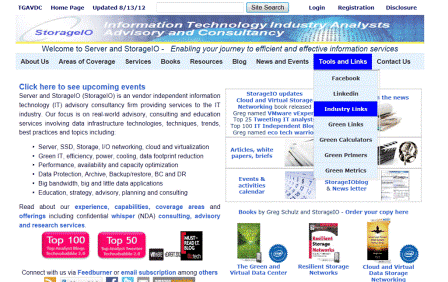
The industry links page is accessed from the StorageIO main web page via the Tools and Links menu tab, or via the URL https://storageio.com/links. An example of the StorageIO industry links page is shown below with six different menu tabs in alphabetical order.

StorageIO server storage IO networking cloud and virtualization links

Know of a company, service or organization that is not listed on the links page, if so, send an email note to info at storageio.com. If your company or organization is listed, contact StorageIO to discuss how to expand your presence on the links page and other related options.

Visit the updated StorageIO industry links page and watch for more updates, and click here to learn more about the links page.

Ok, nuff said for now.

Cheers Gs

Greg Schulz – Author Cloud and Virtual Data Storage Networking (CRC Press, 2011), The Green and Virtual Data Center (CRC Press, 2009), and Resilient Storage Networks (Elsevier, 2004)

twitter @storageio

All Comments, (C) and (TM) belong to their owners/posters, Other content (C) Copyright 2006-2012 StorageIO and UnlimitedIO All Rights Reserved

Congratulations to new and returning 2012 VMware vExperts

A quick note of congratulations to all the new as well as too my fellow returning 2012 VMware vExperts from around the world.

Here is a link listing the 2012 VMware vExperts including how you can follow them on twitter if you are interested in virtualization, cloud, data and storage networking related topics either VMware specific or industry and technology general.

Also, here are some added links to follow and check out.

twitter @VMwareCommunity
plantetv12n blogs and information
Wmware and community blogs
VMware communities
vExpert spotlights (follow links to various profiles)

I’m honored to be among such a great group of people and again, congratulations to all.

Ok, nuff said for now.

Cheers
Gs

Greg Schulz – Author Cloud and Virtual Data Storage Networking (CRC Press, 2011), The Green and Virtual Data Center (CRC Press, 2009), and Resilient Storage Networks (Elsevier, 2004)

twitter @storageio

All Comments, (C) and (TM) belong to their owners/posters, Other content (C) Copyright 2006-2012 StorageIO and UnlimitedIO All Rights Reserved

VMware vSphere v5 and Storage DRS

Here is a link to a recent guest post that I was invited to do over at The virtualization Practice (TVP) pertaining to the recent VMware vSphere 5.0 announcement. A theme of the vSphere 5.0 launch is reducing complexity, enabling automation, and supporting scaling with confidence for cloud and virtual environments. As a key component for supporting cloud, virtual and dynamic infrastructure environments, vSphere V5.0 includes many storage related enhancements and new features including Storage Distributed Resource Scheduler (SDRS).

Read more here.

Ok, nuff said for now.

Cheers gs

Greg Schulz – Author Cloud and Virtual Data Storage Networking (CRC Press, 2011), The Green and Virtual Data Center (CRC Press, 2009), and Resilient Storage Networks (Elsevier, 2004)

twitter @storageio

All Comments, (C) and (TM) belong to their owners/posters, Other content (C) Copyright 2006-2011 StorageIO and UnlimitedIO All Rights Reserved

Summer 2011 StorageIO News Letter

StorageIO News Letter Image
Summer 2011 Newsletter

Welcome to the Summer 2011 edition of the Server and StorageIO Group (StorageIO) newsletter. This follows the Spring 2011 edition.

You can get access to this news letter via various social media venues (some are shown below) in addition to StorageIO web sites and subscriptions.


Click on the following links to view the Summer 2011 edition as an HTML or PDF or, to go to the newsletter page to view previous editions.

Follow via Goggle Feedburner here or via email subscription here.

You can also subscribe to the news letter by simply sending an email to newsletter@storageio.com

Enjoy this edition of the StorageIO newsletter, let me know your comments and feedback.

Nuff said for now

Cheers
Gs

Greg Schulz – Author Cloud and Virtual Data Storage Networking (CRC Press), The Green and Virtual Data Center (CRC Press) and Resilient Storage Networks (Elsevier)
twitter @storageio

All Comments, (C) and (TM) belong to their owners/posters, Other content (C) Copyright 2006-2011 StorageIO and UnlimitedIO All Rights Reserved

Cloud and Virtual Data Storage Networking

For those who have read any of my previous posts, seen some of my articles, news letters, videos, pod casts, web casts or in person appearances you may have heard that I have a new book coming out this summer.

Here in the northern hemisphere its summer (well technically the solstice is just around the corner) and in Minnesota the ice (from the winter) is off the lakes and rivers. Granted, there is some ice floating that fell out of coolers for keeping beverages cool. This means that it is also fishing (and catching) season on the Scenic St. Croix River.

Karen of Arcola catches first fish of 2011 season, St. Croix river, stripe bassGreg showing his first catch of the 2011 season, St. Croix walleye aka Walter or Wanda

FTC disclosures (and for fun): Karenofarcola is wearing a StorageIO baseball cap and Im wearing a cap from a vendor marketing person who sent several as they too enjoy fishing and boating. Funny thing about the cap, all of the river rats and fishing people think it is from the people who make rod reels instead of solutions that go around tape and disk reels. Note, if you feel compelled to send me baseball caps, send at least a pair so there is a backup, standby, spare or extra one for a guest. The mustang survival jacket that Im wearing with the Seadoo logo is something I bought myself. I did get a discount however since there was a Seadoo logo on it and I used to have Seadoo jet boats. Btw, that was some disclosure fun and humor!

Ok, enough of the fun stuff, lets get back to the main theme of this post.

My new book which is the third in a series of solo projects including Resilient Storage Networks: Designing Flexible Scalable Data Infrastructures (Elsevier) and The Green and Virtual Data Center (CRC).

While the official launch and general availability will be later in the summer, following are some links and related content to give you advance information about the new book.

Click on the above image which will take you to the CRC Press page where you can learn more including what the book is about, view a table of contents, see reviews and more. Also check out the video below to learn more as well as visit my main web site where you can learn about Cloud and Virtual Data Storage Networking, my other books and view (or listen to) related content such as white papers, solution briefs, articles, tips, web cast, pod cast as well as view the recent and upcoming events schedule.

I also invite you to join Cloud and Virtual Data Storage Networking group

You can also view the short video at dailymotion, metacage, blip.tv, veoh, flickr, and photobucket among other venues.

If you are interested in being a reviewer, send a note to cvdsn@storageio.com with your name, blog or website and contact information including shipping address (sorry no PO boxes) plus telephone (or skype) number. Also indicate if you are a blogger, press/media, free lance writer, analyst, consultant, var, vendor, investor, IT professional or other.

Watch for more news and information as we get closer to the formal launch and release, in the meantime, you can pre order your copy now at Amazon, CRC Press and other venues around the world.

Ok, time to get back to work or go fishing, nuff said

Cheers Gs

Greg Schulz – Author The Green and Virtual Data Center (CRC), Resilient Storage Networks (Elsevier) and coming summer 2011 Cloud and Virtual Data Storage Networking (CRC)
twitter @storageio

All Comments, (C) and (TM) belong to their owners/posters, Other content (C) Copyright 2006-2011 StorageIO and UnlimitedIO All Rights Reserved

StorageIO Momentus Hybrid Hard Disk Drive (HHDD) Moments

This is the third in a series of posts that I have done about Hybrid Hard Disk Drives (HHDDs) along with pieces about Hard Disk Drives (HDD) and Solid State Devices (SSDs). Granted the HDD received its AARP card several years ago when it turned 50 and is routinely declared dead (or read here) even though it continues to evolve along SSD maturing and both expanding into different markets as well as usage roles.

For those who have not read previous posts about Hybrid Hard Disk Drives (HHDDs) and the Seagate Momentus XT you can find them here and here.

Since my last post, I have been using the HHDDs extensively and recently installed the latest firmware. The release of new HHDD firmware by Seagate for the Momentus XT (SD 25) like its predecessor SD24 cleaned up some annoyances and improved on overall stability. Here is a Seagate post by Mark Wojtasiak discussing SD25 and feedback obtained via the Momentus XT forum from customers.

If you have never done a HDD firmware update, its not as bad or intimidating as might be expected. The Seagate firmware update tools make it very easy, that is assuming you have a recent good backup of your data (one that can be restored) and about 10 to 15 minutes of time for a couple of reboots.

Speaking of stability, the Momentus XT HHDDs have been performing well helping to speed up accessing large documents on various projects including those for my new book. Granted an SSD would be faster across the board, however the large capacity at the price point of the HHDD is what makes it a hybrid value proposition. As I have said in previous posts, if you have the need for speed all of the time and time is money, get an SSD. Likewise if you need as much capacity as you can get and performance is not your primary objective, then leverage the high capacity HDDs. On the other hand, if you need a balance of some performance boost with capacity boost and a good value, then check out the HHDDs.

Image of Momentus XT courtesy of www.Seagate.com

Lets shift gears from that of the product or technology to that of common questions that I get asked about HHDDs.

Common questions I get asked about HHDDs include:

What is a Hybrid Hard Disk Drive?

A Hybrid Hard Disk Drive includes a combination of rotating HDD, solid state flash persistent memory along with volatile dynamic random access memory (DRAM) in an integrated package or product. The value proposition and benefit is a balance of performance and capacity at a good price for those environments, systems or applications that do not need all SSD performance (and cost) vs. those that need some performance in addition to large capacity.

How the Seagate Momentus XT differs from other Hybrid Disks?
One approach is to take a traditional HDD and pair it with a SSD using a controller packaged in various ways. For example on a large scale, HDDs and SSDs coexist in the same tiered storage system being managed by the controllers, storage processors or nodes in the solution including automated tiering and cache promotion or demotion. The main difference however between other storage systems, tiering and pairing and HHDDs is that in the case of the Momentus XT the HDD, SLC flash (SSD functionality) and RAM cache and their management are all integrated within the disk drive enclosure.

Do I use SSDs and HDDs or just HHDDs?
I have HHDDs installed internally in my laptops. I also have HDDs which are installed in servers, NAS and disk to disk (D2D) backup devices and Digital Video Recorders (DVRs) along with external SSD and Removable Hard Disk Drives (RHDDs). The RHDDs are used for archive and master or gold copy data protection that go offsite complimenting how I also use cloud backup services as part of my data protection strategy.

What are the technical specifications of a HHDD such as the Seagate Momentus XT?
3Gbs SATA interface, 2.5 inch 500GB 7,200 RPM HDD with 32MB RAM cache and integrated 4GByte SLC flash all managed via internal drive processor. Power consumption varies depending what the device is doing such as initial power up, idle, normal or other operating modes. You can view the Seagate Momentus XT 500GB (ST95005620AS which is what I have) specifications here as well as the product manual here.


One of my HHDDs on a note pad (paper) and other accessories

Do you need a special controller or management software?
Generally speaking no, the HHDD that I have been using plugged and played into my existing laptops internal bay replacing the HDD that came with those systems. No extra software was needed for Windows, no data movement or migration tools needed other than when initially copying from the source HDD to the new HHDD. The HHDD do their own caching, read ahead and write behind independent of the operating system or controller. Now the reason I say generally speaking is that like many devices, some operating systems or controllers may be able to leverage advanced features so check your particular system capabilities.

How come the storage system vendors are not talking about these HHDDs?
Good question which I assume it has a lot to do with the investment (people, time, engineering, money and marketing) that they have or are making in controller and storage system software functionality to effectively create hybrid tiered storage systems using SSD and HDDs on different scales. There have been some packaged HHDD systems or solutions brought to market by different vendors that combine HDD and SSD into a single physical package glued together with some software and controllers or processors to appear as a single system. I would not be surprised to see discrete HHDDs (where the HDD and flash SSD and RAM are all one integrated product) appear in lower end NAS or multifunction storage systems as well as for backup, dedupe or other system that requires large amounts of capacity space and performance boost now and then.

Why do I think this? Simple, say you have five HHDDs each with 500GB of capacity configured as a RAID5 set resulting in 2TByte of capacity. Using as a hypothetical example the Momentus XT yields 5 x 4GByte or 20GByte of flash cache helps accelerate write operations during data dumps, backup or other updates. Granted that is an overly simplified example and storage systems can be found with hundreds of GByte of cache, however think in terms of value or low cost balancing performance and capacity to cost for different usage scenarios. For example, applications such as bulk or scale out file and object storage including cloud or big data, entertainment, Server (Citrix/Xen, Microsoft/HyperV, VMware/vSphere) and Desktop virtualization or VDI, Disk to Disk (D2D) backup, business analytics among others. The common tenets of those applications and usage scenario is a combination of I/O and storage consolidation in a cost effective manner addressing the continuing storage capacity to I/O performance gap.

Data Center and I/O Bottlenecks

Storage and I/O performance gap

Do you have to backup HHDDs?
Yes, just as you would want to backup or protect any SSD or HHD device or system.

How does data get moved between the SSD and the HDD?
Other than the initial data migration from the old HDD (or SSD) to the HHDD, unless you are starting with a new system, once your data and applications exist on the HHDD, it automatically via the internal process of the device manages the RAM, flash and HDD activity. Unlike in a tiered storage system where data blocks or files may be moved between different types of storage devices, inside the HHDD, all data gets written to the HDD, however the flash and RAM are used as buffers for caching depending on activity needs. If you have sat through or listened to a NetApp or HDS use of cache for tiering discussion what the HHDDs do is similar in concept however on a smaller scale at the device level, potentially even in a complimentary mode in the future? Other functions performed inside the HHDD by its processor includes reading and writing, managing the caches, bad block replacement or re vectoring on the HDD, wear leveling of the SLC flash and other routine tasks such as integrity checks and diagnostics. Unlike paired storage solutions where data gets moved between tiers or types of devices, once data is stored in the HHDD, it is managed by the device similar to how a SSD or HDD would move blocks of data to and from the specific media along with leveraging RAM cache as a buffer.

Where is the controller that manages the SSD and HDD?
The HHDD itself is the controller per say in that the internal processor that manages the HDD also directly access the RAM and flash.

What type of flash is used and will it wear out?
The XT uses SLC (single level cell) flash which with wear leveling has a good duty cycle (life span) and is what is typically found in higher end flash SSD solutions vs. lower cost MLC (multi level cell)

Have I lost any data from it yet?
No, at least nothing that was not my own fault from saving the wrong file in the wrong place and having to recover from one of my recent D2D copies or the cloud. Oh, regarding what have I done with the HDDs that were replaced by the HHDDs? They are now an extra gold master backup copy as of a particular point in time and are being kept in a safe secure facility, encrypted of course.

Have you noticed a performance improvement?
Yes, performance will vary however in many cases I have seen performance comparable to SSD on both reads and writes as long as the HDDs keep up with the flash and RAM cache. Even as larger amounts of data are written, I have seen better performance than compared to HDDs. The caveat however is that initially you may see little to marginal performance improvement however over time, particularly on the same files, performance tends to improve. Working on large tens to hundreds of MByte size documents I noticed good performance when doing saves compared to working with them on a HDD.

What do the HHDDs cost?
Amazon.com has the 500GB model for about $100 which is about $40 to $50 less than when I bought my most recent one last fall. I have heard from other people that you can find them at even lower prices at other venues. In the theme of disclosures, I bought one of my HHDDs from Amazon and Seagate gave me one to test.

Will I buy more HHDDs or switch to SSDs?
Where applicable I will add SSDs as well as HDDs, however where possible and practical, I will also add HHDDs perhaps even replacing the HDDs in my NAS system with HHDDs at some time or maybe trying them in a DVR.

What is the down side to the HHDDs?
Im generating and saving more data on the devices at a faster rate which means that when I installed them I was wondering if I would ever fill up a 500GB drive. I still have hundreds of GBytes free or available for use, however I also am able to cary more reference data or information than in the past. In addition to more reference data including videos, audio, images, slide decks and other content, I have also been able to keep more versions or copies of documents which has been handy on the book project. Data that changes gets backed up D2D as well as to my cloud provider including while traveling. Leveraging compression and dedupe, given that many chapters or other content are similar, not as much data actually gets transmitted when doing cloud backups which has been handy when doing a backup from a airplane flying over the clouds. A wish for the XT type of HHDD that I have is for vendors such as Seagate to add Self Encrypting Disk (SED) capabilities to them along with applying continued intelligent power management (IPM) enhancements.

Why do I like the HHDD?
Simple, it solves both business and technology challenges while being an enabler, it gives me a balance of performance for productivity and capacity in a cost effective manner while being transparent to the systems it works with.

Here are some related links to additional material:
Data Center I/O Bottlenecks Performance Issues and Impacts
Has SSD put Hard Disk Drives (HDDs) On Endangered Species List?
Seagate Momentus XT SD 25 firmware
Seagate Momentus XT SD25 firmware update coming this week
A Storage I/O Momentus Moment
Another StorageIO Hybrid Momentus Moment
As the Hard Disk Drive (HDD) continues to spin
Has SSD put Hard Disk Drives (HDDs) On Endangered Species List?
Funeral for a Friend
As the Hard Disk Drive (HDD) continues to spin
Seagate Momentus XT product specifications
Seagate Momentus XT product manual
Technology Tiering, Servers Storage and Snow Removal
Self Encrypting Disks (SEDs)

Ok, nuff said for now

Cheers Gs

Greg Schulz – Author The Green and Virtual Data Center (CRC), Resilient Storage Networks (Elsevier) and coming summer 2011 Cloud and Virtual Data Storage Networking (CRC)
twitter @storageio

All Comments, (C) and (TM) belong to their owners/posters, Other content (C) Copyright 2006-2011 StorageIO and UnlimitedIO All Rights Reserved

The new Green IT: Efficient, Effective, Smart and Productive

Given the buzz about big data and conversations or confusion around clouds along with virtualizing virtually anything possible, Green IT has fallen off the Buzzword Bingo Bandwagon.

Green IT like so many other buzzwords and trends typically go through a hype cycle before getting tired, worn out, or disillusioned (see here and here). Often these buzzwords will go to Some Day Isle for some rest and recuperation before reappearing later as part of a second or third buzzword wave either making it to broad adoption which means the plateau of profitability (for vendors or vars) and productivity (for customers) or disappearing.

Some Day Isle for those not familiar with it is a visional or fictional place that some day you will go to, a wishful happy place so to speak that is perfect for hyperbole R and R. After some R and R, these trends, technologies or techniques often reappear well rested and ready for the next wave of buzz, FUD, hype and activity.

Keep in mind that industry adoption (e.g. everybody is talking about it) can differ from industry deployment (e.g. some people have actually paid for, deployed and using the technology) to broad customer adoption (e.g. many people are actually paying for, deploying and using the technology on a routine basis).

Confusion still reigns around Green IT not surprising given the heavy dose of Green Washing that has occurred.

Consequently Green IT themes or pitches often fall on deaf ears as people have either become numb or ignore the Green washing hype or FUD. For example many people will skip reading this post because the word Green is in the title assuming that it is another CO2 or related themed piece missing out on the other themes or messages here. Unfortunately as I have discussed in the past, there remains a Green Gap that results in missed opportunities for vendors, vars, service providers, IT organizations along with those who would like to see environmental benefits or change.

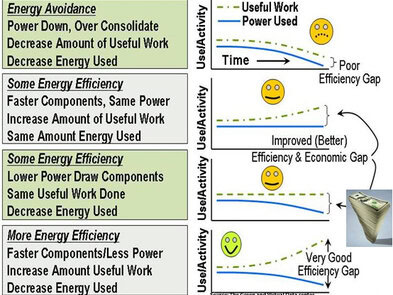
Another example of a Green gap is messaging around energy avoidance as being efficient vs. using energy in a more productive or effective manner (doing more work with the same or fewer resources) shown in the figure below.

Tiered Storage
Expanding focus from energy avoidance to energy usage effectiveness

In routine conversations with IT professionals it is clear that the Green Gap and thus missed opportunities will continue for some time until the business and economic values of efficient, effective, smart and productive IT are understood to have environmental benefits as a by product and thus being Green. Watch for more missed messaging around CO2 and related themes popular with so called Greenies (or if you prefer environmentalists) that miss the mark with most business and IT organizations.

Business and thus IT are driven by economics and as such will invest where they can reduce complexity and costs, become more efficient and effective while increasing productivity and reducing waste by working smarter. In other words, by changing how information services are delivered in a smarter more effective efficient manner maximizes what resources are used enabling more to be done in a denser footprint (budget, people staffing, management, power, cooling, floor space) that have positive environmental benefits. Put another way, a benefit for IT organizations to remove complexity results in lower costs, by becoming more efficient and effective reducing waste results in better productivity and fewer missed opportunities meaning enhanced profits. The net result is that environmental concerns get a free ride or being funded as a result of IT organizations improving their productivity which of course should have a business benefit.

Efficient and Optimized IT Wheel of Oppourtunity
Wheel of Opportunity: Various techniques and technologies for infrastructure optimization

Efficient and effective IT (aka the other Green IT) that links to common technology and business issues with the benefit of helping the environment can be accomplished using a combination approaches. The approaches for enabling an efficient, effective, smarter and productive IT environment includes from a generic perspective various technologies, techniques and best practices shown in the wheel of opportunity figure.

For example:

Here are some related links for additional reading:

Also check out my book for enabling efficient, effective and smart IT The Green and Virtual Data Center (CRC) including a free sample chapter download here.

Ok, nuff said for now, go hug a tree, your computer, hybrid car, droid, ipad or whatever suits your needs.

Cheers gs

Greg Schulz – Author Cloud and Virtual Data Storage Networking (CRC), The Green and Virtual Data Center (CRC), Resilient Storage Networks (Elsevier)
twitter @storageio

All Comments, (C) and (TM) belong to their owners/posters, Other content (C) Copyright 2006-2011 StorageIO and UnlimitedIO All Rights Reserved
What do you need when its time to buy a new server?

You have been told by someone or determined on your own that it is time for a new server, however what to get?

A blade server, rack mount, floor model, physical or virtual perhaps cloud?

How about one that is fully configured and accessorized to meet your specific environments needs?

There are several considerations involving what type of server or computer is needed to meet your specific needs or application requirements. Options include price, packaging, vendor preferences, blade center, freestanding, 1U rack mount, virtual and cloud support, with or without storage and networking, performance as well as power and cooling among other considerations.

Here is a link (PDF version here, may require registration) to an article that I put together to help determine your needs as well as consider various options for your next server.

Hope you find the information useful!

Nuff said for now

Cheers gs

Greg Schulz – Author The Green and Virtual Data Center (CRC), Resilient Storage Networks (Elsevier) and coming summer 2011 Cloud and Virtual Data Storage Networking (CRC) at https://storageio.com/books
twitter @storageio

Winter 2011 Server and StorageIO News Letter

StorageIO News Letter Image
Winter 2011 Newsletter

Welcome to the Winter 2011 edition of the Server and StorageIO Group (StorageIO) newsletter. This follows the Fall 2011 edition.

You can access this news letter via various social media venues (some are shown below) in addition to StorageIO web sites and subscriptions. Click on the following links to view the Winter 2011 edition as an HTML or PDF or, to go to the newsletter page to view previous editions.

Follow via Goggle Feedburner here or via email subscription here.

You can also subscribe to the news letter by simply sending an email to newsletter@storageio.com

Enjoy this edition of the StorageIO newsletter, let me know your comments and feedback.

Cheers gs

Nuff said for now

Cheers gs

Greg Schulz – Author The Green and Virtual Data Center (CRC), Resilient Storage Networks (Elsevier) and coming summer 2011 Cloud and Virtual Data Storage Networking (CRC)
twitter @storageio