
Server and StorageIO Update newsletter – April and May 2014 | ||||||||||||||||||||||||||||||||||||||||||||
| ||||||||||||||||||||||||||||||||||||||||||||
 Greg Schulz on break




Is there an information or data recession? Are you using less storage? (With Polls)
Is there an information or data recession? Are you using less storage? (With Polls)

Is there an information recession where you are creating, processing, moving or saving less data?
Are you using less data storage than in the past either locally online, offline or remote including via clouds?
IMHO there is no such thing as a data or information recession, granted storage is being used more effectively by some, while economic pressures or competition enables your budgets to be stretched further. Likewise people and data are living longer and getting larger.
In conversations with IT professionals particular the real customers (e.g. not vendors, VAR’s, analysts, blogalysts, consultants or media) I routinely hear from people that they continue to have the need to store more information, however they’re data storage usage and acquisition patterns are changing. For some this means using what they have more effectively leveraging data footprint reduction (DFR) which includes (archiving, compression, dedupe, thin provision, changing how and when data is protected). This also means using different types of storage from flash SSD to HDD to SSHD to tape summit resources as well as cloud in different ways spanning block, file and object storage local and remote.
A common question that comes up particular around vendor earnings announcement times is if the data storage industry is in decline with some vendors experience poor results?
Look beyond vendor revenue metrics
As a back ground reading, you might want to check out this post here (IT and storage economics 101, supply and demand) which candidly should be common sense.
If all you looked at were a vendors revenues or margin numbers as an indicator of how well such as the data storage industry (includes traditional, legacy as well as cloud) you would not be getting the picture.
What needs to be factored into the picture is how much storage is being shipped (from components such as drives to systems and appliances) as well as delivered by service providers.
Looking at storage systems vendors from a revenue earnings perspective you would get mixed indicators depending on who you include, not to mention on how those vendors report break of revenues by product, or amount units shipped. For example looking at public vendors EMC, HDS, HP, IBM, NetApp, Nimble and Oracle (among others) as well as the private ones (if you can see the data) such as Dell, Pure, Simplivity, Solidfire, Tintri results in different analysis. Some are doing better than others on revenues and margins, however try to get clarity on number of units or systems shipped (for actual revenue vs. loaners (planting seeds for future revenue or trials) or demos).
Then look at the service providers such as AWS, Centurlylink, Google, HP, IBM, Microsoft Rackspace or Verizon (among others) you should see growth, however clarity about how much they are actually generating on revenues plus margin for storage specific vs. broad general buckets can be tricky.
Now look at the component suppliers such as Seagate and Western Digital (WD) for HDDs and SSHDs who also provide flash SSD drives and other technology. Also look at the other flash component suppliers such as Avago/LSI whose flash business is being bought by Seagate, FusionIO, SANdisk, Samsung, Micron and Intel among others (this does not include the systems vendors who OEM those or other products to build systems or appliances). These and other component suppliers can give another indicator as to the health of the industry both from revenue and margin, as well as footprint (e.g. how many devices are being shipped). For example the legacy and startup storage systems and appliance vendors may have soft or lower revenue numbers, however are they shipping the same or less product? Likewise the cloud or service providers may be showing more revenues and product being acquired however at what margin?
What this all means?

Look at revenue numbers in the proper context as well as in the bigger picture.
If the same number of component devices (e.g. processors, HDD, SSD, SSHD, memory, etc) are being shipped or more, that is an indicator of continued or increased demand. Likewise if there is more competition and options for IT organizations there will be price competition between vendors as well as service providers.
All of this means that while IT organizations budgets stay stretched, their available dollars or euros should be able to buy (or rent) them more storage space capacity.
Likewise using various data and storage management techniques including DFR, the available space capacity can be stretched further.
So this then begs the question of if the management of storage is important, why are we not hearing vendors talking about software defined storage management vs. chasing each other to out software define storage each other?
Ah, that’s for a different post ;).
So what say you?
Are you using less storage?
Do you have less data being created?
Are you using storage and your available budget more effectively?
Please take a few minutes and cast your vote (and see the results).
Sorry I have no Amex or Amazon gift cards or other things to offer you as a giveaway for participating as nobody is secretly sponsoring this poll or post, it’s simply sharing and conveying information for you and others to see and gain insight from.
Do you think that there is an information or data recession?
How about are you using or buying more storage, could there be a data storage recession?
Some more reading links
IT and storage economics 101, supply and demand
Green IT deferral blamed on economic recession might be result of green gap
Industry trend: People plus data are aging and living longer
Is There a Data and I/O Activity Recession?
Supporting IT growth demand during economic uncertain times
The Human Face of Big Data, a Book Review
Garbage data in, garbage information out, big data or big garbage?
Little data, big data and very big data (VBD) or big BS?
Ok, nuff said (for now)
Cheers gs
Greg Schulz – Author Cloud and Virtual Data Storage Networking (CRC Press), The Green and Virtual Data Center (CRC Press) and Resilient Storage Networks (Elsevier)
twitter @storageio
All Comments, (C) and (TM) belong to their owners/posters, Other content (C) Copyright 2006-2026 Server StorageIO and UnlimitedIO LLC All Rights Reserved
Enterprise SSHD and Flash SSD Part of an Enterprise Tiered Storage Strategy
Enterprise SSHD and Flash SSD Part of an Enterprise Tiered Storage Strategy
The question to ask yourself is not if flash Solid State Device (SSD) technologies are in your future.
Instead the questions are when, where, using what, how to configure and related themes. SSD including traditional DRAM and NAND flash-based technologies are like real estate where location matters; however, there are different types of properties to meet various needs. This means leveraging different types of NAND flash SSD technologies in different locations in a complementary and cooperative aka hybrid way.
Introducing Solid State Hybrid Drives (SSHD)
Solid State Hybrid Disks (SSHD) are the successors to previous generation Hybrid Hard Disk Drives (HHDD) that I have used for several years (you can read more about them here, and here).
While it would be nice to simply have SSD for everything, there are also economic budget realities to be dealt with. Keep in mind that a bit of nand flash SSD cache in the right location for a given purpose can go a long way which is the case with SSHDs. This is also why in many environments today there is a mix of SSD, HDD of various makes, types, speeds and capacities (e.g. different tiers) to support diverse application needs (e.g. not everything in the data center is the same).
However, If you have the need for speed and can afford or benefit from the increased productivity by all means go SSD!
Otoh if you have budget constraints and need more space capacity yet want some performance boost, then SSHDs are an option. The big difference however between today’s SSHDs that are available for both enterprise class storage systems and servers, as well as desktop environments is that they can accelerate both reads and writes. This is different from their predecessors that I have used for several years now that had basic read acceleration, however no write optimizations.

Better Together: Where SSHDs fit in an enterprise tiered storage environment with SSD and HDDs
As their names imply, they are a hybrid between a nand flash Solid State Device (SSD) and traditional Hard Disk Drive (HDD) meaning a best of situation. This means that the SSHD are based on a traditional spinning HDD (various models with different speeds, space capacity, interfaces) along with DRAM (which is found on most modern HDDs), along with nand flash for read cache, and some extra nonvolatile memory for persistent write cache combined with a bit of software defined storage performance optimization algorithms.
Btw, if you were paying attention to that last sentence you would have picked up on something about nonvolatile memory being used for persistent write cache which should prompt the question would that help with nand flash write endurance? Yup.
Where and when to use SSHD?
In the StorageIO Industry Trends Perspective thought leadership white paper I recently released compliments of Seagate Enterprise Turbo SSHD (that’s a disclosure btw ;) enterprise class Solid State Hybrid Drives (SSHD) were looked at and test driven in the StorageIO Labs with various application workloads. These activities include being in a virtual environment for common applications including database and email messaging using industry standard benchmark workloads (e.g. TPC-B and TPC-E for database, JetStress for Exchange).

Conventional storage system focused workloads using iometer, iorate and vdbench were also run in the StorageIO Labs to set up baseline reads, writes, random, sequential, small and large I/O size with IOPs, bandwidth and response time latency results. Some of those results can be found here (Part II: How many IOPS can a HDD, HHDD or SSD do with VMware?) with other ongoing workloads continuing in different configurations. The various test drive proof points were done in the comparing SSHD, SSD and different HDDs.
Data Protection (Archiving, Backup, BC, DR) | Staging cache buffer area for snapshots, replication or current copies before streaming to other storage tier using fast read/write capabilities. Meta data, index and catalogs benefit from fast reads and writes for faster protection. |
Big Data DSS | Support sequential read-ahead operations and “hot-band” data caching in a cost-effective way using SSHD vs. slower similar capacity size HDDs for Data warehouse, DSS and other analytic environments. |
Email, Text and Voice Messaging | Microsoft Exchange and other email journals, mailbox or object repositories can leverage faster read and write I/Os with more space capacity. |
OLTP, Database | Eliminate the need to short stroke HDDs to gain performance, offer more space capacity and IOP performance per device for tables, logs, journals, import/export and scratch, temporary ephemeral storage. Leverage random and sequential read acceleration to compliment server-side SSD-based read and write-thru caching. Utilize fast magnetic media for persistent data reducing wear and tear on more costly flash SSD storage devices. |
Server Virtualization | Fast disk storage for data stores and virtual disks supporting VMware vSphere/ESXi, Microsoft Hyper-V, KVM, Xen and others. Holding virtual machines such as VMware VMDKs, along with Hyper-V and other hypervisor virtual disks. Compliment virtual server read cache and I/O optimization using SSD as a cache with writes going to fast SSHD. For example VMware V5.5 Virtual SAN host disk groups use SSD as a read cache and can use SSHD as the magnetic disk for storing data while boosting performance without breaking the budget or adding complexity. Speaking of Virtual, as mentioned the various proof points were run using Windows systems that were VMware guests with the SSHD and other devices being Raw Device Mapped (RDM) SAS and SATA attached, read how to do that here. Hint: If you know about the VMware trick for making a HDD look like a SSD to vSphere/ESXi (refer to here and here) think outside the virtual box for a moment on some things you could do with SSHD in a VSAN environment among other things, for now, just sayin ;). |
Virtual Desktop Infrastructure (VDI) | SSHD can be used as high performance magnetic disk for storing linked clone images, applications and data. Leverage fast read to support read ahead or pre-fetch to compliment SSD based read cache solutions. Utilize fast writes to quickly store data enabling SSD-based read or write-thru cache solutions to be more effective. Reduce impact of boot, shutdown, and virus scan or maintenance storms while providing more space capacity. |
Table 1 Example application and workload scenarios benefiting from SSHDs
Test drive application proof points
Various workloads were run using Seagate Enterprise Turbo SSHD in the StorageIO lab environment across different real world like application workload scenarios. These include general storage I/O performance characteristics profiling (e.g. reads, writes, random, sequential or various IOP size) to understand how these devices compare to other HDD, HHDD and SSD storage devices in terms of IOPS, bandwidth and response time (latency). In addition to basic storage I/O profiling, the Enterprise Turbo SSHD was also used with various SQL database workloads including Transaction Processing Council (TPC); along with VMware server virtualization among others use case scenarios.
Note that in the following workload proof points a single drive was used meaning that using more drives in a server or storage system should yield better performance. This also means scaling would be bound by the constraints of a given configuration, server or storage system. These were also conducted using 6Gbps SAS with PCIe Gen 2 based servers and ongoing testing is confirming even better results with 12Gbs SAS, faster servers with PCIe Gen 3.

Copy (read and write) 80GB and 220GB file copies (time to copy entire file)

SQLserver TPC-B batch database updates
Test configuration: 600GB 2.5” Enterprise Turbo SSHD (ST600MX) 6 Gbps SAS, 600GB 2.5” Enterprise Enhanced 15K V4 (15K RPM) HDD (ST600MP) with 6 Gbps SAS, 500GB 3.5” 7.2K RPM HDD 3 Gbps SATA, 1TB 3.5” 7.2K RPM HDD 3 Gbps SATA. Workload generator and virtual clients ran on Windows 7 Ultimate. Microsoft SQL Server 2012 Database was on Windows 7 Ultimate SP1 (64 bit) 14 GB DRAM, Dual CPU (Intel x3490 2.93 GHz)), with LSI 9211 6Gbps SAS adapters with TPC-B (www.tpc.org) workloads. VM resided on separate data store from devices being tested. All devices being tested with SQL MDF were Raw Device Mapped (RDM) independent persistent with database log file (LDF) on a separate SSD device also persistent (no delayed writes). Tests were performed in StorageIO Lab facilities by StorageIO personal.

SQLserver TPC-E transactional workload
Test configuration: 600GB 2.5” Enterprise Turbo SSHD (ST600MX) 6 Gbps SAS, 600GB 2.5” Enterprise Enhanced 15K V4 (15K RPM) HDD (ST600MP) with 6 Gbps SAS, 300GB 2.5” Savio 10K RPM HDD 6 Gbps SAS, 1TB 3.5” 7.2K RPM HDD 6 Gbps SATA. Workload generator and virtual clients Windows 7 Ultimate. Microsoft SQL Server 2012 database was on Windows 7 Ultimate SP1 (64 bit) 14 GB DRAM, Dual CPU (E8400 2.99GHz), with LSI 9211 6Gbps SAS adapters with TPC-E (www.tpc.org) workloads. VM resided on separate SSD based data store from devices being tested (e.g., where MDF resided). All devices being tested were Raw Device Mapped (RDM) independent persistent with database log file on a separate SSD device also persistent (no delayed writes). Tests were performed in StorageIO Lab facilities by StorageIO personal.

Microsoft Exchange workload
Test configuration: 2.5” Seagate 600 Pro 120GB (ST120FP0021 ) SSD 6 Gbps SATA, 600GB 2.5” Enterprise Turbo SSHD (ST600MX) 6 Gbps SAS, 600GB 2.5” Enterprise Enhanced 15K V4 (15K RPM) HDD (ST600MP) with 6 Gbps SAS, 2.5” Savio 146GB HDD 6 Gbps SAS, 3.5” Barracuda 500GB 7.2K RPM HDD 3 Gbps SATA. Email server hosted as guest on VMware vSphere/ESXi V5.5, Microsoft Small Business Server (SBS) 2011 Service Pack 1 64 bit, 8GB DRAM, One CPU (Intel X3490 2.93 GHz) LSI 9211 6 Gbps SAS adapter, JetStress 2010 (no other active workload during test intervals). All devices being tested were Raw Device Mapped (RDM) where EDB resided. VM on a SSD based separate data store than devices being tested. Log file IOPs were handled via a separate SSD device.
Read more about the above proof points along view data points and configuration information in the associated white paper found here (no registration required).
What this all means
Similar to flash-based SSD technologies the question is not if, rather when, where, why and how to deploy hybrid solutions such as SSHDs. If your applications and data infrastructures environment have the need for storage I/O speed without loss of space capacity and breaking your budget, SSD enabled devices like the Seagate Enterprise Turbo 600GB SSHD are in your future. You can learn more about enterprise class SSHD such as those from Seagate by visiting this link here.
Watch for extra workload proof points being performed including with 12Gbps SAS and faster servers using PCIe Gen 3.
Ok, nuff said.
Cheers
Gs
Greg Schulz – Author Cloud and Virtual Data Storage Networking (CRC Press), The Green and Virtual Data Center (CRC Press) and Resilient Storage Networks (Elsevier)
twitter @storageio
All Comments, (C) and (TM) belong to their owners/posters, Other content (C) Copyright 2006-2026 Server StorageIO and UnlimitedIO LLC All Rights Reserved
Chat with Cash Coleman talking ClearDB, cloud database and Johnny Cash
Podcast with Cash Coleman talking ClearDB, cloud database and Johnny Cash

In this episode from the SNIA DSI 2014 event I am joined by Cashton Coleman (@Cash_Coleman).

Introducing Cashton (Cash) Coleman and ClearDB
Cashton (Cash) is a Software architect, product mason, family bonder, life builder, idea founder along with Founder & CEO of SuccessBricks, Inc., makers of ClearDB. ClearDB is a provider of MySQL database software tools for cloud and physical environments. In our conversation talk about ClearDB, what they do and whom they do it with including deployments in cloud’s as well as onsite. For example if you are using some of the Microsoft Azure cloud services using MySQL, you may already be using this technology. However, there is more to the story and discussion including how Cash got his name, how to speed up databases for little and big data among other topics.
If you are a database person, you will want to listen to what Cash has to say about boosting performance and getting more value out of your physical hardware or cloud services. On the other hand if you are a storage person, listen in to get some insight and ideas on to address database performance and resiliency. For others who just like to listen to new trends, technology talk, or hear about emerging companies to keep an eye on, you wont want to miss the podcast conversation.
Topics and themes discussed:
Check out ClearDB and listen in to the conversation with Cash podcast here.
Also available via
Ok, nuff said.
Cheers
Gs
Greg Schulz – Author Cloud and Virtual Data Storage Networking (CRC Press), The Green and Virtual Data Center (CRC Press) and Resilient Storage Networks (Elsevier)
twitter @storageio
All Comments, (C) and (TM) belong to their owners/posters, Other content (C) Copyright 2006-2026 Server StorageIO and UnlimitedIO LLC All Rights Reserved
Lenovo TS140 Server and Storage I/O Review
Lenovo TS140 Server and Storage I/O Review
This is a review that looks at my recent hands on experiences in using a TS140 (Model MT-M 70A4 – 001RUS) pedestal (aka tower) server that the Lenovo folks sent to me to use for a month or so. The TS140 is one of the servers that Lenovo had prior to its acquisition of IBM x86 server business that you can read about here.
The Lenovo TS140 Experience
Lets start with the overall experience which was very easy and good. This includes going from initial answering some questions to get the process moving, agreeing to keep the equipment safe, secure, insured as well as not damaging anything (this was not a tear down and rip it apart into pieces trial).
Part of the process also involved answering some configuration related questions and shortly there after a large box from Lenovo arrived. Turns out it was a box (server hardware) inside of a Lenovo box, that was inside a slightly larger unmarked shipping box (see larger box in the background).
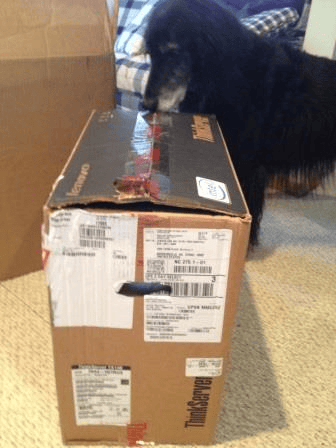
TS140 shipment undergoing initial security screen scan and sniff (all was ok)

TS140 with Keyboard and Mouse (Monitor not included)
One of the reasons I have a photo of the TS140 on a desk is that I initially put it in an office environment as Lenovo claimed it would be quiet enough to do so. I was not surprised and indeed the TS140 is quiet enough to be used where you would normally find a workstation or mini-tower. By being so quiet the TS140 is a good fit for environments that need a small or starter server that has to go into an office environment as opposed to a server or networking room. For those who are into mounting servers, there is the option for placing the TS140 on its side into a cabinet or rack.

TS140 with Windows Server 2012 Essentials
TS140 as tested

TS140 "Selfie" with 4 x 4GB DDR3 DIMM (16GB) and PCIe slots (empty)
16GB RAM (4 x 4GB DDR3 UDIMM, larger DIMMs are supported)
Windows Server 2012 Essentials
Intel Xeon E3-1225 v3 @3.2 Ghz quad (C226 chipset and TPM 1.2) vPRO/VT/EP capable
Intel GbE 1217-LM Network connection
280 watt power supply
Keyboard and mouse (no monitor)
Two 7.2K SATA HDDs (WD) configured as RAID 1 (100GB Lun)
Slot 1 PCIe G3 x16
Slot 2 PCIe G2 x1
Slot 3 PCIe G2 x16 (x4 electrical signal)
Slot 4 PCI (legacy)
Onboard 6GB SATA RAID 0/1/10/5
Onboard SATSA 3.0 (6Gbps) connectors (0-4), USB 3.0 and USB 2.0
Read more about what I did with the Lenovo TS140 in part II of my review along with what I liked, did not like and general comments here.
Ok, nuff said (for now)
Cheers
Gs
Greg Schulz – Author Cloud and Virtual Data Storage Networking (CRC Press), The Green and Virtual Data Center (CRC Press) and Resilient Storage Networks (Elsevier)
twitter @storageio
All Comments, (C) and (TM) belong to their owners/posters, Other content (C) Copyright 2006-2026 Server StorageIO and UnlimitedIO LLC All Rights Reserved
Part II: What I did with Lenovo TS140 in my Server and Storage I/O Review
Part II: Lenovo TS140 Server and Storage I/O Review
This is the second of a two-part post series on my recent experiences with a Lenovo TS140 Server, you can read part I here.
What Did I do with the TS140
After initial check out in an office type environment, I moved the TS140 into the lab area where it joined other servers to be used for various things.
Some of those activities included using the Windows Server 2012 Essentials along with associated admin activities. Also, I also installed VMware ESXi 5.5 and ran into a few surprises. One of those was that I needed to apply an update to VMware drivers to support the onboard Intel NIC, as well as enable VT and EP modes for virtualization to assist via the BIOS. The biggest surprise was that I discovered I could not install VMware onto an internal drive attached via one of the internal SATA ports which turns out to be a BIOS firmware issue.
Lenovo confirmed this when I brought it to their attention, and the workaround is to use USB to install VMware onto a USB flash SSD thumb drive, or other USB attached drive or to use external storage via an adapter. As of this time Lenovo is aware of the VMware issue, however, no date for new BIOS or firmware is available. Speaking of BIOS, I did notice that there was some newer BIOS and firmware available (FBKT70AUS December 2013) than what was installed (FB48A August of 2013). So I went ahead and did this upgrade which was a smooth, quick and easy process. The process included going to the Lenovo site (see resource links below), selecting the applicable download, and then installing it following the directions.
Since I was going to install various PCIe SAS adapters into the TS140 attached to external SAS and SATA storage, this was not a big issue, more of an inconvenience Likewise for using storage mounted internally the workaround is to use an SAS or SATA adapter with internal ports (or cable). Speaking of USB workarounds, have a HDD, HHDD, SSHD or SSD that is a SATA device and need to attach it to USB, then get one of these cables. Note that there are USB 3.0 and USB 2.0 cables (see below) available so choose wisely.
USB to SATA adapter cable
In addition to running various VMware-based workloads with different guest VMs.
I also ran FUTREMARK PCmark (btw, if you do not have this in your server storage I/O toolbox it should be) to gauge the systems performance. As mentioned the TS140 is quiet. However, it also has good performance depending on what processor you select. Note that while the TS140 has a list price as of the time of this post under $400 USD, that will change depending on which processor, amount of memory, software and other options you choose.


| PCmark test | Results |
| Composite score | 2274 |
| Compute | 11530 |
| System Storage | 2429 |
| Secondary Storage | 2428 |
| Productivity | 1682 |
| Lightweight | 2137 |
PCmark results are shown above for the Windows Server 2012 system (non-virtualized) configured as shipped and received from Lenovo.
What I liked
Unbelievably quiet which may not seem like a big deal, however, if you are looking to deploy a server or system into a small office workspace, this becomes an important considerations. Otoh, if you are a power user and want a robust server that can be installed into a home media entertainment system, well, this might be a nice to have consideration ;).
Something else that I liked is that the TS140 with the E3-1220 v3 family of processor supports PCIe G3 adapters which are useful if you are going to be using 10GbE cards or 12Gbs SAS and faster cards to move lots of data, support more IOPs or reduce response time latency.
In addition, while only 4 DIMM slots is not very much, its more than what some other similar focused systems have, plus with large capacity DIMMs, you can still get a nice system, or two, or three or four for a cluster at a good price or value (Hmm, VSAN anybody?). Also while not a big item, the TS140 did not require ordering an HDD or SSD if you are not also ordering software the system for a diskless system and have your own.
Speaking of IO slots, naturally I’m interested in Server Storage I/O so having multiple slots is a must have, along with the processor that is quad core (pretty much standard these days) along with VT and EP for supporting VMware (these were disabled in the BIOS. However, that was an easy fix).
Then there is the price as of this posting starting at $379 USD which is a bare bones system (e.g. minimal memory, basic processor, no software) whose price increases as you add more items. What I like about this price is that it has the PCIe G3 slot as well as other PCIe G2 slots for expansion meaning I can install 12Gbps (or 6Gbps) SAS storage I/O adapters, or other PCIe cards including SSD, RAID, 10GbE CNA or other cards to meet various needs including software defined storage.
What I did not like
I would like to have had at least six vs. four DIMM slots, however keeping in mind the price point of where this system is positioned, not to mention what you could do with it thinking outside of the box, I’m fine with only 4 x DIMM. Space for more internal storage would be nice, however, if that is what you need, then there are the larger Lenovo models to look at. By the way, thinking outside of the box, could you do something like a Hadoop, OpenStack, Object Storage, VMware VSAN or other cluster with these in addition to using as a Windows Server?
Yup.
Granted you won’t have as much internal storage, as the TS140 only has two fixed drive slots (for more storage there is the model TD340 among others).
However it is not that difficult to add more (not Lenovo endorsed) by adding a StarTech enclosure like I did with my other systems (see here). Oh and those extra PCIe slots, that’s where a 12Gbs (or 6Gbps) adapter comes into play while leaving room for GbE cards and PCIe SSD cards. Btw not sure what to do with that PCIe x1 slot, that’s a good place for a dual GbE NIC to add more networking ports or an SATA adapter for attaching to larger capacity slower drives.
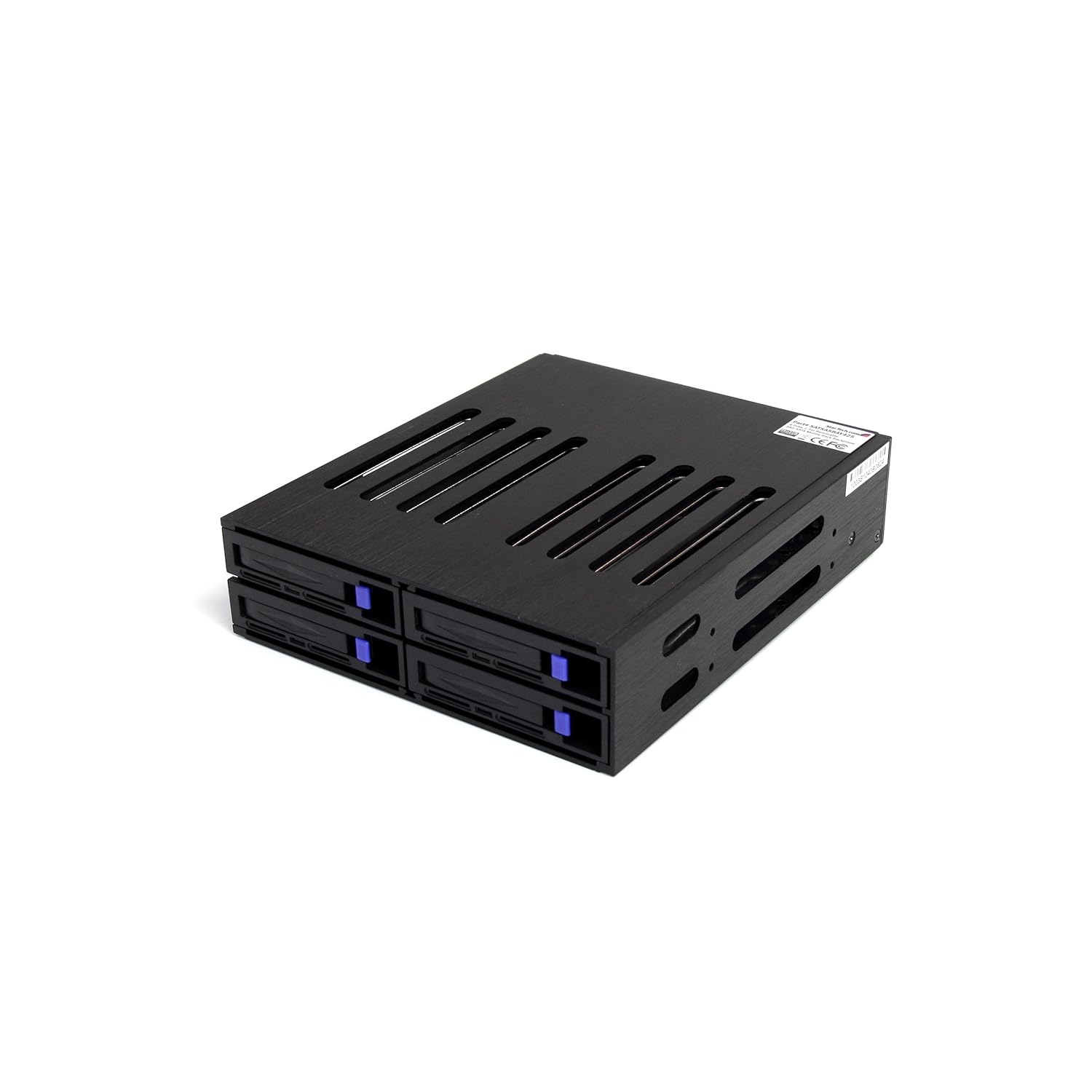
StarTech 2.5″ SAS SATA drive enclosure via Amazon.com
If VMware is not a requirement, and you need a good entry level server for a large SOHO or small SMB environment, or, if you are looking to add a flexible server to a lab or for other things the TS140 is good (see disclosure below) and quiet.
Otoh as mentioned, there is a current issue with the BIOS/firmware with the TS140 involving VMware (tried ESXi 5 & 5.5).
However I did find a workaround which is that the current TS140 BIOS/Firmware does work with VMware if you install onto a USB drive, and then use external SAS, SATA or other accessible storage which is how I ended up using it.
Lenovo TS140 resources include
Summary
Disclosure: Lenovo loaned the TS140 to me for just under two months including covering shipping costs at no charge (to them or to me) hence this is not a sponsored post or review. On the other hand I have placed an order for a new TS140 similar to the one tested that I bought on-line from Lenovo.
This new TS140 server that I bought joins the Dell Inspiron I added late last year (read more about that here) as well as other HP and Dell systems.
Overall I give the Lenovo TS140 an provisional "A" which would be a solid "A" once the BIOS/firmware issue mentioned above is resolved for VMware. Otoh, if you are not concerned about using the TS140 for VMware (or can do a work around), then consider it as an "A".
As mentioned above, I liked it so much I actually bought one to add to my collection.
Ok, nuff said (for now)
Cheers
Gs
Greg Schulz – Microsoft MVP Cloud and Data Center Management, vSAN and VMware vExpert. Author of Software Defined Data Infrastructure Essentials (CRC Press), as well as Cloud and Virtual Data Storage Networking (CRC Press), The Green and Virtual Data Center (CRC Press), Resilient Storage Networks (Elsevier) and twitter @storageio.
All Comments, (C) and (TM) belong to their owners/posters, Other content (C) Copyright 2006-2023 Server StorageIO(R) and UnlimitedIO All Rights Reserved
Nand flash SSD NVM SCM server storage I/O memory conversations
Updated 8/31/19
The SSD Place NVM, SCM, PMEM, Flash, Optane, 3D XPoint, MRAM, NVMe Server, Storage, I/O Topics
Now and then somebody asks me if I’m familiar with flash or nand flash Solid State Devices (SSD) along with other non-volatile memory (NVM) technologies and trends including NVM Express (NVMe).
Having been involved with various types of SSD technology, products and solutions since the late 80s initially as a customer in IT (including as a lunch customer for DEC’s ESE20 SSD’s), then later as a vendor selling SSD solutions, as well as an analyst and advisory consultant cover the technologies, I tell the person asking, well, yes, of course.
That gave me the idea as well as to help me keep track of some of the content and make it easy to find by putting it here in this post (which will be updated now and then).
Thus this is a collection of articles, tips, posts, presentations, blog posts and other content on SSD including nand flash drives, PCIe cards, DIMMs, NVM Express (NVMe), hybrid and other storage solutions along with related themes.
Also if you can’t find it here, you can always do a Google search like this or this to find some more material (some of which is on this page).

Flash SSD Articles, posts and presentations
The following are some of my tips, articles, blog posts, presentations and other content on SSD. Keep in mind that the question should not be if SSD are in your future, rather when, where, with what, from whom and how much. Also keep in mind that a bit of SSD as storage or cache in the right place can go a long way, while a lot of SSD will give you a benefit however also cost a lot of cash.
- NVMe overview and primer – Part I
- Part II – NVMe overview and primer (Different Configurations)
- Part III – NVMe overview and primer (Need for Performance Speed)
- Part IV – NVMe overview and primer (Where and How to use NVMe)
- Part V – NVMe overview and primer (Where to learn more, what this all means)
- PCIe Server I/O Fundamentals
- If NVMe is the answer, what are the questions?
- NVMe Wont Replace Flash By Itself
- Via Computerweekly – NVMe discussion: PCIe card vs U.2 and M.2
- Server storage I/O benchmark tools, workload scripts and examples (Part I) and (Part II)
- Via GizModo: Comments on Intel Optane 800P NVMe M.2 SSD
- Via InfoStor: 8 Big Enterprise SSD Trends to Expect in 2017
- Why NVMe Should Be in Your Data Center – Preparing for Tomorrow’s Data Center Today (StorageIO Guest Post Via Micron.com)
- Via SearchStoragae: Comments on Top 10 Tips on Solid State Storage Adoption Strategy
- Via J Metz’s Blog – Vendor neutral bibliography of material by subject matter for NVMe
- Via InfoStor – SSD Trends, Tips and Topics
- StorageIOblog: Get in the NVMe SSD game (if you are not already)
- Via J Metz’s Blog – Vendor neutral learning NVMe A Program of Study
- Via StorageIOblog: VMware vSAN v6.6
- Via StorageIOblog: Cisco announces 32Gb FC and NVMe fabrics
- Via Pure Storage: Announces new NVMe storage
- Via Micron Blog (Guest Post by Greg Schulz): What’s next for NVMe and your Data Center – Preparing for Tomorrow Today
- Via ChannelProSMB: Comments on NVMe (and SSD) and server storage I/O
- EnterpriseStorageForum: Comments Top 10 Enterprise SSD Market Trends
- SearchSolidStateStorage: Comments on How to add solid-state storage to your enterprise data storage systems
- Microsoft TechNet: Understand the cache in Storage Spaces Direct
- Microsoft Technet: Don’t do it: consumer-grade solid-state drives (SSD) in Storage Spaces Direct
- Why Micron NVMe SSDs (Via Micron.com)
- New Path to Storage I/O Performance and Resiliency With NVMe (Via Micron.com)
- How NVMe Will Revolutionize Server and Storage I/O(Via Micron.com)
- How to Prepare for the NVMe Server Storage I/O Wave (Via Micron.com)
- Why NVMe Should Be in Your Data Center (Via Micron.com)
- NVMe U2 (8639) vs. M2 interfaces (Via Gamersnexus)
- Enmotus FuzeDrive MicroTiering (StorageIO Lab Report)
- EMC DSSD D5 Rack Scale Direct Attached Shared SSD All Flash Array Part I (Via StorageIOBlog)
- Part II – EMC DSSD D5 Direct Attached Shared AFA (Via StorageIOBlog)
- NAND, DRAM, SAS/SCSI & SATA/AHCI: Not Dead, Yet! (Via EnterpriseStorageForum)
- Non Volatile Memory (NVM), NVMe, Flash Memory Summit and SSD updates (Via StorageIOblog)
- Microsoft and Intel showcase Storage Spaces Direct with NVM Express at IDF ’15 (Via TechNet)
- MNVM Express solutions (Via SuperMicro)
- Gaining Server Storage I/O Insight into Microsoft Windows Server 2016 (Via StorageIOblog)
- PMC-Sierra Scales Storage with PCIe, NVMe (Via EEtimes)
- RoCE updates among other items (Via InfiniBand Trade Association (IBTA) December Newsletter)
- NVMe: The Golden Ticket for Faster Flash Storage? (Via EnterpriseStorageForum)
- What should I consider when using SSD cloud? (Via SearchCloudStorage)
- MSP CMG, Sept. 2014 Presentation (Flash back to reality – Myths and Realities – Flash and SSD Industry trends perspectives plus benchmarking tips)– PDF
- Selecting Storage: Start With Requirements (Via NetworkComputing)
- PMC Announces Flashtec NVMe SSD NVMe2106, NVMe2032 Controllers With LDPC (Via TomsITpro)
- Exclusive: If Intel and Micron’s “Xpoint” is 3D Phase Change Memory, Boy Did They Patent It (Via Dailytech)
- Intel & Micron 3D XPoint memory — is it just CBRAM hyped up? Curation of various posts (Via Computerworld)
- How many IOPS can a HDD, HHDD or SSD do (Part I)?
- How many IOPS can a HDD, HHDD or SSD do with VMware? (Part II)
- I/O Performance Issues and Impacts on Time-Sensitive Applications (Via CMG)
- Via EnterpriseStorageForum: 5 Hot Storage Technologies to Watch
- Via EnterpriseStorageForum: 10-Year Review of Data Storage
- Via EnterpriseStorageForum: Where All-Flash Storage Makes No Sense
- Via EnterpriseStorageForum: Top Tips for Enterprise SSD Form Factor Selection and Deployment
- Who Will Be Top Of Storage World?
- Intel announces new processors
- Server Storage I/O CI, HCI overview
- Data Infrastructure Tradecraft Overview
- SSD, flash and NVM Trends
- Top Tips for Enterprise SSD Form Factor Selection and Deployment
- StorageIO Industry Trends Perspective White Paper: Solid State Hybrid Drives (SSHD) aka Turbo Drives
- Via EnterpriseStorageForum: Software-Defined Storage Tips
- Via EnterpriseStorageForum: What SSD form factor is best
- Via InfoStor: SSD Trends, Tips and Topics
- Via StorageIOlab (ITCentralStation): Intel NVMe 750 SSD review
- Via Microsoft Technet: Don’t do it: consumer-grade solid-state drives (SSD) in Storage Spaces Direct
- EnterpriseStorageForum: Comments Top 10 Enterprise SSD Market Trends
- SearchSolidStateStorage: Comments on How to add solid-state storage to your enterprise data storage systems
- StorageIOblog: Some server storage I/O benchmark tools, workload scripts and examples (Part I) and (Part II)
- StorageIOblog: Get in the NVMe SSD game (if you are not already)
- Doridmen.com: Transcend SSD360S Review with tips on using ATTO and Crystal benchmark tools
- Webinar and Blog: 12Gb SAS SSD Enabling Server Storage I/O Performance and Effectiveness Webinar
- Enmotus FuzeDrive MicroTiering (StorageIO Lab Report
- Microsoft TechNet: Understand the cache in Storage Spaces Direct
- Via StorageIOlab (ITCentralStation): Intel NVMe 750 SSD review
- Via Microsoft Technet: Don’t do it: consumer-grade solid-state drives (SSD) in Storage Spaces Direct
- EnterpriseStorageForum: Comments Top 10 Enterprise SSD Market Trends
- SearchSolidStateStorage: Comments on How to add solid-state storage to your enterprise data storage systems
- StorageIOblog: Some server storage I/O benchmark tools, workload scripts and examples (Part I) and (Part II)
- StorageIOblog: Get in the NVMe SSD game (if you are not already)
- Doridmen.com: Transcend SSD360S Review with tips on using ATTO and Crystal benchmark tools
- Webinar and Blog: 12Gb SAS SSD Enabling Server Storage I/O Performance and Effectiveness Webinar
- Via Micron Blog (Guest Post by Greg Schulz): What’s next for NVMe and your Data Center – Preparing for Tomorrow Today
- AFA over NVMe Fabric (Via Zstor)
- Enmotus FuzeDrive MicroTiering (StorageIO Lab Report)
- Microsoft TechNet: Understand the cache in Storage Spaces Direct
- Via CustomPCreview: Samsung SM961 PCIe NVMe SSD Shows Up for Pre-Order
- StorageIO Industry Trends Perspective White Paper: Seagate 1200 Enterprise SSD (12Gbps SAS) with proof points (e.g. Lab test results)
- Companion: Seagate 1200 12Gbs Enterprise SAS SSD StorgeIO lab review (blog post part I and Part II)
- NewEggBusiness: Seagate 1200 12Gbs Enterprise SAS SSD StorgeIO lab review Are NVMe m.2 drives ready for the limelight?
- Google (Research White Paper): Disks for Data Centers (vs. just SSD)
- CMU (PDF White Paper): A Large-Scale Study of Flash Memory Failures in the Field
- Via ZDnet: Google doubles Cloud Compute local SSD capacity: Now it’s 3TB per VM
- EMC DSSD D5 Rack Scale Direct Attached Shared SSD All Flash Array Part I (Via StorageIOBlog)
- Part II – EMC DSSD D5 Direct Attached Shared AFA (Via StorageIOBlog)
- NAND, DRAM, SAS/SCSI & SATA/AHCI: Not Dead, Yet! (Via EnterpriseStorageForum)
- Here’s why Western Digital is buying SanDisk (Via ComputerWorld)
- HP, SanDisk partner to bring storage-class memory to market (Via ComputerWorld)
- Non Volatile Memory (NVM), NVMe, Flash Memory Summit and SSD updates (Via StorageIOblog)
- Microsoft and Intel showcase Storage Spaces Direct with NVM Express at IDF ’15 (Via TechNet)
- PMC-Sierra Scales Storage with PCIe, NVMe (Via EEtimes)
- Seagate Grows Its Nytro Enterprise Flash Storage Line (Via InfoStor)
- New SAS Solid State Drive First Product From Seagate Micron Alliance (Via Seagate)
- Wow, Samsung’s New 16 Terabyte SSD Is the World’s Largest Hard Drive (Via Gizmodo)
- Samsung ups the SSD ante with faster, higher capacity drives (Via ITworld)
- PMC Announces Flashtec NVMe SSD NVMe2106, NVMe2032 Controllers With LDPC (Via TomsITpro)
- New SATA SSD powers elastic cloud agility for CSPs (Via Cbronline)
- Toshiba Solid-State Drive Family Features PCIe Technology (Via Eweek)
- SanDisk aims CloudSpeed Ultra SSD at cloud providers (Via ITwire)
- Everspin & Aupera reveal all-MRAM Storage Module in M.2 Form Factor (Via BusinessWire)
- Intel, Micron Launch “Bulk-Switching” ReRAM (Via EEtimes)
- Exclusive: If Intel and Micron’s “Xpoint” is 3D Phase Change Memory, Boy Did They Patent It (Via Dailytech)
- Intel & Micron 3D XPoint memory — is it just CBRAM hyped up? Curation of various posts (Via Computerworld)
- NVMe: The Golden Ticket for Faster Flash Storage? (Via EnterpriseStorageForum)

- What should I consider when using SSD cloud? (Via SearchCloudStorage)
- MSP CMG, September 2014 Presentation (Flash back to reality – Myths and Realities Flash and SSD Industry trends perspectives plus benchmarking tips) – PDF
- Selecting Storage: Start With Requirements (Via NetworkComputing)
- Spot The Newest & Best Server Trends (Via Processor)
- Market ripe for embedded flash storage as prices drop (Via Powermore (Dell))
- 2015 Tech Preview: SSD and SMBs (Via ChannelProNetworks )
- How to test your HDD, SSD or all flash array (AFA) storage fundamentals (Via StorageIOBlog)
- Processor: Comments on What Abandoned Data Is Costing Your Company
- Processor: Comments on Match Application Needs & Infrastructure Capabilities
- Processor: Comments on Explore The Argument For Flash-Based Storage
- Processor: Comments on Understand The True Cost Of Acquiring More Storage
- Processor: Comments on What Resilient & Highly Available Mean
- Processor: Explore The Argument For Flash-Based Storage
- SearchCloudStorage What should I consider when using SSD cloud?
- StorageSearch.com: (not to be confused with TechTarget, good site with lots of SSD related content)
- StorageSearch.com: What kind of SSD world… 2015?
- StorageSearch.com: Various links about SSD
- FlashStorage.com: (Various flash links curated by Tegile and analyst firm Actual Tech Media [Scott D. Lowe])
- StorageSearch.com: How fast can your SSD run backwards?
- Seagate has shipped over 10 Million storage HHDD’s (SSHDs), is that a lot?
- Are large storage arrays dead at the hands of SSD?
- Can we get a side of context with them IOPS and other storage metrics?
- Cisco buys Whiptail continuing the SSD storage I/O flash cash cache dash
- EMC VFCache respinning SSD and intelligent caching (Part I)
- Flash Data Storage: Myth vs. Reality (Via InfoStor)
- Have SSDs been unsuccessful with storage arrays (with poll)?
- How many IOPS can a HDD, HHDD or SSD do (Part I)?
- How many IOPS can a HDD, HHDD or SSD do with VMware? (Part II)
- I/O Performance Issues and Impacts on Time-Sensitive Applications (Via CMG)

- IBM buys flash solid state device (SSD) industry veteran TMS
- Is SSD dead? No, however some vendors might be
- Is SSD Only for Performance?
- NetApp EF540, something familiar, something new
- Researchers and marketers don’t agree on future of nand flash SSD
- Server and Storage IO Memory: DRAM and nand flash
- Some of my experiences with Hybrid Hard Disk Drive (HHDD) series of posts based on what I use in my laptops and others systems including Seagate Momentus XT here, here, here, and here (along with Samsung SSD 512GB 840 that I upgraded from a 256GB 830).
- What, When, Why & How to Accelerate Storage (Via Storage Acceleration)
- Tips for Measuring Your Storage Acceleration (Via Storage Acceleration)
- Speaking of speeding up business with SSD storage
- Speaking of SSDs (with poll) With Poll, Cast Your Vote Here

- Spiceworks SSD and related conversation here and here, profiling IOPs here, and SSD endurance here.
- SSD is in your future, How, when, with what and where you will be using it (PDF Presentation)
- SSD for Virtual (and Physical) Environments: Part I Spinning up to speed on SSD (Via TheVirtualizationPractice), Part II, The call to duty, SSD endurance, Part III What SSD is best for you?, and Part IV what’s best for your needs.
- IT and storage economics 101, supply and demand
- SSD, flash and DRAM, DejaVu or something new?
- The Many Faces of Solid State Devices/Disks (SSD)
- The Nand Flash Cache SSD Cash Dance (Via InfoStor)
- The Right Storage Option Is Important for Big Data Success (Via FedTech)
- Viking SATADIMM: Nand flash SATA SSD in DDR3 DIMM slot?
- WD buys nand flash SSD storage I/O cache vendor Virident (Via VMware Communities)
- What is the best kind of IO? The one you do not have to do
- When and Where to Use NAND Flash SSD for Virtual Servers (Via TheVirtualizationPractice)
- Why SSD based arrays and storage appliances can be a good idea (Part I)
- Why SSD based arrays and storage appliances can be a good idea (Part II)
- Q&A on Access data more efficiently with automated storage tiering and flash (Via SearchSolidStateStorage)
- InfoStor: Flash Data Storage: Myth vs. Reality (Via InfoStor)
- Enterprise Storage Forum: Not Just a Flash in the Pan (Via EnterpriseStorageForum)
SSD Storage I/O and related technologies comments in the news
The following are some of my commentary and industry trend perspectives that appear in various global venues.
- Comments on using Flash Drives To Boost Performance (Via Processor)
- Comments on selecting the Right Type, Amount & Location of Flash Storage (Via Toms It Pro)
- Comments Google vs. AWS SSD: Which is the better deal? (Via SearchAWS)
- Tech News World: SANdisk SSD comments and perspectives.
- Tech News World: Samsung Jumbo SSD drives perspectives
- Comments on Why Degaussing Isn’t Always Effective (Via StateTech Magazine)
- Processor: SSD (FLASH and RAM)
- SearchStorage: FLASH and SSD Storage
- Internet News: Steve Wozniak joining SSD startup
- Internet News: SANdisk sale to Toshiba
- SearchSMBStorage: Comments on SanDisk and wireless storage product
- StorageAcceleration: Comments on When VDI Hits a Storage Roadblock and SSD
- Statetechmagazine: Boosting performance with SSD
- Edtechmagazine: Driving toward SSDs
- SearchStorage: Seagate SLC and MLC flash SSD
- SearchWindowServer: Making the move to SSD in a SAN/NAS
- SearchSolidStateStorage: Comments SSD marketplace
- InfoStor: Comments on SSD approaches and opportunities
- SearchSMBStorage: Solid State Devices (SSD) benefits
- SearchSolidState: Comments on Fusion-IO flash SSD and API’s
- SeaarchSolidStateStorage: Comments on SSD industry activity and OCZ bankruptcy
- Processor: Comments on Plan Your Storage Future including SSD
- Processor: Comments on Incorporate SSDs Into Your Storage Plan
- Digistor: Comments on SSD and flash storage
- ITbusinessEdge: Comments on flash SSD and hybrid storage environments
- SearchStorage: Perspectives on Cisco buying SSD storage vendor Whiptail
- StateTechMagazine: Comments on all flash SSD storage arrays
- Processor: Comments on choosing SSDs for your data center needs
- Searchsolidstatestorage: Comments on how to add solid state devices (SSD) to your storage system
- Networkcomputing: Comments on SSD/Hard Disk Hybrids Bridge Storage Divide
- Internet Evolution: Comments on IBM buying flash SSD vendor TMS
- ITKE: Comments on IBM buying flash SSD vendor TMS
- Searchsolidstatestorage: SSD, Green IT and economic benefits
- IT World Canada: Cloud computing, dot be scared, look before you leap
- SearchStorage: SSD in storage systems
- SearchStorage: SAS SSD
- SearchSolidStateStorage: Comments on Access data more efficiently with automated storage tiering and flash
- InfoStor: Comments on EMC’s Light to Speed: Flash, VNX, and Software-Defined
- EnterpriseStorageForum: Cloud Storage Mergers and Acquisitions: What’s Going On?
Check out the Server StorageIO NVM Express (NVMe) focus page aka www.thenvmeplace.com for additional related content. nterested in data protection, check out the data protection diaries series of posts here, or cloud and object storage here, and server storage I/O performance benchmarking here. Also check out the StorageIO events and activities page here, as well as tips and articles here, news commentary here, along out newsletter here.
Ok, nuff said (for now)
Cheers
Gs
Greg Schulz – Author Cloud and Virtual Data Storage Networking (CRC Press), The Green and Virtual Data Center (CRC Press) and Resilient Storage Networks (Elsevier)
twitter @storageio
All Comments, (C) and (TM) belong to their owners/posters, Other content (C) Copyright 2006-2026 Server StorageIO and UnlimitedIO LLC All Rights Reserved
Matt Vogt of Computex talks VMware vCOPs in his first ever podcast
Matt Vogt of Computex talks VMware vCOPs in his first ever podcast
In this episode from the Computex Rethink your Datacenter for 2017 planning and strategy event I am joined by Matt Vogt (@MattVogt).
Introducing Matt Vogt
Matt is a Principal Architect with Computex Technology Solutions as well as certified VMware specialist and fellow vExpert.

Not only is this the first appearance by Matt on the StorageIO Podcasts, it is also his first time as a guest on any podcast so I’m honored to host his global debut podcast appearance here.
We talk about the role of automation for performance and capacity optimization along with how VMware vCOPs plays an important role.
Listen in to learn more about how to gain insight and situational awareness to make informed decisions for your data infrastructure environment with Matt.
Check out Matt’s blog here at blog.mattvogt.net and listen in to the pod cast here.
Also available via
Ok, nuff said.
Cheers
Gs
Greg Schulz – Author Cloud and Virtual Data Storage Networking (CRC Press), The Green and Virtual Data Center (CRC Press) and Resilient Storage Networks (Elsevier)
twitter @storageio
All Comments, (C) and (TM) belong to their owners/posters, Other content (C) Copyright 2006-2026 Server StorageIO and UnlimitedIO LLC All Rights Reserved
March 2014 StorageIO Update Newsletter : Cisco Cloud, VMware VSAN and More
Industry Trends Perspectives: Cisco Cloud and VMware VSAN
| ||||||||||||||||||||||||||||||||||||||||||||||||||||||||||||||||||||||||




Spring 2014 StorageIO Events and Activities Update
Cloud Virtual Server Storage I/O and Networking events
Speaking of Old School, New School, Current and Future School, here are some upcoming events including live in-person as well as virtual or online StorageIO activities. The following calendar also includes a series of one-day workshop sessions that are part of a week of seminars to be held in Nijkerk Netherlands being Organized by Brouwer Storage Consultancy (learn more here).
The current calendar which continues to be updated includes a mix of webinars (playback are available), and live events covering data infrastructure topics from cloud, virtual, physical and software defined across servers, storage I/O networking, SSD, performance, object storage and data protection among other related themes.
| June 19, 2014 | Server and StorageIO BrightTalk Channel | Evolving from Disaster Recovery and Business Continuity (BC) to Business Resiliency (BR) | Webinar 9AM PT |
| June 12, 2014 | Server and StorageIO BrightTalk Channel | The Many Facets of Virtual Storage and Software Defined Storage Virtualization | 9AM PTWebinar |
| June 11, 2014 | Server and StorageIO BrightTalk Channel | The Changing Face and Landscape of Enterprise Storage | 9AM PTWebinar |
| May 16, 2014 |  | What you need to know about virtualization (Demystifying Virtualization) | Nijkerk Holland Netherlands |
| May 15, 2014 | | Data Infrastructure Industry Trends: What’s New and Trending | Nijkerk Holland Netherlands |
| May 14, 2014 | | To be announced | Nijkerk Holland Netherlands |
| May 13, 2014 | | Data Movement and Migration: Storage Decision Making Considerations | Nijkerk Holland Netherlands |
| May 12, 2014 | | Rethinking Business Resiliency: From Disaster Recovery to Business Continuance | Nijkerk Holland Netherlands |
| May 5-7, 2014 | EMC World | Las Vegas | |
| April 22-23, 2014 | SNIA DSI Event | TBA | Santa Clara CA |
| April 16, 2014 | Server and StorageIO BrightTalk Channel | Open Source and Cloud Storage – Enabling business, or a technology enabler? | 9AM PT Webinar |
| April 9, 2014 | Server and StorageIO BrightTalk Channel | Storage Decision Making for Fast, Big and Very Big Data Environments | 9AM PT Webinar |
| April 8, 2014 | NAB | National Association Broadcasters (e.g. Very Big Fast data Event) | Las Vegas NV |
| March 27, 2014 | | Keynote: The 2017 Datacenter – PREPARING FOR THE 2017 DATACENTER SESSIONS | Edina MN 8:00AM CT Register Here |
| March 19, 2014 | Server and StorageIO BrightTalk Channel | Business Resiliency (BR), Business Continuity (BC) and Disaster Recovery (DR) Management | 9AM PT Webinar |
| March 19, 2014 | Server and StorageIO BrightTalk Channel | Data Center Monitoring – Metrics that Matter for Effective Management | 7AM PT Webinar |
| March 12, 2014 | Server and StorageIO BrightTalk Channel | Hybrid Clouds – Bridging the Gap between public and private environments | 11AM PT Webinar |
View other recent and past activities along with new additions at the StorageIO.com/events page. Also check out recent commentary in the news here as well as tips and articles here.
Ok, nuff said (for now)
Cheers Gs
Greg Schulz – Author Cloud and Virtual Data Storage Networking (CRC Press), The Green and Virtual Data Center (CRC Press) and Resilient Storage Networks (Elsevier)
twitter @storageio
All Comments, (C) and (TM) belong to their owners/posters, Other content (C) Copyright 2006-2026 Server StorageIO and UnlimitedIO LLC All Rights Reserved
February 2014 Server StorageIO Update Newsletter Data Infrastructure Insights
| ||||||||||||||||||||||||||||||||||||||||||||||||||||||||||

 DataCenter
Ok, nuff said
Cheers
Gs
Greg Schulz – Author Cloud and Virtual Data Storage Networking (CRC Press), The Green and Virtual Data Center (CRC Press) and Resilient Storage Networks (Elsevier)
twitter @storageio
All Comments, (C) and (TM) belong to their owners/posters, Other content (C) Copyright 2006-2026 Server StorageIO and UnlimitedIO LLC All Rights Reserved
Server Storage I/O Network Benchmark Winter Olympic Games
Server Storage I/O Network Benchmark Winter Olympic Games
It is time for the 2014 Winter Olympic games in Sochi Russia where competitors including some athletes come together in what has become a mix of sporting and entertainment engaging activities.
Games of inches and seconds, performance and skill
Some of these activities including real Olympic game events are heavier on sports appeal, some with artistic and others pure entertainment with a mix of beauty, braun and maybe even a beast or two. Then there are those events that have been around since the last ice age, while others being post global warming era.
Hence some have been around longer than others showing a mix of old, new in terms of the sports, athletes not to mention technology and their outfits.
I mean how about some of the new snow boarding and things on skis being done, can you image if they brought in as a new "X" sport roller derby on the short speed skating track sponsored by Red Bull or Bud light? Wait, that sounds like the Red Bull Crashed Ice event (check this out if not familiar with) think motto cross, hockey, down hill on ice. How about getting some of the south African long distance sprinters to learn how to speed skate, talk about moving some gold metal as in medals back to the african continent! On the other hand, the current powers to be would lodge protest, change the benchmark or rules to stay in power, hmm, sound familiar with IT?
Ok, enough of the fun stuff (for now), let’s get back on track here (catch that pun?).
Metrics that matter, winners and losers
Since these are the Olympics, lets also remember that there still awards for personal and team winners (along with second and third place), after all, if all Olympians were winners, there would be no losers and if no losers, how could there be a winner?
Who or what decides the winners vs. losers involves metrics that matter, something that also applies to servers, storage I/O networking hardware, software and services.
In the case of the Olympics, some of the sports or events are based on speed or how fast (e.g. time) something is done, or how much is accumulated or done in that amount of time while in other events the metrics that matter may be more of a mystery based on judging that maybe subjective.
The technologies to record times, scores, movements and other things that go into scoring have certainly improved, as have the ability for fans to engage and vote their choice, or opposition via social media venues from twitter to face book among others.
What about server storage I/O networking benchmarks
There could easily be an Information Technology (IT) or data infrastructure benchmarking Olympics with events such as faster server (physical, virtual or cloud, personal or consortium team), storage, I/O and networking across hardware, software or services. Of course there would be different approaches favored by the various teams with disputes, protests and other things sometimes seen during Olympic games. One of the challenges however is what would be the metrics that matter particularly to the various marketing groups of each organization or their joint consortium?
Just like with sports, which of the various industry trade groups or consortiums would be the ruling party or voice for a particular event specifying the competition criteria, scoring and other things. What happens when there is a break away group that launches their own competing approach yet when it comes time for the IT benchmarking Olympics, which of the various bodies does the Olympic committee defer to? In case you are not familiar with in sports there are various groups and sub-groups who can decide the participants for various supports perhaps independent of an overall group, sound like IT?
Let the games begin
So then the fun starts, however which of the events are relevant to your needs or interest, sure some are fun or entertaining while others are not practical. Some you can do yourself, while others are just fun to watch, both the thrill of victory and agony of defeat.
This is similar to IT industry benchmarking and specmanship competitions, some of which is more relevant than others, then there are those that are entertaining.
Likewise some benchmarks or workload claims can be reproduced to confirm the results or claims, while others remain more like the results of figure skating judges.
Hence some of the benchmark games are more entertaining, however for those who are not aware or informed, they may turn out to be more misinformation or lead to poor decision-making.
Consequently benchmarks and metrics that matter are those that most closely aging with what your environment is or will be doing.
If your environment is going to be running a particularly simulation or script, than so be it, otoh, look for comparisons that are reflective.
On the other hand, if you can’t find something that is applicable, then look at tools and results that have meaning along with relevance, not to mention that provide clarity and repeatable. Being repeatable means that you can get access to the tools, scripts or scenario (preferably free) to run in your own environment.
There is a long list of benchmarks and workload simulation tools, as well as traces available, some for free, some for fee that apply to components, subsystems or complete application systems from server, storage I/O networking applications and hardware. These include those for Email such as Microsoft Exchange related, SQL databases, , LoginVSI for VDI, VMmark for VMware, Hadoop and HDFS related for big data among many others (see more here).
Apples to Apples vs. Apple pie vs. Orange Jello
Something else that matters are apples to apples vs. apples to oranges or worse, apple pie to orange Jello.
This means knowing or gaining insight into the pieces as we as how they behave under different conditions as well as the entire system for a baseline (e.g normal) vs. abnormal.
Hence its winter server storage I/O networking benchmark games with the first event having been earlier this week with team Brocade taking on Cisco. Here is a link to a post by Tony Bourke (@tbourke) that provides some interesting perspectives and interactions, along with a link here to the Brocade sponsored report done by Evaluator Group.
In this match-up, Team Brocade (with HP servers, Brocade switches and an unnamed 16GFC SSD storage system) take on Team Cisco and their UCS (also an un-named 16GFC SSD system that I wonder if Cisco even knows whose’s it was?). Ironic that it was almost six years to the date that there was a similar winter benchmark wonder event when NetApp submitted an SPC result for EMC (read more about that cold day here).
The Brocade FC (using HP servers and somebody’s SSD storage) vs. Cisco FCoE using UCS (and somebody else’s storage) comparison is actually quite entertaining, granted it can also be educational on what to do or not do, focus on or include among others things. The report also raises many questions that seem more wondering why somebody won in an ice figuring skating event vs. the winner of a men’s or women’s hockey game.
Closing thoughts (for now)
So here’s my last point and perspective, let’s have a side of context with them IOPs, TPS, bandwidth and other metrics that matter.
Take metrics and benchmarks with a grain of salt however look for transparency in both how they are produced, information provided and most important, does it matter or is it relevant to your environment or simply entertaining.
Lets see what the next event in the ongoing server storage I/O networking benchmark 2014 winter Olympic games will be.
Some more reading:
SPC and Storage Benchmarking Games
Moving Beyond the Benchmark Brouhaha
More storage and IO metrics that matter
Its US Census time, What about IT Data Centers?
March Metrics and Measuring Social Media (keep in mind that March Madness is just around the corner)
PUE, Are you Managing Power, Energy or Productivity?
How many IOPS can a HDD, HHDD or SSD do?
Part II: How many IOPS can a HDD, HHDD or SSD do with VMware?
You can also take part in the on-going or re-emerging FC vs. FCoE hype and fud events by casting your vote here and see results below.
Note the following poll is from a previous StorageIOblog post (Where has the FCoE hype and FUD gone? (with poll)).
Disclosure: I used to work for Evaluator Group after working for a company called Inrange that competed with, then got absorbed (via CNT and McData) into Brocade who has been a client as has Cisco. I also do performance and functionality testing, audits, validation and proof of concepts services in my own as well as in client labs using various industry standard available tools and techniques. Otoh, not sure that I even need to disclose anything however its easy enough to do so why not ;).
Ok, nuff said (for now)
Cheers gs
Greg Schulz – Author Cloud and Virtual Data Storage Networking (CRC Press), The Green and Virtual Data Center (CRC Press) and Resilient Storage Networks (Elsevier)
twitter @storageio
All Comments, (C) and (TM) belong to their owners/posters, Other content (C) Copyright 2006-2026 Server StorageIO and UnlimitedIO LLC All Rights Reserved
StorageIO data infrastructure industry vendors links page updated with over 1,200 entries
StorageIO data infrastructure industry vendors links page updated with over 1,200 entries
Is your company, organization or one that you are a fan of, or represent listed on the StorageIO industry links page?
The StorageIO industry links page has been updated with over thousand different industry related companies, vendors, vars, trade groups, part and solution suppliers along with cloud and managed service providers. The common theme with these industry links is information and data infrastructures which means severs, storage, IO and networking, hardware, software, applications and tools, services, products and related items for traditional, virtual and cloud environments.
The industry links page is accessed from the StorageIO main web page via the Tools and Links menu tab, or via the URL https://storageio.com/links. An example of the StorageIO industry links page is shown below with six different menu tabs in alphabetical order.

Know of a company, service or organization that is not listed on the links page, if so, send an email note to info at storageio.com. If your company or organization is listed, contact StorageIO to discuss how to expand your presence on the links page and other related options.
Visit the updated StorageIO industry links page and watch for more updates, and click here to learn more about the links page.
Ok, nuff said (for now)
Cheers
Gs
Greg Schulz – Author Cloud and Virtual Data Storage Networking (CRC Press), The Green and Virtual Data Center (CRC Press) and Resilient Storage Networks (Elsevier)
twitter @storageio
All Comments, (C) and (TM) belong to their owners/posters, Other content (C) Copyright 2006-2026 Server StorageIO and UnlimitedIO LLC All Rights Reserved
IT and data center sustainability, the other convergence zone
IT and data center sustainability convergence
Recently Hailey Lynne McKeefry (@HaileyMcK), Editor in Chief over at Data Center Acceleration (@DataAccelerate) reached out for a conversation about well, data center themes and topics. Given Hailey’s background in covering technology as well as business supply chain we somehow ended up talking about business, IT and data center sustainability. Hailey wrote a piece about Driving for Datacenter Sustainability and in addition I was honored to be an invited guest for a live on-line chat yesterday (you can view the conversation here).
Excerpt from Haileys piece: Too often, sustainability efforts in the datacenter are written off as feel-good, public relations efforts. In reality, green is about economics — and done well, it can save the datacenter tons of cash. "You mention green, and datacenter managers run or cringe and roll their eyes, because there’s been so much green washing done in the past few years," said Greg Schulz, founder of IT consultancy StorageIO. "It’s really about green economics, though, and getting more work done with the same budget." Read more of Hailey’s piece here |
Many different faces of IT and data center sustainability
Granted, when you here the term sustainability, IT and data centers you may think of different things depending on your view or area of focus.
For some it will be Green or environmental focused such as use of renewable and EH&S themes, recycling among others Related to the previous item some will see sustainability as being tied to energy, either tied to cost, availability/accessibility, standby or alternative and renewable Yet for others, it will mean business continuance (BC), disaster recovery (DR), business resiliency (BR), high availability or reliability availability service (RAS) among others Then the economics concerns of keeping the business running to discuss top and bottom line concerns.
Otoh, if your focus is on one of the above or a subset of one of them, you might not view the other areas as being tied to sustainability.
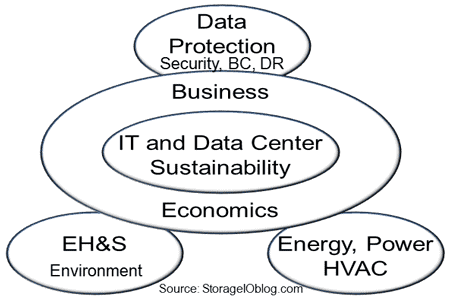
Likewise, you might even want to not be included in another other, let alone share your area with others. For example if your focus is on security you may not want to see or hear that data protection is part of sustainability, not to mention backup/restore, bc, dr and so forth.
Learning, education and knowledge sustainability
Part of sustainability is also continuing to learn about new things not only in your field or focus area, also in adjacent spaces.
Keep in mind that there is more of a data center or information factory than just a building or facility with power, cooling as there are the technologies, tools, people, process, delivery/distribution network, warehouse for storing raw and finished material, metrics and management that all go into delivering the product which is information services.
Hence there are many aspects to IT and data center sustainability and thus think more pragmatically about sustaining information factories, however lets also be realistic and not jump the shark by declaring everything as sustainable ;).
Check out the live talk chat that we had yesterday over at Data Center Acceleration by clicking here.
Some related more reading:
Green IT, Green Gap, Tiered Energy and Green Myths
The new Green IT: Efficient, Effective, Smart and Productive
Saving Money with Green IT: Time To Invest In Information Factories
PUE, Are you Managing Power, Energy or Productivity?
Green IT deferral blamed on economic recession might be result of green gap
IT and storage economics 101, supply and demand
The Green and Virtual Data Center (CRC Press) – Intel Recommended Reading List
Driving for Datacenter Sustainability
Live Chat 01/23: Building the Sustainable Datacenter
Ok, nuff said
Cheers
Gs
Greg Schulz – Author Cloud and Virtual Data Storage Networking (CRC Press), The Green and Virtual Data Center (CRC Press) and Resilient Storage Networks (Elsevier)
twitter @storageio
All Comments, (C) and (TM) belong to their owners/posters, Other content (C) Copyright 2006-2014