How to test your HDD SSD or all flash array (AFA) storage fundamentals

How to test your HDD SSD AFA Hybrid or cloud storage

server storage data infrastructure i/o hdd ssd all flash array afa fundamentals

Updated 2/14/2018

Over at BizTech Magazine I have a new article 4 Ways to Performance Test Your New HDD or SSD that provides a quick guide to verifying or learning what the speed characteristic of your new storage device are capable of.

An out-take from the article used by BizTech as a "tease" is:

These four steps will help you evaluate new storage drives. And … psst … we included the metrics that matter.

Building off the basics, server storage I/O benchmark fundamentals

The four basic steps in the article are:

  • Plan what and how you are going to test (what’s applicable for you)
  • Decide on a benchmarking tool (learn about various tools here)
  • Test the test (find bugs, errors before a long running test)
  • Focus on metrics that matter (what’s important for your environment)

Server Storage I/O performance

Where To Learn More

View additional NAS, NVMe, SSD, NVM, SCM, Data Infrastructure and HDD related topics via the following links.

Additional learning experiences along with common questions (and answers), as well as tips can be found in Software Defined Data Infrastructure Essentials book.

Software Defined Data Infrastructure Essentials Book SDDC

What This All Means

To some the above (read the full article here) may seem like common sense tips and things everybody should know otoh there are many people who are new to servers storage I/O networking hardware software cloud virtual along with various applications, not to mention different tools.

Thus the above is a refresher for some (e.g. Dejavu) while for others it might be new and revolutionary or simply helpful. Interested in HDD’s, SSD’s as well as other server storage I/O performance along with benchmarking tools, techniques and trends check out the collection of links here (Server and Storage I/O Benchmarking and Performance Resources).

Ok, nuff said, for now.

Gs

Greg Schulz – Microsoft MVP Cloud and Data Center Management, VMware vExpert 2010-2017 (vSAN and vCloud). Author of Software Defined Data Infrastructure Essentials (CRC Press), as well as Cloud and Virtual Data Storage Networking (CRC Press), The Green and Virtual Data Center (CRC Press), Resilient Storage Networks (Elsevier) and twitter @storageio. Courteous comments are welcome for consideration. First published on https://storageioblog.com any reproduction in whole, in part, with changes to content, without source attribution under title or without permission is forbidden.

All Comments, (C) and (TM) belong to their owners/posters, Other content (C) Copyright 2006-2026 Server StorageIO and UnlimitedIO. All Rights Reserved. StorageIO is a registered Trade Mark (TM) of Server StorageIO.

Server storage I/O Intel NUC nick knack notes – Second impressions

Storage I/O trends

Server storage I/O Intel NUC nick knack notes – Second impressions

This is the second of a two-part series about my first and second impressions of the Intel NUC (Next Unit Computing). In the first post (here) I give an overview and my first impressions while in this post lets look at options added to my NUC model 54250, first deployment use and more impressions.

Intel® NUC with Intel® Core™ i5 Processor and 2.5-Inch Drive Support (NUC5i5RYH) via Intel.com

What you will want to add to a NUC

Since the NUC is a basic brick with a processor mounted on its mother board, you will need to add memory, some type of persistent storage device (mSATA, SATA or USB based) and optionally a WiFi card.

One of the nice things about the NUC is that in many ways it is the equivalent functionality of a laptop or mini-tower without the extra overhead (cost, components, packaging) enabling you to customize as needed for your specific requirements. For example there is no keyboard, mouse, video screen, WiFi, Hard Disk Drive (HDD) or flash Solid State Device (SSD) included with an operating system pre-installed. There is no least memory required enabling you to decide how much to configure while using compatible laptop style memory. Video and monitors attach via HDMI or mini-port including VGA devices via an adapter cable. Keyboard and mouse if needed are handled via USB ports.

Here is what I added to my NUC model 5420.

1Crucial 16GB Kit (2 x 8GB) DDR3 1600 (PC3-12800) SODIMM 204-Pin Notebook Memory
1Intel Network 7260 WiFi Wireless-AC 7260 H/T Dual Band 2×2 AC+Bluetooth HMC. Here is link to Intel site for various drivers.
1500GB Samsung Electronics 840 EVO mSATA 0.85-Inch Solid State Drive
1SATA HDD, SSD or HHDD/SSHD (I used one of my existing drives)

Note that you will also need to supply some type of Keyboard Video Mouse (KVM), in my case I used a HDMI to VGA adapter cable to attach the NUC via HDMI (for video) and USB (keyboard and mouse) to my Startech KVM switch.

Following images show on the left Intel WiFi card installed and on the right, a Samsung 840 EVO mSATA 500GB flash SSD installed above the WiFi card. Also notice on the far right of the images the two DDR3 "notebook" class DRAM DIMM slots.

NUC WiFi cardmSATA SSD
Left: Intel WiFi card installed and Right Samsung EVO mSATA SSD card (sits above WiFi card)

Note that the NUC (as do many laptops) accepts 9mm or smaller thin 7mm height HDDs and SSDs in its SATA drive bay. I mention this because some of the higher-capacity 2TB 2.5" SFF drives are taller than 9m as shown in the above image and do not fit in the NUC internal SATA drive bay. While many devices and systems support 2.5" drive slots for HDD, SSD or HHDD/SSHDs, pay attention to the height and avoid surprises when something does not fit like it was assumed to.

2.5 HDD and SSDs
Low-profile and tall-profile 2.5" SFF HDDs

Additional drives and devices can be attached using external USB 3.0 ports including HDDs, SSDs or even USB to GbE adapters if needed. You will need to supply your own operating system, hypervisor, storage, networking or other software, such as Windows, *nix, VMware ESXi, Hyper-V, KVM, Xen, OpenStack or any of the various ZFS based (among others) storage appliances.

Unpacking and physical NUC installation

Initial setup and physical configuration of the NUC is pretty quick with the only tool needed being a Philips screw driver.
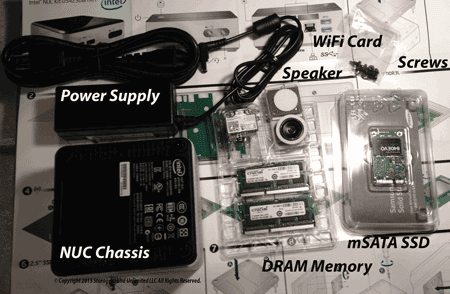
NUC and components ready for installation
Intel NUC 5420 and components ready for installation

With all the components including the NUC itself laid out for a quick inventory including recording serial numbers (see image above), the next step is to open up the NUC by removing four Philip screws from the bottom. Once the screws are removed and bottom plate removed, the SATA drive bay opens up to reach the slots of memory, mSATA SSD and WiFi card (see images below). Once the memory, mSATA and WiFi cards are installed, the SATA drive bay coverage those components and it is time to install a 2.5" standard height HDD or SSD. For my first deployment I installed temporarily installed on of my older HHDDs a 750GB Seagate Momentus XT that will be replaced by something newer soon.

NUC internal HDD/SSD slotNUC internal HDD installed
View of NUC with bottom cover removed, Left empty SATA drive bay, Right HDD installed

After the components are installed, it is time to replace the bottom cover plate of the NUC securing in place with the four screws previously removed. Next up is attaching any external devices via USB and other ports including KVM and LAN network connection. Once the hardware is ready, its time to power up the NUC and checkout the Visual BIOS (or UEFI) as shown below.

Intel NUC Visual BIOSIntel NUC Visual BIOS display
NUC VisualBIOS screen shot examples

At this point unless you have already installed an operating system, hypervisor or other software on a HDD, SSD or USB device, it is time to install your prefered software.

Windows 7

First up was Windows 7 as I already had an image built on the HHDD that required some drivers to be added. specifically, a visit to the Intel resources site (See NUC resources and links section later in this post) was made to get a LAN GbE, WiFi and USB drivers. Once those were installed the on-board GbE LAN port worked good as did the WiFi. Another driver that needed to be download was for a USB-GbE adapter to add another LAN connection. Also a couple of reboots were required for other Windows drivers and configuration changes to take place to correct some transient problems including KVM hangs which eventually cleared themselves up.

Windows 2012 R2

Following Windows 7, next up was a clean install of Windows 2012 R2 which also required some drivers and configuration changes. One of the challenges is that Windows 2012 R2 is not officially supported on the NUC with its GbE LAN and WiFi cards. However after doing some searches and reading a few posts including this and this, a solution was found and Windows 2012 R2 and its networking are working good.

Ubuntu and Clonezilla

Next up was a quick install of Ubuntu 14.04 which went pretty smooth, as well as using Clonezilla to do some drive maintenance, move images and partitions among other things.

VMware ESXi 5.5U2

My first attempt at installing a standard VMware ESXi 5.5U2 image ran into problems due to the GbE LAN port not being seen. The solution is to use a different build, or custom ISO that includes the applicable GbE LAN driver (e.g. net-e1000e-2.3.2.x86_64.vib) and some useful information at Florian Grehl site (@virten) and over at Andreas Peetz site (@VFrontDe) including SATA controller driver for xahci. Once the GbE driver was added (same driver that addresses other Intel NIC I217/I218 based systems) along with updating the SATA driver, VMware worked fine.

Needless to say there are many other things I plan on doing with the NUC both as a standalone bare-metal system as well as a virtual platform as I get more time and projects allow.

What about building your NUC alternative?

In addition to the NUC models available via Intel and its partners and accessorizing as needed, there are also special customized and ruggedized NUC versions similar to what you would expect to find with laptop, notebooks, and other PC based systems.

MSI Probox rear viewMSI Probox front view
Left MSI ProBox rear-view Right MSI ProBox front view

If you are looking to do more than what Intel and its partners offer, then there are some other options such as to increase the number of external ports among other capabilities. One option which I recently added to my collection of systems is an DIY (Do It Yourself) MSI ProBox (VESA mountable) such as this one here.

MSI Probox internal view
Internal view MSI ProBox (no memory, processor or disks)

With the MSI ProBox, they are essentially a motherboard with an empty single cpu socket (e.g. LGA 1150 up to 65W) for supporting various processors, two empty DDR3 DIMM slots, 2 empty 2.5" SATA ports among other capabilities. Enclosures such as the MSI ProBox give you flexibility creating something more robust beyond a basic NUC yet smaller than a traditional server depending on your specific needs.

Looking for other small form factor modular and ruggedized server options as an alternative to a NUC, than check out those from Xi3, Advantech, Cadian Networks, and Logic Supply among many others.

Storage I/O trends

First NUC impressions

Overall I like the NUC and see many uses for it from consumer, home including entertainment and media systems, video security surveillance as well as a small server or workstation device. In addition, I can see a NUC being used for smaller environments as desktop workstations or as a lower-power, lower performance system including as a small virtualization host for SOHO, small SMB and ROBO environments. Another usage is for home virtual lab as well as gaming among other scenarios including simple software defined storage proof of concepts. For example, how about creating a small cluster of NUCs to run VMware VSAN, or Datacore, EMC ScaleIO, Starwind, Microsoft SOFS or Hyper-V as well as any of the many ZFS based NAS storage software applications.

Pro’s – Features and benefits

Small, low-power, self-contained with flexibility to choose my memory, WiFi, storage (HDD or SSD) without the extra cost of those items or software being included.

Con’s – Caveats or what to look out for

Would be nice to have another GbE LAN port however I addressed that by adding a USB 3.0 to GbE cable, likewise would be nice if the 2.5" SATA drive bay supported tall height form-factor devices such as the 2TB devices. The work around for adding larger capacity and physically larger storage devices is to use the USB 3.0 ports. The biggest warning is if you are going to venture outside of the official supported operating system and application software realm be ready to load some drivers, possibly patch and hack some install scripts and then plug and pray it all works. So far I have not run into any major show stoppers that were not addressed with some time spent searching (google will be your friend), then loading the drivers or making configuration changes.

Additional NUC resources and links

Various Intel products support search page
Intel NUC support and download links
Intel NUC model 54250 page, product brief page (and PDF version), and support with download links
Intel NUC home theater solutions guide (PDF)
Intel HCL for NUC page and Intel Core i5-4250U processor speeds and feeds
VMware on NUC tips
VMware ESXi driver for LAN net-e1000e-2.3.2.x86_64
VMware ESXi SATA xahci driver
Server storage I/O Intel NUC nick knack notes – First impressions
Server Storage I/O Cables Connectors Chargers & other Geek Gifts (Part I and Part II)
Software defined storage on a budget with Lenovo TS140

Storage I/O trends

What this all means

Intel NUC provides a good option for many situations that might otherwise need a larger mini-tower desktop workstations or similar systems both for home, consumer and small office needs. NUC can also be used for specialized pre-configured application specific situations that need low-power, basic system functionality and expansion options in a small physical footprint. In addition NUC can also be a good option for adding to an existing physical and virtual LAB or as a basis for starting a new one.

So far I have found many uses for NUC which free up other systems to do other tasks while enabling some older devices to finally be retired. On the other hand like most any technology, while the NUC is flexible, its low power and performance are not enough to support other applications. However the NUC gives me flexibility to leverage the applicable unit of compute (e.g. server, workstation, etc.) that is applicable to a given task or put another way, use the right technology tool for the task at hand.

For now I only need a single NUC to be a companion to my other HP, Dell and Lenovo servers as well as MSI ProBox, however maybe there will be a small NUC cluster, grid or ring configured down the road.

What say you, do you have a NUC if so, how is it being used and tips, tricks or hints to share with others?

Ok, nuff said for now.

Cheers
Gs

Greg Schulz – Author Cloud and Virtual Data Storage Networking (CRC Press), The Green and Virtual Data Center (CRC Press) and Resilient Storage Networks (Elsevier)
twitter @storageio

All Comments, (C) and (TM) belong to their owners/posters, Other content (C) Copyright 2006-2023 StorageIO and UnlimitedIO LLC All Rights Reserved

Part II 2014 Server Storage I/O Geek Gift ideas

Part II 2014 Server Storage I/O Geek Gift ideas

server storage I/O trends

This is part two of a two part series for what to get a geek for a gift, read part one here.

KVM switch

Not to be confused with a software defined network (SDN) switch for the KVM virtualization hypervisor, how about the other KVM switch?

kvm switch
My KVM switch in use, looks like five servers are powered on.

If you have several servers or devices that need a Keyboard Video Mouse connection, or are using A/B box or other devices, why not combine using a KVM switch. I bought the Startech shown above from Amazon which works out to be under $40 a port (connection) meaning I do not have to have Keyboards, Video monitors or Mouse for each of those systems.

With my KVM shown above, I have used the easy setup to name each of the ports via the management software so that when a button is pressed, not only does the applicable screen appear, also a graphic text message overlay tell me which server is being displayed. This is handy for example as I have some servers that are identical (e.g. Lenovo TS140s) running VMware that a quick glance can help me verify I’m on the right one (e.g. without looking at the VMware host name or IP). This feature is also handy during power on self test (POST) when the servers physical or logical (e.g. VMware, Windows, Hyper-V, Ubuntu, Openstack, etc..) identity is known. Another thing I like about these is that on the KVM switch there is a single VGA type connector, while on the server end there is a VGA connector for attaching to the monitor port of the device, and a break out cable with USB for attaching to server to get Keyboard and Mouse.

Single drive shoe box

Usually things are in larger server or storage systems enclosures, however now and then there is the need to supply power to a HDD or SSD along with a USB or eSATA interface for attaching to a system. These are handy and versatile little aluminum enclosures.

single drive sata enclosuredisk enclosure

Note that you can now also find these types of cables that can do same or similar function for in side a server connection (check out this cable among others at Amazon)

USB-SATA cable

It would be easy to assume that everybody would have these by now particular since everybody (depending on who you listen to or what you read) has probably converted from a HDD to SSD. However for those who have not done an HDD to SSD, or simply a HDD to newer HDD conversion, or that have an older HDD (or SSD) lying around, these cables come in very handy. attach one end (e.g. the SATA end) to a HDD or SSD and the other to a USB port on a laptop, tablet or server. Caveat however with these is that they generally only have power (via USB) for a 2.5″ type drive so for a larger more power-hungry 3.5″ device, you would need a different powered cable, or small shoe box type enclosure.

eSATA cable
(Left) USB to SATA and (Right) eSATA to SATA cables

Mophie USB charger

There are many different types of mobile device chargers available along with multi-purpose cables. I like the Mophie which I received at an event from NetApp (Thanks NetApp) and the flexible connector I received from Dyn while at AWS re:Invent 2014 (Thanks Dyn, I’m also a Dyn customer fwiw).
power chargerpower cable
(Left) Mophie Power station and (Right) multi-connector cable

The Mohpie has USB connector so that you can charge it via a charging station or via a computer, as well as attach a USB to Apple or other device connector. There is also a small connector for attach to other devices. This is where the dandy Dyn device comes into play as it has a USB as well as Apple and many other common connectors as shown in the figure below. Google around and I’m sure you can find both for sale, or as giveaways or something similar.

SAS SATA Interposer

sas interposerserver storage power
(Left) SAS to SATA interposer (Right) Molex power with SATA connector to SAS

Note that the above are intended for passing a SAS signal from a device such as HDD or SSD to a SAS based controller that happens to have SATA mechanical or keyed interfaces such as with some servers. This means that the real controller needs to be SAS and the attached drives can be SATA or SAS keeping in mind that a SATA device can plug into a SAS controller however not vise versa. You can find the above at Amazon among other venues. Need a dual-lane SAS connector as an alternative to the one shown above on the right, then check this one out at Amazon.

Need to learn more about the many different facets of SAS and related technologies including how it coexists with iSCSI, Fibre Channel (FC), FCoE, InfiniBand and other interfaces, how about getting a free copy of SAS SANs for Dummies?

SAS SANS for dummies

There are also these for doing board level connections

esata connectorsata to esata cablesata male to male gender changer
Some additional SAS and SATA drive connectors

In the above on the left are a female to female SATA cable with a male to male SATA gender changer attached to be used for example between a storage device and the SATA connector port on a servers motherboard, HBA or RAID controller. In the middle are shown some SATA female to female cables, as well as a SATA to eSATA (external SATA) cable (middle), and on the right are some SATA Male to SATA Male gender changes also shown being used on the left in the above figures.

Internal Power cable / connectors

If you or your geek are doing things in the lab or other environment adding and reconfiguring devices such as some of those mentioned above (or below), sooner or later there will be the need to do something with power cables and connectors.

power meter
Various cables, adapters and extender

In the above figure are shown (top to bottom) a SATA male to molex, SATA female to SATA male and to its right SATA female to Molex. Below that are two SATA females to Molex, below that is a SATA male to dual Molex and on the bottom is a single SATA to dual SATA. Needless to say there are many other combinations of connectors as well as different genders (e.g. Male or Female) along with extenders. As mentioned above, pay attention to manufacturers recommend power draw and safety notices to prevent accidental electric shock or fire.

Intel Edison kit for IoT and IoD

Are you or your geek into the Internet of Things (IoT) or Internet of Devices (IoD) or other similar things and gadgets? Have you heard about Intel’s Edison breakout board for doing software development and attachment of various hardware things? Looking for something to move beyond a Raspberry Pi system?

Intel Edison boardIntel Edison kits
Images via Intel.com

Over the hills, through the woods WiFi

This past year I found Nanostation extended WiFi devices that solved a challenge (problem) which was how to get a secure WiFi signal up to a couple hundred yards through a thick forest between some hill’s.


Image via UBNT.com, check out their other models as well as resources for different deployments

The problem was it was to far and too many tree’s with leaves use a regular WiFi connection and too far to run cable if I did not need to. I found the solution by getting a pair of the Nanostation M2 putting them into bridge mode, then doing some alignment with their narrow beam antennas to bounce a signal through the woods. For those who simply need to go a long distance, these devices can be reconfigured to go several km’s line of sight. Click on the image above to see other models of the Nanostation as well as links to various resources on how they can be used for other things or deployments.

How about some software

  • UpDraft Backup – This is a WordPress blog plugin that I use to back up my entire web including the templates, plug-ins, MySQL database and all other related components. While my dedicated private server gets backed up by my service provider (Bluehost), I wanted an extra detail of protection along with a copy placed at a different place (e.g. at my AWS account). Updraft is an example of an emerging class of tools for backing up and protecting cloud based and cloud born data. For example EMC recently acquired cloud backup startup Spanning who has the ability of protecting Salesforce, Google and other cloud based data.
  • Visual ESXtop – This is a great free tool that provides a nice interface and remote access for doing ESXtop functions normally accomplished from the ESXi console.
  • Microsoft Diskspd – If you or your geek is into server storage I/O performance and benchmark that has a Windows environment and looking for something besides Iometer, have them download the Microsoft Diskspd free utility.
  • Futuremark PCmark – Speaking of server storage I/O performance, check out Futuremark PCmark which will give your computer a great workout from graphics and video to compute, storage I/O and other common tasks.
  • RV Tools – Need to know more about your VMware virtual environment, take a quick inventory or something else, then your geek should have a copy of RV Tools from Robware.
  • iVMControl – For that vgeek how wants to be able to do simple VMware tasks from an iPhone, check out iVMControl tools. Its great, I don’t use it a lot, however there are times where I don’t need to or want to use a tablet or PC to reach my VMware environment, that’s when this virtual gadget comes into play.

Livescribe Digital Pen and Paper

How about a Livescribe digital pen and paper? Sure you can use a PC, Apple or other tablet, however some things are still easier done on a traditional paper and virtual pen. I got one of these about a year ago and use it for note taking, mocking up slides for presentations and in some cases have used this for creating figures and other things. It would be easy to see and place the Livescribe and a Windows or other tablet as an either or competitive however for me, I still see where they are better together addressing different things, at least for now.

livescribe digital penlivescribe digital pen

(Left) using my Livescribe and Echo digital pen (Right) resulting exported .Png

Tip: I you noticed in the above left image (e.g. the original) the lines in the top figure, compared to the lines in the figure on the right are different. If you encounter your livescribe causing lines to run on or into each other it is because your digital pen tip is sticking. It’s easy to check by looking at the tip of your digital pen and see if the small red light is on or off, or if it stays on when you press the pen tip. If it stays on, reset the pen tip. Also when you write, make sure to lift up on the pen tip so that it releases, otherwise you will get results like those shown on the right.

livescribe digital penlivescribe digital pen
(Left) Livescribe Digital Desktop (Middle) Imported Digital Document (Right) Exported PNG

Also check out this optional application that turns a Livescribe Echo pen like mine into a digital tablet allowing you to draw on-screen with certain applications and webinar tools.

Some books for the geek

Speaking of reading, for those who are not up on the No SQL and alternative SQL based databases including Mongo, Hbase, Riak, Cassandra, MySQL, add Seven Databases in Seven Weeks to your liust. Click on the image to read my book review of it as well as links to order it from Amazon. Seven Databases in Seven Weeks (A Guide to Modern Databases and the NoSQL Movement) is a book written Eric Redmond (@coderoshi) and Jim Wilson (@hexlib), part of The Pragmatic Programmers (@pragprog) series that takes a look at several non SQL based database systems.

seven database nosql

Where to get the above items

  • Ebay for new and used
  • Amazon for new and used
  • Newegg
  • PC Pit stop
  • And many other venues

What this all means

Note: Some of the above can be found at your favorite trade show or conference so keep that in mind for future gift giving.

What interesting geek gift ideas or wish list items do you have?

Of course if you have anything interesting to mention feel free to add it to the comments (keep it clean though ;) or feel free to send to me for future mention.

In the meantime have a safe and happy holiday season for what ever holiday you enjoy celebrating anytime of the year.

Ok, nuff said, for now…

Cheers gs

Greg Schulz – Author Cloud and Virtual Data Storage Networking (CRC Press), The Green and Virtual Data Center (CRC Press) and Resilient Storage Networks (Elsevier)
twitter @storageio

All Comments, (C) and (TM) belong to their owners/posters, Other content (C) Copyright 2006-2026 Server StorageIO and UnlimitedIO LLC All Rights Reserved

Is Computer Data Storage Complex? It Depends

Is Computer Data Storage Complex? It Depends

I often get asked, or, told that computer data storage is complex with so many options to choose from, apples to oranges comparison among other things.

On a recent trip to Europe while being interviewed by a Dutch journalist in Nijkerk Holland at a Brouwer Storage Consultancy event I was presenting at, the question came up again about storage complexity. Btw, you can read the article on data storage industry trends here (its in dutch).

I hesitated and thought for a moment and responded that in some ways it’s not as complex as some make it seem, although there is more to data storage than just cost per capacity. As I usually do when asked or told how complex data storage is my response is a mixed yes it (storage, data and information infrastructure) are complex, however lets put it in perspective which is storage any more complex than other things?

Our conversation then evolved with an example that I find shopping for an automobile complex unless I know exactly what I’m looking for. After all there are cars trucks SUV’s used new buy lease different manufacturers makes and models speeds cargo capacity management tools and interfaces not to mention metrics and fuel.

This is where I usually mention how IMHO buying a new car or vehicle is with all the different options, that is unless you know what you want, or know your selection criteria and options. Same with selecting a new laptop computer, tablet or smart phone, not to mention a long list of other things that to the outsiders can also seem complex, intimidating or overwhelming. However lets take a step back to look at storage then return to compare some other things that may be confusing to those who are not focused on them.

Stepping back looking at storage

Similar to other technologies, there are different types of data storage to meet various needs from performance to space capacity as well as support various forms of scaling.

server and storage I/O flow
Server and storage I/O fundamentals

Storage options
Various types of storage devices including HDD’s, SSHD/HHDD’s and SSD’s

Storage type options
Various types of storage devices

Storage I/O decision making
Storage options, block, file, object, ssd, hdd, primary, secondary, local and cloud

Shopping for other things can be complex

During my return trip to the US from the Dutch event, I had a layover at London Heathrow (LHR) and walking the concourse it occurred to me that while there are complexities involved with different technologies including storage, data and information infrastructures, there were other complexities.

Same thing with shoes so any differ options not to mention cell phones or laptops and tablets, PCIe, or how about tv’s?

I wan to go on a trip do I book based on lowest cost for air fare then hotel and car rental, or do I purchase a package? For the air fare is it the cheapest yet that takes all day to get from point a to b via plane changes at points c d and e not to mention paying extra fees vs paying a higher price for a direct flight with extra amenities?

Getting hungry so what to do for dinner, what type of cuisine or food?

Hand Baggage options
How about a new handbag or perhaps shoes?

Baggage options
How about a new backpack, brief case or luggage?

Beverage options
What to drink for a beverage, so many options unless you know what you want.

PDA options
Complexity of choosing what cell phone, PDA or other electronics

What to read options
How about what to read including print vs. online accessible content?

How about auto parts complexity

Once I got home from my European trip I had some mechanical things to tend to including replacing some spark plugs.

Auto part options
How about automobile parts from tires, to windshield wiper blades to spark plugs?

Sure if you know the exact part number and assuming that part number has not changed, then you can start shopping for the part. However recently I had a part number based on a vehicle serial number (e.g. make, model, year, etc) only to receive the wrong part. Sure the part numbers were correct, however along the line somewhere the manufacture made a change and not all downstream vendors knew about the part change, granted I eventually received the correct part.

Back to tech and data infrastructures

Ok, hopefully you got the point from the above examples among many others in that we live in world full of options and those options can bring complexity.

What type of network or server? How about operating system, browser, database, programming or development language as there are different needs and options?

Sure there are many storage options as not everything is the same.

Likewise while there can be simple answer with a trend of what to use before the question is understood (perhaps due to a preference) or explained, the best or applicable answer may be it depends. However saying it depends may seem complex to those who just want a simple answer.

Closing Comments

So is storage more complex than other technologies, tools, products or services?

What say you?

Ok, nuff said, for now…

Cheers
Gs

Greg Schulz – Author Cloud and Virtual Data Storage Networking (CRC Press), The Green and Virtual Data Center (CRC Press) and Resilient Storage Networks (Elsevier)
twitter @storageio

All Comments, (C) and (TM) belong to their owners/posters, Other content (C) Copyright 2006-2026 Server StorageIO and UnlimitedIO LLC All Rights Reserved

What does server storage I/O scaling mean to you?

What does server storage I/O scaling mean to you?

Scaling means different things to various people depending on the context or what it is referring to.

For example, scaling can me having or doing more of something, or less as well as referring to how more, or less of something is implemented.

Scaling occurs in a couple of different dimensions and ways:

  • Application workload attributes – Performance, Availability, Capacity, Economics (PACE)
  • Stability without compromise or increased complexity
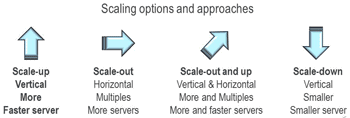
  • Dimension and direction – Scaling-up (vertical), scaling-out (horizontal), scaling-down

Scaling PACE – Performance Availability Capacity Economics

Often I hear people talk about scaling only in the context of space capacity. However there are aspects including performance, availability as well as scaling-up or scaling-out. Scaling from application workloads perspectives include four main group themes which are performance, availability, capacity and economics (as well as energy).

  • Performance – Transactions, IOP’s, bandwidth, response time, errors, quality of service
  • Availability – Accessibility, durability, reliability, HA, BC, DR, Backup/Restore, BR, data protection, security
  • Capacity – Space to store information or place for workload to run on a server, connectivity ports for networks
  • Economics – Capital and operating expenses, buy, rent, lease, subscription

Scaling with Stability

The latter of the above items should be thought of more in terms of a by-product, result or goal for implementing scaling. Scaling should not result in a compromise of some other attribute such as increasing performance and loss of capacity or increased complexity. Scaling with stability also means that as you scale in some direction, or across some attribute (e.g. PACE), there should not be a corresponding increase in complexity of management, or loss of performance and availability. To use a popular buzz-term scaling with stability means performance, availability, capacity, economics should scale linear with their capabilities or perhaps cost less.

Scaling directions: Scaling-up, scaling-down, scaling-out

server and storage i/o scale options

Some examples of scaling in different directions include:

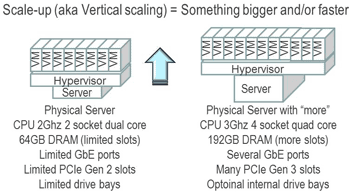
  • Scaling-up (vertical scaling with bigger or faster)
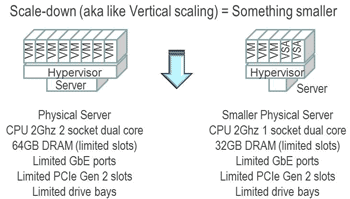
  • Scaling-down (vertical scaling with less)
  • Scaling-out (horizontal scaling with more of what being scaled)
  • Scaling-up and out (combines vertical and horizontal)

Of course you can combine the above in various combinations such as the example of scaling up and out, as well as apply different names and nomenclature to see your needs or preferences. The following are a closer look at the above with some simple examples.

server and storage i/o scale up
Example of scaling up (vertically)

server and storage i/o scale down
Example of scaling-down (e.g. for smaller scenarios)

server and storage i/o scale out
Example of scaling-out (horizontally)

server and storage i/o scale out
Example of scaling-out and up(horizontally and vertical)

Summary and what this means

There are many aspects to scaling, as well as side-effects or impacts as a result of scaling.

Scaling can refer to different workload attributes as well as how to support those applications.

Regardless of what you view scaling as meaning, keep in mind the context of where and when it is used and that others might have another scale view of scale.

Ok, nuff said (for now)…

Cheers gs

Greg Schulz – Author Cloud and Virtual Data Storage Networking (CRC Press), The Green and Virtual Data Center (CRC Press) and Resilient Storage Networks (Elsevier)
twitter @storageio

All Comments, (C) and (TM) belong to their owners/posters, Other content (C) Copyright 2006-2026 Server StorageIO and UnlimitedIO LLC All Rights Reserved

SNIA announces Cloud Data Management Initiative (CDMI) V1.1

SNIA announces Cloud Data Management Initiative (CDMI) V1.1

In case you missed it, the Storage Networking Industry Association (SNIA) recently released their version 1.1 of its Cloud Data Management Interface (CDMI) specification.

Highlights of CDMI version 1.1 include:

  • New functionality to ease CDMI implementation with other cloud API’s (e.g. AWS S3, OpenStack Swift, etc.)
  • Expanded cloud data services along with backwards compatible to earlier versions among other enhancements.
  • Check out the full specification here.

    Speaking of SNIA and CDMI, check out this pod cast post of CDMI in a conversation with Wayne Adams and David Dale of SNIA.

    Ok, nuff said

    Cheers gs

    Greg Schulz – Author Cloud and Virtual Data Storage Networking (CRC Press), The Green and Virtual Data Center (CRC Press) and Resilient Storage Networks (Elsevier)
    twitter @storageio

    All Comments, (C) and (TM) belong to their owners/posters, Other content (C) Copyright 2006-2026 Server StorageIO and UnlimitedIO LLC All Rights Reserved

    CompTIA needs input for their Storage+ certification, can you help?

    CompTIA needs input for their Storage+ certification, can you help?

    The CompTIA folks are looking for some comments and feedback from those who are involved with data storage in various ways as part of planning for their upcoming enhancements to the Storage+ certification testing.

    As a point of disclosure, I am member of the CompTIA Storage+ certification advisory committee (CAC), however I don’t get paid or receive any other type of renumeration for contributing my time to give them feedback and guidance other than a thank, Atta boy for giving back and playing it forward to help others in the IT community similar to what my predecessors did.

    I have been asked to pass this along to others (e.g. you or who ever forwards it on to you).

    Please take a few moments and feel free to share with others this link here to the survey for CompTIA Storage+.

    What they are looking for is to validate the exam blueprint generated from a recent Job Task Analysis (JTA) process.

    In other words, does the certification exam show real-world relevance to what you and your associates may be doing involved with data storage.

    This is opposed to being aligned with those whose’s job it is to create test questions and may not understand what it is you the IT pro involved with storage does or does not do.

    If you have ever taken a certification exam test and scratched your head or wondered out why some questions that seem to lack real-world relevance were included, vs. ones of practical on-the-job experience were missing, here’s your chance to give feedback.

    Note that you will not be rewarded with an Amex or Amazon gift card, Starbucks or Dunkin Donuts certificates, free software download or some other incentive to play and win, however if you take the survey let me know and will be sure to tweet you an Atta boy or Atta girl! However they are giving away a free T-Shirt to every 10 survey takers.

    Btw, if you really need something for free, send me a note (I’m not that difficult to find) as I have some free copies of Resilient Storage Networking (RSN): Designing Flexible Scalable Data Infrastructures (Elsevier) you simply pay shopping and handling. RSN can be used to help prepare you for various storage testing as well as other day-to-day activities.

    CompTIA is looking for survey takers who have some hands-on experience or involved with data storage (e.g. can you spell SAN, NAS, Disk or SSD and work with them hands-on then you are a candidate ;).

    Welcome to the CompTIA Storage+ Certification Job Task Analysis (JTA) Survey

  • Your input will help CompTIA evaluate which test objectives are most important to include in the CompTIA Storage+ Certification Exam
  • Your responses are completely confidential.
  • The results will only be viewed in the aggregate.
  • Here is what (and whom) CompTIA is looking for feedback from:

  • Has at least 12 to 18 months of experience with storage-related technologies.
  • Makes recommendations and decisions regarding storage configuration.
  • Facilitates data security and data integrity.
  • Supports a multiplatform and multiprotocol storage environment with little assistance.
  • Has basic knowledge of cloud technologies and object storage concepts.
  • As a small token of CompTIA appreciation for your participation, they will provide an official CompTIA T-shirt to every tenth (1 of every 10) person who completes this survey. Go here for official rules.

    Click here to complete the CompTIA Storage+ survey

    Contact CompTIA with any survey issues, research@comptia.org

    What say you, take a few minutes like I did and give some feedback, you will not be on the hook for anything, and if you do get spammed by the CompTIA folks, let me know and I in turn will spam them back for spamming you as well as me.

    Ok, nuff said

    Cheers gs

    Greg Schulz – Author Cloud and Virtual Data Storage Networking (CRC Press), The Green and Virtual Data Center (CRC Press) and Resilient Storage Networks (Elsevier)
    twitter @storageio

    All Comments, (C) and (TM) belong to their owners/posters, Other content (C) Copyright 2006-2026 Server StorageIO and UnlimitedIO LLC All Rights Reserved

    VMware VVOLs storage I/O fundementals (Part 1)

    VMware VVOL’s storage I/O fundamentals (Part I)

    Note that this is a three part series with the first piece here (e.g. Are VMware VVOL’s in your virtual server and storage I/O future?), the second piece here (e.g.VMware VVOL’s and storage I/O fundamentals Part 1) and the third piece here (e.g. VMware VVOL’s and storage I/O fundamentals Part 2).

    Some of you may already be participating in the VMware beta of VVOL involving one of the initial storage vendors also in the beta program.

    Ok, now let’s go a bit deeper, however if you want some good music to listen to while reading this, check out @BruceRave GoDeepMusic.Net and shows here.

    Taking a step back, digging deeper into Storage I/O and VVOL’s fundamentals

    Instead of a VM host accessing its virtual disk (aka VMDK) which is stored in a VMFS formatted data store (part of ESXi hypervisor) built on top of a SCSI LUN (e.g. SAS, SATA, iSCSI, Fibre Channel aka FC, FCoE aka FC over Ethernet, IBA/SRP, etc) or an NFS file system presented by a storage system (or appliance), VVOL’s push more functionality and visibility down into the storage system. VVOL’s shift more intelligence and work from the hypervisor down into the storage system. Instead of a storage system simply presenting a SCSI LUN or NFS mount point and having limited (coarse) to no visibility into how the underlying storage bits, bytes as well as blocks are being used, storage systems gain more awareness.

    Keep in mind that even files and objects still get ultimately mapped to pages and blocks aka sectors even on nand flash-based SSD’s. However also keep an eye on some new technology such as the Seagate Kinetic drive that instead of responding to SCSI block based commands, leverage object API’s and associated software on servers. Read more about these emerging trends here and here at objectstoragecenter.com.

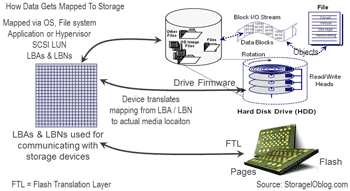
    With a normal SCSI LUN the underlying storage system has no knowledge of how the upper level operating system, hypervisor, file system or application such as a database (doing raw IO) is allocating the pages or blocks of memory aka storage. It is up to the upper level storage and data management tools to map from objects and files to the corresponding extents, pages and logical block address (LBA) understood by the storage system. In the case of a NAS solution, there is a layer of abstractions placed over the underlying block storage handling file management and the associated file to LBA mapping activity.

    Storage I/O basics
    Storage I/O and IOP basics and addressing: LBA’s and LBN’s

    Getting back to VVOL, instead of simply presenting a LUN which is essentially a linear range of LBA’s (think of a big table or array) that the hypervisor then manages data placement and access, the storage system now gains insight into what LBA’s correspond to various entities such as a VMDK or VMX, log, clone, swap or other VMware objects. With this more insight, storage systems can now do native and more granular functions such as clone, replication, snapshot among others as opposed to simply working on a coarse LUN basis. The similar concepts extend over to NAS NFS based access. Granted, there are more to VVOL’s including ability to get the underlying storage system more closely integrated with the virtual machine, hypervisor and associated management including supported service manage and classes or categories of service across performance, availability, capacity, economics.

    What about VVOL, VAAI and VASA?

    VVOL’s are building from earlier VMware initiatives including VAAI and VASA. With VAAI, VMware hypervisor’s can off-load common functions to storage systems that support features such as copy, clone, zero copy among others like how a computer can off-load graphics processing to a graphics card if present.

    VASA however provides a means for visibility, insight and awareness between the hypervisor and its associated management (e.g. vCenter etc) as well as the storage system. This includes storage systems being able to communicate and publish to VMware its capabilities for storage space capacity, availability, performance and configuration among other things.

    With VVOL’s VASA gets leveraged for unidirectional (e.g. two-way) communication where VMware hypervisor and management tools can tell the storage system of things, configuration, activities to do among others. Hence why VASA is important to have in your VMware CASA.

    What’s this object storage stuff?

    VVOL’s are a form of object storage access in that they differ from traditional block (LUN’s) and files (NAS volumes/mount points). However, keep in mind that not all object storage are the same as there are object storage access and architectures.

    object storage
    Object Storage basics, generalities and block file relationships

    Avoid making the mistake of when you hear object storage that means ANSI T10 (the folks that manage the SCSI command specifications) Object Storage Device (OSD) or something else. There are many different types of underlying object storage architectures some with block and file as well as object access front ends. Likewise there are many different types of object access that sit on top of object architectures as well as traditional storage system.

    Object storage I/O
    An example of how some object storage gets accessed (not VMware specific)

    Also keep in mind that there are many different types of object access mechanism including HTTP Rest based, S3 (e.g. a common industry defacto standard based on Amazon Simple Storage Service), SNIA CDMI, SOAP, Torrent, XAM, JSON, XML, DICOM, IL7 just to name a few, not to mention various programmatic bindings or application specific implementations and API’s. Read more about object storage architectures, access and related topics, themes and trends at www.objecstoragecenter.com

    Lets take a break here and when you are ready, click here to read the third piece in this series VMware VVOL’s and storage I/O fundamentals Part 2.

    Ok, nuff said (for now)

    Cheers gs

    Greg Schulz – Author Cloud and Virtual Data Storage Networking (CRC Press), The Green and Virtual Data Center (CRC Press) and Resilient Storage Networks (Elsevier)
    twitter @storageio

    All Comments, (C) and (TM) belong to their owners/posters, Other content (C) Copyright 2006-2026 Server StorageIO and UnlimitedIO LLC All Rights Reserved

    April and May 2014 Server and StorageIO Update newsletter


    Server and StorageIO Update newsletter – April and May 2014

    Welcome to the April and May 2014 edition of the StorageIO Update (newsletter) containing trends perspectives on cloud, virtualization and data infrastructure topics.

    The good news is that while spring is running late (as is this newsletter ;) here in the Stillwater MN area as well as other parts of the world, both are finally here. To say that a lot has been going on and things busy would be an understatement, however that is probably also the situation with you as well. So what has been going on during April and May 2014?

    Industry and Technology Updates

    Sony and Fujifilm (with their partner IBM) are trading marketing and proof of concept (POC) lab material in the efforts to show tape is still alive for data storage. Sony announced a month or so ago that it was moving the bar to 185TB per tape (without dedupe). Not to be out done, Fujifilm announced in late May that they in conjunction with IBM have a POC for a 154 TB LTO in the works.

    Greg Schulz Storage I/OGreg Schulz on break
    On the Hard Disk Drive (HDD) front, Seagate released a new 6TB device that they claim to be fast. I asked Seagate to send me one of the drives to see how fast it really is vs. their claims. While I have not completed all tests yet, what I can tell you is that the 6TB 3.5" 12Gbps SAS 7.2K RPM drive is like an american football linebacker or fullback. Its big, bulky, high-capacity, resilient with 10 to the 15 bit error rate (higher than normal high-capacity HDD’s) and fast.

    Sure the 6TB HDD is not in the speed race of a quick SSD or SSHD or 15K, however I was surprised at just how fast it is for its space capacity. Watch for a follow-up review in the not so distant future and if a WD 6TB drive were to show up on my door step can give some perspectives on that as well.

    As for SSD, they are following the trend paths of tape and HDD’s of increasing in space capacity, coming down in price and improving on resiliency. While I see HDD and even tape surviving for some time, granted in different roles, I’m also a firm believer that flash SSD in some form are in your future. The question is how much, when, where, with what and from whom. Needless to say there is plenty of SSD related hardware and software activity occurring in the StorageIO labs ;).

    Vendors and revenue earnings, is there storage slowdown?

    In other industry news and activity, vendor quarterly earnings are out and there is mixed information (see this recent post of if there is an information recession). IBM is one of those who have announced lowered storage related revenues as NetApp had mixed results (as did other vendors). In addition IBM is officially saying they are finally dropping the NetApp (FAS/ONTAP) based N series (was originally reported a week or so ago via Bloomberg). Note that IBM will continue to OEM NetApp E series (e.g. Engenio based). Some of you might remember (or do a Google search) that IBM indicated a few years back that it was De emphasizing the N series or moving away from it. Perhaps this time they really mean it while NetApp could move to embrace those VAR’s and IBM business partners to sell NetApp vs. IBM branded versions of the product. Here are some more perspectives appearing in SearchStorage. Watch for more about NetApp in a future follow-up post.

    In some other industry news, you might remember back in the February StorageIO update newsletter there was mention of Avago buying LSI. Now Avago is selling the flash business of LSI to Seagate for about $450M USD in the ongoing flash dance for cache and cash.

    Staying busy is a good thing

    What have I been doing during April and May 2014 to stay busy besides getting ready for spring and summer fun including in and around the water?

    • Attended NAB 2014 in Las Vegas where it is not just about archiving pertaining to data storage
    • Presented backup, restore, BC, DR and archiving including a keynote at the SNIA DSI conference
    • Was back in Las Vegas to attend EMCworld, I have some updates in the works from that event
    • Presented several BrightTalk Webinars (see events below) with more coming up in June
    • Release of new ITP white paper and StorageIO lab proof points with more in the works
    • More videos and pod casts, technology reviews including servers among other things
    • Participated including keynote at a vendor neutral archiving event in Europe
    • Providing industry commentary in different venues (see below) along with some writing
    • Not to mention various client consulting projects
    • Remember, work hard play hard, play hard and work hard!

    Whats in the works?

    Several projects and things are in the works that will show themselves in the coming weeks or months if not sooner. Some of which are more proof points coming out of the StorageIO labs involving software defined, converged, cloud, virtual, SSD, data protection and more.

    Speaking of Software Defined, join me for a free BrightTalk Webinar on June 12 on the many faces and facets of virtualization and software defined storage. Learn more about that event here as well as in the activities section down below.

    Watch for more StorageIO posts, commentary, perspectives, presentations, webinars, tips and events on information and data infrastructure topics, themes and trends. Data Infrastructure topics include among others cloud, virtual, legacy server, storage I/O networking, data protection, hardware and software.

    Enjoy this edition of the StorageIO Update newsletter and look forward to catching up with you live or online while out and about this spring.

    Ok, nuff said (for now)

    Cheers gs

    April and May 2014 Industry trend and perspectives

    Tips, commentary, articles and blog posts

    StorageIO Industry Trends and Perspectives

    The following is a synopsis of some StorageIOblog posts, articles and comments in different venues on various industry trends, perspectives and related themes about clouds, virtualization, data and storage infrastructure topics among related themes.

    StorageIO comments and perspectives in the news

    SearchStorage: Comments on IBM dropping N series, NetApp is still OEM to IBM
    InfoStor: Comments on Software Defined Storage: 10 Things You Need to Know
    SearchDataBackup: Comments about buying guides for enterprise Hard Disk Drives (HDD)
    SearchDataBackup: Conversation about data protection modernization
    InfoStor: Comments on cloud storage, 10 things you need to know
    InfoStor: Comments on Data Archiving: Life Beyond Compliance
    NetworkComputing: Comments on Sorting Through Storage Industry Hype
    StateTech: Comments on Secure Erasing HDDs and SSDs including planning in advance
    SNIA: Comments on CDMI Cloud Management Conformance Testing
    EnterpriseStorageForum: Comments on Hybrid Cloud Storage Tips
    NetworkComputing: Comments on Sorting Through Storage Industry Hype

    StorageIO tips and articles appearing in various venues

    StorageIO tips and articles

    Via InformationSecurityBuzz:  Dark Territories MH370 Do You Know Where Your Information Is? We still dont know 100% where the missing Malaysian airlines flight 370 is which amplifies the fact that there are still dar territories or gaps in coverage in this large world. Likewise there are gaps in coverage in many IT environments yet tools and technologies are available to gain better situational awareness and insight.

    Via The Virtualization Practice: This piece looks at the EMC ViPR V1.1 and SRM V3.0 (Software Defined Storage Management) announcements from earlier this year, along with links to earlier announcement and technology analysis. Note that EMC announced May 5, 2014 ViPR 2.0 along with their new Elastic Cloud Storage Appliance (ECS) among other enhancements at EMC World. Additional perspectives on ViPR 2.0, Elastic Cloud Storage Appliance and EMCworld announcement summary analysis can be found here in this video (with text) that I did (produced via TechTarget) while at EMCworld 2014. Watch for more coverage of ViPR 2.0 and other related new as well as updated items from EMCworld 2014 in upcoming posts, articles and commentary.

    Via InfoStor: Data Archiving: Life Beyond Compliance. Today many people think or assume based on what they hear that Archiving is only for regulatory archiving. Meanwhile some of you may remember a time before the regulatory compliance era of the early 2000s when Archiving was used as a general purpose tool, technology and solution to many IT data management storage challenges. This piece I did over at InfoStor looks at Data Archiving: Life Beyond Compliance and how Archiving is also a key technology that are part of Data Footprint Reduction (DFR) that also includes compression, dedupe, thin provisioning amount other techniques and tools. Here is a related Email Archiving piece (beyond compliance) from over at StateTech along with Practical tips in a piece over at VMware Communities.

    StorageIO video and audio pod casts

    StorageIOblog postStorageIOblog post
    Video conversation with Rob Emsley of EMC and me discussing data protection modernization moving beyond the product pitch!(Via TechTarget SearchDataBackup). In this conversation Rob and me talk about various aspects of data protection modernization including finding and fixing problems at the source, accidental architectures, using new (and old) things in new ways, rethinking data protection. However the conversation is a discussion about the topics, issues, trends, what can be done as opposed to a product pitch infomercial. Check out this video blog (vblog) of Rob and me via TechTarget SearchDataBackup, then weigh in with your comments.

    audioSNIA DSI David Dale
    Audio Podcast: Data Storage Innovation Conversation with SNIA Wayne Adams and David Dale
    In this episode, SNIA Chairman Emeritus Wayne Adams and current Chairman David Dale join me in a conversation from the Data Storage Innovation (DSI) 2014 conference event. DSI is a new event produced by SNIA targeted for IT professionals involved with data storage related topics, themes, technologies and tools spanning hardware, software, cloud, virtual and physical. In this conversation, we talk about the new DSI event, the diversity of new attendees who are attending their first SNIA event, along with other updates. Some of these updates include what is new with the SNIA Cloud Data Management Initiative (CDMI), Non Volatile Memory (think flash and SSD), SMIS, education and more. Listen in to our conversation in this podcast here as we cover cloud, convergence, software defined and more about data storage.

    audiocash coleman cleardb
    Audio Podcast: Catching up with Cash Coleman talking ClearDB, cloud database and Johnny Cash
    In this episode from the SNIA DSI 2014 event I am joined by Cashton Coleman (@Cash_Coleman). Cashton (Cash) is a Software architect, product mason, family bonder, life builder, idea founder along with Founder & CEO of SuccessBricks, Inc., makers of ClearDB. ClearDB is a provider of MySQL database software tools for cloud and physical environments. We talk about ClearDB, what they do and whom they do it with including deployments in cloud’s as well as onsite. For example if you are using some of the Microsoft Azure cloud services using MySQL, you may already be using this technology. However, there is more to the story and discussion including how Cash got his name, how to speed up databases for little and big data among other topics. Check out ClearDB and listen in to the conversation with Cash podcast here.

    audio
    Audio Podcast: Matt Vogt talks VMware vCOP in his first ever podcast
    In this episode from the Computex Rethink your Datacenter for 2017 planning and strategy event I am joined by Matt Vogt (@MattVogt). Matt is a Principal Architect with Computex Technology Solutions as well as certified VMware specialist and fellow vExpert. We talk about the role of automation for performance and capacity optimization along with how VMware vCop plays an important role. Listen in to learn more about how to gain insight and situational awareness to make informed decisions for your data infrastructure environment with Matt. Check out Matt’s blog here at blog.mattvogt.net and listen in to the podcast here.

    StorageIO audio podcasts are also available via
    and at StorageIO.tv

    StorageIOblog posts and perspectives

    StorageIOblog post

  • Is there an information or data recession, are you using less storage (with polls)
  • Lenovo TS140 Server and Storage IO Review Part I here and Part II here
  • Nand flash SSD server storage I/O conversations: See more SSD stories here
  • Data Protection Diaries: March 31 World Backup Day is Restore Data Test, read more here
  • March 2014 StorageIO Update Newsletter: Click here to read more
  • StorageIO White Papers, Solution Briefs and StorageIO Lab reports

    White Paper

    New White Paper: Solid State Hybrid Drives (SSHD)
    Enterprise SSHD and Flash SSD – Better Together – Part of an Enterprise Tiered Storage Strategy The question to ask yourself is not if flash Solid State Device (SSD) technologies are in your future. Instead the questions are when, where, using what, how to configure and related themes. SSD including traditional DRAM and NAND flash-based technologies are like real estate where location matters; however, there are different types of properties to meet various needs.

    This means leveraging different types of NAND flash SSD technologies in different locations in a complementary and cooperative aka hybrid way. In this StorageIO Industry Trends Perspective thought leadership white paper we look at how enterprise class Solid State Hybrid Drives (SSHD) and how they address current and next generation tiered storage for virtual, cloud, traditional Little and Big Data infrastructure environments. This includes providing proof points running various workloads including Database TPC-B, TPC-E and Microsoft Exchange in the StorageIO Labscomparing SSHD, SSD and different HDDs. Read more in this StorageIO Industry Trends and Perspective (ITP) white paper compliments of Seagate Enterprise Turbo SSHD. Read the companion blog post here that includes more proof points for large file transfer performance.

    Remember to check out our objectstoragecenter.com page where you will find a growing collection of information and links on cloud and object storage themes, technologies and trends from various sources.

    If you are interested in data protection including Backup/Restore, BC, DR, BR and Archiving along with associated technologies, tools, techniques and trends visit our storageioblog.com/data-protection-diaries-main/ page. For those who follow SSD and related technologies, we have organized a series of items at storageio.com/ssd.

    StorageIO events and activities

    Server and StorageIO seminars, conferences, web cats, events, activities

    The StorageIO calendar continues to evolve, here are some recent and upcoming activities including live in-person seminars, conferences, keynote and speaking activities as well as on-line webinars, twitter chats, Google+ hangouts among others.

    June 12, 2014The Many Facets of Virtual Storage and Software Defined Storage VirtualizationWebinar
    9AM PT
    June 11, 2014The Changing Face and Landscape of Enterprise StorageWebinar
    9AM PT
    May 14, 2014Brouwer Storage ConsultancyKeynote – Healthcare Vendor Neutral Archiving SymposiumNijkerk Netherlands
    May 5-7, 2014EMC WorldLas Vegas
    April 23, 2014SNIA DSI EventKeynote: Enabling Data Infrastructure Return On Innovation – The Other ROIbackup, restore, BC, DR and archiving
    April 22, 2014SNIA DSI EventThe Cloud Hybrid “Homerun” – Life Beyond The Hypebackup, restore, BC, DR and archiving
    April 16, 2014Open Source and Cloud Storage – Enabling business, or a technology enabler?Webinar
    9AM PT
    April 9, 2014Storage Decision Making for Fast, Big and Very Big Data EnvironmentsWebinar
    9AM PT

    Click here to view other upcoming along with earlier event activities. Watch for more 2014 events to be added soon to the StorageIO events calendar page. Topics include data protection modernization (backup/restore, HA, BC, DR, archive), data footprint reduction (archive, compression, dedupe), storage optimization, SSD, object storage, server and storage virtualization, big data, little data, cloud and object storage, performance and management trends among others.

    Vendors, VAR’s and event organizers, give us a call or send an email to discuss having us involved in your upcoming pod cast, web cast, virtual seminar, conference or other events.

    StorageIO Update Newsletter Archives

    Click here to view previous StorageIO Update newsletters (HTML and PDF versions) at www.storageio.com/newsletter. Subscribe to this newsletter (and pass it along) by clicking here (Via Secure Campaigner site). View archives of past StorageIO update news letters as well as download PDF versions at: www.storageio.com/newsletter

    Ok, nuff said (for now)

    Cheers
    Gs

    Greg Schulz – Author Cloud and Virtual Data Storage Networking (CRC Press), The Green and Virtual Data Center (CRC Press) and Resilient Storage Networks (Elsevier)
    twitter @storageio

    All Comments, (C) and (TM) belong to their owners/posters, Other content (C) Copyright 2006-2026 Server StorageIO and UnlimitedIO LLC All Rights Reserved

    Spring 2014 StorageIO Events and Activities Update

    Storage I/O trends

    Cloud Virtual Server Storage I/O and Networking events

    Speaking of Old School, New School, Current and Future School, here are some upcoming events including live in-person as well as virtual or online StorageIO activities. The following calendar also includes a series of one-day workshop sessions that are part of a week of seminars to be held in Nijkerk Netherlands being Organized by Brouwer Storage Consultancy (learn more here).

    The current calendar which continues to be updated includes a mix of webinars (playback are available), and live events covering data infrastructure topics from cloud, virtual, physical and software defined across servers, storage I/O networking, SSD, performance, object storage and data protection among other related themes.

    June 19, 2014
    Server and StorageIO BrightTalk Channel
    Evolving from Disaster Recovery and Business Continuity (BC) to Business Resiliency (BR)Webinar
    9AM PT
    June 12, 2014
    Server and StorageIO BrightTalk Channel
    The Many Facets of Virtual Storage and Software Defined Storage Virtualization9AM PTWebinar
    June 11, 2014
    Server and StorageIO BrightTalk Channel
    The Changing Face and Landscape of Enterprise Storage9AM PTWebinar
    May 16, 2014 What you need to know about virtualization (Demystifying Virtualization)Nijkerk Holland
    Netherlands
    May 15, 2014 Data Infrastructure Industry Trends: What’s New and TrendingNijkerk Holland
    Netherlands
    May 14, 2014 To be announcedNijkerk Holland
    Netherlands
    May 13, 2014 Data Movement and Migration: Storage Decision Making ConsiderationsNijkerk Holland
    Netherlands
    May 12, 2014 Rethinking Business Resiliency: From Disaster Recovery to Business ContinuanceNijkerk Holland
    Netherlands
    May 5-7, 2014EMC WorldLas Vegas
    April 22-23, 2014SNIA DSI EventTBASanta Clara CA
    April 16, 2014
    Server and StorageIO BrightTalk Channel
    Open Source and Cloud Storage – Enabling business, or a technology enabler?9AM PT
    Webinar
    April 9, 2014
    Server and StorageIO BrightTalk Channel
    Storage Decision Making for Fast, Big and Very Big Data Environments9AM PT
    Webinar
    April 8, 2014NABNational Association Broadcasters (e.g. Very Big Fast data Event)Las Vegas NV
    March 27, 2014
    Keynote: The 2017 Datacenter – PREPARING FOR THE 2017 DATACENTER SESSIONSEdina MN
    8:00AM CT
    Register Here
    March 19, 2014
    Server and StorageIO BrightTalk Channel
    Business Resiliency (BR), Business Continuity (BC) and Disaster Recovery (DR) Management9AM PT
    Webinar
    March 19, 2014
    Server and StorageIO BrightTalk Channel
    Data Center Monitoring – Metrics that Matter for Effective Management7AM PT
    Webinar
    March 12, 2014
    Server and StorageIO BrightTalk Channel
    Hybrid Clouds – Bridging the Gap between public and private environments11AM PT
    Webinar

    View other recent and past activities along with new additions at the StorageIO.com/events page. Also check out recent commentary in the news here as well as tips and articles here.

    Ok, nuff said (for now)

    Cheers Gs

    Greg Schulz – Author Cloud and Virtual Data Storage Networking (CRC Press), The Green and Virtual Data Center (CRC Press) and Resilient Storage Networks (Elsevier)
    twitter @storageio

    All Comments, (C) and (TM) belong to their owners/posters, Other content (C) Copyright 2006-2026 Server StorageIO and UnlimitedIO LLC All Rights Reserved

    USENIX FAST (File and Storage Technologies) 2014 Conference Proceedings

    Storage I/O trends

    USENIX FAST (File and Storage Technologies) 2014 Conference Proceedings

    In case you missed it, the 12th annual USENIX conference on File and Storage Technologies (FAST) was recently held in Santa Clara, CA.

    USENIX FAST 2014

    Big Data, Little Data, Fast SSD and Erasure Code Data

    If like me you are interested in FAST related technologies, trends, tools and related research, check out the conference PDF proceedings here.

    You can also go here to the USENIX FAST site to view additional information about the sessions along with other download material.

    The PDF format proceedings contain over 320 pages of content including some good white papers and information covering RAID and Erasure code, Big Data and Little Data, Cloud and Virtualization, Flash, DRAM, SSD, Filesystem performance, metrics, measurement and related software along with plenty of file system related material.

    USENIX FAST 2014 Proceedings Index

    USENIX FAST 2014 Proceedings Index part 3

    Heads up though, these are not your usual vendor high-level marketing white papers rather what you would expect from a technical conference such as FAST as you can see in the above index with abstracts.

    So add the 2014 USENIX FAST Proceedings to your reading list.

    Ok, nuff said

    Cheers gs

    Greg Schulz – Author Cloud and Virtual Data Storage Networking (CRC Press), The Green and Virtual Data Center (CRC Press) and Resilient Storage Networks (Elsevier)
    twitter @storageio

    All Comments, (C) and (TM) belong to their owners/posters, Other content (C) Copyright 2006-2026 Server StorageIO and UnlimitedIO LLC All Rights Reserved

    Its Award Season: Time for 2014 top VMware and virtualization blog voting

    Storage I/O trends

    Its Award Season: Time for 2014 top VMware and virtualization blog voting

    It’s that time of the year again for award season including with the recently wrapped up 2014 Winter Olympic (and benchmarking games), the academy awards and many others. That also means it is time again for the annual top VMware, Virtualization, Storage and related blogs voting now taking place until March 17th over at Eric Siebert (aka @ericsiebert) vsphere-land.com site that then appears on his vLaunchPad site. There is plenty of new school, as well as some old school and a few current or future school theme blogs represented with some being more VMware specific while others are cloud, virtual, server, storage, networking, development or other related themes.

    Click on the above image to cast your vote

    My StorageIOblog.com has been on the vLaunchPad site for a few years now as well as having syndicated content that also appears via some of the other venues listed there.

    Greg Schulz StorageIOblog

    Thus as this is a peoples choice process, I’m asking if you can take a few moments and cast your vote here (thank you in advance) which I hope includes StorageIOblog.com as part of the top ten, in addition to being nominated in the Storage, Podcast and Independent blogger categories.

    VMware vExpert

    In addition to mine, you will also find many of my fellow VMware vExperts among others at the vLaunchpad site so check them out as well.

    Ok, nuff said (other than thanks for reading)

    Cheers gs

    Greg Schulz – Author Cloud and Virtual Data Storage Networking (CRC Press), The Green and Virtual Data Center (CRC Press) and Resilient Storage Networks (Elsevier)
    twitter @storageio

    All Comments, (C) and (TM) belong to their owners/posters, Other content (C) Copyright 2006-2026 Server StorageIO and UnlimitedIO LLC All Rights Reserved

    Server Storage I/O Network Benchmark Winter Olympic Games

    Storage I/O trends

    Server Storage I/O Network Benchmark Winter Olympic Games

    It is time for the 2014 Winter Olympic games in Sochi Russia where competitors including some athletes come together in what has become a mix of sporting and entertainment engaging activities.

    Games of inches and seconds, performance and skill

    Some of these activities including real Olympic game events are heavier on sports appeal, some with artistic and others pure entertainment with a mix of beauty, braun and maybe even a beast or two. Then there are those events that have been around since the last ice age, while others being post global warming era.

    Hence some have been around longer than others showing a mix of old, new in terms of the sports, athletes not to mention technology and their outfits.

    I mean how about some of the new snow boarding and things on skis being done, can you image if they brought in as a new "X" sport roller derby on the short speed skating track sponsored by Red Bull or Bud light? Wait, that sounds like the Red Bull Crashed Ice event (check this out if not familiar with) think motto cross, hockey, down hill on ice. How about getting some of the south African long distance sprinters to learn how to speed skate, talk about moving some gold metal as in medals back to the african continent! On the other hand, the current powers to be would lodge protest, change the benchmark or rules to stay in power, hmm, sound familiar with IT?

    Ok, enough of the fun stuff (for now), let’s get back on track here (catch that pun?).

    Metrics that matter, winners and losers

    Since these are the Olympics, lets also remember that there still awards for personal and team winners (along with second and third place), after all, if all Olympians were winners, there would be no losers and if no losers, how could there be a winner?

    Who or what decides the winners vs. losers involves metrics that matter, something that also applies to servers, storage I/O networking hardware, software and services.

    In the case of the Olympics, some of the sports or events are based on speed or how fast (e.g. time) something is done, or how much is accumulated or done in that amount of time while in other events the metrics that matter may be more of a mystery based on judging that maybe subjective.

    The technologies to record times, scores, movements and other things that go into scoring have certainly improved, as have the ability for fans to engage and vote their choice, or opposition via social media venues from twitter to face book among others.

    What about server storage I/O networking benchmarks

    There could easily be an Information Technology (IT) or data infrastructure benchmarking Olympics with events such as faster server (physical, virtual or cloud, personal or consortium team), storage, I/O and networking across hardware, software or services. Of course there would be different approaches favored by the various teams with disputes, protests and other things sometimes seen during Olympic games. One of the challenges however is what would be the metrics that matter particularly to the various marketing groups of each organization or their joint consortium?

    Just like with sports, which of the various industry trade groups or consortiums would be the ruling party or voice for a particular event specifying the competition criteria, scoring and other things. What happens when there is a break away group that launches their own competing approach yet when it comes time for the IT benchmarking Olympics, which of the various bodies does the Olympic committee defer to? In case you are not familiar with in sports there are various groups and sub-groups who can decide the participants for various supports perhaps independent of an overall group, sound like IT?

    Storage I/O trends

    Let the games begin

    So then the fun starts, however which of the events are relevant to your needs or interest, sure some are fun or entertaining while others are not practical. Some you can do yourself, while others are just fun to watch, both the thrill of victory and agony of defeat.

    This is similar to IT industry benchmarking and specmanship competitions, some of which is more relevant than others, then there are those that are entertaining.

    Likewise some benchmarks or workload claims can be reproduced to confirm the results or claims, while others remain more like the results of figure skating judges.

    Hence some of the benchmark games are more entertaining, however for those who are not aware or informed, they may turn out to be more misinformation or lead to poor decision-making.

    Consequently benchmarks and metrics that matter are those that most closely aging with what your environment is or will be doing.

    If your environment is going to be running a particularly simulation or script, than so be it, otoh, look for comparisons that are reflective.

    On the other hand, if you can’t find something that is applicable, then look at tools and results that have meaning along with relevance, not to mention that provide clarity and repeatable. Being repeatable means that you can get access to the tools, scripts or scenario (preferably free) to run in your own environment.

    There is a long list of benchmarks and workload simulation tools, as well as traces available, some for free, some for fee that apply to components, subsystems or complete application systems from server, storage I/O networking applications and hardware. These include those for Email such as Microsoft Exchange related, SQL databases, , LoginVSI for VDI, VMmark for VMware, Hadoop and HDFS related for big data among many others (see more here).

    Apples to Apples vs. Apple pie vs. Orange Jello

    Something else that matters are apples to apples vs. apples to oranges or worse, apple pie to orange Jello.

    This means knowing or gaining insight into the pieces as we as how they behave under different conditions as well as the entire system for a baseline (e.g normal) vs. abnormal.

    Hence its winter server storage I/O networking benchmark games with the first event having been earlier this week with team Brocade taking on Cisco. Here is a link to a post by Tony Bourke (@tbourke) that provides some interesting perspectives and interactions, along with a link here to the Brocade sponsored report done by Evaluator Group.

    In this match-up, Team Brocade (with HP servers, Brocade switches and an unnamed 16GFC SSD storage system) take on Team Cisco and their UCS (also an un-named 16GFC SSD system that I wonder if Cisco even knows whose’s it was?). Ironic that it was almost six years to the date that there was a similar winter benchmark wonder event when NetApp submitted an SPC result for EMC (read more about that cold day here).

    The Brocade FC (using HP servers and somebody’s SSD storage) vs. Cisco FCoE using UCS (and somebody else’s storage) comparison is actually quite entertaining, granted it can also be educational on what to do or not do, focus on or include among others things. The report also raises many questions that seem more wondering why somebody won in an ice figuring skating event vs. the winner of a men’s or women’s hockey game.

    Closing thoughts (for now)

    So here’s my last point and perspective, let’s have a side of context with them IOPs, TPS, bandwidth and other metrics that matter.

    Take metrics and benchmarks with a grain of salt however look for transparency in both how they are produced, information provided and most important, does it matter or is it relevant to your environment or simply entertaining.

    Lets see what the next event in the ongoing server storage I/O networking benchmark 2014 winter Olympic games will be.

    Some more reading:
    SPC and Storage Benchmarking Games
    Moving Beyond the Benchmark Brouhaha
    More storage and IO metrics that matter
    Its US Census time, What about IT Data Centers?
    March Metrics and Measuring Social Media (keep in mind that March Madness is just around the corner)
    PUE, Are you Managing Power, Energy or Productivity?

    How many IOPS can a HDD, HHDD or SSD do?
    Part II: How many IOPS can a HDD, HHDD or SSD do with VMware?

    You can also take part in the on-going or re-emerging FC vs. FCoE hype and fud events by casting your vote here and see results below.

    Note the following poll is from a previous StorageIOblog post (Where has the FCoE hype and FUD gone? (with poll)).

    Disclosure: I used to work for Evaluator Group after working for a company called Inrange that competed with, then got absorbed (via CNT and McData) into Brocade who has been a client as has Cisco. I also do performance and functionality testing, audits, validation and proof of concepts services in my own as well as in client labs using various industry standard available tools and techniques. Otoh, not sure that I even need to disclose anything however its easy enough to do so why not ;).

    Ok, nuff said (for now)

    Cheers gs

    Greg Schulz – Author Cloud and Virtual Data Storage Networking (CRC Press), The Green and Virtual Data Center (CRC Press) and Resilient Storage Networks (Elsevier)
    twitter @storageio

    All Comments, (C) and (TM) belong to their owners/posters, Other content (C) Copyright 2006-2026 Server StorageIO and UnlimitedIO LLC All Rights Reserved
    StorageIO data infrastructure industry vendors links page updated with over 1,200 entries
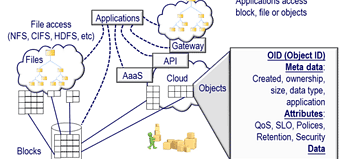
    Storage I/O trends

    StorageIO data infrastructure industry vendors links page updated with over 1,200 entries
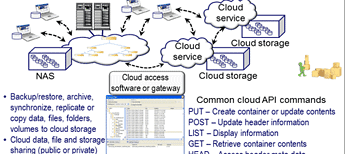
    Is your company, organization or one that you are a fan of, or represent listed on the StorageIO industry links page?

    The StorageIO industry links page has been updated with over thousand different industry related companies, vendors, vars, trade groups, part and solution suppliers along with cloud and managed service providers. The common theme with these industry links is information and data infrastructures which means severs, storage, IO and networking, hardware, software, applications and tools, services, products and related items for traditional, virtual and cloud environments.

    The industry links page is accessed from the StorageIO main web page via the Tools and Links menu tab, or via the URL https://storageio.com/links. An example of the StorageIO industry links page is shown below with six different menu tabs in alphabetical order.

    storage I/O and data infrastructure cloud, virtual and software defined links

    Know of a company, service or organization that is not listed on the links page, if so, send an email note to info at storageio.com. If your company or organization is listed, contact StorageIO to discuss how to expand your presence on the links page and other related options.

    Visit the updated StorageIO industry links page and watch for more updates, and click here to learn more about the links page.

    Ok, nuff said (for now)

    Cheers
    Gs

    Greg Schulz – Author Cloud and Virtual Data Storage Networking (CRC Press), The Green and Virtual Data Center (CRC Press) and Resilient Storage Networks (Elsevier)
    twitter @storageio

    All Comments, (C) and (TM) belong to their owners/posters, Other content (C) Copyright 2006-2026 Server StorageIO and UnlimitedIO LLC All Rights Reserved