IBM Server Side Storage I/O SSD Flash Cache Software

Storage I/O trends

IBM Server Side Storage I/O SSD Flash Cache Software

As I often say, the best server storage I/O or IOP is the one that you do not have to do. The second best storage I/O or IOP is the one with least impact or that can be done in a cost-effective way. Likewise the question is not if solid-state device (SSD) including nand flash are in your future, rather when, where, why, with what, how much along with from whom. Also location matters when it comes to SSD including nand flash with different environments and applications leveraging different placement (locality) options, not to mention how much performance do you need vs. want?

As part of their $1 billion USD (to be spent over three years, or $333.3333 million per year) flash ahead initiative IBM has announced their Flash Cache Storage Accelerator (FCSA) server software. While IBM did not use the term, (congratulations and thank you btw) some creative marketer might want to try calling this Software Defined Cache (SDC) or Software Defined SSD (SDSSD) which if that occurs, apologies in advance ;). Keep in mind that it was about a year ago this time when IBM announced that they were acquiring SSD industry veteran Texas Memory Systems (TMS).

What was announced, introducing Flash Cache Storage Acceleration or FCSA

With this announcement of FCSA slated for customer general availability by end of August, IBM joins EMC and NetApp among other storage systems vendors who developed their own, or have collaborated on server-side IO optimization and cache software. Some of the other startup and established vendors who have IO optimization, performance acceleration and caching software include DataRam (Ramdisk), FusionIO, Infinio (NFS for VMware), Pernix (block for VMware), Proximal and SANdisk (bought flashsoft) among others.

Read more about IBM Flash Cache Software (FCSA) including various questions and perspectives in part two of this two-part post located here.

Ok, nuff said (for now)

Cheers
Gs

Greg Schulz – Author Cloud and Virtual Data Storage Networking (CRC Press), The Green and Virtual Data Center (CRC Press) and Resilient Storage Networks (Elsevier)

All Comments, (C) and (TM) belong to their owners/posters, Other content (C) Copyright 2006-2026 Server StorageIO and UnlimitedIO LLC All Rights Reserved

Server and Storage IO Memory: DRAM and nand flash

Storage I/O trends

DRAM, DIMM, DDR3, nand flash memory, SSD, stating what’s often assumed

Often what’s assumed is not always the case. For example in along with around server, storage and IO networking circles including virtual as well as cloud environments terms such as nand (Negated AND or NOT And) flash memory aka (Solid State Device or SSD), DRAM (Dynamic Random Access Memory), DDR3 (Double Data Rate 3) not to mention DIMM (Dual Inline Memory Module) get tossed around with the assumption everybody must know what they mean.

On the other hand, I find plenty of people who are not sure what those among other terms or things are, sometimes they are even embarrassed to ask, particular if they are a self-proclaimed expert.

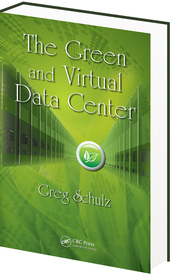
So for those who need a refresh or primer, here you go, an excerpt from Chapter 7 (Servers – Physical, Virtual and Software) from my book "The Green and Virtual Data Center" (CRC Press) available at Amazon.com and other global venues in print and ebook formats.

7.2.2 Memory

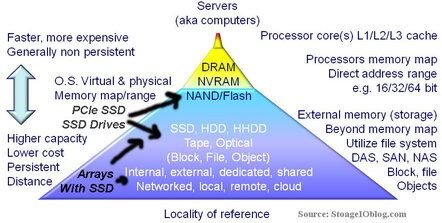
Computers rely on some form of memory ranging from internal registers, local on-board processor Level 1 (L1) and Level 2 (L2) caches, random accessible memory (RAM), non-volatile RAM (NVRAM) or nand Flash (SSD) along with external disk storage. Memory, which includes external disk storage, is used for storing operating system software along with associated tools or utilities, application programs and data. Main memory or RAM, also known as dynamic RAM (DRAM) chips, is packaged in different ways with a common form being dual inline memory modules (DIMMs) for notebook or laptop, desktop PC and servers.

RAM main memory on a server is the fastest form of memory, second only to internal processor or chip based registers, L1, L2 or local memory. RAM and processor based memories are volatile and non-persistent in that when power is removed, the contents of memory are lost. As a result, some form of persistent memory is needed to keep programs and data when power is removed. Read only memory (ROM) and NVRAM are both persistent forms of memory in that their contents are not lost when power is removed. The amount of RAM that can be installed into a server will vary with specific architecture implementation and operating software being used. In addition to memory capacity and packaging format, the speed of memory is also important to be able to move data and programs quickly to avoid internal bottlenecks. Memory bandwidth performance increases with the width of the memory bus in bits and frequency in MHz. For example, moving 8 bytes on a 64 bit buss in parallel at the same time at 100MHz provides a theoretical 800MByte/sec speed.

To improve availability and increase the level of persistence, some servers include battery backed up RAM or cache to protect data in the event of a power loss. Another technique to protect memory data on some servers is memory mirroring where twice the amount of memory is installed and divided into two groups. Each group of memory has a copy of data being stored so that in the event of a memory failure beyond those correctable with standard parity and error correction code (ECC) no data is lost. In addition to being fast, RAM based memories are also more expensive and used in smaller quantities compared to external persistent memories such as magnetic hard disk drives, magnetic tape or optical based memory medias.

Memory diagram
Memory and Storage Pyramid

The above shows a tiered memory model that may look familiar as the bottom part is often expanded to show tiered storage. At the top of the memory pyramid is high-speed processor memory followed by RAM, ROM, NVRAM and FLASH along with many forms of external memory commonly called storage. More detail about tiered storage is covered in chapter 8 (Data Storage – Data Storage – Disk, Tape, Optical, and Memory). In addition to being slower and lower cost than RAM based memories, disk storage along with NVRAM and FLASH based memory devices are also persistent.

By being persistent, when power is removed, data is retained on the storage or memory device. Also shown in the above figure is that on a relative basis, less energy is used for power storage or memory at the bottom of the pyramid than for upper levels where performance increases. From a PCFE (Power, Cooling, Floor space, Economic) perspective, balancing memory and storage performance, availability, capacity and energy to a given function, quality of service and service level objective for a given cost needs to be kept in perspective and not considering simply the lowest cost for the most amount of memory or storage. In addition to gauging memory on capacity, other metrics include percent used, operating system page faults and page read/write operations along with memory swap activity as well memory errors.

Base 2 versus base 10 numbering systems can account for some storage capacity that appears to “missing” when real storage is compared to what is expected to be seen. Disk drive manufacturers use base 10 (decimal) to count bytes of data while memory chip, server and operating system vendors typically use base 2 (binary) to count bytes of data. This has led to confusion when comparing a disk drive base 10 GB with a chip memory base 2 GB of memory capacity, such as 1,000,000,000 (10^9) bytes versus 1,073,741,824 (2^30) bytes. Nomenclature based on the International System of Units uses MiB, GiB and TiB to denote million, billion and trillion bytes for base 2 numbering with base 10 using MB, TB and GB . Most vendors do document how many bytes, sometimes in both base 2 and base 10, as well as the number of 512 byte sectors supported on their storage devices and storage systems, though it might be in the small print.

Related more reading:
How much storage performance do you want vs. need?
Can RAID extend the life of nand flash SSD?
Can we get a side of context with them IOPS and other storage metrics?
SSD & Real Estate: Location, Location, Location
What is the best kind of IO? The one you do not have to do
SSD, flash and DRAM, DejaVu or something new?

Ok, nuff said (for now).

Cheers
Gs

Greg Schulz – Author Cloud and Virtual Data Storage Networking (CRC Press), The Green and Virtual Data Center (CRC Press) and Resilient Storage Networks (Elsevier).

All Comments, (C) and (TM) belong to their owners/posters, Other content (C) Copyright 2006-2026 Server StorageIO and UnlimitedIO LLC All Rights Reserved

Non Disruptive Updates, Needs vs. Wants

Storage I/O trends

Do you want non disruptive updates or do you need non disruptive upgrades?

First there is a bit of play on words going on here with needs vs. wants, as well as what is meant by non disruptive.

Regarding needs vs. wants, they are often used interchangeably particular in IT when discussing requirements or what the customer would like to have. The key differentiator is that a need is something that is required and somehow cost justified, or hopefully easier than a want item. A want or like to have item is simply that, its not a need however it could add value being a benefit although may be seen as discretionary.

There is also a bit of play on words with non disruptive updates or upgrades that can take on different meanings or assumptions. For example my Windows 7 laptop has automatic Microsoft updates enabled some of which can be applied while I work. On the other hand, some of those updates may be applied while I work however they may not take effect until I reboot or exit and restart an application.

This is not unique to Windows as my Ubuntu and Centos Linux systems can also apply updates, and in some cases a reboot might be required, same with my VMware environment. Lets not forget about applying new firmware to a server, or workstation, laptop or other device, along with networking routers, switches and related devices. Storage is also not immune as new software or firmware can be applied to a HDD or SSD (traditional or NVMe), either by your workstation, laptop, server or storage system. Speaking of storage systems, they too have new software or firmware that gets updated.

Storage I/O trends

The common theme here though is if the code (e.g. software, firmware, microcode, flash update, etc) can be applied non disruptive something known as non disruptive code load, followed by activation. With activation, the code may have been applied while the device or software was in use, however may need a reboot or restart. With non disruptive code activation, there should not be a disruption to what is being done when the new software takes effect.

This means that if a device supports non disruptive code load (NDCL) updates along with non disruptive code activation (NDCA), the upgrade can occur without disruption or having to wait for a reboot.

Which is better?

That depends, I want NDCA, however for many things I only need NDCL.

On the other hand, depending on what you need, perhaps it is both NDCL and NDCA, however also keep in mind needs vs. wants.

Ok, nuff said (for now).

Cheers gs

Greg Schulz – Author Cloud and Virtual Data Storage Networking (CRC Press), The Green and Virtual Data Center (CRC Press) and Resilient Storage Networks (Elsevier)
twitter @storageio

All Comments, (C) and (TM) belong to their owners/posters, Other content (C) Copyright 2006-2026 Server StorageIO and UnlimitedIO LLC All Rights Reserved

As the platters spin, HDD’s for cloud, virtual and traditional storage environments

HDDs for cloud, virtual and traditional storage environments

Storage I/O trends

Updated 1/23/2018

As the platters spin is a follow-up to a recent series of posts on Hard Disk Drives (HDD’s) along with some posts about How Many IOPS HDD’s can do.

HDD and storage trends and directions include among others

HDD’s will continue to be declared dead into the next decade, just as they have been for over a decade, meanwhile they are being enhanced, continued to be used in evolving roles.
hdd and ssd

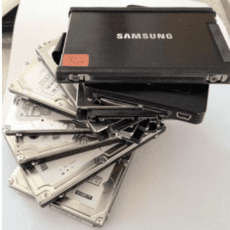
SSD will continue to coexist with HDD, either as separate or converged HHDD’s. Where, where and how they are used will also continue to evolve. High IO (IOPS) or low latency activity will continue to move to some form of nand flash SSD (PCM around the corner), while storage capacity including some of which has been on tape stays on disk. Instead of more HDD capacity in a server, it moves to a SAN or NAS or to a cloud or service provider. This includes for backup/restore, BC, DR, archive and online reference or what some call active archives.

The need for storage spindle speed and more

The need for faster revolutions per minute (RPM’s) performance of drives (e.g. platter spin speed) is being replaced by SSD and more robust smaller form factor (SFF) drives. For example, some of today’s 2.5” SFF 10,000 RPM (e.g. 10K) SAS HDD’s can do as well or better than their larger 3.5” 15K predecessors can for both IOPS and bandwidth. This is also an example where the RPM speed of a drive may not be the only determination for performance as it has been in the past.
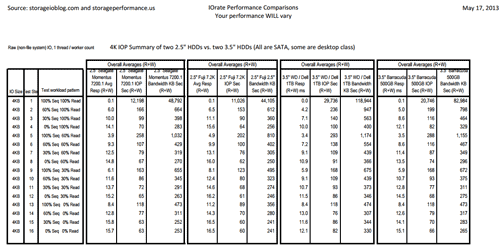

Performance comparison of four different drive types, click to view larger image.

The need for storage space capacity and areal density

In terms of storage enhancements, watch for the appearance of Shingled Magnetic Recording (SMR) enabled HDD’s to help further boost the space capacity in the same footprint. Using SMR HDD manufactures can put more bits (e.g. areal density) into the same physical space on a platter.


Traditional vs. SMR to increase storage areal density capacity

The generic idea with SMR is to increase areal density (how many bits can be safely stored per square inch) of data placed on spinning disk platter media. In the above image on the left is a representative example of how traditional magnetic disk media lays down tracks next to each other. With traditional magnetic recording approaches, the tracks are placed as close together as possible for the write heads to safely write data.

With new recording formats such as SMR along with improvements to read/write heads, the tracks can be more closely grouped together in an overlapping way. This overlapping way (used in a generic sense) is like how the shingles on a roof overlap, hence Shingled Magnetic Recording. Other magnetic recording or storage enhancements in the works include Heat Assisted Magnetic Recording (HAMR) and Helium filed drives. Thus, there is still plenty of bits and bytes room for growth in HDD’s well into the next decade to co-exist and complement SSD’s.

DIF and AF (Advanced Format), or software defining the drives

Another evolving storage feature that ties into HDD’s is Data Integrity Feature (DIF) that has a couple of different types. Depending on which type of DIF (0, 1, 2, and 3) is used; there can be added data integrity checks from the application to the storage medium or drive beyond normal functionality. Here is something to keep in mind, as there are different types or levels of DIF, when somebody says they support or need DIF, ask them which type or level as well as why.

Are you familiar with Advanced Format (AF)? If not you should be. Traditionally outside of special formats for some operating systems or controllers, that standard open system data storage block, page or sector has been 512 bytes. This has served well in the past, however; with the advent of TByte and larger sized drives, a new mechanism is needed. The need is to support both larger average data allocation sizes from operating systems and storage systems, as well as to cut the overhead of managing all the small sectors. Operating systems and file systems have added new partitioning features such as GUID Partition Table (GPT) to support 1TB and larger SSD, HDD and storage system LUN’s.

These enhancements are enabling larger devices to be used in place of traditional Master Boot Record (MBR) or other operating system partition and allocation schemes. The next step, however, is to teach operating systems, file systems, and hypervisors along with their associated tools or drives how to work with 4,096 byte or 4 Kbyte sectors. The advantage will be to cut the overhead of tracking all of those smaller sectors or file system extents and clusters. Today many HDD’s support AF however by default may have 512-byte emulation mode enabled due to lack of operating system or other support.

Intelligent Power Management, moving beyond drive spin down

Intelligent Power Management (IPM) is a collection of techniques that can be applied to vary the amount of energy consumed by a drive, controller or processor to do its work. These include in the case of an HDD slowing the spin rate of platters, however, keep in mind that mass in motion tends to stay in motion. This means that HDD’s once up and spinning do not need as much relative power as they function like a flywheel. Where their power draw comes in is during reading and write, in part to the movement of reading/write heads, however also for running the processors and electronics that control the device. Another big power consumer is when drives spin up, thus if they can be kept moving, however at a lower rate, along with disabling energy used by read/write heads and their electronics, you can see a drop in power consumption. Btw, a current generation 3.5” 4TB 6Gbs SATA HDD consumes about 6-7 watts of power while in active use, or less when in idle mode. Likewise a current generation high performance 2.5” 1.2TB HDD consumes about 4.8 watts of energy, a far cry from the 12-16 plus watts of energy some use as HDD fud.

Hybrid Hard Disk Drives (HHDD) and Solid State Hybrid Drives (SSDHD)

Hybrid HDD’s (HHDD’s) also known as Solid State Hybrid Drives (SSHD) have been around for a while and if you have read my earlier posts, you know that I have been a user and fan of them for several years. However one of the drawbacks of the HHDD’s has been lack of write acceleration, (e.g. they only optimize for reads) with some models. Current and emerging HDDD’s are appearing with a mix of nand flash SLC (used in earlier versions), MLC and eMLC along with DRAM while enabling write optimization. There are also more drive options available as HHDD’s from different manufactures both for desktop and enterprise class scenarios.

The challenge with HHDD’s is that many vendors either do not understand how they fit and compliment their tiering or storage management software tools or simply do not see the value proposition. I have had vendors and others tell me that the HHDD’s don’t make sense as they are too simple, how can they be a fit without requiring tiering software, controllers, SSD and HDD’s to be viable?

Storage I/O trends

I also see a trend similar to when the desktop high-capacity SATA drives appeared for enterprise-class storage systems in the early 2000s. Some of the same people did not see where or how a desktop class product or technology could ever be used in an enterprise solution.

Hmm, hey wait a minute, I seem to recall similar thinking when SCSI drives appeared in the early 90s, funny how some things do not change, DejaVu anybody?

Does that mean HHDD’s will be used everywhere?

Not necessarily, however, there will be places where they make sense, others where either an HDD or SSD will be more practical.

Networking with your server and storage

Drive native interfaces near-term will remain as 6Gbs (going to 12Gbs) SAS and SATA with some FC (you might still find a parallel SCSI drive out there). Likewise, with bridges or interface cards, those drives may appear as USB or something else.

What about SCSI over PCIe, will that catch on as a drive interface? Tough to say however I am sure we can find some people who will gladly try to convince you of that. FC based drives operating at 4Gbs FC (4GFC) are still being used for some environments however most activity is shifting over to SAS and SATA. SAS and SATA are switching over from 3Gbs to 6Gbs with 12Gbs SAS on the roadmaps.

So which drive is best for you?

That depends; do you need bandwidth or IOPS, low latency or high capacity, small low profile thin form factor or feature functions? Do you need a hybrid or all SSD or a self-encrypting device (SED) also known as Instant Secure Erase (ISE), these are among your various options.

Disk drives

Why the storage diversity?

Simple, some are legacy soon to be replaced and disposed of while others are newer. I also have a collection so to speak that get used for various testing, research, learning and trying things out. Click here and here to read about some of the ways I use various drives in my VMware environment including creating Raw Device Mapped (RDM) local SAS and SATA devices.

Other capabilities and functionality existing or being added to HDD’s include RAID and data copy assist; securely erase, self-encrypting, vibration dampening among other abilities for supporting dense data environments.

Where To Learn More

Additional learning experiences along with common questions (and answers), as well as tips can be found in Software Defined Data Infrastructure Essentials book.

Software Defined Data Infrastructure Essentials Book SDDC

What This All Means

Do not judge a drive only by its interface, space capacity, cost or RPM alone. Look under the cover a bit to see what is inside in terms of functionality, performance, and reliability among other options to fit your needs. After all, in the data center or information factory not everything is the same.

From a marketing and fun to talk about new technology perspective, HDD’s might be dead for some. The reality is that they are very much alive in physical, virtual and cloud environments, granted their role is changing.

Ok, nuff said, for now.

Gs

Greg Schulz – Microsoft MVP Cloud and Data Center Management, VMware vExpert 2010-2017 (vSAN and vCloud). Author of Software Defined Data Infrastructure Essentials (CRC Press), as well as Cloud and Virtual Data Storage Networking (CRC Press), The Green and Virtual Data Center (CRC Press), Resilient Storage Networks (Elsevier) and twitter @storageio. Courteous comments are welcome for consideration. First published on https://storageioblog.com any reproduction in whole, in part, with changes to content, without source attribution under title or without permission is forbidden.

All Comments, (C) and (TM) belong to their owners/posters, Other content (C) Copyright 2006-2026 Server StorageIO and UnlimitedIO. All Rights Reserved. StorageIO is a registered Trade Mark (TM) of Server StorageIO.

June 2013 Server and StorageIO Update Newsletter

StorageIO News Letter Image
June 2013 News letter

Welcome to the June 2013 edition of the StorageIO Update. In this edition coverage includes data center infrastructure management (DCIM), metrics that matter, industry trends, IBM buying Softlayer for Cloud, IaaS and managed services. Other items include backup and data protection topics for SMBs, as well as big data storage topics. Also the EPA has announced a review session for Energy Star for Data Center storage that you can give your comments. Enjoy this edition of the StorageIO Update newsletter.

Click on the following links to view the June 2013 edition as (HTML sent via Email) version, or PDF versions.

Visit the news letter page to view previous editions of the StorageIO Update.

You can subscribe to the news letter by clicking here.

Enjoy this edition of the StorageIO Update news letter, let me know your comments and feedback.

Ok Nuff said, for now

Cheers
Gs

Greg Schulz – Author Cloud and Virtual Data Storage Networking (CRC Press), The Green and Virtual Data Center (CRC Press) and Resilient Storage Networks (Elsevier)
twitter @storageio

All Comments, (C) and (TM) belong to their owners/posters, Other content (C) Copyright 2006-2026 Server StorageIO and UnlimitedIO LLC All Rights Reserved

EPA Energy Star Data Center Storage Draft Specification review

Storage I/O trends

For those of you interested in EPA Energy Star for Data Center Storage, here is an announcement for an upcoming conference call and review of the version 1.0 final draft specification.

There are a few attachments referenced in the following note from EPA that can be accessed here:

EPA_Version 1.0 Storage Final Draft Specification Cover Letter
EPA_Version 1.0 Storage Draft 4 Specification Comment Response Document
EPA_Version 1.0 Storage Final Draft Test Method
EPA_Version 1.0 Storage Final Draft Specification

Dear ENERGY STAR® Data Center Storage Partner or Other Interested Party:

Please see the attached important correspondence from the U.S. Environmental Protection Agency concerning the ENERGY STAR Version 1.0 Data Center Storage Final Draft Specification and Test Method. EPA will host a webinar on July 9, 2013 from 3:00 5:00 PM Eastern Time to discuss the documents with stakeholders.  Please RSVP for the webinar to storage@energystar.gov no later than July 5, 2013.

Thank you for your continued support of the ENERGY STAR program.

For more information, visit:www.energystar.gov

This message was sent to you on behalf of ENERGY STAR. Each ENERGY STAR partner organization must have at least one primary contact receiving e-mail to maintain partnership. If you are no longer working on ENERGY STAR, and wish to be removed as a contact, please update your contact status in your MESA account. If you are not a partner organization and wish to opt out of receiving e-mails, you may call the ENERGY STAR Hotline at 1-888-782-7937 and request to have your mass mail settings changed. Unsubscribing means that you will no longer receive program-wide or product-specific e-mails from ENERGY STAR.

Ok, nuff said.

Cheers gs

Greg Schulz – Author Cloud and Virtual Data Storage Networking (CRC Press), The Green and Virtual Data Center (CRC Press) and Resilient Storage Networks (Elsevier)
twitter @storageio

All Comments, (C) and (TM) belong to their owners/posters, Other content (C) Copyright 2006-2026 Server StorageIO and UnlimitedIO LLC All Rights Reserved

May 2013 Server and StorageIO Update Newsletter

StorageIO News Letter Image
May 2013 News letter

Welcome to the May 2013 edition of the StorageIO Update. This edition has announcement analysis of EMC ViPR, Software Defined Storage (including a video here), server, storage and I/O metrics that matter for example how many IOPS can a HDD do (it depends). SSD including nand flash remains a popular topic, both in terms of industry adoption and customer deployment. Also included are my perspectives on the SSD vendor FusionIO CEO leaving in a flash. Speaking of nand flash, have you thought about how some RAID implementations and configurations can extend the life along with durability of SSD’s? More on this soon, however check out this video to give you some perspectives.

Click on the following links to view the May 2013 edition as (HTML sent via Email) version, or PDF versions.

Visit the news letter page to view previous editions of the StorageIO Update.

You can subscribe to the news letter by clicking here.

Enjoy this edition of the StorageIO Update news letter, let me know your comments and feedback.

Ok Nuff said, for now

Cheers
Gs

Greg Schulz – Author Cloud and Virtual Data Storage Networking (CRC Press), The Green and Virtual Data Center (CRC Press) and Resilient Storage Networks (Elsevier)
twitter @storageio

All Comments, (C) and (TM) belong to their owners/posters, Other content (C) Copyright 2006-2026 Server StorageIO and UnlimitedIO LLC All Rights Reserved

How many I/O iops can flash SSD or HDD do?

How many i/o iops can flash ssd or hdd do with vmware?

sddc data infrastructure Storage I/O ssd trends

Updated 2/10/2018

A common question I run across is how many I/O iopsS can flash SSD or HDD storage device or system do or give.

The answer is or should be it depends.

This is the first of a two-part series looking at storage performance, and in context specifically around drive or device (e.g. mediums) characteristics across HDD, HHDD and SSD that can be found in cloud, virtual, and legacy environments. In this first part the focus is around putting some context around drive or device performance with the second part looking at some workload characteristics (e.g. benchmarks).

What about cloud, tape summit resources, storage systems or appliance?

Lets leave those for a different discussion at another time.

Getting started

Part of my interest in tools, metrics that matter, measurements, analyst, forecasting ties back to having been a server, storage and IO performance and capacity planning analyst when I worked in IT. Another aspect ties back to also having been a sys admin as well as business applications developer when on the IT customer side of things. This was followed by switching over to the vendor world involved with among other things competitive positioning, customer design configuration, validation, simulation and benchmarking HDD and SSD based solutions (e.g. life before becoming an analyst and advisory consultant).

Btw, if you happen to be interested in learn more about server, storage and IO performance and capacity planning, check out my first book Resilient Storage Networks (Elsevier) that has a bit of information on it. There is also coverage of metrics and planning in my two other books The Green and Virtual Data Center (CRC Press) and Cloud and Virtual Data Storage Networking (CRC Press). I have some copies of Resilient Storage Networks available at a special reader or viewer rate (essentially shipping and handling). If interested drop me a note and can fill you in on the details.

There are many rules of thumb (RUT) when it comes to metrics that matter such as IOPS, some that are older while others may be guess or measured in different ways. However the answer is that it depends on many things ranging from if a standalone hard disk drive (HDD), Hybrid HDD (HHDD), Solid State Device (SSD) or if attached to a storage system, appliance, or RAID adapter card among others.

Taking a step back, the big picture

hdd image
Various HDD, HHDD and SSD’s

Server, storage and I/O performance and benchmark fundamentals

Even if just looking at a HDD, there are many variables ranging from the rotational speed or Revolutions Per Minute (RPM), interface including 1.5Gb, 3.0Gb, 6Gb or 12Gb SAS or SATA or 4Gb Fibre Channel. If simply using a RUT or number based on RPM can cause issues particular with 2.5 vs. 3.5 or enterprise and desktop. For example, some current generation 10K 2.5 HDD can deliver the same or better performance than an older generation 3.5 15K. Other drive factors (see this link for HDD fundamentals) including physical size such as 3.5 inch or 2.5 inch small form factor (SFF), enterprise or desktop or consumer, amount of drive level cache (DRAM). Space capacity of a drive can also have an impact such as if all or just a portion of a large or small capacity devices is used. Not to mention what the drive is attached to ranging from in internal SAS or SATA drive bay, USB port, or a HBA or RAID adapter card or in a storage system.

disk iops
HDD fundamentals

How about benchmark and performance for marketing or comparison tricks including delayed, deferred or asynchronous writes vs. synchronous or actually committed data to devices? Lets not forget about short stroking (only using a portion of a drive for better IOP’s) or even long stroking (to get better bandwidth leveraging spiral transfers) among others.

Almost forgot, there are also thick, standard, thin and ultra thin drives in 2.5 and 3.5 inch form factors. What’s the difference? The number of platters and read write heads. Look at the following image showing various thickness 2.5 inch drives that have various numbers of platters to increase space capacity in a given density. Want to take a wild guess as to which one has the most space capacity in a given footprint? Also want to guess which type I use for removable disk based archives along with for onsite disk based backup targets (compliments my offsite cloud backups)?

types of disks
Thick, thin and ultra thin devices

Beyond physical and configuration items, then there are logical configuration including the type of workload, large or small IOPS, random, sequential, reads, writes or mixed (various random, sequential, read, write, large and small IO). Other considerations include file system or raw device, number of workers or concurrent IO threads, size of the target storage space area to decide impact of any locality of reference or buffering. Some other items include how long the test or workload simulation ran for, was the device new or worn in before use among other items.

Tools and the performance toolbox

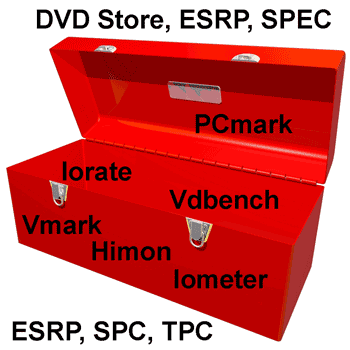
Then there are the various tools for generating IO’s or workloads along with recording metrics such as reads, writes, response time and other information. Some examples (mix of free or for fee) include Bonnie, Iometer, Iorate, IOzone, Vdbench, TPC, SPC, Microsoft ESRP, SPEC and netmist, Swifttest, Vmark, DVDstore and PCmark 7 among many others. Some are focused just on the storage system and IO path while others are application specific thus exercising servers, storage and IO paths.

performance tools
Server, storage and IO performance toolbox

Having used Iometer since the late 90s, it has its place and is popular given its ease of use. Iometer is also long in the tooth and has its limits including not much if any new development, never the less, I have it in the toolbox. I also have Futremark PCmark 7 (full version) which turns out has some interesting abilities to do more than exercise an entire Windows PC. For example PCmark can use a secondary drive for doing IO to.

PCmark can be handy for spinning up with VMware (or other tools) lots of virtual Windows systems pointing to a NAS or other shared storage device doing real world type activity. Something that could be handy for testing or stressing virtual desktop infrastructures (VDI) along with other storage systems, servers and solutions. I also have Vdbench among others tools in the toolbox including Iorate which was used to drive the workloads shown below.

What I look for in a tool are how extensible are the scripting capabilities to define various workloads along with capabilities of the test engine. A nice GUI is handy which makes Iometer popular and yes there are script capabilities with Iometer. That is also where Iometer is long in the tooth compared to some of the newer generation of tools that have more emphasis on extensibility vs. ease of use interfaces. This also assumes knowing what workloads to generate vs. simply kicking off some IOPs using default settings to see what happens.

Another handy tool is for recording what’s going on with a running system including IO’s, reads, writes, bandwidth or transfers, random and sequential among other things. This is where when needed I turn to something like HiMon from HyperIO, if you have not tried it, get in touch with Tom West over at HyperIO and tell him StorageIO sent you to get a demo or trial. HiMon is what I used for doing start, stop and boot among other testing being able to see IO’s at the Windows file system level (or below) including very early in the boot or shutdown phase.

Here is a link to some other things I did awhile back with HiMon to profile some Windows and VDI activity test profiling.

What’s the best tool or benchmark or workload generator?

The one that meets your needs, usually your applications or something as close as possible to it.

disk iops
Various 2.5 and 3.5 inch HDD, HHDD, SSD with different performance

Where To Learn More

View additional NAS, NVMe, SSD, NVM, SCM, Data Infrastructure and HDD related topics via the following links.

Additional learning experiences along with common questions (and answers), as well as tips can be found in Software Defined Data Infrastructure Essentials book.

Software Defined Data Infrastructure Essentials Book SDDC

What This All Means

That depends, however continue reading part II of this series to see some results for various types of drives and workloads.

Ok, nuff said, for now.

Gs

Greg Schulz – Microsoft MVP Cloud and Data Center Management, VMware vExpert 2010-2017 (vSAN and vCloud). Author of Software Defined Data Infrastructure Essentials (CRC Press), as well as Cloud and Virtual Data Storage Networking (CRC Press), The Green and Virtual Data Center (CRC Press), Resilient Storage Networks (Elsevier) and twitter @storageio. Courteous comments are welcome for consideration. First published on https://storageioblog.com any reproduction in whole, in part, with changes to content, without source attribution under title or without permission is forbidden.

All Comments, (C) and (TM) belong to their owners/posters, Other content (C) Copyright 2006-2026 Server StorageIO and UnlimitedIO. All Rights Reserved. StorageIO is a registered Trade Mark (TM) of Server StorageIO.

HDS Claus Mikkelsen talking storage from SNW Fall 2012

Now also available via

This is a new episode in the continuing StorageIO industry trends and perspectives pod cast series (you can view more episodes or shows along with other audio and video content here) as well as listening via iTunes or via your preferred means using this RSS feed )

Storage I/O cloud virtual and big data perspectives

In this episode from SNW Fall 2012 in Santa Clara, I am joined by my co-host Bruce Ravid (@BruceRave) of Ravid and Associates as we catch up with long time storage industry veteran Claus Mikkelsen (@YoClaus) and HDS Chief Scientist.

Bruce and Claus meet for the first time having been around and probably passed each other in the halls at various events, hence, its a small world, however there is always opportunity to meet somebody new. We also chat about SNW past and present, data storage, technologies, networking with people, travel and of course with Claus, touch on wine.

Note that Claus and me were apart of a consortium of people that collaborated on the original book The Resilient Enterprise released in spring of 2012 published by Veritas. Ok, nuff said.

Click here (right-click to download MP3 file) or on the microphone image to listen to the conversation with Claus Mikkelsen.

StorageIO podcast

Also available via

Watch (and listen) for more StorageIO industry trends and perspectives audio blog posts pod casts and other upcoming events. Also be sure to heck out other related pod casts, videos, posts, tips and industry commentary at StorageIO.com and StorageIOblog.com.

Enjoy this episode from SNW Fall 2013 with Claus Mikkelsen.

Ok, nuff said.

Cheers gs

Greg Schulz – Author Cloud and Virtual Data Storage Networking (CRC Press, 2011), The Green and Virtual Data Center (CRC Press, 2009), and Resilient Storage Networks (Elsevier, 2004)

twitter @storageio

All Comments, (C) and (TM) belong to their owners/posters, Other content (C) Copyright 2006-2026 Server StorageIO and UnlimitedIO LLC All Rights Reserved

HP Moonshot 1500 software defined capable compute servers

Storage I/O cloud virtual and big data perspectives

Riding the current software defined data center (SDC) wave being led by the likes of VMware and software defined networking (SDN) also championed by VMware via their acquisition of Nicira last year, Software Defined Marketing (SDM) is in full force. HP being a player in providing the core building blocks for traditional little data and big data, along with physical, virtual, converged, cloud and software defined has announced a new compute, processor or server platform called the Moonshot 1500.

HP Moonshot software defined server image

Software defined marketing aside, there are some real and interesting things from a technology standpoint that HP is doing with the Moonshot 1500 along with other vendors who are offering micro server based solutions.

First, for those who see server (processor and compute) improvements as being more and faster cores (and threads) per socket, along with extra memory, not to mention 10GbE or 40GbE networking and PCIe expansion or IO connectivity, hang on to your hats.

HP Moonshot software defined server image individual server blade

Moonshot is in the model of the micro servers or micro blades such as what HP has offered in the past along with the likes of Dell and Sea Micro (now part of AMD). The micro servers are almost the opposite of the configuration found on regular servers or blades where the focus is putting more ability on a motherboard or blade.

With micro servers the approach support those applications and environments that do not need lots of CPU processing capability, large amount of storage or IO or memory. These include some web hosting or cloud application environments that can leverage more smaller, lower power, less performance or resource intensive platforms. For example big data (or little data) applications whose software or tools benefit from many low-cost, low power, and lower performance with distributed, clustered, grid, RAIN or ring based architectures can benefit from this type of solution.

HP Moonshot software defined server image and components

What is the Moonshot 1500 system?

  • 4.3U high rack mount chassis that holds up to 45 micro servers
  • Each hot-swap micro server is its own self-contained module similar to blade server
  • Server modules install vertically from the top into the chassis similar to some high-density storage enclosures
  • Compute or processors are Intel Atom S1260 2.0GHz based processors with 1 MB of cache memory
  • Single S0-DIMM slot (unbuffered ECC at 1333 MHz) supports 8GB (1 x 8GB DIMM) DRAM
  • Each server module has a single 2.5″ SATA 200GB SSD, 500GB or 1TB HDD onboard
  • A dual port Broadcom 5720 1 Gb Ethernet LAn per server module that connects to chassis switches
  • Marvel 9125 storage controller integrated onboard each server module
  • Chassis and enclosure management along with ACPI 2.0b, SMBIOS 2.6.1 and PXE support
  • A pair of Ethernet switches each give up to six x 10GbE uplinks for the Moonshot chassis
  • Dual RJ-45 connectors for iLO chassis management are also included
  • Status LEDs on the front of each chassis providers status of the servers and network switches
  • Support for Canonical Ubuntu 12.04, RHEL 6.4, SUSE Linux LES 11 SP2

Storage I/O cloud virtual and big data perspectives

Notice a common theme with moonshot along with other micro server-based systems and architectures?

If not, it is simple, I mean literally simple and flexible is the value proposition.

Simple is the theme (with software defined for marketing) along with low-cost, lower energy power demand, lower performance, less of what is not needed to remove cost.

Granted not all applications will be a good fit for micro servers (excuse me, software defined servers) as some will need the more robust resources of traditional servers. With solutions such as HP Moonshot, system architects and designers have more options available to them as to what resources or solution options to use. For example, a cloud or object storage system based solutions that does not need a lot of processing performance per node or memory, and a low amount of storage per node might find this as an interesting option for mid to entry-level needs.

Will HP release a version of their Lefthand or IBRIX (both since renamed) based storage management software on these systems for some market or application needs?

How about deploying NoSQL type tools including Cassandra or Mongo, how about CloudStack, OpenStack Swift, Basho Riak (or Riak CS) or other software including object storage, on these types of solutions, or web servers and other applications that do not need the fastest processors or most memory per node?

Thus micro server-based solutions such as Moonshot enable return on innovation (the new ROI) by enabling customers to leverage the right tool (e.g. hard product) to create their soft product allowing their users or customers to in turn innovate in a cost-effective way.

Will the Moonshot servers be the software defined turnaround for HP, click here to see what Bloomberg has to say, or Forbes here.

Learn more about Moonshot servers at HP here, here or data sheets found here.

Btw, HP claims that this is the industries first software defined server, hmm.

Ok, nuff said (for now).

Cheers gs

Greg Schulz – Author Cloud and Virtual Data Storage Networking (CRC Press), The Green and Virtual Data Center (CRC Press) and Resilient Storage Networks (Elsevier)
twitter @storageio

All Comments, (C) and (TM) belong to their owners/posters, Other content (C) Copyright 2006-2026 Server StorageIO and UnlimitedIO LLC All Rights Reserved

SNIA Spring 2013 update with Wayne Adams

Now also available via

This is a new episode in the continuing StorageIO industry trends and perspectives pod cast series (you can view more episodes or shows along with other audio and video content here) as well as listening via iTunes or via your preferred means using this RSS feed )

StorageIO industry trends cloud, virtualization and big data

In this episode from SNW Spring 2013 in Orlando Florida, Bruce Ravid (@BruceRave) and me visit with our guest SNIA Chairman Wayne Adams (@wma01606). Wayne was one of our first pod cast guests back in 2013 in the episode titled Waynes World, SNIA and SNW that you can listen to here.

SNIA image logo

Wayne gives us an update on what’s new with SNIA including education, tutorials, videos and other training material, along with standards such as SMIS among other items. Also check out the companion pod cast where Wayne is joined by SW Worth of SNIA education to discuss their new SNIA SPDEcon conference that will occur June 10th in Santa Clara California. Listen to the SPDEcon overview pod cast discussion here.

Click here (right-click to download MP3 file) or on the microphone image to listen to the conversation with Wayne.

StorageIO podcast

Also available via

Watch (and listen) for more StorageIO industry trends and perspectives audio blog posts pod casts and other upcoming events. Also be sure to heck out other related pod casts, videos, posts, tips and industry commentary at StorageIO.com and StorageIOblog.com.

Enjoy this episode from SNW Spring 2013 with Wayne Adams to learn more about SNIA and what is new.

Ok, nuff said.

Cheers gs

Greg Schulz – Author Cloud and Virtual Data Storage Networking (CRC Press, 2011), The Green and Virtual Data Center (CRC Press, 2009), and Resilient Storage Networks (Elsevier, 2004)

twitter @storageio

All Comments, (C) and (TM) belong to their owners/posters, Other content (C) Copyright 2006-2026 Server StorageIO and UnlimitedIO LLC All Rights Reserved

Welcome to the Cloud Bulk Object Storage Resources Center

Updated 8/31/19

Cloud Bulk Big Data Software Defined Object Storage Resources

server storage I/O trends Object Storage resources

Welcome to the Cloud, Big Data, Software Defined, Bulk and Object Storage Resources Center Page objectstoragecenter.com.

This object storage resources, along with software defined, cloud, bulk, and scale-out storage page is part of the server StorageIOblog microsite collection of resources. Software-defined, Bulk, Cloud and Object Storage exist to support expanding and diverse application data demands.

Other related resources include:

  • Software Defined, Cloud, Bulk and Object Storage Fundamentals
  • Software Defined Data Infrastructure Essentials book (CRC Press)
  • Cloud, Software Defined, Scale-Out, Object Storage News Trends
  •  Object storage SDDC SDDI
    Via Software Defined Data Infrastructure Essentials (CRC Press 2017)

    Bulk, Cloud, Object Storage Solutions and Services

    There are various types of cloud, bulk, and object storage including public services such as Amazon Web Services (AWS) Simple Storage Service (S3), Backblaze, Google, Microsoft Azure, IBM Softlayer, Rackspace among many others. There are also solutions for hybrid and private deployment from Cisco, Cloudian, CTERA, Cray, DDN, Dell EMC, Elastifile, Fujitsu, Vantera/HDS, HPE, Hedvig, Huawei, IBM, NetApp, Noobaa, OpenIO, OpenStack, Quantum, Rackspace, Rozo, Scality, Spectra, Storpool, StorageCraft, Suse, Swift, Virtuozzo, WekaIO, WD, among many others.

    Bulk Cloud Object storage SDDC SDDI
    Via Software Defined Data Infrastructure Essentials (CRC Press 2017)

    Cloud products and services among others, along with associated data infrastructures including object storage, file systems, repositories and access methods are at the center of bulk, big data, big bandwidth and little data initiatives on a public, private, hybrid and community basis. After all, not everything is the same in cloud, virtual and traditional data centers or information factories from active data to in-active deep digital archiving.

    Object Context Matters

    Before discussing Object Storage lets take a step back and look at some context that can clarify some confusion around the term object. The word object has many different meanings and context, both inside of the IT world as well as outside. Context matters with the term object such as a verb being a thing that can be seen or touched as well as a person or thing of action or feeling directed towards.

    Besides a person, place or physical thing, an object can be a software-defined data structure that describes something. For example, a database record describing somebody’s contact or banking information, or a file descriptor with name, index ID, date and time stamps, permissions and access control lists along with other attributes or metadata. Another example is an object or blob stored in a cloud or object storage system repository, as well as an item in a hypervisor, operating system, container image or other application.

    Besides being a verb, an object can also be a noun such as disapproval or disagreement with something or someone. From an IT context perspective, an object can also refer to a programming method (e.g. object-oriented programming [oop], or Java [among other environments] objects and classes) and systems development in addition to describing entities with data structures.

    In other words, a data structure describes an object that can be a simple variable, constant, complex descriptor of something being processed by a program, as well as a function or unit of work. There are also objects unique or with context to specific environments besides Java or databases, operating systems, hypervisors, file systems, cloud and other things.

    The Need For Bulk, Cloud and Object Storage

    There is no such thing as an information recession with more data being generated, moved, processed, stored, preserved and served, granted there are economic realities. Likewise as a society our dependence on information being available for work or entertainment, from medical healthcare to social media and all points in between continues to increase (check out the Human Face of Big Data).

    In addition, people and data are living longer, as well as getting larger (hence little data, big data and very big data). Cloud products and services along with associated object storage, file systems, repositories and access methods are at the center of big data, big bandwidth and little data initiatives on a public, private, hybrid and community basis. After all, not everything is the same in cloud, virtual and traditional data centers or information factories from active data to in-active deep digital archiving.

    Click here to view (and hear) more content including cloud and object storage fundamentals

    Click here to view software defined, bulk, cloud and object storage trend news

    cloud object storage

    Where to learn more

    The following resources provide additional information about big data, bulk, software defined, cloud and object storage.


    Via InfoStor: Object Storage Is In Your Future
    Via FujiFilm IT Summit: Software Defined Data Infrastructures (SDDI) and Hybrid Clouds
    Via MultiChannel: After ditching cloud business, Verizon inks Virtual Network Services deal with Amazon
    Via MultiChannel: Verizon Digital Media Services now offers integrated Microsoft Azure Storage
    Via StorageIOblog: AWS EFS Elastic File System (Cloud NAS) First Preview Look
    Via InfoStor: Cloud Storage Concerns, Considerations and Trends
    Via InfoStor: Object Storage Is In Your Future
    Via Server StorageIO: April 2015 Newsletter Focus on Cloud and Object storage
    Via StorageIOblog: AWS S3 Cross Region Replication storage enhancements
    Cloud conversations: AWS EBS, Glacier and S3 overview
    AWS (Amazon) storage gateway, first, second and third impressions
    Cloud and Virtual Data Storage Networking (CRC Book)

    View more news, trends and related cloud object storage activity here.

    Videos and podcasts at storageio.tv also available via Applie iTunes.

    Human Face of Big Data
    Human Face of Big Data (Book review)

    Seven Databases in Seven weeks Seven Databases in Seven Weeks (Book review)

    Additional learning experiences along with common questions (and answers), as well as tips can be found in Software Defined Data Infrastructure Essentials book.

    Software Defined Data Infrastructure Essentials Book SDDC

    What This All Means

    Object and cloud storage are in your future, the questions are when, where, with what and how among others.

    Watch for more content and links to be added here soon to this object storage center page including posts, presentations, pod casts, polls, perspectives along with services and product solutions profiles.

    Ok, nuff said, for now.

    Gs

    Greg Schulz – Microsoft MVP Cloud and Data Center Management, VMware vExpert 2010-2017 (vSAN and vCloud). Author of Software Defined Data Infrastructure Essentials (CRC Press), as well as Cloud and Virtual Data Storage Networking (CRC Press), The Green and Virtual Data Center (CRC Press), Resilient Storage Networks (Elsevier) and twitter @storageio. Courteous comments are welcome for consideration. First published on https://storageioblog.com any reproduction in whole, in part, with changes to content, without source attribution under title or without permission is forbidden.

    All Comments, (C) and (TM) belong to their owners/posters, Other content (C) Copyright 2006-2026 Server StorageIO and UnlimitedIO. All Rights Reserved. StorageIO is a registered Trade Mark (TM) of Server StorageIO.

    Vote for top 2013 vblogs, thanks for your continued support

    Eric Siebert (@Ericsiebert) author of the book Maximum vSphere (get your copy on Amazon.com here) has opened up voting for the annual top vBlog over at his site (vSphere-land).

    While there is a focus on VMware and Virtualization blogs, there are also other categories such as Storage, Scripting, pod casting as well as independent for the non vendors and VARs.

    VMware vExpert

    It is an honor to be included in the polling along with my many 2012 fellow vExperts on the list.

    Last year I made Eric’s 2012 top 50 list as well as appearing in the storage and some other categories in those rankings (thanks to all who voted last year).

    This year I forgot to nominate myself (it’s a self nomination process) so while I am not on the storage, independent bloggers, pod cast sub-categories, I am however included in the general voting having made the top 50 list last year (#46).

    A summary of Eric’s recommended voting criteria vs. basic popularity are:

    • Longevity: How long has somebody been blogging and posting for vs. starting and stopping.
    • Length: Short quick snippet posts vs more original content, time and effort vs. just posting.
    • Frequency: How often do posts appear, lots of short pieces vs. regular longer ones vs. an occasional post.
    • Quality: What’s in the post, original ideas, tips, information, insight, analysis, thought perspectives vs. reposting or reporting what others are doing.

    Voting is now open (click here on the vote image) and closes on March 1, 2013 so if you read this or any of my other posts, comments and content or listen to our new pod casts at storageio.tv (also on iTunes).

    Thank you in advance for your continued support and watch for more posts, comments, perspectives and pod casts about data and information infrastructure topics, trends, tools and techniques including servers, storage, IO networking, cloud, virtualization, backup/recovery, BC, DR and data protection along with big and little data (among other things).

    Ok, nuff said.

    Cheers gs

    Greg Schulz – Author Cloud and Virtual Data Storage Networking (CRC Press, 2011), The Green and Virtual Data Center (CRC Press, 2009), and Resilient Storage Networks (Elsevier, 2004)

    twitter @storageio

    All Comments, (C) and (TM) belong to their owners/posters, Other content (C) Copyright 2006-2026 Server StorageIO and UnlimitedIO LLC All Rights Reserved

    Cloud, virtualization, Storage I/O trends for 2013 and beyond

    StorageIO Industry trends and perspectives image

    It is still early in 2013, so I can make some cloud, virtualization, storage and IO related predictions, or more aptly, talk about some trends, in addition to those that I made in late 2012, looking forward and back. Common over-riding themes will continue to include convergence (people and technology), valueware, clouds (public, private, hybrid and community) among others.

    cloud virtualization storage I/O data center image

    Certainly, solid state drives (SSDs) will remain popular, both in terms of industry adoption, and industry deployment. Big-data (and little data) management tools and purpose-build storage systems or solutions continue to be popular, as are those for supporting little data applications. On the cloud storage front, there are many options for various use cases available. Watch for more emphasis on service-level agreements (SLA), service-level objectives (SLO), security, pricing transparency, and tiers of service.

    storage I/O rto rpo dcim image

    Cloud and object storage will continue to gain in awareness, functionality, and options from various providers in terms of products, solutions, and services. There will be a mix of large-scale solutions and smaller ones, with a mix of open-source and proprietary pieces. Some of these will be for archiving, some for backup or data protection. Others will be for big-data, high-performance computing, or cloud on a local or wide area basis, while others for general file sharing.

    Ceph object storage architecture example

    Along with cloud and object storage, watch for more options about how those products or services can be accessed using traditional NAS (NFS, CIFS, HDFS and others) along with block, such as iSCSI object API’s, including Amazon S3, REST, HTTP, JSON, XML, iOS and CDMI along with programmatic bindings.

    Data protection modernization, including backup/restore, high-availability, business continuity, disaster recovery, archiving, and related technologies for cloud, virtual, and traditional environments will remain popular themes.

    cloud and virtual data center image

    Expect more Fibre Channel over Ethernet for networking with your servers and storage, PCIe Gen 3 to move data in and out of servers, and Serial-attached SCSI (SAS) as a means of attaching storage to servers or as the back-end storage for larger storage systems and appliances. For those who like to look out over the horizon, keep an eye and ear open for more discussion around PCI gen 3 deployment and gen 4 definitions, not to mention DDR4 and nand flash moving close to the processors.

    With VMware buying Virsto, that should keep software defined marketing (SDM) and Storage hypervisors, storage virtualization, virtual storage, virtual storage arrays (VSA’s) active topic themes. Lets also keep in mind for storage space capacity optimization Data footprint reduction (DFR) including archiving, backup and data protection modernization, compression, consolidation, dedupe and data management.

    Ok, nuff said.

    Cheers gs

    Greg Schulz – Author Cloud and Virtual Data Storage Networking (CRC Press, 2011), The Green and Virtual Data Center (CRC Press, 2009), and Resilient Storage Networks (Elsevier, 2004)

    twitter @storageio

    All Comments, (C) and (TM) belong to their owners/posters, Other content (C) Copyright 2006-2026 Server StorageIO and UnlimitedIO LLC All Rights Reserved