Installing new Insider’s build Windows Server vnext NVMeoF, host initiator

Installing new Insider’s build Windows Server vnext NVMeoF, host initiator

A few weeks ago, Microsoft released a new Insider’s build of Windows Server vnext with NVMeoF host initiator. This post looks at installing and setting up the new initiator for testing. Granted, this is for testing and evaluating the NVMe over Fabric (NVMeoF) that supports TCP and RDMA for networked block storage with a Windows Server vnext host, and a Linux test target. Given that this is for a simple test and trying things out, you will want to adjust some of the security and access control settings on both the initiator and target sides.

Whats Needed

For the host NVMeoF initiator, you will need a current version of the insider build release of Windows Server vnext available here. You will also need some type of NVMeoF target, such as a storage system or platform that supports NVMeoF via TCP or RDMA, or a test initiator, for example, on a Linux system. For my test target, I set up an Ubuntu 25 Linux server with a small 50GB device to export as an NVMeoF device.

On the Ubuntu Linux server (e.g NVMeoF target)

sudo apt install nvme-cli -y
sudo modprobe nvmet
sudo modprobe nvmet-tcp
lsmod | grep nvmet

You should then see something like the following:

nvmet_tcp 45056 1
nvmet 249856 7 nvmet_tcp
nvme_core 241664 4 nvmet,nvme_tcp,nvme,nvme_fabrics
nvme_keyring 20480 5 nvmet,nvme_tcp,nvmet_tcp,nvme_core,nvme_fabrics
nvme_auth 28672 2 nvmet,nvme_core

Continue with the NVMeoF target setup:

sudo mount -t configfs none /sys/kernel/config
cd /sys/kernel/config/nvmet

# define your nqn which can be what ever you like, or have

sudo mkdir subsystems/nqn-2026-03.com:nvme.storageio01

# since this is for testing, this is being loose with access control

echo 1 | sudo tee subsystems/nqn-2026-03.com:nvme.storageio01/attr_allow_any_host
sudo mkdir subsystems/nqn-2026-03.com:nvme.storageio01/namespaces/1

# specify device to use as target, the device could be a partition, volume, file, etc

echo /dev/sdb | sudo tee subsystems/nqn-2026-03.com:nvme.storageio01/namespaces/1/device_path
echo 1 | sudo tee subsystems/nqn-2026-03.com:nvme.storageio01/namespaces/1/enable

# You can select what port you want to use. For testing, used 4420

sudo mkdir ports/4420
echo tcp | sudo tee ports/4420/addr_trtype
echo 192.168.1.205 | sudo tee ports/4420/addr_traddr
echo 4420 | sudo tee ports/4420/addr_trsvcid
echo ipv4 | sudo tee ports/4420/addr_adrfam

# For non-testing, you can adjust access to suit your needs

sudo ufw allow 4420/tcp

# now make the target accessible

sudo ln -s /sys/kernel/config/nvmet/subsystems/nqn-2026-03.com:nvme.storageio01 /sys/kernel/config/nvmet/ports/4420/subsystems/nqn-2026-03.com:nvme.storageio01

# now lets see if there is a listener

sudo ss -ltnp | grep 4420

# Should see something like this:

LISTEN 0 128 192.168.1.205:4420 0.0.0.0:*

# now lets discover whats out there based on what we have setup

sudo nvme discover -t tcp -a 192.168.1.205 -s 4420

# should see something like this:

Discovery Log Number of Records 2, Generation counter 2
=====Discovery Log Entry 0======
trtype: tcp
adrfam: ipv4
subtype: current discovery subsystem
treq: not specified, sq flow control disable supported
portid: 4420
trsvcid: 4420
subnqn: nqn.2014-08.org.nvmexpress.discovery
traddr: 192.168.1.205
eflags: none
sectype: none
=====Discovery Log Entry 1======
trtype: tcp
adrfam: ipv4
subtype: nvme subsystem
treq: not specified, sq flow control disable supported
portid: 4420
trsvcid: 4420
subnqn: nqn-2026-03.com:nvme.storageio01
traddr: 192.168.1.205
eflags: none
sectype: none

# if you want to connect from the Linux server

sudo nvme connect -t tcp -a 192.168.1.205 -s 4420 -n nqn-2026-03.com:nvme.storageio01

# and then list the targets

nvme list

# you should see something like this:

Node Generic SN Model Namespace Usage Format FW Rev
——————— ——————— ——————– —————————————- ———- ————————– —————- ——–
/dev/nvme0n1 /dev/ng0n1 eab7bd175e01b9dbbba5 Linux 0x1 53.69 GB / 53.69 GB 512 B + 0 B 6.17.0-1
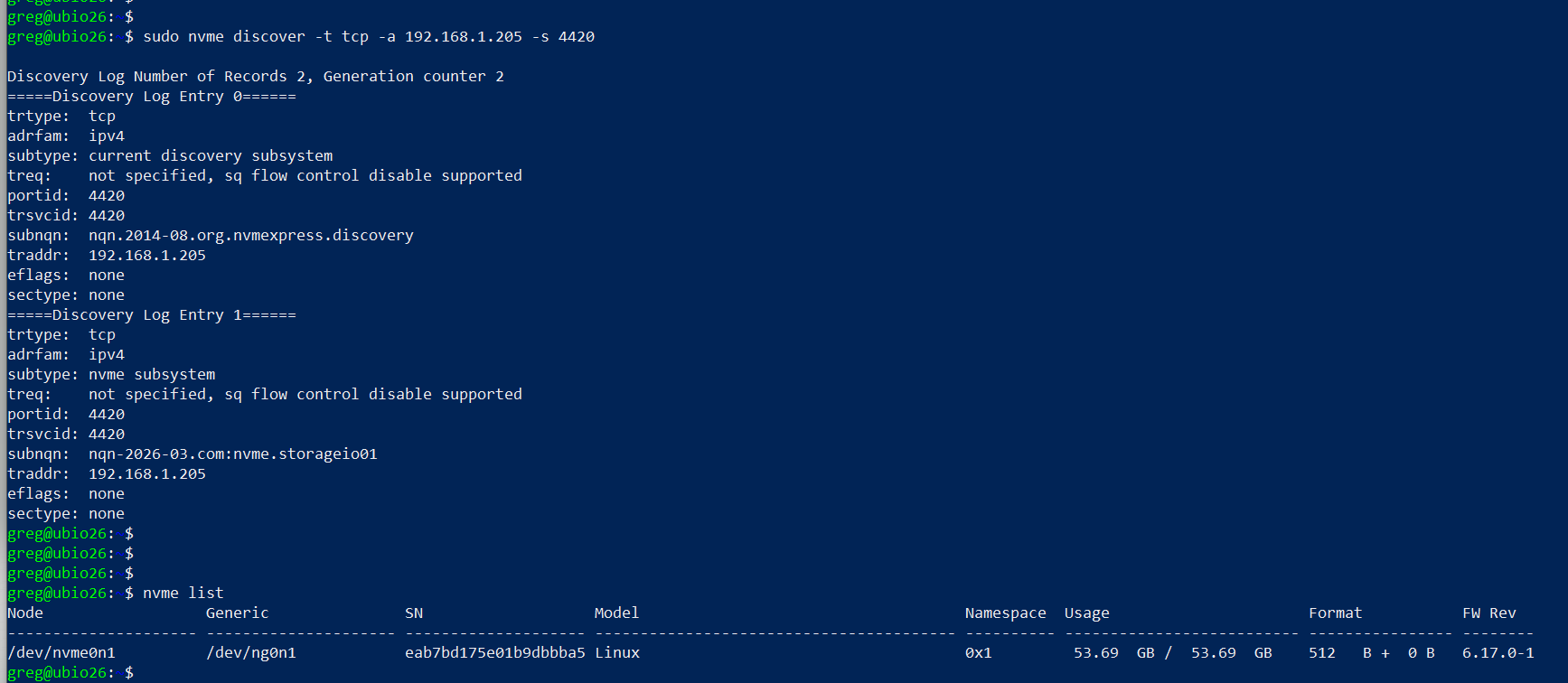
setting up linux nvmeof target

On Windows Server vnext (NVMeoF Initiator)

Now, on your Windows Server vnext, open a command window with elevated access (e.g., Run as Administrator) and use the following, making note of the parameters from the target (e.g., IP address, port 4420, nqn).

Here is a screen shot of the host initiator before the NVMeoF target appears.
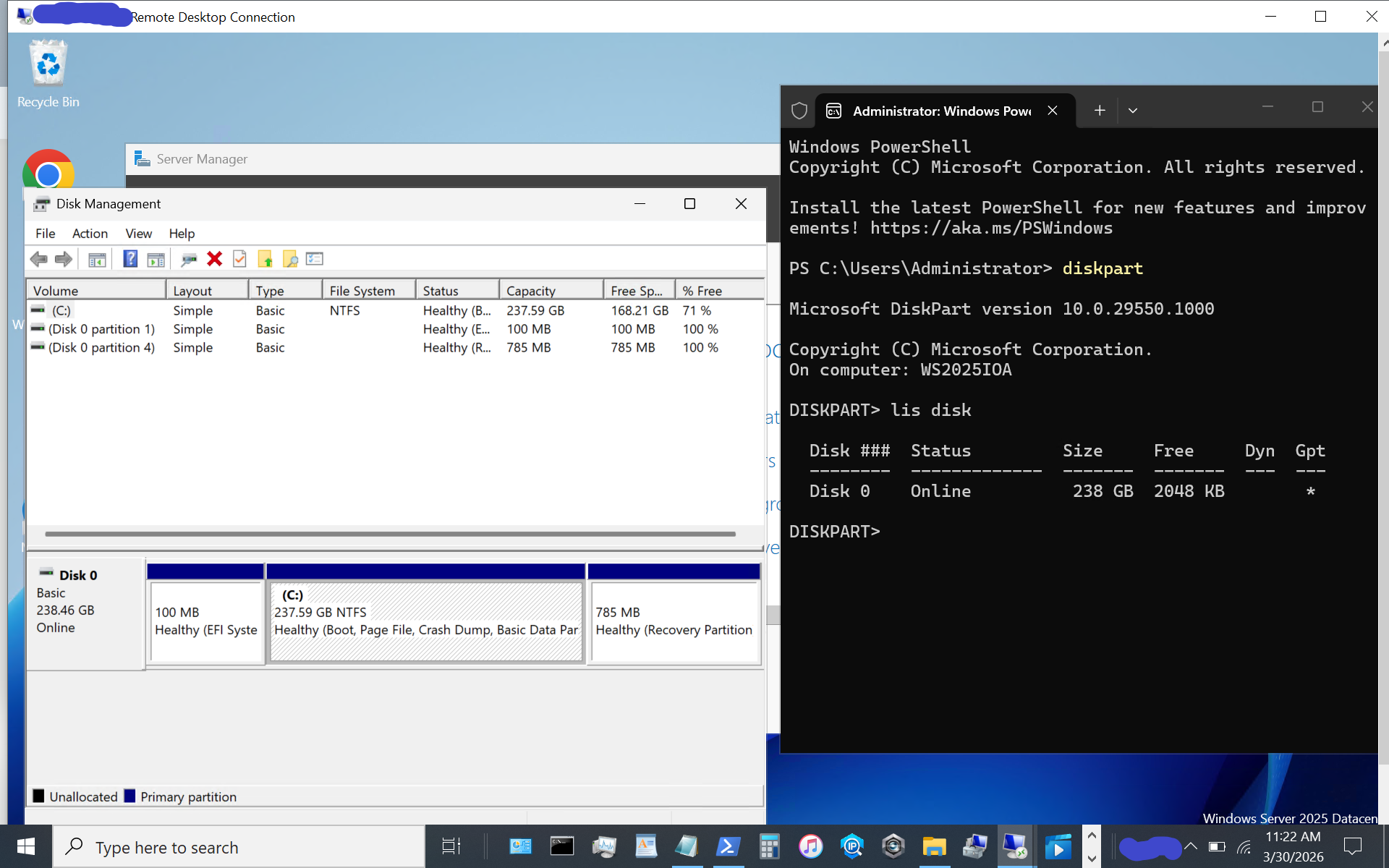
windows server vnext nvmeof host initiator setup

Now display available NVMeoF initiators using this command:

nvmeofutil.exe list -t ia
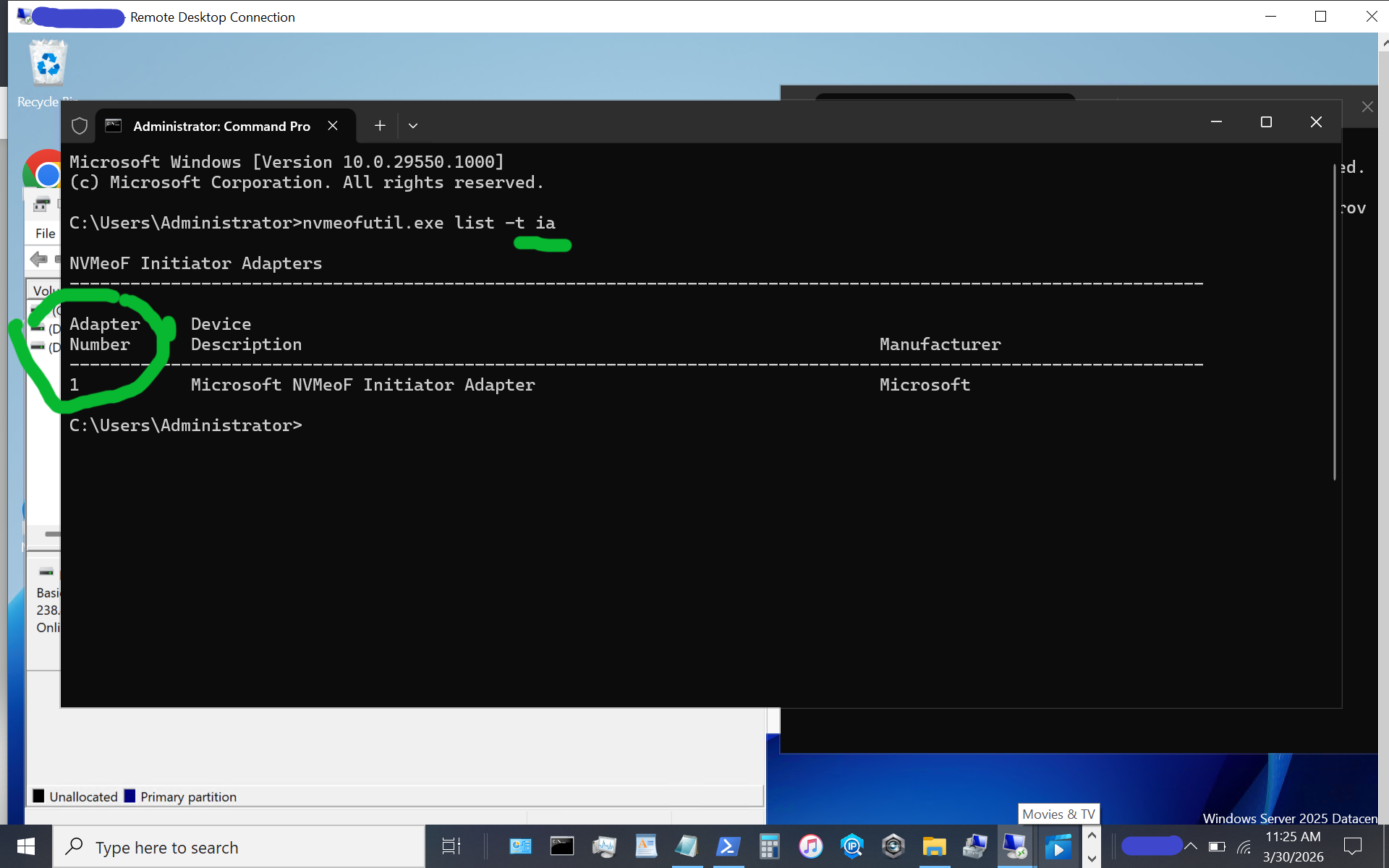
windows server vnext nvmeof host initiator setup

Note the host adapter number (e.g., 1) which will be used in the next step to get host gateway information.

nvmeofutil.exe list -t sp -ia 1
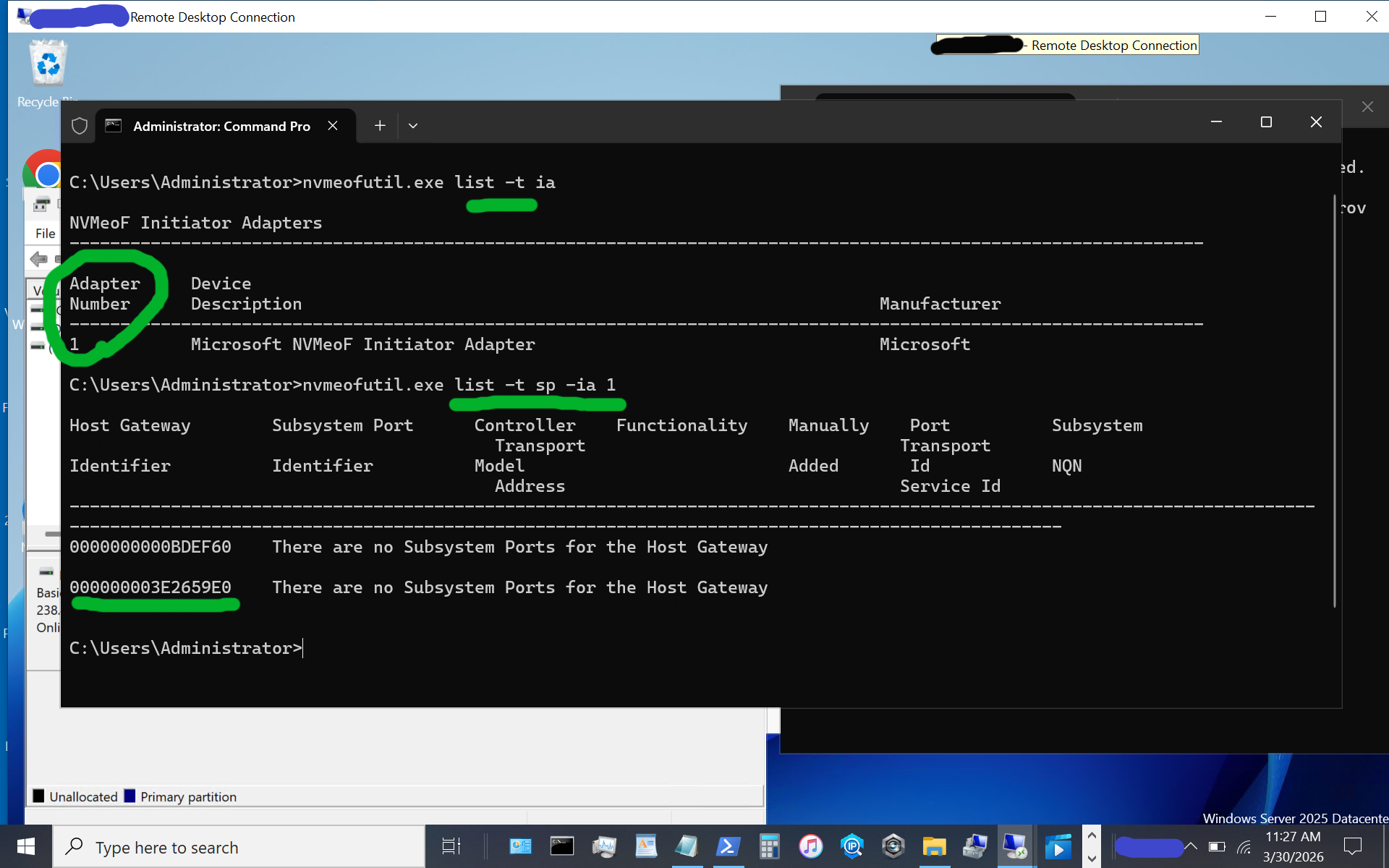
windows server vnext nvmeof host initiator setup display host gateway

Note the host gateway, target IP address, target port, and target nqn. Also note that there is an IPV6 and IPV4, in this example there is no IPV6 being used, so we are using the 2nd item (e.g. IPV4).

nvmeofutil.exe add -t sp -ia 1 -hg -dy true -pi 1 -nq nqn-2026-03.com:nvme.storageio01 -ta 192.168.1.205 -ts 4420
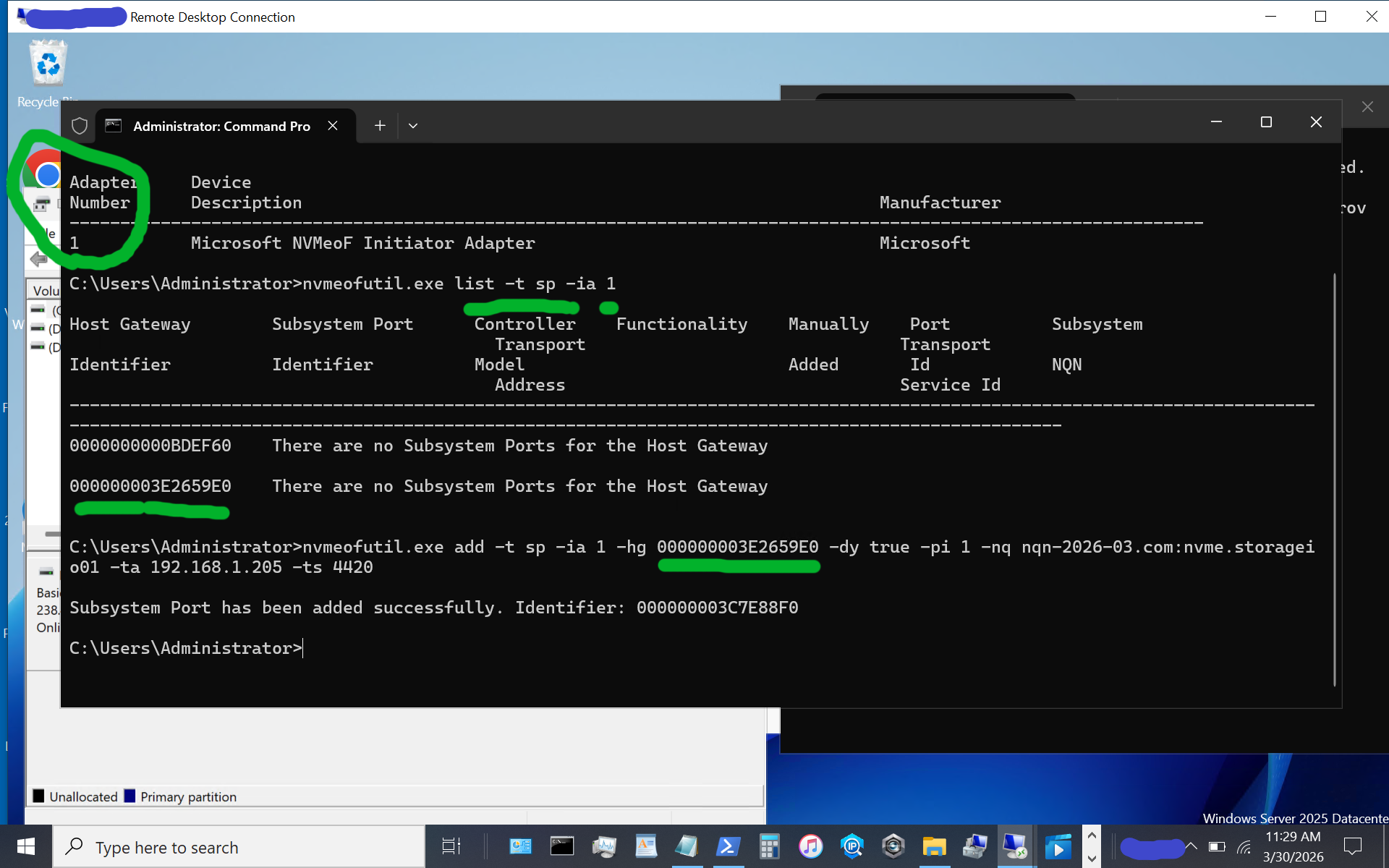
windows server vnext nvmeof host initiator setup showing host gateway and other information

Now, let’s identify the target subsystem ID.

nvmeofutil.exe list -t sp -ia 1
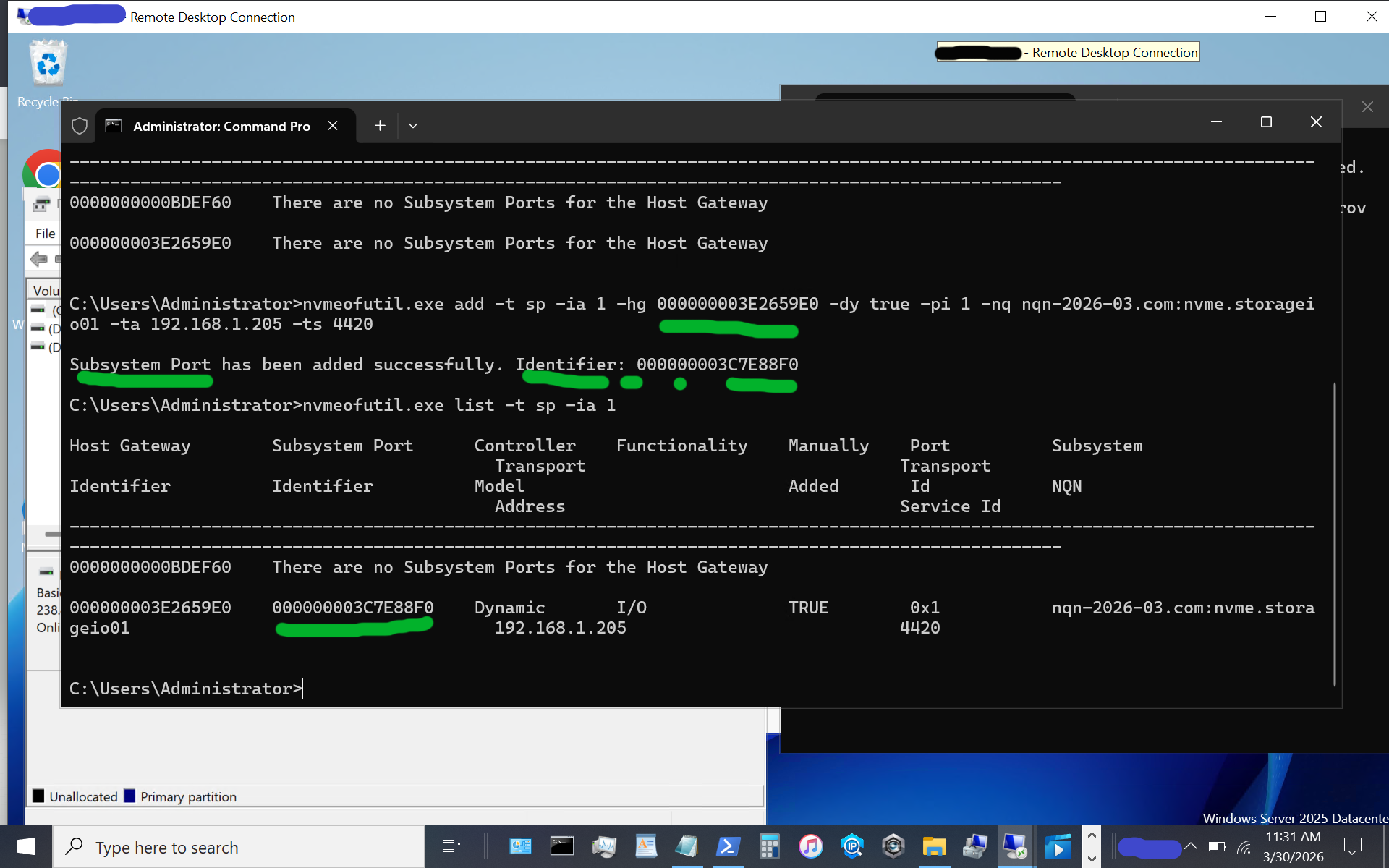
windows server vnext nvmeof host initiator setup showing subsystem information of available targets

Now, let’s use the subsystem port from above to connect to the target. Note that in some of the instructions I have seen, there is a reference to sp without an sp shown; thus, the previous steps help identify the sp to use.

nvmeofutil.exe connect -ia 1 -sp 000000003C7E88F0
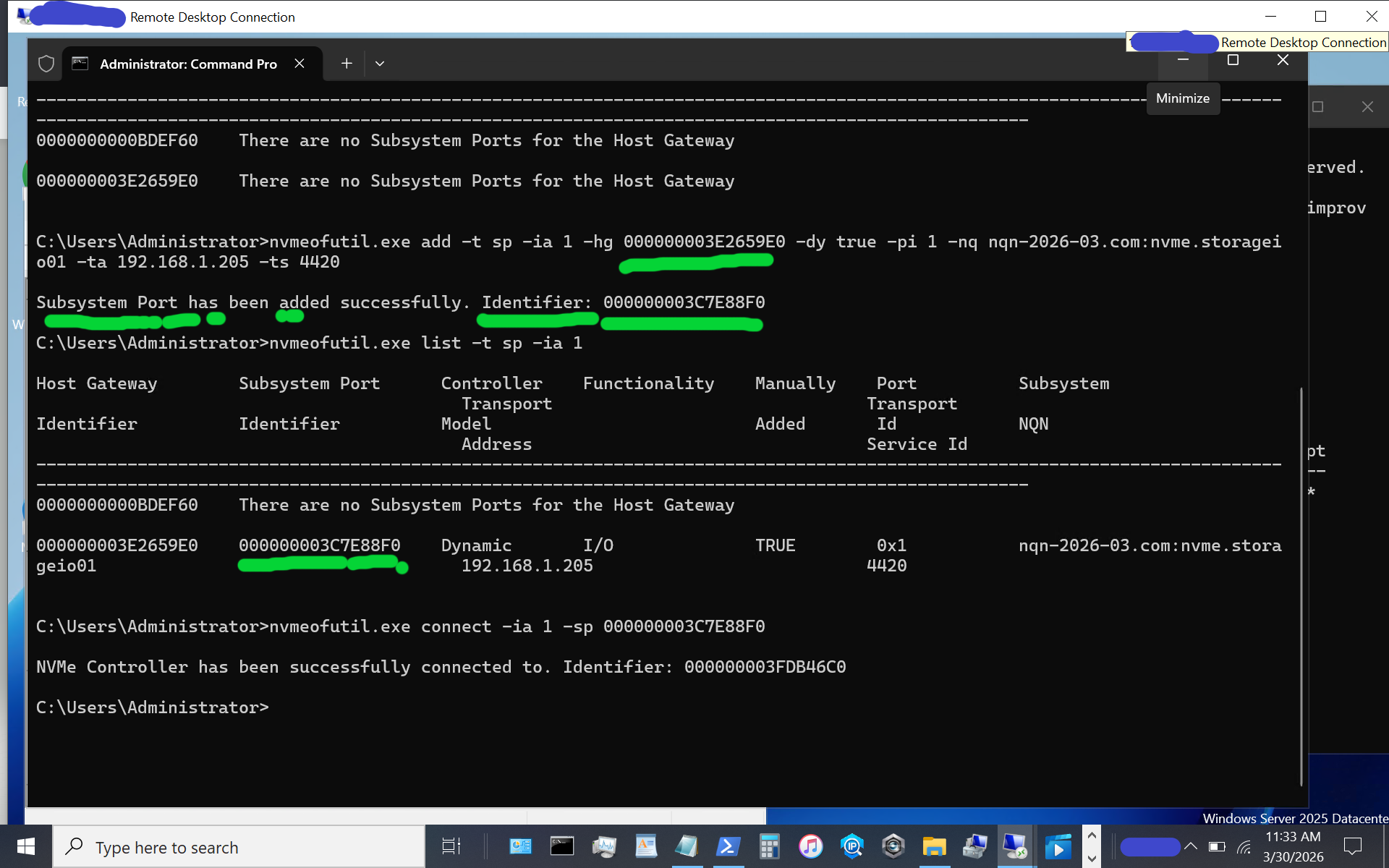
windows server vnext nvmeof host initiator setup

Congratulations, at this point, you should see a new disk or volume appear on your Windows Server vnext host system.
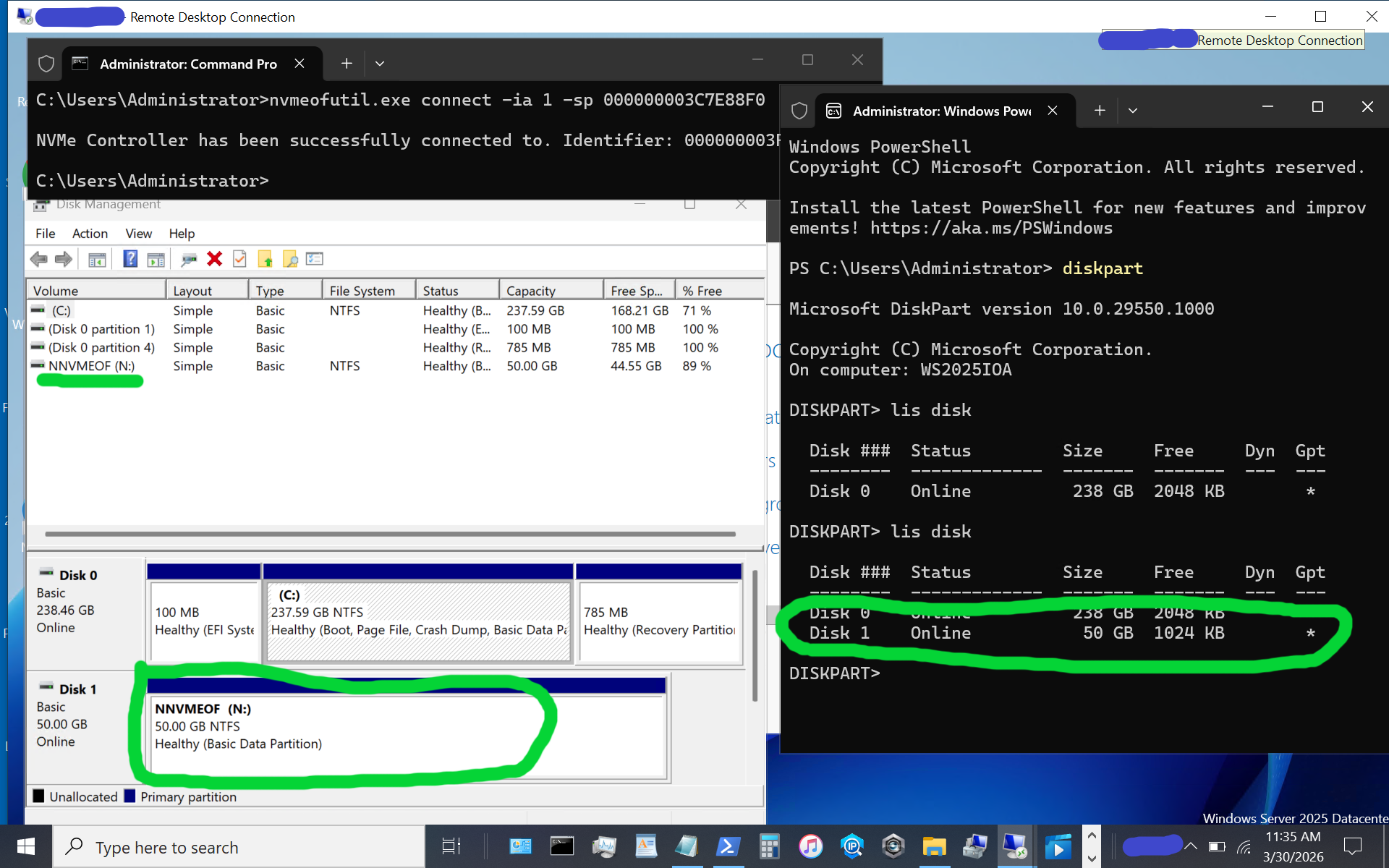
windows server vnext nvmeof host initiator setup

The above image shows what appears when using diskpart, as well as the disk format utility, or use your preferred command, PowerShell script, or tool. If the disk or volume has not yet been used, it must be initialized and formatted. Otoh, as in this example, the disk volume had previously been initialized and formatted as a simple NTFS volume.

Again, reiterating, the above is for simple testing and evaluation, with loose security and persistence that you will want to tighten up as needed. The whole process is pretty easy as long as you don’t make any typos, for example, with nqn or other items.

Additional Resources Where to learn more

Microsoft Windows Server Insider Build NVMeoF Initiator (Blog post)
NVMe Linux Driver and related info
Announcing Native NVMe in Windows Server 2025 (Microsoft Post)
Introducing the Windows NVMe-oF Initiator Preview in Windows Server Insiders Builds (Microsoft Post)
Windows Server Insider Builds (Microsoft Downloads)
ToE NVMeoF TCP Performance Boost Performance Reduce Costs (blog post)
TheNVMeplace.com (Various NVMe resources)
Azure Cloud Storage here (Microsoft Post)
Microsoft Azure Data Box (Blog Post)
Azure Elastic SAN from Cloud to On-Prem here (Blog Post)
Cloud and Software Defined Data Infrastructure topics here

Additional learning experiences along with common questions (and answers) pertaining to SCSI, Fibre Channel, NVMe, Cloud, Hardware, Software, Services, techniques, server, storage, I/O networking, data protection among other topics are found in my Software Defined Data Infrastructure Essentials book.
Software Defined Data Infrastructure Essentials (CRC Press) by Greg Schulz

What this all means

With the insiders preview of Windows Server vnext you have the opportunity to try out the new NVMeoF initiator using TCP and RDMA including on Ethernet based fabric networks. The current insiders build utilizes the nvmeofutility.exe for initial testing, evaluations and experiments while future releases should see other management tools and interfaces such as Powershell cmdlets among others.

Ok, nuff said.

Cheers Gs

Greg Schulz – Ten time Microsoft MVP Cloud and Data Center Management and Azure Storage, along with previous ten-time VMware vExpert. Author of Software Defined Data Infrastructure Essentials (CRC Press), as well as Cloud and Virtual Data Storage Networking (CRC Press), The Green and Virtual Data Center (CRC Press), Resilient Storage Networks (Elsevier) and twitter @storageio. Courteous comments are welcome for consideration. First published on https://storageioblog.com any reproduction in whole, in part, with changes to content, without source attribution under title or without permission is forbidden.

All Comments, (C) and (TM) belong to their owners/posters, Other content (C) Copyright 2006-2026 Server StorageIO and UnlimitedIO. All Rights Reserved. StorageIO is a registered Trade Mark (TM) of UnlimitedIO LLC.

Its Time for NVMeoF to let iSCSI begin its slow retirement journey

Why Its Time for NVMeoF

Its Time for NVMeoF to let iSCSI begin its slow retirement journey for networked shared block storage. Dating back to the late 1990s and early 2000s, iSCSI encapsulates the SCSI command set over a TCP/IP (IP)- based fabric network, or as an alternative to SCSI on Fibre Channel (SCSI_FCP aka FCP aka FC). The SCSI command set dates back to the 1980s, having been deployed on physical parallel cabling and later on other transports, including Fibre Channel, Serial Attached SCSI (SAS), and iSCSI.

The reason it’s time for NVMe over Fabric (NVMeoF), and specifically NVMeoF using TCP and RDMA, to let iSCSI begin its slow retirement journey, is the evolution of the NVMe protocol command set and the expansion of its ecosystem as a modern, ground-up, streamlined server storage I/O protocol command set.

Keep in mind that there are two aspects in play with NVMeoF, which are similar to iSCSI and Fibre Channel-based FCP: the upper layer or protocol command set (e.g., NVMe and SCSI), and media through which these command sets are implemented via various interfaces such as TCP or RDMA on Ethernet, via InfiniBand, Fibre Channel, or physical PCIe, among others.

Ethernet has established itself as the dominant network interface, supporting various upper layers, such as TCP, and increasing its speed. Likewise, InfiniBand and Fibre Channel continue to increase their speeds and maintain their deployment roles in some environments.

Besides supporting faster networks, the NVMe command set was architected and has been deployed to support the current and evolving generations of processors with multiple cores, enabling more concurrent I/O operations and compute threads with less CPU overhead due to a modern, streamlined I/O stack and associated native drivers.

Why NVMeoF (over TCP or RDMA)

Leverage the combined improved benefits of NVMe as a server storage I/O communications protocol, along with TCP networking and industry-standard Ethernet as a communications fabric. With the NVMe command protocol server storage, I/O processing is streamlined and optimized for modern high-speed, low-latency network fabrics, such as Ethernet, as the transport.

The NVMe command set, compared to the SCSI command set, enables faster I/O processing with lower latency, higher IOPs, greater bandwidth, and more transactions, while increasing concurrency and the number of threads and reducing CPU usage per I/O operation. Similar to the SCSI command set, which has been deployed on various industry-standard transport interfaces, the NVMe command set is also deployed across various transports. For example, SCSI has been supported on IP (iSCSI), Fibre Channel (SCSI_FCP, e.g., FCP), Serial Attached SCSI (SAS), and Parallel SCSI, among others.

Likewise, the NVMe command set has been implemented via PCIe, including U.2, as well as over fabrics (e.g., NVMe over Fabric, aka NVMeoF), most notably with TCP and RDMA, along with some NVMe over Fibre Channel. In addition to being a modern, streamlined command set, NVMe also supports more devices, queues, and sessions, and is optimized with host-server initiator and target-side stacks.
An example of how NVMe is being embraced from a software support standpoint is Microsoft’s production release of a new, re-architected, optimized I/O stack as part of Windows Server 2025 in December 2025. Recently, Microsoft released, as part of the latest vnext insiders preview build, an all-new NVMeoF (TCP & RDMA) initiator for testing and evaluation.

NVMe has proven itself as a command set using various transports for use as a target for various SSD and flash storage devices (e.g., back-end) in servers, clients, and storage systems, as well as a front-end alternative to SCSI_FCP (e.g., FCP or FC) and iSCSI among others on storage systems, and software-defined storage solutions. Also, keep in mind that while the SCSI command set dates back to at least the early 1990s for general-purpose access of Magnetic Tape, CD/DVD, HDD, and later SSD, NVMe developed in the last decade was created from the ground up for solid-state devices (SSDs), including flash, among other persistent storage mediums.

Why NVMeoF (TCP) vs iSCSI

It would be, and is, too easy to say the 2000s called and want iSCSI back; however, tongue-in-cheek, there is some reality to that. However, looking closer, iSCSI evolved in the early 2000s as a low-cost SCSI command set alternative to Fibre Channel (SCSI_FCP, e.g., FCP or FC), as well as the survivor of the block IP storage wars (e.g., iFCP, FCIP, iSCSI, etc.) for general-purpose IP-based SCSI storage access.

Fibre Channel-based SCSI (FCP) went on to dominate higher-performance fabric- or networked-storage, aka storage area networks (SANs), with iSCSI having some success in other areas alongside file-based IP storage access via NFS & SMB, among others.

Now that we are in the mid-2020s, the ecosystem around NVMe has matured and continues to do so, with full-stack NVMe solutions, hardware- and software-based initiators, native NVMe drivers, target-based storage systems, and storage devices using various transports. NVMe has evolved from direct-attached PCIe card slots to PCIe U.2 & U.3, M.2 and EDSFF slots, as well as NVMe over Fabrics including TCP and RDMA, among others.

The benefit of using NVMeoF vs iSCSI is lower latency, due to native NVMe commands over TCP being streamlined, vs older SCSI encapsulation and associated cumbersome driver stacks. Besides the streamlined drivers and transports, NVMeoF also provides massive parallelism and multi-threading to boost server storage I/O while leveraging today’s multi-core processors and offload capabilities.

The net result is more I/O operations supporting higher IOPs, bandwidth, and transactions per second, with lower latency and lower CPU usage, resulting in greater productivity and better economics for databases, virtualization, AI/ML, and other block-based workloads.

Who supports NVMe and NVMeoF?

Most host and client operating systems support NVMe or NVMeoF initiators (e.g., Linux, VMware, Microsoft Windows [in the current Insider build], among others). There are also hardware adapter-based NVMe initiators, such as those from Broadcom, Chelsio, and NVIDIA. There are software NVMe and NVMe target packages for many platforms, such as Linux-based NVMe, nvme-tcp, nvme-rdma, nvme-fc, nvmet, nvmet-tcp, and SPDK (Storage Performance Development Kit), among others.

Besides server- or client-side support, there are storage and server hardware chassis building blocks that support NVMe, as well as storage system solutions from Dell, HPE, Hitachi, NetApp, Pure, among others. Within large cloud service providers such as AWS, Microsoft Azure, and Google Cloud Platform (GCP), NVMe is also widely used across their platform ecosystems.

Why it’s time for NVMeoF to let iSCSI begin its slow retirement journey
This is not to say that iSCSI is dead or that it has no future; rather, NVMeoF and its ecosystem have evolved and are ready to do more. Likewise, the SCSI command set is not dead; it’s still used with SAS, Fibre Channel (FCP), iSCSI, etc. However, NVMe has evolved and is seeing broad adoption from server and client attachment to storage devices and storage systems over various transport interfaces and media (PCIe, U.2/U.3, M.2, EDSFF, Ethernet, and fabrics).

Storage systems have also evolved, adding front-end support for NVMeoF and back-end attachment of NVMe flash and SSDs. With the combination of server, client and other software platforms having or in public release review, new streamlined native NVMe drivers and I/O stacks along with NVMeoF initiators (or targets), now is the time to look at NVMeoF as a replacement or alternative to iSCSI, and perhaps even Fibre Channel in the future to support existing and legacy workloads as well as new and emerging application landscapes and their demanding server storage I/O and compute needs (e.g. AI among others).

Additional Resources Where to learn more

Microsoft Windows Server Insider Build NVMeoF Initiator (Blog post)
Installing new Insider’s build Windows Server vnext NVMeoF, host initiator (blog post)
NVMe Linux Driver and related info
Announcing Native NVMe in Windows Server 2025 (Microsoft Post)
Introducing the Windows NVMe-oF Initiator Preview in Windows Server Insiders Builds (Microsoft Post)
Windows Server Insider Builds (Microsoft Downloads)
ToE NVMeoF TCP Performance Line Boost Performance Reduce Costs (blog post)
TheNVMeplace.com (Various NVMe resources)
Azure Cloud Storage here (Microsoft Post)
Microsoft Azure Data Box (Blog Post)
Azure Elastic SAN from Cloud to On-Prem here (Blog Post)
Cloud and Software Defined Data Infrastructure topics here

Additional learning experiences along with common questions (and answers) pertaining to SCSI, Fibre Channel, NVMe, Cloud, Hardware, Software, Services, techniques, server, storage, I/O networking, data protection among other topics are found in my Software Defined Data Infrastructure Essentials book.

Software Defined Data Infrastructure Essentials (CRC Press) by Greg Schulz

What this all means

Now is a good time to look into NVMe and, specifically, NVMe over Fabric (NVMeoF) if you have not recently done so, to refresh or learn what it can do. Likewise, if you are using iSCSI or Fibre Channel-based SCSI_FCP (e.g., not FICON), now is a good time to review or refresh your understanding of NVMeoF and where it fits into future plans for block storage. For those who say block storage is dead and everything is object storage, file storage, or even table storage, that’s fine, as those are all companions to block storage in a balanced ecosystem, each with its own uses, roles, and fits.

Ok, nuff said.

Cheers Gs

Greg Schulz – Ten time Microsoft MVP Cloud and Data Center Management and Azure Storage, along with previous ten-time VMware vExpert. Author of Software Defined Data Infrastructure Essentials (CRC Press), as well as Cloud and Virtual Data Storage Networking (CRC Press), The Green and Virtual Data Center (CRC Press), Resilient Storage Networks (Elsevier) and twitter @storageio. Courteous comments are welcome for consideration. First published on https://storageioblog.com any reproduction in whole, in part, with changes to content, without source attribution under title or without permission is forbidden.

All Comments, (C) and (TM) belong to their owners/posters, Other content (C) Copyright 2006-2026 Server StorageIO and UnlimitedIO. All Rights Reserved. StorageIO is a registered Trade Mark (TM) of UnlimitedIO LLC.

Microsoft Windows Server Insider Build NVMeoF Initiator

Microsoft Windows Server Insider Build NVMeoF Initiator

In case you haven’t heard, in addition to recently announcing a new NVMe native driver for Windows Server 2025 back in December 2025, Microsoft has now introduced a new Windows NVMe over Fabrics (NVMeoF, aka NVMe-oF) Initiator Preview in the latest Windows Server Insiders Builds.

With the preview of this new NVMeoF initiator, Microsoft is moving closer to delivering enhanced server storage I/O performance by embracing NVMe as both a native storage target and a native NVMe host server initiator. While the new NVMe native storage stack driver was released for production back in December 2025, this new host initiator capability is available as a preview in the latest Windows Server insider build.

By adding a native NVMeoF initiator, Microsoft is enabling organizations to use shared networked block software-defined and SAN storage using the faster NVMe protocol, rather than traditional SCSI/iSCSI/SCSI_FCP(FC) protocol-based interfaces. In addition to supporting native direct-attached NVMe storage, Microsoft Windows servers (insider build) now support the streamlined NVMe server storage I/O stack over networks, including Ethernet and RDMA fabrics.

Additional Resources Where to learn more

ToE NVMeoF TCP Performance Line Boost Performance Reduce Costs (blog post)
NVMe Linux Driver and related info
Its Time for NVMeoF to let iSCSI begin its slow retirement journey (blog post)
Announcing Native NVMe in Windows Server 2025 (Microsoft Post)
Installing new Insider’s build Windows Server vnext NVMeoF, host initiator (blog post)
Introducing the Windows NVMe-oF Initiator Preview in Windows Server Insiders Builds (Microsoft Post)
Windows Server Insider Builds (Microsoft Downloads)
TheNVMeplace.com (Various NVMe resources)
Azure Cloud Storage here (Microsoft Post)
Microsoft Azure Data Box (Blog Post)
Azure Elastic SAN from Cloud to On-Prem here (Blog Post)
Cloud and Software Defined Data Infrastructure topics here

Additional learning experiences along with common questions (and answers) pertaining to Cloud, Hardware, Software, Services, techniques, server, storage, I/O networking, data protection among other topics are found in my Software Defined Data Infrastructure Essentials book.

Software Defined Data Infrastructure Essentials (CRC Press) by Greg Schulz

What this all means

While this new Windows Server host NVMe over Fabric (NVMeoF aka NVMe-oF) initiator for block storage is currently available as part of a Windows Server insiders build, it provides a means for organizations to begin testing native NVMe connectivity via Windows Servers to their existing SAN and other networked software defined storage servers via fabrics including Ethernet along with RDMA based. Learn more about this new initiator, along with how to try it out for yourself via this Microsoft blog post that includes instructions on how to setup your own NVMeoF storage target if you dont have one.

Ok, nuff said.

Cheers Gs

Greg Schulz – Ten time Microsoft MVP Cloud and Data Center Management and Azure Storage, along with previous ten-time VMware vExpert. Author of Software Defined Data Infrastructure Essentials (CRC Press), as well as Cloud and Virtual Data Storage Networking (CRC Press), The Green and Virtual Data Center (CRC Press), Resilient Storage Networks (Elsevier) and twitter @storageio. Courteous comments are welcome for consideration. First published on https://storageioblog.com any reproduction in whole, in part, with changes to content, without source attribution under title or without permission is forbidden.

All Comments, (C) and (TM) belong to their owners/posters, Other content (C) Copyright 2006-2026 Server StorageIO and UnlimitedIO. All Rights Reserved. StorageIO is a registered Trade Mark (TM) of UnlimitedIO LLC.

Azure Cloud Storage Options

Azure Cloud Storage Options

Recently I was a guest on fellow Microsoft MVP Navika Chhauda podcast  Tech Chat with Navika on YouTube. We discussed various Microsoft Cloud Storage Options, services, features and use cases. Here’s the link to the podcast episode Understanding Azure Storage.

Our conversation included an overview of the various Azure Cloud Storage options and services along with some use cases. Our conversation covered Azure Cloud Storage options such as Blobs (e.g. objects) including Append, Block and Page blobs. We also discussed various File, Block including Azure Disk (for Azure VMs with NVMe SSD and HDDs). Another Azure Cloud Storage option is Azure Elastic SAN with various storage tiers.

We also discussed scenarios for Azure Data Lake Storage Gen2, Blob and file options, how they differ, as well as when to use the different types of storage. In addition, we discussed the integration of Azure Disk Storage with Azure Site recovery along with Azure Backup, as well as Data Box among other items.

Additional Resources Where to learn more

Learn more via the following resourcest:

Windows Server Insider Build new NVMeoF initiator (Blog Post)
Azure Cloud Storage here
Microsoft Azure Data Box here
Azure Elastic SAN from Cloud to On-Prem here
Navika Chauda on LinkedIn here
Cloud and Software Defined Data Infrastructure topics here

Additional learning experiences along with common questions (and answers) pertaining to Cloud, Hardware, Software, Services, techniques, server, storage, I/O networking, data protection among other topics are found in my Software Defined Data Infrastructure Essentials book.

Software Defined Data Infrastructure Essentials (CRC Press) by Greg Schulz

What this all means

There is more to cloud storage than just objects and buckets or in Microsoft Azure parlance blobs and containers. Various storage options, tiers, categories and services are provided by the different cloud providers including Microsoft Azure. Some cloud storage options are for use within the cloud, while others can be used hybrid including from on-prem. These various Azure Cloud Storage Options support different workloads from new cloud native and Kubernetes based to traditional VM as well as on-prem, from data protection to on-line high performance, to AI among many others.

Ok, nuff said.

Cheers Gs

Greg Schulz – Nine time Microsoft MVP Cloud and Data Center Management and Azure Storage, along with previous ten-time VMware vExpert. Author of Software Defined Data Infrastructure Essentials (CRC Press), as well as Cloud and Virtual Data Storage Networking (CRC Press), The Green and Virtual Data Center (CRC Press), Resilient Storage Networks (Elsevier) and twitter @storageio. Courteous comments are welcome for consideration. First published on https://storageioblog.com any reproduction in whole, in part, with changes to content, without source attribution under title or without permission is forbidden.

All Comments, (C) and (TM) belong to their owners/posters, Other content (C) Copyright 2006-2026 Server StorageIO and UnlimitedIO. All Rights Reserved. StorageIO is a registered Trade Mark (TM) of UnlimitedIO LLC.

RTO Context Matters

RTO Context Matters

With RTO context matters similar to many things in and around Information Technology (IT) among other industries. Various three (or more) letter acronyms (TLAs) have different meanings based on their context. An example of a TLA is RTO which has different meanings. For  instance, RTO can mean:

    • Return To Office
    • Recovery Time Objective
    • Ready To Operate
    • Return To Operations
    • Among others…

From the data protection and cyber resilience context, RTO has traditionally been thought of as a Recovery Time Objective or the amount of time that something should be able to be restored, recovered, rebuilt, reset, or returned to service, aka being usable. Another way of looking at Recovery Time Objective is the goal or requirement that something is ready to operate, enabling an organization and its IT services apps, data, and information to return to operations.

Data Infrastructures and Recovery Time Objectives (RTO)
Figure 1 Data Infrastructures and Recovery Time Objectives (RTO)

RTO Recovery Time Object Context

Where context is needed is not just simply what RTO is being discussed, e.g., recovery time objective; also, what is the scope of the recovery time objective? Is it all-inclusive for a specific component, layer, or focus point? A holistic RTO is when everything in the stack, vertical up and down all layers of hardware, software, services, and, if applicable, also horizontal across different systems, platforms, and locations, is usable. For example, when a user can access an app from various places, and everything is functioning, perhaps not at full or regular speed, it is functioning.

Data Infrastructures and Recovery Time Objectives (RTO) layers
Figure 2 Various Threats and Data Infrastructure Layers

Recovery Time Objective Focus

On the other hand, component RTO refers to a specific focus area, point, or location in the stack (figure 2). For example, a lower-level server, network, storage device, physical or virtual machine, container, file system, database repository, or application is restored or returned to readiness and operation. The individual components may be restored to operating; however, what about the sum of all the parts that make up the holistic solution or service the user sees and expects to be in working condition?

Additional Resources Where to learn more

The following links are additional resources to learn more about Recovery Time Objectives (RTO)  and related data infrastructures, tradecraft, and metrics that matter topics.

Various excerpts from Chapter 9 Software Defined Data Infrastructure book
Modernizing Data Protection (Blog Post)
Data Protection Diaries (Blog Post)
Azure Cloud Storage Options (Blog Post)
Availability and Accessibility (Article)

Additional learning experiences along with common questions (and answers), are found in my Software Defined Data Infrastructure Essentials book.

Software Defined Data Infrastructure Essentials (CRC Press) by Greg Schulz

What this all means

RTO context matters, not only for which RTO but also if it refers to a holistic compound aggregate scope or that of a component. While component RTOs are essential, so is the holistic focus of when things are usable.

Ok, nuff said.

Cheers Gs

Greg Schulz – Nine time Microsoft MVP Cloud and Data Center Management and Azure Storage, along with previous ten-time VMware vExpert. Author of Software Defined Data Infrastructure Essentials (CRC Press), as well as Cloud and Virtual Data Storage Networking (CRC Press), The Green and Virtual Data Center (CRC Press), Resilient Storage Networks (Elsevier) and twitter @storageio. Courteous comments are welcome for consideration. First published on https://storageioblog.com any reproduction in whole, in part, with changes to content, without source attribution under title or without permission is forbidden.

All Comments, (C) and (TM) belong to their owners/posters, Other content (C) Copyright 2006-2026 Server StorageIO and UnlimitedIO. All Rights Reserved. StorageIO is a registered Trade Mark (TM) of UnlimitedIO LLC.

PACE your Server Storage I/O decision making, its about application requirements

PACE your Server Storage I/O decision making, its about application requirements

PACE your Server Storage I/O decision-making, it’s about application requirements. Regardless of if you are looking for physical, software-defined virtual, cloud or container storage, block, file or object, primary, secondary or protection copies, standalone, converged, hyper-converged, cluster in a box or other forms of storage and packaging, when it comes to server storage I/O decision-making, it’s about the applications.

I often see people deciding on the best storage before the questions of requirements, needs and wants are even mentioned. Sure the technology is important, so too are the techniques and trends including using new things in new ways, as well as old things in new ways. There are lots of buzzwords on the storage scene these days. But don’t even think about buying it until you truly understand your business’ storage needs.

However when it comes down to it unless you have a unique need, most environments server, and storage I/O resources exist to protect preserve and serve applications and their information or data. Recently I did a couple of articles over at Network Computing; these are tied to server and storage I/O decision-making balancing technology buzzwords with business and application requirements.

PACE and common applications characteristics

PACE your server storage decisions

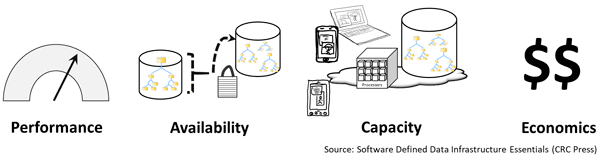
A theme I mention in the above two articles as well as elsewhere on server, storage I/O and applications is PACE. That is, application Performance Availability Capacity Economics (PACE). Different applications will have various attributes, in general, as well as how they are used. For example database transaction activity vs. reporting or analytics, logs and journals vs. redo logs, indices, tables, indices, import/export, scratch and temp space. PACE (figure 2.7) describes the applications and data characters and needs.

Server Storage I/O PACE

Common Application Pace Attributes

All applications have PACE attributes

  • Those PACE attributes vary by application and usage
  • Some applications and their data are more active vs. others
  • PACE characteristics will vary within different parts of an application

Think of an application along with associated data PACE as its personality or how it behaves, what it does, how it does it and when along with value, benefit or cost along with Quality of Service (QoS) attributes. Understanding the applications in different environments, data value and associated PACE attributes is essential for making informed server, storage I/O decisions from configuration to acquisitions or upgrades, when, where, why and how to protect, or performance optimization along with capacity planning, reporting, and troubleshooting, not to mention addressing budget concerns.

Data and Application PACE

Primary PACE attributes for active and inactive applications and data:
P – Performance and activity (how things get used)
AAvailability and durability (resiliency and protection)
C – Capacity and space (what things use or occupy)
EEnergy and Economics (people, budgets and other barriers)

Some applications need more performance (server computer, or storage and network I/O) while others need space capacity (storage, memory, network or I/O connectivity). Likewise, some applications have different availability needs (data protection, durability, security, resiliency, backup, BC, DR) that determine various tools, technologies and techniques to use. Budgets are also a concern which for some applications meaning enabling more performance per cost while others are focused on maximizing space capacity and protection level per cost. PACE attributes also define or influence policies for QoS (performance, availability, capacity), as well as thresholds, limits, quotas, retention and disposition among others.

Where to learn more

Learn more about data infrastructures and tradecraft related trends, tools, technologies and topics via the following links:

Additional learning experiences along with common questions (and answers), as well as tips can be found in Software Defined Data Infrastructure Essentials book.

Software Defined Data Infrastructure Essentials Book SDDC

What this all means

The best storage will be the one that meets or exceeds your application requirements instead of the solution that meets somebody else’s needs or wants. Keep in mind, PACE your Server Storage I/O decision making, it is about application requirements

Ok, nuff said, for now.

Cheers Gs

Greg Schulz – Microsoft MVP Cloud and Data Center Management, VMware vExpert 2010-2018. Author of Software Defined Data Infrastructure Essentials (CRC Press), as well as Cloud and Virtual Data Storage Networking (CRC Press), The Green and Virtual Data Center (CRC Press), Resilient Storage Networks (Elsevier) and twitter @storageio. Courteous comments are welcome for consideration. First published on https://storageioblog.com any reproduction in whole, in part, with changes to content, without source attribution under title or without permission is forbidden.

All Comments, (C) and (TM) belong to their owners/posters, Other content (C) Copyright 2006-2026 Server StorageIO and UnlimitedIO. All Rights Reserved. StorageIO is a registered Trade Mark (TM) of Server StorageIO.

2019 Happy Holidays Seasons Greetings

2019 Happy Holidays Seasons Greetings, here’s a video from our companion site Pictures Over Stillwater with holiday lights and Stillwater Lights.

Where to learn more

Learn and view more via the following links:

Additional learning experiences along with common questions (and answers), as well as tips can be found in Software Defined Data Infrastructure Essentials book.

Software Defined Data Infrastructure Essentials Book SDDC

What this all means

2019 Happy Holidays Seasons Greetings.

Ok, nuff said, for now.

Cheers GS

Greg Schulz – Multi-year Microsoft MVP Cloud and Data Center Management, ten-time VMware vExpert. Author of Data Infrastructure Insights (CRC Press), Software Defined Data Infrastructure Essentials (CRC Press), as well as Cloud and Virtual Data Storage Networking (CRC Press), The Green and Virtual Data Center (CRC Press), Resilient Storage Networks (Elsevier) and twitter @storageio. Also visit www.picturesoverstillwater.com to view various UAS/UAV e.g. drone based aerial content created by Greg Schulz. Courteous comments are welcome for consideration. First published on https://storageioblog.com any reproduction in whole, in part, with changes to content, without source attribution under title or without permission is forbidden.

All Comments, (C) and (TM) belong to their owners/posters, Other content (C) Copyright 2006-2026 Server StorageIO and UnlimitedIO. Visit our companion site https://picturesoverstillwater.com to view drone based aerial photography and video related topics. All Rights Reserved. StorageIO is a registered Trade Mark (TM) of Server StorageIO.

April 2018 Server StorageIO Data Infrastructure Update Newsletter

April 2018 Server StorageIO Data Infrastructure Update Newsletter

Server StorageIO data infrastructure Update Newsletter

Volume 18, Issue 4 (April 2018) Data Infrastructure Update Newsletter

Hello and welcome to the April 2018 Server StorageIO Data Infrastructure Update Newsletter.

In cased you missed it, the March 2018 Server StorageIO Data Infrastructure Update Newsletter can be viewed here (HTML and PDF).

In this issue themes include life beyond world backup day, focus on recovery, restoration and resiliency, as well as getting ready for GDPR. Also covered in this issue are themes of NVMe along with NVMe over Fabric (NVMeoF), Storage Class Memories (SCM) and related technologies covered in the March 2018 newsletter. Recent VMware public, private and hybrid cloud along with vSphere v6.7 are covered as well as other topics including:

Enjoy this edition of the Server StorageIO Data Infrastructure update newsletter.

Cheers GS

Server StorageIO Commentary in the news, tips and articles

Recent Server StorageIO industry trends perspectives commentary in the news.

Via SearchStorage: Comments on Dell EMC storage strategy talk buzzes Dell Tech World
Via GizModo: Comments Can a Loud Noise Really Bring Down a Data Center?
Via StateTech: Comments IT Ingenuity Lets State and Local Agencies Do More with Less
Via StateTech: Comments State and Local Agencies See Power in the VDI, HCI Combination
Via StateTech: Comments How Local Governments Can Meet the Demands of IoT Networking
Via IronMountain: Comments Hybrid cloud deployment demands a change in security mindset
Via IronMountain: Hybrid 4 3 2 1 Data Protection
Via IronMountain InfoGoto: The growing Trend of Secondary Data Storage
Via IronMountain InfoGoto: World Backup Day Best Practices For a Hybrid Approach
Via BizTech: Why Hybrid (SSD and HDD) Storage Might Be Fit for SMB environments

View more Server, Storage and I/O trends and perspectives comments here.

Server StorageIOblog Data Infrastructure Posts

Recent and popular Server StorageIOblog posts include:

VMware vSphere vSAN vCenter version 6.7 SDDC Update Summary
VMware vSphere vSAN vCenter v6.7 SDDC details
VMware vSphere vSAN vCenter Server Storage I/O Enhancements
Have you heard about the new CLOUD Act data regulation?
Data Protection Recovery Life Post World Backup Day Pre GDPR
Microsoft Windows Server 2019 Insiders Preview
March 2018 Server StorageIO Data Infrastructure Update Newsletter
Application Data Value Characteristics Everything Is Not The Same
Application Data Availability 4 3 2 1 Data Protection
VMware continues cloud construction with March announcements
World Backup Day 2018 Data Protection Readiness Reminder
Use Intel Optane NVMe U.2 SFF 8639 SSD drive in PCIe slot
Data Infrastructure Resource Links cloud data protection tradecraft trends
IT transformation Serverless Life Beyond DevOps Podcast
Data Protection Diaries Fundamental Topics Tools Techniques Technologies Tips
AWS Announces New S3 Cloud Storage Security Encryption Features
Introducing Windows Subsystem for Linux WSL Overview #blogtober
Hot Popular New Trending Data Infrastructure Vendors To Watch

View other recent as well as past StorageIOblog posts here

Events and Activities

Recent and upcoming event activities.

April 25, 2018 – Webinar – SDDC and Data Protection Discussion

April 24, 2018 – Webinar – AWS and on-site, on-premises hybrid data protection

March 27, 2018 – Webinar – Veeams Road to GDPR compliance The 5 Lessons Learned

Feb 28, 2018 – Webinar – Benefits of Moving Hyper-V Disaster Recovery to the Cloud

See more webinars and activities on the Server StorageIO Events page here.

Data Infrastructure Server StorageIO Industry Resources and Links

Various useful links and resources:

Data Infrastructure Recommend Reading and watching list
Microsoft TechNet – Various Microsoft related from Azure to Docker to Windows
storageio.com/links – Various industry links (over 1,000 with more to be added soon)
objectstoragecenter.com – Cloud and object storage topics, tips and news items
OpenStack.org – Various OpenStack related items
storageio.com/downloads – Various presentations and other download material
storageio.com/protect – Various data protection items and topics
thenvmeplace.com – Focus on NVMe trends and technologies
thessdplace.com – NVM and Solid State Disk topics, tips and techniques
storageio.com/converge – Various CI, HCI and related SDS topics
storageio.com/performance – Various server, storage and I/O benchmark and tools
VMware Technical Network – Various VMware related items

Connect and Converse With Us

Storage IO RSS storageio linkedin     Google+   storageio youtube  storageio instagram

Subscribe to Newsletter – Newsletter Archives StorageIO.comStorageIOblog.com

What this all means and wrap-up

Data Infrastructures are what exist inside of physical and cloud data centers that in turn support applications that transform data into information. Clouds continue to be a popular topic as well as deployment platform for and of data infrastructures. VMware has made several announcements in support of their public, private and hybrid cloud environments. A fundamental role of data infrastructures is to protect, preserve, secure and serve information via server, storage, I/O network hardware, software as well as services.

Ok, nuff said, for now.

Gs

Greg Schulz – Microsoft MVP Cloud and Data Center Management, VMware vExpert 2010-2017 (vSAN and vCloud). Author of Software Defined Data Infrastructure Essentials (CRC Press), as well as Cloud and Virtual Data Storage Networking (CRC Press), The Green and Virtual Data Center (CRC Press), Resilient Storage Networks (Elsevier) and twitter @storageio. Courteous comments are welcome for consideration. First published on https://storageioblog.com any reproduction in whole, in part, with changes to content, without source attribution under title or without permission is forbidden.

All Comments, (C) and (TM) belong to their owners/posters, Other content (C) Copyright 2006-2026 Server StorageIO and UnlimitedIO. All Rights Reserved. StorageIO is a registered Trade Mark (TM) of Server StorageIO.

Have you heard about the new CLOUD Act data regulation?

Have you heard about the new CLOUD Act data regulation?

new CLOUD Act data regulation

Have you heard about the new CLOUD Act data regulation?

The new CLOUD Act data regulation became law as part of the recent $1.3 Trillion (USD) omnibus U.S. government budget spending bill passed by Congress on March 23, 2018 and signed by President of the U.S. (POTUS) Donald Trump in March.

CLOUD Act is the acronym for Clarifying Lawful Overseas Use of Data, not to be confused with initiatives such as U.S. federal governments CLOUD First among others which are focused on using cloud, securing and complying (e.g. FedRAMP among others). In other words, the new CLOUD Act data regulation pertains to how data stored by cloud or other service providers can be accessed by law environment officials (LEO).

U.S. Supreme court
Supreme Court of the U.S. (SCOTUS) Image via https://www.supremecourt.gov/

CLOUD Act background and Stored Communications Act

After the signing into law of CLOUD Act, the US Department of Justice (DOJ) has asked the Supreme Court of the U.S. (SCOTUS) to dismiss the pending case against Microsoft (e.g., Azure Cloud). The case or question in front of SCOTUS pertained to whether LEO can search as well as seize information or data that is stored overseas or in foreign counties.

As a refresher, or if you had not heard, SCOTUS was asked to resolve if a service provider who is responding to a warrant based on probable cause under the 1986 era Stored Communications Act, is required to provide data in its custody, control or possession, regardless of if stored inside, or, outside the US.

Microsoft Azure Regions and software defined data infrastructures
Microsoft Azure Regions via Microsoft.com

This particular case in front of SCOTUS centered on whether Microsoft (a U.S. Technology firm) had to comply with a court order to produce emails (as part of an LEO drug investigation) even if those were stored outside of the US. In this particular situation, the emails were alleged to have been stored in a Microsoft Azure Cloud Dublin Ireland data center.

For its part, Microsoft senior attorney Hasan Ali said via FCW “This bill is a significant step forward in the larger global debate on what our privacy laws should look like, even if it does not go to the highest threshold". Here are some additional perspectives via Microsoft Brad Smith on his blog along with a video.

What is CLOUD Act

Clarifying Lawful Overseas Use of Data is the new CLOUD Act data regulation approved by Congress (House and Senate) details can be read here and here respectively with additional perspectives here.

The new CLOUD Act law allows for POTUS to enter into executive agreements with foreign governments about data on criminal suspects. Granted what is or is not a crime in a given country will likely open Pandora’s box of issues. For example, in the case of Microsoft, if an agreement between the U.S. and Ireland were in place, and, Ireland agreed to release the data, it could then be accessed.

Now, for some who might be hyperventilating after reading the last sentence, keep this in mind that if you are overseas, it is up to your government to protect your privacy. The foreign government must have an agreement in place with the U.S. and that a crime has or had been committed, a crime that both parties concur with.

Also, keep in mind that is also appeal processes for providers including that the customer is not a U.S. person and does not reside in the U.S. and the disclosure would put the provider at risk of violating foreign law. Also, keep in mind that various provisions must be met before a cloud or service provider has to hand over your data regardless of what country you reside, or where the data resides.

Where to learn more

Learn more about CLOUD Act, cloud, data protection, world backup day, recovery, restoration, GDPR along with related data infrastructure topics for cloud, legacy and other software defined environments via the following links:

Additional learning experiences along with common questions (and answers), as well as tips can be found in Software Defined Data Infrastructure Essentials book.

Software Defined Data Infrastructure Essentials Book SDDC

What this all means and wrap-up

Is the new CLOUD Act data regulation unique to Microsoft Azure Cloud?

No, it also applies to Amazon Web Services (AWS), Google, IBM Softlayer Cloud, Facebook, LinkedIn, Twitter and the long list of other service providers.

What about GDPR?

Keep in mind that the new Global Data Protection Regulations (GDPR) go into effect May 25, 2018, that while based out of the European Union (EU), have global applicability across organizations of all size, scope, and type. Learn more about GDPR, Data Protection and its global impact here.

Thus, if you have not heard about the new CLOUD Act data regulation, now is the time to become aware of it.

Ok, nuff said, for now.

Gs

Greg Schulz – Microsoft MVP Cloud and Data Center Management, VMware vExpert 2010-2017 (vSAN and vCloud). Author of Software Defined Data Infrastructure Essentials (CRC Press), as well as Cloud and Virtual Data Storage Networking (CRC Press), The Green and Virtual Data Center (CRC Press), Resilient Storage Networks (Elsevier) and twitter @storageio. Courteous comments are welcome for consideration. First published on https://storageioblog.com any reproduction in whole, in part, with changes to content, without source attribution under title or without permission is forbidden.

All Comments, (C) and (TM) belong to their owners/posters, Other content (C) Copyright 2006-2026 Server StorageIO and UnlimitedIO. All Rights Reserved. StorageIO is a registered Trade Mark (TM) of Server StorageIO.

Data Protection Recovery Life Post World Backup Day Pre GDPR

Data Protection Recovery Life Post World Backup Day Pre GDPR

Data Protection Recovery Life Post World Backup Day Pre GDPR trends

It’s time for Data Protection Recovery Life Post World Backup Day Pre GDPR Start Date.

The annual March 31 world backup day focus has come and gone once again.

However, that does not mean data protection including backup as well as recovery along with security gets a 364-day vacation until March 31, 2019 (or the days leading up to it).

Granted, for some environments, public relations, editors, influencers and other industry folks backup day will take some time off while others jump on the ramp up to GDPR which goes into effect May 25, 2018.

Expanding Focus Data Protection and GDPR

As I mentioned in this post here, world backup day should be expanded to include increased focus not just on backup, also recovery as well as other forms of data protection. Likewise, May 25 2018 is not the deadline or finish line or the destination for GDPR (e.g. Global Data Protection Regulations), rather, it is the starting point for an evolving journey, one that has global impact as well as applicability. Recently I participated in a fireside chat discussion with Danny Allan of Veeam who shared his GDPR expertise as well as experiences, lessons learned, tips of Veeam as they started their journey, check it out here.

Expanding Focus Data Protection Recovery and other Things that start with R

As part of expanding the focus on Data Protection Recovery Life Post World Backup Day Pre GDPR, that also means looking at, discussing things that start with R (like Recovery). Some examples besides recovery include restoration, reassess, review, rethink protection, recovery point, RPO, RTO, reconstruction, resiliency, ransomware, RAID, repair, remediation, restart, resume, rollback, and regulations among others.

Data Protection Tips, Reminders and Recommendations

  • There are no blue participation ribbons for failed recovery. However, there can be pink slips.
  • Only you can prevent on-premises or cloud data loss. However, it is also a shared responsibility with vendors and service providers
  • You can’t go forward in the future when there is a disaster or loss of data if you can’t go back in time for recovery
  • GDPR appliances to organizations around the world of all size and across all sectors including nonprofit
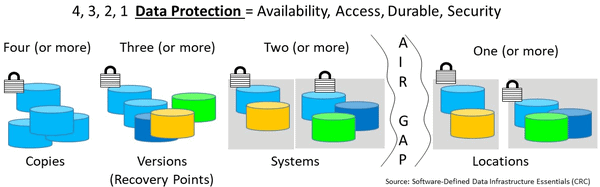
  • Keep new school 4 3 2 1 data protection in mind while evolving from old school 3 2 1 backup rules
  • 4 3 2 1 backup data protection rule

  • A Fundamental premise of data infrastructures is to enable applications and their data, protect, preserve, secure and serve
  • Remember to protect your applications, as well as data including metadata, settings configurations
  • Test your restores including can you use the data along with security settings
  • Don’t cause a disaster in the course of testing your data protection, backups or recovery
  • Expand (or refresh) your data protection and data infrastructure education tradecraft skills experiences

Where to learn more

Learn more about data protection, world backup day, recovery, restoration, GDPR along with related data infrastructure topics for cloud, legacy and other software defined environments via the following links:

Additional learning experiences along with common questions (and answers), as well as tips can be found in Software Defined Data Infrastructure Essentials book.

Software Defined Data Infrastructure Essentials Book SDDC

What this all means and wrap-up

Data protection including business continuance (BC), business resiliency (BR), disaster recovery (DR), availability, accessibility, backup, snapshots, encryption, security, privacy among others is a 7 x 24 x 365 day a year focus. The focus of data protection also needs to evolve from an after the fact cost overhead to proactive, business enabler Meanwhile, welcome to Data Protection Recovery Post World Backup Day Pre GDPR Start Date.

Ok, nuff said, for now.

Gs

Greg Schulz – Microsoft MVP Cloud and Data Center Management, VMware vExpert 2010-2017 (vSAN and vCloud). Author of Software Defined Data Infrastructure Essentials (CRC Press), as well as Cloud and Virtual Data Storage Networking (CRC Press), The Green and Virtual Data Center (CRC Press), Resilient Storage Networks (Elsevier) and twitter @storageio. Courteous comments are welcome for consideration. First published on https://storageioblog.com any reproduction in whole, in part, with changes to content, without source attribution under title or without permission is forbidden.

All Comments, (C) and (TM) belong to their owners/posters, Other content (C) Copyright 2006-2026 Server StorageIO and UnlimitedIO. All Rights Reserved. StorageIO is a registered Trade Mark (TM) of Server StorageIO.

Microsoft Windows Server 2019 Insiders Preview

Microsoft Windows Server 2019 Insiders Preview

Application Data Value Characteristics Everything Is Not The Same

Microsoft Windows Server 2019 Insiders Preview has been announced. Windows Server 2019 in the past might have been named 2016 R2 also known as a Long-Term Servicing Channel (LTSC) release. Microsoft recommends LTSC Windows Server for workloads such as Microsoft SQL Server, Share Point and SDDC. The focus of Microsoft Windows Server 2019 Insiders Preview is around hybrid cloud, security, application development as well as deployment including containers, software defined data center (SDDC) and software defined data infrastructure, as well as converged along with hyper-converged infrasture (HCI) management.

Windows Server 2019 Preview Features

Features and enhancements in the Microsoft Windows Server 2019 Insiders Preview span HCI management, security, hybrid cloud among others.

  • Hybrid cloud – Extending active directory, file server synchronize, cloud backup, applications spanning on-premises and cloud, management).
  • Security – Protect, detect and respond including shielded VMs, attested guarded fabric of host guarded machines, Windows and Linux VM (shielded), VMConnect for Windows and Linux troubleshooting of Shielded VM and encrypted networks, Windows Defender Advanced Threat Protection (ATP) among other enhancements.
  • Application platform – Developer and deployment tools for Windows Server containers and Windows Subsystem on Linux (WSL). Note that Microsoft has also been reducing the size of the Server image while extending feature functionality. The smaller images take up less storage space, plus load faster. As part of continued serverless and container support (Windows and Linux along with Docker), there are options for deployment orchestration including Kubernetes (in beta). Other enhancements include extending previous support for Windows Subsystem for Linux (WSL).

Other enhancements part of Microsoft Windows Server 2019 Insiders Preview include cluster sets in support of software defined data center (SDDC). Cluster sets expand SDDC clusters of loosely coupled grouping of multiple failover clusters including compute, storage as well as hyper-converged configurations. Virtual machines have fluidity across member clusters within a cluster set and unified storage namespace. Existing failover cluster management experiences is preserved for member clusters, along with a new cluster set instance of the aggregate resources.

Management enhancements include S2D software defined storage performance history, project Honolulu support for storage updates, along with powershell cmdlet updates, as well as system center 2019. Learn more about project Honolulu hybrid management here and here.

Microsoft and Windows LTSC and SAC

As a refresher, Microsoft Windows (along with other software) is now being released on two paths including more frequent semi-annual channel (SAC), and less frequent LTSC releases. Some other things to keep in mind that SAC are focused around server core and nano server as container image while LTSC includes server with desktop experience as well as server core. For example, Windows Server 2016 released fall of 2016 is an LTSC, while the 1709 release was a SAC which had specific enhancements for container related environments.

There was some confusion fall of 2017 when 1709 was released as it was optimized for container and serverless environments and thus lacked storage spaces direct (S2D) leading some to speculate S2D was dead. S2D among other items that were not in the 1709 SAC are very much alive and enhanced in the LTSC preview for Windows Server 2019. Learn more about Microsoft LTSC and SAC here.

Test Driving Installing The Bits

One of the enhancements with LTSC preview candidate server 2019 is improved upgrades of existing environments. Granted not everybody will choose the upgrade in place keeping existing files however some may find the capability useful. I chose to give the upgrade keeping current files in place as an option to see how it worked. To do the upgrade I used a clean and up to date Windows Server 2016 data center edition with desktop. This test system is a VMware ESXi 6.5 guest running on flash SSD storage. Before the upgrade to Windows Server 2019, I made a VMware vSphere snapshot so I could quickly and easily restore the system to a good state should something not work.

To get the bits, go to Windows Insiders Preview Downloads (you will need to register)

Windows Server 2019 LTSC build 17623 is available in 18 languages in an ISO format and require a key.

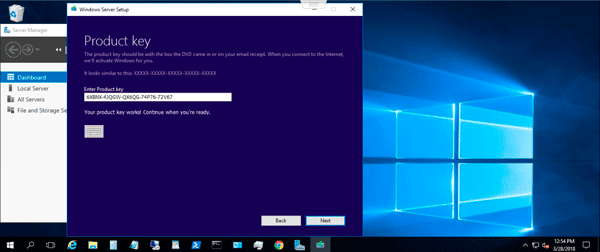
The keys for the pre-release unlimited activations are:
Datacenter Edition         6XBNX-4JQGW-QX6QG-74P76-72V67
Standard Edition             MFY9F-XBN2F-TYFMP-CCV49-RMYVH

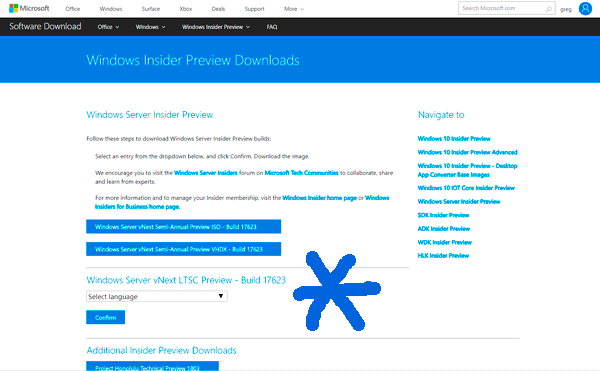
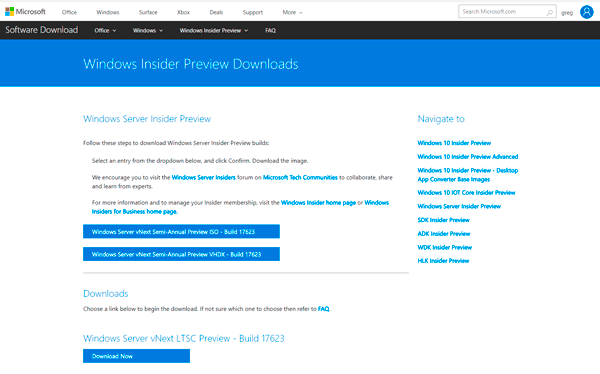
First step is downloading the bits from the Windows insiders preview page including select language for the image to use.

Getting the windows server 2019 preview bits
Select the language for the image to download

windows server 2019 select language

Starting the download

Once you have the image download, apply it to your bare metal server or hypervisors guest. In this example, I copied the windows server 2019 image to a VMware ESXi server for a Windows Server 2016 guest machine to access via its virtual CD/DVD.

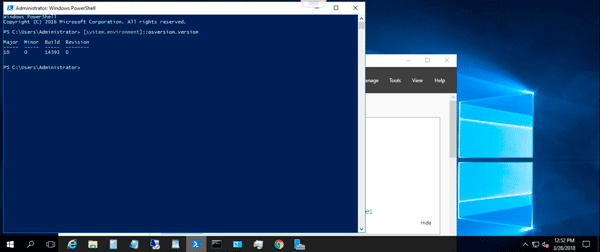
pre upgrade check windows server version
Verify the Windows Server version before upgrade

After download, access the image, in this case, I attached the image to the virtual machine CD, then accessed it and ran the setup application.

Microsoft Windows Server 2019 Insiders Preview download

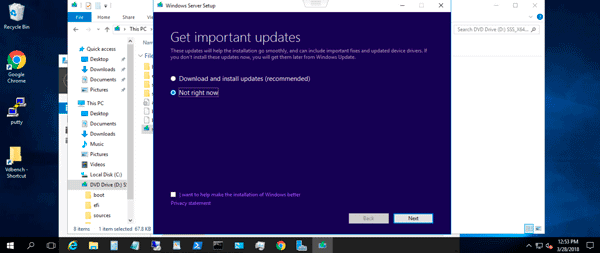
Download updates now or later

license key

Entering license key for pre-release windows server 2019

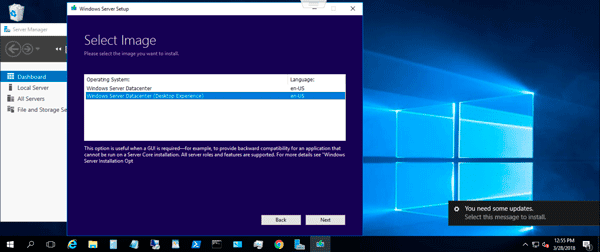
Microsoft Windows Server 2019 Insiders Preview datacenter desktop version

Selecting Windows Server Datacenter with Desktop

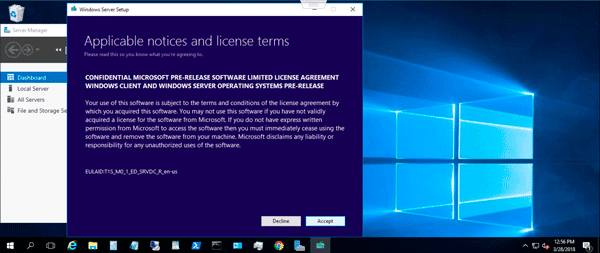
Microsoft Windows Server 2019 Insiders Preview license

Accepting Software License for pre-release version.

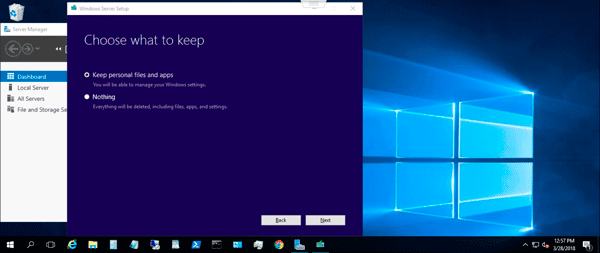
Next up is determining to do a new install (keep nothing), or an in-place upgrade. I wanted to see how smooth the in-place upgrade was so selected that option.

Microsoft Windows Server 2019 Insiders Preview inplace upgrade

What to keep, nothing, or existing files and data


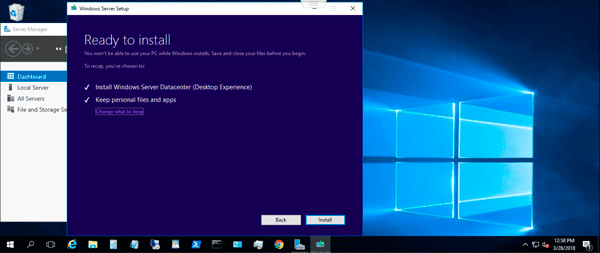
Confirming your selections

Microsoft Windows Server 2019 Insiders Preview install start

Ready to start the installation process

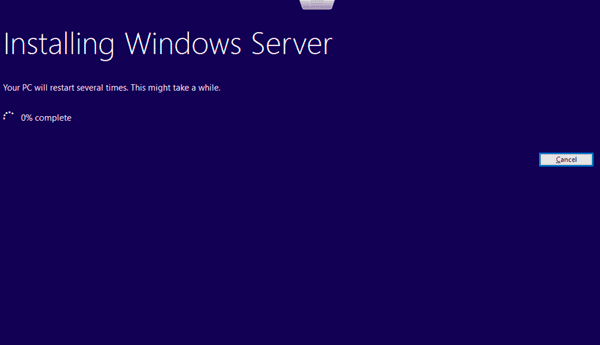
Microsoft Windows Server 2019 Insiders Preview upgrade in progress
Installation underway of Windows Server 2019 preview

Once the installation is complete, verify that Windows Server 2019 is now installed.

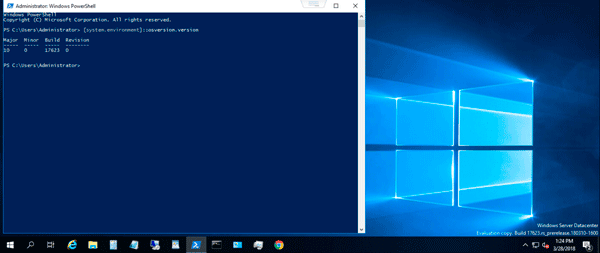
Microsoft Windows Server 2019 Insiders Preview upgrade completed
Completed upgrade from Windows Server 2016 to Microsoft Windows Server 2019 Insiders Preview

The above shows verifying the system build using Powershell, as well as the message in the lower right corner of the display. Granted the above does not show the new functionality, however you should get an idea of how quickly a Windows Server 2019 preview can be deployed to explore and try out the new features.

Where to learn more

Learn more Microsoft Windows Server 2019 Insiders Preview, Windows Server Storage Spaces Direct (S2D), Azure and related software defined data center (SDDC), software defined data infrastructures (SDDI) topics via the following links:

Additional learning experiences along with common questions (and answers), as well as tips can be found in Software Defined Data Infrastructure Essentials book.

Software Defined Data Infrastructure Essentials Book SDDC

What this all means and wrap-up

Microsoft Windows Server 2019 Insiders Preview gives a glimpse of some of the new features that are part of the next evolution of Windows Server as part of supporting hybrid IT environments. In addition to the new features and functionality that convey not only support for hybrid cloud, also hybrid applications development, deployment, devops and workloads, Microsoft is showing flexibility in management, ease of use, scalability, along with security as well as scale out stability. If you have not looked at Windows Server for a while, or involved with serverless, containers, Kubernetes among other initiatives, now is a good time to check out Microsoft Windows Server 2019 Insiders Preview.

Ok, nuff said, for now.

Gs

Greg Schulz – Microsoft MVP Cloud and Data Center Management, VMware vExpert 2010-2017 (vSAN and vCloud). Author of Software Defined Data Infrastructure Essentials (CRC Press), as well as Cloud and Virtual Data Storage Networking (CRC Press), The Green and Virtual Data Center (CRC Press), Resilient Storage Networks (Elsevier) and twitter @storageio. Courteous comments are welcome for consideration. First published on https://storageioblog.com any reproduction in whole, in part, with changes to content, without source attribution under title or without permission is forbidden.

All Comments, (C) and (TM) belong to their owners/posters, Other content (C) Copyright 2006-2026 Server StorageIO and UnlimitedIO. All Rights Reserved. StorageIO is a registered Trade Mark (TM) of Server StorageIO.

March 2018 Server StorageIO Data Infrastructure Update Newsletter

March 2018 Server StorageIO Data Infrastructure Update Newsletter

Server and StorageIO Update Newsletter

Volume 18, Issue 3 (March 2018)

Hello and welcome to the March 2018 Server StorageIO Data Infrastructure Update Newsletter.

If you are wondering where the January and February 2018 update newsletters are, they are rolled into this combined edition. In addition to the short email version (free signup here), you can access full versions (html here and PDF here) along with previous editions here.

In this issue:

Enjoy this edition of the Server StorageIO Data Infrastructure update newsletter.

Cheers GS

Data Infrastructure and IT Industry Activity Trends

Data Infrastructure Data Protection and Backup BC BR DR HA Security

World Backup day is coming up on March 31 which is a good time to remember to verify and validate that your data protection is working as intended. On one hand I think it is a good idea to call out the importance of making sure your data is protected including backed up.

On the other hand data protection is not a once a year, rather a year around, 7 x 24 x 365 day focus. Also the focus needs to be on more than just backup, rather, all aspects of data protection from archiving to business continuance (BC), business resiliency (BR), disaster recovery (DR), always on, always accessible, along with security and recovery.

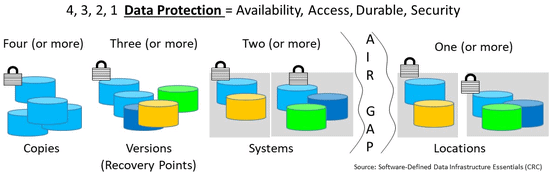
Data Infrastructure Data Protection Backup 4 3 2 1 rule
Data Infrastructure 4 3 2 1 Data Protection and Backup

Some data spring thoughts, perspectives and reminders. Data lakes may swell beyond their banks causing rivers of data to flood as they flow into larger reservoirs, great data lakes, gulfs of data, seas and oceans of data. Granted, some of that data will be inactive cold parked like glaciers while others semi-active floating around like icebergs. Hopefully your data is stored on durable storage solutions or services and does not melt.

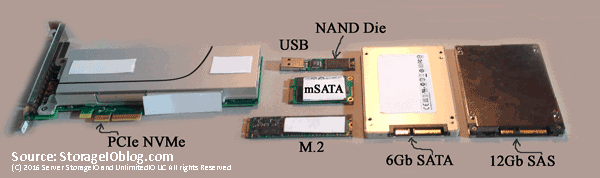
Data Infrastructure Server Storage I/O flash SSD NVMe
Various NAND Flash SSD devices and SAS, SATA, NVMe, M.2 interfaces

Non-Volatile Memory (NVM) including various solid state device (SSD) mediums (e.g. nand flash, 3D XPoint, MRAM among others), packaging (drives, PCIe Add in cars [AiC] along with entire systems, appliances or arrays). Also part of the continue evolution of NVM, SSD and other persistent memories (PM) including storage class memories (SCM) are different access protocol interfaces.

Keep in mind that there is a difference between NVM (medium) and NVMe (access), NVM is the generic category of mediums or media and devices such as nand flash, nvram, 3D XPoint among others SCM (and PMs). In other words, NVM is what data devices use for storing data, NVMe is how devices and systems are accessed. NVMe and its variations is how NVM, SSD, PM, SCM media and devices get accessed locally, as well as over network fabrics (e.g. NVMe-oF an FC-NVMe).

NVMe continues to evolve including with networked fabric variations such as RDMA based NVMe over Fabric (NVMe-oF), along with Fibre Channel based (FC-NVMe). The Fibre Channel Industry Association trade group recently held its second multi-vendor plugfest in support of NVMe over Fibre Channel.

Read more about NVM, NVMe, SSD, SCM, flash and related technologies, tools, trends, tips via the following resources:

Has Object Storage failed to live up to its industry hype lacking traction? Or, is object storage (also known as blobs) progressing with customer adoption and deployment on normal realistic timelines? Recently I have seen some industry comments about object storage not catching on with customers or failing to live up to its hyped expectation. IMHO object storage is very much alive along with block, file, table (e.g. database SQL and NoSQL repositories), message/queue among others, as well as emerging blockchain aka data exchanges.

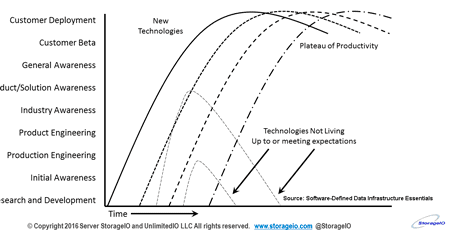
Various Industry and Customer Adoption Deployment timeline
Various Industry and Customer Adoption Deployment Timeline (Via: StorageIOblog.com)

An issue with object storage is that it is still new, still evolving, many IT environments applications do not yet speak or access objects and blobs natively. Likewise as is often the case, industry adoption and deployment is usually early and short term around the hype, vs. the longer cycle of customer adoption and deployment. The downside for those who only focus on object storage (or blobs) is that they may be under pressure to do things short term instead of adjusting to customer cycles which take longer, however real adoption and deployment also last longer.

While the hype and industry buzz around object storage (and blobs) may have faded, customer adoption continues and is here to stay, along with block, file among others, learn more at www.objectstoragecenter.com. Also keep in mind that there is a difference between industry and customer adoption along with deployment.

Some recent Industry Activities, Trends, News and Announcements include:

In case you missed it, Amazon Web Services (e.g. AWS) announced EKS (Elastic Kubernetes Service) which as its name implies, is an easy to use and manage Kubernetes (containers, serverless data infrastructure) running on AWS. AWS joins others including Microsoft Azure Kubernetes Services (AKS), Googles Kubernetes Engine, EasyStack (ESContainer for openstack and Kubernetes),VMware Pivotal Container Service (PKS) among others. What this means is that in the container serverless data infrastructure ecosystem Kubernetes container management (orchestration platform) is gaining in both industry as well as customer adoption along with deployment.

Check out other industry news, comments, trends perspectives here.

Data Infrastructure Server StorageIO Comments Content

Server StorageIO Commentary in the news, tips and articles

Recent Server StorageIO industry trends perspectives commentary in the news.

Via BizTech: Why Hybrid (SSD and HDD) Storage Might Be Fit for SMB environments
Via Excelero: Server StorageIO white paper enabling database DBaaS productivity
Via Cloudian: YouTube video interview file services on object storage with HyperFile
Via CDW Solutions: Comments on Software Defined Access
Via SearchStorage: Comments on Cloudian HyperStore on demand cloud like pricing
Via EnterpriseStorageForum: Comments and tips on Software Defined Storage Best Practices
Via PRNewsWire: Comments on Excelero NVMe NVMesh Database and DBaaS solutions
Via SearchStorage: Comments on NooBaa multi-cloud storage management
Via CDW: Comments on New IT Strategies Improve Your Bottom Line 
Via EnterpriseStorageForum: Comments on Software Defined Storage: Pros and Cons
Via DataCenterKnowledge: Comments on The Great Data Center Headache IoT
Via SearchStorage: Comments on Dell and VMware merger scenario options
Via PRNewswire: Comments on Chelsio Microsoft Validation of iWARP/RDMA
Via SearchStorage: Comments on Server Storage Industry trends and Dell EMC
Via ChannelProSMB: Comments on Hybrid HDD and SSD storage solutions
Via ChannelProNetwork: Comments on What the Future Holds for HDDs
Via HealthcareITnews: Comments on MOUNTAINS OF MOBILE DATA
Via SearchStorage: Comments on Cloudian HyperStore 7 targets multi-cloud complexities
Via GlobeNewsWire: Comments on Cloudian HyperStore 7
Via GizModo: Comments on Intel Optane 800P NVMe M.2 SSD
Via DataCenterKnowledge: Comments on getting data centers ready for IoT
Via DataCenterKnowledge: Comments on Beyond the Hype: AI in the Data Center
Via DataCenterKnowledge: Comments on Data Center and Cloud Disaster Recovery
Via SearchStoragae: Comments on Cloudian HyperFile marries NAS and object storage
Via SearchStoragae: Comments on Top 10 Tips on Solid State Storage Adoption Strategy
Via SearchStoragae: Comments on 8 Top Tips for Beating the Big Data Deluge

View more Server, Storage and I/O trends and perspectives comments here.

Data Infrastructure Server StorageIOblog posts

Server StorageIOblog Data Infrastructure Posts

Recent and popular Server StorageIOblog posts include:

Application Data Value Characteristics Everything Is Not The Same
Application Data Availability 4 3 2 1 Data Protection
AWS Cloud Application Data Protection Webinar
Microsoft Windows Server 2019 Insiders Preview
Application Data Characteristics Types Everything Is Not The Same
Application Data Volume Velocity Variety Everything Is Not The Same
Application Data Access Lifecycle Patterns Everything Is Not The Same
Veeam GDPR preparedness experiences Webinar walking the talk
VMware continues cloud construction with March announcements
Benefits of Moving Hyper-V Disaster Recovery to the Cloud Webinar
World Backup Day 2018 Data Protection Readiness Reminder
Use Intel Optane NVMe U.2 SFF 8639 SSD drive in PCIe slot
Data Infrastructure Resource Links cloud data protection tradecraft trends
How to Achieve Flexible Data Protection Availability with All Flash Storage Solutions
November 2017 Server StorageIO Data Infrastructure Update Newsletter
IT transformation Serverless Life Beyond DevOps Podcast
Data Protection Diaries Fundamental Topics Tools Techniques Technologies Tips
HPE Announces AMD Powered Gen 10 ProLiant DL385 For Software Defined Workloads
AWS Announces New S3 Cloud Storage Security Encryption Features
Introducing Windows Subsystem for Linux WSL Overview #blogtober
Hot Popular New Trending Data Infrastructure Vendors To Watch

View other recent as well as past StorageIOblog posts here

Server StorageIO Recommended Reading (Watching and Listening) List

Software-Defined Data Infrastructure Essentials SDDI SDDC

In addition to my own books including Software Defined Data Infrastructure Essentials (CRC Press 2017) available at Amazon.com (check out special sale price), the following are Server StorageIO data infrastructure recommended reading, watching and listening list items. The Server StorageIO data infrastructure recommended reading list includes various IT, Data Infrastructure and related topics including Intel Recommended Reading List (IRRL) for developers is a good resource to check out. Speaking of my books, Didier Van Hoye (@WorkingHardInIt) has a good review over on his site you can view here, also check out the rest of his great content while there.

In case you may have missed it, here is a good presentation from AWS re:invent 2017 by Brendan Gregg (@brendangregg) about how Netflix does EC2 and other AWS tuning along with plenty of great resource links. Keith Tenzer (@keithtenzer) provides a good perspective piece about containers in a large IT enterprise environment here including various options.

Speaking of IT data centers and data infrastructure environments, checkout the list of some of the worlds most extreme habitats for technology here. Mark Betz (@markbetz) has a series of Docker and Kubernetes networking fundamentals posts on his site here, as well as over at Medium including mention of Google Cloud (@googlecloud). The posts in Marks series are good refresher or intros to how Docker and Kubernetes handles basic networking between containers, pods, nodes, hosts in clusters. Check out part I here and part II here.

Blockchain elements
Image via https://stevetodd.typepad.com

Steve Todd (@Stevetodd) has some good perspectives about Trusted Data Exchanges e.g. life beyond blockchain and bitcoin here along with core element considerations (beyond the product pitch) here, along with associated data infrastructure and storage evolution vs. revolution here.

Watch for more items to be added to the recommended reading list book shelf soon.

Data Infrastructure Server StorageIO event activities

Events and Activities

Recent and upcoming event activities.

March 27, 2018 – Webinar – Veeams Road to GDPR Compliancy The 5 Lessons Learned

Feb 28, 2018 – Webinar – Benefits of Moving Hyper-V Disaster Recovery to the Cloud

Jan 30, 2018 – Webinar – Achieve Flexible Data Protection and Availability with All Flash Storage

Nov. 9, 2017 – Webinar – All You Need To Know about ROBO Data Protection Backup

See more webinars and activities on the Server StorageIO Events page here.

Data Infrastructure Server StorageIO Industry Resources and Links

Various useful links and resources:

Data Infrastructure Recommend Reading and watching list
Microsoft TechNet – Various Microsoft related from Azure to Docker to Windows
storageio.com/links – Various industry links (over 1,000 with more to be added soon)
objectstoragecenter.com – Cloud and object storage topics, tips and news items
OpenStack.org – Various OpenStack related items
storageio.com/downloads – Various presentations and other download material
storageio.com/protect – Various data protection items and topics
thenvmeplace.com – Focus on NVMe trends and technologies
thessdplace.com – NVM and Solid State Disk topics, tips and techniques
storageio.com/converge – Various CI, HCI and related SDS topics
storageio.com/performance – Various server, storage and I/O benchmark and tools
VMware Technical Network – Various VMware related items

Connect and Converse With Us

Storage IO RSS storageio linkedin     Google+   storageio youtube  storageio instagram

Subscribe to Newsletter – Newsletter Archives StorageIO.comStorageIOblog.com

What this all means and wrap-up

Data Infrastructures are what exists inside physical data centers spanning cloud, converged, hyper-converged, virtual, serverless and other software defined as well as legacy environments. The fundamental role of data infrastructures comprising server (compute), storage, I/O networking hardware, software, services defined by management tools, best practices and policies is to provide a platform for applications along with their data to deliver information services. With March 31 being world backup day, also focus on making sure that on April 1st you are not a fool trying to recover from a bad data protection copy. With the continued movement to flash SSD along with other forms of storage class memory (SCM) and persistent memories (PM), data moves at a faster rate meaning data protection is even more important to get you out of trouble as fast as you get into issues.

Ok, nuff said, for now.

Gs

Greg Schulz – Microsoft MVP Cloud and Data Center Management, VMware vExpert 2010-2017 (vSAN and vCloud). Author of Software Defined Data Infrastructure Essentials (CRC Press), as well as Cloud and Virtual Data Storage Networking (CRC Press), The Green and Virtual Data Center (CRC Press), Resilient Storage Networks (Elsevier) and twitter @storageio. Courteous comments are welcome for consideration. First published on https://storageioblog.com any reproduction in whole, in part, with changes to content, without source attribution under title or without permission is forbidden.

All Comments, (C) and (TM) belong to their owners/posters, Other content (C) Copyright 2006-2026 Server StorageIO and UnlimitedIO. All Rights Reserved. StorageIO is a registered Trade Mark (TM) of Server StorageIO.

Application Data Value Characteristics Everything Is Not The Same (Part I)

Application Data Value Characteristics Everything Is Not The Same

Application Data Value Characteristics Everything Is Not The Same

Application Data Value Characteristics Everything Is Not The Same

This is part one of a five-part mini-series looking at Application Data Value Characteristics Everything Is Not The Same as a companion excerpt from chapter 2 of my new book Software Defined Data Infrastructure Essentials – Cloud, Converged and Virtual Fundamental Server Storage I/O Tradecraft (CRC Press 2017). available at Amazon.com and other global venues. In this post, we start things off by looking at general application server storage I/O characteristics that have an impact on data value as well as access.

Application Data Value Software Defined Data Infrastructure Essentials Book SDDC

Everything is not the same across different organizations including Information Technology (IT) data centers, data infrastructures along with the applications as well as data they support. For example, there is so-called big data that can be many small files, objects, blobs or data and bit streams representing telemetry, click stream analytics, logs among other information.

Keep in mind that applications impact how data is accessed, used, processed, moved and stored. What this means is that a focus on data value, access patterns, along with other related topics need to also consider application performance, availability, capacity, economic (PACE) attributes.

If everything is not the same, why is so much data along with many applications treated the same from a PACE perspective?

Data Infrastructure resources including servers, storage, networks might be cheap or inexpensive, however, there is a cost to managing them along with data.

Managing includes data protection (backup, restore, BC, DR, HA, security) along with other activities. Likewise, there is a cost to the software along with cloud services among others. By understanding how applications use and interact with data, smarter, more informed data management decisions can be made.

IT Applications and Data Infrastructure Layers

Keep in mind that everything is not the same across various organizations, data centers, data infrastructures, data and the applications that use them. Also keep in mind that programs (e.g. applications) = algorithms (code) + data structures (how data defined and organized, structured or unstructured).

There are traditional applications, along with those tied to Internet of Things (IoT), Artificial Intelligence (AI) and Machine Learning (ML), Big Data and other analytics including real-time click stream, media and entertainment, security and surveillance, log and telemetry processing among many others.

What this means is that there are many different application with various character attributes along with resource (server compute, I/O network and memory, storage requirements) along with service requirements.

Common Applications Characteristics

Different applications will have various attributes, in general, as well as how they are used, for example, database transaction activity vs. reporting or analytics, logs and journals vs. redo logs, indices, tables, indices, import/export, scratch and temp space. Performance, availability, capacity, and economics (PACE) describes the applications and data characters and needs shown in the following figure.

Application and data PACE attributes
Application PACE attributes (via Software Defined Data Infrastructure Essentials)

All applications have PACE attributes, however:

  • PACE attributes vary by application and usage
  • Some applications and their data are more active than others
  • PACE characteristics may vary within different parts of an application

Think of applications along with associated data PACE as its personality or how it behaves, what it does, how it does it, and when, along with value, benefit, or cost as well as quality-of-service (QoS) attributes.

Understanding applications in different environments, including data values and associated PACE attributes, is essential for making informed server, storage, I/O decisions and data infrastructure decisions. Data infrastructures decisions range from configuration to acquisitions or upgrades, when, where, why, and how to protect, and how to optimize performance including capacity planning, reporting, and troubleshooting, not to mention addressing budget concerns.

Primary PACE attributes for active and inactive applications and data are:

P – Performance and activity (how things get used)
A – Availability and durability (resiliency and data protection)
C – Capacity and space (what things use or occupy)
E – Economics and Energy (people, budgets, and other barriers)

Some applications need more performance (server computer, or storage and network I/O), while others need space capacity (storage, memory, network, or I/O connectivity). Likewise, some applications have different availability needs (data protection, durability, security, resiliency, backup, business continuity, disaster recovery) that determine the tools, technologies, and techniques to use.

Budgets are also nearly always a concern, which for some applications means enabling more performance per cost while others are focused on maximizing space capacity and protection level per cost. PACE attributes also define or influence policies for QoS (performance, availability, capacity), as well as thresholds, limits, quotas, retention, and disposition, among others.

Performance and Activity (How Resources Get Used)

Some applications or components that comprise a larger solution will have more performance demands than others. Likewise, the performance characteristics of applications along with their associated data will also vary. Performance applies to the server, storage, and I/O networking hardware along with associated software and applications.

For servers, performance is focused on how much CPU or processor time is used, along with memory and I/O operations. I/O operations to create, read, update, or delete (CRUD) data include activity rate (frequency or data velocity) of I/O operations (IOPS). Other considerations include the volume or amount of data being moved (bandwidth, throughput, transfer), response time or latency, along with queue depths.

Activity is the amount of work to do or being done in a given amount of time (seconds, minutes, hours, days, weeks), which can be transactions, rates, IOPs. Additional performance considerations include latency, bandwidth, throughput, response time, queues, reads or writes, gets or puts, updates, lists, directories, searches, pages views, files opened, videos viewed, or downloads.
 
Server, storage, and I/O network performance include:

  • Processor CPU usage time and queues (user and system overhead)
  • Memory usage effectiveness including page and swap
  • I/O activity including between servers and storage
  • Errors, retransmission, retries, and rebuilds

the following figure shows a generic performance example of data being accessed (mixed reads, writes, random, sequential, big, small, low and high-latency) on a local and a remote basis. The example shows how for a given time interval (see lower right), applications are accessing and working with data via different data streams in the larger image left center. Also shown are queues and I/O handling along with end-to-end (E2E) response time.

fundamental server storage I/O
Server I/O performance fundamentals (via Software Defined Data Infrastructure Essentials)

Click here to view a larger version of the above figure.

Also shown on the left in the above figure is an example of E2E response time from the application through the various data infrastructure layers, as well as, lower center, the response time from the server to the memory or storage devices.

Various queues are shown in the middle of the above figure which are indicators of how much work is occurring, if the processing is keeping up with the work or causing backlogs. Context is needed for queues, as they exist in the server, I/O networking devices, and software drivers, as well as in storage among other locations.

Some basic server, storage, I/O metrics that matter include:

  • Queue depth of I/Os waiting to be processed and concurrency
  • CPU and memory usage to process I/Os
  • I/O size, or how much data can be moved in a given operation
  • I/O activity rate or IOPs = amount of data moved/I/O size per unit of time
  • Bandwidth = data moved per unit of time = I/O size × I/O rate
  • Latency usually increases with larger I/O sizes, decreases with smaller requests
  • I/O rates usually increase with smaller I/O sizes and vice versa
  • Bandwidth increases with larger I/O sizes and vice versa
  • Sequential stream access data may have better performance than some random access data
  • Not all data is conducive to being sequential stream, or random
  • Lower response time is better, higher activity rates and bandwidth are better

Queues with high latency and small I/O size or small I/O rates could indicate a performance bottleneck. Queues with low latency and high I/O rates with good bandwidth or data being moved could be a good thing. An important note is to look at several metrics, not just IOPs or activity, or bandwidth, queues, or response time. Also, keep in mind that metrics that matter for your environment may be different from those for somebody else.

Something to keep in perspective is that there can be a large amount of data with low performance, or a small amount of data with high-performance, not to mention many other variations. The important concept is that as space capacity scales, that does not mean performance also improves or vice versa, after all, everything is not the same.

Where to learn more

Learn more about Application Data Value, application characteristics, PACE along with data protection, software defined data center (SDDC), software defined data infrastructures (SDDI) and related topics via the following links:

SDDC Data Infrastructure

Additional learning experiences along with common questions (and answers), as well as tips can be found in Software Defined Data Infrastructure Essentials book.

Software Defined Data Infrastructure Essentials Book SDDC

What this all means and wrap-up

Keep in mind that with Application Data Value Characteristics Everything Is Not The Same across various organizations, data centers, data infrastructures spanning legacy, cloud and other software defined data center (SDDC) environments. However all applications have some element (high or low) of performance, availability, capacity, economic (PACE) along with various similarities. Likewise data has different value at various times. Continue reading the next post (Part II Application Data Availability Everything Is Not The Same) in this five-part mini-series here.

Ok, nuff said, for now.

Gs

Greg Schulz – Microsoft MVP Cloud and Data Center Management, VMware vExpert 2010-2017 (vSAN and vCloud). Author of Software Defined Data Infrastructure Essentials (CRC Press), as well as Cloud and Virtual Data Storage Networking (CRC Press), The Green and Virtual Data Center (CRC Press), Resilient Storage Networks (Elsevier) and twitter @storageio. Courteous comments are welcome for consideration. First published on https://storageioblog.com any reproduction in whole, in part, with changes to content, without source attribution under title or without permission is forbidden.

All Comments, (C) and (TM) belong to their owners/posters, Other content (C) Copyright 2006-2026 Server StorageIO and UnlimitedIO. All Rights Reserved. StorageIO is a registered Trade Mark (TM) of Server StorageIO.

Application Data Availability 4 3 2 1 Data Protection

Application Data Availability 4 3 2 1 Data Protection

4 3 2 1 data protection Application Data Availability Everything Is Not The Same

Application Data Availability 4 3 2 1 Data Protection

This is part two of a five-part mini-series looking at Application Data Value Characteristics everything is not the same as a companion excerpt from chapter 2 of my new book Software Defined Data Infrastructure Essentials – Cloud, Converged and Virtual Fundamental Server Storage I/O Tradecraft (CRC Press 2017). available at Amazon.com and other global venues. In this post, we continue looking at application performance, availability, capacity, economic (PACE) attributes that have an impact on data value as well as availability.

4 3 2 1 data protection  Book SDDC

Availability (Accessibility, Durability, Consistency)

Just as there are many different aspects and focus areas for performance, there are also several facets to availability. Note that applications performance requires availability and availability relies on some level of performance.

Availability is a broad and encompassing area that includes data protection to protect, preserve, and serve (backup/restore, archive, BC, BR, DR, HA) data and applications. There are logical and physical aspects of availability including data protection as well as security including key management (manage your keys or authentication and certificates) and permissions, among other things.

Availability = accessibility (can you get to your application and data) + durability (is the data intact and consistent). This includes basic Reliability, Availability, Serviceability (RAS), as well as high availability, accessibility, and durability. “Durable” has multiple meanings, so context is important. Durable means how data infrastructure resources hold up to, survive, and tolerate wear and tear from use (i.e., endurance), for example, Flash SSD or mechanical devices such as Hard Disk Drives (HDDs). Another context for durable refers to data, meaning how many copies in various places.

Server, storage, and I/O network availability topics include:

  • Resiliency and self-healing to tolerate failure or disruption
  • Hardware, software, and services configured for resiliency
  • Accessibility to reach or be reached for handling work
  • Durability and consistency of data to be available for access
  • Protection of data, applications, and assets including security

Additional server I/O and data infrastructure along with storage topics include:

  • Backup/restore, replication, snapshots, sync, and copies
  • Basic Reliability, Availability, Serviceability, HA, fail over, BC, BR, and DR
  • Alternative paths, redundant components, and associated software
  • Applications that are fault-tolerant, resilient, and self-healing
  • Non disruptive upgrades, code (application or software) loads, and activation
  • Immediate data consistency and integrity vs. eventual consistency
  • Virus, malware, and other data corruption or loss prevention

From a data protection standpoint, the fundamental rule or guideline is 4 3 2 1, which means having at least four copies consisting of at least three versions (different points in time), at least two of which are on different systems or storage devices and at least one of those is off-site (on-line, off-line, cloud, or other). There are many variations of the 4 3 2 1 rule shown in the following figure along with approaches on how to manage technology to use. We will go into deeper this subject in later chapters. For now, remember the following.

large version application server storage I/O
4 3 2 1 data protection (via Software Defined Data Infrastructure Essentials)

4    At least four copies of data (or more), Enables durability in case a copy goes bad, deleted, corrupted, failed device, or site.
3    The number (or more) versions of the data to retain, Enables various recovery points in time to restore, resume, restart from.
2    Data located on two or more systems (devices or media/mediums), Enables protection against device, system, server, file system, or other fault/failure.

1    With at least one of those copies being off-premise and not live (isolated from active primary copy), Enables resiliency across sites, as well as space, time, distance gap for protection.

Capacity and Space (What Gets Consumed and Occupied)

In addition to being available and accessible in a timely manner (performance), data (and applications) occupy space. That space is memory in servers, as well as using available consumable processor CPU time along with I/O (performance) including over networks.

Data and applications also consume storage space where they are stored. In addition to basic data space, there is also space consumed for metadata as well as protection copies (and overhead), application settings, logs, and other items. Another aspect of capacity includes network IP ports and addresses, software licenses, server, storage, and network bandwidth or service time.

Server, storage, and I/O network capacity topics include:

  • Consumable time-expiring resources (processor time, I/O, network bandwidth)
  • Network IP and other addresses
  • Physical resources of servers, storage, and I/O networking devices
  • Software licenses based on consumption or number of users
  • Primary and protection copies of data and applications
  • Active and standby data infrastructure resources and sites
  • Data footprint reduction (DFR) tools and techniques for space optimization
  • Policies, quotas, thresholds, limits, and capacity QoS
  • Application and database optimization

DFR includes various techniques, technologies, and tools to reduce the impact or overhead of protecting, preserving, and serving more data for longer periods of time. There are many different approaches to implementing a DFR strategy, since there are various applications and data.

Common DFR techniques and technologies include archiving, backup modernization, copy data management (CDM), clean up, compress, and consolidate, data management, deletion and dedupe, storage tiering, RAID (including parity-based, erasure codes , local reconstruction codes [LRC] , and Reed-Solomon , Ceph Shingled Erasure Code (SHEC ), among others), along with protection configurations along with thin-provisioning, among others.

DFR can be implemented in various complementary locations from row-level compression in database or email to normalized databases, to file systems, operating systems, appliances, and storage systems using various techniques.

Also, keep in mind that not all data is the same; some is sparse, some is dense, some can be compressed or deduped while others cannot. Likewise, some data may not be compressible or dedupable. However, identical copies can be identified with links created to a common copy.

Economics (People, Budgets, Energy and other Constraints)

If one thing in life and technology that is constant is change, then the other constant is concern about economics or costs. There is a cost to enable and maintain a data infrastructure on premise or in the cloud, which exists to protect, preserve, and serve data and information applications.

However, there should also be a benefit to having the data infrastructure to house data and support applications that provide information to users of the services. A common economic focus is what something costs, either as up-front capital expenditure (CapEx) or as an operating expenditure (OpEx) expense, along with recurring fees.

In general, economic considerations include:

  • Budgets (CapEx and OpEx), both up front and in recurring fees
  • Whether you buy, lease, rent, subscribe, or use free and open sources
  • People time needed to integrate and support even free open-source software
  • Costs including hardware, software, services, power, cooling, facilities, tools
  • People time includes base salary, benefits, training and education

Where to learn more

Learn more about Application Data Value, application characteristics, PACE along with data protection, software defined data center (SDDC), software defined data infrastructures (SDDI) and related topics via the following links:

SDDC Data Infrastructure

Additional learning experiences along with common questions (and answers), as well as tips can be found in Software Defined Data Infrastructure Essentials book.

Software Defined Data Infrastructure Essentials Book SDDC

What this all means and wrap-up

Keep in mind that with Application Data Value Characteristics Everything Is Not The Same across various organizations, data centers, data infrastructures spanning legacy, cloud and other software defined data center (SDDC) environments. All applications have some element of performance, availability, capacity, economic (PACE) needs as well as resource demands. There is often a focus around data storage about storage efficiency and utilization which is where data footprint reduction (DFR) techniques, tools, trends and as well as technologies address capacity requirements. However with data storage there is also an expanding focus around storage effectiveness also known as productivity tied to performance, along with availability including 4 3 2 1 data protection. Continue reading the next post (Part III Application Data Characteristics Types Everything Is Not The Same) in this series here.

Ok, nuff said, for now.

Gs

Greg Schulz – Microsoft MVP Cloud and Data Center Management, VMware vExpert 2010-2017 (vSAN and vCloud). Author of Software Defined Data Infrastructure Essentials (CRC Press), as well as Cloud and Virtual Data Storage Networking (CRC Press), The Green and Virtual Data Center (CRC Press), Resilient Storage Networks (Elsevier) and twitter @storageio. Courteous comments are welcome for consideration. First published on https://storageioblog.com any reproduction in whole, in part, with changes to content, without source attribution under title or without permission is forbidden.

All Comments, (C) and (TM) belong to their owners/posters, Other content (C) Copyright 2006-2026 Server StorageIO and UnlimitedIO. All Rights Reserved. StorageIO is a registered Trade Mark (TM) of Server StorageIO.