If NVMe is the answer, what are the questions?

If NVMe is the answer, what are the questions?

If NVMe is the answer, then what are the various questions that should be asked?

Some common questions that NVMe is the answer to include what is the difference between NVM and NVMe?

Is NVMe only for servers, does NVMe require fabrics and what benefit is NVMe beyond more IOPs.

Lets take a look at some of these common NVMe conversations and other questions.

Main Features and Benefits of NVMe

Some of the main feature and benefits of NVMe among others include:

    • Lower latency due to improve drivers and increased queues (and queue sizes)
    • Lower CPU used to handle larger number of I/Os (more CPU available for useful work)
    • Higher I/O activity rates (IOPS) to boost productivity unlock value of fast flash and NVM
    • Bandwidth improvements leveraging various fast PCIe interface and available lanes
    • Dual-pathing of devices like what is available with dual-path SAS devices
    • Unlock the value of more cores per processor socket and software threads (productivity)
    • Various packaging options, deployment scenarios and configuration options
    • Appears as a standard storage device on most operating systems
    • Plug-play with in-box drivers on many popular operating systems and hypervisors

NVM and Media memory matters

Whats the differences between NVM and NVMe? Non-Volatile Memory (NVM) which as its name implies is persistent electronic memory medium where data is stored. Today you commonly know about NVMs as NAND flash Solid State Devices (SSD), along with NVRAM among others emerging storage class memories (SCM).

Emerging SCM such as 3D XPoint among other mediums (or media if you prefer) have the premises of boosting both read and write performance beyond traditional NAND flash, closer to DRAM, while having durability also closer to DRAM. For now let’s set the media and mediums aside and get back to how they or will be accessed as well as used.
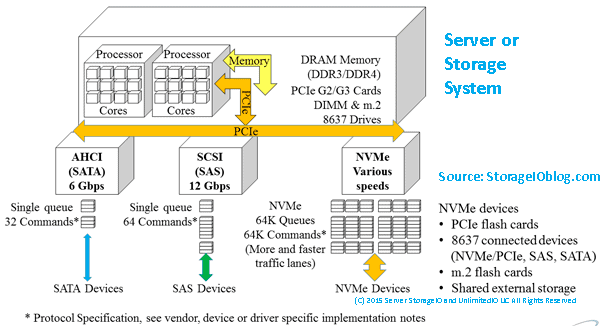
server storage I/O NVMe fundamentals

Server and Storage I/O Media access matters

NVM Express (e.g. NVMe) is a standard industry protocol for accessing NVM media (SSD and flash devices, storage system, appliances). If NVMe is the answer, then depending on your point of view, NVMe can be (or is) a replacement (today or in the future) for AHCI/SATA, Serial Attached SCSI (SAS). What this means is that NVMe can coexist or replace other block SCSI protocol implementations (e.g. Fibre Channel FCP aka FCP, iSCSI, SRP) as well as NBD (among others).

Similar to the SCSI command set that is implemented on different networks (e.g. iSCSI (IP), FCP (Fibre Channel), SRP (InfiniBand), SAS) NVMe as a protocol is now implemented using PCIe with form factors of add-in cards (AiC), M.2 (e.g. gum sticks aka next-gen form factor or NGFF) as well as U.2 aka 8639 drive form factors. There are also the emerging NVMe over Fabrics variants including FC-NVMe (e.g. NVMe protocol over Fibre Channel) which is an alternative to SCSI_FCP (e.g. SCSI on Fibre Channel). An example of a PCIe AiC that I have include the Intel 750 400GB NVMe (among others). You should be able to find the Intel among other NVMe devices from your prefered vendor as well as different venues including Amazon.com.
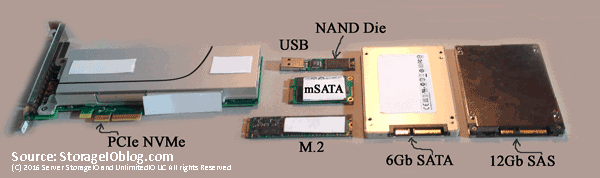
NVM, flash and NVMe SSD
Left PCIe AiC x4 NVMe SSD, lower center M.2 NGFF, right SAS and SATA SSD

The following image shows an NVMe U.2 (e.g. 8639) drive form factor device that from a distance looks like a SAS device and connector. However looking closer some extra pins or connectors that present a PCIe Gen 3 x4 (4 PCIe lanes) connection from the server or enclosure backplane to the devices. These U.2 devices plug into 8639 slots (right) that look like a SAS slot that can also accommodate SATA. Remember, SATA can plug into SAS, however not the other way around.

NVMe U.2 8639 driveNVMe 8639 slot
Left NVMe U.2 drive showing PCIe x4 connectors, right, NVMe U.2 8639 connector

What NVMe U.2 means is that the 8639 slots can be used for 12Gbps SAS, 6Gbps SATA or x4 PCIe-based NVMe. Those devices in turn attach to their respective controllers (or adapters) and device driver software protocol stack. Several servers have U.2 or 8639 drive slots either in 2.5” or 1.8” form factors, sometimes these are also called or known as “blue” drives (or slots). The color coding simply helps to keep track of what slots can be used for different things.

Navigating your various NVMe options

If NVMe is the answer, then some device and component options are as follows.

NVMe device components and options include:

    • Enclosures and connector port slots
    • Adapters and controllers
    • U.2, PCIe AIC and M.2 devices
    • Shared storage system or appliances
    • PCIe and NVMe switches

If NVMe is the answer, what to use when, where and why?

Why use an U.2 or 8639 slot when you could use PCIe AiC? Simple, your server or storage system may be PCIe slot constrained, yet have more available U.2 slots. There are U.2 drives from various vendors including Intel and Micro, as well as servers from Dell, Intel and Lenovo among many others.

Why and when would you use an NVMe M.2 device? As a local read/write cache, or perhaps a boot and system device on servers or appliances that have M.2 slots. Many servers and smaller workstations including Intel NUC support M.2. Likewise, there are M.2 devices from many different vendors including Micron, Samsung among others.

Where and why would you use NVMe PCIe AiC? Whenever you can and if you have enough PCIe slots of the proper form factor, mechanical and electrical (e.g. x1, x4, x8, x16) to support a particular card.

Can you mix and match different types of NVMe devices on the same server or appliance? As long as the physical server and its software (BIOS/UEFI, operating system, hypervisors, drivers) support it yes. Most server and appliance vendors support PCIe NVMe AiCs, however, pay attention to if they are x4, x8 both mechanical as well as electrical. Also, verify operating system and hypervisor device driver support. PCIe NVMe AiCs are available from Dell, Intel, Micron and many other vendors.

Networking with your Server and NVMe Storage

Keep in mind that context is important when discussing NVMe as there are devices for attaching as the back-end to servers, storage systems or appliances, as well as for front-end attachment (e.g. for attaching storage systems to servers). NVMe devices can also be internal to a server or storage system and appliance, or, accessible over a network. Think of NVMe as an upper-level command set protocol like SCSI that gets implemented on different networks (e.g. iSCSI, FCP, SRP).

How can NVMe use PCIe as a transport to use devices that are outside of a server? Different vendors have PCIe adapter cards that support longer distances (few meters) to attach to devices. For example, Dell EMC DSSD has a special dual port (two x4 ports) that are PCIe x8 cards for attachment to the DSSD shared SSD devices.

Note that there are also PCIe switches similar to SAS and InfiniBand among other switches. However just because these are switches, does not mean they are your regular off the shelf network type switch that your networking folks will know what to do with (or want to manage).

The following example shows a shared storage system or appliance being accessed by servers using traditional block, NAS file or object protocols. In this example, the storage system or appliance has implemented NVMe devices (PCIe AiC, M.2, U.2) as part of their back-end storage. The back-end storage might be all NVMe, or a mix of NVMe, SAS or SATA SSD and perhaps some high-capacity HDD.
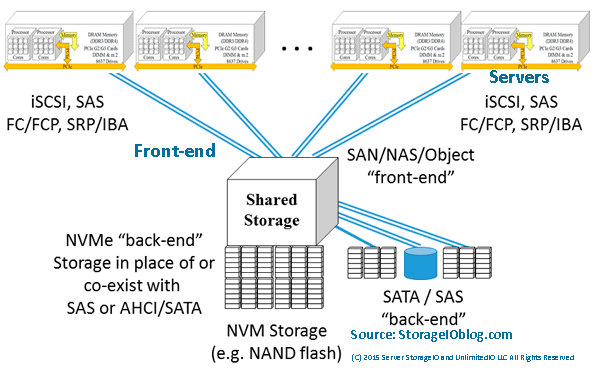
NVMe and server storage access
Servers accessing shared storage with NVMe back-end devices
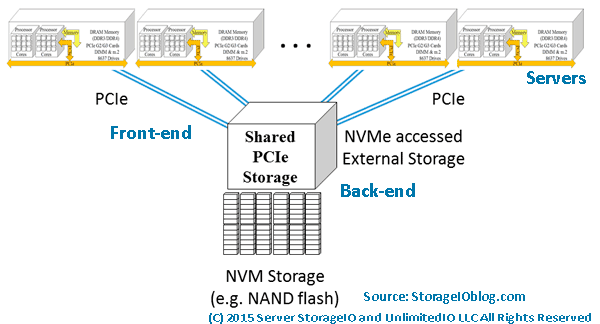
NVMe and server storage access via PCIe
NVMe PCIe attached (via front-end) storage with various back-end devices

In addition to shared PCIe-attached storage such as Dell EMC DSSD similar to what is shown above, there are also other NVMe options. For example, there are industry initiatives to support the NVMe protocol to use shared storage over fabric networks. There are different fabric networks, they range from RDMA over Converged Ethernet (RoCE) based as well as Fibre Channel NVME (e.g. FC-NVME) among others.

An option that on the surface may not seem like a natural fit or leverage NVMe to its fullest is simply adding NVMe devices as back-end media to existing arrays and appliances. For example, adding NVMe devices as the back-end to iSCSI, SAS, FC, FCoE or other block-based, NAS file or object systems.
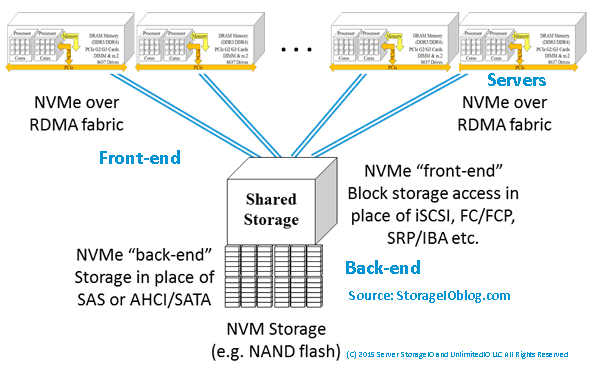
NVMe and server storage access via shared PCIe
NVMe over a fabric network (via front-end) with various back-end devices

A common argument against using legacy storage access of shared NVMe is along the lines of why would you want to put a slow network or controller in front of a fast NVM device? You might not want to do that, or your vendor may tell you many reasons why you don’t want to do it particularly if they do not support it. On the other hand, just like other fast NVM SSD storage on shared systems, it may not be all about 100% full performance. Rather, for some environments, it might be about maximizing connectivity over many interfaces to faster NVM devices for several servers.

NVMe and server storage I/O performance

Is NVMe all about boosting the number of IOPS? NVMe can increase the number of IOPS, as well as support more bandwidth. However, it also reduces response time latency as would be expected with an SSD or NVM type of solution. The following image shows an example of not surprisingly an NVMe PCIe AiC x4 SSD outperforming (more IOPs, lower response time) compared to a 6Gb SATA SSD (apples to oranges). Also keep in mind that best benchmark or workload tool is your own application as well as your performance mileage will vary.
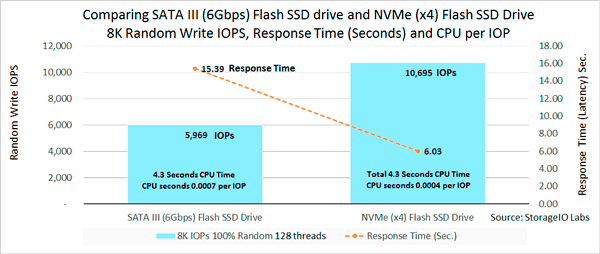
NVMe using less CPU per IOP
SATA SSD vs. NVMe PCIe AiC SSD IOPS, Latency and CPU per IOP

The above image shows the lower amount of CPU per IOP given the newer, more streamlined driver and I/O software protocol of NVMe. With NVMe there is less overhead due to the new design, more queues and ability to unlock value not only in SSD also in servers with more sockets, cores and threads.

What this means is that NVMe and SSD can boost performance for activity (TPS, IOPs, gets, puts, reads, writes). NVMe can also lower response time latency while also enabling higher throughput bandwidth. In other words, you get more work out of your servers CPU (and memory). Granted SSDs have been used for decades to boost server performance and in many cases, delay an upgrade to a newer faster system by getting more work out of them (e.g. SSD marketing 202).

NVMe maximizing your software license investments

What may not be so obvious (e.g. SSD marketing 404) is that by getting more work activity done in a given amount of time, you can also stretch your software licenses further. What this means is that you can get more out of your IBM, Microsoft, Oracle, SAP, VMware and other software licenses by increasing their effective productivity. You might already be using virtualization to increase server hardware efficiency and utilization to cut costs. Why not go further and boost productivity to increase your software license (as well as servers) effectiveness by using NVMe and SSDs?

Note that fast applications need fast software, servers, drivers, I/O protocols and devices.

Also just because you have NVMe present or PCIe does not mean full performance, similar to how some vendors put SSDs behind their slow controllers and saw, well slow performance. On the other hand vendors who had or have fast controllers (software, firmware, hardware) that were HDD or are even SSD performance constrained can see a performance boost.

Additional NVMe and related tips

If you have a Windows server and have not overridden, check your power plan to make sure it is not improperly set to balanced instead of high performance. For example using PowerShell issue the following command:

PowerCfg -SetActive “381b4222-f694-41f0-9685-ff5bb260df2e”

Another Windows related tip if you have not done so is enable task manager disk stats by issuing from a command line “diskperf –y”. Then display task manager and performance and see drive performance.

Need to benchmark, validate, compare or test an NVMe, SSD (or even HDD) device or system, there are various tools and workloads for different scenarios. Likewise those various tools can be configured for different activity to reflect your needs (and application workloads). For example, Microsoft Diskspd, fio.exe, iometer and vdbench sample scripts are shown here (along with results) as a starting point for comparison or validation testing.

Does M.2. mean you have NVMe? That depends as some systems implement M.2 with SATA, while others support NVMe, read the fine print or ask for clarification.

Do all NVMe using PCIe run at the same speed? Not necessarily as some might be PCIe x1 or x4 or x8. Likewise some NVMe PCIe cards might be x8 (mechanical and electrical) yet split out into a pair of x4 ports. Also keep in mind that similar to a dual port HDD, NVMe U.2 drives can have two paths to a server, storage system controller or adapter, however both might not be active at the same time. You might also have a fast NVMe device attached to a slow server or storage system or adapter.

Who to watch and keep an eye on in the NVMe ecosystem? Besides those mentioned above, others to keep an eye on include Broadcom, E8, Enmotus Fuzedrive (micro-tiering software), Excelero, Magnotics, Mellanox, Microsemi (e.g. PMC Sierra), Microsoft (Windows Server 2016 S2D + ReFS + Storage Tiering), NVM Express trade group, Seagate, VMware (Virtual NVMe driver part of vSphere ESXi in addition to previous driver support) and WD/Sandisk among many others.

Where To Learn More

Additional related content can be found at:

Additional learning experiences along with common questions (and answers), as well as tips can be found in Software Defined Data Infrastructure Essentials book.

Software Defined Data Infrastructure Essentials Book SDDC

What This All Means

NVMe is in your future, that was the answer, however there are the when, where, how, with what among other questions to be addressed. One of the great things IMHO about NVMe is that you can have it your way, where and when you need it, as a replacement or companion to what you have. Granted that will vary based on your preferred vendors as well as what they support today or in the future.

If NVMe is the answer, Ask your vendor when they will support NVMe as a back-end for their storage systems, as well as a front-end. Also decide when will your servers (hardware, operating systems hypervisors) support NVMe and in what variation. Learn more why NVMe is the answer and related topics at www.thenvmeplace.com

Ok, nuff said, for now.

Gs

Greg Schulz – Microsoft MVP Cloud and Data Center Management, VMware vExpert 2010-2017 (vSAN and vCloud). Author of Software Defined Data Infrastructure Essentials (CRC Press), as well as Cloud and Virtual Data Storage Networking (CRC Press), The Green and Virtual Data Center (CRC Press), Resilient Storage Networks (Elsevier) and twitter @storageio. Courteous comments are welcome for consideration. First published on https://storageioblog.com any reproduction in whole, in part, with changes to content, without source attribution under title or without permission is forbidden.

All Comments, (C) and (TM) belong to their owners/posters, Other content (C) Copyright 2006-2026 Server StorageIO and UnlimitedIO. All Rights Reserved. StorageIO is a registered Trade Mark (TM) of Server StorageIO.

12Gb SAS SSD Enabling Server Storage I/O Performance and Effectiveness Webinar

12Gb SAS SSD Enabling Server Storage I/O Performance and Effectiveness Webinar

server storage I/O trends

Non-Volatile Memory (NVM) Solid State Devices (SSDs) including nand flash, DRAM as well as emerging PCM and 3D XPoint as part of Storage Class Memories (SCMs) are in your future. The questions are where, when, for what, how much as well as what form factor packaging, along with server storage I/O interface are applicable for your different applications and data infrastructures.

server storage I/O SCM NVM SSD performance

Server storage I/O physical interfaces for access NVM SSDs include PCIe Add in Cards (AiC), M.2 as well as emerging SFF 8639 (e.g. NVMe U2 drive form factor) along with mSATA (e.g. mini PCIe card) in addition to SAS, SATA, USB among others. Protocols include NVM Express (NVMe), SAS, SATA as well as general server storage I/O access of shared storage systems that leverage NVM SSD and SCM technologies.

To help address the question of which server storage I/O interface is applicable for different environments, I invite you to a webinar on June 22, 2016 at 1PM ET hosted by and compliments of Micron.

During the webinar myself and Rob Peglarr (@peglarr) of Micron will discuss and answer questions about how 12Gb SAS remains a viable option for attach NVM SSD storage to servers, as well as via storage systems today and into the future. Today’s 12Gb SAS SSDs enable you to leverage your existing knowledge, skill sets, as well as technology to maximize your data infrastructure investments. For servers or storage systems that are PCIe slot constrained, 12Gb SAS enables more SSD including 2.5" form factor multiple TByte capacity devices to be used to boost performance and capacity in a cost as well as energy effective way.

server storage I/O nvm ssd options

In addition to Rob Peglarr, we will also be joined by Doug Rollins of Micron (@GreyHairStorage) who will share some technical speeds, feeds, slots and watts information about Micron 12Gb SAS SSDs that can scale into the TBs in capacity per device.

Here’s the synopsis from the Micron information page for this webinar.

Don’t let old, slow SAS HDDs drag down your data center

Modernize it by upgrading your storage from SAS HDDs to SAS SSDs. It’s an easy upgrade that provides a significant boost in performance, longer lasting endurance and nearly 4X the capacity. Flash storage changes how you do business and keeps you competitive.

We invite you to join Rob Peglar, Greg Schulz, along with Doug Rollins, from Micron’s technical marketing team to learn:

  • Simple solutions to solving the challenges with today’s ever-growing data demands
  • Why SAS—how it continues to fuel the data center
  • HDDs versus SDDs—before and after stories from your peers, including upfront cost savings

We will also have a live Q&A session so you can talk with the experts. Please register today! If you’re unable to attend the live webinar, we encourage you to register anyway to receive a link to the recorded session, as well as a copy of the presentation.

Where To Learn More

What This All Means

Remember, everything is not the same in the data center or with data infrastructures that support different applications, like there are various NVM SSD options as well as interfaces.

Join us for this webinar, you can view more information here, as well as register for the event.

Ok, nuff said, for now…

Cheers
Gs

Greg Schulz – Author Cloud and Virtual Data Storage Networking (CRC Press), The Green and Virtual Data Center (CRC Press) and Resilient Storage Networks (Elsevier)
twitter @storageio

All Comments, (C) and (TM) belong to their owners/posters, Other content (C) Copyright 2006-2023 Server StorageIO(R) and UnlimitedIO All Rights Reserved

Which Enterprise HDD for Content Applications General I/O Performance

Which HDD for Content Applications general I/O Performance

hdd general i/o performance server storage I/O trends

Updated 1/23/2018

Which enterprise HDD to use with a content server platform general I/O performance Insight for effective server storage I/O decision making
Server StorageIO Lab Review

Which enterprise HDD to use for content servers

This is the sixth in a multi-part series (read part five here) based on a white paper hands-on lab report I did compliments of Servers Direct and Seagate that you can read in PDF form here. The focus is looking at the Servers Direct (www.serversdirect.com) converged Content Solution platforms with Seagate Enterprise Hard Disk Drive (HDD’s). In this post the focus is around general I/O performance including 8KB and 128KB IOP sizes.

General I/O Performance

In addition to running database and file (large and small) processing workloads, Vdbench was also used to collect basic small (8KB) and large (128KB) sized I/O operations. This consisted of random and sequential reads as well as writes with the results shown below. In addition to using vdbench, other tools that could be used include Microsoft Diskspd, fio, iorate and iometer among many others.

These workloads used Vdbench configured (13) to do direct I/O to a Windows file system mounted device using as much of the available disk space as possible. All workloads used 16 threads and were run concurrently similar to database and file processing tests.

(Note 13) Sample vdbench configuration for general I/O, note different settings were used for various tests

Table-7 shows workload results for 8KB random IOPs 75% reads and 75% writes including IOPs, bandwidth and response time.


ENT 15K RAID1

ENT 10K RAID1

ENT CAP RAID1

ENT 10K R10
(4 Drives)

ECAP SW RAID (5 Drives)


75% Read

25% Read

75% Read

25% Read

75% Read

25% Read

75% Read

25% Read

75% Read

25% Read

I/O Rate (IOPs)

597.11

559.26

514

475

285

293

979

984

491

644

MB/sec

4.7

4.4

4.0

3.7

2.2

2.3

7.7

7.7

3.8

5.0

Resp. Time (Sec.)

25.9

27.6

30.2

32.7

55.5

53.7

16.3

16.3

32.6

24.8

Table-7 8KB sized random IOPs workload results

Figure-6 shows small (8KB) random I/O (75% read and 25% read) across different HDD configurations. Performance including activity rates (e.g. IOPs), bandwidth and response time for mixed reads / writes are shown. Note how response time increases with the Enterprise Capacity configurations vs. other performance optimized drives.

general 8K random IO
Figure-6 8KB random reads and write showing IOP activity, bandwidth and response time

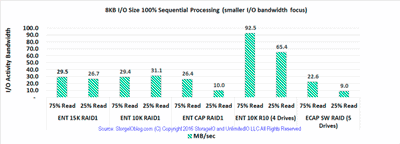
Table-8 below shows workload results for 8GB sized I/Os 100% sequential with 75% reads and 75% writes including IOPs, MB/sec and response time in seconds.

ENT 15K RAID1

ENT 10K RAID1

ENT CAP RAID1

ENT 10K R10
(4 Drives)

ECAP SW RAID (5 Drives)

75% Read

25% Read

75% Read

25% Read

75% Read

25% Read

75% Read

25% Read

75% Read

25% Read

I/O Rate (IOPs)

3,778

3,414

3,761

3,986

3,379

1,274

11,840

8,368

2,891

1,146

MB/sec

29.5

26.7

29.4

31.1

26.4

10.0

92.5

65.4

22.6

9.0

Resp. Time (Sec.)

2.2

3.1

2.3

2.4

2.7

10.9

1.3

1.9

5.5

14.0

Table-8 8KB sized sequential workload results

Figure-7 shows small 8KB sequential mixed reads and writes (75% read and 75% write), while the Enterprise Capacity 2TB HDD has a large amount of space capacity, its performance in a RAID 1 vs. other similar configured drives is slower.

8KB Sequential
Figure-7 8KB sequential 75% reads and 75% write showing bandwidth activity

Table-9 shows workload results for 100% sequential, 100% read and 100% write 128KB sized I/Os including IOPs, bandwidth and response time.

ENT 15K RAID1

ENT 10K RAID1

ENT CAP RAID1

ENT 10K R10
(4 Drives)

ECAP SW RAID (5 Drives)

Read

Write

Read

Write

Read

Write

Read

Write

Read

Write

I/O Rate (IOPs)

1,798

1,771

1,716

1,688

921

912

3,552

3,486

780

721

MB/sec

224.7

221.3

214.5

210.9

115.2

114.0

444.0

435.8

97.4

90.1

Resp. Time (Sec.)

8.9

9.0

9.3

9.5

17.4

17.5

4.5

4.6

19.3

20.2

Table-9 128KB sized sequential workload results

Figure-8 shows sequential or streaming operations of larger I/O (100% read and 100% write) requests sizes (128KB) that would be found with large content applications. Figure-8 highlights the relationship between lower response time and increased IOPs as well as bandwidth.

128K Sequential
Figure-8 128KB sequential reads and write showing IOP activity, bandwidth and response time

Where To Learn More

Additional learning experiences along with common questions (and answers), as well as tips can be found in Software Defined Data Infrastructure Essentials book.

Software Defined Data Infrastructure Essentials Book SDDC

What This All Means

Some content applications are doing small random I/Os for database, key value stores or repositories as well as meta data processing while others are doing large sequential I/O. 128KB sized I/O may be large for your environment, on the other hand, with an increasing number of applications, file systems, software defined storage management tools among others, 1 to 10MB or even larger I/O sizes are becoming common. Key is selecting I/O sizes and read write as well as random sequential along with I/O or queue depths that align with your environment.

Continue reading part seven the final post in this multi-part series here where the focus is around how HDD’s continue to evolve including performance beyond traditional RPM based execrations along with wrap up.

Ok, nuff said, for now.

Gs

Greg Schulz – Microsoft MVP Cloud and Data Center Management, VMware vExpert 2010-2017 (vSAN and vCloud). Author of Software Defined Data Infrastructure Essentials (CRC Press), as well as Cloud and Virtual Data Storage Networking (CRC Press), The Green and Virtual Data Center (CRC Press), Resilient Storage Networks (Elsevier) and twitter @storageio. Courteous comments are welcome for consideration. First published on https://storageioblog.com any reproduction in whole, in part, with changes to content, without source attribution under title or without permission is forbidden.

All Comments, (C) and (TM) belong to their owners/posters, Other content (C) Copyright 2006-2026 Server StorageIO and UnlimitedIO. All Rights Reserved. StorageIO is a registered Trade Mark (TM) of Server StorageIO.

Part V – NVMe overview primer (Where to learn more, what this all means)

This is the fifth in a five-part mini-series providing a NVMe primer overview.

View Part I, Part II, Part III, Part IV, Part V as well as companion posts and more NVMe primer material at www.thenvmeplace.com.

There are many different facets of NVMe including protocol that can be deployed on PCIe (AiC, U.2/8639 drives, M.2) for local direct attached, dedicated or shared for front-end or back-end of storage systems. NVMe direct attach is also found in servers and laptops using M.2 NGFF mini cards (e.g. “gum sticks”). In addition to direct attached, dedicated and shared, NVMe is also deployed on fabrics including over Fibre Channel (FC-NVMe) as well as NVMe over Fabrics (NVMeoF) leveraging RDMA based networks (e.g. iWARP, RoCE among others).

The storage I/O capabilities of flash can now be fed across PCIe faster to enable modern multi-core processors to complete more useful work in less time, resulting in greater application productivity. NVMe has been designed from the ground up with more and deeper queues, supporting a larger number of commands in those queues. This in turn enables the SSD to better optimize command execution for much higher concurrent IOPS. NVMe will coexist along with SAS, SATA and other server storage I/O technologies for some time to come. But NVMe will be at the top-tier of storage as it takes full advantage of the inherent speed and low latency of flash while complementing the potential of multi-core processors that can support the latest applications.

With NVMe, the capabilities of underlying NVM and storage memories are further realized Devices used include a PCIe x4 NVMe AiC SSD, 12 GbpsSAS SSD and 6 GbpsSATA SSD. These and other improvements with NVMe enable concurrency while reducing latency to remove server storage I/O traffic congestion. The result is that application demanding more concurrent I/O activity along with lower latency will gravitate towards NVMe for access fast storage.

Like the robust PCIe physical server storage I/O interface it leverages, NVMe provides both flexibility and compatibility. It removes complexity, overhead and latency while allowing far more concurrent I/O work to be accomplished. Those on the cutting edge will embrace NVMe rapidly. Others may prefer a phased approach.

Some environments will initially focus on NVMe for local server storage I/O performance and capacity available today. Other environments will phase in emerging external NVMe flash-based shared storage systems over time.

Planning is an essential ingredient for any enterprise. Because NVMe spans servers, storage, I/O hardware and software, those intending to adopt NVMe need to take into account all ramifications. Decisions made today will have a big impact on future data and information infrastructures.

Key questions should be, how much speed do your applications need now, and how do growth plans affect those requirements? How and where can you maximize your financial return on investment (ROI) when deploying NVMe and how will that success be measured?

Several vendors are working on, or have already introduced NVMe related technologies or initiatives. Keep an eye on among others including AWS, Broadcom (Avago, Brocade), Cisco (Servers), Dell EMC, Excelero, HPE, Intel (Servers, Drives and Cards), Lenovo, Micron, Microsoft (Azure, Drivers, Operating Systems, Storage Spaces), Mellanox, NetApp, OCZ, Oracle, PMC, Samsung, Seagate, Supermicro, VMware, Western Digital (acquisition of SANdisk and HGST) among others.

Where To Learn More

View additional NVMe, SSD, NVM, SCM, Data Infrastructure and related topics via the following links.

Additional learning experiences along with common questions (and answers), as well as tips can be found in Software Defined Data Infrastructure Essentials book.

Software Defined Data Infrastructure Essentials Book SDDC

What this all means

NVMe is in your future if not already, so If NVMe is the answer, what are the questions?

Ok, nuff said, for now.

Gs

Greg Schulz – Microsoft MVP Cloud and Data Center Management, VMware vExpert 2010-2017 (vSAN and vCloud). Author of Software Defined Data Infrastructure Essentials (CRC Press), as well as Cloud and Virtual Data Storage Networking (CRC Press), The Green and Virtual Data Center (CRC Press), Resilient Storage Networks (Elsevier) and twitter @storageio. Courteous comments are welcome for consideration. First published on https://storageioblog.com any reproduction in whole, in part, with changes to content, without source attribution under title or without permission is forbidden.

All Comments, (C) and (TM) belong to their owners/posters, Other content (C) Copyright 2006-2026 Server StorageIO and UnlimitedIO. All Rights Reserved. StorageIO is a registered Trade Mark (TM) of Server StorageIO.

NVMe overview primer

server storage I/O trends
Updated 2/2/2018

This is the first in a five-part mini-series providing a primer and overview of NVMe. View companion posts and more material at www.thenvmeplace.com.

What is NVM Express (NVMe)

Non-Volatile Memory (NVM) includes persistent memory such as NAND flash and other forms Solid State Devices (SSD). NVM express (NVMe) is a new server storage I/P protocol alternative to AHCI/SATA and the SCSI protocol used by Serial Attached SCSI (SAS). Note that the name NVMe is owned and managed by the industry trade group for NVM Express is (www.nvmexpress.org).

The key question with NVMe is not if, rather when, where, why, how and with what will it appear in your data center or server storage I/O data infrastructure. This is a companion to material that I have on my micro site www.thenvmeplace.com that provides an overview of NVMe, as well as helps to discuss some of the questions about NVMe.

Main features of NVMe include among others:

  • Lower latency due to improve drivers and increased queues (and queue sizes)
  • Lower CPU used to handler larger number of I/Os (more CPU available for useful work)
  • Higher I/O activity rates (IOPs) to boost productivity unlock value of fast flash and NVM
  • Bandwidth improvements leveraging various fast PCIe interface and available lanes
  • Dual-pathing of devices like what is available with dual-path SAS devices
  • Unlock the value of more cores per processor socket and software threads (productivity)
  • Various packaging options, deployment scenarios and configuration options
  • Appears as a standard storage device on most operating systems
  • Plug-play with in-box drivers on many popular operating systems and hypervisors

Why NVMe for Server Storage I/O?
NVMe has been designed from the ground up for accessing fast storage including flash SSD leveraging PCI Express (PCIe). The benefits include lower latency, improved concurrency, increased performance and the ability to unleash a lot more of the potential of modern multi-core modern processors.

NVMe Server Storage I/O
Figure 1 shows common server I/O connectivity including PCIe, SAS, SATA and NVMe.

NVMe, leveraging PCIe, enables modern applications to reach their full potential. NVMe is one of those rare, generational protocol upgrades that comes around every couple of decades to help unlock the full performance value of servers and storage. NVMe does need new drivers, but once in place, it plugs and plays seamlessly with existing tools, software and user experiences. Likewise many of those drivers are now in the box (e.g. ship with) for popular operating systems and hypervisors.

While SATA and SAS provided enough bandwidth for HDDs and some SSD uses, more performance is needed. NVMe near-term does not replace SAS or SATA they can and will coexist for years to come enabling different tiers of server storage I/O performance.

NVMe unlocks the potential of flash-based storage by allowing up to 65,536 (64K) queues each with 64K commands per queue. SATA allowed for only one command queue capable of holding 32 commands per queue and SAS supports a queue with 64K command entries. As a result, the storage IO capabilities of flash can now be fed across PCIe much faster to enable modern multi-core processors to complete more useful work in less time.

Where To Learn More

View additional NVMe, SSD, NVM, SCM, Data Infrastructure and related topics via the following links.

Additional learning experiences along with common questions (and answers), as well as tips can be found in Software Defined Data Infrastructure Essentials book.

Software Defined Data Infrastructure Essentials Book SDDC

What This All Means

Continue reading about NVMe with Part II (Different NVMe configurations) in this five-part series, or jump to Part III, Part IV or Part V.

Ok, nuff said, for now.

Gs

Greg Schulz – Microsoft MVP Cloud and Data Center Management, VMware vExpert 2010-2017 (vSAN and vCloud). Author of Software Defined Data Infrastructure Essentials (CRC Press), as well as Cloud and Virtual Data Storage Networking (CRC Press), The Green and Virtual Data Center (CRC Press), Resilient Storage Networks (Elsevier) and twitter @storageio. Courteous comments are welcome for consideration. First published on https://storageioblog.com any reproduction in whole, in part, with changes to content, without source attribution under title or without permission is forbidden.

All Comments, (C) and (TM) belong to their owners/posters, Other content (C) Copyright 2006-2026 Server StorageIO and UnlimitedIO. All Rights Reserved. StorageIO is a registered Trade Mark (TM) of Server StorageIO.

NVMe Place NVM Non Volatile Memory Express Resources

NVMe place server Storage I/O data infrastructure trends

Welcome to NVMe place NVM Non Volatile Memory Express Resources. NVMe place is about Non Volatile Memory (NVM) Express (NVMe) with Industry Trends Perspectives, Tips, Tools, Techniques, Technologies, News and other information.

Disclaimer

Please note that this NVMe place resources site is independent of the industry trade and promoters group NVM Express, Inc. (e.g. www.nvmexpress.org). NVM Express, Inc. is the sole owner of the NVM Express specifications and trademarks.

NVM Express Organization
Image used with permission of NVM Express, Inc.

Visit the NVM Express industry promoters site here to learn more about their members, news, events, product information, software driver downloads, and other useful NVMe resources content.


The NVMe Place resources and NVM including SCM, PMEM, Flash

NVMe place includes Non Volatile Memory (NVM) including nand flash, storage class memories (SCM), persistent memories (PM) are storage memory mediums while NVM Express (NVMe) is an interface for accessing NVM. This NVMe resources page is a companion to The SSD Place which has a broader Non Volatile Memory (NVM) focus including flash among other SSD topics. NVMe is a new server storage I/O access method and protocol for fast access to NVM based storage and memory technologies. NVMe is an alternative to existing block based server storage I/O access protocols such as AHCI/SATA and SCSI/SAS devices commonly used for access Hard Disk Drives (HDD) along with SSD among other things.

Server Storage I/O NVMe PCIe SAS SATA AHCI
Comparing AHCI/SATA, SCSI/SAS and NVMe all of which can coexist to address different needs.

Leveraging the standard PCIe hardware interface, NVMe based devices (that have an NVMe controller) can be accessed via various operating systems (and hypervisors such as VMware ESXi) with both in the box drivers or optional third-party device drivers. Devices that support NVMe can be 2.5″ drive format packaged that use a converged 8637/8639 connector (e.g. PCIe x4) coexisting with SAS and SATA devices as well as being add-in card (AIC) PCIe cards supporting x4, x8 and other implementations. Initially, NVMe is being positioned as a back-end to servers (or storage systems) interface for accessing fast flash and other NVM based devices.

NVMe as back-end storage
NVMe as a “back-end” I/O interface for NVM storage media

NVMe as front-end server storage I/O interface
NVMe as a “front-end” interface for servers or storage systems/appliances

NVMe has also been shown to work over low latency, high-speed RDMA based network interfaces using NVMeoF including RoCE (RDMA over Converged Ethernet) and InfiniBand (read more here, here and here involving Mangstor, Mellanox and PMC among others). What this means is that like SCSI based SAS which can be both a back-end drive (HDD, SSD, etc) access protocol and interface, NVMe can also being used for back-end can also be used as a front-end of server to storage interface like how Fibre Channel SCSI_Protocol (aka FCP), SCSI based iSCSI, SCSI RDMA Protocol via InfiniBand (among others) are used.

NVMe features

Main features of NVMe include among others:

  • Lower latency due to improve drivers and increased queues (and queue sizes)
  • Lower CPU used to handle larger number of I/Os (more CPU available for useful work)
  • Higher I/O activity rates (IOPs) to boost productivity unlock value of fast flash and NVM
  • Bandwidth improvements leveraging various fast PCIe interface and available lanes
  • Dual-pathing of devices like what is available with dual-path SAS devices
  • Unlock the value of more cores per processor socket and software threads (productivity)
  • Various packaging options, deployment scenarios and configuration options
  • Appears as a standard storage device on most operating systems
  • Plug-play with in-box drivers on many popular operating systems and hypervisors

Shared external PCIe using NVMe
NVMe and shared PCIe (e.g. shared PCIe flash DAS)

NVMe related content and links

The following are some of my tips, articles, blog posts, presentations and other content, along with material from others pertaining to NVMe. Keep in mind that the question should not be if NVMe is in your future, rather when, where, with what, from whom and how much of it will be used as well as how it will be used.

NVMe Linux Driver and related info
Its Time for NVMeoF to let iSCSI begin its slow retirement journey (blog post)
Microsoft Windows Server Insider Build NVMeoF Initiator
Installing new Insider’s build Windows Server vnext NVMeoF, host initiator (blog post)
Announcing Native NVMe in Windows Server 2025
Introducing NVMe-oF Initiator Preview in Windows Server Insiders Builds
ToE NVMeoF TCP Performance Line Boost Performance Reduce Costs
Use Intel Optane NVMe U.2 SFF 8639 SSD drive in PCIe slot
NVMe overview and primer – Part I
Part II – NVMe overview and primer (Different Configurations)
Part III – NVMe overview and primer (Need for Performance Speed)
Part IV – NVMe overview and primer (Where and How to use NVMe)
Part V – NVMe overview and primer (Where to learn more, what this all means)

PCIe Server I/O Fundamentals
If NVMe is the answer, what are the questions?
NVMe Wont Replace Flash By Itself
Via Computerweekly – NVMe discussion: PCIe card vs U.2 and M.2
Server storage I/O benchmark tools, workload scripts and examples (Part I) and (Part II)

Via GizModo: Comments on Intel Optane 800P NVMe M.2 SSD
Via InfoStor: 8 Big Enterprise SSD Trends to Expect in 2017
Why NVMe Should Be in Your Data Center – Preparing for Tomorrow’s Data Center Today (StorageIO Guest Post Via Micron.com)
Via SearchStoragae: Comments on Top 10 Tips on Solid State Storage Adoption Strategy
Via J Metz’s Blog – Vendor neutral bibliography of material by subject matter for NVMe

Via InfoStor – SSD Trends, Tips and Topics
StorageIOblog: Get in the NVMe SSD game (if you are not already)
Via VMware VirtualBlocks Blog – Base NVM Express – Part One
Dell EMC PowerEdge MX 7000 Kinetic Based Data Infrastructure Architecture
Via J Metz’s Blog – Vendor neutral learning NVMe A Program of Study
Via StorageIOblog: VMware vSAN v6.6
Via StorageIOblog: Cisco announces 32Gb FC and NVMe fabrics

Data Infrastructure Primer and Overview (Its Whats Inside The Data Center)
SSD, flash, Non-volatile memory (NVM), NVMe, storage Trends, Tips & Topics
Cloud and Object storage are in your future, what are some questions?”>Cloud and Object Storage Questions
Data Infrastructure Server Storage I/O related tradecraft overview
Data Infrastructure Server Storage I/O Tradecraft Trends

Via NextPlatform – Assessing tradeoffs NVMe storage Scale
Via NextPlatform – PCIe flash revamped to compete with NVMe drives
Via NextPlatform – Flash disruption comes to server main memory
Via NextPlatform – Hybrid arrays fight back against all flash
Via NextPlatform – Making remote NVMe flash look local fast

Via NextPlatform – Hyperscaling Consumer Flash NVMe
Via NextPlatform – Purified Implementation NVMe storage
Via NextPlatform – Impatient fabrics Micron forges NVMe arrays
Via NextPlatform – The truth about flash memory in the datacenter

Via Pure Storage: Announces new NVMe storage
Via Micron Blog (Guest Post by Greg Schulz): What’s next for NVMe and your Data Center – Preparing for Tomorrow Today
Via ChannelProSMB: Comments on NVMe (and SSD) and server storage I/O
EnterpriseStorageForum: Comments Top 10 Enterprise SSD Market Trends
SearchSolidStateStorage: Comments on How to add solid-state storage to your enterprise data storage systems

Microsoft TechNet: Understand the cache in Storage Spaces Direct
Microsoft Technet: Don’t do it: consumer-grade solid-state drives (SSD) in Storage Spaces Direct
Why Micron NVMe SSDs (Via Micron.com)
New Path to Storage I/O Performance and Resiliency With NVMe (Via Micron.com)
How NVMe Will Revolutionize Server and Storage I/O(Via Micron.com)

How to Prepare for the NVMe Server Storage I/O Wave (Via Micron.com)
Why NVMe Should Be in Your Data Center (Via Micron.com)
NVMe U2 (8639) vs. M2 interfaces (Via Gamersnexus)
Enmotus FuzeDrive MicroTiering (StorageIO Lab Report)
EMC DSSD D5 Rack Scale Direct Attached Shared SSD All Flash Array Part I (Via StorageIOBlog)

Part II – EMC DSSD D5 Direct Attached Shared AFA (Via StorageIOBlog)
NAND, DRAM, SAS/SCSI & SATA/AHCI: Not Dead, Yet! (Via EnterpriseStorageForum)
Non Volatile Memory (NVM), NVMe, Flash Memory Summit and SSD updates (Via StorageIOblog)
Microsoft and Intel showcase Storage Spaces Direct with NVM Express at IDF ’15 (Via TechNet)
MNVM Express solutions (Via SuperMicro)

Gaining Server Storage I/O Insight into Microsoft Windows Server 2016 (Via StorageIOblog)
PMC-Sierra Scales Storage with PCIe, NVMe (Via EEtimes)
RoCE updates among other items (Via InfiniBand Trade Association (IBTA) December Newsletter)
NVMe: The Golden Ticket for Faster Flash Storage? (Via EnterpriseStorageForum)
What should I consider when using SSD cloud? (Via SearchCloudStorage)

MSP CMG, Sept. 2014 Presentation (Flash back to reality – Myths and Realities – Flash and SSD Industry trends perspectives plus benchmarking tips)– PDF
Selecting Storage: Start With Requirements (Via NetworkComputing)
PMC Announces Flashtec NVMe SSD NVMe2106, NVMe2032 Controllers With LDPC (Via TomsITpro)
Exclusive: If Intel and Micron’s “Xpoint” is 3D Phase Change Memory, Boy Did They Patent It (Via Dailytech)
Intel & Micron 3D XPoint memory — is it just CBRAM hyped up? Curation of various posts (Via Computerworld)

How many IOPS can a HDD, HHDD or SSD do (Part I)?
How many IOPS can a HDD, HHDD or SSD do with VMware? (Part II)
I/O Performance Issues and Impacts on Time-Sensitive Applications (Via CMG)
Via EnterpriseStorageForum: 5 Hot Storage Technologies to Watch
Via EnterpriseStorageForum: 10-Year Review of Data Storage

Via EnterpriseStorageForum: Where All-Flash Storage Makes No Sense
Via EnterpriseStorageForum: Top Tips for Enterprise SSD Form Factor Selection and Deployment
Who Will Be Top Of Storage World?
Intel announces new processors
Server Storage I/O CI, HCI overview
Data Infrastructure Tradecraft Overview
SSD, flash and NVM Trends
If NVMe is the answer, what are the questions?

Non-Volatile Memory (NVM) Express (NVMe) continues to evolve as a technology for enabling and improving server storage I/O for NVM including nand flash SSD storage. NVMe streamline performance enabling more work to be done (e.g. IOPs), data to be moved (bandwidth) at a lower response time using less CPU.

NVMe and SATA flash SSD performance

The above figure is a quick look comparing nand flash SSD being accessed via SATA III (6Gbps) on the left and NVMe (x4) on the right. As with any server storage I/O performance comparisons there are many variables and take them with a grain of salt. While IOPs and bandwidth are often discussed, keep in mind that with the new protocol, drivers and device controllers with NVMe that streamline I/O less CPU is needed.

Additional NVMe Resources

Also check out the Server StorageIO companion micro sites landing pages including thessdplace.com (SSD focus), data protection diaries (backup, BC/DR/HA and related topics), cloud and object storage, and server storage I/O performance and benchmarking here.

If you are in to the real bits and bytes details such as at device driver level content check out the Linux NVMe reflector forum. The linux-nvme forum is a good source if you are developer to stay up on what is happening in and around device driver and associated topics.

Additional learning experiences along with common questions (and answers), as well as tips can be found in Software Defined Data Infrastructure Essentials book.

Software Defined Data Infrastructure Essentials Book SDDC

Disclaimer

Disclaimer: Please note that this site is independent of the industry trade and promoters group NVM Express, Inc. (e.g. www.nvmexpress.org). NVM Express, Inc. is the sole owner of the NVM Express specifications and trademarks. Check out the NVM Express industry promoters site here to learn more about their members, news, events, product information, software driver downloads, and other useful NVMe resources content.

NVM Express Organization
Image used with permission of NVM Express, Inc.

Wrap Up

Watch for updates with more content, links and NVMe resources to be added here soon.

Ok, nuff said (for now)

Cheers
Gs

Greg Schulz – Microsoft MVP Cloud and Data Center Management, VMware vExpert 2010-2017 (vSAN and vCloud). Author of Software Defined Data Infrastructure Essentials (CRC Press), as well as Cloud and Virtual Data Storage Networking (CRC Press), The Green and Virtual Data Center (CRC Press), Resilient Storage Networks (Elsevier) and twitter @storageio. Courteous comments are welcome for consideration. First published on https://storageioblog.com any reproduction in whole, in part, with changes to content, without source attribution under title or without permission is forbidden.

All Comments, (C) and (TM) belong to their owners/posters, Other content (C) Copyright 2006-2026 Server StorageIO and UnlimitedIO. All Rights Reserved. StorageIO is a registered Trade Mark (TM) of Server StorageIO.
Part II – EMC DSSD D5 Direct Attached Shared AFA

Part II – EMC DSSD D5 Direct Attached Shared AFA

server storage I/O trends

This is the second post in a two-part series on the EMC DSSD D5 announcement, you can read part one here.

Lets take a closer look at how EMC DSSD D5 works, its hardware and software components, how it compares and other considerations.

How Does DSSD D5 Work

Up to 48 Linux servers attach via dual port PCIe Gen 3 x8 cards that are stateless. Stateless simply means they do not have any flash or are not being used as storage cards, rather, they are essentially just an NVMe adapter card. With the first release block, HDFS file along with object and APIs are available for Linux systems. These drivers enabling the shared NVMe storage to be accessed by applications using different streamlined server and storage I/O driver software stacks to cut latency. DSSD D5 is meant to be a rack scale solutions so distance is measured as inside a rack (e.g. a couple of meters).

The 5U tall DSSD D5 supports 48 servers via a pair of I/O Modules (IOM) each with 48 ports that in turn attach to the data plane and on to the Flash Modules (FM). Also attached to the data plane are a pair of controllers that are active / active for performing management tasks, however they do not sit in the data path. This means that host client directly access the FMs without having to go through a controller which is the case in traditional storage systems and AFAs. The controllers only get involved when there is some setup, configuration or other management activities, otherwise they get out-of-the-way, kind of like how management should function. There when you need them to help, then get out-of-the-way so productive work can be done.

EMC DSSD shared ssd das
Pardon the following hand drawn sketches, you can see some nice pretty diagrams, videos and other content via the EMC Pulse Blog as well as elsewhere.

Note that the host client servers take on the responsibility for managing and coordinating data consistency meaning data can be shared between servers assuming applicable software is used for implementing integrity. This means that clustering and other software that can support shared storage are able to support low latency high performance read and write activity the DSSD D5 as opposed to relying on the underlying storage system for handling the shared storage coordination such as in a NAS. Another note is that the DSSD D5 is optimized for concurrent multi-threaded and asynchronous I/O operations along with atomic writes for data integrity that enable the multiple cores in today’s faster processors to be more effectively leveraged.

The data plane is a mesh or switch or expander based back plane enabling any of the north bound (host client-server) 96 (2 x 48) PCIe Gen 3 x4 ports to reach the up to 36 (or as few as 18) FMs that are also dual pathed. Note that the host client-server PCIe dual port cards are Gen 3 x8 while the DSSD D5 ports are Gen 3 x4. Simple math should tell you that if are going to have 2 x PCIe Gen 3 x4 ports running at full speed, you want to have a Gen 3 x8 connection inside the server to get full performance.

Think of the data plane similar to how a SAS expander works in an enclosure or a SAS switch, the difference being it is PCIe and not SAS or other protocol. Note that even though the terms mesh, fabric, switch, network are used, these are NOT attached to traditional LAN, SAN, NAS or other networks. Instead, this is a private “networked back plane” between the server and storage devices (e.g. FM).

EMC DSSD D5 details

The dual controllers (e.g. control plane) over see the flash management including garbage collection among other tasks, as well as storage is thin provisioned.

Dual Controllers (active/active) are connected to each other (e.g. control plane) as well as to the data path, however, do not sit in the data path. Thus this is a fast path control path approach meaning the controllers can get involved to do management functions when needed, and get out-of-the-way of work when not needed. The controllers are hot-swap and add global management functions including setting up, tearing down host client/server I/O paths, mappings and affinities. Controllers also support the management of CUBIC RAID data protection functions performed by the Flash Modules (FM).

Other functions the controllers implement leveraging their CPUs and DRAM include flash translation layer (FTL) functions normally handled by SSD cards, drives or other devices. These FTL functions include wear-leveling for durability, garbage collection, voltage power management among other tasks. The result is that the flash modules are able to spend more time and their resources handling I/O operations vs. handling management tasks vs. traditional off the shelf SSD drives, cards or devices.

The FMs insert from the front and come in two sizes of 2TB and 4TB of raw NAND capacity. What’s different about the FMs vs. some other vendors approach is that these are not your traditional PCIe flash cards, instead they are custom cards with a proprietary ASIC and raw nand dies. DRAM is used in the FM as a buffer to hold data for write optimization as well as enhance wear-leveling to increase flash endurance.

The result is up to thousands of nand dies spread over up to 36 FMs however more important, more performance being derived out of those resources. The increased performance comes from DSSD implementing its own flash translation layer, garbage collection, power voltage management among other techniques to derive more useful work per watt of energy consumed.

EMC DSSD performance claims:

  • 100 microsecond latency for small IOs
  • 100GB bandwidth for large IOs
  • 10 Million small IO IOPs
  • Up to 144TB raw capacity

How Does It Compare To Other AFA and SSD solutions

There will be many apples to oranges comparisons as is often the case with new technologies or at least until others arrive in the market.

Some general comparisons that may be apples to oranges as opposed to apples to apples include:

  • Shared and dense fast nand flash (eMLC) SSD storage
  • disaggregated flash SSD storage from server while enabling high performance, low latency
  • Eliminate pools or ponds of dedicated SSD storage capacity and performance
  • Not a SAN yet more than server-side flash or flash SSD JBOD
  • Underlying Flash Translation Layer (FTL) is disaggregated from SSD devices
  • Optimized hardware and software data path
  • Requires special server-side stateless adapter for accessing shared storage

Some other comparisons include:

  • Hybrid and AFA shared via some server storage I/O network (good sharing, feature rich, resilient, slower performance and higher latency due to hardware, network and server I/O software stacks). For example EMC VMAX, VNX, XtremIO among others.
  • Server attached flash SSD aka server SAN (flash SSD creates islands of technology, lower resource sharing, data shuffling between servers, limited or no data services, management complexity). For example PCIe flash SSD state full (persistent) cards where data is stored or used as a cache along with associated management tools and drivers.
  • DSSD D5 is a rack-scale hybrid approach combing direct attached shared flash with lower latency, higher performance vs. traditional AFA or hybrid storage array, better resource usage, sharing, management and performance vs. traditional dedicated server flash. Compliment server-side data infrastructure and applications scale-out software. Server applications can reach NVMe storage via user spacing with block, hdfs, Flood and other APIs.

Using EMC DSSD D5 in possible hybrid ways

What Happened to Server PCIe cards and Server SANs

If you recall a few years ago the industry rage was flash SSD PCIe server cards from vendors such as EMC, FusionIO (now part of SANdisk), Intel (still Intel), LSI (now part of Seagate), Micron (still Micron) and STEC (now part of Western Digital) among others. Server side flash SSD PCIe cards are still popular particular with newer NVMe controller based models that use the NVMe protocol stack instead of AHC/SATA or others.

However as is often the case, things evolve and while there is still a place for server-side state full PCIe flash cards either for data or as cache, there is also the need to combine and simplify management, as well as streamline the software I/O stacks which is where EMC DSSD D5 comes into play. It enables consolidation of server-side SSD cards into a shared 5U chassis enabling up to 48 dual pathed servers access to the flash pools while using streamlined server software stacks and drivers that leverage NVMe over PCIe.

Where to learn more

Continue reading with the following links about NVMe, flash SSD and EMC DSSD.

  • Part one of this series here and part two here.
  • Performance Redefined! Introducing DSSD D5 Rack-Scale Flash Solution (EMC Pulse Blog)
  • EMC Unveils DSSD D5: A Quantum Leap In Flash Storage (EMC Press Release)
  • EMC Declares 2016 The “Year of All-Flash” For Primary Storage (EMC Press Release)
  • EMC DSSD D5 Rack-Scale Flash (EMC PDF Overview)
  • EMC DSSD and Cloudera Evolve Hadoop (EMC White Paper Overview)
  • Software Aspects of The EMC DSSD D5 Rack-Scale Flash Storage Platform (EMC PDF White Paper)
  • EMC DSSD D5 (EMC PDF Architecture and Product Specification)
  • EMC VFCache respinning SSD and intelligent caching (Part II)
  • EMC To Acquire DSSD, Inc., Extends Flash Storage Leadership
  • Part II: XtremIO, XtremSW and XtremSF EMC flash ssd portfolio redefined
  • XtremIO, XtremSW and XtremSF EMC flash ssd portfolio redefined
  • Learn more about flash SSD here and NVMe here at thenvmeplace.com
  • What this all means

    EMC with DSSD D5 now has another solution to offer clients, granted their challenge as it has been over the past couple of decades now will be to educate and compensate their sales force and partners on what technology solution to put for different needs.

    On one hand, life could be simpler for EMC if they only had one platform solution that would then be the answer to every problem, something that some other vendors and startups face. Likewise, if all you have is one solution, then while you can try to make that solution fit different environments, or, get the environment to adapt to the solution, having options is a good thing if those options can remove complexity along with cost while boosting productivity.

    I would like to see support for other operating systems such as Windows, particular with the future Windows 2016 based Nano, as well as hypervisors including VMware, Hyper-V among others. On the other hand I also would like to see a Sharp Aquous Quattron 80" 1080p 240Hz 3D TV on my wall to watch HD videos from my DJI Phantom Drone. For now focusing on Linux makes sense, however, would be nice to see some more platforms supported.

    Keep an eye on the NVMe space as we are seeing NVMe solutions appearing inside servers, storage system, external dedicated and shared, as well as some other emerging things including NVMe over Fabric. Learn more about EMC DSSD D5 here.

    Ok, nuff said (for now)

    Cheers
    Gs

    Greg Schulz – Author Cloud and Virtual Data Storage Networking (CRC Press), The Green and Virtual Data Center (CRC Press) and Resilient Storage Networks (Elsevier)
    twitter @storageio

    All Comments, (C) and (TM) belong to their owners/posters, Other content (C) Copyright 2006-2023 Server StorageIO(R) and UnlimitedIO All Rights Reserved

    Various Hardware (SAS, SATA, NVM, M2) and Software (VHD) Defined Odd’s and Ends

    Various Hardware (SAS, SATA, NVM, M2) and Software (VHD) Defined Odd’s and Ends

    server storage I/O trends

    Ever need to add another GbE port to a small server, workstation or perhaps Intel NUC, however no PCIe slots are available? How about attaching a M2 form factor flash SSD card to a server or device that does not have an M2 port, or, for mirroring two M2 cards together with a RAID adapter? Looking for tool to convert a Windows system to a Virtual Hard Disk (VHD) while it is running? The following are a collection of odd’s and end’s devices and tools for hardware and software defining your environment.

    Adding GbE Ports Without PCIe Ports

    Adding Ethernet ports or NICs is relatively easy with larger servers, assuming you have available PCIe slots.

    However what about when you are limited or out of PCIe ports? One option is to use USB (preferably USB 3) to GbE connectors. Another option is if you have an available mSATA card slot, such as on a server or workstation that had a WiFi card you no longer need to use, is get a mSATA to GbE kit (shown below). Granted you might have to get creative with the PCIe bracket depending on what you are going to put one of these into.

    mSATA to GbE and USB to GbE
    Left mSATA to GbE port, Right USB 3 (Blue) to GbE connector

    Tip: Some hypervisors may not like the USB to GbE, or have drivers for the mSATA to GbE connector, likewise some operating systems do not have in the box drivers. Start by loading GbE drivers such as those needed for RealTek NICs and you may end up with plug and play.

    SAS to SATA Interposer and M2 to SATA docking card

    In the following figure on the left is a SAS to SATA interposer which enables a SAS HDD or SSD to connect to a SATA connector (power and data). Keep in mind that SATA devices can attach to SAS ports, however the usual rule of thumb is that SAS devices can not attach to a SATA port or controller. To prevent that from occurring, the SAS and SATA connectors have different notched connectors that prevent a SAS device from plugging into a SATA connector.

    Where the SAS to SATA interposers come into play is that some servers or systems have SAS controllers, however their drive bays have SATA power and data connectors. Note that the key here is that there is a SAS controller, however instead of a SAS connector to the drive bay, a SATA connector is used. To get around this, interposers such as the one above allows the SAS device to attach to the SATA connector which in turn attached to the SAS controller.

    SAS SATA interposer and M2 to SATA docking card
    Left SAS to SATA interposer, Right M2 to SATA docking card

    In the above figure on the right, is an M2 NVM nand flash SSD card attached to a M2 to SATA docking card. This enables M2 cards that have SATA protocol controllers (as opposed to M2 NVMe) to be attached to a SATA port on an adapter or RAID card. Some of these docking cards can also be mounted in server or storage system 2.5" (or larger) drive bays. You can find both of the above at Amazon.com as well as many other venues.

    P2V and Creating VHD and VHDX

    I like and use various Physical to Virtual (P2V) as well as Virtual to Virtual (V2V) and even Virtual to Physical (V2P) along with Virtual to Cloud (V2C) tools including those from VMware (vCenter Converter), Microsoft (e.g. Microsoft Virtual Machine Converter) among others. Likewise Clonezilla, Acronis and many other tools are in the toolbox. One of those other tools that is handy for relatively quickly making a VHD or VHDX out of a running Windows server is disk2vhd.

    disk2vhd

    Now you should ask, why not just use the Microsoft Migration tool or VMware converter?

    Simple, if you use those or other tools and run into issues with GPT vs MBR or BIOS vs UEFI settings among others, disk2vhd is a handy work around. Simply install it, tell it where to create the VHD or VHDX (preferably on another device), start the creation, when done, move the VHDX or VHD to where needed and go from there.

    Where do you get disk2vhd and how much does it cost?

    Get it here from Microsoft Technet Windows Sysinternals page and its free.

    Where to learn more

    Continue reading about the above and other related topics with these links.

  • Server storage I/O Intel NUC nick knack notes – Second impressions
  • Some Windows Server Storage I/O related commands
  • Server Storage I/O Cables Connectors Chargers & other Geek Gifts
  • The NVM (Non Volatile Memory) and NVMe Place (Non Volatile Memory Express)
  • Nand flash SSD and NVM server storage I/O memory conversations
  • Cloud Storage for Camera Data?
  • Via @EmergencyMgtMag Cloud Storage for Camera Data?

  • Software Defined Storage Virtual Hard Disk (VHD) Algorithms + Data Structures
  • Part II 2014 Server Storage I/O Geek Gift ideas
  • What this all means

    While the above odd’s and end’s tips, tricks, tools and technology may not be applicable for your production environment, perhaps they will be useful for your test or home lab environment needs. On the other hand, the above may not be practically useful for anything, yet simply entertaining, the rest is up to you as if there is any return on investment, or, perhaps return on innovation from use these or other odd’s, end’s tips and tricks that might be outside of the traditional box so to speak.

    Ok, nuff said (for now)

    Cheers
    Gs

    Greg Schulz – Author Cloud and Virtual Data Storage Networking (CRC Press), The Green and Virtual Data Center (CRC Press) and Resilient Storage Networks (Elsevier)
    twitter @storageio

    All Comments, (C) and (TM) belong to their owners/posters, Other content (C) Copyright 2006-2023 Server StorageIO(R) and UnlimitedIO All Rights Reserved

    Big Files Lots of Little File Processing Benchmarking with Vdbench

    Big Files Lots of Little File Processing Benchmarking with Vdbench


    server storage data infrastructure i/o File Processing Benchmarking with Vdbench

    Updated 2/10/2018

    Need to test a server, storage I/O networking, hardware, software, services, cloud, virtual, physical or other environment that is either doing some form of file processing, or, that you simply want to have some extra workload running in the background for what ever reason? An option is File Processing Benchmarking with Vdbench.

    I/O performance

    Getting Started


    Here’s a quick and relatively easy way to do it with Vdbench (Free from Oracle). Granted there are other tools, both for free and for fee that can similar things, however we will leave those for another day and post. Here’s the con to this approach, there is no Uui Gui like what you have available with some other tools Here’s the pro to this approach, its free, flexible and limited by your creative, amount of storage space, server memory and I/O capacity.

    If you need a background on Vdbench and benchmarking, check out the series of related posts here (e.g. www.storageio.com/performance).

    Get and Install the Vdbench Bits and Bytes


    If you do not already have Vdbench installed, get a copy from the Oracle or Source Forge site (now points to Oracle here).

    Vdbench is free, you simply sign-up and accept the free license, select the version down load (it is a single, common distribution for all OS) the bits as well as documentation.

    Installation particular on Windows is really easy, basically follow the instructions in the documentation by copying the contents of the download folder to a specified directory, set up any environment variables, and make sure that you have Java installed.

    Here is a hint and tip for Windows Servers, if you get an error message about counters, open a command prompt with Administrator rights, and type the command:

    $ lodctr /r


    The above command will reset your I/O counters. Note however that command will also overwrite counters if enabled so only use it if you have to.

    Likewise *nix install is also easy, copy the files, make sure to copy the applicable *nix shell script (they are in the download folder), and verify Java is installed and working.

    You can do a vdbench -t (windows) or ./vdbench -t (*nix) to verify that it is working.

    Vdbench File Processing

    There are many options with Vdbench as it has a very robust command and scripting language including ability to set up for loops among other things. We are only going to touch the surface here using its file processing capabilities. Likewise, Vdbench can run from a single server accessing multiple storage systems or file systems, as well as running from multiple servers to a single file system. For simplicity, we will stick with the basics in the following examples to exercise a local file system. The limits on the number of files and file size are limited by server memory and storage space.

    You can specify number and depth of directories to put files into for processing. One of the parameters is the anchor point for the file processing, in the following examples =S:\SIOTEMP\FS1 is used as the anchor point. Other parameters include the I/O size, percent reads, number of threads, run time and sample interval as well as output folder name for the result files. Note that unlike some tools, Vdbench does not create a single file of results, rather a folder with several files including summary, totals, parameters, histograms, CSV among others.


    Simple Vdbench File Processing Commands

    For flexibility and ease of use I put the following three Vdbench commands into a simple text file that is then called with parameters on the command line.
    fsd=fsd1,anchor=!fanchor,depth=!dirdep,width=!dirwid,files=!numfiles,size=!filesize

    fwd=fwd1,fsd=fsd1,rdpct=!filrdpct,xfersize=!fxfersize,fileselect=random,fileio=random,threads=!thrds

    rd=rd1,fwd=fwd1,fwdrate=max,format=yes,elapsed=!etime,interval=!itime

    Simple Vdbench script

    # SIO_vdbench_filesystest.txt
    #
    # Example Vdbench script for file processing
    #
    # fanchor = file system place where directories and files will be created
    # dirwid = how wide should the directories be (e.g. how many directories wide)
    # numfiles = how many files per directory
    # filesize = size in in k, m, g e.g. 16k = 16KBytes
    # fxfersize = file I/O transfer size in kbytes
    # thrds = how many threads or workers
    # etime = how long to run in minutes (m) or hours (h)
    # itime = interval sample time e.g. 30 seconds
    # dirdep = how deep the directory tree
    # filrdpct = percent of reads e.g. 90 = 90 percent reads
    # -p processnumber = optional specify a process number, only needed if running multiple vdbenchs at same time, number should be unique
    # -o output file that describes what being done and some config info
    #
    # Sample command line shown for Windows, for *nix add ./
    #
    # The real Vdbench script with command line parameters indicated by !=
    #

    fsd=fsd1,anchor=!fanchor,depth=!dirdep,width=!dirwid,files=!numfiles,size=!filesize

    fwd=fwd1,fsd=fsd1,rdpct=!filrdpct,xfersize=!fxfersize,fileselect=random,fileio=random,threads=!thrds

    rd=rd1,fwd=fwd1,fwdrate=max,format=yes,elapsed=!etime,interval=!itime

    Big Files Processing Script


    With the above script file defined, for Big Files I specify a command line such as the following.
    $ vdbench -f SIO_vdbench_filesystest.txt fanchor=S:\SIOTemp\FS1 dirwid=1 numfiles=60 filesize=5G fxfersize=128k thrds=64 etime=10h itime=30 numdir=1 dirdep=1 filrdpct=90 -p 5576 -o SIOWS2012R220_NOFUZE_5Gx60_BigFiles_64TH_STX1200_020116

    Big Files Processing Example Results


    The following is one of the result files from the folder of results created via the above command for Big File processing showing totals.


    Run totals

    21:09:36.001 Starting RD=format_for_rd1

    Feb 01, 2016 .Interval. .ReqstdOps.. ...cpu%... read ....read.... ...write.... ..mb/sec... mb/sec .xfer.. ...mkdir... ...rmdir... ..create... ...open.... ...close... ..delete...
    rate resp total sys pct rate resp rate resp read write total size rate resp rate resp rate resp rate resp rate resp rate resp
    21:23:34.101 avg_2-28 2848.2 2.70 8.8 8.32 0.0 0.0 0.00 2848.2 2.70 0.00 356.0 356.02 131071 0.0 0.00 0.0 0.00 0.1 109176 0.1 0.55 0.1 2006 0.0 0.00

    21:23:35.009 Starting RD=rd1; elapsed=36000; fwdrate=max. For loops: None

    07:23:35.000 avg_2-1200 4939.5 1.62 18.5 17.3 90.0 4445.8 1.79 493.7 0.07 555.7 61.72 617.44 131071 0.0 0.00 0.0 0.00 0.0 0.00 0.1 0.03 0.1 2.95 0.0 0.00


    Lots of Little Files Processing Script


    For lots of little files, the following is used.


    $ vdbench -f SIO_vdbench_filesystest.txt fanchor=S:\SIOTEMP\FS1 dirwid=64 numfiles=25600 filesize=16k fxfersize=1k thrds=64 etime=10h itime=30 dirdep=1 filrdpct=90 -p 5576 -o SIOWS2012R220_NOFUZE_SmallFiles_64TH_STX1200_020116

    Lots of Little Files Processing Example Results


    The following is one of the result files from the folder of results created via the above command for Big File processing showing totals.
    Run totals

    09:17:38.001 Starting RD=format_for_rd1

    Feb 02, 2016 .Interval. .ReqstdOps.. ...cpu%... read ....read.... ...write.... ..mb/sec... mb/sec .xfer.. ...mkdir... ...rmdir... ..create... ...open.... ...close... ..delete...
    rate resp total sys pct rate resp rate resp read write total size rate resp rate resp rate resp rate resp rate resp rate resp
    09:19:48.016 avg_2-5 10138 0.14 75.7 64.6 0.0 0.0 0.00 10138 0.14 0.00 158.4 158.42 16384 0.0 0.00 0.0 0.00 10138 0.65 10138 0.43 10138 0.05 0.0 0.00

    09:19:49.000 Starting RD=rd1; elapsed=36000; fwdrate=max. For loops: None

    19:19:49.001 avg_2-1200 113049 0.41 67.0 55.0 90.0 101747 0.19 11302 2.42 99.36 11.04 110.40 1023 0.0 0.00 0.0 0.00 0.0 0.00 7065 0.85 7065 1.60 0.0 0.00


    Where To Learn More

    View additional NAS, NVMe, SSD, NVM, SCM, Data Infrastructure and HDD related topics via the following links.

    Additional learning experiences along with common questions (and answers), as well as tips can be found in Software Defined Data Infrastructure Essentials book.

    Software Defined Data Infrastructure Essentials Book SDDC

    What This All Means

    The above examples can easily be modified to do different things particular if you read the Vdbench documentation on how to setup multi-host, multi-storage system, multiple job streams to do different types of processing. This means you can benchmark a storage systems, server or converged and hyper-converged platform, or simply put a workload on it as part of other testing. There are even options for handling data footprint reduction such as compression and dedupe.

    Ok, nuff said, for now.

    Gs

    Greg Schulz - Microsoft MVP Cloud and Data Center Management, VMware vExpert 2010-2017 (vSAN and vCloud). Author of Software Defined Data Infrastructure Essentials (CRC Press), as well as Cloud and Virtual Data Storage Networking (CRC Press), The Green and Virtual Data Center (CRC Press), Resilient Storage Networks (Elsevier) and twitter @storageio. Courteous comments are welcome for consideration. First published on https://storageioblog.com any reproduction in whole, in part, with changes to content, without source attribution under title or without permission is forbidden.

    All Comments, (C) and (TM) belong to their owners/posters, Other content (C) Copyright 2006-2026 Server StorageIO and UnlimitedIO. All Rights Reserved. StorageIO is a registered Trade Mark (TM) of Server StorageIO.

    Server StorageIO December 2015 Update Newsletter


    Server and StorageIO Update Newsletter

    Volume 15, Issue XII – End of Year (EOY) Edition

    Hello and welcome to this December 2015 Server StorageIO update newsletter.

    Seasons Greetings and Happy New Years.

    Winter has arrived here in the northern hemisphere and it is also the last day of 2015 e.g. End Of Year or EOY). For some this means relaxing and having fun after a busy year, for others, it’s the last day of the most important quarter of the most important year ever, particular if you are involved in sales or spending.

    This is also that time of year where predictions for 2016 will start streaming out as well as reflections looking back at 2015 appear (more on these in January). Another EOY activity is planning for 2016 as well as getting items ready for roll-out or launch in the new year. Overall 2015 has been a very good year with many things in the works both public facing, as well as several behind the scenes some of which will start to appear throughout 2016.

    Enjoy this abbreviated edition of the Server StorageIO update newsletter and watch for new tips, articles, predictions, StorageIO lab report reviews, blog posts, videos and podcast’s along with in the news commentary appearing soon.

    Thank you for enabling a successful 2015 and wishing you all a prosperous new year in 2016.

    Cheers GS

    In This Issue

  • Tips and Articles
  • Events and Webinars
  • Resources and Links
  • StorageIO Tips and Articles

    Recent Server StorageIO articles appearing in different venues include:

    • IronMountain:  5 Noteworthy Data Privacy Trends From 2015
    • Virtual Blocks (VMware Blogs):  Part III EVO:RAIL – When And Where To Use It?
    • InfoStor:  Object Storage Is In Your Future
    • InfoStor:  Water, Data and Storage Analogy

    Check out these resources and links technology, techniques, trends as well as tools. View more tips and articles here

    StorageIO Webinars and Industry Events

    EMCworld (Las Vegas) May 2-4, 2016

    Interop (Las Vegas) May 4-6 2016

    NAB (Las Vegas) April 19-20, 2016

    Redmond Magazine Gridstore (How to Migrate from VMware to Hyper-V) February 25, 2016 Webinar (11AM PT)

    See more webinars and other activities on the Server StorageIO Events page here.

    Server StorageIO Industry Resources and Links

    Check out these useful links and pages:

    storageio.com/links
    objectstoragecenter.com
    storageioblog.com/data-protection-diaries-main/
    storageperformance.us
    thenvmeplace
    thessdplace.com
    storageio.com/raid
    storageio.com/ssd

    Ok, nuff said

    Cheers
    Gs

    Greg Schulz – Author Cloud and Virtual Data Storage Networking (CRC Press), The Green and Virtual Data Center (CRC Press) and Resilient Storage Networks (Elsevier)
    twitter @storageio

    All Comments, (C) and (TM) belong to their owners/posters, Other content (C) Copyright 2006-2026 Server StorageIO and UnlimitedIO LLC All Rights Reserved

    How to test your HDD SSD or all flash array (AFA) storage fundamentals

    How to test your HDD SSD AFA Hybrid or cloud storage

    server storage data infrastructure i/o hdd ssd all flash array afa fundamentals

    Updated 2/14/2018

    Over at BizTech Magazine I have a new article 4 Ways to Performance Test Your New HDD or SSD that provides a quick guide to verifying or learning what the speed characteristic of your new storage device are capable of.

    An out-take from the article used by BizTech as a "tease" is:

    These four steps will help you evaluate new storage drives. And … psst … we included the metrics that matter.

    Building off the basics, server storage I/O benchmark fundamentals

    The four basic steps in the article are:

    • Plan what and how you are going to test (what’s applicable for you)
    • Decide on a benchmarking tool (learn about various tools here)
    • Test the test (find bugs, errors before a long running test)
    • Focus on metrics that matter (what’s important for your environment)

    Server Storage I/O performance

    Where To Learn More

    View additional NAS, NVMe, SSD, NVM, SCM, Data Infrastructure and HDD related topics via the following links.

    Additional learning experiences along with common questions (and answers), as well as tips can be found in Software Defined Data Infrastructure Essentials book.

    Software Defined Data Infrastructure Essentials Book SDDC

    What This All Means

    To some the above (read the full article here) may seem like common sense tips and things everybody should know otoh there are many people who are new to servers storage I/O networking hardware software cloud virtual along with various applications, not to mention different tools.

    Thus the above is a refresher for some (e.g. Dejavu) while for others it might be new and revolutionary or simply helpful. Interested in HDD’s, SSD’s as well as other server storage I/O performance along with benchmarking tools, techniques and trends check out the collection of links here (Server and Storage I/O Benchmarking and Performance Resources).

    Ok, nuff said, for now.

    Gs

    Greg Schulz – Microsoft MVP Cloud and Data Center Management, VMware vExpert 2010-2017 (vSAN and vCloud). Author of Software Defined Data Infrastructure Essentials (CRC Press), as well as Cloud and Virtual Data Storage Networking (CRC Press), The Green and Virtual Data Center (CRC Press), Resilient Storage Networks (Elsevier) and twitter @storageio. Courteous comments are welcome for consideration. First published on https://storageioblog.com any reproduction in whole, in part, with changes to content, without source attribution under title or without permission is forbidden.

    All Comments, (C) and (TM) belong to their owners/posters, Other content (C) Copyright 2006-2026 Server StorageIO and UnlimitedIO. All Rights Reserved. StorageIO is a registered Trade Mark (TM) of Server StorageIO.

    I/O, I/O how well do you know good bad ugly server storage I/O iops?

    How well do you know good bad ugly I/O iops?

    server storage i/o iops activity data infrastructure trends

    Updated 2/10/2018

    There are many different types of server storage I/O iops associated with various environments, applications and workloads. Some I/Os activity are iops, others are transactions per second (TPS), files or messages per time (hour, minute, second), gets, puts or other operations. The best IO is one you do not have to do.

    What about all the cloud, virtual, software defined and legacy based application that still need to do I/O?

    If no IO operation is the best IO, then the second best IO is the one that can be done as close to the application and processor as possible with the best locality of reference.

    Also keep in mind that aggregation (e.g. consolidation) can cause aggravation (server storage I/O performance bottlenecks).

    aggregation causes aggravation
    Example of aggregation (consolidation) causing aggravation (server storage i/o blender bottlenecks)

    And the third best?

    It’s the one that can be done in less time or at least cost or effect to the requesting application, which means moving further down the memory and storage stack.

    solving server storage i/o blender and other bottlenecks
    Leveraging flash SSD and cache technologies to find and fix server storage I/O bottlenecks

    On the other hand, any IOP regardless of if for block, file or object storage that involves some context is better than those without, particular involving metrics that matter (here, here and here [webinar] )

    Server Storage I/O optimization and effectiveness

    The problem with IO’s is that they are a basic operations to get data into and out of a computer or processor, so there’s no way to avoid all of them, unless you have a very large budget. Even if you have a large budget that can afford an all flash SSD solution, you may still meet bottlenecks or other barriers.

    IO’s require CPU or processor time and memory to set up and then process the results as well as IO and networking resources to move data too their destination or retrieve them from where they are stored. While IO’s cannot be eliminated, their impact can be greatly improved or optimized by, among other techniques, doing fewer of them via caching and by grouping reads or writes (pre-fetch, write-behind).

    server storage I/O STI and SUT

    Think of it this way: Instead of going on multiple errands, sometimes you can group multiple destinations together making for a shorter, more efficient trip. However, that optimization may also mean your drive will take longer. So, sometimes it makes sense to go on a couple of quick, short, low-latency trips instead of one larger one that takes half a day even as it accomplishes many tasks. Of course, how far you have to go on those trips (i.e., their locality) makes a difference about how many you can do in a given amount of time.

    Locality of reference (or proximity)

    What is locality of reference?

    This refers to how close (i.e., its place) data exists to where it is needed (being referenced) for use. For example, the best locality of reference in a computer would be registers in the processor core, ready to be acted on immediately. This would be followed by levels 1, 2, and 3 (L1, L2, and L3) onboard caches, followed by main memory, or DRAM. After that comes solid-state memory typically NAND flash either on PCIe cards or accessible on a direct attached storage (DAS), SAN, or NAS device. 

    server storage I/O locality of reference

    Even though a PCIe NAND flash card is close to the processor, there still remains the overhead of traversing the PCIe bus and associated drivers. To help offset that impact, PCIe cards use DRAM as cache or buffers for data along with meta or control information to further optimize and improve locality of reference. In other words, this information is used to help with cache hits, cache use, and cache effectiveness vs. simply boosting cache use.

    SSD to the rescue?

    What can you do the cut the impact of IO’s?

    There are many steps one can take, starting with establishing baseline performance and availability metrics.

    The metrics that matter include IOP’s, latency, bandwidth, and availability. Then, leverage metrics to gain insight into your application’s performance.

    Understand that IO’s are a fact of applications doing work (storing, retrieving, managing data) no matter whether systems are virtual, physical, or running up in the cloud. But it’s important to understand just what a bad IO is, along with its impact on performance. Try to identify those that are bad, and then find and fix the problem, either with software, application, or database changes. Perhaps you need to throw more software caching tools, hypervisors, or hardware at the problem. Hardware may include faster processors with more DRAM and faster internal busses.

    Leveraging local PCIe flash SSD cards for caching or as targets is another option.

    You may want to use storage systems or appliances that rely on intelligent caching and storage optimization capabilities to help with performance, availability, and capacity.

    Where to gain insight into your server storage I/O environment

    There are many tools that you can be used to gain insight into your server storage I/O environment across cloud, virtual, software defined and legacy as well as from different layers (e.g. applications, database, file systems, operating systems, hypervisors, server, storage, I/O networking). Many applications along with databases have either built-in or optional tools from their provider, third-party, or via other sources that can give information about work activity being done. Likewise there are tools to dig down deeper into the various data information infrastructure to see what is happening at the various layers as shown in the following figures.

    application storage I/O performance
    Gaining application and operating system level performance insight via different tools

    windows and linux storage I/O performance
    Insight and awareness via operating system tools on Windows and Linux

    In the above example, Spotlight on Windows (SoW) which you can download for free from Dell here along with Ubuntu utilities are shown, You could also use other tools to look at server storage I/O performance including Windows Perfmon among others.

    vmware server storage I/O
    Hypervisor performance using VMware ESXi / vsphere built-in tools

    vmware server storage I/O performance
    Using Visual ESXtop to dig deeper into virtual server storage I/O performance

    vmware server storage i/o cache
    Gaining insight into virtual server storage I/O cache performance

    Wrap up and summary

    There are many approaches to address (e.g. find and fix) vs. simply move or mask data center and server storage I/O bottlenecks. Having insight and awareness into how your environment along with applications is important to know to focus resources. Also keep in mind that a bit of flash SSD or DRAM cache in the applicable place can go along way while a lot of cache will also cost you cash. Even if you cant eliminate I/Os, look for ways to decrease their impact on your applications and systems.

    Where To Learn More

    View additional NAS, NVMe, SSD, NVM, SCM, Data Infrastructure and HDD related topics via the following links.

    Additional learning experiences along with common questions (and answers), as well as tips can be found in Software Defined Data Infrastructure Essentials book.

    Software Defined Data Infrastructure Essentials Book SDDC

    What This All Means

    >Keep in mind: SSD including flash and DRAM among others are in your future, the question is where, when, with what, how much and whose technology or packaging.

    Ok, nuff said, for now.

    Gs

    Greg Schulz – Microsoft MVP Cloud and Data Center Management, VMware vExpert 2010-2017 (vSAN and vCloud). Author of Software Defined Data Infrastructure Essentials (CRC Press), as well as Cloud and Virtual Data Storage Networking (CRC Press), The Green and Virtual Data Center (CRC Press), Resilient Storage Networks (Elsevier) and twitter @storageio. Courteous comments are welcome for consideration. First published on https://storageioblog.com any reproduction in whole, in part, with changes to content, without source attribution under title or without permission is forbidden.

    All Comments, (C) and (TM) belong to their owners/posters, Other content (C) Copyright 2006-2026 Server StorageIO and UnlimitedIO. All Rights Reserved. StorageIO is a registered Trade Mark (TM) of Server StorageIO.

    Revisiting RAID data protection remains relevant resource links

    Revisiting RAID data protection remains relevant and resources

    Storage I/O trends

    Updated 2/10/2018

    RAID data protection remains relevant including erasure codes (EC), local reconstruction codes (LRC) among other technologies. If RAID were really not relevant anymore (e.g. actually dead), why do some people spend so much time trying to convince others that it is dead or to use a different RAID level or enhanced RAID or beyond raid with related advanced approaches?

    When you hear RAID, what comes to mind?

    A legacy monolithic storage system that supports narrow 4, 5 or 6 drive wide stripe sets or a modern system support dozens of drives in a RAID group with different options?

    RAID means many things, likewise there are different implementations (hardware, software, systems, adapters, operating systems) with various functionality, some better than others.

    For example, which of the items in the following figure come to mind, or perhaps are new to your RAID vocabulary?

    RAID questions

    There are Many Variations of RAID Storage some for the enterprise, some for SMB, SOHO or consumer. Some have better performance than others, some have poor performance for example causing extra writes that lead to the perception that all parity based RAID do extra writes (some actually do write gathering and optimization).

    Some hardware and software implementations using WBC (write back cache) mirrored or battery backed-BBU along with being able to group writes together in memory (cache) to do full stripe writes. The result can be fewer back-end writes compared to other systems. Hence, not all RAID implementations in either hardware or software are the same. Likewise, just because a RAID definition shows a particular theoretical implementation approach does not mean all vendors have implemented it in that way.

    RAID is not a replacement for backup rather part of an overall approach to providing data availability and accessibility.

    data protection and durability

    What’s the best RAID level? The one that meets YOUR needs

    There are different RAID levels and implementations (hardware, software, controller, storage system, operating system, adapter among others) for various environments (enterprise, SME, SMB, SOHO, consumer) supporting primary, secondary, tertiary (backup/data protection, archiving).

    RAID comparison
    General RAID comparisons

    Thus one size or approach does fit all solutions, likewise RAID rules of thumbs or guides need context. Context means that a RAID rule or guide for consumer or SOHO or SMB might be different for enterprise and vise versa, not to mention on the type of storage system, number of drives, drive type and capacity among other factors.

    RAID comparison
    General basic RAID comparisons

    Thus the best RAID level is the one that meets your specific needs in your environment. What is best for one environment and application may be different from what is applicable to your needs.

    Key points and RAID considerations include:

    · Not all RAID implementations are the same, some are very much alive and evolving while others are in need of a rest or rewrite. So it is not the technology or techniques that are often the problem, rather how it is implemented and then deployed.

    · It may not be RAID that is dead, rather the solution that uses it, hence if you think a particular storage system, appliance, product or software is old and dead along with its RAID implementation, then just say that product or vendors solution is dead.

    · RAID can be implemented in hardware controllers, adapters or storage systems and appliances as well as via software and those have different features, capabilities or constraints.

    · Long or slow drive rebuilds are a reality with larger disk drives and parity-based approaches; however, you have options on how to balance performance, availability, capacity, and economics.

    · RAID can be single, dual or multiple parity or mirroring-based.

    · Erasure and other coding schemes leverage parity schemes and guess what umbrella parity schemes fall under.

    · RAID may not be cool, sexy or a fun topic and technology to talk about, however many trendy tools, solutions and services actually use some form or variation of RAID as part of their basic building blocks. This is an example of using new and old things in new ways to help each other do more without increasing complexity.

    ·  Even if you are not a fan of RAID and think it is old and dead, at least take a few minutes to learn more about what it is that you do not like to update your dead FUD.

    Wait, Isn’t RAID dead?

    There is some dead marketing that paints a broad picture that RAID is dead to prop up something new, which in some cases may be a derivative variation of parity RAID.

    data dispersal
    Data dispersal and durability

    RAID rebuild improving
    RAID continues to evolve with rapid rebuilds for some systems

    Otoh, there are some specific products, technologies, implementations that may be end of life or actually dead. Likewise what might be dead, dying or simply not in vogue are specific RAID implementations or packaging. Certainly there is a lot of buzz around object storage, cloud storage, forward error correction (FEC) and erasure coding including messages of how they cut RAID. Catch is that some object storage solutions are overlayed on top of lower level file systems that do things such as RAID 6, granted they are out of sight, out of mind.

    RAID comparison
    General RAID parity and erasure code/FEC comparisons

    Then there are advanced parity protection schemes which include FEC and erasure codes that while they are not your traditional RAID levels, they have characteristic including chunking or sharding data, spreading it out over multiple devices with multiple parity (or derivatives of parity) protection.

    Bottom line is that for some environments, different RAID levels may be more applicable and alive than for others.

    Via BizTech – How to Turn Storage Networks into Better Performers

    • Maintain Situational Awareness
    • Design for Performance and Availability
    • Determine Networked Server and Storage Patterns
    • Make Use of Applicable Technologies and Techniques

    If RAID is alive, what to do with it?

    If you are new to RAID, learn more about the past, present and future keeping mind context. Keeping context in mind means that there are different RAID levels and implementations for various environments. Not all RAID 0, 1, 1/0, 10, 2, 3, 4, 5, 6 or other variations (past, present and emerging) are the same for consumer vs. SOHO vs. SMB vs. SME vs. Enterprise, nor are the usage cases. Some need performance for reads, others for writes, some for high-capacity with low performance using hardware or software. RAID Rules of thumb are ok and useful, however keep them in context to what you are doing as well as using.

    What to do next?

    Take some time to learn, ask questions including what to use when, where, why and how as well as if an approach or recommendation are applicable to your needs. Check out the following links to read some extra perspectives about RAID and keep in mind, what might apply to enterprise may not be relevant for consumer or SMB and vise versa.

    Some advise needed on SSD’s and Raid (Via Spiceworks)
    RAID 5 URE Rebuild Means The Sky Is Falling (Via BenchmarkReview)
    Double drive failures in a RAID-10 configuration (Via SearchStorage)
    Industry Trends and Perspectives: RAID Rebuild Rates (Via StorageIOblog)
    RAID, IOPS and IO observations (Via StorageIOBlog)
    RAID Relevance Revisited (Via StorageIOBlog)
    HDDs Are Still Spinning (Rust Never Sleeps) (Via InfoStor)
    When and Where to Use NAND Flash SSD for Virtual Servers (Via TheVirtualizationPractice)
    What’s the best way to learn about RAID storage? (Via Spiceworks)
    Design considerations for the host local FVP architecture (Via Frank Denneman)
    Some basic RAID fundamentals and definitions (Via SearchStorage)
    Can RAID extend nand flash SSD life? (Via StorageIOBlog)
    I/O Performance Issues and Impacts on Time-Sensitive Applications (Via CMG)
    The original RAID white paper (PDF) that while over 20 years old, it provides a basis, foundation and some history by Katz, Gibson, Patterson et al
    Storage Interview Series (Via Infortrend)
    Different RAID methods (Via RAID Recovery Guide)
    A good RAID tutorial (Via TheGeekStuff)
    Basics of RAID explained (Via ZDNet)
    RAID and IOPs (Via VMware Communities)

    Where To Learn More

    View additional NAS, NVMe, SSD, NVM, SCM, Data Infrastructure and HDD related topics via the following links.

    Additional learning experiences along with common questions (and answers), as well as tips can be found in Software Defined Data Infrastructure Essentials book.

    Software Defined Data Infrastructure Essentials Book SDDC

    What This All Means

    What is my favorite or preferred RAID level?

    That depends, for some things its RAID 1, for others RAID 10 yet for others RAID 4, 5, 6 or DP and yet other situations could be a fit for RAID 0 or erasure codes and FEC. Instead of being focused on just one or two RAID levels as the solution for different problems, I prefer to look at the environment (consumer, SOHO, small or large SMB, SME, enterprise), type of usage (primary or secondary or data protection), performance characteristics, reads, writes, type and number of drives among other factors. What might be a fit for one environment would not be a fit for others, thus my preferred RAID level along with where implemented is the one that meets the given situation. However also keep in mind is tying RAID into part of an overall data protection strategy, remember, RAID is not a replacement for backup.

    What this all means

    Like other technologies that have been declared dead for years or decades, aka the Zombie technologies (e.g. dead yet still alive) RAID continues to be used while the technologies evolves. There are specific products, implementations or even RAID levels that have faded away, or are declining in some environments, yet alive in others. RAID and its variations are still alive, however how it is used or deployed in conjunction with other technologies also is evolving.

    Ok, nuff said, for now.

    Gs

    Greg Schulz – Microsoft MVP Cloud and Data Center Management, VMware vExpert 2010-2017 (vSAN and vCloud). Author of Software Defined Data Infrastructure Essentials (CRC Press), as well as Cloud and Virtual Data Storage Networking (CRC Press), The Green and Virtual Data Center (CRC Press), Resilient Storage Networks (Elsevier) and twitter @storageio. Courteous comments are welcome for consideration. First published on https://storageioblog.com any reproduction in whole, in part, with changes to content, without source attribution under title or without permission is forbidden.

    All Comments, (C) and (TM) belong to their owners/posters, Other content (C) Copyright 2006-2026 Server StorageIO and UnlimitedIO. All Rights Reserved. StorageIO is a registered Trade Mark (TM) of Server StorageIO.

    Server Storage I/O Cables Connectors Chargers & other Geek Gifts

    Server Storage I/O Cables Connectors Chargers & other Geek Gifts

    server storage I/O trends

    This is part one of a two part series for what to get a geek for a gift, read part two here.

    It is that time of the year when annual predictions are made for the upcoming year, including those that will be repeated next year or that were also made last year.

    It’s also the time of the year to get various projects wrapped up, line up new activities, get the book-keeping things ready for year-end processing and taxes, as well as other things.

    It’s also that time of the year to do some budget and project planning including upgrades, replacements, enhancements while balancing an over-subscribed holiday party schedule some of you may have.

    Lets not forget getting ready for vacations, perhaps time off from work with some time upgrading your home lab or other projects.

    Then there are the gift lists or trying to figure out what to get that difficult to shop for person particular geek’s who may have everything, or want the latest and greatest that others have, or something their peers don’t have yet.

    Sure I have a DJI Phantom II on my wish list, however also have other things on my needs list (e.g. what I really need and want vs. what would be fun to wish for).

    DJI Phantom helicopter drone
    Image via DJI.com, click on image to learn more and compare models

    So here are some things for the geek or may have everything or is up on having the latest and greatest, yet forgot or didn’t know about some of these things.

    Not to mention some of these might seem really simple and low-cost, think of them like a Lego block or erector set part where your imagination will be your boundary how to use them. Also, most if not all of these are budget friendly particular if you shop around.

    Replace a CD/DVD with 4 x 2.5″ HDD’s or SSD’s

    So you need to add some 2.5" SAS or SATA HDD’s, SSD’s, HHDD’s/SSHD’s to your server for supporting your VMware ESXi, Microsoft Hyper-V, KVM, Xen, OpenStack, Hadoop or legacy *nix or Windows environment or perhaps gaming system. Challenge is that you are out of disk drive bay slots and you want things neatly organized vs. a rat’s nest of cables hanging out of your system. No worries assuming your server has an empty media bay (e.g. those 5.25" slots where CDs/DVDs or really old HDD’s go), or if you can give up the CD/DVD, then use that bay and its power connector to add ones of these. This is a 4 x 2.5" SAS and SATA drive bay that has a common power connector (molex male) with each drive bay having its own SATA drive connection. By each drive having its own SATA connection you can map the drives to an on-board available SATA port attached to a SAS or SATA controller, or attach an available port on a RAID adapter to the ports using a cable such as small form factor (SFF) 8087 to SATA.

    sas storage enclosuresas sata storage enclosure
    (Left) Rear view with Molex power and SATA cables (Right) front view

    I have a few of these in different systems and what I like about them is that they support different drive speeds, plus they will accept a SAS drive where many enclosures in this category only support SATA. Once you mount your 2.5" HDD or SSD using screws, you can hot swap (requires controller and OS support) the drives and move them between other similar enclosures as needed. The other thing I like is that there are front indicator lights as well as by each drive having its own separate connection, you can attach some of the drives to a RAID adapter while others connected to on-board SATA ports. Oh, and you can also have different speeds of drives as well.

    Power connections

    Depending on the type of your server, you may have Molex, SATA or some other type of power connections. You can use different power connection cables to go from one type (Molex) to another, create a connection for two devices, create an extension to reach hard to get to mounting locations.

    Warning and disclosure note, keep in mind how much power you are drawing when attaching devices to not cause an electrical or fire hazard, follow manufactures instructions and specification doing so at your own risk! After all, Just like Clark Grizzwald in National Lampoon Christmas Vacation who found you could attach extension cord to splitters to splitters and fan-out to have many lights attached, you don’t want to cause a fire or blackout when you plug to many drives in.


    National Lampoon Christmas Vacation

    Measuring Power

    Ok so you do not want to do a Clark Grizzwald (see above video) and overload a power circuit, or perhaps you simply want to know how many watts, amps or quality of your voltage is.

    There are many types of power meters along with various prices, some even have interfaces where you can grab event data to correlate with server storage I/O networking performance to do things such as IOP’s per watt among other metrics. Speaking of IOP’s per watt, check out the SNIA Emerald site where they have some good tools including a benchmark script that uses Vdbench to drive hot band workload (e.g. basically kick the crap out of a storage system).

    Back to power meters, I like the Kill A Watt series of meters as they give good info about amps, volts, power quality. I have these plugged into outlets so I can see how much power is being used by the battery backup units (BBU) aka UPS that also serve as power surge filters. If needed I can move these further downstream to watch the power intake of a specific server, storage, network or other device.

    Kill A Watt Power meter

    Standby and backup power

    Electrical power surge strips should be a given or considered common sense, however what is or should be common sense should be repeated so that it remains common sense, you should be using power surge strips or other devices.

    Standby, UPS and BBU

    For most situations a good surge suppressor will cover short power transients.

    Image via APC and model similar to those that I have

    For slightly longer power outages of a few seconds to minutes, that’s where battery backup up (BBU) units that also have surge suppression comes into play. There are many types, sizes with various features to meet your needs and budget. I have several of theses in a couple of different sizes not only for servers, storage and networking equipment (including some WiFi access points, routers, etc), I also have them for home things such as satellite DVR’s. However not everything needs to stay on while others simply need to stay on long-enough in order to shutdown manually or via automated power off sequences.

    Alternate Power Generation

    Generators are not just for the rich and famous or large data center, like other technologies they are available in different sizes, power capacity, fuel sources, manual or automated among other things.

    kohler residential generator
    Image via Kohler Power similar to model that I have

    Note that even with a typical generator there will be a time gap from the time power goes off until the generator starts, stabilizes and you have good power. That’s where the BBU and UPS mentioned above comes into play to bridge those time gaps which in my cases is about 25-30 seconds. Btw, knowing how much power your technology is drawing using tools such as the Kill A Watt is part of the planning process to avoid surprises.

    What about Solar Power

    Yup, whether it is to fit in and be green, or simply to get some electrical power when or where it is not needed to charge a battery or power some device, these small solar power devices are very handy.

    solar charger
    Image via Amazon.com
    solar battery charger
    Image via Amazon.com

    For example you can get or easily make an adapter to charge laptops, cell phones or even power them for normal use (check manufactures information on power usage, Amps and Voltage draws among other warnings to prevent fire and other things). Btw, not only are these handy for computer related things, they also work great for keeping batteries on my fishing boat charged so that I have my fish finder and other electronics, just saying.

    Fire suppression

    How about a new or updated smoke and fire detection alarm monitor, as well as fire extinguisher for the geek’s software defined hardware that runs on power (electrical or battery)?

    The following is from the site Fire Extinguisher 101 where you can learn more about different types of suppression technologies.

    Image via Fire Extinguisher 101
    • Class A extinguishers are for ordinary combustible materials such as paper, wood, cardboard, and most plastics. The numerical rating on these types of extinguishers indicates the amount of water it holds and the amount of fire it can extinguish. Geometric symbol (green triangle)
    • Class B fires involve flammable or combustible liquids such as gasoline, kerosene, grease and oil. The numerical rating for class B extinguishers indicates the approximate number of square feet of fire it can extinguish. Geometric symbol (red square)
    • Class C fires involve electrical equipment, such as appliances, wiring, circuit breakers and outlets. Never use water to extinguish class C fires – the risk of electrical shock is far too great! Class C extinguishers do not have a numerical rating. The C classification means the extinguishing agent is non-conductive. Geometric symbol (blue circle)
    • Class D fire extinguishers are commonly found in a chemical laboratory. They are for fires that involve combustible metals, such as magnesium, titanium, potassium and sodium. These types of extinguishers also have no numerical rating, nor are they given a multi-purpose rating – they are designed for class D fires only. Geometric symbol (Yellow Decagon)
    • Class K fire extinguishers are for fires that involve cooking oils, trans-fats, or fats in cooking appliances and are typically found in restaurant and cafeteria kitchens. Geometric symbol (black hexagon)

    Wrap up for part I

    This wraps up part I of what to get a geek V2014, continue reading part II here.

    Ok, nuff said, for now…

    Cheers gs

    Greg Schulz – Author Cloud and Virtual Data Storage Networking (CRC Press), The Green and Virtual Data Center (CRC Press) and Resilient Storage Networks (Elsevier)
    twitter @storageio

    All Comments, (C) and (TM) belong to their owners/posters, Other content (C) Copyright 2006-2026 Server StorageIO and UnlimitedIO LLC All Rights Reserved