Installing new Insider’s build Windows Server vnext NVMeoF, host initiator

Installing new Insider’s build Windows Server vnext NVMeoF, host initiator

A few weeks ago, Microsoft released a new Insider’s build of Windows Server vnext with NVMeoF host initiator. This post looks at installing and setting up the new initiator for testing. Granted, this is for testing and evaluating the NVMe over Fabric (NVMeoF) that supports TCP and RDMA for networked block storage with a Windows Server vnext host, and a Linux test target. Given that this is for a simple test and trying things out, you will want to adjust some of the security and access control settings on both the initiator and target sides.

Whats Needed

For the host NVMeoF initiator, you will need a current version of the insider build release of Windows Server vnext available here. You will also need some type of NVMeoF target, such as a storage system or platform that supports NVMeoF via TCP or RDMA, or a test initiator, for example, on a Linux system. For my test target, I set up an Ubuntu 25 Linux server with a small 50GB device to export as an NVMeoF device.

On the Ubuntu Linux server (e.g NVMeoF target)

sudo apt install nvme-cli -y
sudo modprobe nvmet
sudo modprobe nvmet-tcp
lsmod | grep nvmet

You should then see something like the following:

nvmet_tcp 45056 1
nvmet 249856 7 nvmet_tcp
nvme_core 241664 4 nvmet,nvme_tcp,nvme,nvme_fabrics
nvme_keyring 20480 5 nvmet,nvme_tcp,nvmet_tcp,nvme_core,nvme_fabrics
nvme_auth 28672 2 nvmet,nvme_core

Continue with the NVMeoF target setup:

sudo mount -t configfs none /sys/kernel/config
cd /sys/kernel/config/nvmet

# define your nqn which can be what ever you like, or have

sudo mkdir subsystems/nqn-2026-03.com:nvme.storageio01

# since this is for testing, this is being loose with access control

echo 1 | sudo tee subsystems/nqn-2026-03.com:nvme.storageio01/attr_allow_any_host
sudo mkdir subsystems/nqn-2026-03.com:nvme.storageio01/namespaces/1

# specify device to use as target, the device could be a partition, volume, file, etc

echo /dev/sdb | sudo tee subsystems/nqn-2026-03.com:nvme.storageio01/namespaces/1/device_path
echo 1 | sudo tee subsystems/nqn-2026-03.com:nvme.storageio01/namespaces/1/enable

# You can select what port you want to use. For testing, used 4420

sudo mkdir ports/4420
echo tcp | sudo tee ports/4420/addr_trtype
echo 192.168.1.205 | sudo tee ports/4420/addr_traddr
echo 4420 | sudo tee ports/4420/addr_trsvcid
echo ipv4 | sudo tee ports/4420/addr_adrfam

# For non-testing, you can adjust access to suit your needs

sudo ufw allow 4420/tcp

# now make the target accessible

sudo ln -s /sys/kernel/config/nvmet/subsystems/nqn-2026-03.com:nvme.storageio01 /sys/kernel/config/nvmet/ports/4420/subsystems/nqn-2026-03.com:nvme.storageio01

# now lets see if there is a listener

sudo ss -ltnp | grep 4420

# Should see something like this:

LISTEN 0 128 192.168.1.205:4420 0.0.0.0:*

# now lets discover whats out there based on what we have setup

sudo nvme discover -t tcp -a 192.168.1.205 -s 4420

# should see something like this:

Discovery Log Number of Records 2, Generation counter 2
=====Discovery Log Entry 0======
trtype: tcp
adrfam: ipv4
subtype: current discovery subsystem
treq: not specified, sq flow control disable supported
portid: 4420
trsvcid: 4420
subnqn: nqn.2014-08.org.nvmexpress.discovery
traddr: 192.168.1.205
eflags: none
sectype: none
=====Discovery Log Entry 1======
trtype: tcp
adrfam: ipv4
subtype: nvme subsystem
treq: not specified, sq flow control disable supported
portid: 4420
trsvcid: 4420
subnqn: nqn-2026-03.com:nvme.storageio01
traddr: 192.168.1.205
eflags: none
sectype: none

# if you want to connect from the Linux server

sudo nvme connect -t tcp -a 192.168.1.205 -s 4420 -n nqn-2026-03.com:nvme.storageio01

# and then list the targets

nvme list

# you should see something like this:

Node Generic SN Model Namespace Usage Format FW Rev
——————— ——————— ——————– —————————————- ———- ————————– —————- ——–
/dev/nvme0n1 /dev/ng0n1 eab7bd175e01b9dbbba5 Linux 0x1 53.69 GB / 53.69 GB 512 B + 0 B 6.17.0-1
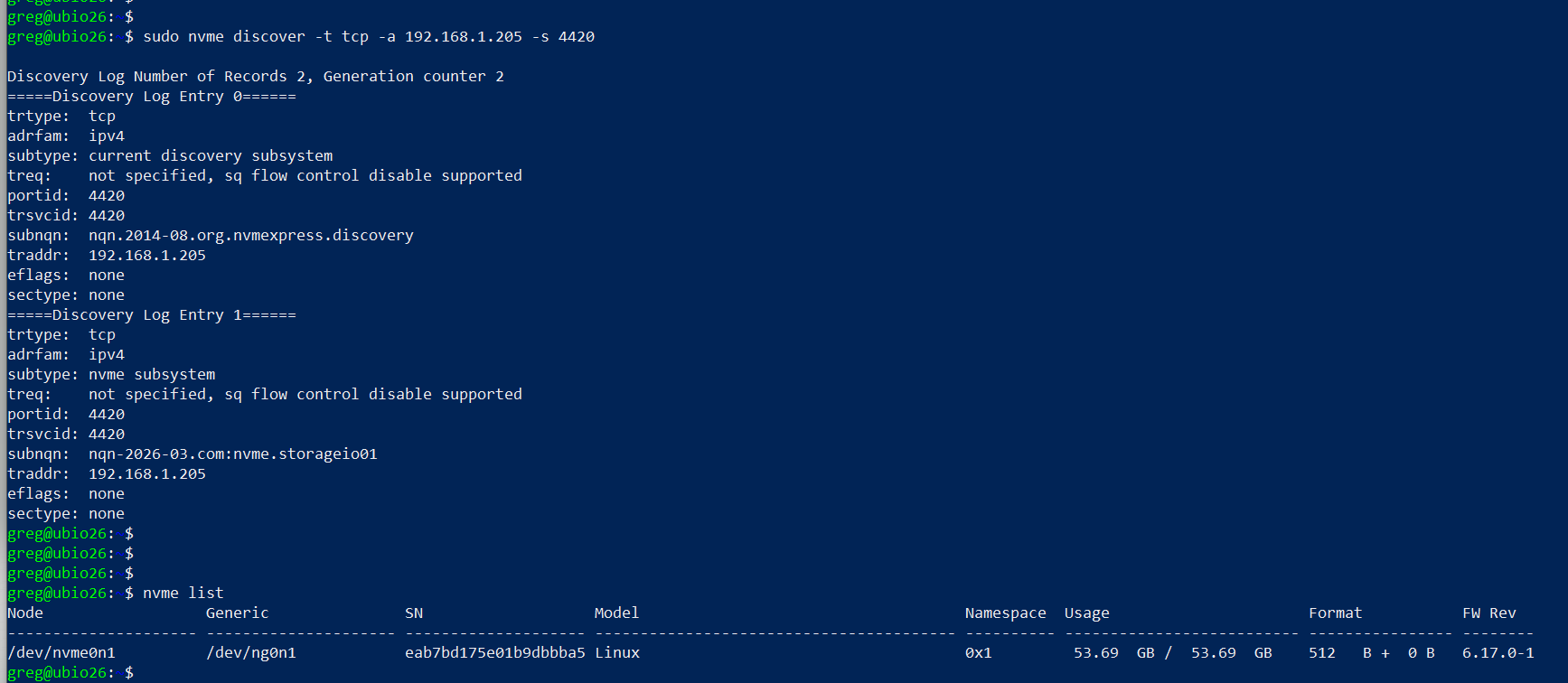
setting up linux nvmeof target

On Windows Server vnext (NVMeoF Initiator)

Now, on your Windows Server vnext, open a command window with elevated access (e.g., Run as Administrator) and use the following, making note of the parameters from the target (e.g., IP address, port 4420, nqn).

Here is a screen shot of the host initiator before the NVMeoF target appears.
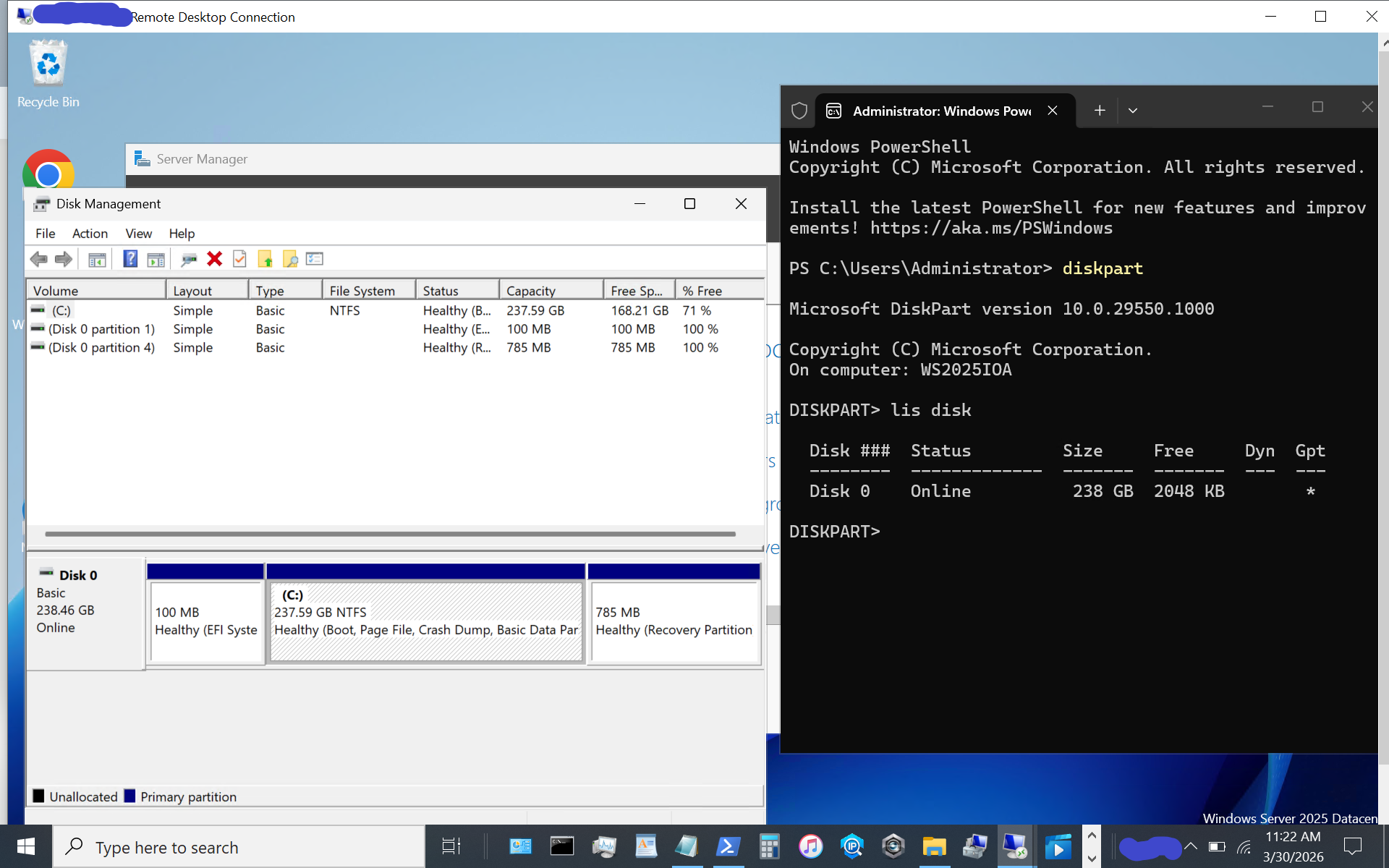
windows server vnext nvmeof host initiator setup

Now display available NVMeoF initiators using this command:

nvmeofutil.exe list -t ia
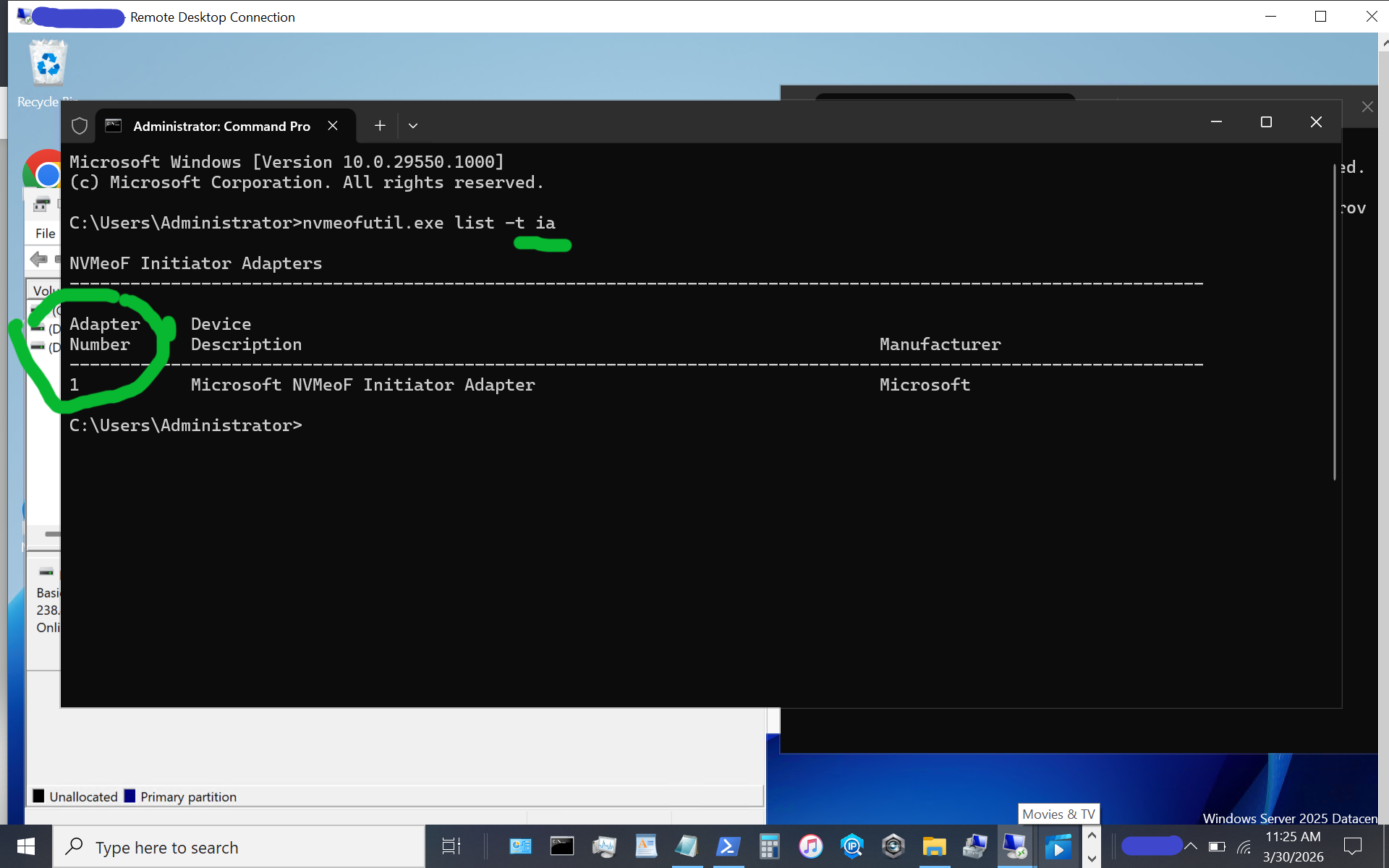
windows server vnext nvmeof host initiator setup

Note the host adapter number (e.g., 1) which will be used in the next step to get host gateway information.

nvmeofutil.exe list -t sp -ia 1
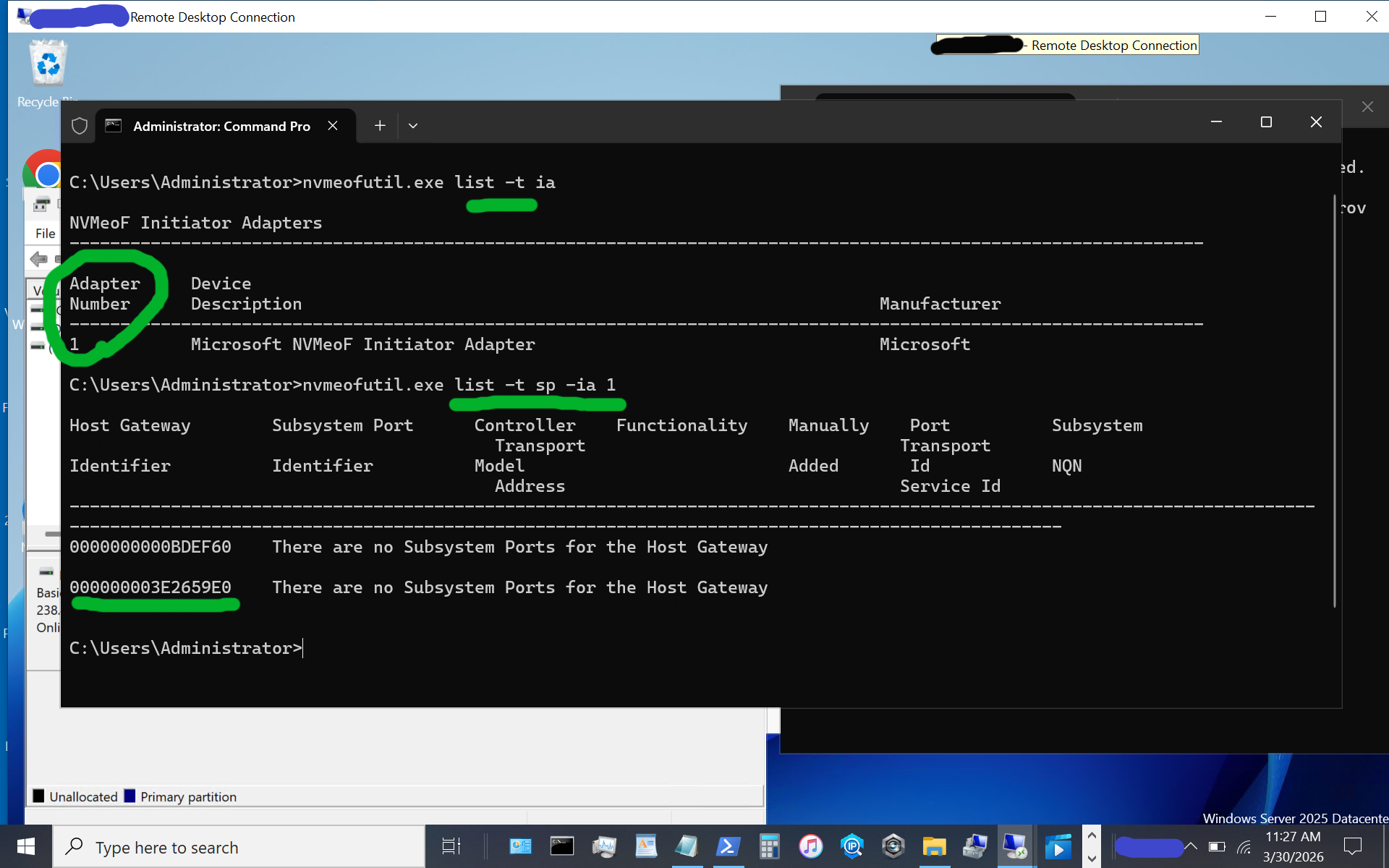
windows server vnext nvmeof host initiator setup display host gateway

Note the host gateway, target IP address, target port, and target nqn. Also note that there is an IPV6 and IPV4, in this example there is no IPV6 being used, so we are using the 2nd item (e.g. IPV4).

nvmeofutil.exe add -t sp -ia 1 -hg -dy true -pi 1 -nq nqn-2026-03.com:nvme.storageio01 -ta 192.168.1.205 -ts 4420
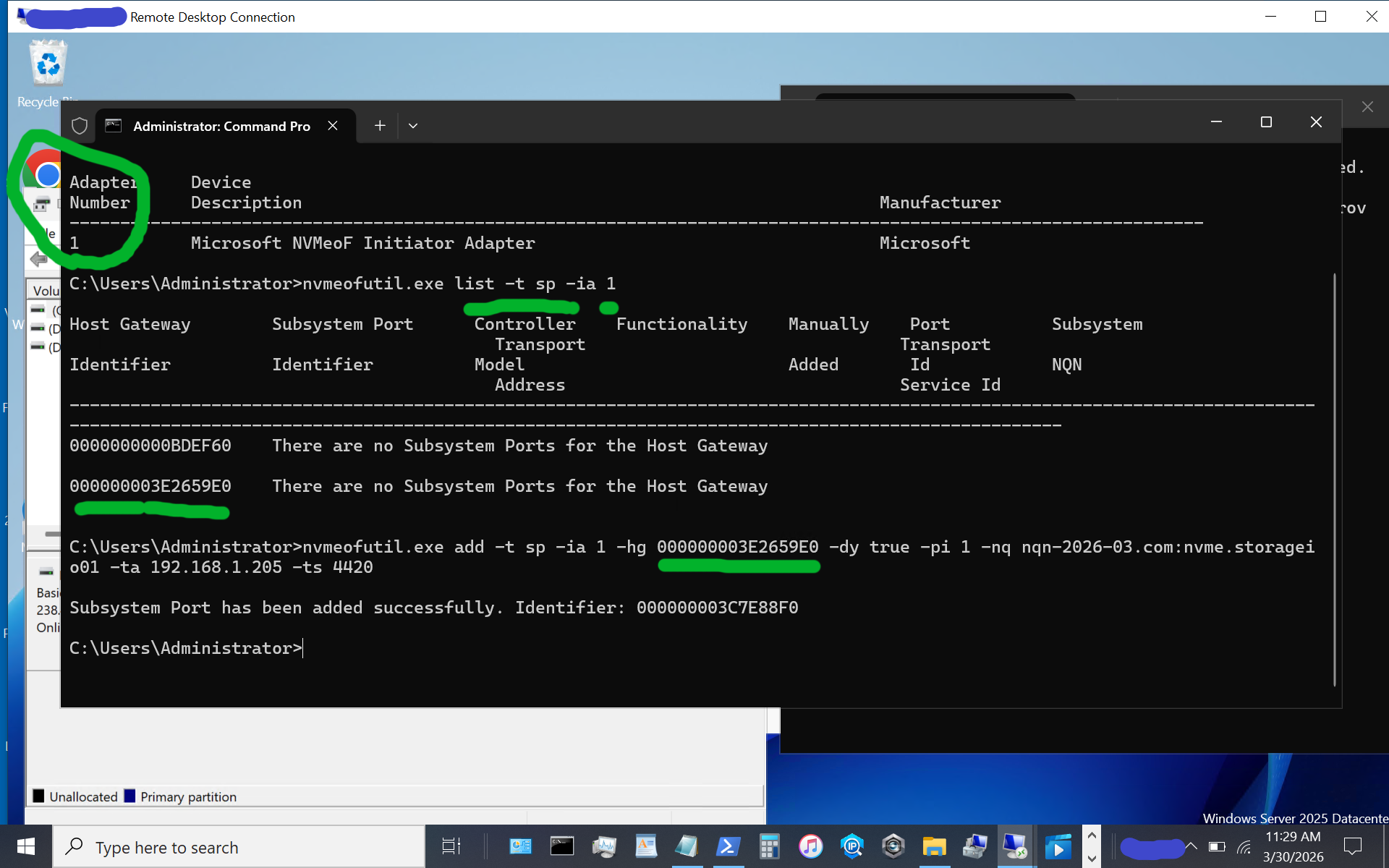
windows server vnext nvmeof host initiator setup showing host gateway and other information

Now, let’s identify the target subsystem ID.

nvmeofutil.exe list -t sp -ia 1
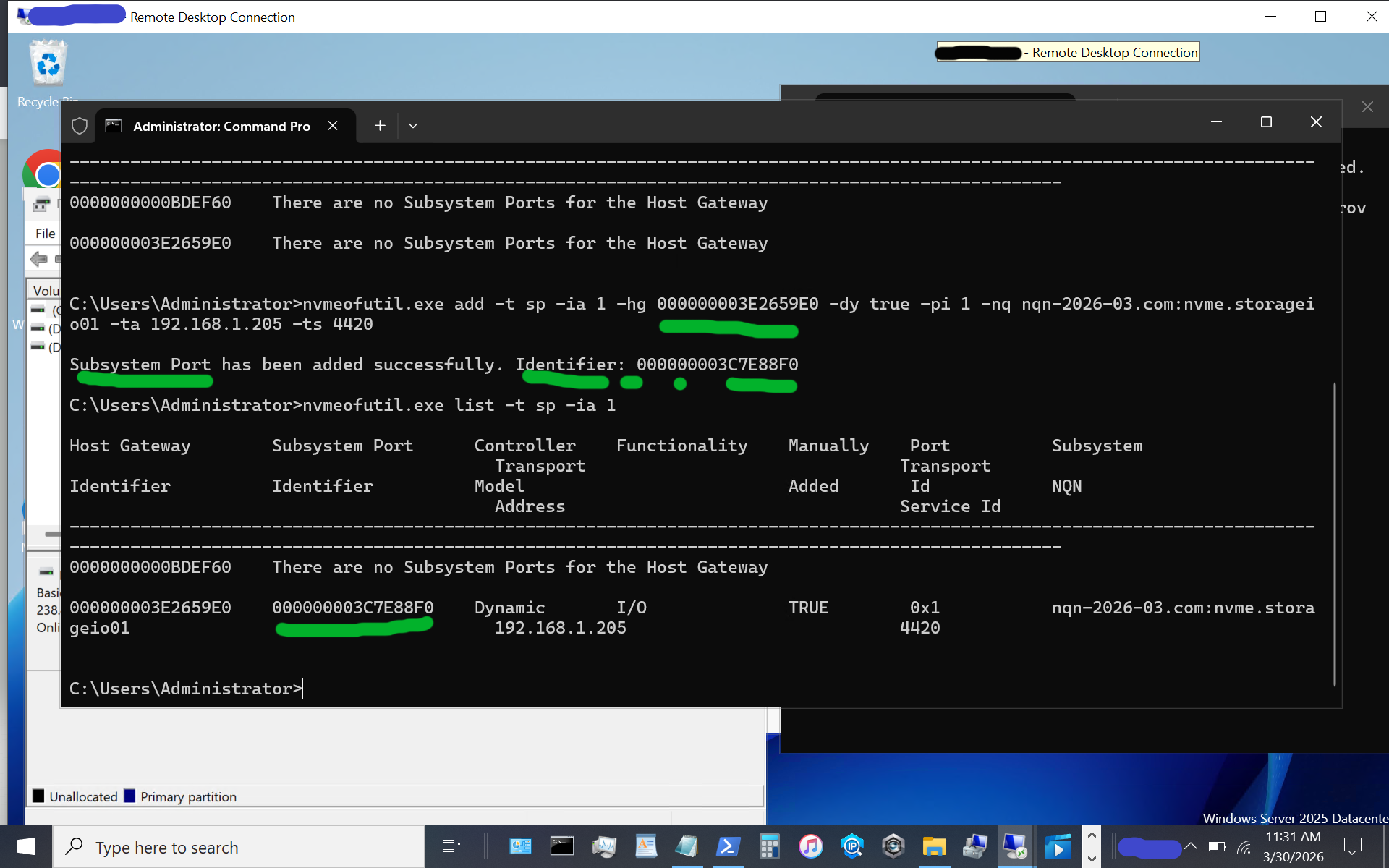
windows server vnext nvmeof host initiator setup showing subsystem information of available targets

Now, let’s use the subsystem port from above to connect to the target. Note that in some of the instructions I have seen, there is a reference to sp without an sp shown; thus, the previous steps help identify the sp to use.

nvmeofutil.exe connect -ia 1 -sp 000000003C7E88F0
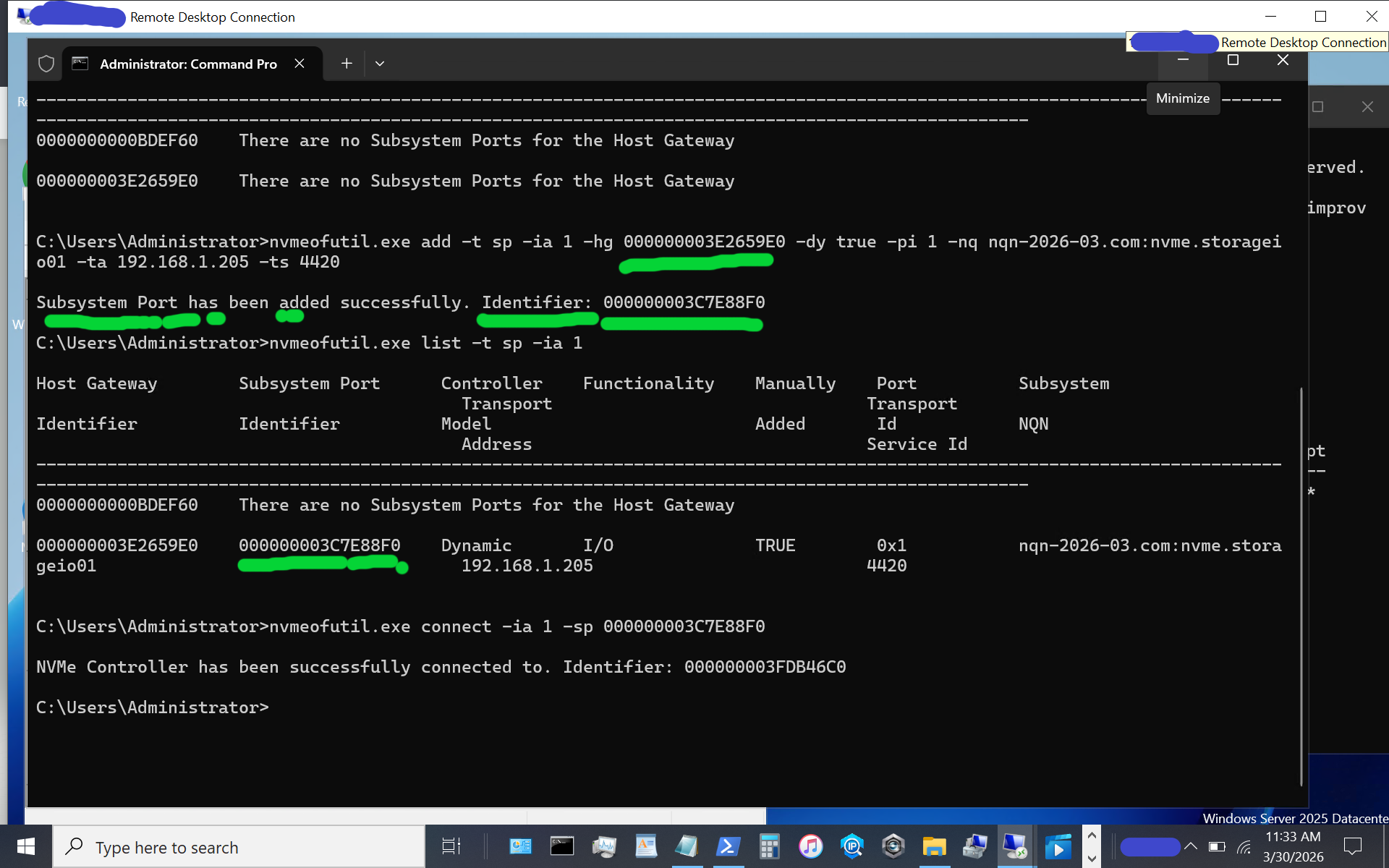
windows server vnext nvmeof host initiator setup

Congratulations, at this point, you should see a new disk or volume appear on your Windows Server vnext host system.
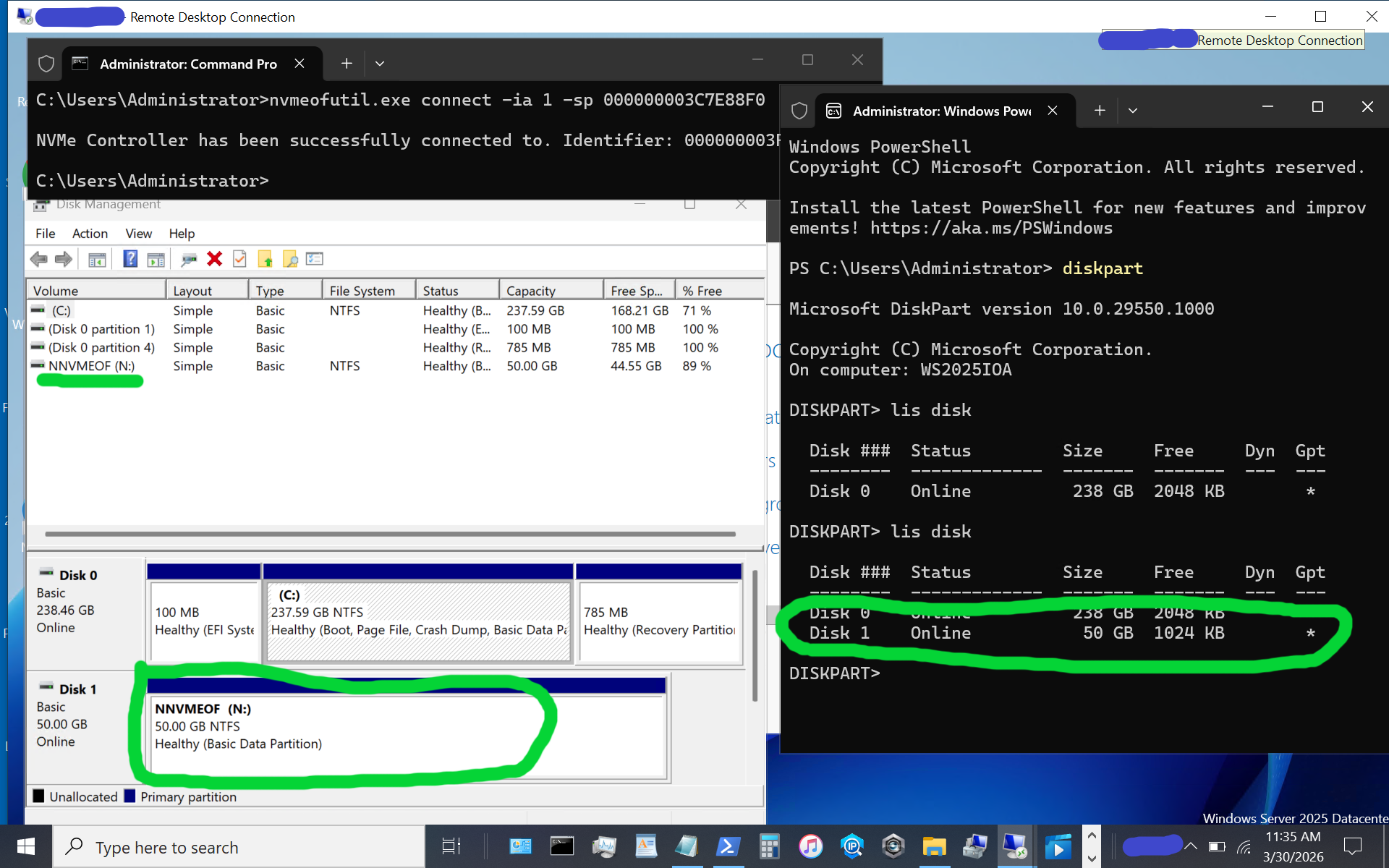
windows server vnext nvmeof host initiator setup

The above image shows what appears when using diskpart, as well as the disk format utility, or use your preferred command, PowerShell script, or tool. If the disk or volume has not yet been used, it must be initialized and formatted. Otoh, as in this example, the disk volume had previously been initialized and formatted as a simple NTFS volume.

Again, reiterating, the above is for simple testing and evaluation, with loose security and persistence that you will want to tighten up as needed. The whole process is pretty easy as long as you don’t make any typos, for example, with nqn or other items.

Additional Resources Where to learn more

Microsoft Windows Server Insider Build NVMeoF Initiator (Blog post)
NVMe Linux Driver and related info
Announcing Native NVMe in Windows Server 2025 (Microsoft Post)
Introducing the Windows NVMe-oF Initiator Preview in Windows Server Insiders Builds (Microsoft Post)
Windows Server Insider Builds (Microsoft Downloads)
ToE NVMeoF TCP Performance Boost Performance Reduce Costs (blog post)
TheNVMeplace.com (Various NVMe resources)
Azure Cloud Storage here (Microsoft Post)
Microsoft Azure Data Box (Blog Post)
Azure Elastic SAN from Cloud to On-Prem here (Blog Post)
Cloud and Software Defined Data Infrastructure topics here

Additional learning experiences along with common questions (and answers) pertaining to SCSI, Fibre Channel, NVMe, Cloud, Hardware, Software, Services, techniques, server, storage, I/O networking, data protection among other topics are found in my Software Defined Data Infrastructure Essentials book.
Software Defined Data Infrastructure Essentials (CRC Press) by Greg Schulz

What this all means

With the insiders preview of Windows Server vnext you have the opportunity to try out the new NVMeoF initiator using TCP and RDMA including on Ethernet based fabric networks. The current insiders build utilizes the nvmeofutility.exe for initial testing, evaluations and experiments while future releases should see other management tools and interfaces such as Powershell cmdlets among others.

Ok, nuff said.

Cheers Gs

Greg Schulz – Ten time Microsoft MVP Cloud and Data Center Management and Azure Storage, along with previous ten-time VMware vExpert. Author of Software Defined Data Infrastructure Essentials (CRC Press), as well as Cloud and Virtual Data Storage Networking (CRC Press), The Green and Virtual Data Center (CRC Press), Resilient Storage Networks (Elsevier) and twitter @storageio. Courteous comments are welcome for consideration. First published on https://storageioblog.com any reproduction in whole, in part, with changes to content, without source attribution under title or without permission is forbidden.

All Comments, (C) and (TM) belong to their owners/posters, Other content (C) Copyright 2006-2026 Server StorageIO and UnlimitedIO. All Rights Reserved. StorageIO is a registered Trade Mark (TM) of UnlimitedIO LLC.


Its Time for NVMeoF to let iSCSI begin its slow retirement journey

Why Its Time for NVMeoF

Its Time for NVMeoF to let iSCSI begin its slow retirement journey for networked shared block storage. Dating back to the late 1990s and early 2000s, iSCSI encapsulates the SCSI command set over a TCP/IP (IP)- based fabric network, or as an alternative to SCSI on Fibre Channel (SCSI_FCP aka FCP aka FC). The SCSI command set dates back to the 1980s, having been deployed on physical parallel cabling and later on other transports, including Fibre Channel, Serial Attached SCSI (SAS), and iSCSI.

The reason it’s time for NVMe over Fabric (NVMeoF), and specifically NVMeoF using TCP and RDMA, to let iSCSI begin its slow retirement journey, is the evolution of the NVMe protocol command set and the expansion of its ecosystem as a modern, ground-up, streamlined server storage I/O protocol command set.

Keep in mind that there are two aspects in play with NVMeoF, which are similar to iSCSI and Fibre Channel-based FCP: the upper layer or protocol command set (e.g., NVMe and SCSI), and media through which these command sets are implemented via various interfaces such as TCP or RDMA on Ethernet, via InfiniBand, Fibre Channel, or physical PCIe, among others.

Ethernet has established itself as the dominant network interface, supporting various upper layers, such as TCP, and increasing its speed. Likewise, InfiniBand and Fibre Channel continue to increase their speeds and maintain their deployment roles in some environments.

Besides supporting faster networks, the NVMe command set was architected and has been deployed to support the current and evolving generations of processors with multiple cores, enabling more concurrent I/O operations and compute threads with less CPU overhead due to a modern, streamlined I/O stack and associated native drivers.

Why NVMeoF (over TCP or RDMA)

Leverage the combined improved benefits of NVMe as a server storage I/O communications protocol, along with TCP networking and industry-standard Ethernet as a communications fabric. With the NVMe command protocol server storage, I/O processing is streamlined and optimized for modern high-speed, low-latency network fabrics, such as Ethernet, as the transport.

The NVMe command set, compared to the SCSI command set, enables faster I/O processing with lower latency, higher IOPs, greater bandwidth, and more transactions, while increasing concurrency and the number of threads and reducing CPU usage per I/O operation. Similar to the SCSI command set, which has been deployed on various industry-standard transport interfaces, the NVMe command set is also deployed across various transports. For example, SCSI has been supported on IP (iSCSI), Fibre Channel (SCSI_FCP, e.g., FCP), Serial Attached SCSI (SAS), and Parallel SCSI, among others.

Likewise, the NVMe command set has been implemented via PCIe, including U.2, as well as over fabrics (e.g., NVMe over Fabric, aka NVMeoF), most notably with TCP and RDMA, along with some NVMe over Fibre Channel. In addition to being a modern, streamlined command set, NVMe also supports more devices, queues, and sessions, and is optimized with host-server initiator and target-side stacks.
An example of how NVMe is being embraced from a software support standpoint is Microsoft’s production release of a new, re-architected, optimized I/O stack as part of Windows Server 2025 in December 2025. Recently, Microsoft released, as part of the latest vnext insiders preview build, an all-new NVMeoF (TCP & RDMA) initiator for testing and evaluation.

NVMe has proven itself as a command set using various transports for use as a target for various SSD and flash storage devices (e.g., back-end) in servers, clients, and storage systems, as well as a front-end alternative to SCSI_FCP (e.g., FCP or FC) and iSCSI among others on storage systems, and software-defined storage solutions. Also, keep in mind that while the SCSI command set dates back to at least the early 1990s for general-purpose access of Magnetic Tape, CD/DVD, HDD, and later SSD, NVMe developed in the last decade was created from the ground up for solid-state devices (SSDs), including flash, among other persistent storage mediums.

Why NVMeoF (TCP) vs iSCSI

It would be, and is, too easy to say the 2000s called and want iSCSI back; however, tongue-in-cheek, there is some reality to that. However, looking closer, iSCSI evolved in the early 2000s as a low-cost SCSI command set alternative to Fibre Channel (SCSI_FCP, e.g., FCP or FC), as well as the survivor of the block IP storage wars (e.g., iFCP, FCIP, iSCSI, etc.) for general-purpose IP-based SCSI storage access.

Fibre Channel-based SCSI (FCP) went on to dominate higher-performance fabric- or networked-storage, aka storage area networks (SANs), with iSCSI having some success in other areas alongside file-based IP storage access via NFS & SMB, among others.

Now that we are in the mid-2020s, the ecosystem around NVMe has matured and continues to do so, with full-stack NVMe solutions, hardware- and software-based initiators, native NVMe drivers, target-based storage systems, and storage devices using various transports. NVMe has evolved from direct-attached PCIe card slots to PCIe U.2 & U.3, M.2 and EDSFF slots, as well as NVMe over Fabrics including TCP and RDMA, among others.

The benefit of using NVMeoF vs iSCSI is lower latency, due to native NVMe commands over TCP being streamlined, vs older SCSI encapsulation and associated cumbersome driver stacks. Besides the streamlined drivers and transports, NVMeoF also provides massive parallelism and multi-threading to boost server storage I/O while leveraging today’s multi-core processors and offload capabilities.

The net result is more I/O operations supporting higher IOPs, bandwidth, and transactions per second, with lower latency and lower CPU usage, resulting in greater productivity and better economics for databases, virtualization, AI/ML, and other block-based workloads.

Who supports NVMe and NVMeoF?

Most host and client operating systems support NVMe or NVMeoF initiators (e.g., Linux, VMware, Microsoft Windows [in the current Insider build], among others). There are also hardware adapter-based NVMe initiators, such as those from Broadcom, Chelsio, and NVIDIA. There are software NVMe and NVMe target packages for many platforms, such as Linux-based NVMe, nvme-tcp, nvme-rdma, nvme-fc, nvmet, nvmet-tcp, and SPDK (Storage Performance Development Kit), among others.

Besides server- or client-side support, there are storage and server hardware chassis building blocks that support NVMe, as well as storage system solutions from Dell, HPE, Hitachi, NetApp, Pure, among others. Within large cloud service providers such as AWS, Microsoft Azure, and Google Cloud Platform (GCP), NVMe is also widely used across their platform ecosystems.

Why it’s time for NVMeoF to let iSCSI begin its slow retirement journey
This is not to say that iSCSI is dead or that it has no future; rather, NVMeoF and its ecosystem have evolved and are ready to do more. Likewise, the SCSI command set is not dead; it’s still used with SAS, Fibre Channel (FCP), iSCSI, etc. However, NVMe has evolved and is seeing broad adoption from server and client attachment to storage devices and storage systems over various transport interfaces and media (PCIe, U.2/U.3, M.2, EDSFF, Ethernet, and fabrics).

Storage systems have also evolved, adding front-end support for NVMeoF and back-end attachment of NVMe flash and SSDs. With the combination of server, client and other software platforms having or in public release review, new streamlined native NVMe drivers and I/O stacks along with NVMeoF initiators (or targets), now is the time to look at NVMeoF as a replacement or alternative to iSCSI, and perhaps even Fibre Channel in the future to support existing and legacy workloads as well as new and emerging application landscapes and their demanding server storage I/O and compute needs (e.g. AI among others).

Additional Resources Where to learn more

Microsoft Windows Server Insider Build NVMeoF Initiator (Blog post)
Installing new Insider’s build Windows Server vnext NVMeoF, host initiator (blog post)
NVMe Linux Driver and related info
Announcing Native NVMe in Windows Server 2025 (Microsoft Post)
Introducing the Windows NVMe-oF Initiator Preview in Windows Server Insiders Builds (Microsoft Post)
Windows Server Insider Builds (Microsoft Downloads)
ToE NVMeoF TCP Performance Line Boost Performance Reduce Costs (blog post)
TheNVMeplace.com (Various NVMe resources)
Azure Cloud Storage here (Microsoft Post)
Microsoft Azure Data Box (Blog Post)
Azure Elastic SAN from Cloud to On-Prem here (Blog Post)
Cloud and Software Defined Data Infrastructure topics here

Additional learning experiences along with common questions (and answers) pertaining to SCSI, Fibre Channel, NVMe, Cloud, Hardware, Software, Services, techniques, server, storage, I/O networking, data protection among other topics are found in my Software Defined Data Infrastructure Essentials book.

Software Defined Data Infrastructure Essentials (CRC Press) by Greg Schulz

What this all means

Now is a good time to look into NVMe and, specifically, NVMe over Fabric (NVMeoF) if you have not recently done so, to refresh or learn what it can do. Likewise, if you are using iSCSI or Fibre Channel-based SCSI_FCP (e.g., not FICON), now is a good time to review or refresh your understanding of NVMeoF and where it fits into future plans for block storage. For those who say block storage is dead and everything is object storage, file storage, or even table storage, that’s fine, as those are all companions to block storage in a balanced ecosystem, each with its own uses, roles, and fits.

Ok, nuff said.

Cheers Gs

Greg Schulz – Ten time Microsoft MVP Cloud and Data Center Management and Azure Storage, along with previous ten-time VMware vExpert. Author of Software Defined Data Infrastructure Essentials (CRC Press), as well as Cloud and Virtual Data Storage Networking (CRC Press), The Green and Virtual Data Center (CRC Press), Resilient Storage Networks (Elsevier) and twitter @storageio. Courteous comments are welcome for consideration. First published on https://storageioblog.com any reproduction in whole, in part, with changes to content, without source attribution under title or without permission is forbidden.

All Comments, (C) and (TM) belong to their owners/posters, Other content (C) Copyright 2006-2026 Server StorageIO and UnlimitedIO. All Rights Reserved. StorageIO is a registered Trade Mark (TM) of UnlimitedIO LLC.

Microsoft Windows Server Insider Build NVMeoF Initiator

Microsoft Windows Server Insider Build NVMeoF Initiator

In case you haven’t heard, in addition to recently announcing a new NVMe native driver for Windows Server 2025 back in December 2025, Microsoft has now introduced a new Windows NVMe over Fabrics (NVMeoF, aka NVMe-oF) Initiator Preview in the latest Windows Server Insiders Builds.

With the preview of this new NVMeoF initiator, Microsoft is moving closer to delivering enhanced server storage I/O performance by embracing NVMe as both a native storage target and a native NVMe host server initiator. While the new NVMe native storage stack driver was released for production back in December 2025, this new host initiator capability is available as a preview in the latest Windows Server insider build.

By adding a native NVMeoF initiator, Microsoft is enabling organizations to use shared networked block software-defined and SAN storage using the faster NVMe protocol, rather than traditional SCSI/iSCSI/SCSI_FCP(FC) protocol-based interfaces. In addition to supporting native direct-attached NVMe storage, Microsoft Windows servers (insider build) now support the streamlined NVMe server storage I/O stack over networks, including Ethernet and RDMA fabrics.

Additional Resources Where to learn more

ToE NVMeoF TCP Performance Line Boost Performance Reduce Costs (blog post)
NVMe Linux Driver and related info
Its Time for NVMeoF to let iSCSI begin its slow retirement journey (blog post)
Announcing Native NVMe in Windows Server 2025 (Microsoft Post)
Installing new Insider’s build Windows Server vnext NVMeoF, host initiator (blog post)
Introducing the Windows NVMe-oF Initiator Preview in Windows Server Insiders Builds (Microsoft Post)
Windows Server Insider Builds (Microsoft Downloads)
TheNVMeplace.com (Various NVMe resources)
Azure Cloud Storage here (Microsoft Post)
Microsoft Azure Data Box (Blog Post)
Azure Elastic SAN from Cloud to On-Prem here (Blog Post)
Cloud and Software Defined Data Infrastructure topics here

Additional learning experiences along with common questions (and answers) pertaining to Cloud, Hardware, Software, Services, techniques, server, storage, I/O networking, data protection among other topics are found in my Software Defined Data Infrastructure Essentials book.

Software Defined Data Infrastructure Essentials (CRC Press) by Greg Schulz

What this all means

While this new Windows Server host NVMe over Fabric (NVMeoF aka NVMe-oF) initiator for block storage is currently available as part of a Windows Server insiders build, it provides a means for organizations to begin testing native NVMe connectivity via Windows Servers to their existing SAN and other networked software defined storage servers via fabrics including Ethernet along with RDMA based. Learn more about this new initiator, along with how to try it out for yourself via this Microsoft blog post that includes instructions on how to setup your own NVMeoF storage target if you dont have one.

Ok, nuff said.

Cheers Gs

Greg Schulz – Ten time Microsoft MVP Cloud and Data Center Management and Azure Storage, along with previous ten-time VMware vExpert. Author of Software Defined Data Infrastructure Essentials (CRC Press), as well as Cloud and Virtual Data Storage Networking (CRC Press), The Green and Virtual Data Center (CRC Press), Resilient Storage Networks (Elsevier) and twitter @storageio. Courteous comments are welcome for consideration. First published on https://storageioblog.com any reproduction in whole, in part, with changes to content, without source attribution under title or without permission is forbidden.

All Comments, (C) and (TM) belong to their owners/posters, Other content (C) Copyright 2006-2026 Server StorageIO and UnlimitedIO. All Rights Reserved. StorageIO is a registered Trade Mark (TM) of UnlimitedIO LLC.
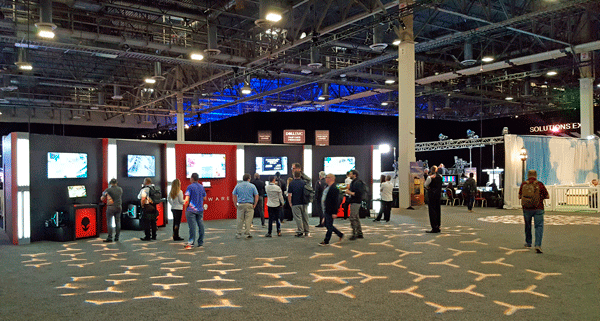
Dell Technology World 2018 Announcement Summary

Dell Technology World 2018 Announcement Summary

Dell Technology World 2018 Announcement Summary
This is part one of a five-part series about Dell Technology World 2018 announcement summary. Last week (April 30-May 3) I traveled to Las Vegas Nevada (LAS) to attend Dell Technology World 2018 (e.g., DTW 2018) as a guest of Dell (that is a disclosure btw). There were several announcements along with plenty of other activity from sessions, meetings, hallway and event networking taking place at Dell Technology World DTW 2018.

Major data infrastructure technology announcements include:

  • PowerMax all-flash array (AFA) solid state device (SSD) NVMe storage system
  • PowerEdge four-socket 2U and 4U rack servers
  • XtremIO X2 AFA SSD storage system updates
  • PowerEdge MX preview of future composable servers
  • Desktop and thin client along with other VDI updates
  • Cloud and networking enhancements

Besides the above, additional data infrastructure related announcements were made in association with Dell Technology family members including VMware along with other partners, as well as customer awards. Other updates and announcements were tied to business updates from Dell Technology, Dell Technical Capital (venture capital), and, Dell Financial Services.

Dell Technology World Buzzword Bingo Lineup

Some of the buzzword bingo terms, topics, acronyms from Dell Technology World 2018 included AFA, AI, Autonomous, Azure, Bare Metal, Big Data, Blockchain, CI, Cloud, Composable, Compression, Containers, Core, Data Analytics, Dedupe, Dell, DFS (Dell Financial Services), DFR (Data Footprint Reduction), Distributed Ledger, DL, Durability, Fabric, FPGA, GDPR, Gen-Z, GPU, HCI, HDD, HPC, Hybrid, IOP, Kubernetes, Latency, MaaS (Metal as a Service), ML, NFV, NSX, NVMe, NVMeoF, PACE (Performance Availability Capacity Economics), PCIe, Pivotal, PMEM, RAID, RPO, RTO, SAS, SATA, SC, SCM, SDDC, SDS, Socket, SSD, Stamp, TBW (Terabytes Written per day), VDI, venture capital, VMware and VR among others.

Dell Technology World 2018 Venue
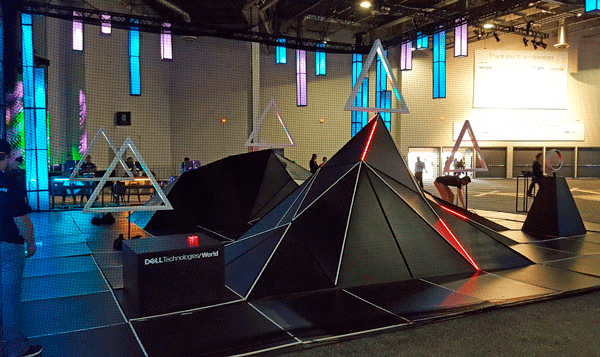
Dell Technology World DTW 2018 Event and Venue

Dell Technology World 2018 was located at the combined Palazzo and Venetian hotels along with adjacent Sands Expo center kicking off Monday, April 30th and wrapping up May 4th.

The theme for Dell Technology World DTW 2018 was make it real, which in some ways was interesting given the focus on virtual including virtual reality (VR), software-defined data center (SDDC) virtualization, data infrastructure topics, along with artificial intelligence (AI).

Virtual Sky Dell Technology World 2018
Make it real – Venetian Palazzo St. Mark’s Square on the way to Sands Expo Center

There was plenty of AI, VR, SDDC along with other technologies, tools as well as some fun stuff to do including VR games.

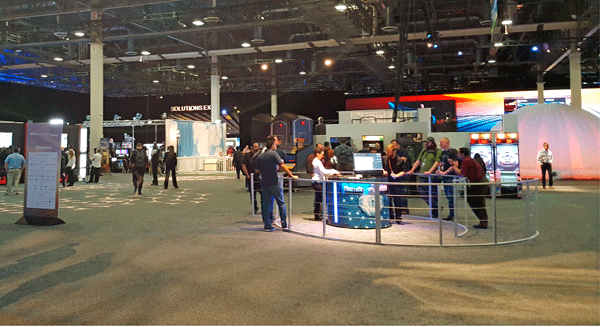
Dell Technology World 2018 Commons Area
Dell Technology World Village Area near Key Note and Expo Halls

Dell Technology World 2018 Commons Area Drones
Dell Technology World Drone Flying Area

During a break from some meetings, I used a few minutes to fly a drone using VR which was interesting. I Have been operating drones (See some videos here) visually without dependence on first-person view (FPV) or relying on extensive autonomous operations instead flying heads up by hand for several years. Needless to say, the VR was interesting, granted encountered a bit of vertigo that I had to get used to.

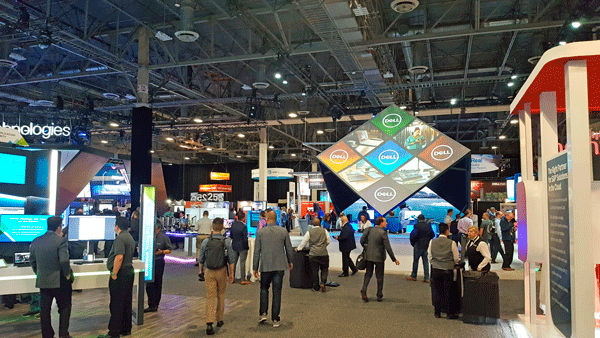
Dell Technology World 2018 Commons Area Virtual Village
More views of the Dell Technology World Village and Commons Area with VR activity

Dell Technology World 2018 Commons Area Virtual Village
Dell Technology World Village and VR area

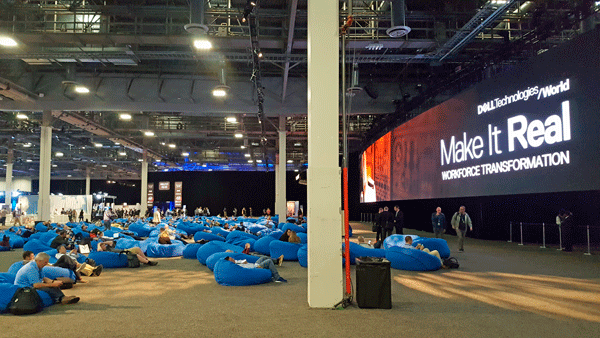
Dell Technology World 2018 Commons Area Virtual Village
Dell Technology World Bean Bag Area

Dell Technology World 2018 Announcement Summary

Ok, nuff with the AI, ML, DL, VR fun, time to move on to the business and technology topics of Dell Technologies World 2018.

What was announced at Dell Technology World 2018 included among others:

Dell Technology World 2018 PowerMax
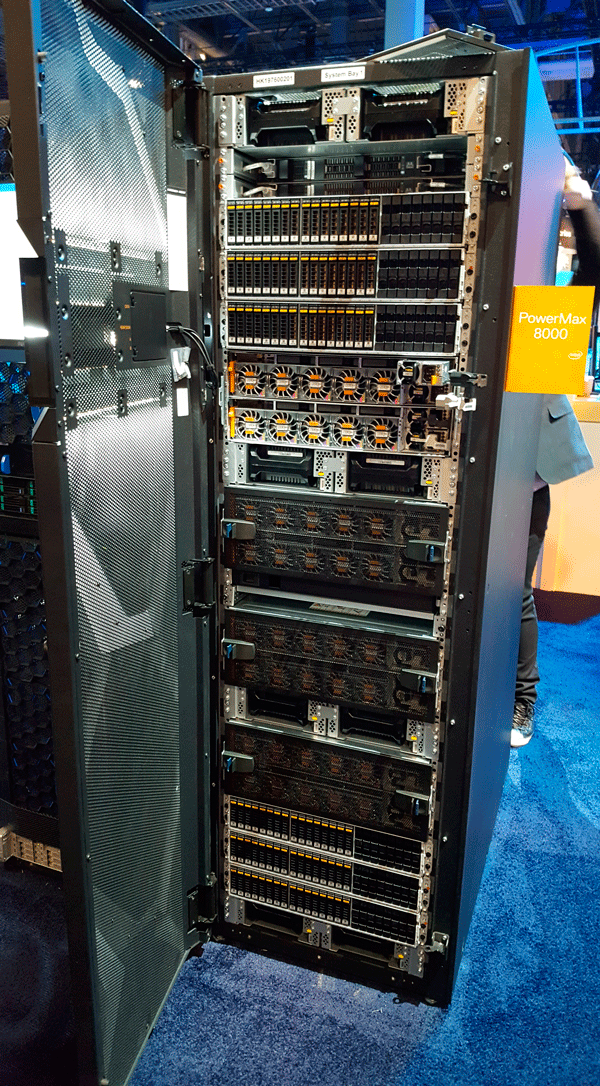
Dell PowerMax Front View

Subsequent posts in this series take a deeper look at the various announcements as well as what they mean.

Where to learn more

Learn more about Dell Technology World 2018 and related topics via the following links:

Additional learning experiences along with common questions (and answers), as well as tips can be found in Software Defined Data Infrastructure Essentials book.

Software Defined Data Infrastructure Essentials Book SDDC

What this all means

On the surface it may appear that there was not much announced at Dell Technology World 2018 particular compared to some of the recent Dell EMC Worlds and EMC Worlds. However turns out that there was a lot announced, granted without some of the entertainment and circus like atmosphere of previous events. Continue reading here Part II Dell Technology World 2018 Modern Data Center Announcement Details in this series, along with Part III here, Part IV here (including PowerEdge MX composable infrastructure leveraging Gen-Z) and Part V (servers and converged) here.

Ok, nuff said, for now.

Cheers Gs

Greg Schulz – Microsoft MVP Cloud and Data Center Management, VMware vExpert 2010-2017 (vSAN and vCloud). Author of Software Defined Data Infrastructure Essentials (CRC Press), as well as Cloud and Virtual Data Storage Networking (CRC Press), The Green and Virtual Data Center (CRC Press), Resilient Storage Networks (Elsevier) and twitter @storageio. Courteous comments are welcome for consideration. First published on https://storageioblog.com any reproduction in whole, in part, with changes to content, without source attribution under title or without permission is forbidden.

All Comments, (C) and (TM) belong to their owners/posters, Other content (C) Copyright 2006-2026 Server StorageIO and UnlimitedIO. All Rights Reserved. StorageIO is a registered Trade Mark (TM) of Server StorageIO.

Part II Dell Technology World 2018 Modern Data Center Announcement Details

Part II Dell Technology World 2018 Modern Data Center Announcement Details

Dell Technology World 2018 Modern Data Center Announcement Summary
This is Part II Dell Technology World 2018 Modern Data Center Announcement Details that is part of a five-post series (view part I here, part III here, part IV here and part V here). Last week (April 30-May 3) I traveled to Las Vegas Nevada (LAS) to attend Dell Technology World 2018 (e.g., DTW 2018) as a guest of Dell (that is a disclosure btw).

Dell Technology World 2018 Venue
Dell Technology World DTW 2018 Event and Venue

What was announced at Dell Technology World 2018 included among others:

Dell Technology World 2018 PowerMax
Dell PowerMax Front View

Dell Technology World 2018 Modern Data Center Announcement Details

Dell Technologies data infrastructure related announcements included new solutions competencies and expanded services deployment competencies with partners to boost deal size and revenues. An Internet of Things (IoT) solution competency was added with others planned including High-Performance Computing (HPC) / Super Computing (SC), Data Analytics, Business Applications and Security related topics. Dell Financial Services flexible consumption models announced at Dell EMC World 2017 provide flexible financing options for both partners as well as their clients.

Flexible Dell Financial Services cloud-like consumption model (e.g., pay for what you use) enhancements include reduced entry points for the Flex on Demand solutions across the Dell EMC storage portfolio. For example, Flex on Demand velocity pricing models for Dell EMC Unity All-Flash Array (AFA) solid state device (SSD) storage solution, and XtremIO X2 AFA systems with price points of less than USD 1,000.00 per month. The benefit is that Dell partners have a financial vehicle to help their midrange customers run consumption-based financing for all-flash storage without custom configurations resulting in faster deployment opportunities.

In other partner updates, Dell Technologies is enhancing the incentive program Dell EMC MyRewards program to help drive new business. Dell EMC MyRewards Program is an opt-in, points-based reward program for solution provider sales reps and systems engineers. MyRewards program is slated to replace the existing Partner Advantage and Sell & Earn programs with bigger and better promotions (up to 3x bonus payout, simplified global claiming).

What this means for partners is the ability to earn more while offering their clients new solutions with flexible financing and consumption-based pricing among other options. Other partner enhancements include update demo program, Proof of Concept (POC) program, and IT transformation campaigns.

Powering up the Modern Data Center and Future of Work

Powering up the modern data center along with future of work, part of the make it real theme of Dell Technologies world 2018 includes data infrastructure server, storage, I/O networking hardware, software and service solutions. These data infrastructure solutions include NVMe based storage, Converged Infrastructure (CI), hyper-converged infrastructure (HCI), software-defined data center (SDDC), VMware based multi-clouds, along with modular infrastructure resources.

In addition to server and storage data infrastructure resources form desktop to data center, Dell also has a focus of enabling traditional as well as emerging Artificial Intelligence (AI), Machine Learning (ML) and Deep Learning (DL) as well as analytics applications. Besides providing data infrastructure resources to support AI, ML, DL, IoT and other applications along with their workloads, Dell is leveraging AI technology in some of their products for example PowerMax.

Other Dell Technologies announcements include Virtustream cloud risk management and compliance, along with Epic and SAP Digital Health healthcare software solutions. In addition to Virtustream, Dell Technologies cloud-related announcements also include VMware NSX network Virtual Cloud Network with Microsoft Azure support along with security enhancements. Refer here to recent April VMware vSphere, vCenter, vSAN, vRealize and other Virtual announcements as well as here for March VMware cloud updates.

Where to learn more

Learn more about Dell Technology World 2018 and related topics via the following links:

Additional learning experiences along with common questions (and answers), as well as tips can be found in Software Defined Data Infrastructure Essentials book.

Software Defined Data Infrastructure Essentials Book SDDC

What this all means

The above set of announcements span business to technology along with partner activity. Continue reading here (Part III Dell Technology World 2018 Storage Announcement Details) of this series, and part I (general summary) here, along with Part IV (PowerEdge MX Composable) here and part V here.

Ok, nuff said, for now.

Cheers Gs

Greg Schulz – Microsoft MVP Cloud and Data Center Management, VMware vExpert 2010-2017 (vSAN and vCloud). Author of Software Defined Data Infrastructure Essentials (CRC Press), as well as Cloud and Virtual Data Storage Networking (CRC Press), The Green and Virtual Data Center (CRC Press), Resilient Storage Networks (Elsevier) and twitter @storageio. Courteous comments are welcome for consideration. First published on https://storageioblog.com any reproduction in whole, in part, with changes to content, without source attribution under title or without permission is forbidden.

All Comments, (C) and (TM) belong to their owners/posters, Other content (C) Copyright 2006-2026 Server StorageIO and UnlimitedIO. All Rights Reserved. StorageIO is a registered Trade Mark (TM) of Server StorageIO.

Part III Dell Technology World 2018 Storage Announcement Details

Part III Dell Technology World 2018 Storage Announcement Details

Part III Dell Technology World 2018 Storage Announcement Details

This is Part III Dell Technology World 2018 Storage Announcement Details that is part of a five-post series (view part I here, part II here, part IV (PowerEdge MX Composable) here and part V here). Last week (April 30-May 3) I traveled to Las Vegas Nevada (LAS) to attend Dell Technology World 2018 (e.g., DTW 2018) as a guest of Dell (that is a disclosure btw).

Dell Technology World 2018 Storage Announcements Include:

  • PowerMax – Enterprise class tier 0 and tier 1 all-flash array (AFA)
  • XtremIO X2 – Native replication and new entry-level pricing

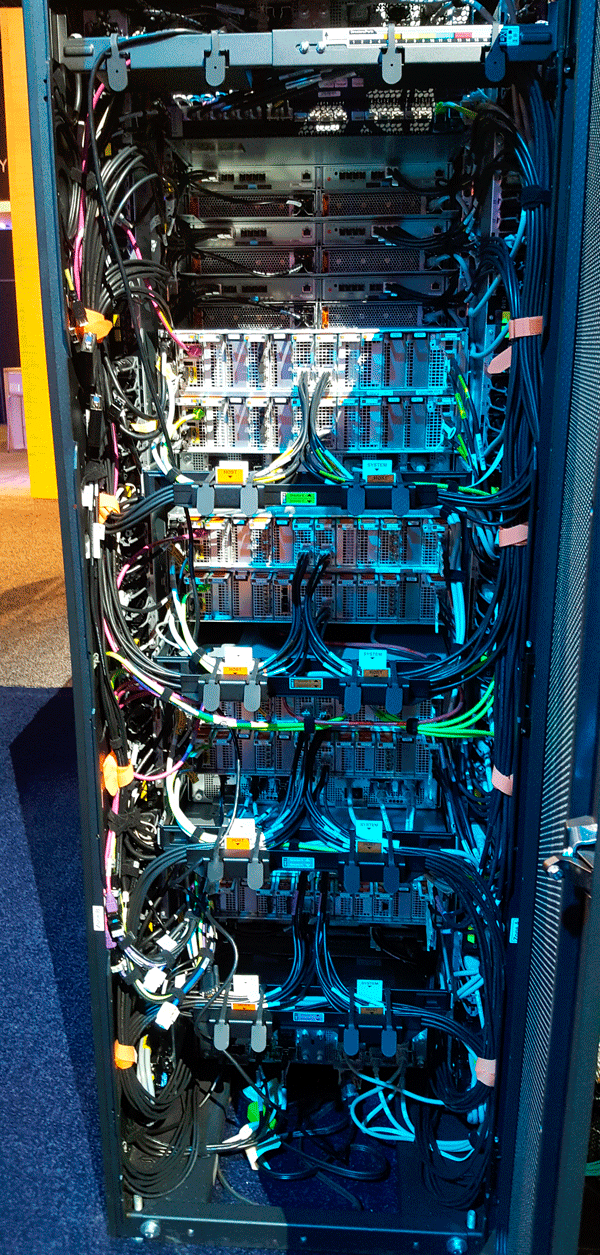
Dell Technology World 2018 PowerMax back view
Back view of Dell PowerMax

Dell PowerMax Something Old, Something New, Something Fast Near You Soon

PowerMax is the new companion to VMAX. Positioned for traditional tier 0 and tier 1 enterprise-class applications and workloads, PowerMax is optimized for dense server virtualization and SDDC, SAP, Oracle, SQL Server along with other low-latency, high-performance database activity. Different target workloads include Mainframe as well as Open Systems, AI, ML, DL, Big Data, as well as consolidation.

The Dell PowerMax is an all-flash array (AFA) architecture with an end to end NVMe along with built-in AI and ML technology. Building on the architecture of Dell EMC VMAX (some models still available) with new faster processors, full end to end NVMe ready (e.g., front-end server attachment, back-end devices).

The AI and ML features of PowerMax PowerMaxOS include an engine (software) that learns and makes autonomous storage management decisions, as well as implementations including tiering. Other AI and ML enabled operations include performance optimizations based on I/O pattern recognition.

Other features of PowerMax besides increased speeds, feeds, performance includes data footprint reduction (DFR) inline deduplication along with enhanced compression. The DFR benefits include up to 5:1 data reduction for space efficiency, without performance impact to boost performance effectiveness. The DFR along with improved 2x rack density, along with up to 40% power savings (your results may vary) based on Dell claims to enable an impressive amount of performance, availability, capacity, economics (e.g., PACE) in a given number of cubic feet (or meters).

There are two PowerMax models including 2000 (scales from 1 to 2 redundant controllers) and 8000 (scales from 1 to 8 redundant controller nodes). Note that controller nodes are Intel Xeon multi-socket, multi-core processors enabling scale-up and scale-out performance, availability, and capacity. Competitors of the PowerMax include AFA solutions from HPE 3PAR, NetApp, and Pure Storage among others.

Dell Technology World 2018 PowerMax Front View
Front view of Dell PowerMax

Besides resiliency, data services along with data protection, Dell is claiming PowerMax is 2x faster than their nearest high-end storage system competitors with up to 150GB/sec (e.g., 1,200Gbps) of bandwidth, as well as up to 10 million IOPS with 50% lower latency compared to previous VMAX.

PowerMax is also a full end to end NVMe ready (both back-end and front-end). Back-end includes NVMe drives, devices, shelves, and enclosures) as well as front-end (future NVMe over Fabrics, e.g., NVMeoF). Being NVMeoF ready enables PowerMax to support future front-end server network connectivity options to traditional SAN Fibre Channel (FC), iSCSI among others.

PowerMax is also ready for new, emerging high speed, low-latency storage class memory (SCM).  SCM is the next generation of persistent memories (PMEM) having performance closer to traditional DRAM while persistence of flash SSD. Examples of SCM technologies entering the market include Intel Optane based on 3D XPoint, along with others such as those from Everspin among others.

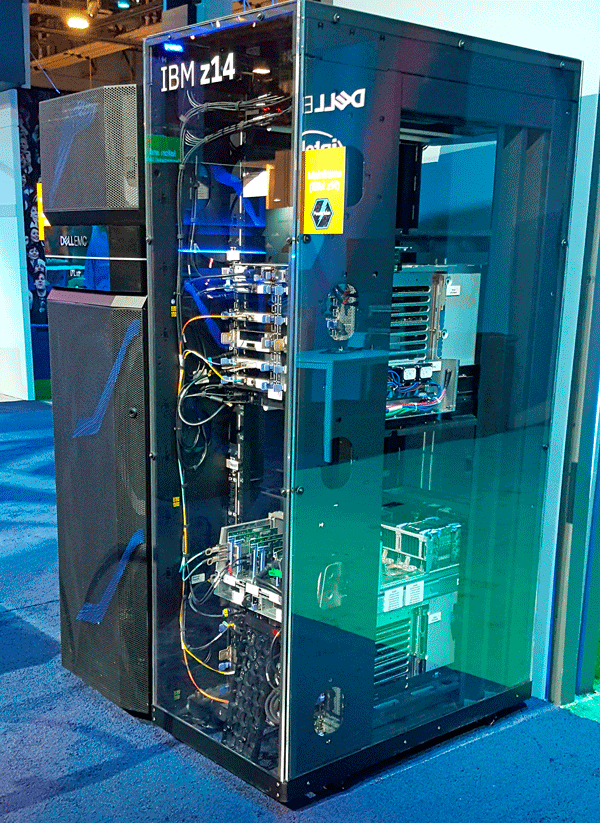
IBM Z Zed Mainframe at Dell Technology World 2018
An IBM “Zed” Mainframe (in case you have never seen one)

Based on the performance claims, the Dell PowerMax has an interesting if not potentially industry leading power, performance, availability, capacity, economic footprint per cubic foot (or meter). It will be interesting to see some third-party validation or audits of Dell claims. Likewise, I look forward to seeing some real-world applied workloads of Dell PowerMax vs. other storage systems. Here are some additional perspectives Via SearchStorage: Dell EMC all-flash PowerMax replaces VMAX, injects NVMe


Dell PowerMax Visual Studio (Image via Dell.com)

To help with customer decision making, Dell has created an interactive VMAX and PowerMax configuration studio that you can use to try out as well as learn about different options here. View more Dell PowerMax speeds, feeds, slots, watts, features and functions here (PDF).

Dell Technology World 2018 XtremIO X2

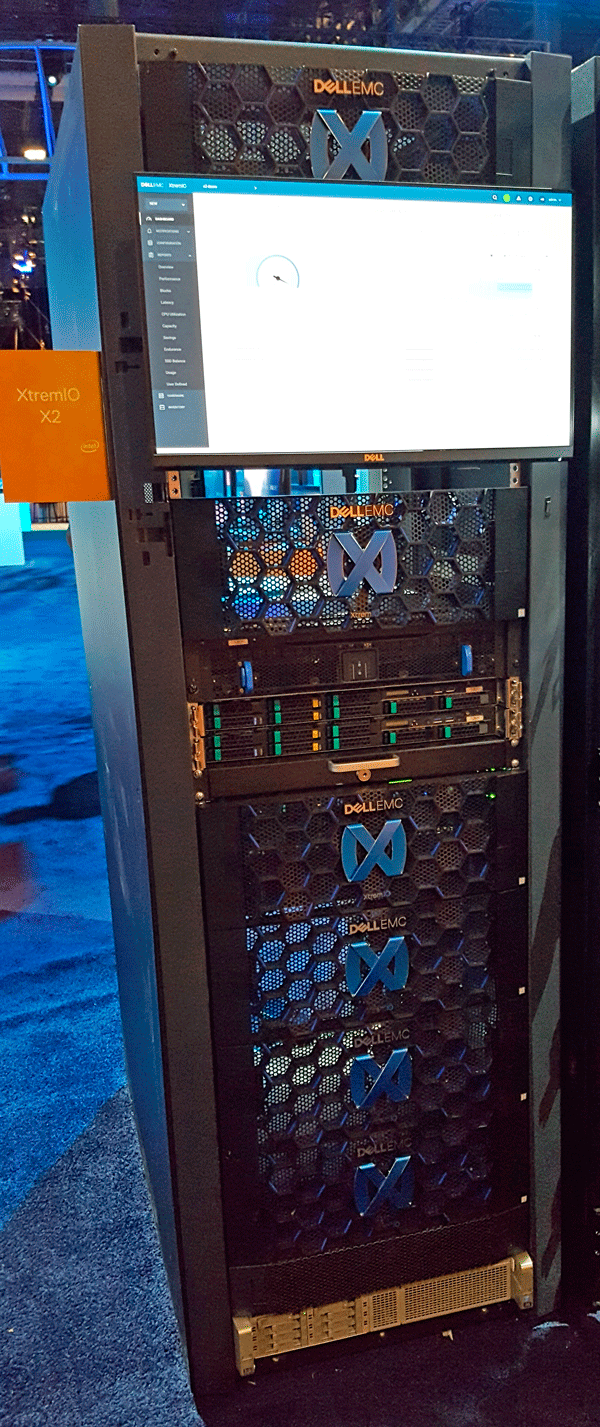
XtremIO X2

Dell XtremIO X2 and XIOS 6.1 operating system (software-defined storage) enhanced with native replication across wide area networks (WAN). The new WAN replication is metadata-aware native to the XtremIO X2 that implements data footprint reduction (DFR) technology reducing the amount of data sent over network connections. The benefit is more data moved in a given amount of time along with better data protection requiring less time (and network) by only moving unique changed data.

Dell Technology World 2018 XtremIO X2 back view
Back View of XtremIO X2

Dell EMC claims to reduce WAN network bandwidth by up to 75% utilizing the new native XtremIO X2 native asynchronous replication. Also, Dell says XtremIO X2 requires up to 38% less storage space at disaster recovery and business resiliency locations while maintaining predictable recovery point objectives (RPO) of 30 seconds. Another XtremIO X2 announcement is a new entry model for customers at up to 55% lower cost than previous product generations. View more information about Dell XtremIO X2 here, along with speeds feeds here, here, as well as here.

What about Dell Midrange Storage Unity and SC?

Here are some perspectives Via SearchStorage: Dell EMC midrange storage keeps its overlapping arrays.

Dell Bulk and Elastic Cloud Storage (ECS)

One of the questions I had going into Dell Technology World 2018 was what is the status of ECS (and its predecessors Atmos as well as Centera) bulk object storage is given lack of messaging and news around it. Specifically, my concern was that if ECS is the platform for storing and managing data to be preserved for the future, what is the current status, state as well as future of ECS.

In conversations with the Dell ECS folks, ECS which has encompassed Centera functionality and it (ECS) is very much alive, stay tuned for more updates. Also, note that Centera has been EOL. However, its feature functionality has been absorbed by ECS meaning that data preserved can now be managed by ECS. While I can not divulge the details of some meeting discussions, I can say that I am comfortable (for now) with the future directions of ECS along with the data it manages, stay tuned for updates.

Dell Data Protection

What about Data Protection? Security was mentioned in several different contexts during Dell Technology World 2018, as was a strong physical security presence seen at the Palazzo and Sands venues. Likewise, there was a data protection presence at Dell Technologies World 2018 in the expo hall, as well as with various sessions.

What was heard was mainly around data protection management tools, hybrid, as well as data protection appliances and data domain-based solutions. Perhaps we will hear more from Dell Technologies World in the future about data protection related topics.

Where to learn more

Learn more about Dell Technology World 2018 and related topics via the following links:

Additional learning experiences along with common questions (and answers), as well as tips can be found in Software Defined Data Infrastructure Essentials book.

Software Defined Data Infrastructure Essentials Book SDDC

What this all means

If there was any doubt about would Dell keep EMC storage progressing forward, the above announcements help to show some examples of what they are doing. On the other hand, lets stay tuned to see what news and updates appear in the future pertaining to mid-range storage (e.g. Unity and SC) as well as Isilon, ScaleIO, Data Protection platforms as well as software among other technologies.

Continue reading part IV (PowerEdge MX Composable and Gen-Z) here in this series, as well as part I here, part II here, part IV (PowerEdge MX Composable) here, and, part V here.

Ok, nuff said, for now.

Cheers Gs

Greg Schulz – Microsoft MVP Cloud and Data Center Management, VMware vExpert 2010-2017 (vSAN and vCloud). Author of Software Defined Data Infrastructure Essentials (CRC Press), as well as Cloud and Virtual Data Storage Networking (CRC Press), The Green and Virtual Data Center (CRC Press), Resilient Storage Networks (Elsevier) and twitter @storageio. Courteous comments are welcome for consideration. First published on https://storageioblog.com any reproduction in whole, in part, with changes to content, without source attribution under title or without permission is forbidden.

All Comments, (C) and (TM) belong to their owners/posters, Other content (C) Copyright 2006-2026 Server StorageIO and UnlimitedIO. All Rights Reserved. StorageIO is a registered Trade Mark (TM) of Server StorageIO.

Part IV Dell Technology World 2018 PowerEdge MX Gen-Z Composable Infrastructure

Part IV Dell Technology World 2018 PowerEdge MX Gen-Z Composable Infrastructure

Part IV Dell Technology World 2018 PowerEdge MX Gen-Z Composable Infrastructure
This is Part IV Dell Technology World 2018 PowerEdge MX Gen-Z Composable Infrastructure that is part of a five-post series (view part I here, part II here, part III here and part V here). Last week (April 30-May 3) I traveled to Las Vegas Nevada (LAS) to attend Dell Technology World 2018 (e.g., DTW 2018) as a guest of Dell (that is a disclosure btw).

Introducing PowerEdge MX Composable Infrastructure (the other CI)

Dell announced at Dell Technology World 2018 a preview of the new PowerEdge MX (kinetic) family of data infrastructure resource servers. PowerEdge MX is being developed to meet the needs of resource-centric data infrastructures that require scalability, as well as performance availability, capacity, economic (PACE) flexibility for diverse workloads. Read more about Dell PowerEdge MX, Gen-Z and composable infrastructures (the other CI) here.

Some of the workloads being targeted by PowerEdge MX include large-scale dense SDDC virtualization (and containers), private (or public clouds by service providers). Other workloads include AI, ML, DL, data analytics, HPC, SC, big data, in-memory database, software-defined storage (SDS), software-defined networking (SDN), network function virtualization (NFV) among others.

The new PowerEdge MX previewed will be announced later in 2018 featuring a flexible, decomposable, as well as composable architecture that enables resources to be disaggregated and reassigned or aggregated to meet particular needs (e.g., defined or composed). Instead of traditional software defined virtualization carving up servers in smaller virtual machines or containers to meet workload needs, PowerEdge MX is part of a next-generation approach to enable server resources to be leveraged at a finer granularity.

For example, today an entire server including all of its sockets, cores, memory, PCIe devices among other resources get allocated and defined for use. A server gets defined for use by an operating system when bare metal (or Metal as a Service) or a hypervisor. PowerEdge MX (and other platforms expected to enter the market) have a finer granularity where with a proper upper layer (or higher altitude) software resources can be allocated and defined to meet different needs.

What this means is the potential to allocate resources to a given server with more granularity and flexibility, as well as combine multiple server’s resources to create what appears to be a more massive server. There are vendors in the market who have been working on and enabling this type of approach for several years ranging from ScaleMP to startup Liqid and Tidal among others. However, at the heart of the Dell PowerEdge MX is the new emerging Gen-Z technology.

If you are not familiar with Gen-Z, add it to your buzzword bingo lineup and learn about it as it is coming your way. A brief overview of Gen-Z consortium and Gen-Z material and primer information here. A common question is if Gen-Z is a replacement for PCIe which for now is that they will coexist and complement each other. Another common question is if Gen-Z will replace Ethernet and InfiniBand and the answer is for now they complement each other. Another question is if Gen-Z will replace Intel Quick Path and another CPU device and memory interconnects and the answer is potentially, and in my opinion, watch to see how long Intel drags its feet.

Note that composability is another way of saying defined without saying defined, something to pay attention too as well as have some vendor fun with. Also, note that Dell is referent to PowerEdge MX and Kinetic architecture which is not the same as the Seagate Kinetic Ethernet-based object key value accessed drive initiative from a few years ago (learn more about Seagate Kinetic here). Learn more about Gen-Z and what Dell is doing here.

Where to learn more

Learn more about Dell Technology World 2018 and related topics via the following links:

Additional learning experiences along with common questions (and answers), as well as tips can be found in Software Defined Data Infrastructure Essentials book.

Software Defined Data Infrastructure Essentials Book SDDC

What this all means

Dell has provided a glimpse of what they are working on pertaining composable infrastructure, the other CI, as well as Gen-Z and related next generation of servers with PowerEdge MX as well as Kinetic. Stay tuned for more about Gen-Z and composable infrastructures. Continue reading Part V (servers converged) in this series here, as well as part I here, part II here and part III here.

Ok, nuff said, for now.

Cheers Gs

Greg Schulz – Microsoft MVP Cloud and Data Center Management, VMware vExpert 2010-2017 (vSAN and vCloud). Author of Software Defined Data Infrastructure Essentials (CRC Press), as well as Cloud and Virtual Data Storage Networking (CRC Press), The Green and Virtual Data Center (CRC Press), Resilient Storage Networks (Elsevier) and twitter @storageio. Courteous comments are welcome for consideration. First published on https://storageioblog.com any reproduction in whole, in part, with changes to content, without source attribution under title or without permission is forbidden.

All Comments, (C) and (TM) belong to their owners/posters, Other content (C) Copyright 2006-2026 Server StorageIO and UnlimitedIO. All Rights Reserved. StorageIO is a registered Trade Mark (TM) of Server StorageIO.

NVMe Wont Replace Flash By Itself They Complement Each Other

NVMe Wont Replace Flash By Itself They Complement Each Other

server storage I/O data infrastructure trends

Updated 2/2/2018

NVMe Wont Replace Flash By Itself They Complement Each Other

>various NVM flash and SSD devices
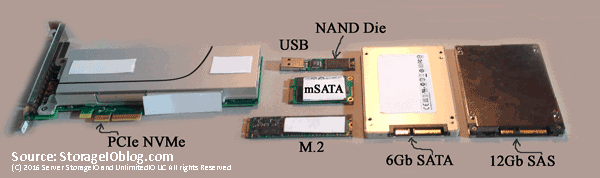
Various Solid State Devices (SSD) including NVMe, SAS, SATA, USB, M.2

There has been some recent industry marketing buzz generated by a startup to get some attention by claiming via a study sponsored by including the startup that Non-Volatile Memory (NVM) Express (NVMe) will replace flash storage. Granted, many IT customers as well as vendors are still confused by NVMe thinking it is a storage medium as opposed to an interface used for accessing fast storage devices such as nand flash among other solid state devices (SSDs). Part of that confusion can be tied to common SSD based devices rely on NVM that are persistent memory retaining data when powered off (unlike the memory in your computer).

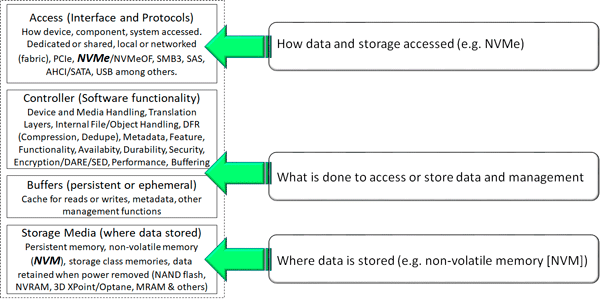
NVMe is an access interface and protocol

Instead of saying NVMe will mean the demise of flash, what should or could be said however some might be scared to say it is that other interfaces and protocols such as SAS (Serial Attached SCSI), AHCI/SATA, mSATA, Fibre Channel SCSI Protocol aka FCP aka simply Fibre Channel (FC), iSCSI and others are what can be replaced by NVMe. NVMe is simply the path or roadway along with traffic rules for getting from point a (such as a server) to point b (some storage device or medium e.g. flash SSD). The storage medium is where data is stored such as magnetic for Hard Disk Drive (HDD) or tape, nand flash, 3D XPoint, Optane among others.

NVMe and NVM better together

NVMe and NVM including flash are better together

The simple quick get to the point is that NVMe (e.g. Non Volatile Memory aka NVM Express [NVMe]) is an interface protocol (like SAS/SATA/iSCSI among others) used for communicating with various nonvolatile memory (NVM) and solid state device (SSDs). NVMe is how data gets moved between a computer or other system and the NVM persistent memory such as nand flash, 3D XPoint, Spintorque or other storage class memories (SCM).

In other words, the only thing NVMe will, should, might or could kill off would be the use of some other interface such as SAS, SATA/AHCI, Fibre Channel, iSCSI along with propritary driver or protocols. On the other hand, given the extensibility of NVMe and how it can be used in different configurations including as part of fabrics, it is an enabler for various NVMs also known as persistent memories, SCMs, SSDs including those based on NAND flash as well as emerging 3D XPoint (or Intel version) among others.

Where To Learn More

View additional NVMe, SSD, NVM, SCM, Data Infrastructure and related topics via the following links.

Additional learning experiences along with common questions (and answers), as well as tips can be found in Software Defined Data Infrastructure Essentials book.

Software Defined Data Infrastructure Essentials Book SDDC

What This All Means

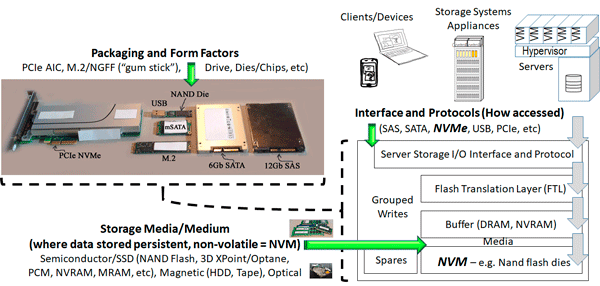
Context matters for example, NVM as the medium compared to NVMe as the interface and access protocols. With context in mind you can compare like or similar apples to apples such as nand flash, MRAM, NVRAM, 3D XPoint, Optane among other persistent memories also known as storage class memories, NVMs and SSDs. Likewise with context in mind NVMe can be compared to other interfaces and protocols such as SAS, SATA, PCIe, mSATA, Fibre Channel among others. The following puts all of this into context including various packaging options, interfaces and access protocols, functionality and media.

NVMe is the access for NVM flash
Putting IT all together

Will NVMe kill off flash? IMHO no not by itself, however NVMe combined with some other form of NVM, SCM, persistent memory as a storage medium may eventually combine as an alternative to NVMe and flash (or SAS/SATA and flash). However, for now at least for many applications, NVMe is in your future (along with flash among other storage mediums), the questions include when, where, why, how, with what among other questions (and answers). NVMe wont replace flash by itself (at least yet) as they complement each other.

Keep in mind, if NVMe is the answer, what are the questions.

Ok, nuff said, for now.

Gs

Greg Schulz – Microsoft MVP Cloud and Data Center Management, VMware vExpert 2010-2017 (vSAN and vCloud). Author of Software Defined Data Infrastructure Essentials (CRC Press), as well as Cloud and Virtual Data Storage Networking (CRC Press), The Green and Virtual Data Center (CRC Press), Resilient Storage Networks (Elsevier) and twitter @storageio. Courteous comments are welcome for consideration. First published on https://storageioblog.com any reproduction in whole, in part, with changes to content, without source attribution under title or without permission is forbidden.

All Comments, (C) and (TM) belong to their owners/posters, Other content (C) Copyright 2006-2026 Server StorageIO and UnlimitedIO. All Rights Reserved. StorageIO is a registered Trade Mark (TM) of Server StorageIO.

Cisco Next Gen 32Gb Fibre Channel NVMe SAN Updates

server storage I/O trends

Cisco Next Gen 32Gb Fibre Channel and NVMe SAN Updates

Cisco announced today next generation MDS storage area networking (SAN) Fibre Channel (FC) switches with 32Gb, along with NVMe over FC support.

Cisco Fibre Channel (FC) Directors (Left) and Switches (Right)

Highlights of the Cisco announcement include:

  • MDS 9700 48 port 32Gbps FC switching module
  • High density 768 port 32Gbps FC directors
  • NVMe over FC for attaching fast flash SSD devices (current MDS 9700, 9396S, 9250i and 9148S)
  • Integrated analytics engine for management insight awareness
  • Multiple concurrent protocols including NVMe, SCSI (e.g. SCSI_FCP aka FCP) and FCoE

Where to Learn More

The following are additional resources to learn more.

What this all means, wrap up and summary

Fibre Channel remains relevant for many environments and it makes sense that Cisco known for Ethernet along with IP networking enhance their offerings. By having 32Gb Fibre Channel, along with adding NVMe over Fabric provides existing (and new) Cisco customers to support their legacy (e.g. FC) and emerging (NVMe) workloads as well as devices. For those environments that still need some mix of Fibre Channel, as well as NVMe over fabric this is a good announcement. Keep an eye and ear open for which storage vendors jump on the NVMe over Fabric bandwagon now that Cisco as well as Brocade have made switch support announcements.

Ok, nuff said (for now…).

Cheers
Gs

Greg Schulz – Microsoft MVP Cloud and Data Center Management, VMware vExpert (and vSAN). Author Cloud and Virtual Data Storage Networking (CRC Press), The Green and Virtual Data Center (CRC Press), Resilient Storage Networks (Elsevier) and twitter @storageio. Watch for the spring 2017 release of his new book “Software-Defined Data Infrastructure Essentials” (CRC Press).

Courteous comments are welcome for consideration. First published on https://storageioblog.com any reproduction in whole, in part, with changes to content, without source attribution under title or without permission is forbidden.

All Comments, (C) and (TM) belong to their owners/posters, Other content (C) Copyright 2006-2023 Server StorageIO(R) and UnlimitedIO. All Rights Reserved.

Server StorageIO August 2016 Update Newsletter

Volume 16, Issue VIII

Hello and welcome to this August 2016 Server StorageIO update newsletter.

In This Issue

  • Commentary in the news
  • Tips and Articles
  • StorageIOblog posts
  • Events and Webinars
  • Industry Activity Trends
  • Resources and Links
  • Enjoy this shortened summer edition of the Server StorageIO update newsletter.

    Cheers GS

    Industry Activity Trends

    With VMworld coming up this week, rest assured, there will be plenty to talk about and discuss in the following weeks. However for now, here are a few things from this past month.

    At Flash Memory Summit (FMS) which is more of a component, vendor to vendor industry type event, there was buzz about analytics, however what was shown as analytics tended to be Iometer. Hmmm, more on that in a future post. However something else at FMS besides variations of Non-Volatile Memory (NVM) including SSD, NAND, Flash, Storage Class Memory (SCM) such as 3D XPoint (among its new marketing names) along with NVM Expres (NVMe) was NVMe over Fabric.

    This includes NVMe over RoCE (RDMA over Converged Ethernet) which can be implemented on some 10 Gb (and faster) Ethernet adapters as well as some InfiniBand adapters from Mellanox among others. Another variation is Fibre Channel NVMe (FC-NVMe) where the NVMe protocol command set is transported as a Upper Level Protocol (ULP) over FC. This is similar to how the SCSI command set is implemented on FC (e.g. SCSI_FCP or FCP) which means NVMe can be seen as a competing protocol to FCP (which it will or could be). Naturally not to be left out, some of the marketers have already started with Persistent Memory over Fabric among other variations of Non- Ephemeral Memory over Fabrics. More on NVM, NVMe and fabrics in future posts, commentary and newsletter.

    Some other buzzword topics regaining mention (or perhaps for the first time for some) includes
    FedRAMP, Authority To Operate (ATO) clouds for Government entities, and FISMA among others. Many service providers, cloud and hosting providers from large AWS and Azure to smaller Blackmesh have added FedRAMP and other options in addition to traditional, DevOps.

    Some of you may recall me mentioning ScaleMP in the past which is a technology for aggregating multiple compute servers including processors and memory into a converged resource pool. Think the opposite of a hypervisor that divides up resources to support consolidation. In other words, where you need to scale up without complexity of clustering or to avoid having to change and partition your software applications. In addition to ScaleMP, a newer hardware agnostic startup to check out is Tidal Scale.

    On the merger and acquisition front, the Dell / EMC deal is moving forward expected to close soon, perhaps by time or before you read this. In other news, HPE announced that it is buying SGI to gain access to a larger part of the traditional legacy big data Super Compute and High Performance Compute (HPC) market. One of the SGI diamonds in the rough that if you are not aware, is DMF for data management. HPE and Dropbox also announced a partnership deal earlier this summer.

    That’s all for now, time to pack my bags and off to Las Vegas for VMworld 2016.

    Ok, nuff said, for now…


    StorageIOblog Posts

    Recent and popular Server StorageIOblog posts include:

    View other recent as well as past StorageIOblog posts here


    StorageIO Commentary in the news

    Recent Server StorageIO industry trends perspectives commentary in the news.

    Via FutureReadyOEM Q&A: when to implement ultra-dense storage
    Via EnterpriseStorageForum Comments on Top 10 Enterprise SSD Market Trends
    Via SearchStorage Comments on NAS system buying decisions
    Via EnterpriseStorageForum Comments on Cloud Storage Pros and Cons
    EnterpriseStorageForum Comments on Top 10 Enterprise SSD Market Trends

    View more Server, Storage and I/O hardware as well as software trends comments here


    StorageIO Tips and Articles

    Recent and past Server StorageIO articles appearing in different venues include:

    Via Iron Mountain Preventing Unexpected Disasters: IT and Data Infrastructure
    Via FutureReadyOEM Q&A: When to implement ultra-dense storage servers
    Via Micron Blog Whats next for NVMe and your Data Center – Preparing for Tomorrow
    Redmond Magazine: Trends – Evolving from Data Protection to Data Resiliency
    IronMountain: 5 Noteworthy Data Privacy Trends From 2015
    InfoStor: Data Protection Gaps, Some Good, Some Not So Good
    Virtual Blocks (VMware Blogs): EVO:RAIL ? When And Where To Use It?

    Check out these resources techniques, trends as well as tools. View more tips and articles here

    StorageIO Webinars and Industry Events

    December 7: BrightTalk Webinar – Hyper-Converged Infrastructure (HCI) Webinar 11AM PT

    November 23: BrightTalk Webinar – BCDR and Cloud Backup – Software Defined Data Infrastructures (SDDI) and Data Protection – 10AM PT

    November 23: BrightTalk Webinar – Cloud Storage – Hybrid and Software Defined Data Infrastructures (SDDI) – 9AM PT

    November 22: BrightTalk Webinar – Cloud Infrastructure – Hybrid and Software Defined Data Infrastructures (SDDI) – 10AM PT

    October 20: BrightTalk Webinar – Next-Gen Data Centers – Software Defined Data Infrastructures (SDDI) including Servers, Storage and Virtualizations – 9AM PT

    September 29: TBA Webinar – 10AM PT

    September 27-28 – NetApp – Las Vegas

    September 20: BrightTalk Webinar – Software Defined Data Infrastructures (SDDI) Enabling Software Defined Data Centers – Part of Software-Defined Storage summit – 8AM PT

    September 13: Redmond Webinar – Windows Server 2016 and Active Directory What’s New and How to Plan for Migration – 11AM PT

    September 8: Redmond Webinar – Data Protection for Modern Microsoft Environments – 11AM PT

    August 29-31: VMworld Las Vegas

    August 25 – MSP CMG – The Answer is Software Defined – What was the question?

    August 16: BrightTalk Webinar Software Defined Data Centers (SDDC) are in your future (if not already) – Part of Enterprise Software and Infrastructure summit 8AM PT

    August 10-11 Flash Memory Summit (Panel discussion August 11th) – NVMe over Fabric

    See more webinars and other activities on the Server StorageIO Events page here.


    Server StorageIO Industry Resources and Links

    Check out these useful links and pages:

    storageio.com/links – Various industry links (over 1,000 with more to be added soon)
    objectstoragecenter.com – Cloud and object storage topics, tips and news items
    storageioblog.com/data-protection-diaries-main/ – Various data protection items and topics
    thenvmeplace.com – Focus on NVMe trends and technologies
    thessdplace.com – NVM and Solid State Disk topics, tips and techniques
    storageio.com/performance.com – Various server, storage and I/O performance and benchmarking

    Ok, nuff said

    Cheers
    Gs

    Greg Schulz – Author Cloud and Virtual Data Storage Networking (CRC Press), The Green and Virtual Data Center (CRC Press) and Resilient Storage Networks (Elsevier)
    twitter @storageio

    All Comments, (C) and (TM) belong to their owners/posters, Other content (C) Copyright 2006-2026 Server StorageIO and UnlimitedIO LLC All Rights Reserved

    NVMe Place NVM Non Volatile Memory Express Resources

    NVMe place server Storage I/O data infrastructure trends

    Welcome to NVMe place NVM Non Volatile Memory Express Resources. NVMe place is about Non Volatile Memory (NVM) Express (NVMe) with Industry Trends Perspectives, Tips, Tools, Techniques, Technologies, News and other information.

    Disclaimer

    Please note that this NVMe place resources site is independent of the industry trade and promoters group NVM Express, Inc. (e.g. www.nvmexpress.org). NVM Express, Inc. is the sole owner of the NVM Express specifications and trademarks.

    NVM Express Organization
    Image used with permission of NVM Express, Inc.

    Visit the NVM Express industry promoters site here to learn more about their members, news, events, product information, software driver downloads, and other useful NVMe resources content.


    The NVMe Place resources and NVM including SCM, PMEM, Flash

    NVMe place includes Non Volatile Memory (NVM) including nand flash, storage class memories (SCM), persistent memories (PM) are storage memory mediums while NVM Express (NVMe) is an interface for accessing NVM. This NVMe resources page is a companion to The SSD Place which has a broader Non Volatile Memory (NVM) focus including flash among other SSD topics. NVMe is a new server storage I/O access method and protocol for fast access to NVM based storage and memory technologies. NVMe is an alternative to existing block based server storage I/O access protocols such as AHCI/SATA and SCSI/SAS devices commonly used for access Hard Disk Drives (HDD) along with SSD among other things.

    Server Storage I/O NVMe PCIe SAS SATA AHCI
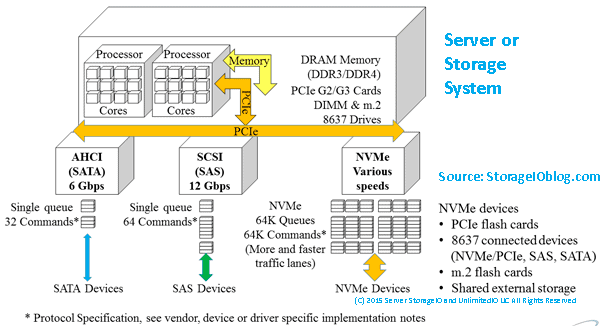
    Comparing AHCI/SATA, SCSI/SAS and NVMe all of which can coexist to address different needs.

    Leveraging the standard PCIe hardware interface, NVMe based devices (that have an NVMe controller) can be accessed via various operating systems (and hypervisors such as VMware ESXi) with both in the box drivers or optional third-party device drivers. Devices that support NVMe can be 2.5″ drive format packaged that use a converged 8637/8639 connector (e.g. PCIe x4) coexisting with SAS and SATA devices as well as being add-in card (AIC) PCIe cards supporting x4, x8 and other implementations. Initially, NVMe is being positioned as a back-end to servers (or storage systems) interface for accessing fast flash and other NVM based devices.

    NVMe as back-end storage
    NVMe as a “back-end” I/O interface for NVM storage media

    NVMe as front-end server storage I/O interface
    NVMe as a “front-end” interface for servers or storage systems/appliances

    NVMe has also been shown to work over low latency, high-speed RDMA based network interfaces using NVMeoF including RoCE (RDMA over Converged Ethernet) and InfiniBand (read more here, here and here involving Mangstor, Mellanox and PMC among others). What this means is that like SCSI based SAS which can be both a back-end drive (HDD, SSD, etc) access protocol and interface, NVMe can also being used for back-end can also be used as a front-end of server to storage interface like how Fibre Channel SCSI_Protocol (aka FCP), SCSI based iSCSI, SCSI RDMA Protocol via InfiniBand (among others) are used.

    NVMe features

    Main features of NVMe include among others:

    • Lower latency due to improve drivers and increased queues (and queue sizes)
    • Lower CPU used to handle larger number of I/Os (more CPU available for useful work)
    • Higher I/O activity rates (IOPs) to boost productivity unlock value of fast flash and NVM
    • Bandwidth improvements leveraging various fast PCIe interface and available lanes
    • Dual-pathing of devices like what is available with dual-path SAS devices
    • Unlock the value of more cores per processor socket and software threads (productivity)
    • Various packaging options, deployment scenarios and configuration options
    • Appears as a standard storage device on most operating systems
    • Plug-play with in-box drivers on many popular operating systems and hypervisors

    Shared external PCIe using NVMe
    NVMe and shared PCIe (e.g. shared PCIe flash DAS)

    NVMe related content and links

    The following are some of my tips, articles, blog posts, presentations and other content, along with material from others pertaining to NVMe. Keep in mind that the question should not be if NVMe is in your future, rather when, where, with what, from whom and how much of it will be used as well as how it will be used.

    NVMe Linux Driver and related info
    Its Time for NVMeoF to let iSCSI begin its slow retirement journey (blog post)
    Microsoft Windows Server Insider Build NVMeoF Initiator
    Installing new Insider’s build Windows Server vnext NVMeoF, host initiator (blog post)
    Announcing Native NVMe in Windows Server 2025
    Introducing NVMe-oF Initiator Preview in Windows Server Insiders Builds
    ToE NVMeoF TCP Performance Line Boost Performance Reduce Costs
    Use Intel Optane NVMe U.2 SFF 8639 SSD drive in PCIe slot
    NVMe overview and primer – Part I
    Part II – NVMe overview and primer (Different Configurations)
    Part III – NVMe overview and primer (Need for Performance Speed)
    Part IV – NVMe overview and primer (Where and How to use NVMe)
    Part V – NVMe overview and primer (Where to learn more, what this all means)

    PCIe Server I/O Fundamentals
    If NVMe is the answer, what are the questions?
    NVMe Wont Replace Flash By Itself
    Via Computerweekly – NVMe discussion: PCIe card vs U.2 and M.2
    Server storage I/O benchmark tools, workload scripts and examples (Part I) and (Part II)

    Via GizModo: Comments on Intel Optane 800P NVMe M.2 SSD
    Via InfoStor: 8 Big Enterprise SSD Trends to Expect in 2017
    Why NVMe Should Be in Your Data Center – Preparing for Tomorrow’s Data Center Today (StorageIO Guest Post Via Micron.com)
    Via SearchStoragae: Comments on Top 10 Tips on Solid State Storage Adoption Strategy
    Via J Metz’s Blog – Vendor neutral bibliography of material by subject matter for NVMe

    Via InfoStor – SSD Trends, Tips and Topics
    StorageIOblog: Get in the NVMe SSD game (if you are not already)
    Via VMware VirtualBlocks Blog – Base NVM Express – Part One
    Dell EMC PowerEdge MX 7000 Kinetic Based Data Infrastructure Architecture
    Via J Metz’s Blog – Vendor neutral learning NVMe A Program of Study
    Via StorageIOblog: VMware vSAN v6.6
    Via StorageIOblog: Cisco announces 32Gb FC and NVMe fabrics

    Data Infrastructure Primer and Overview (Its Whats Inside The Data Center)
    SSD, flash, Non-volatile memory (NVM), NVMe, storage Trends, Tips & Topics
    Cloud and Object storage are in your future, what are some questions?”>Cloud and Object Storage Questions
    Data Infrastructure Server Storage I/O related tradecraft overview
    Data Infrastructure Server Storage I/O Tradecraft Trends

    Via NextPlatform – Assessing tradeoffs NVMe storage Scale
    Via NextPlatform – PCIe flash revamped to compete with NVMe drives
    Via NextPlatform – Flash disruption comes to server main memory
    Via NextPlatform – Hybrid arrays fight back against all flash
    Via NextPlatform – Making remote NVMe flash look local fast

    Via NextPlatform – Hyperscaling Consumer Flash NVMe
    Via NextPlatform – Purified Implementation NVMe storage
    Via NextPlatform – Impatient fabrics Micron forges NVMe arrays
    Via NextPlatform – The truth about flash memory in the datacenter

    Via Pure Storage: Announces new NVMe storage
    Via Micron Blog (Guest Post by Greg Schulz): What’s next for NVMe and your Data Center – Preparing for Tomorrow Today
    Via ChannelProSMB: Comments on NVMe (and SSD) and server storage I/O
    EnterpriseStorageForum: Comments Top 10 Enterprise SSD Market Trends
    SearchSolidStateStorage: Comments on How to add solid-state storage to your enterprise data storage systems

    Microsoft TechNet: Understand the cache in Storage Spaces Direct
    Microsoft Technet: Don’t do it: consumer-grade solid-state drives (SSD) in Storage Spaces Direct
    Why Micron NVMe SSDs (Via Micron.com)
    New Path to Storage I/O Performance and Resiliency With NVMe (Via Micron.com)
    How NVMe Will Revolutionize Server and Storage I/O(Via Micron.com)

    How to Prepare for the NVMe Server Storage I/O Wave (Via Micron.com)
    Why NVMe Should Be in Your Data Center (Via Micron.com)
    NVMe U2 (8639) vs. M2 interfaces (Via Gamersnexus)
    Enmotus FuzeDrive MicroTiering (StorageIO Lab Report)
    EMC DSSD D5 Rack Scale Direct Attached Shared SSD All Flash Array Part I (Via StorageIOBlog)

    Part II – EMC DSSD D5 Direct Attached Shared AFA (Via StorageIOBlog)
    NAND, DRAM, SAS/SCSI & SATA/AHCI: Not Dead, Yet! (Via EnterpriseStorageForum)
    Non Volatile Memory (NVM), NVMe, Flash Memory Summit and SSD updates (Via StorageIOblog)
    Microsoft and Intel showcase Storage Spaces Direct with NVM Express at IDF ’15 (Via TechNet)
    MNVM Express solutions (Via SuperMicro)

    Gaining Server Storage I/O Insight into Microsoft Windows Server 2016 (Via StorageIOblog)
    PMC-Sierra Scales Storage with PCIe, NVMe (Via EEtimes)
    RoCE updates among other items (Via InfiniBand Trade Association (IBTA) December Newsletter)
    NVMe: The Golden Ticket for Faster Flash Storage? (Via EnterpriseStorageForum)
    What should I consider when using SSD cloud? (Via SearchCloudStorage)

    MSP CMG, Sept. 2014 Presentation (Flash back to reality – Myths and Realities – Flash and SSD Industry trends perspectives plus benchmarking tips)– PDF
    Selecting Storage: Start With Requirements (Via NetworkComputing)
    PMC Announces Flashtec NVMe SSD NVMe2106, NVMe2032 Controllers With LDPC (Via TomsITpro)
    Exclusive: If Intel and Micron’s “Xpoint” is 3D Phase Change Memory, Boy Did They Patent It (Via Dailytech)
    Intel & Micron 3D XPoint memory — is it just CBRAM hyped up? Curation of various posts (Via Computerworld)

    How many IOPS can a HDD, HHDD or SSD do (Part I)?
    How many IOPS can a HDD, HHDD or SSD do with VMware? (Part II)
    I/O Performance Issues and Impacts on Time-Sensitive Applications (Via CMG)
    Via EnterpriseStorageForum: 5 Hot Storage Technologies to Watch
    Via EnterpriseStorageForum: 10-Year Review of Data Storage

    Via EnterpriseStorageForum: Where All-Flash Storage Makes No Sense
    Via EnterpriseStorageForum: Top Tips for Enterprise SSD Form Factor Selection and Deployment
    Who Will Be Top Of Storage World?
    Intel announces new processors
    Server Storage I/O CI, HCI overview
    Data Infrastructure Tradecraft Overview
    SSD, flash and NVM Trends
    If NVMe is the answer, what are the questions?

    Non-Volatile Memory (NVM) Express (NVMe) continues to evolve as a technology for enabling and improving server storage I/O for NVM including nand flash SSD storage. NVMe streamline performance enabling more work to be done (e.g. IOPs), data to be moved (bandwidth) at a lower response time using less CPU.

    NVMe and SATA flash SSD performance

    The above figure is a quick look comparing nand flash SSD being accessed via SATA III (6Gbps) on the left and NVMe (x4) on the right. As with any server storage I/O performance comparisons there are many variables and take them with a grain of salt. While IOPs and bandwidth are often discussed, keep in mind that with the new protocol, drivers and device controllers with NVMe that streamline I/O less CPU is needed.

    Additional NVMe Resources

    Also check out the Server StorageIO companion micro sites landing pages including thessdplace.com (SSD focus), data protection diaries (backup, BC/DR/HA and related topics), cloud and object storage, and server storage I/O performance and benchmarking here.

    If you are in to the real bits and bytes details such as at device driver level content check out the Linux NVMe reflector forum. The linux-nvme forum is a good source if you are developer to stay up on what is happening in and around device driver and associated topics.

    Additional learning experiences along with common questions (and answers), as well as tips can be found in Software Defined Data Infrastructure Essentials book.

    Software Defined Data Infrastructure Essentials Book SDDC

    Disclaimer

    Disclaimer: Please note that this site is independent of the industry trade and promoters group NVM Express, Inc. (e.g. www.nvmexpress.org). NVM Express, Inc. is the sole owner of the NVM Express specifications and trademarks. Check out the NVM Express industry promoters site here to learn more about their members, news, events, product information, software driver downloads, and other useful NVMe resources content.

    NVM Express Organization
    Image used with permission of NVM Express, Inc.

    Wrap Up

    Watch for updates with more content, links and NVMe resources to be added here soon.

    Ok, nuff said (for now)

    Cheers
    Gs

    Greg Schulz – Microsoft MVP Cloud and Data Center Management, VMware vExpert 2010-2017 (vSAN and vCloud). Author of Software Defined Data Infrastructure Essentials (CRC Press), as well as Cloud and Virtual Data Storage Networking (CRC Press), The Green and Virtual Data Center (CRC Press), Resilient Storage Networks (Elsevier) and twitter @storageio. Courteous comments are welcome for consideration. First published on https://storageioblog.com any reproduction in whole, in part, with changes to content, without source attribution under title or without permission is forbidden.

    All Comments, (C) and (TM) belong to their owners/posters, Other content (C) Copyright 2006-2026 Server StorageIO and UnlimitedIO. All Rights Reserved. StorageIO is a registered Trade Mark (TM) of Server StorageIO.