Industry Trends Perspectives: Cisco Cloud and VMware VSAN
| ||||||||||||||||||||||||||||||||||||||||||||||||||||||||||||||||||||||||

Server StorageIO Data Infrastructure Insights and Analysis
| ||||||||||||||||||||||||||||||||||||||||||||||||||||||||||||||||||||||||

Speaking of Old School, New School, Current and Future School, here are some upcoming events including live in-person as well as virtual or online StorageIO activities. The following calendar also includes a series of one-day workshop sessions that are part of a week of seminars to be held in Nijkerk Netherlands being Organized by Brouwer Storage Consultancy (learn more here).
The current calendar which continues to be updated includes a mix of webinars (playback are available), and live events covering data infrastructure topics from cloud, virtual, physical and software defined across servers, storage I/O networking, SSD, performance, object storage and data protection among other related themes.
| June 19, 2014 | Server and StorageIO BrightTalk Channel | Evolving from Disaster Recovery and Business Continuity (BC) to Business Resiliency (BR) | Webinar 9AM PT |
| June 12, 2014 | Server and StorageIO BrightTalk Channel | The Many Facets of Virtual Storage and Software Defined Storage Virtualization | 9AM PTWebinar |
| June 11, 2014 | Server and StorageIO BrightTalk Channel | The Changing Face and Landscape of Enterprise Storage | 9AM PTWebinar |
| May 16, 2014 |  | What you need to know about virtualization (Demystifying Virtualization) | Nijkerk Holland Netherlands |
| May 15, 2014 | | Data Infrastructure Industry Trends: What’s New and Trending | Nijkerk Holland Netherlands |
| May 14, 2014 | | To be announced | Nijkerk Holland Netherlands |
| May 13, 2014 | | Data Movement and Migration: Storage Decision Making Considerations | Nijkerk Holland Netherlands |
| May 12, 2014 | | Rethinking Business Resiliency: From Disaster Recovery to Business Continuance | Nijkerk Holland Netherlands |
| May 5-7, 2014 | EMC World | Las Vegas | |
| April 22-23, 2014 | SNIA DSI Event | TBA | Santa Clara CA |
| April 16, 2014 | Server and StorageIO BrightTalk Channel | Open Source and Cloud Storage – Enabling business, or a technology enabler? | 9AM PT Webinar |
| April 9, 2014 | Server and StorageIO BrightTalk Channel | Storage Decision Making for Fast, Big and Very Big Data Environments | 9AM PT Webinar |
| April 8, 2014 | NAB | National Association Broadcasters (e.g. Very Big Fast data Event) | Las Vegas NV |
| March 27, 2014 | | Keynote: The 2017 Datacenter – PREPARING FOR THE 2017 DATACENTER SESSIONS | Edina MN 8:00AM CT Register Here |
| March 19, 2014 | Server and StorageIO BrightTalk Channel | Business Resiliency (BR), Business Continuity (BC) and Disaster Recovery (DR) Management | 9AM PT Webinar |
| March 19, 2014 | Server and StorageIO BrightTalk Channel | Data Center Monitoring – Metrics that Matter for Effective Management | 7AM PT Webinar |
| March 12, 2014 | Server and StorageIO BrightTalk Channel | Hybrid Clouds – Bridging the Gap between public and private environments | 11AM PT Webinar |
View other recent and past activities along with new additions at the StorageIO.com/events page. Also check out recent commentary in the news here as well as tips and articles here.
Ok, nuff said (for now)
Cheers Gs
Greg Schulz – Author Cloud and Virtual Data Storage Networking (CRC Press), The Green and Virtual Data Center (CRC Press) and Resilient Storage Networks (Elsevier)
twitter @storageio
All Comments, (C) and (TM) belong to their owners/posters, Other content (C) Copyright 2006-2026 Server StorageIO and UnlimitedIO LLC All Rights Reserved
In case you missed it, the 12th annual USENIX conference on File and Storage Technologies (FAST) was recently held in Santa Clara, CA.
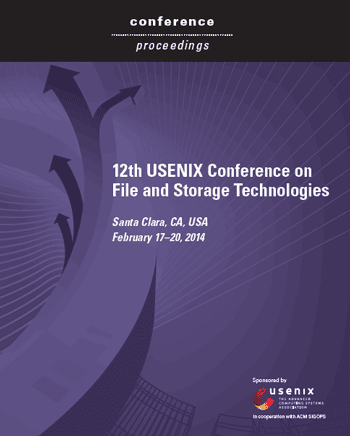
If like me you are interested in FAST related technologies, trends, tools and related research, check out the conference PDF proceedings here.
You can also go here to the USENIX FAST site to view additional information about the sessions along with other download material.
The PDF format proceedings contain over 320 pages of content including some good white papers and information covering RAID and Erasure code, Big Data and Little Data, Cloud and Virtualization, Flash, DRAM, SSD, Filesystem performance, metrics, measurement and related software along with plenty of file system related material.
Heads up though, these are not your usual vendor high-level marketing white papers rather what you would expect from a technical conference such as FAST as you can see in the above index with abstracts.
So add the 2014 USENIX FAST Proceedings to your reading list.
Ok, nuff said
Cheers gs
Greg Schulz – Author Cloud and Virtual Data Storage Networking (CRC Press), The Green and Virtual Data Center (CRC Press) and Resilient Storage Networks (Elsevier)
twitter @storageio
All Comments, (C) and (TM) belong to their owners/posters, Other content (C) Copyright 2006-2026 Server StorageIO and UnlimitedIO LLC All Rights Reserved
It’s that time of the year again for award season including with the recently wrapped up 2014 Winter Olympic (and benchmarking games), the academy awards and many others. That also means it is time again for the annual top VMware, Virtualization, Storage and related blogs voting now taking place until March 17th over at Eric Siebert (aka @ericsiebert) vsphere-land.com site that then appears on his vLaunchPad site. There is plenty of new school, as well as some old school and a few current or future school theme blogs represented with some being more VMware specific while others are cloud, virtual, server, storage, networking, development or other related themes.
Click on the above image to cast your vote
My StorageIOblog.com has been on the vLaunchPad site for a few years now as well as having syndicated content that also appears via some of the other venues listed there.

Thus as this is a peoples choice process, I’m asking if you can take a few moments and cast your vote here (thank you in advance) which I hope includes StorageIOblog.com as part of the top ten, in addition to being nominated in the Storage, Podcast and Independent blogger categories.

In addition to mine, you will also find many of my fellow VMware vExperts among others at the vLaunchpad site so check them out as well.
Ok, nuff said (other than thanks for reading)
Cheers gs
Greg Schulz – Author Cloud and Virtual Data Storage Networking (CRC Press), The Green and Virtual Data Center (CRC Press) and Resilient Storage Networks (Elsevier)
twitter @storageio
All Comments, (C) and (TM) belong to their owners/posters, Other content (C) Copyright 2006-2026 Server StorageIO and UnlimitedIO LLC All Rights Reserved
Are you old school or new school?
If you are new school or old school, then will you be stuck on those school’s of thought or advanced to the current and future schools?
From the old school folks you will hear things along the lines of that is how we do or did it. Also you might hear things along the lines of lets use what we have as long as we can make it work to fix problems while learning from mistakes. Also from old school you may here things like new school is only focused on the newest latest greatest shiny technology. Not to mention themes such as we have to stick around and clean up and take care of the mess left when new schoolers move to their next focus.
On the other hand from new school you may hear snarky comments about old school either in kidding and jest, as a way to put down to promote self up in status. Some other new school perspectives are focus on the newest technology that can be used wherever with focus on the tool, product or service as opposed to sometimes lack of focus on the problem to address. Another theme can be don’t worry about the future, we will either throw away what we have and get something new, or leave it up to somebody else to take care, after all, the old schoolers are good at doing that.
Then there are the current and future schoolers that are hybrid, combing the best of old-school leveraging their experiences with openness to explore new things of the new schoolers. The current or future schoolers are a blend of risk-averse yet willing to explore and find new ways to fix problems vs. simply moving, masking or leaving issues behind. The new or current schoolers are keen on learning lessons and mistakes of the past to avoid making them in the future.
Likewise they are also dialed into using both new and old tools, technologies and techniques in new ways vs. simply using new things in old ways. Another characteristics of the new or future schoolers is that they are open and willing to create converged teams to leverage converged technologies. Not only are they dialed into the new technology, trends and techniques, they are also dialed into how to use them for different things, situations and apply to business or other needs as opposed to just a focus on the tech.
This means that they are willing and interested in learning other skills, crafts capabilities vs. creating old or new silos or fiefdoms of technology. These new schoolers could care less who is a cloud, virtual, server, storage, networking, database, applications, backup, security, hardware or software person as they are focused on all of those as data infrastructure professionals.

Some of you might be old school while others are may be new school or what ever is current trendy and cool. However new schoolers to become future or current schoolers can learn from the old schoolers. Likewise the old schoolers can learn a new thing or two as well as help transfer some knowledge experience to the new schoolers to become future schoolers. Granted old schoolers can settle in to their comfort zone while new schoolers can stay out front of the curve and both watch the rise of the new and future schoolers.
Are you old school, new school, current or no school, cast your vote and see results below:
Some more reading:
Who or what is your sphere of influence?
How many degrees separate you and your information?
Technology buying, do you decide on G2 or GQ?
What does gaining industry traction or adoption mean too you?
Industry adoption vs. industry deployment, is there a difference?
Pulling Together a Converged Team
People, Not Tech, Prevent IT Convergence
Ok, nuff said (for now)
Cheers Gs
Greg Schulz – Author Cloud and Virtual Data Storage Networking (CRC Press), The Green and Virtual Data Center (CRC Press) and Resilient Storage Networks (Elsevier)
twitter @storageio
All Comments, (C) and (TM) belong to their owners/posters, Other content (C) Copyright 2006-2026 Server StorageIO and UnlimitedIO LLC All Rights Reserved
| ||||||||||||||||||||||||||||||||||||||||||||||||||||||||||
Ok, nuff said
Cheers
Gs
Greg Schulz – Author Cloud and Virtual Data Storage Networking (CRC Press), The Green and Virtual Data Center (CRC Press) and Resilient Storage Networks (Elsevier)
twitter @storageio
All Comments, (C) and (TM) belong to their owners/posters, Other content (C) Copyright 2006-2026 Server StorageIO and UnlimitedIO LLC All Rights Reserved
Updated 1/10/2018
This is a series of posts about data protection which includes security (logical and physical), backup/restore, business continuance (BC), disaster recovery (DR), business resiliency (BR) along with high availability (HA), archiving and related topic themes, technologies and trends.
Think of data protection like protect, preserve and serve information across cloud, virtual and physical environments spanning traditional servers, storage I/O networking along with mobile (ok, some IoT as well), SOHO/SMB to enterprise.
Recently I have done a series of webinars and Google+ hangouts as part of the BackupU initiative brought to you by Dell Software (that’s a disclosure btw ;) ) that are vendor and technology neutral. Instead of the usual vendor product or technology focused seminars and events, these are about getting back to the roots, the fundamentals of what to protect when and why, then decide your options as well as different approaches (e.g. what tools to use when).
In addition over the past year (ok, years) I have also been doing other data protection related events, seminars, workshops, articles, tips, posts across cloud, virtual and physical from SOHO/SMB to enterprise. These are in addition to the other data infrastructure server and storage I/O stuff (e.g. SSD, object storage, software defined, big data, little data, buzzword bingo and others).
Keep in mind that in the data center or information factory everything is not the same as there are different applications, threat risk scenarios, availability and durability among other considerations. In this series like the cloud conversations among others, I’m going to be pulling various data protection themes together hopefully to make it easier for others to find, as well as where I know where to get them.
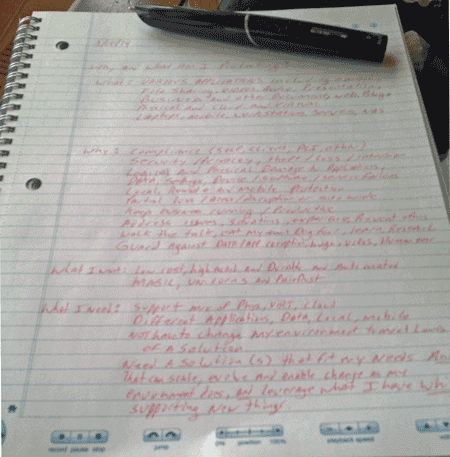
Some notes for an upcoming post in this series using my Livescribe about data protection
Here are some more posts to checkout pertaining to data protection trends, technologies and perspectives:
Ok, nuff said (for now)
Cheers
Gs
Greg Schulz – Author Cloud and Virtual Data Storage Networking (CRC Press), The Green and Virtual Data Center (CRC Press) and Resilient Storage Networks (Elsevier)
twitter @storageio
All Comments, (C) and (TM) belong to their owners/posters, Other content (C) Copyright 2006-2026 Server StorageIO and UnlimitedIO LLC All Rights Reserved
Recently Hailey Lynne McKeefry (@HaileyMcK), Editor in Chief over at Data Center Acceleration (@DataAccelerate) reached out for a conversation about well, data center themes and topics. Given Hailey’s background in covering technology as well as business supply chain we somehow ended up talking about business, IT and data center sustainability. Hailey wrote a piece about Driving for Datacenter Sustainability and in addition I was honored to be an invited guest for a live on-line chat yesterday (you can view the conversation here).
Excerpt from Haileys piece: Too often, sustainability efforts in the datacenter are written off as feel-good, public relations efforts. In reality, green is about economics — and done well, it can save the datacenter tons of cash. "You mention green, and datacenter managers run or cringe and roll their eyes, because there’s been so much green washing done in the past few years," said Greg Schulz, founder of IT consultancy StorageIO. "It’s really about green economics, though, and getting more work done with the same budget." Read more of Hailey’s piece here |
Granted, when you here the term sustainability, IT and data centers you may think of different things depending on your view or area of focus.
For some it will be Green or environmental focused such as use of renewable and EH&S themes, recycling among others Related to the previous item some will see sustainability as being tied to energy, either tied to cost, availability/accessibility, standby or alternative and renewable Yet for others, it will mean business continuance (BC), disaster recovery (DR), business resiliency (BR), high availability or reliability availability service (RAS) among others Then the economics concerns of keeping the business running to discuss top and bottom line concerns.
Otoh, if your focus is on one of the above or a subset of one of them, you might not view the other areas as being tied to sustainability.
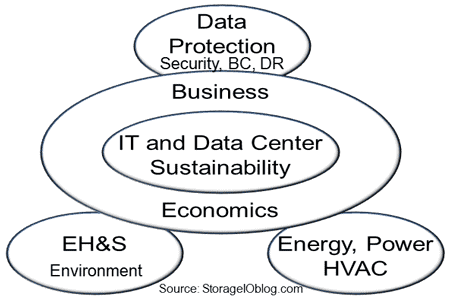
Likewise, you might even want to not be included in another other, let alone share your area with others. For example if your focus is on security you may not want to see or hear that data protection is part of sustainability, not to mention backup/restore, bc, dr and so forth.
Part of sustainability is also continuing to learn about new things not only in your field or focus area, also in adjacent spaces.
Keep in mind that there is more of a data center or information factory than just a building or facility with power, cooling as there are the technologies, tools, people, process, delivery/distribution network, warehouse for storing raw and finished material, metrics and management that all go into delivering the product which is information services.
Hence there are many aspects to IT and data center sustainability and thus think more pragmatically about sustaining information factories, however lets also be realistic and not jump the shark by declaring everything as sustainable ;).
Check out the live talk chat that we had yesterday over at Data Center Acceleration by clicking here.
Some related more reading:
Green IT, Green Gap, Tiered Energy and Green Myths
The new Green IT: Efficient, Effective, Smart and Productive
Saving Money with Green IT: Time To Invest In Information Factories
PUE, Are you Managing Power, Energy or Productivity?
Green IT deferral blamed on economic recession might be result of green gap
IT and storage economics 101, supply and demand
The Green and Virtual Data Center (CRC Press) – Intel Recommended Reading List
Driving for Datacenter Sustainability
Live Chat 01/23: Building the Sustainable Datacenter
Ok, nuff said
Cheers
Gs
Greg Schulz – Author Cloud and Virtual Data Storage Networking (CRC Press), The Green and Virtual Data Center (CRC Press) and Resilient Storage Networks (Elsevier)
twitter @storageio
All Comments, (C) and (TM) belong to their owners/posters, Other content (C) Copyright 2006-2014
Recently I did a piece over at the site Information Security Buzz title How Secure Is Your Data Storage? that takes a cursory look at securing your digital assets from a storage perspective. Keep in mind that data protection can mean many things to different people from various focus or technology domain perspectives. Likewise there are various threat risks to protect against and, not all of them are head-line news making events.

Protecting your data or data protection is a diverse topic and not exclusive to just backup/restore, business continuance (BC), disaster recovery (DR), high availability (HA), durability, archiving, privacy and compliance (PCI, Hippa, High-tech, Sarbox, etc) or security (logical [encryption, access control, identity management] and physical).
In the broader scope and context of information infrastructures and data infrastructures, think of data protection as part of or enabling protect, process, preserve and serving of information in an effective way that does not introduce complexity or compromise your digital and physical assets.
Following is an excerpt from the piece over at Information Security Buzz:
| The usual belief is that information behind firewall’s and on storage attached to servers that have rights access control and find access, all is safe; hence no need to encrypt the real storage device. There is a couple of other usual comments or statements that people make to me about encrypting storage devices that it is too difficult due to lack of good key management, and the other is that people say the encryption algorithms are no good. Both can be valid points, particular given what we are hearing with the NSA and other government activities. My usual response is a) have spare keys placed in safe trusted locations and b) do you lock the doors and windows on your home as somebody who really wants to get in probably can, hence need for multiple rings of security, however the encryption will deter the casual or more typical adversary. Click to read more |
In addition to the above, also check out the following related items on the many difference faces or facets of data protection.
Various StorageIO tips and articles from different venues: Via StateTech Magazine – 5 Tips for Factoring Software into Disaster Recovery Plans and Via the StorageIO fall November 2013 news letter, Cloud and data protection perspectives.
Also via StorageIOblog: Data protection modernization, more than swapping out media and Cloud conversations: Has Nirvanix shutdown caused cloud confidence and data protection concerns? along with In the data center or information factory not everything is the same plus Securing data at rest and fast secure erase with SED’s.
Also check out BackupU (www.software.dell.com/backupU) series of webinars and Google+ hangouts that I’m involved with about modernizing and rethinking data protection. Note that while Dell is the sponsor of these events, they are also vendor and technology neutral, that’s a disclosure btw fwiw ;) ).
Only you can prevent data loss as it is a shared responsibility!
Ok, nuff said (for now)
Cheers gs
Greg Schulz – Author Cloud and Virtual Data Storage Networking (CRC Press), The Green and Virtual Data Center (CRC Press) and Resilient Storage Networks (Elsevier)
twitter @storageio
All Comments, (C) and (TM) belong to their owners/posters, Other content (C) Copyright 2006-201
The O’Reilly @oreillymedia media folks (oops, excuse me, Microsoft Press) sent me out (that’s a disclosure btw) an real soft cover print copy of Rethinking Enterprise Storage – A Hybrid Cloud Model by Marc Farley aka @MicroFarley of Microsoft/Storsimple that features a forward by Martin Glassborow aka @Storagebod.

Publisher: Microsoft Press
Author: Marc Farley
Paper back
Features: Many diagrams, figures, index, glossary
Pages: 101
ISBN: 978-0-7356-7990-3
Published: 2013
MSRP: $9.99 USD

One of the many books many figures on the right, on the left i needed to hold a page down ;)!
Make no mistake that this is a Microsoft and Storsimple themed book, however IMHO Marc (aka Farley) does a great job of making it more relevant than just another vendor product book (JAVPB). While it is a Microsoft focused book around enabling hybrid cloud storage for various applications, the premises presented could be adapted for other environments or implementations. The book at 101 pages including table of contents (TOC), index, appendix, glossary and other front matter is a very easy and fast read while providing more information or coverage than what might be found in a "Dummies" type themed book.
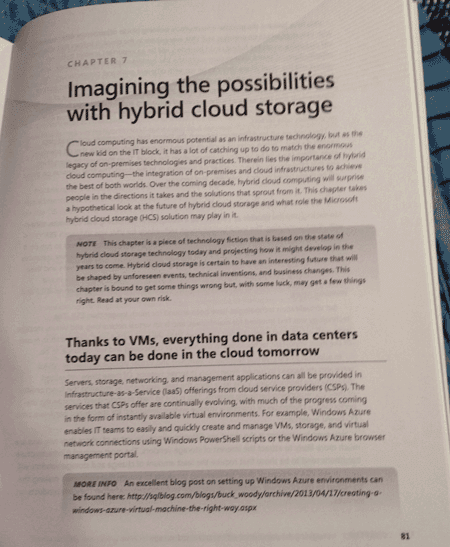
Start thinking outside the box (or cloud), imagine what you can do with a Hybrid cloud!
Overall I found the book to be good and not just because I know Marc or that the O’Reilly folks sent me a free copy (I had actually previously received the electronic ebook version), rather that it is timely and does a nice job of conveying the topic theme and setting up the conversation, time to rethink storage for enterprise and other environments. IMHO the question is not if hybrid cloud storage is in your future, rather when, where, why, for what, how, with whom and related conversations. While you can buy a copy of the book at various venues, it shouldn’t take a lot of effort to get your own printed soft cover copy, or an ebook version.
Btw, here’s a pod cast discussion with Marc Farley from spring 2013 at SNW, as well as a link to a hybrid cloud and object storage post he did over at Microsoft Technet.
To summarize and quote Marc Farley "Hey now…."
Ok, nuff said
Cheers gs
Greg Schulz – Author Cloud and Virtual Data Storage Networking (CRC Press), The Green and Virtual Data Center (CRC Press) and Resilient Storage Networks (Elsevier)
All Comments, (C) and (TM) belong to their owners/posters, Other content (C) Copyright 2006-2013 StorageIO and UnlimitedIO All Rights Reserved
The following are some commands and tools for Microsoft Windows environments that are useful for storage I/O activities (among others).
So you may know and how to find out the more familiar Windows storage device (Solid State Device – SSD, Hard Disk Drives – HDD among others) names such as A:, B:, C:, D: as what you can view from the Windows Explorer, Computer or Admin tools.

However what if you need to find out a physical name for raw (not mounted) and mounted devices for configuration? For example, if you have a tool that wants the physical name for your C: drive that might be \\.\PhysicalDrive0\?
No worries, use the command WMIC DISKDRIVE LIST BRIEF

Need more detail about the devices beyond what is shown above?
Then use WMIC DISKDRIVE LIST or as in the above example, direct the output to a file with the results shown below (scroll to the left or right to see more detail information).
        Availability  BytesPerSector  Capabilities  CapabilityDescriptions                 CompressionMethod  ConfigManagerErrorCode  ConfigManagerUserConfig  DefaultBlockSize  Description  DeviceID            ErrorCleared  ErrorDescription  ErrorMethodology  Index  InstallDate  InterfaceType  LastErrorCode  Manufacturer            MaxBlockSize  MaxMediaSize  MediaLoaded  MediaType              MinBlockSize  Model                                  Name                NeedsCleaning  NumberOfMediaSupported  Partitions  PNPDeviceID                                                  PowerManagementCapabilities  PowerManagementSupported  SCSIBus  SCSILogicalUnit  SCSIPort  SCSITargetId  SectorsPerTrack  Signature   Size           Status  StatusInfo  SystemName  TotalCylinders  TotalHeads  TotalSectors  TotalTracks  TracksPerCylinder
              512             {3, 4}        {"Random Access", "Supports Writing"}                     0                       FALSE                                      Disk drive   \\.\PHYSICALDRIVE2                                                    2                   SCSI                          (Standard disk drives)                              TRUE         Fixed hard disk media                ATA ST3000DM001-1CH1 SCSI Disk Device  \\.\PHYSICALDRIVE2                                         0           SCSI\DISK&VEN_ATA&PROD_ST3000DM001-1CH1\5&3626375C&0&000600                                                         0        0                3         6             63               0           3000590369280  OK                  DBIOTEST    364801          255         5860528065    93024255     255
              512             {3, 4}        {"Random Access", "Supports Writing"}                     0                       FALSE                                      Disk drive   \\.\PHYSICALDRIVE3                                                    3                   SCSI                          (Standard disk drives)                              TRUE         Fixed hard disk media                SEAGATE ST600MP0034 SCSI Disk Device   \\.\PHYSICALDRIVE3                                         0           SCSI\DISK&VEN_SEAGATE&PROD_ST600MP0034\5&3626375C&0&000A00                                                          0        0                3         10            63                           600124654080   OK                  DBIOTEST    72961           255         1172118465    18605055     255
              512             {3, 4}        {"Random Access", "Supports Writing"}                     0                       FALSE                                      Disk drive   \\.\PHYSICALDRIVE4                                                    4                   SCSI                          (Standard disk drives)                              TRUE         Fixed hard disk media                SEAGATE ST600MX0004 SCSI Disk Device   \\.\PHYSICALDRIVE4                                         0           SCSI\DISK&VEN_SEAGATE&PROD_ST600MX0004\5&3626375C&0&000C00                                                          0        0                3         12            63                           600124654080   OK                  DBIOTEST    72961           255         1172118465    18605055     255
              512             {3, 4}        {"Random Access", "Supports Writing"}                     0                       FALSE                                      Disk drive   \\.\PHYSICALDRIVE1                                                    1                   SCSI                          (Standard disk drives)                              TRUE         Fixed hard disk media                SEAGATE ST9300603SS SCSI Disk Device   \\.\PHYSICALDRIVE1                                         0           SCSI\DISK&VEN_SEAGATE&PROD_ST9300603SS\5&3626375C&0&000400                                                          0        0                3         4             63                           299992412160   OK                  DBIOTEST    36472           255         585922680     9300360      255
              512             {3, 4}        {"Random Access", "Supports Writing"}                     0                       FALSE                                      Disk drive   \\.\PHYSICALDRIVE0                                                    0                   SCSI                          (Standard disk drives)                              TRUE         Fixed hard disk media                VMware Virtual disk SCSI Disk Device   \\.\PHYSICALDRIVE0                                         2           SCSI\DISK&VEN_VMWARE&PROD_VIRTUAL_DISK\5&1982005&1&000000                                                           0        0                2         0             63               -873641784  64420392960    OK                  DBIOTEST    7832            255         125821080     1997160      255
Some of you might be familiar with Xcopy and if not, it is a handy tool for copying files, folders and directories to local as well as networked storage. Some handy Xcopy command switches include:
/j = use un-buffered IO for large files
/y = suppress prompting
/c = continue if error
/E = copy sub directories
/H = copy hidden files
/Q = quiet mode (don’t list files being copied)
In the following example the content of the Videos folder and its sub-directories (83.5GB) are copied to another destination. Note the Time /T command that is also shown which is useful for timing how long the copy takes (e.g. subtract start-time from end-time and you have elapsed time). In this example 83.5GB are copied from one place to another on the same SSD device and using the results of the Time /T command the elapsed time was about 12 minutes.

Xcopy command example
Ever have a Windows storage device or system that failed to boot, or a problem with a partition, volume or other issue?
How about running into a situation where you are not able to format a device that you know and can confirm is ok to erase, yet you get a message that the volume is write protected or read only?
Diskpart is handy, powerful and potentially dangerous tool if you are not careful as you could mistakenly drop a good volume or partition (e.g. the importance of having good backups). However Diskpart can be used to help repair storage devices that have boot problems, or for clearing read only attributes among other tasks. If you are prefer GUI interfaces, many of the Diskpart functions can also be done via Disk Management interface (e.g. Control Panel -> All Control Panel Items -> Administrative Tools -> Computer Management -> Storage -> Disk Management ). Note that Diskpart to do certain functions will need to be run as Administrator.

In the above example the LIST DISK command shows what disks are present (on-line or off-line) which means that you may see devices here that do not show up elsewhere. Also shown is selecting a disk and then listing partitions, selecting a partition and showing attributes. The Attribute command can be used for clearing Read Only modes should a partition become write protected.
Hint, ever have a device that was once had VMware installed on it, then you move it to Windows and try to reformat for use and get a Read Only error? If so, you will want to have a look at Diskpart and the Attribute commands. However BE CAREFULL and pay attention which disk, partition and volumes you are working with as you can easily cause a problem that would result in testing how good your backups are.
If you have a SATA SSD the TRIM command is a form of garbage collection that is supported with Windows 7 (SAS drives use the SCSI UNMAP). Not sure if your system has TRIM enabled? Try the following command as administrator. Note that if you see a result of "0" then TRIM is enabled while a value of "1" means that it is disabled for your system.

Want to learn more about TRIM, check out this piece from Intel as well as this Microsoft Windows item.
Have an issue or problem collecting your system statistics, or when running a benchmark, workload generation tool such as vdbench and getting an "Unable to obtain CPU statistics"?
Try the Lodctr /R command (as administrator), however read this Microsoft Tip first to learn more.

Like its name implies, if you do not have this tool, you can download it here from Microsoft to not only delete files, folders, as well as write "0" patterns across a disk to secure erase it. You can specify the number of times you want to run the write "0" patterns across a disk to meet your erasure requirements.
There is also another use for Sdelete which is if you need or want to pre-condition a SSD or other device such as for testing, you can run a pre-conditioning pass using Sdelete.
Some command options include -p #n where "n" is the number of times to run, -s recursive to process sub-directories, -z to write "0" or zero out the space on the device, -c for clean, -a to process read-only attributes. Learn more and get your copy of Sdelete from Microsoft here.
A handy tool available from Seagate (may only work with Seagate and their partner devices) is SeaTools that can give drive information, health and status as well as perform various tests including SMART.

Seagate Seatools example
Different HDD and SSD as well as storage system vendors give tools for configuration, monitoring, management and in some cases data movement with their solutions. Samsung SSD Magician is a tool I have installed for managing my SSDs (830 and 840 Pros) that has features for updating firmware, drive health as well as performance optimization. Other hand tools include the Samsung copy tool based on Clonix as Acronis among other clone or data migration utilities (more on those in a future post).

Samsung SSD Magician
While the Microsoft WIndows USB Tool is handy for dealing with Microsoft ISO, however for creating USB’s with ISO’s such as for installing VMware or Linux on bare metal systems, Rufus is a handy tool to have in the tool-box.

Another useful tool that functions as an SSH and FTP utility is Cyberduck that also supports access to Amazon S3 among other cloud services.
There are many other tools for server, storage I/O and other activities on WIndows, not to mention other platforms, however hopefully you find the above useful.
How about it, what’s your favorite Windows server, storage I/O tools and commands?
Ok, nuff said (for now)
Cheers
Gs
Greg Schulz – Author Cloud and Virtual Data Storage Networking (CRC Press), The Green and Virtual Data Center (CRC Press) and Resilient Storage Networks (Elsevier)
twitter @storageio
All Comments, (C) and (TM) belong to their owners/posters, Other content (C) Copyright 2006-2026 Server StorageIO and UnlimitedIO LLC All Rights Reserved
First, for those who may have missed this, thanks to all who helped make 2013 a great year!

Looking back at 2013 I saw a continued trend of more vendors and their media public relations (PR) people reaching out to have their predictions placed in articles, posts, columns or trends perspectives pieces.
Hmm, maybe a new trend is predictions selfies? ;)
Not to worry, this is not a wrapper piece for a bunch of those pitched and placed predictions requests that I received in 2013 as those have been saved for a rainy or dull day when we need to have some fun ;) .
2013 end up with some end of year spree’s including Avago acquiring storage I/O and networking vendor LSI for about $6.6B USD (e.g. SSD cards, RAID cards, cache cards, HBA’s (Host Bus Adapters), chips and other items) along with Seagate buying Xyratex for about $374M USD (a Seagate suppliers and a customer partner).
Xyratex is known by some for making the storage enclosures that house hard disk drive (HDD’s) and Solid State Device (SSD) drives that are used by many well-known, and some not so well-known systems and solution vendors. Xyratex also has other pieces of their business such as appliances that combine their storage enclosures for HDD and SSD’s along with server boards, along with a software group focus on High Performance Compute (HPC) Lustre. There is another part of the Xyratex business that is not as well-known which is the test equipment used by disk drive manufacturers such as Seagate as part of their manufacturing process. Thus the Seagate acquisition moves them up market with more integrated solutions to offer to their (e.g. Seagate and Xyratex) joint customers, as well as streamline their own supply chain and costs (not to mention sell equipment to the other remaining drive manufactures WD and Toshiba).
Other 2013 acquisitions included (Whiptail by Cisco, Virident by WD (who also bought several other companies), Softlayer by IBM) along with various mergers, company launches, company shutdowns (cloud storage Nirvanix and SSD maker OCZ bankruptcy filing), and IPO’s (some did well like Nimble while Violin not so well), while earlier high-flying industry darlings such as FusionIO are now the high-flung darling targets of the shareholder sock lawsuit attorneys.
2013 also saw the end of SNW (Storage Network World), jointly produced by SNIA and Computerworld Storage in the US after more than a decade. Some perspectives from the last US SNW held October 2013 can be found in the Fall 2013 StorageIO Update Newsletter here, granted those were before the event was formal announced as being terminated.
Speaking of events, check out the November 2013 StorageIO Update Newsletter here for perspectives from attending the Amazon Web Services (AWS) re:Invent conference which joins VMworld, EMCworld and a bunch of other vendor world events.
Lets also not forget Dell buying itself in 2013.
Click on the following links read (and here) more about various 2013 industry perspectives trends commentary of mine in various venues, along with tips, articles, newsletters, events, pod cast, videos and other items.
Perhaps 2014 will build on the 2013 momentum of the annual rights of pages refereed to as making meaningless future year trends and predictions as being passe?
Not that there is anything wrong with making predictions for the coming year, particular if they actually have some relevance, practicality not to mention track record.
However that past few years seems to have resulted in press releases along with product (or services) plugs being masked as predictions, or simply making the same predictions for the coming year that did not come to be for the earlier year (or the one before that or before that and so forth).
On the other hand, from an entertainment perspective, perhaps that’s where we will see annual predictions finally get classified and put into perspectives as being just that.
Now for those who still cling to as well as look forward to annual predictions, ok, simple, we will continue in 2014 (and beyond) from where we left off in 2013 (and 2012 and earlier) meaning more (or continued):

That’s easy, many of the predictions and prophecies that you hear about for the coming year have also been pitched in prior years, so it only makes sense that some of those will be part of the future.
The late Jim Morrison of the Doors said "There are things known and things unknown and in between are the doors.".
Above image and link via Amazon.com
Hence there is what we know about 2013 or will learn about the past in the future, then there is what will be in 2014 as well as beyond, hence lets step through some doors and see what will be. This means learn and leverage lessons from the past to avoid making the same or similar mistakes in the future, however doing so while looking forward without a death grip clinging to the past.
Needless to say there will be more to review, preview and discuss throughout the coming year and beyond as we go from what is unknown through doors and learn about the known.
Thanks to all who made 2013 a great year, best wishes to all, look forward to seeing and hearing from you in 2014!
Ok, nuff said (for now)
Cheers
Gs
Greg Schulz – Author Cloud and Virtual Data Storage Networking (CRC Press), The Green and Virtual Data Center (CRC Press) and Resilient Storage Networks (Elsevier)
twitter @storageio
All Comments, (C) and (TM) belong to their owners/posters, Other content (C) Copyright 2006-2026 Server StorageIO and UnlimitedIO LLC All Rights Reserved
Note that in Information Technology (IT) conversations there are multiple meanings for SMB including Server Message Block aka Microsoft Windows CIFS (Common Internet File System) along with its SAMBA implementation, however for this piece the context is Small Medium Business.
A decade or so ago, mention SMB (Small Medium Business) to many vendors, particular those who were either established or focused on the big game enterprise space and you might have gotten a condescending look or answer if not worse.
In other words, a decade ago the SMB did not get much respect from some vendors and those who followed or covered them.
Fast forward to today and many of those same vendors along with their pundits and media followers have now gotten their SMB grove, lingo, swagger or social media footsteps, granted for some that might be at the higher end of SMB also known as SME (Small Medium Enterprise).
Today in general the SMB is finally getting respect and in some circles its down right cool and trendy vs. being perceived as old school, stodgy large enterprise. Likewise the Remote Office Branch Office (ROBO) gained more awareness and coverage a few years back which while the ROBO buzz has subsided, the market and opportunities are certainly there.
I assert that SOHO today is getting the same lack of respect that SMB in general received a decade ago.
IMHO the SOHO environment and market today is being treated with a similar lack of respect that the larger SMB received a decade ago.
Granted there are some vendors and their followings who are seeing the value and opportunity, not to mention market size potential of expanding their portfolios, not to mention routes to markets to meet their different needs of the SOHO.

One of the challenges with SMB, SOHO among other classifications are just that, the classifications.
Some classificaitons are based on number of employees, others on number of servers or workstations, while others are based on revenue or even physical location.
Meanwhile some are based on types of products, technologies or tools while others are tied to IT or general technology spending.
Some confuse the SOHO space with the consumer market space or sector which should not be a surprise if you view market segments as enterprise, SMB and consumer. However if you take a more pragmatic approach, between true consumer and SMB space, there lies the SOHO space. For some the definitions of what is consumer, SOHO, SMB, SME and enterprise (among others) will be based on number of employees, or revenue amount. Yet for others the categories may be tied to IT spending (e.g. price bands), number of workstations, servers, storage space capacity or some other metric. On the other hand some definitions of what is consumer vs. SOHO vs. SMB vs. SME or enterprise will be based on product capabilities, size, feature function and cost among other attributes.
Keep in mind that SOHO can also overlap with Remote Office Branch Office (ROBO), not to mention blend with high-end consumer (prosumer) or lower bounds of SMB.
Part of the challenge (or problem) is that many confuse the Home Office or HO aspect of SOHO as being consumer.
Likewise many also confuse the Small Office or SO part of SOHO as being just the small home office or the virtual office of a mobile worker.
The reality is that just as the SMB space has expanded, there is also a growing area just above where consumer markets exist and where many place the lower-end of SMB (e.g. the bottom limits of where the solutions fit).
First keep in mind that many put too much focus and mistakenly believe that the HO or Home Office part of SOHO means that this is just a consumer focused space.
The reality is that while the HO gets included as part of SOHO, there is also the SO or Small Office which is actually the low-end of the SMB space.
Keep in mind that there are more:
SOHO than SMB
SMB than SME
SME than enterprise
F500 (Fortune 500) than F100
F100 than F10 and so forth.
SOHO does not have to be the Rodney Dangerfield of IT (e.g. gets no respect)!
If you jumped on the SMB bandwagon a decade ago, start paying attention to what’s going on with the SOHO or lower-end SMB sector. The reasons are simple, just as SMBs can grow up to be larger SMBs or SME or enterprise, SOHOs can also evolve to become SMBs either in business size, or in IT and data infrastructure needs, requirements.
For those who prefer (at least for now) look down upon or ignore the SOHO similar to what was done with SMB before converting to SMBism, do so at your own risk.
However let me be clear, this does not mean ignore or shift focus and thus disrupt or lose coverage of other areas, rather, extend, expand and at least become aware of what is going on in the SOHO space.
Ok, nuff said (for now)
Cheers
Gs
Greg Schulz – Author Cloud and Virtual Data Storage Networking (CRC Press), The Green and Virtual Data Center (CRC Press) and Resilient Storage Networks (Elsevier)
twitter @storageio
All Comments, (C) and (TM) belong to their owners/posters, Other content (C) Copyright 2006-2026 Server StorageIO and UnlimitedIO LLC All Rights Reserved
| ||||||||||||||||||||||||||||||||||||||||||||
 Greg Schulz on break



 DataCenter