Cloud and Object storage are in your future, what are some questions?

Cloud and Object storage are in your future, what are some questions?

server storage I/O trends

IMHO there is no doubt that cloud and object storage are in your future, what are some questions?

Granted, what type of cloud and object storage or service along with for work or entertainment are some questions.

Likewise, what are your cloud and object storage concerns (assuming you already have heard the benefits)?

Some other questions include when, where for different applications workload needs, as well as how and with what among others.

Keep in mind that there are many aspects to cloud storage and they are not all object, likewise, there are many facets to object storage.

Recently I did a piece over at InfoStor titled Cloud Storage Concerns, Considerations and Trends that looks at the above among other items including:

  • Is cloud storage cheaper than traditional storage?
  • How do you access cloud object storage from legacy block and file applications?
  • How do you implement on-site cloud storage?
  • Is enterprise file sync and share (EFSS) safe and secure?
  • Does cloud storage need to be backed up and protected?
  • What geographic location requirements or regulations apply to you?

When it comes to cloud computing and, in particular, cloud storage, context matters. Conversations are necessary to discuss concerns, as well as discuss various considerations, options and alternatives. People often ask me questions about the best cloud storage to use, concerns about privacy, security, performance and cost.

Some of the most common cloud conversations topics involve context :

  • Public, private or hybrid cloud; turnkey subscription service or do it yourself (DIY)?
  • Storage, compute server, networking, applications or development tools?
  • Storage application such as file sync and share like Dropbox?
  • Storage resources such as table, queues, objects, file or block?
  • Storage for applications in the cloud, on-site or hybrid?

Continue reading Cloud Storage Concerns, Considerations and Trends over at InfoStor.

Where To Learn More

Additional related content can be found at:

What This All Means

As I mentioned above, cloud and object storage are in your future, granted your future may not rely on just cloud or object storage. Take a few minutes to check out some of the conversation topics, tips and trends in my piece over at InfoStor Cloud Storage Concerns, Considerations and Trends along with more material at www.objectstoragecenter.com.

Btw, what are your questions, comments, concerns, claims or caveats as part of cloud and object storage conversations?

Ok, nuff said, for now…

Cheers
Gs

Greg Schulz – Microsoft MVP Cloud and Data Center Management, vSAN and VMware vExpert. Author of Software Defined Data Infrastructure Essentials (CRC Press), as well as Cloud and Virtual Data Storage Networking (CRC Press), The Green and Virtual Data Center (CRC Press), Resilient Storage Networks (Elsevier) and twitter @storageio.

All Comments, (C) and (TM) belong to their owners/posters, Other content (C) Copyright 2006-2023 Server StorageIO(R) and UnlimitedIO All Rights Reserved

September and October 2016 Server StorageIO Update Newsletter

Volume 16, Issue IX

Hello and welcome to this September and October 2016 Server StorageIO update newsletter.

In This Issue

  • Commentary in the news
  • Tips and Articles
  • StorageIOblog posts
  • Events and Webinars
  • Industry Activity Trends
  • Resources and Links
  • Connect and Converse With Us
  • About Us
  • Enjoy this edition of the Server StorageIO update newsletter.

    Cheers GS

    Industry Activity Trends

    Recent Industry Activates and Trends

    EMC is now Dell EMC – What this means is that EMC is no longer a publicly traded company instead now being privately held under the Dell Technologies umbrella. In case you did not know or had forgotten, one of the principal owners of Dell Technologies is Michael Dell aka the founder of Dell Computers which itself went private a few years ago. Read more in this Server StoageIOblog update post.

    While Michael Dell and Dell Technologies continues to expand by acquiring companies (granted also shedding some assets to support that growth), HP Enterprise (HPE) is taking a different approach. Similar to Dell, HPE has been offloading some of its divisions and assets since its split into two separate companies about a year ago.

    More recently HPE has announced it is selling off some of its software assets to which follows other deals where HPE created a new partnership with CSC to offload or park some of its services assets. What’s not clear is HPE CEO Meg Whitman leveraging the trend that some Private Equity (PE) firms are interested in acquiring under performing companies or assets to prepare them as part of a pivot to profit scenario, or something else?

    • HPE selling off business units including software group here, here, here and here
    • HPE looking to boost its HPC and super compute business with $275B acquisition of SGI
    • Announced new shared storage for SMB and mid-size environments including for sub $10K price points. These include HPE StoreVirtual 3200 and HPE MSA 2042.
    • HPE and Dropbox partnership
    • Various other HPE news and updates

    Hyper-Converged Infrastructure (HCI) startup vendor Nutanix finally IPO (NTNX) after a not so consolidated IPO cycle. Prior to the IPO NTNX acquired other startup Pernix (VMware cache software solution) and calmio to beef up their product portfolio. Congratulations to NTNX and best wishes, hopefully the public markets will provide risk vs. reward, on the other hand, now being public, the spotlight will be on them.

    Nutanix Stock via Yahoo 10/31/16
    NTNX Stock Trading via Yahoo Finance 10/31/16 (Click to see current status)


    Microsoft has extended its software defined storage (SDS) along with software defined data center (SDDC) as well as software defined networking (SDN) capabilities by formerly announcing Windows Server 2016. A month or so ago Microsoft announced the 20th birthday or anniversary of Windows Server as well as having previously released Tech Previews (TP).
    See what’s new in Server 2016 here. For those not aware, With Windows Server 2016, you can configure it to be CI, HCI, legacy or various hybrid ways to meet your needs, along with your choice of hardware from your preferred vendor or solution provider. Read more about Microsoft Windows Server 2016 and related topics in this Server StorageIOblog post.

    Needless to say there is a lot of other activity in the works including VMware enhancements with vSphere 6.5 as well as VMware vSphere (and related tools) being announced as hosted on bare metal (BM) dedicated private servers (DPS) via AWS among other updates.


    StorageIOblog Posts

    Recent and popular Server StorageIOblog posts include:

    View other recent as well as past StorageIOblog posts here


    StorageIO Commentary in the news

    Recent Server StorageIO industry trends perspectives commentary in the news.

    Via InfoStor Top Ten Data Storage Performance Tips: Improving Data Storage
    Via ChannelProNetwork Your Time Will Come, All-Flash Storage
    Via FutureReadyOEM When to implement ultra-dense CI or HCI storage
    Via EnterpriseStorageForum Top 10 Enterprise SSD Market Trends
    Via EnterpriseStorageForum Storage Hyperconvergence: When Does It Make Sense?
    SearchCloudStorage: EMC VxRack Neutrino Nodes launched for OpenStack cloud storage
    EnterpriseStorageForum: Looking Beyond the Hype at Hyperconvergence in Storage
    CDW Digital: Transitioning Data Centers To Hybrid Environment
    SearchDataCenter: EMC, VCE, CI and Hyperconverged vs. Hyper-small
    InfoStor: Docker and Containerization Storage Buying Guide
    NetworkComputing: Dell-EMC: The Storage Ramifications
    EnterpriseTech: VMware Targets Synergies in Dell-EMC Deal 
    HPCwire: Dell to Buy EMC Focus on Large Enterprises and High-End Computing
    EnterpriseStorageForum: Storage Futures: Do We Really Need to Store Everything?

    View more Server, Storage and I/O hardware as well as software trends comments here


    StorageIO Tips and Articles

    Recent and past Server StorageIO articles appearing in different venues include:

    Via Iron Mountain  Is Your Data Infrastructure Prepared for Storm Season?
    Via Iron Mountain  Preventing Unexpected Disasters: IT and Data Infrastructure
    Via FutureReadyOEM  When to implement ultra-dense storage
    Via Micron Blog (Guest Post)  Whats next for NVMe and your Data Center
    Redmond Magazine  Data Protection Trends – Evolving Data Protection and Resiliency
    Virtual Blocks (VMware Blogs)  EVO:RAIL Part III – When And Where To Use It?
    Virtual Blocks (VMware Blogs)  EVO:RAIL Part II – Why And When To Use It?
    Virtual Blocks (VMware Blogs)  EVO:RAIL Part I – What Is It And Why Does It Matter?

    Check out these resources techniques, trends as well as tools. View more tips and articles here


    Events and Activities

    Recent and upcoming event activities.

    December 7, 2016 11AM PT – BrightTalk Webinar: Hyper-Converged Infrastructure

    November 29-30, 2016 – Nijkerk Netherlands Workshop Seminar (Presenting)
    Organized by Brouwer Storage Consultancy

    Converged and Other Server Storage Decision Making

    November 28, 2016 – Nijkerk Netherlands Workshop Seminar (Presenting)
    Organized by Brouwer Storage Consultancy
    – Industry Trends Update

    November 23, 2016 10AM PT – BrightTalk Webinar: BCDR and Cloud Backup
    Software Defined Data Infrastructures (SDDI) and Data Protection

    November 23, 2016 9AM PT – BrightTalk Webinar: Cloud Storage
    Hybrid and Software Defined Data Infrastructures (SDDI)

    November 22, 2016 10AM PT – BrightTalk Webinar: Cloud Infrastructure
    Hybrid and Software Defined Data Infrastructures (SDDI)

    November 15, 2016 11AM PT – Redmond Magazine and SolarWinds
    Presenting – The O.A.R. of Virtualization Scaling

    November 3, 2016 11AM PT – Redmond Magazine and Dell Software
    Presenting – Backup, Data Protection and Security Management

    October 27, 2016 10AM PT – Virtual Instruments Webinar
    The Value of Infrastructure Insight

    October 20, 2016 9AM PT – BrightTalk Webinar: Next-Gen Data Centers
    Software Defined Data Infrastructures (SDDI) – Servers, Storage and Virtualization

    September 20, 2016 8AM PT – BrightTalk Webinar
    Software Defined Data Infrastructures (SDDI)
    Enabling Software Defined Data Centers

    September 13, 2016 11AM PT – Redmond Magazine and Dell Software
    Windows Server 2016 and Active Directory
    What’s New and How to Plan for Migration

    See more webinars and other activities on the Server StorageIO Events page here.


    Server StorageIO Industry Resources and Links

    Useful links and pages:
    Microsoft TechNet – Various Microsoft related from Azure to Docker to Windows
    storageio.com/links – Various industry links (over 1,000 with more to be added soon)
    objectstoragecenter.com – Cloud and object storage topics, tips and news items
    OpenStack.org – Various OpenStack related items
    storageio.com/protect – Various data protection items and topics
    thenvmeplace.com – Focus on NVMe trends and technologies
    thessdplace.com – NVM and Solid State Disk topics, tips and techniques
    storageio.com/performance – Various server, storage and I/O performance and benchmarking
    VMware Technical Network – Various VMware related items

    Ok, nuff said, for now…

    Cheers
    Gs

    Greg Schulz – Microsoft MVP Cloud and Data Center Management, vSAN and VMware vExpert. Author Cloud and Virtual Data Storage Networking (CRC Press), The Green and Virtual Data Center (CRC Press) and Resilient Storage Networks (Elsevier) and twitter @storageio

    All Comments, (C) and (TM) belong to their owners/posters, Other content (C) Copyright 2006-2023 Server StorageIO(R) and UnlimitedIO All Rights Reserved

    Updated Software Defined Data Infrastructure Webinars and Fall 2016 events

    Software Defined Data Infrastructure Webinars and Fall 2016 events

    server storage I/O trends

    Here is the updated Server StorageIO fall 2016 webinar and event activities covering software defined data center, data infrastructure, virtual, cloud, containers, converged, hyper-converged server, storage, I/O network, performance and data protection among other topics.

    December 7, 2016 – Webinar 11AM PT – BrightTalk
    Hyper-Converged Infrastructure Decision Making

    Hyper-Converged Infrastructure, HCI and CI Decision Making

    Are Converged Infrastructures (CI), Hyper-Converged Infrastructures (HCI), Cluster in Box or Cloud in Box (CiB) solutions for you? The answer is it depends on what your needs, requirements, application among other criteria are. In addition are you focused on a particular technology solution or architecture approach, or, looking for something that adapts to your needs? Join us in this discussion exploring your options for different scenarios as we look beyond they hype including to next wave of hyper-scale converged along with applicable decision-making criteria. Topics include:

    – Data Infrastructures exist to support applications and their underlying resource needs
    – What are your application and environment needs along with other objectives
    – Explore various approaches for hyper-small and hyper-large environments
    – What are you converging, hardware, hypervisors, management or something else?
    – Does HCI mean hyper-vendor-lock-in, if so, is that a bad thing?
    – When, where, why and how to use different scenarios

    November 29-30, 2016 (New) – Converged & Hyper-Converged Decision Making
    Is Converged Infrastructure Right For You?
    Workshop Seminar – Nijkerk The Netherlands

    Converged and server storage I/O data infrastructure trends
    Agenda and topics to be covered include:

    • When should decide to evaluate CI/HCI vs. traditional approach
    • What are decision and evaluation criteria for apples to apples vs. Apples to pears
    • What are the costs, benefits, and caveats of the different approaches
    • How different applications such as VDI or VSI or database have different needs
    • What are the network, storage, software license and training cost implications
    • Different comparison criteria for smaller environments remote office vs. Larger enterprise
    • How will you protect and secure a CI, HCI environment (HA, BC, BR, DR, Backup)
    • What is the risk and benefit of startups, companies with limited portfolios vs. Big vendors
    • Do it yourself (DiY) vs. Turnkey software vs. Bundled tin wrapped software solution
    • We will also look at associated trends including software-defined, NVM/SSD, NVMe, VMware, Microsoft, KVM, Citrix/Xen, Docker, OpenStack among others.

    Organized by:
    Brouwer Storage Consultancy

    November 28, 2016 (New) – Server Storage I/O Fundamental Trends V2.1116
    Whats New, Whats the buzz, what you need to know about and whos doing what
    Workshop Seminar – Nijkerk The Netherlands
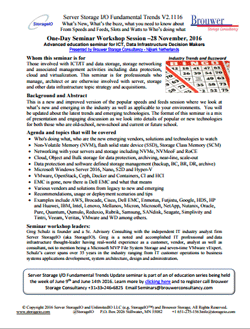
    Converged and server storage I/O data infrastructure trends
    Agenda and topics that will be covered include:

    • Who’s doing what, who are the new emerging vendors, solutions and technologies to watch
    • Non-Volatile Memory (NVM), flash solid state device (SSD), Storage Class Memory (SCM)
    • Networking with your servers and storage including NVMe, NVMeoF and RoCE
    • Cloud, Object and Bulk storage for data protection, archiving, near-line, scale-out
    • Data protection and software defined storage management (backup, BC, BR, DR, archive)
    • Microsoft Windows Server 2016, Nano, S2D and Hyper-V
    • VMware, OpenStack, Ceph, Docker and Containers, CI and HCI
    • EMC is gone, now there is Dell EMC and what that means
    • Various vendors and solutions from legacy to new and emerging
    • Recommendations, usage or deployment scenarios and tips
    • Some examples of who’s doing what includes AWS, Brocade, Cisco, Dell EMC, Enmotus, Futjistu, Google, HDS, HP and Huawei, IBM, Intel, Lenovo, Mellanox, Micron, Microsoft, NetApp, Nutanix, Oracle, Pure, Quantum, Qumulo, Reduxio, Rubrik, Samsung, SANdisk, Seagate, Simplivity and Tintri, Veeam, Veritas, VMware and WD among others.

    Organized by:
    Brouwer Storage Consultancy

    November 23, 2016 – Webinar 10AM PT BrightTalk
    BCDR and Cloud Backup Software Defined Data Infrastructures (SDDI) and Data Protection

    BC DR Cloud Backup and Data Protection

    The answer is BCDR and Cloud Backup, however what was the question? Besides how to protect preserve and secure your data, applications along with data Infrastructures against various threat risk issues, what are some other common questions? For example how to modernize, rethink, re-architect, use new and old things in new ways, these and other topics, techniques, trends, tools have a common theme of BCDR and Cloud Backup. Join us in this discussion exploring your options for protecting data, applications and your data Infrastructures spanning legacy, software-defined virtual and cloud environments. Topics include:

    – Data Infrastructures exist to support applications and their underlying resource needs
    – Various cloud storage options to meet different application PACE needs
    – Do clouds need to be backed-up or protected?
    – How to leverage clouds for various data protection objectives
    – When, where, why and how to use different scenarios

    November 23, 2016 – Webinar 9AM PT – BrightTalk
    Cloud Storage – Hybrid and Software Defined Data Infrastructures (SDDI)

    Cloud Storage Decision Making

    You have been told, or determined that you need (or want) to use cloud storage, ok, now what? What type of cloud storage do you need or want, or do you simply want cloud storage? However, what are your options as well as application requirements including Performance, Availability, Capacity and Economics (PACE) along with access or interfaces? Where are your applications and where will they be located? What are your objectives for using cloud storage or is it simply you have heard or told its cheaper. Join us in this discussion exploring your options, considerations for cloud storage decision-making. Topics include:

    – Data Infrastructures exist to support applications and their underlying resource needs
    – Various cloud storage options to meet different application PACE needs
    – Storage for primary, secondary, performance, availability, capacity, backup, archiving
    – Public, private and hybrid cloud storage options from block, file, object to application service
    – When, where, why and how to use cloud storage for different scenarios

    November 22, 2016 – Webinar 10AM PT – BrightTalk
    Cloud Infrastructure Hybrid and Software Defined Data Infrastructures (SDDI)

    Cloud Infrastructure and Hybrid Software Defined

    At the core of cloud (public, private, hybrid) next generation data centers are software defined data infrastructures that exist to protect, preserve and serve applications, data along with their resulting information services. Software defined data infrastructure core components include hardware, software servers and storage configured (defined) to provide various services enabling application Performance Availability Capacity and Economics (PACE). Just as there are different types of environments, applications along with workloads various options, technologies as well as techniques exist for cloud services (and underlying data infrastructures). Join us in this session to discuss trends, technologies, tools, techniques and services options for cloud infrastructures. Topics include:

    – Data Infrastructures exist to support applications and their underlying resource needs
    – Software Defined Infrastructures (SDDI) are what enable Software Defined Data Centers and clouds
    – Various types of clouds along with cloud services that determine how resources get defined
    – When, where, why and how to use cloud Infrastructures along with associated resources

    November 15, 2016 (New) – 11AM PT Webinar – Redmond Magazine and Solarwinds
    The O.A.R. of Virtualization Scaling
    A journey of optimization, automation, and reporting

    Your journey to a flexible, scalable and secure IT universe begins now. Join Microsoft MVP and VMware vSAN and vExpert Greg Schulz of Server StorageIO along with VMware vExpert, Cisco Champion and Head Geek of Virtualization and Cloud Practice Kong Yang of SolarWinds for an interactive discussion empowering you to become the master of your software defined and virtual data center. Topics will include:

    • Trust your instruments and automation, however, verify they are working properl
    • Insight into how your environment, as well as automation tools, are working
    • Leverage automation to handle recurring tasks so you can focus on more productive activities
    • Capture, retain and transfer knowledge and tradecraft experiences into automation policies
    • Automated system management is only as good as the policies and data they rely upon
    • Optimize via automation that relies on reporting for insight, awareness and analytics 

    November 3, 2016 (New) – Webinar 11AM PT – Redmond Magazine and
    Dell Software
    Tailor Your Backup Data Repositories to
    Fit Your Security and Management Needs

    Does data protection storage have you working overtime to take care of it? Do you have the flexibility to protect, preserve, secure and serve different workgroups or customers in a shared environment? Is your environment looking to expand with new applications and remote offices, yet your data protection is slowing you down? 

    In this webinar we will look at current and emerging trends along with issues including how different threat risk challenges impact your evolving environment, as well as opportunities to address them. It’s time to deploy technology that works for you and your environment instead of you working for the solution. 

    Attend and learn about:

    • Data protection trends, issues, regulatory compliance, challenges and opportunities
    • How to utilize purpose built appliances to protect and defend your systems, applications and data from various threat risks
    • Importance of timely insight and situational awareness into your data protection infrastructure
    • Protecting centralized and distributed remote office branch offices (ROBO) workgroups
    • What you can do today to optimize your environment

    October 27, 2016 (New) – Webinar 10AM PT – Virtual Instruments
    The Value of Infrastructure Insight

    This webinar looks at the value of data center infrastructure insight both as a technology as well as a business productivity enabler. Besides productivity, having insight into how data infrastructure resources (servers, storage, networks, system software) are used, enables informed analysis, troubleshooting, planning, forecasting as well as cost-effective decision-making. In other words, data center infrastructure insight, based on infrastructure performance analytics, enables you to avoid flying blind, having situational awareness for proactive Information Technology (IT) management. Your return on innovation is increased, and leveraging insight awareness along with metrics that matter drives return on investment (ROI) along with enhanced service delivery.

    October 20, 2016 – Webinar 9AM PT – BrightTalk
    Next-Gen Data Centers Software Defined Data Infrastructures (SDDI) including Servers, Storage and Virtualization

    Cloud Storage Decision Making

    At the core of next generation data centers are software defined data infrastructures that enable, protect, preserve and serve applications, data along with their resulting information services. Software defined data infrastructure core components include hardware, software servers and storage configured (defined) to provide various services enabling application Performance Availability Capacity and Economics (PACE). Just as there are different types of environments, applications along with workloads various options, technologies as well as techniques exist for virtual servers and storage. Join us in this session to discuss trends, technologies, tools, techniques and services around storage and virtualization for today, tomorrow, and in the years to come. Topics include:

    – Data Infrastructures exist to support applications and their underlying resource needs
    – Software Defined Infrastructures (SDDI) are what enable Software Defined Data Centers
    – Server and Storage Virtualization better together, with and without CI/HCI
    – Many different facets (types) of Server virtualization and virtual storage
    – When, where, why and how to use storage virtualization and virtual storage

    September 20, 2016 – Webinar 8AM PT – BrightTalk
    Software Defined Data Infrastructures (SDDI) Enabling Software Defined Data Centers – Part of Software-Defined Storage summit

    Cloud Storage Decision Making

    Data Infrastructures exist to support applications and their underlying resource needs. Software-Defined Infrastructures (SDI) are what enable Software-Defined Data Centers, and at the heart of a SDI is storage that is software-defined. This spans cloud, virtual and physical storage and is at the focal point of today. Join us in this session to discuss trends, technologies, tools, techniques and services around SDI and SDDC- today, tomorrow, and in the years to come.

    September 13, 2016 – Webinar 11AM PT – Redmond Magazine and
    Dell Software
    Windows Server 2016 and Active Directory
    Whats New and How to Plan for Migration

    Windows Server 2016 is expected to GA this fall and is a modernized version of the Microsoft operating system that includes new capabilities such as Active Directory (AD) enhancements. AD is critical to organizational operations providing control and secure access to data, networks, servers, storage and more from physical, virtual and cloud (public and hybrid). But over time, organizations along with their associated IT infrastructures have evolved due to mergers, acquisitions, restructuring and general growth. As a result, yesterday’s AD deployments may look like they did in the past while using new technology (e.g. in old ways). Now is the time to start planning for how you will optimize your AD environment using new tools and technologies such as those in Windows Server 2016 and AD in new ways. Optimizing AD means having a new design, performing cleanup and restructuring prior to migration vs. simply moving what you have. Join us for this interactive webinar to begin planning your journey to Windows Server 2016 and a new optimized AD deployment that is flexible, scalable and elastic, and enables resilient infrastructures. You will learn:

    • What’s new in Windows Server 2016 and how it impacts your AD
    • Why an optimized AD is critical for IT environments moving forward
    • How to gain insight into your current AD environment
    • AD restructuring planning considerations

    September 8, 2016 – Webinar 11AM PT (Watch on Demand) – Redmond Magazine, Acronis and Unitrends
    Data Protection for Modern Microsoft Environments

    Your organization’s business depends on modern Microsoft® environments — Microsoft Azure and new versions of Windows Server 2016, Microsoft Hyper-V with RCT, and business applications — and you need a data protection solution that keeps pace with Microsoft technologies. If you lose mission-critical data, it can cost you $100,000 or more for a single hour of downtime. Join our webinar and learn how different data protection solutions can protect your Microsoft environment, whether you store data on company premises, at remote locations, in private and public clouds, and on mobile devices.

    Where To Learn More

    What This All Means

    Its fall back to school and learning time, join me on these and other upcoming event activities.

    Ok, nuff said, for now…

    Cheers
    Gs

    Greg Schulz – Microsoft MVP Cloud and Data Center Management, vSAN and VMware vExpert. Author Cloud and Virtual Data Storage Networking (CRC Press), The Green and Virtual Data Center (CRC Press) and Resilient Storage Networks (Elsevier) and twitter @storageio

    All Comments, (C) and (TM) belong to their owners/posters, Other content (C) Copyright 2006-2023 Server StorageIO(R) and UnlimitedIO All Rights Reserved

    Back To Software Defined Data Infrastructure School, Webinar and Fall 2016 events

    Software Defined Data Infrastructure Webinars and Fall 2016 events

    server storage I/O trends

    Its September and that means back to school time, and not just for the kids. Here is the preliminary Server StorageIO fall 2016 back to school, webinar and event activities covering software defined data center, data infrastructure, virtual, cloud, containers, converged, hyper-converged server, storage, I/O network, performance and data protection among other topics.

    December 7, 2016 – Webinar 11AM PT – BrightTalk
    Hyper-Converged Infrastructure Decision Making

    Are Converged Infrastructures (CI), Hyper-Converged Infrastructures (HCI), Cluster in Box or Cloud in Box (CiB) solutions for you? The answer is it depends on what your needs, requirements, application among other criteria are. In addition are you focused on a particular technology solution or architecture approach, or, looking for something that adapts to your needs? Join us in this discussion exploring your options for different scenarios as we look beyond they hype including to next wave of hyper-scale converged along with applicable decision-making criteria. Topics include:

    – Data Infrastructures exist to support applications and their underlying resource needs
    – What are your application and environment needs along with other objectives
    – Explore various approaches for hyper-small and hyper-large environments
    – What are you converging, hardware, hypervisors, management or something else?
    – Does HCI mean hyper-vendor-lock-in, if so, is that a bad thing?
    – When, where, why and how to use different scenarios

    November 23, 2016 – Webinar 10AM PT BrightTalk
    BCDR and Cloud Backup Software Defined Data Infrastructures (SDDI) and Data Protection

    The answer is BCDR and Cloud Backup, however what was the question? Besides how to protect preserve and secure your data, applications along with data Infrastructures against various threat risk issues, what are some other common questions? For example how to modernize, rethink, re-architect, use new and old things in new ways, these and other topics, techniques, trends, tools have a common theme of BCDR and Cloud Backup. Join us in this discussion exploring your options for protecting data, applications and your data Infrastructures spanning legacy, software-defined virtual and cloud environments. Topics include:

    – Data Infrastructures exist to support applications and their underlying resource needs
    – Various cloud storage options to meet different application PACE needs
    – Do clouds need to be backed-up or protected?
    – How to leverage clouds for various data protection objectives
    – When, where, why and how to use different scenarios

    November 23, 2016 – Webinar 9AM PT – BrightTalk
    Cloud Storage – Hybrid and Software Defined Data Infrastructures (SDDI)

    You have been told, or determined that you need (or want) to use cloud storage, ok, now what? What type of cloud storage do you need or want, or do you simply want cloud storage? However, what are your options as well as application requirements including Performance, Availability, Capacity and Economics (PACE) along with access or interfaces? Where are your applications and where will they be located? What are your objectives for using cloud storage or is it simply you have heard or told its cheaper. Join us in this discussion exploring your options, considerations for cloud storage decision-making. Topics include:

    – Data Infrastructures exist to support applications and their underlying resource needs
    – Various cloud storage options to meet different application PACE needs
    – Storage for primary, secondary, performance, availability, capacity, backup, archiving
    – Public, private and hybrid cloud storage options from block, file, object to application service
    – When, where, why and how to use cloud storage for different scenarios

    November 22, 2016 – Webinar 10AM PT – BrightTalk
    Cloud Infrastructure Hybrid and Software Defined Data Infrastructures (SDDI)

    At the core of cloud (public, private, hybrid) next generation data centers are software defined data infrastructures that exist to protect, preserve and serve applications, data along with their resulting information services. Software defined data infrastructure core components include hardware, software servers and storage configured (defined) to provide various services enabling application Performance Availability Capacity and Economics (PACE). Just as there are different types of environments, applications along with workloads various options, technologies as well as techniques exist for cloud services (and underlying data infrastructures). Join us in this session to discuss trends, technologies, tools, techniques and services options for cloud infrastructures. Topics include:

    – Data Infrastructures exist to support applications and their underlying resource needs
    – Software Defined Infrastructures (SDDI) are what enable Software Defined Data Centers and clouds
    – Various types of clouds along with cloud services that determine how resources get defined
    – When, where, why and how to use cloud Infrastructures along with associated resources

    October 27, 2016 – Webinar 10AM PT – Virtual Instruments
    The Value of Infrastructure Insight

    This webinar looks at the value of data center infrastructure insight both as a technology as well as a business productivity enabler. Besides productivity, having insight into how data infrastructure resources (servers, storage, networks, system software) are used, enables informed analysis, troubleshooting, planning, forecasting as well as cost-effective decision-making. In other words, data center infrastructure insight, based on infrastructure performance analytics, enables you to avoid flying blind, having situational awareness for proactive Information Technology (IT) management. Your return on innovation is increased, and leveraging insight awareness along with metrics that matter drives return on investment (ROI) along with enhanced service delivery.

    October 20, 2016 – Webinar 9AM PT – BrightTalk
    Next-Gen Data Centers Software Defined Data Infrastructures (SDDI) including Servers, Storage and Virtualizations

    At the core of next generation data centers are software defined data infrastructures that enable, protect, preserve and serve applications, data along with their resulting information services. Software defined data infrastructure core components include hardware, software servers and storage configured (defined) to provide various services enabling application Performance Availability Capacity and Economics (PACE). Just as there are different types of environments, applications along with workloads various options, technologies as well as techniques exist for virtual servers and storage. Join us in this session to discuss trends, technologies, tools, techniques and services around storage and virtualization for today, tomorrow, and in the years to come. Topics include:

    – Data Infrastructures exist to support applications and their underlying resource needs
    – Software Defined Infrastructures (SDDI) are what enable Software Defined Data Centers
    – Server and Storage Virtualization better together, with and without CI/HCI
    – Many different facets (types) of Server virtualization and virtual storage
    – When, where, why and how to use storage virtualization and virtual storage

    September 20, 2016 – Webinar 8AM PT – BrightTalk
    Software Defined Data Infrastructures (SDDI) Enabling Software Defined Data Centers – Part of Software-Defined Storage summit

    Data Infrastructures exist to support applications and their underlying resource needs. Software-Defined Infrastructures (SDI) are what enable Software-Defined Data Centers, and at the heart of a SDI is storage that is software-defined. This spans cloud, virtual and physical storage and is at the focal point of today. Join us in this session to discuss trends, technologies, tools, techniques and services around SDI and SDDC- today, tomorrow, and in the years to come.

    September 13, 2016 – Webinar 11AM PT – Redmond Magazine and
    Dell Software
    Windows Server 2016 and Active Directory
    Whats New and How to Plan for Migration

    Windows Server 2016 is expected to GA this fall and is a modernized version of the Microsoft operating system that includes new capabilities such as Active Directory (AD) enhancements. AD is critical to organizational operations providing control and secure access to data, networks, servers, storage and more from physical, virtual and cloud (public and hybrid). But over time, organizations along with their associated IT infrastructures have evolved due to mergers, acquisitions, restructuring and general growth. As a result, yesterday’s AD deployments may look like they did in the past while using new technology (e.g. in old ways). Now is the time to start planning for how you will optimize your AD environment using new tools and technologies such as those in Windows Server 2016 and AD in new ways. Optimizing AD means having a new design, performing cleanup and restructuring prior to migration vs. simply moving what you have. Join us for this interactive webinar to begin planning your journey to Windows Server 2016 and a new optimized AD deployment that is flexible, scalable and elastic, and enables resilient infrastructures. You will learn:

    • What’s new in Windows Server 2016 and how it impacts your AD
    • Why an optimized AD is critical for IT environments moving forward
    • How to gain insight into your current AD environment
    • AD restructuring planning considerations

    September 8, 2016 – Webinar 11AM PT (Watch on Demand) – Redmond Magazine, Acronis and Unitrends
    Data Protection for Modern Microsoft Environments

    Your organization’s business depends on modern Microsoft® environments — Microsoft Azure and new versions of Windows Server 2016, Microsoft Hyper-V with RCT, and business applications — and you need a data protection solution that keeps pace with Microsoft technologies. If you lose mission-critical data, it can cost you $100,000 or more for a single hour of downtime. Join our webinar and learn how different data protection solutions can protect your Microsoft environment, whether you store data on company premises, at remote locations, in private and public clouds, and on mobile devices.

    Where To Learn More

    What This All Means

    Its back to school and learning time, join me on these and other upcoming event activities.

    Ok, nuff said, for now…

    Cheers
    Gs

    Greg Schulz – Author Cloud and Virtual Data Storage Networking (CRC Press), The Green and Virtual Data Center (CRC Press) and Resilient Storage Networks (Elsevier)
    twitter @storageio

    All Comments, (C) and (TM) belong to their owners/posters, Other content (C) Copyright 2006-2023 Server StorageIO(R) and UnlimitedIO All Rights Reserved
    Like an Eagle Standing Tall and Proud, 9/11 2001 Never Forget

    Like an Eagle Standing Tall and Proud, 9/11 2001 Never Forget

    eagle standing tall server storage I/O trends

    Updated 1/28/2018

    A Eagle Standing Tall and Proud

    Like an Eagle Standing Tall and Proud

    On this 15th anniversary of the September 11 (e.g. 9/11), 2001 terror attacks on the United States, instead of a lot of words, photos, videos, links and other items, standing tall and proud, never forget, always remember that fateful day (along with December 7, 1941) among others.

    My wife took the following photo (the flag was added later) of two adult bald eagles next to our backyard on a windy evening a few weeks ago. Something about the photo caught my eye, perhaps its the focus and look of the eagles or how they are standing tall together having each others backs.

    A picture is worth a hundred or thousands of words, photos, videos or links

    Standing Tall and Proud

    Additional learning experiences along with common questions (and answers), as well as tips can be found in Software Defined Data Infrastructure Essentials book.

    Software Defined Data Infrastructure Essentials Book SDDC

    What This All Means

    Never forget, always remember, like the bald eagles in the photo united standing tall and proud.

    Ok, nuff said, for now.

    Gs

    Greg Schulz – Microsoft MVP Cloud and Data Center Management, VMware vExpert 2010-2017 (vSAN and vCloud). Author of Software Defined Data Infrastructure Essentials (CRC Press), as well as Cloud and Virtual Data Storage Networking (CRC Press), The Green and Virtual Data Center (CRC Press), Resilient Storage Networks (Elsevier) and twitter @storageio. Courteous comments are welcome for consideration. First published on https://storageioblog.com any reproduction in whole, in part, with changes to content, without source attribution under title or without permission is forbidden.

    All Comments, (C) and (TM) belong to their owners/posters, Other content (C) Copyright 2006-2026 Server StorageIO and UnlimitedIO. All Rights Reserved. StorageIO is a registered Trade Mark (TM) of Server StorageIO.

    Server StorageIO August 2016 Update Newsletter

    Volume 16, Issue VIII

    Hello and welcome to this August 2016 Server StorageIO update newsletter.

    In This Issue

  • Commentary in the news
  • Tips and Articles
  • StorageIOblog posts
  • Events and Webinars
  • Industry Activity Trends
  • Resources and Links
  • Enjoy this shortened summer edition of the Server StorageIO update newsletter.

    Cheers GS

    Industry Activity Trends

    With VMworld coming up this week, rest assured, there will be plenty to talk about and discuss in the following weeks. However for now, here are a few things from this past month.

    At Flash Memory Summit (FMS) which is more of a component, vendor to vendor industry type event, there was buzz about analytics, however what was shown as analytics tended to be Iometer. Hmmm, more on that in a future post. However something else at FMS besides variations of Non-Volatile Memory (NVM) including SSD, NAND, Flash, Storage Class Memory (SCM) such as 3D XPoint (among its new marketing names) along with NVM Expres (NVMe) was NVMe over Fabric.

    This includes NVMe over RoCE (RDMA over Converged Ethernet) which can be implemented on some 10 Gb (and faster) Ethernet adapters as well as some InfiniBand adapters from Mellanox among others. Another variation is Fibre Channel NVMe (FC-NVMe) where the NVMe protocol command set is transported as a Upper Level Protocol (ULP) over FC. This is similar to how the SCSI command set is implemented on FC (e.g. SCSI_FCP or FCP) which means NVMe can be seen as a competing protocol to FCP (which it will or could be). Naturally not to be left out, some of the marketers have already started with Persistent Memory over Fabric among other variations of Non- Ephemeral Memory over Fabrics. More on NVM, NVMe and fabrics in future posts, commentary and newsletter.

    Some other buzzword topics regaining mention (or perhaps for the first time for some) includes
    FedRAMP, Authority To Operate (ATO) clouds for Government entities, and FISMA among others. Many service providers, cloud and hosting providers from large AWS and Azure to smaller Blackmesh have added FedRAMP and other options in addition to traditional, DevOps.

    Some of you may recall me mentioning ScaleMP in the past which is a technology for aggregating multiple compute servers including processors and memory into a converged resource pool. Think the opposite of a hypervisor that divides up resources to support consolidation. In other words, where you need to scale up without complexity of clustering or to avoid having to change and partition your software applications. In addition to ScaleMP, a newer hardware agnostic startup to check out is Tidal Scale.

    On the merger and acquisition front, the Dell / EMC deal is moving forward expected to close soon, perhaps by time or before you read this. In other news, HPE announced that it is buying SGI to gain access to a larger part of the traditional legacy big data Super Compute and High Performance Compute (HPC) market. One of the SGI diamonds in the rough that if you are not aware, is DMF for data management. HPE and Dropbox also announced a partnership deal earlier this summer.

    That’s all for now, time to pack my bags and off to Las Vegas for VMworld 2016.

    Ok, nuff said, for now…


    StorageIOblog Posts

    Recent and popular Server StorageIOblog posts include:

    View other recent as well as past StorageIOblog posts here


    StorageIO Commentary in the news

    Recent Server StorageIO industry trends perspectives commentary in the news.

    Via FutureReadyOEM Q&A: when to implement ultra-dense storage
    Via EnterpriseStorageForum Comments on Top 10 Enterprise SSD Market Trends
    Via SearchStorage Comments on NAS system buying decisions
    Via EnterpriseStorageForum Comments on Cloud Storage Pros and Cons
    EnterpriseStorageForum Comments on Top 10 Enterprise SSD Market Trends

    View more Server, Storage and I/O hardware as well as software trends comments here


    StorageIO Tips and Articles

    Recent and past Server StorageIO articles appearing in different venues include:

    Via Iron Mountain Preventing Unexpected Disasters: IT and Data Infrastructure
    Via FutureReadyOEM Q&A: When to implement ultra-dense storage servers
    Via Micron Blog Whats next for NVMe and your Data Center – Preparing for Tomorrow
    Redmond Magazine: Trends – Evolving from Data Protection to Data Resiliency
    IronMountain: 5 Noteworthy Data Privacy Trends From 2015
    InfoStor: Data Protection Gaps, Some Good, Some Not So Good
    Virtual Blocks (VMware Blogs): EVO:RAIL ? When And Where To Use It?

    Check out these resources techniques, trends as well as tools. View more tips and articles here

    StorageIO Webinars and Industry Events

    December 7: BrightTalk Webinar – Hyper-Converged Infrastructure (HCI) Webinar 11AM PT

    November 23: BrightTalk Webinar – BCDR and Cloud Backup – Software Defined Data Infrastructures (SDDI) and Data Protection – 10AM PT

    November 23: BrightTalk Webinar – Cloud Storage – Hybrid and Software Defined Data Infrastructures (SDDI) – 9AM PT

    November 22: BrightTalk Webinar – Cloud Infrastructure – Hybrid and Software Defined Data Infrastructures (SDDI) – 10AM PT

    October 20: BrightTalk Webinar – Next-Gen Data Centers – Software Defined Data Infrastructures (SDDI) including Servers, Storage and Virtualizations – 9AM PT

    September 29: TBA Webinar – 10AM PT

    September 27-28 – NetApp – Las Vegas

    September 20: BrightTalk Webinar – Software Defined Data Infrastructures (SDDI) Enabling Software Defined Data Centers – Part of Software-Defined Storage summit – 8AM PT

    September 13: Redmond Webinar – Windows Server 2016 and Active Directory What’s New and How to Plan for Migration – 11AM PT

    September 8: Redmond Webinar – Data Protection for Modern Microsoft Environments – 11AM PT

    August 29-31: VMworld Las Vegas

    August 25 – MSP CMG – The Answer is Software Defined – What was the question?

    August 16: BrightTalk Webinar Software Defined Data Centers (SDDC) are in your future (if not already) – Part of Enterprise Software and Infrastructure summit 8AM PT

    August 10-11 Flash Memory Summit (Panel discussion August 11th) – NVMe over Fabric

    See more webinars and other activities on the Server StorageIO Events page here.


    Server StorageIO Industry Resources and Links

    Check out these useful links and pages:

    storageio.com/links – Various industry links (over 1,000 with more to be added soon)
    objectstoragecenter.com – Cloud and object storage topics, tips and news items
    storageioblog.com/data-protection-diaries-main/ – Various data protection items and topics
    thenvmeplace.com – Focus on NVMe trends and technologies
    thessdplace.com – NVM and Solid State Disk topics, tips and techniques
    storageio.com/performance.com – Various server, storage and I/O performance and benchmarking

    Ok, nuff said

    Cheers
    Gs

    Greg Schulz – Author Cloud and Virtual Data Storage Networking (CRC Press), The Green and Virtual Data Center (CRC Press) and Resilient Storage Networks (Elsevier)
    twitter @storageio

    All Comments, (C) and (TM) belong to their owners/posters, Other content (C) Copyright 2006-2026 Server StorageIO and UnlimitedIO LLC All Rights Reserved

    Happy 20th Birthday Microsoft Windows Server, get ready for Windows Server 2016

    Happy 20th Birthday Windows Server, ready for Server 2016?

    server storage I/O trends

    In case you have not heard, Microsoft is celebrating the 20th birthday (or anniversary) of Windows Server.

    Microsoft has a nice site with info graphics and timelines of where Windows Server has been and accomplished over the past 20 years (view here).

    Some of you may remember from 20 years ago Windows Server with a different name aka Windows NT Server. Back in the day, if you recall (or read), server requirements were more in the 33 MHz vs. 3.3GHz range, 32MB of RAM Memory vs. 32GB to 320GB, 150MB HDD vs. 150GB SSD or 1.5TB HDD.

    Keep in mind that 20 years ago Linux was a relative new thing with Red Hat not yet quite household or more specific enterprise name. The various Unix (e.g. IBM AIX, HP HP-UX, Sun Solaris, DEC Unix and Ultrix among many others) were still dominate, OS2 had peaked or close to, among others. Virtual Machines were Logical Partitions (LPAR) on Mainframes along with virtual PCs software and hardware assist boards.

    IMHO there is no coincidence of Microsoft celebrating 20 years of WIndows Server going into the fall of 2016 and the upcoming release of Server 2016.

    What’s New in Server 2016 (TP5)?

    If you have not done so, check out the latest Tech Preview 5 (TP5) of Windows Server 2016 (get the bits e.g. software here to try) which includes Storage Spaces Direct (S2D) that leverages internal PCIe and drive format SSD (NVMe, SAS, SATA) along with HDDs (SAS, SATA) for creating local and scale-out converged (desegregated) and hyper-converged (aggregated) solutions. In addition to S2D there is Storage Replica (SR) which is replication of local storage part of S2D (not to be confused with DFS or other replication).

    Other enhancements include ReFS as the default file system instead of NTFS (don’t worry, NTFS like FAT does not go away yet). There are enhancements to Hyper-V including VM shielding, hot-plug virtual network adapters, enhanced Linux support and fail over priorities among others. Other enhancements include updates for AD including improved integration with on-premises as well as Azure AD for hybrid environments, PowerShell updates, Docker management including Linux (via Hyper-V) and Windows via Nano) container engines.

    Microsoft Windows Server 2016 TP5

    Speaking of Nano, if you had not heard, this is a new very light weight Windows Kernel that removes 32 bit WOW and GUI support. The result is that Nano is a very small physical (under 1GB image instance size) using less disk, less memory and less CPU to do a given amount of work, oh, and boots super fast, even without SSD. By not having all the 32 bit and GUI overhead, the intent with Nano is there should be fewer updates and maintenance tasks to do, while enabling Windows containers for SQL Server and other applications.

    In addition to PowerShell, AD and other management enhancements, Windows Server 2016 (TP5) also enables bridging two worlds e.g. traditional on-premises (or cloud) based Windows Server and Public Cloud (e.g. Azure) and Private or Hybrid including Azure Stack. Note that if you have not heard of Azure Stack and are looking at cloud stacks such as OpenStack, do your due diligence and at least familiarize yourself with Azure Stack.

    View more about WIndows 2016 TP5 enhancements here.

    Where To Learn More

    What This All Means

    Congratulations Microsoft and Windows Server on 20th birthday (anniversary) you have come a long way.

    With the new features and functionality in Windows Server 2016, looks like there is still a good future for the software defined server.

    Ok, nuff said, for now…

    Cheers
    Gs

    Greg Schulz – Author Cloud and Virtual Data Storage Networking (CRC Press), The Green and Virtual Data Center (CRC Press) and Resilient Storage Networks (Elsevier)
    twitter @storageio

    All Comments, (C) and (TM) belong to their owners/posters, Other content (C) Copyright 2006-2023 Server StorageIO(R) and UnlimitedIO All Rights Reserved

    Server storage I/O performance benchmark workload scripts Part I

    Server storage I/O performance benchmark workload scripts Part I

    Server storage I/O performance benchmark workload scripts

    Update 1/28/2018

    This is part one of a two-part series of posts about Server storage I/O performance benchmark workload tools and scripts. View part II here which includes the workload scripts and where to view sample results.

    There are various tools and workloads for server I/O benchmark testing, validation and exercising different storage devices (or systems and appliances) such as Non-Volatile Memory (NVM) flash Solid State Devices (SSDs) or Hard Disk Drives (HDD) among others.

    NVMe ssd storage
    Various NVM flash SSD including NVMe devices

    For example, lets say you have an SSD such as an Intel 750 (here, here, and here) or some other vendors NVMe PCIe Add in Card (AiC) installed into a Microsoft Windows server and would like to see how it compares with expected results. The following scripts allow you to validate your system with those of others running the same workload, granted of course your mileage (performance) may vary.

    server storage I/O SCM NVM SSD performance

    Why Your Performance May Vary

    Reasons you performance may vary include among others:

    • GHz Speed of your server, number of sockets, cores
    • Amount of main DRAM memory
    • Number, type and speed of PCIe slots
    • Speed of storage device and any adapters
    • Device drivers and firmware of storage devices and adapters
    • Server power mode setting (e.g. low or balanced power vs. high-performance)
    • Other workload running on system and device under test
    • Solar flares (kp-index) among other urban (or real) myths and issues
    • Typos or misconfiguration of workload test scripts
    • Test server, storage, I/O device, software and workload configuration
    • Versions of test software tools among others

    Windows Power (and performance) Settings

    Some things are assumed or taken for granted that everybody knows and does, however sometimes the obvious needs to be stated or re-stated. An example is remembering to check your server power management settings to see if they are in energy efficiency power savings mode, or, in high-performance mode. Note that if your focus is on getting the best possible performance for effective productivity, then you want to be in high performance mode. On the other hand if performance is not your main concern, instead a focus on energy avoidance, then low power mode, or perhaps balanced.

    For Microsoft Windows Servers, Desktop Workstations, Laptops and Tablets you can adjust power settings via control panel and GUI as well as command line or Powershell. From command line (privileged or administrator) the following are used for setting balanced or high-performance power settings.

    Balanced

    powercfg.exe /setactive 381b4222-f694-41f0-9685-ff5bb260df2e

    High Performance

    powercfg.exe /setactive 8c5e7fda-e8bf-4a96-9a85-a6e23a8c635c

    From Powershell the following set balanced or high-performance.

    Balanced
    PowerCfg -SetActive "381b4222-f694-41f0-9685-ff5bb260df2e"

    High Performance
    PowerCfg -SetActive "8c5e7fda-e8bf-4a96-9a85-a6e23a8c635c"

    Note that you can list Windows power management settings using powercfg -LIST and powercfg -QUERY

    server storage I/O power management

    Btw, if you have not already done so, enable Windows disk (HDD and SSD) performance counters so that they appear via Task Manager by entering from a command prompt:

    diskperf -y

    Workload (Benchmark) Simulation Test Tools Used

    There are many tools (see storageio.com/performance) that can be used for creating and running workloads just as there are various application server I/O characteristics. Different server I/O and application performance attributes include among others read vs. write, random vs. sequential, large vs. small, long vs. short stride, burst vs. sustain, cache and non-cache friendly, activity vs. data movement vs. latency vs. CPU usage among others. Likewise the number of workers, jobs, threads, outstanding and overlapped I/O among other configuration settings can have an impact on workload and results.

    The four free tools that I’m using with this set of scripts are:

    • Microsoft Diskspd (free), get the tool and bits here or here (open source), learn more about Diskspd here.
    • FIO.exe (free), get the tool and bits here or here among other venues.
    • Vdbench (free with registration), get the tool and bits here or here among other venues.
    • Iometer (free), get the tool and bits here among other venues.

    Notice: While best effort has been made to verify the above links, they may change over time and you are responsible for verifying the safety of links and your downloads.

    Where To Learn More

    Additional learning experiences along with common questions (and answers), as well as tips can be found in Software Defined Data Infrastructure Essentials book.

    Software Defined Data Infrastructure Essentials Book SDDC

    What This All Means

    Remember, everything is not the same in the data center or with data infrastructures that support different applications.

    While some tools are more robust or better than others for different things, ultimately it’s usually not the tool that results in a bad benchmark or comparison, it’s the configuration or lack of including workload settings that are not relevant or applicable. The best benchmark, workload or simulation is your own application. Second best is one that closely resembles your application workload characteristics. A bad benchmark is one that has no relevance to your environment, application use scenario. Take and treat all benchmark or workload simulation results with a grain of salt as something to compare, contrast or make reference to in the proper context. Read part two of this post series to view test tool workload scripts along with sample results.

    Ok, nuff said, for now.

    Gs

    Greg Schulz – Microsoft MVP Cloud and Data Center Management, VMware vExpert 2010-2017 (vSAN and vCloud). Author of Software Defined Data Infrastructure Essentials (CRC Press), as well as Cloud and Virtual Data Storage Networking (CRC Press), The Green and Virtual Data Center (CRC Press), Resilient Storage Networks (Elsevier) and twitter @storageio. Courteous comments are welcome for consideration. First published on https://storageioblog.com any reproduction in whole, in part, with changes to content, without source attribution under title or without permission is forbidden.

    All Comments, (C) and (TM) belong to their owners/posters, Other content (C) Copyright 2006-2026 Server StorageIO and UnlimitedIO. All Rights Reserved. StorageIO is a registered Trade Mark (TM) of Server StorageIO.

    Part II – Some server storage I/O workload scripts and results

    Part II – Some server storage I/O workload scripts and results

    server storage I/O trends

    Updated 1/28/2018

    This is the second in a two part series of posts pertaining to using some common server storage I/O workload benchmark tools and scripts. View part I here which includes overview, background and information about the tools used and related topics.

    NVMe ssd storage
    Various NVM flash SSD including NVMe devices

    Following are some server I/O benchmark workload scripts to exercise various storage devices such as Non-Volatile Memory (NVM) flash Solid State Devices (SSDs) or Hard Disk Drives (HDD) among others.

    The Workloads

    Some ways that can impact the workload performance results besides changing the I/O size, read write, random sequential mix is the number of threads, workers and jobs. Note that in the workload steps, the larger 1MB and sequential scenarios have fewer threads, workers vs. the smaller IOP or activity focused workloads. Too many threads or workers can cause overhead and you will reach a point of diminishing return at some point. Likewise too few and you will not drive the system under test (SUT) or device under test (DUT) to its full potential. If you are not sure how many threads or workers to use, run some short calibration tests to see the results before doing a large, longer test.

    Keep in mind that the best benchmark or workload is your own application running with similar load to what you would see in real world, along with applicable features, configuration and functionality enabled. The second best would be those that closely resemble your workload characteristics and that are relevant.

    The following workloads involved a system test initiator (STI) server driving workload using the different tools as well as scripts shown. The STI sends the workload to a SUT or DUT that can be a single drive, card or multiple devices, storage system or appliance. Warning: The following workload tests does both reads and writes which can be destructive to your device under test. Exercise caution on the device and file name specified to avoid causing a problem that might result in you testing your backup / recovery process. Likewise no warranty is given, implied or made for these scripts or their use or results, they are simply supplied as is for your reference.

    The four free tools that I’m using with this set of scripts are:

    • Microsoft Diskspd (free), get the tool and bits here or here (open source), learn more about Diskspd here.
    • FIO.exe (free), get the tool and bits here or here among other venues.
    • Vdbench (free with registration), get the tool and bits here or here among other venues.
    • Iometer (free), get the tool and bits here among other venues.

    Notice: While best effort has been made to verify the above links, they may change over time and you are responsible for verifying the safety of links and your downloads

    Microsoft Diskspd workloads

    Note that a 300GB size file named iobw.tst on device N: is being used for performing read and write I/Os to. There are 160 threads, I/O size of 4KB and 8KB varying from 100% Read (0% write), 70% Read (30% write) and 0% Read (100% write) with random (seek) and no hardware or software cache. Also specified are to collect latency statistics, a 30 second warm up ramp up time, and a quick 5 minute duration (test time). 5 minutes is a quick test for calibration, verify your environment however relatively short for a real test which should be in the hours or more depending on your needs.

    Note that the output results are put into a file with a name describing the test tool, workload and other useful information such as date and time. You may also want to specify a different directory where output files are placed.

    diskspd.exe -c300G -o160 -t160 -b4K -w0 -W30 -d300 -h -fr  N:iobw.tst -L  > DiskSPD_300G_4KRan100Read_160x160_072416_8AM.txt
    diskspd.exe -c300G -o160 -t160 -b4K -w30 -W30 -d300 -h -fr  N:iobw.tst -L  > DiskSPD_300G_4KRan70Read_160x160_072416_8AM.txt
    diskspd.exe -c300G -o160 -t160 -b4K -w100 -W30 -d300 -h -fr  N:iobw.tst -L  > DiskSPD_300G_4KRan0Read_160x160_072416_8AM.txt
    diskspd.exe -c300G -o160 -t160 -b8K -w0 -W30 -d300 -h -fr  N:iobw.tst -L  > DiskSPD_300G_8KRan100Read_160x160_072416_8AM.txt
    diskspd.exe -c300G -o160 -t160 -b8K -w30 -W30 -d300 -h -fr  N:iobw.tst -L  > DiskSPD_300G_8KRan70Read_160x160_072416_8AM.txt
    diskspd.exe -c300G -o160 -t160 -b8K -w100 -W30 -d300 -h -fr  N:iobw.tst -L  > DiskSPD_300G_8KRan0Read_160x160_072416_8AM.txt
    

    The following Diskspd tests use similar settings as above, however instead of random, sequential is specified, threads and outstanding I/Os are reduced while I/O size is set to 1MB, then 8KB, with 100% read and 100% write scenarios. The -t specifies the number of threads and -o number of outstanding I/Os per thread.

    diskspd.exe -c300G -o32 -t132 -b1M -w0 -W30 -d300 -h -si  N:iobw.tst -L  > DiskSPD_300G_1MSeq100Read_32x32_072416_8AM.txt
    diskspd.exe -c300G -o32 -t132 -b1M -w100 -W30 -d300 -h -si  N:iobw.tst -L  > DiskSPD_300G_1MSeq0Read_32x32_072416_8AM.txt
    diskspd.exe -c300G -o160 -t160 -b8K -w0 -W30 -d300 -h -si  N:iobw.tst -L  > DiskSPD_300G_8KSeq100Read_32x32_072416_8AM.txt
    diskspd.exe -c300G -o160 -t160 -b8K -w100 -W30 -d300 -h -si  N:iobw.tst -L  > DiskSPD_300G_8KSeq0Read_32x32_072416_8AM.txt
    

    Fio.exe workloads

    Next are the fio workloads similar to those run using Diskspd except the sequential scenarios are skipped.

    fio --filename=N\:\iobw.tst --filesize=300000M --direct=1  --rw=randrw --refill_buffers --norandommap --randrepeat=0 --ioengine=windowsaio  --ba=4k --bs=4k --rwmixread=100 --iodepth=32 --numjobs=5 --exitall --time_based  --ramp_time=30 --runtime=300 --group_reporting --name=xxx  --output=FIO_300000M_4KRan100Read_5x32_072416_8AM.txt
    fio --filename=N\:\iobw.tst --filesize=300000M --direct=1  --rw=randrw --refill_buffers --norandommap --randrepeat=0 --ioengine=windowsaio  --ba=4k --bs=4k --rwmixread=70 --iodepth=32 --numjobs=5 --exitall --time_based  --ramp_time=30 --runtime=300 --group_reporting --name=xxx  --output=FIO_300000M_4KRan70Read_5x32_072416_8AM.txt
    fio --filename=N\:\iobw.tst --filesize=300000M --direct=1  --rw=randrw --refill_buffers --norandommap --randrepeat=0 --ioengine=windowsaio  --ba=4k --bs=4k --rwmixread=0 --iodepth=32 --numjobs=5 --exitall --time_based  --ramp_time=30 --runtime=300 --group_reporting --name=xxx  --output=FIO_300000M_4KRan0Read_5x32_072416_8AM.txt
    fio --filename=N\:\iobw.tst --filesize=300000M --direct=1  --rw=randrw --refill_buffers --norandommap --randrepeat=0 --ioengine=windowsaio  --ba=8k --bs=8k --rwmixread=100 --iodepth=32 --numjobs=5 --exitall --time_based  --ramp_time=30 --runtime=300 --group_reporting --name=xxx  --output=FIO_300000M_8KRan100Read_5x32_072416_8AM.txt
    fio --filename=N\:\iobw.tst --filesize=300000M --direct=1  --rw=randrw --refill_buffers --norandommap --randrepeat=0 --ioengine=windowsaio  --ba=8k --bs=8k --rwmixread=70 --iodepth=32 --numjobs=5 --exitall --time_based  --ramp_time=30 --runtime=300 --group_reporting --name=xxx  --output=FIO_300000M_8KRan70Read_5x32_072416_8AM.txt
    fio --filename=N\:\iobw.tst --filesize=300000M --direct=1  --rw=randrw --refill_buffers --norandommap --randrepeat=0 --ioengine=windowsaio  --ba=8k --bs=8k --rwmixread=0 --iodepth=32 --numjobs=5 --exitall --time_based  --ramp_time=30 --runtime=300 --group_reporting --name=xxx  --output=FIO_300000M_8KRan0Read_5x32_072416_8AM.txt
    

    Vdbench workloads

    Next are the Vdbench workloads similar to those used with the Microsoft Diskspd scenarios. In addition to making sure Vdbench is installed and working, you will need to create a text file called seqrxx.txt containing the following:

    hd=localhost,jvms=!jvmn
    sd=sd1,lun=!drivename,openflags=directio,size=!dsize
    wd=mix,sd=sd1
    rd=!jobname,wd=mix,elapsed=!etime,interval=!itime,iorate=max,forthreads=(!tthreads),forxfersize=(!worktbd),forseekpct=(!workseek),forrdpct=(!workread),openflags=directio

    The following are the commands that call the Vdbench script file. Note Vdbench puts output files (yes, plural there are many results) in a output folder.

    vdbench -f seqrxx.txt dsize=300G  tthreads=160 jvmn=64 worktbd=4k workseek=100 workread=100 jobname=NVME etime=300 itime=30 drivename="\\.\N:\iobw.tst" -o  vdbench_NNVMe_300GB_64JVM_160TH_4K100Ran100Read_0726166AM
    vdbench -f seqrxx.txt dsize=300G  tthreads=160 jvmn=64 worktbd=4k workseek=100 workread=70 jobname=NVME etime=300 itime=30 drivename="\\.\N:\iobw.tst" -o vdbench_NNVMe_300GB_64JVM_160TH_4K100Ran70Read_072416_8AM
    vdbench -f seqrxx.txt dsize=300G  tthreads=160 jvmn=64 worktbd=4k workseek=100 workread=0 jobname=NVME etime=300 itime=30 drivename="\\.\N:\iobw.tst" -o vdbench_NNVMe_300GB_64JVM_160TH_4K100Ran0Read_072416_8AM
    vdbench -f seqrxx.txt dsize=300G  tthreads=160 jvmn=64 worktbd=8k workseek=100 workread=100 jobname=NVME etime=300 itime=30 drivename="\\.\N:\iobw.tst" -o vdbench_NNVMe_300GB_64JVM_160TH_8K100Ran100Read_072416_8AM
    vdbench -f seqrxx.txt dsize=300G  tthreads=160 jvmn=64 worktbd=8k workseek=100 workread=70 jobname=NVME etime=300 itime=30 drivename="\\.\N:\iobw.tst" -o vdbench_NNVMe_300GB_64JVM_160TH_8K100Ran70Read_072416_8AM
    vdbench -f seqrxx.txt dsize=300G  tthreads=160 jvmn=64 worktbd=8k workseek=100 workread=0 jobname=NVME etime=300 itime=30 drivename="\\.\N:\iobw.tst" -o vdbench_NNVMe_300GB_64JVM_160TH_8K100Seq0Read_072416_8AM
    vdbench -f seqrxx.txt dsize=300G  tthreads=160 jvmn=64 worktbd=8k workseek=0 workread=100 jobname=NVME etime=300 itime=30 drivename="\\.\N:\iobw.tst" -o vdbench_NNVMe_300GB_64JVM_160TH_8K100Seq100Read_072416_8AM
    vdbench -f seqrxx.txt dsize=300G  tthreads=160 jvmn=64 worktbd=8k workseek=0 workread=70 jobname=NVME etime=300 itime=30 drivename="\\.\N:\iobw.tst" -o vdbench_NNVMe_300GB_64JVM_160TH_8K100Seq70Read_072416_8AM
    vdbench -f seqrxx.txt dsize=300G  tthreads=160 jvmn=64 worktbd=8k workseek=0 workread=0 jobname=NVME etime=300 itime=30 drivename="\\.\N:\iobw.tst" -o vdbench_NNVMe_300GB_64JVM_160TH_8K100Seq0Read_072416_8AM
    vdbench -f seqrxx.txt dsize=300G  tthreads=32 jvmn=64 worktbd=1M workseek=0 workread=100 jobname=NVME etime=300 itime=30 drivename="\\.\N:\iobw.tst" -o vdbench_NNVMe_300GB_64JVM_32TH_1M100Seq100Read_072416_8AM
    vdbench -f seqrxx.txt dsize=300G  tthreads=32 jvmn=64 worktbd=1M workseek=0 workread=0 jobname=NVME etime=300 itime=30 drivename="\\.\N:\iobw.tst" -o vdbench_NNVMe_300GB_64JVM_32TH_1M100Seq0Read_072416_8AM
    

    Iometer workloads

    Last however not least, lets do an Iometer run. The following command calls an Iometer input file (icf) that you can find here. In that file you will need to make a few changes including the name of the server where Iometer is running, description and device under test address. For example in the icf file change SIOSERVER to the name of the server where you will be running Iometer from. Also change the address for the DUT, for example N: to what ever address, drive, mount point you are using. Also update the description accordingly (e.g. "NVME" to "Your test example".

    Here is the command line to run Iometer specifying an icf and where to put the results in a CSV file that can be imported into Excel or other tools.

    iometer /c  iometer_5work32q_intel_Profile.icf /r iometer_nvmetest_5work32q_072416_8AM.csv
    

    server storage I/O SCM NVM SSD performance

    What About The Results?

    For context, the following results were run on a Lenovo TS140 (32GB RAM), single socket quad core (3.2GHz) Intel E3-1225 v3 with an Intel NVMe 750 PCIe AiC (Intel SSDPEDMW40). Out of the box Microsoft Windows NVMe drive and controller drivers were used (e.g. 6.3.9600.18203 and 6.3.9600.16421). Operating system is Windows 2012 R2 (bare metal) with NVMe PCIe card formatted with ReFS file system. Workload generator and benchmark driver tools included Microsoft Diskspd version 2.012, Fio.exe version 2.2.3, Vdbench 50403 and Iometer 1.1.0. Note that there are newer versions of the various workload generation tools.

    Example results are located here.

    Where To Learn More

    Additional learning experiences along with common questions (and answers), as well as tips can be found in Software Defined Data Infrastructure Essentials book.

    Software Defined Data Infrastructure Essentials Book SDDC

    What This All Means

    Remember, everything is not the same in the data center or with data infrastructures that support different applications.

    While some tools are more robust or better than others for different things, ultimately its usually not the tool that results in a bad benchmark or comparison, its the configuration or lack of including workload settings that are not relevant or applicable. The best benchmark, workload or simulation is your own application. Second best is one that closely resembles your application workload characteristics. A bad benchmark is one that has no relevance to your environment, application use scenario. Take and treat all benchmark or workload simulation results with a grain of salt as something to compare, contrast or make reference to in the proper context.

    Ok, nuff said, for now.

    Gs

    Greg Schulz – Microsoft MVP Cloud and Data Center Management, VMware vExpert 2010-2017 (vSAN and vCloud). Author of Software Defined Data Infrastructure Essentials (CRC Press), as well as Cloud and Virtual Data Storage Networking (CRC Press), The Green and Virtual Data Center (CRC Press), Resilient Storage Networks (Elsevier) and twitter @storageio. Courteous comments are welcome for consideration. First published on https://storageioblog.com any reproduction in whole, in part, with changes to content, without source attribution under title or without permission is forbidden.

    All Comments, (C) and (TM) belong to their owners/posters, Other content (C) Copyright 2006-2026 Server StorageIO and UnlimitedIO. All Rights Reserved. StorageIO is a registered Trade Mark (TM) of Server StorageIO.

    12Gb SAS SSD Enabling Server Storage I/O Performance and Effectiveness Webinar

    12Gb SAS SSD Enabling Server Storage I/O Performance and Effectiveness Webinar

    server storage I/O trends

    Non-Volatile Memory (NVM) Solid State Devices (SSDs) including nand flash, DRAM as well as emerging PCM and 3D XPoint as part of Storage Class Memories (SCMs) are in your future. The questions are where, when, for what, how much as well as what form factor packaging, along with server storage I/O interface are applicable for your different applications and data infrastructures.

    server storage I/O SCM NVM SSD performance

    Server storage I/O physical interfaces for access NVM SSDs include PCIe Add in Cards (AiC), M.2 as well as emerging SFF 8639 (e.g. NVMe U2 drive form factor) along with mSATA (e.g. mini PCIe card) in addition to SAS, SATA, USB among others. Protocols include NVM Express (NVMe), SAS, SATA as well as general server storage I/O access of shared storage systems that leverage NVM SSD and SCM technologies.

    To help address the question of which server storage I/O interface is applicable for different environments, I invite you to a webinar on June 22, 2016 at 1PM ET hosted by and compliments of Micron.

    During the webinar myself and Rob Peglarr (@peglarr) of Micron will discuss and answer questions about how 12Gb SAS remains a viable option for attach NVM SSD storage to servers, as well as via storage systems today and into the future. Today’s 12Gb SAS SSDs enable you to leverage your existing knowledge, skill sets, as well as technology to maximize your data infrastructure investments. For servers or storage systems that are PCIe slot constrained, 12Gb SAS enables more SSD including 2.5" form factor multiple TByte capacity devices to be used to boost performance and capacity in a cost as well as energy effective way.

    server storage I/O nvm ssd options

    In addition to Rob Peglarr, we will also be joined by Doug Rollins of Micron (@GreyHairStorage) who will share some technical speeds, feeds, slots and watts information about Micron 12Gb SAS SSDs that can scale into the TBs in capacity per device.

    Here’s the synopsis from the Micron information page for this webinar.

    Don’t let old, slow SAS HDDs drag down your data center

    Modernize it by upgrading your storage from SAS HDDs to SAS SSDs. It’s an easy upgrade that provides a significant boost in performance, longer lasting endurance and nearly 4X the capacity. Flash storage changes how you do business and keeps you competitive.

    We invite you to join Rob Peglar, Greg Schulz, along with Doug Rollins, from Micron’s technical marketing team to learn:

    • Simple solutions to solving the challenges with today’s ever-growing data demands
    • Why SAS—how it continues to fuel the data center
    • HDDs versus SDDs—before and after stories from your peers, including upfront cost savings

    We will also have a live Q&A session so you can talk with the experts. Please register today! If you’re unable to attend the live webinar, we encourage you to register anyway to receive a link to the recorded session, as well as a copy of the presentation.

    Where To Learn More

    What This All Means

    Remember, everything is not the same in the data center or with data infrastructures that support different applications, like there are various NVM SSD options as well as interfaces.

    Join us for this webinar, you can view more information here, as well as register for the event.

    Ok, nuff said, for now…

    Cheers
    Gs

    Greg Schulz – Author Cloud and Virtual Data Storage Networking (CRC Press), The Green and Virtual Data Center (CRC Press) and Resilient Storage Networks (Elsevier)
    twitter @storageio

    All Comments, (C) and (TM) belong to their owners/posters, Other content (C) Copyright 2006-2023 Server StorageIO(R) and UnlimitedIO All Rights Reserved

    2016 Going Dutch Cloud Virtualization Server Storage I/O Seminars

    2016 Going Dutch Cloud Virtualization Server Storage I/O Seminars

    server storage I/O trends

    In June 2016 Brouwer Storage Consultancy is organizing their yearly spring seminar workshops in Nijkerk Holland (south of Amsterdam, near Utrecht and Amersfoort) with myself among others presenting.

    Brouwer Consultancy

    Cloud Virtualization Server Storage I/O Seminars

    For this series of seminar workshops, there are four sessions, two being presented by myself, and two others in conjunction with Reduxio as well as Fujitsu & SJ Solutions.

    Brouwer and Server StorageIO Seminar Sessions

    Agenda, How To Register and Where To Learn More

    The vendor sponsored sessions will consist of about 50% content being independent presented by myself and Gert Brouwer, the balance by the event sponsors as well as their partners. All presentation and associated content including handouts will be in English.

    There will be 4 seminar workshop sessions, two of those are paid sessions dedicated to Greg Schulz and the other two are free (sponsored) sessions where 50% of the content is sponsored (Reduxio, FujitsuSJ Solutions) and the other 50% will be independent (Greg Schulz & Gert Brouwer).

    Thursday June 9th – Server StorageIO Trends and Updates

    Server Storage I/O Fundamental Trends V2.016 and Updates. What’s New, What’s the buzz, what you need to know about. From Speeds and Feeds, Slots and Watts to Who’s doing what. Event Location: Golden Tulip Ampt van Nijkerk Hotel, Berencamperweg 4, 3861MC, Nijkerk. Learn more here (PDF abstract and topics to be covered).

    Thursday June 10th – Converged Day

    Converged Day – Moving beyond Hyper-Converged Hype and Server Storage I/O Decision Making Strategies. Event Location: Golden Tulip Ampt van Nijkerk Hotel, Berencamperweg 4, 3861MC, Nijkerk. Learn more here (PDF abstract and topics to be covered).

    Brouwer and Server StorageIO Seminar Sessions De Roode Schuur

    Tuesday June 14th – Round Table Vendor Session with Reduxio

    Symposium Workshop – Round Table Vendor Session with Reduxio – Are some solutions really ‘a Paradigm shift’ or ‘new and revolutionary” as they claim to be, or is it just more of the same (e.g. evolutionary)? – Presentations and discussions led by Greg Schulz (StorageIO), Reduxio and Brouwer Storage Consultancy. (Free, sponsored Session, Access for end-users only). Event Location: Hotel & Gasterij De Roode Schuur, Oude Barneveldseweg 98, 3862PS Nijkerk. Learn more here (PDF abstract and topics to be covered).

    Wednesday June 15th – Software Defined Data Center Symposium Workshop

    Software Defined Data Center Symposium Workshop – Round Table Vendor Session with Fujitsu & SJ Solutions
    With subjects like Openstack, Ceph, distributed object storage, Bigdata, Hyper-Converged Infrastructure (HCI), Converged Infrastructure (CI), Software defined storage (SDS) and Network (SDN and NFV), this round table format workshop seminars explores these and other related topics including what to use when, where, why and how. Presentations by Greg Schulz (StorageIO), SJ Solutions & Fujitsu and Brouwer Storage Consultancy. Event Location: Hotel & Gasterij De Roode Schuur, Oude Barneveldseweg 98, 3862PS Nijkerk. Learn more here (PDF abstract and topics to be covered).

    For more information, abstracts/agenda, registration and the specific locations for all the above events click here.

    Brouwer and Server StorageIO Sessions Ampt van Nijkerk

    What This All Means

    There is a lot of things occurring in the IT industry from physical to software defined clouds, containers and virtualization, nonvolatile memory (NVM) including flash SSD among others. These series of interactive educational workshop seminars converge on Nijkerk Holland combing content discussions from strategy, planning decision making, to what’s new (and old) that can be used in new ways, as well as some trends, speeds and feeds along with practicality for your environment.

    Brouwer Consultancy

    I Look forward to seeing you in Nijkerk and Europe during June 2016, in the meantime, contact Brouwer Storage Consultancy for more information on the above sessions as well as to arrange private discussions or meetings.

    Ok, nuff said, for now…

    Cheers
    Gs

    Greg Schulz – Author Cloud and Virtual Data Storage Networking (CRC Press), The Green and Virtual Data Center (CRC Press) and Resilient Storage Networks (Elsevier)
    twitter @storageio

    All Comments, (C) and (TM) belong to their owners/posters, Other content (C) Copyright 2006-2023 Server StorageIO(R) and UnlimitedIO All Rights Reserved

    Participate in Top vBlog 2016 Voting Now

    Participate in Top vBlog 2016 Voting Now

    server storage I/O trends

    It’s that time of the year when Eric Siebert (@ericsiebert) hosts his annual top virtual Blog (vBlog) voting via his great vsphere-land site (check it out if you are not familiar). The voting is now open until May 27th after which the results tabulated, will be announced.

    While the focus is virtualization, rest assured there are other categories including scripting, storage, independent, new, video and podcast among others. For example my blog is listed under StorageIO (Greg Schulz) and included in storage and independent among some other categories.

    Granted it is an election year here in the US and hopefully those participating in the top vBlog 2016 voting process are doing so based on content vs. simply popularity or what their virtual Popularity Action Committees (vPAC) tells them to do, that is vPACs actually exist or if they are simply vUrban Myths ;). In other words I’m not going to tell you who to vote for, or who I voted for other than that it is based on useful I found those sites and their content contributions.

    Who Is Eligible To Vote

    Anybody can vote, granted you can only vote once. Of course you can get your friends, family, co-workers, sales and marketing department, community or club, customers, clients, basically anything with an IP address and email address in theory including IoT and IoD could vote. However that would be like buying twitter followers, Facebook likes, click for view or pay for view results to game the system which if that is your game, so be it.

    How Did People Get On The List (Ballot)

    Eric puts out a call (tweets, posts here, here and here) that gets amplified for people to submit new blogs to be included, as well as then to self-nominate their site, as well as for what categories. If people do not take the initiative to get on the list, they don’t get included. If the list if important enough to be included on, then it should be important enough to to know or remember to self-nominate to be included.

    I know this from experience in that a few years ago I forgot to nominate my blog in the categories of storage, independent thus was not included in the voting for those categories. However since I had previously notified Eric to include my blog, it was in the general category and thus included. Note to bloggers, if it is important for you to be included, then notify Eric that you should be added to his lists, as well as take the time to nominate yourself to be included in the future. Simply help others help you.

    What Is The Voting Criteria

    Eric for this years top vBlog voting has culled the list to those who besides self nominating in different categories, also had at least 50 posts in the past year.

    In addition, Eric suggests focus on the content, creative and contribution (Longevity, Length, Frequency, Quality) vs. simply being a popularity contest or driven by virtual Popularity Action Committees (e.g. vPAC).

    Following are my paraphrase:

    • Longevity – How long has the blog existed and continued to be maintained vs. one started a long time ago and had not been updated in months or years.
    • Length – Are there lots of very short basically expanded micro twitter posts, recopy press releases or curation of other news, real content and analysis that requires some thought along with creative. These could be short, long or a series of short to medium size posts.
    • Frequency – How often do posts appear, daily, weekly, monthly, yearly. There’s a balance between frequency, length and content along with time effort to create something.
    • Quality – Some can be rehashed with more perspectives, inputs, hints and tips along with analysis, insight or experiences of existing, or new items. The key is what is the value add to the topic, theme or conversation vs. simply reposting or amplifying what’s already out there. In other words, is there new or unique content, perspectives, thought analysis, insight, experiences or simply repeat and amplify those of others.

    Call To Action, Get Out and Vote

    Simple, get out and vote and thanks in advance by using this link to Eric’s site.

    Where To Learn More

    • Voting now open for Top vBlog 2016
    • Link to actual voting page

    What This All Means

    Support and say thanks, give an "atta boy" or "atta girl" to those who take time to create content to share with you on various virtualization related topics from servers, storage, I/O networking, scripting, tools, techniques, clouds, containers and more via blogs, podcast’s and webinars. This includes both the independents like myself and others as well as the vendors, press and media who give the content you consume.

    So take a few moments to jump on over to Eric’s site and cast your vote and if you have found my content to be useful, I humbly appreciate your vote and say thank you for your support, as well as that for others.

    Ok, nuff said and thank you for supporting StorageIOblog.

    Cheers
    Gs

    Greg Schulz – Author Cloud and Virtual Data Storage Networking (CRC Press), The Green and Virtual Data Center (CRC Press) and Resilient Storage Networks (Elsevier)
    twitter @storageio

    All Comments, (C) and (TM) belong to their owners/posters, Other content (C) Copyright 2006-2023 Server StorageIO(R) and UnlimitedIO All Rights Reserved
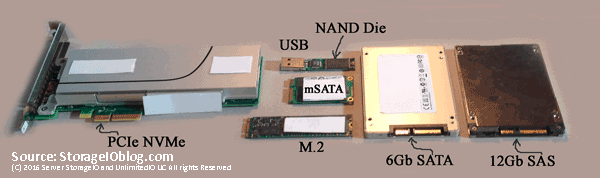
    Which Enterprise HDD for Content Server Platform

    Which Enterprise HDD to use for a Content Server Platform

    data infrastructure HDD server storage I/O trends

    Updated 1/23/2018

    Which enterprise HDD to use with a content server platform?

    Insight for effective server storage I/O decision making
    Server StorageIO Lab Review

    Which enterprise HDD to use for content servers

    This post is the first in a multi-part series based on a white paper hands-on lab report I did compliments of Equus Computer Systems and Seagate that you can read in PDF form here. The focus is looking at the Equus Computer Systems (www.equuscs.com) converged Content Solution platforms with Seagate Enterprise Hard Disk Drive (HDD’s). I was given the opportunity to do some hands-on testing running different application workloads with a 2U content solution platform along with various Seagate Enterprise 2.5” HDD’s handle different application workloads. This includes Seagate’s Enterprise Performance HDD’s with the enhanced caching feature.

    Issues And Challenges

    Even though Non-Volatile Memory (NVM) including NAND flash solid state devices (SSDs) have become popular storage for use internal as well as external to servers, there remains the need for HDD’s Like many of you who need to make informed server, storage, I/O hardware, software and configuration selection decisions, time is often in short supply.

    A common industry trend is to use SSD and HDD based storage mediums together in hybrid configurations. Another industry trend is that HDD’s continue to be enhanced with larger space capacity in the same or smaller footprint, as well as with performance improvements. Thus, a common challenge is what type of HDD to use for various content and application workloads balancing performance, availability, capacity and economics.

    Content Applications and Servers

    Fast Content Needs Fast Solutions

    An industry and customer trend are that information and data are getting larger, living longer, as well as there is more of it. This ties to the fundamental theme that applications and their underlying hardware platforms exist to process, move, protect, preserve and serve information.

    Content solutions span from video (4K, HD, SD and legacy streaming video, pre-/post-production, and editing), audio, imaging (photo, seismic, energy, healthcare, etc.) to security surveillance (including Intelligent Video Surveillance [ISV] as well as Intelligence Surveillance and Reconnaissance [ISR]). In addition to big fast data, other content solution applications include content distribution network (CDN) and caching, network function virtualization (NFV) and software-defined network (SDN), to cloud and other rich unstructured big fast media data, analytics along with little data (e.g. SQL and NoSQL database, key-value stores, repositories and meta-data) among others.

    Content Solutions And HDD Opportunities

    A common theme with content solutions is that they get defined with some amount of hardware (compute, memory and storage, I/O networking connectivity) as well as some type of content software. Fast content applications need fast software, multi-core processors (compute), large memory (DRAM, NAND flash, SSD and HDD’s) along with fast server storage I/O network connectivity. Content-based applications benefit from having frequently accessed data as close as possible to the application (e.g. locality of reference).

    Content solution and application servers need flexibility regarding compute options (number of sockets, cores, threads), main memory (DRAM DIMMs), PCIe expansion slots, storage slots and other connectivity. An industry trend is leveraging platforms with multi-socket processors, dozens of cores and threads (e.g. logical processors) to support parallel or high-concurrent content applications. These servers have large amounts of local storage space capacity (NAND flash SSD and HDD) and associated I/O performance (PCIe, NVMe, 40 GbE, 10 GbE, 12 Gbps SAS etc.) in addition to using external shared storage (local and cloud).

    Where To Learn More

    Additional learning experiences along with common questions (and answers), as well as tips can be found in Software Defined Data Infrastructure Essentials book.

    Software Defined Data Infrastructure Essentials Book SDDC

    What This All Means

    Fast content applications need fast content and flexible content solution platforms such as those from Equus Computer Systems and HDD’s from Seagate. Key to a successful content application deployment is having the flexibility to hardware define and software defined the platform to meet your needs. Just as there are many different types of content applications along with diverse environments, content solution platforms need to be flexible, scalable and robust, not to mention cost effective.

    Continue reading part two of this multi-part series here where we look at how and what to test as well as project planning.

    Ok, nuff said, for now.

    Gs

    Greg Schulz – Microsoft MVP Cloud and Data Center Management, VMware vExpert 2010-2017 (vSAN and vCloud). Author of Software Defined Data Infrastructure Essentials (CRC Press), as well as Cloud and Virtual Data Storage Networking (CRC Press), The Green and Virtual Data Center (CRC Press), Resilient Storage Networks (Elsevier) and twitter @storageio. Courteous comments are welcome for consideration. First published on https://storageioblog.com any reproduction in whole, in part, with changes to content, without source attribution under title or without permission is forbidden.

    All Comments, (C) and (TM) belong to their owners/posters, Other content (C) Copyright 2006-2026 Server StorageIO and UnlimitedIO. All Rights Reserved. StorageIO is a registered Trade Mark (TM) of Server StorageIO.