Can RAID extend the life of nand flash SSD?

Storage I/O trends

Can RAID extend nand flash SSD life?

Imho, the short answer is YES, under some circumstances.

There is a myth and some FUD that RAID (Redundant Array of Independent Disks) can shorten the life durability of nand flash SSD (Solid State Device) vs. HDD (Hard Disk Drives) due to extra IOP’s. The reality is that depending on how configured, RAID level, implementation and other factors, nand flash SSD can be extended as I discuss in this here video.

Video

Nand flash SSD cells and wear

First, there is a myth that nand flash SSD does not have moving parts like hard disk drives (HDD’s) thus do not wear out or break. That is just a myth in that nand flash by its nature wears out with write usage. This is due to how they store data in cells that have a rated number of program erase (P/E) cycles that vary by type of medium. For example, Single Level Cell (SLC) has a longer P/E life duration vs. Multi-Level Cells (MLC) and eMLC that stack multiple cells together.

There are a number of factors that contribute to nand flash wear, also known as duty cycle or durability tied to P/E. For example, some storage systems or controllers do a better job both at the lower level flash translation layer (FTL) in addition to controllers, firmware, caching using DRAM and IO optimization such as write ordering or grouping.

Now what about this RAID and SSD thing?

Ok first as a recap keep in mind that there are many RAID levels along with variations, enhancements and where, or how implemented ranging from software to hardware, adapters to controllers to storage systems.

In the case of RAID 1 or mirroring, just like replication or other one to one or one too many copy operation a write to one device is echoed to another. In the case of RAID 5, data is spread across drives and parity; however, the parity is rotated across all drives in an equal manner.

Some FUD or myths or misunderstandings come into play is that not all RAID 5 implementations as an example are not the same. Some do a better job of buffering or caching data in battery protected mirrored DRAM memory until a full stripe write can occur, or if needed, a partial write.

Another attribute is the chunk or shard size (how much data is sent to each drive member) along with the stripe width (how many drives). Some systems have narrow stripes of say 3+1 or 4+1 or 5+1 while others can be 14+1 or 15+1 or wider. Thus, data can be written across a wider number of drives reducing the P/E consumption or use of a single drive depending on implementation.

How about RAID 6 (dual parity)?

Same thing, it is a matter of how well the implementation is, how the write gathering is done and so forth.

What about RAID wearing out nand flash SSD?

While it is possible that it has or can occur depending on type of RAID implementation, lack of caching or optimization, configuration, type of SSD, RAID level and other things, in general I will say myth busted.

Want some proof?

I could go through a long technical proof point and citing lots of facts, figures, experts and so forth leaving you all silenced and dazed similar to the students listening to Ben Stein in Ferris Buelers day off (Click here to see what I mean) asking “anybody anybody Buleler?

Ben Stein via https://nostagjicmoviesandthings.blogspot.com
Image via nostagjicmoviesandthings.blogspot.com

How about some simple SSD and storage math?

On a very conservative basis, my estimate is that around 250PB of nand flash SSD drives are shipped and installed on a revenue basis attached to or in storage systems and appliances. Combine what Dell + DotHill + EMC + Fujitsu + HDS + HP + IBM (including TMS) + NEC + NetApp + NEC + Oracle among other legacy along with new all flash as well as hybrid vendors (e.g. Cloudbyte, FusionIO (Via their Nexgen acquisition), Kaminario, Greenbytes, Nutanix or Nimble, Purestorage, Starboard or Solidfire, Tegile or Tintri, Violin or Whiptail among others).

It is also a safe assumption based on how customers configure and use those and other storage systems is with some form of RAID. Thus if things were as bad as some researchers were, vendors and their pundits have made them out to be, wouldn’t’t we be hearing of those issues?

Is it just a RAID 5 problem and that RAID 6 magically corrects the problem?

Well, that depends on apples to apples vs. apples to oranges comparisons.

For example if you are using a 14+2 (16 drive) RAID 6 to compare to say a 3+1 (4 drive) RAID 5 that is not a fair comparison. Granted, it is a handy one if you are a vendor that supports wider RAID groups, stripes and ranks vs. those who do not. However also keep in mind that some legacy vendors actually also support wide stripes and RAID groups.

So in some cases the magic is not in the RAID level, rather the implementation or how configured or lack thereof.

Video

Watch this TechTarget produced video recorded live while I was at EMCworld 2013 to learn more.

Otherwise, ok, nuff said (for now).

Cheers
Gs

Greg Schulz – Author Cloud and Virtual Data Storage Networking (CRC Press), The Green and Virtual Data Center (CRC Press) and Resilient Storage Networks (Elsevier)
twitter @storageio

All Comments, (C) and (TM) belong to their owners/posters, Other content (C) Copyright 2006-2026 Server StorageIO and UnlimitedIO LLC All Rights Reserved
Virtual, Cloud and IT Availability, its a shared responsibility and common sense

IT Availability, it’s a shared responsibility and common sense

In case you missed it, recently the State of Oregon had a data center computer problem (ok, storage and application outage) that resulted in unemployment benefits not being provided. Tony Knotzer over at Network Computing did a story Oregon Storage Debacle Highlights Need To Plan For Failure and asked me for some perspectives that you can read here.

Data center

The reason I bring this incident up is not to join in the feeding frenzy that usually occurs when something like this happens, instead, to touch on what should be common. What is lacking at times (or more needed) is common sense when it comes to designing and managing flexible scalable data infrastructures.

“Fundamental IT 101 is that all technology will fail, despite what the vendors tell you,” Schulz said. And the most likely time technology will fail, he notes, is when people are involved — doing configurations, making changes or updates, or performing upgrades. – Via Network Computing

Note that while any technology can or has fail at some point, how it fails along with fault containment via design best practices and vendor resolution are important.

Good vendors learn and correct things so that they don’t happen again as well as work with customers on best practices to isolate and contain faults from expanding into disasters. Thus when a sales or marketing person tries to tell me that they have never had a failure I wonder if a: they are making something up, b: have not actually shipped to a customer in production, c: not aware of other deployments, d: towing the company line, e: too good to be true or f: all the above.

People talking

On the other hand, when a vendor tells me how they have resiliency in their product as well as processes, best practices and can even tell me (public or under NDA) how they have addressed issues, then they have my attention.

A common challenge today is cost cutting along with focus on the newest technology from servers to storage, networking to cloud, virtualization and software defined among other buzzword bingo themes and trends.

buzzword bingo

What also gets overlooked as mentioned above is common sense.

Perhaps if somebody could package and launch a good public relations campaign profiling common sense such as Software Defined Common Sense (SDCS) that might help?

On the other hand, similar to public service announcements (PSA) that may seem like common sense to some, there is a reason they are being done. That is to pass on the information to others who may not know about it thus lack what is perceived as common sense.

Lets get back to the state of Oregon’s computer systems issues and the blame game.

You know the blame game? That is when something happens or does not happen as you want it to simply find somebody else to blame or pivot and point a finger elsewhere.

the blame game

While perhaps good for CYA, the blame games usually does not help to prevent something happening again, or in the first place.

Hence in my comments about the state of Oregon computer storage system problems, I took the tone of what is common these days of no fault, shared responsibility and blame.

In other words does not matter who did what first or did not do, both sides could have prevented it.

For some this might resonate of it does not matter who misbehaved in the sandbox or play room, everybody gets a time out.

This is not to say that one side or the other has to assume or take on more blame or responsibility than the other, rather there is a shared responsibility to look out for each other.

Storage I/O trends

Just like when you drive a car, the education focus is on defensive safe driving to watch out for what the other person might do or not do (e.g. use turn signals or too busy to look in a mirror while talking or texting and driving among other things). The goal is to prevent accidents by watching out for those who are not taking responsibilities for themselves, not to mention learning from others mishaps.

teamwork
Working together vs. the blame game

Different views of customer vs. vendor

Having been a customer, as well as a vendor in the past not surprisingly I have some different views on this.

Sure the customer or client is always right, however sometimes there needs to be unpleasant conversations to help the customer help themselves, or keep themselves out of trouble.

Likewise a vendor may also take the blame when something does go wrong, even if it was entirely not their own fault just to stay in good graces with the customer or get that next deal.

Sometimes a vendor deserves to get beat up when something goes wrong, or at a least tell their story including if needed behind closed doors or under NDA. Likewise to have a meaningful relationship or partnership with the vendor, supplier or VAR, there needs to be trust and confidence which means not everything gets put out for media or blog venues to feed on.

Sure there is explaining what happened without spin, however there is also learning from mistakes to prevent them from happening which should be common sense. If part of that sharing of blame and responsibility requires being not in public that’s fine, as well as enough information of what happened is conveyed to clarify concerns and create confidence.

With vendor lockin, when I was a customer some taught that it’s the vendors fault (or for CYA, blame them), as a vendor the thinking was enforced that the customer is always right and its the competition who causes lockin.

As an analyst advisory consulting, my thinking not surprisingly is that of shared responsibility.

This means only you can allow vendor lockin, not to mention decide if lockin is bad or not.

Likewise only you can prevent data loss in cloud, virtual or traditional environments which also includes loss of access.

Granted somebody higher up the organization structure may over-ride you, however ask yourself if you did what was needed?

Likewise if a vendor is going to be doing some maintenance work in the middle of the week and there is a risk of something happening, even if they have told or sold you there is no single point of failure (NSPOF), or non disruptive upgrades.

Anytime there is a person involved regardless of if hardware, cables, software, firmware, configurations or physical environments something can happen. If the vendor drops the ball or a cable or card or something else and causes an outage or downtime, it is their responsibility to discuss those issues. However it is also the customers responsibility to discuss why they let the vendor do something during that time without taking adequate precautions. Likewise if the storage system was a single point of failure for an important system, then there is the responsibility to discuss the cost cutting concerns of others and have them justify why a redundant solution is not needed (that’s CYA 101 btw ).

Some other common sense tips

For some these might be familiar and if so, are they being done, and for others, perhaps they are new or revolutionary.

In the race to jump to a new technology or vendor, what are the unknowns? For example you may know what the issues or flaws are in an existing systems, solution, product, service or vendor, however what about the new one? Will you be the production beta customer and if so, how can you mitigate any risk?

Ask vendors tough, yet fair questions that are relevant to your needs and requirements including how they handle updates, upgrades and other tasks. Don’t be afraid to go under NDA if needed to get a better view of where they are at, have been and going to avoid surprises.

If this is not common IT sense, then take the responsibility to learn.

On the other hand, if this is common sense, take the responsibility to share and help others learn what it is that you know.

Also understand your availability needs and wants as well as balance those with costs along with risks. If something can go wrong it will if people are involved, thus design for resiliency including maintenance to offset applicable threat risks. Remember in the data center not everything is the same.

Storage I/O trends

Here is my point.

There is enough blame as well as accolades to go around, however take some shared responsibility and use it wisely.

Likewise in the race to cut cost, watch out for causing problems that compromise your information systems or services.

Look into removing complexity and costs without compromise which has long-term benefits vs. simply cutting costs.

Here are some related links and perspectives:
Don’t Let Clouds Scare You Be Prepared
Cloud conversation, Thanks Gartner for saying what has been said
Cloud conversations: Gaining cloud confidence from insights into AWS outages (Part II)
Make Your Company Ready for the Cloud
What do you do when your service provider drops the ball
People, Not Tech, Prevent IT Convergence
Pulling Together a Converged Team
Speaking of lockin, does software eliminate or move the location of vendor lock-in?

Ok, nuff said for now, what say you?

Cheers
Gs

Greg Schulz – Author Cloud and Virtual Data Storage Networking (CRC Press), The Green and Virtual Data Center (CRC Press) and Resilient Storage Networks (Elsevier)
twitter @storageio

All Comments, (C) and (TM) belong to their owners/posters, Other content (C) Copyright 2006-2026 Server StorageIO and UnlimitedIO LLC All Rights Reserved

Seagate provides proof of life: Enterprise HDD enhancements

Storage I/O trends

Proof of life: Enterprise Hard Disk Drives (HDD’s) are enhanced

Last week while hard disk drive (HDD) competitor Western Digital (WD) was announcing yet another (Velobit) in a string of acquisitions ( e.g. earlier included Stec, Arkeia) and investments (Skyera), Seagate announced new enterprise class HDD’s to their portfolio. Note that it was only two years ago that WD acquired Hitachi Global Storage Technologies (HGST) the disk drive manufacturing business of Hitachi Ltd. (not to be confused with HDS).

Seagate

Similar to WD expanding their presence in the growing nand flash SSD market, Seagate also in May of this year extended their existing enterprise class SSD portfolio. These enhancements included new drives with 12Gbs SAS interface, along with a partnership (and investment) with PCIe flash card startup vendor Virident. Other PCIe flash SSD card vendors (manufacturers and OEMs) include Cisco, Dell, EMC, FusionIO, HP, IBM, LSI, Micron, NetApp and Oracle among others.

These new Seagate enterprise class HDD’s are designed for use in cloud and traditional data center servers and storage systems. A month or two ago Seagate also announced new ultra-thin (5mm) client (aka desktop) class HDD’s along with a 3.5 inch 4TB video optimized HDD. The video optimized HDD’s are intended for Digital Video Recorders (DVR’s), Set Top Boxes (STB’s) or other similar applications.

What was announced?

Specifically what Seagate announced were two enterprise class drives, one for performance (e.g. 1.2TB 10K) and the other for space capacity (e.g. 4TB).


Enterprise High Performance 10K.7 (aka formerly known as Savio)

Enterprise Terascale (aka formerly known as constellation)

Class/category

Enterprise / High Performance

Enterprise High Capacity

Form factor

2.5” Small Form Factor (SFF)

3.5”

Interface

6Gbs SAS

6Gbs SATA

Space capacity

1,200GB (1.2TB)

4TB

RPM speed

10,000

5,900

Average seek

2.9 ms

12 ms

DRAM cache

64MB

64MB

Power idle / operating

4.8 watts

5.49 / 6.49 watts

Intelligent Power Management (IPM)

Yes – Seagate PowerChoice

Yes – Seagate PowerChoice

Warranty

Limited 5 years

Limited 3 years

Instant Secure Erase (ISE)

Yes

Optional

Other features

RAID Rebuild assist, Self-Encrypting Device (SED)

Advanced Format (AF) 4K block in addition to standard 512 byte sectors

Use cases

Replace earlier generation 3.5” 15K SAS and Fibre Channel HDD’s for higher performance applications including file systems, databases where SSD are not practical fit.

Backup and data protection, replication, copy operations for erasure coding and data dispersal, active in dormant archives, unstructured NAS, big data, data warehouse, cloud and object storage.

Note the Seagate Terascale has a disk rotation speed of 5,900 (5.9K RPM) which is not a typo given the more traditional 5.4K RPM drives. This slight increase in performance from 5.4K to 5.9K should give when combined with other enhancements (e.g. firmware, electronics) to boost performance for higher capacity workloads.

Let us watch for some performance numbers to be published by Seagate or others. Note that I have not had a chance to try these new drives yet, however look forward to getting my hands on them (among others) sometime in the future for a test drive to add to the growing list found here (hey Seagate and WD, that’s a hint ;) ).

What this all means?

Storage I/O trends

Wait, weren’t HDD’s supposed to be dead or dying?

Some people just like new and emerging things and thus will declare anything existing or that they have lost interest in (or their jobs need it) as old, boring or dead.

For example if you listen to some, they may say nand flash SSD are also dead or dying. For what it is worth, imho nand flash-based SSDs still have a bright future in front of them even with new technologies emerging as they will take time to mature (read more here or listen here).

However, the reality is that for at least the next decade, like them or not, HDD’s will continue to play a role that is also evolving. Thus, these and other improvements with HDD’s will be needed until current nand flash or emerging PCM (Phase Change Memory) among other forms of SSD are capable of picking up all the storage workloads in a cost-effective way.

Btw, yes, I am also a fan and user of nand flash-based SSD’s, in addition to HDD’s and see roles for both as being viable complementing each other for traditional, virtual and cloud environments.

In short, HDD’s will keep spinning (pun intended) for some time granted their roles and usage will also evolve similar to that of tape summit resources.

Storage I/O trends

With this announcement by Seagate along with other enhancements from WD show that the HDD will not only see its 60th birthday, (and here), it will probably also easily see its 70th and not from the comfort of a computer museum. The reason is that there is yet another wave of HDD improvements just around the corner including Shingled Magnetic Recording (SMR) (more info here) along with Heat Assisted Magnetic Recording (HAMR) among others. Watch for more on HAMR and SMR in future posts. With these and other enhancements, we should be able to see a return to the rapid density improvements with HDD’s observed during the mid to late 2000 era when Perpendicular recording became available.

What is up with this ISE stuff is that the same as what Xiotech (e.g. XIO) had?

Is this the same technology that Xiotech (now Xio) referred to the ISE the answer is no. This Seagate ISE is for fast secure erase of data on disk. The benefit of Instant Secure Erase (ISE) is to cut from hours or days the time required to erase a drive for secure disposal to seconds (or less). For those environments that already factor drives erase time as part of those overall costs, this can increase the useful time in service to help improve TCO and ROI.

Wait a minute, aren’t slower RPM’s supposed to be lower performance?

Some of you might be wondering or asking the question of wait, how can a 10,000 revolution per minute (10K RPM) HDD be considered fast vs. a 15K HDD, let alone SSD?

Storage I/O trends

There is a trend occurring with HDD’s that the old rules of IOPS or performance being tied directly to the size and rotational speed (RPM’s) of drives, along with their interfaces. This comes down to being careful to judge a book or in this case a drive by its cover. While RPM’s do have an impact on performance, new generation drives at 10K such as some 2.5” models are delivering performance equal to or better than earlier generation 3.5” 15K device’s.

Likewise, there are similar improvements with 5.4K devices vs. previous generation 7.2K models. As you will see in some of the results found here, not all the old rules of thumbs when it comes to drive performance are still valid. Likewise, keep those metrics that matter in the proper context.


Click on above image to see various performance results

For example as seen in the results (above), the more DRAM or DDR cache on the drives has a positive impact on sequential reads which can be good news if that is what your applications need. Thus, do your homework and avoid judging a device simply by its RPM, interface or form factor.

Other considerations, temperature and vibration

Another consideration is that with increased density of more drives being placed in a given amount of space, some of which may not have the best climate controls, humidity and vibration are concerns. Thus, the importance of drives having vibration dampening or safeguards to keep up performance are important. Likewise, even though drive heads and platters are sealed, there are also considerations that need to be taken care of for humidity in data center or cloud service providers in hot environments near the equator.

If this is not connecting with you, think about how close parts of Southeast Asia and the India subcontinent are to the equator along with the rapid growth and low-cost focus occurring there. Your data center might be temperature and humidity controlled, however others who very focused on cost cutting may not be as concerned with normal facilities best practices.

What type of drives should be used for cloud, virtual and traditional storage?

Good question and one where the answer should be it depends upon what you are trying or need to do (e.g. see previous posts here or here and here (via Seagate)).For example here are some tips for big data storage and storage making decisions in general.

Disclosure

Seagate recently invited me along with several other industry analysts to their cloud storage analyst summit in San Francisco where they covered roundtrip coach airfare, lodging, airport transfers and a nice dinner at the Epic Roast house.

hdd image

I also have received in the past a couple of Momentus XT HHDD (aka SSHD) from Seagate. These are in addition to those that I bought including various Seagate, WD along with HGST, Fujitsu, Toshiba and Samsung (SSD and HDD’s) that I use for various things.

Ok, nuff said (for now).

Cheers gs

Greg Schulz – Author Cloud and Virtual Data Storage Networking (CRC Press), The Green and Virtual Data Center (CRC Press) and Resilient Storage Networks (Elsevier)
twitter @storageio

All Comments, (C) and (TM) belong to their owners/posters, Other content (C) Copyright 2006-2026 Server StorageIO and UnlimitedIO LLC All Rights Reserved

Part II: EMC Evolves Enterprise Data Protection with Enhancements

Storage I/O trends

This is the second part of a two-part series on recent EMC backup and data protection announcements. Read part I here.

What about the products, what’s new?

In addition to articulating their strategy for modernizing data protection (covered in part I here), EMC announced enhancements to Avamar, Data Domain, Mozy and Networker.

Data protection storage systems (e.g. Data Domain)

Building off of previously announced Backup Recovery Solutions (BRS) including Data Domain operating system storage software enhancements, EMC is adding more application and software integration along with new platform (systems) support.

Data Domain (e.g. Protection Storage) enhancements include:

  • Application integration with Oracle, SAP HANA for big data backup and archiving
  • New Data Domain protection storage system models
  • Data in place upgrades of storage controllers
  • Extended Retention now available on added models
  • SAP HANA Studio backup integration via NFS
  • Boost for Oracle RMAN, native SAP tools and replication integration
  • Support for backing up and protecting Oracle Exadata
  • SAP (non HANA) support both on SAP and Oracle

Data in place upgrades of controllers for 4200 series models on up (previously available on some larger models). This means that controllers can be upgraded with data remaining in place as opposed to a lengthy data migration.

Extended Retention facility is a zero cost license that enables more disk drive shelves to be attached to supported Data Domain systems. Thus there is a not a license fee, however you do pay for the storage shelves and drives to increase the available storage capacity. Note that this feature increases the storage capacity by adding more disk drives and does not increase the performance of the Data Domain system. Extended Retention has been available in the past however is now supported via more platform models. The extra storage capacity is essentially placed into a different tier that an archive policy can then migrate data into.

Boost for accelerating data movement to and from Data Domain systems is only available using Fibre Channel. When asked about FC over Ethernet (FCoE) or iSCSI EMC indicated its customers are not asking for this ability yet. This has me wondering if it is that the current customer focus is around FC, or if those customers are not yet ready for iSCSI or FCoE, or, if there were iSCSI or FCoE support, more customers would ask for it?

With the new Data Domain protection storage systems EMC is claiming up to:

  • 4x faster performance than earlier models
  • 10x more scalable and 3x more backup/archive streams
  • 38 percent lower cost per GB based on holding price points and applying improvements


EMC Data Domain data protection storage platform family


Data Domain supporting both backup and archive

Expanding Data Domain from backup to archive

EMC continues to evolve the Data Domain platform from just being a backup target platform with dedupe and replication to a multi-function, multi-role solution. In other words, one platform with many uses. This is an example of using one tool or technology for different purposes such as backup and archiving, however with separate polices. Here is a link to a video where I discuss using common tools for backup and archiving, however with separate polices. In the above figure EMC Data Domain is shown as being used for backup along with storage tiering and archiving (file, email, Sharepoint, content management and databases among other workloads).


EMC Data Domain supporting different functions and workloads

Also shown are various tools from other vendors such as Commvault Simpana that can be used as both a backup or archiving tool with Data Domain as a target. Likewise Dell products acquired via the Quest acquisition are shown along with those from IBM (e.g. Tivoli), FileTek among others. Note that if you are a competitor of EMC or simply a fan of other technology you might come to the conclusion that the above may not be different from others. Then again others who are not articulating their version or vision of something like the above figure probably should be also stating the obvious vs. arguing they did it first.

Data source integration (aka data protection software tools)

It seems like just yesterday that EMC acquired Avamar (2006) and NetWorker aka Legato (2003), not to mention Mozy (2007) or Dantz (Retrospect, since divested) in 2004. With the exception of Dantz (Retrospect) which is now back in the hands of its original developers, EMC continues to enhance and evolve Avamar, Mozy and NetWorker including with this announcement.

General Avamar 7 and Networker 8.1 enhancements include:

  • Deeper integration with primary storage and protection storage tiers
  • Optimization for VMware vSphere virtual server environments
  • Improved visibility and control for data protection of enterprise applications

Additional Avamar 7 enhancements include:

  • More Data Domain integration and leveraging as a repository (since Avamar 6)
  • NAS file systems with NDMP accelerator access (EMC Isilon & Celera, NetApp)
  • Data Domain Boost enhancements for faster backup / recovery
  • Application integration with IBM (DB2 and Notes), Microsoft (Exchange, Hyper-V images, Sharepoint, SQL Server), Oracle, SAP, Sybase, VMware images

Note that Avamar dat is still used mainly for ROBO and desktop, laptop type backup scenarios that do not yet support Data Domain. Also see Mozy enhancements below).

Avamar supports VMware vSphere virtual server environments using granular change block tracking (CBT) technology as well as image level backup and recovery with vSphere plugins. This includes an Instant Access recovery when images are stored on Data Domain storage.

Instant Access enables a VM that has been protected using Avamar image level technology on Data Domain to be booted via an NFS VMware Dat. VMware sees the VM and is able to power it on and boot directly from the Data Domain via the NFS Dat. Once the VM is active, it can be Storage vMotion to a production storage VMware Dat while active (e.g. running) for recovery on the fly capabilities.


Instant Access to a VM on Data Domain storage

EMC NetWorker 8.1 enhancements include:

  • Enhanced visibility and control for owners of data
  • Collaborative protection for Oracle environments
  • Synchronize backup and data protection between DBA and Backup admin’s
  • Oracle DBAs use native tools (e.g. RMAN)
  • Backup admin implements organizations SLA’s (e.g. using Networker)
  • Deeper integration with EMC primary storage (e.g. VMAX, VNX, etc)
  • Isilon integration support
  • Snapshot management (VMAX, VNX, RecoverPoint)
  • Automation and wizards for integration, discovery, simplified management
  • Policy-based management, fast recovery from snapshots
  • Integrating snapshots into and as part of data protection strategy. Note that this is more than basic snapshot management as there is also the ability to roll over a snapshot into a Data Domain protection storage tier.
  • Deeper integration with Data Domain protection storage tier
  • Data Domain Boost over Fibre Channel for faster backups and restores
  • Data Domain Virtual Synthetics to cut impact of full backups
  • Integration with Avamar for managing image level backup recovery (Avamar services embedded as part of NetWorker)
  • vSphere Web Client enabling self-service recovery of VMware images
  • Newly created VMs inherit backup polices automatically

Mozy is being positioned for enterprise remote office branch office (ROBO) or distributed private cloud where Avamar, NetWorker or Data Domain solutions are not as applicable. EMC has mentioned that they have over 800 enterprises using Mozy for desktop, laptop, ROBO and mobile data protection. Note that this is a different target market than the Mozy consumer product focused which also addresses smaller SMBs and SOHOs (Small Office Home Offices).

EMC Mozy enhancements to be more enterprise grade:

  • Simplified management services and integration
  • Active Directory (AD) for Microsoft environments
  • New storage pools (multiple types of pools) vs. dedicated storage per client
  • Keyless activation for faster provisioning of backup clients

Note that EMC enhanced earlier this year Data Protection Advisor (DPA) with version 6.0.

What does this all mean?

Storage I/O trends

Data protection and backup discussions often focus around tape summit resources or cloud arguments, although this is changing. What is changing is growing awareness and discussion around how data protection storage mediums, systems and services are used along with the associated software management tools.

Some will say backup is broke often pointing a finger at a media or medium (e.g. tape and disk) about what is wrong. Granted in some environments the target medium (or media) destination is an easy culprit to point a finger to as the problem (e.g. the usual tape sucks or is dead) mantra. However, for many environments while there can be issues, it is more often than not the media, medium, device or target storage system that is broke, instead how it is being used or abused.

This means revisiting how tools are used along with media or storage systems allocated, used and retained with respect to different threat risk scenarios. After all, not everything is the same in the data center or information factory.

Thus modernizing data protection is more than swapping media or mediums including types of storage system from one to another. It is also more than swapping out one backup or data protection tool for another. Modernizing data protection means rethinking what different applications and data need to be protected against various threat risks.

Storage I/O trends

What this has to do with today’s announcement is that EMC is among others in the industry moving towards a holistic data protection modernizing thought model.

In my opinion what you are seeing out of EMC and some others is taking that step back and expanding the data protection conversation to revisit, rethink why, how, where, when and by whom applications and information get protected.

This announcement also ties into finding and removing costs vs. simply cutting cost at the cost of something elsewhere (e.g. service levels, performance, availability). In other words, finding and removing complexities or overhead associated with data protection while making it more effective.

Some closing points, thoughts and more links:

There is no such thing as a data or information recession
People and data are living longer while getting larger
Not everything is the same in the data center or information factory
Rethink data protection including when, why, how, where, with what and by whom
There is little data, big data, very big data and big fast data
Data protection modernization is more than playing buzzword bingo
Avoid using new technology in old ways
Data footprint reduction (DFR) can be help counter changing data life-cycle patterns
EMC continues to leverage Avamar while keeping Networker relevant
Data Domain evolving for both backup and archiving as an example of tool for multiple uses

Ok, nuff said (for now).

Cheers gs

Greg Schulz – Author Cloud and Virtual Data Storage Networking (CRC Press), The Green and Virtual Data Center (CRC Press) and Resilient Storage Networks (Elsevier)
twitter @storageio

All Comments, (C) and (TM) belong to their owners/posters, Other content (C) Copyright 2006-2026 Server StorageIO and UnlimitedIO LLC All Rights Reserved

EMC Evolves Enterprise Data Protection with Enhancements (Part I)

Storage I/O trends

A couple of months ago at EMCworld there were announcements around ViPR, Pivotal along with trust and clouds among other topics. During the recent EMCworld event there were some questions among attendees what about backup and data protection announcements (or lack there of)?

Modernizing Data Protection

Today EMC announced enhancements to its Backup Recovery Solutions (BRS) portfolio (@EMCBackup) that continue to enable information and applications data protection modernizing including Avamar, Data Domain, Mozy and Networker.

Keep in mind you can’t go forward if you can’t go back, which means if you do not have good data protection to go to, you can’t go forward with your information.

EMC Modern Data Protection Announcements

As part of their Backup to the Future event, EMC announced the following:

  • New generation of data protection products and technologies
  • Data Domain systems: enhanced application integration for backup and archive
  • Data protection suite tools Avamar 7 and Networker 8.1
  • Enhanced Cloud backup capabilities for the Mozy service
  • Paradigm shift as part of data protection modernizing including revisiting why, when, where, how, with what and by whom data protection is accomplished.

What did EMC announce for data protection modernization?

While much of the EMC data protection announcement is around product, there is also the aspect of rethinking data protection. This means looking at data protection modernization beyond swapping out media (e.g. tape for disk, disk for cloud) or one backup software tool for another. Instead, revisiting why data protection needs to be accomplished, by whom, how to remove complexity and cost, enable agility and flexibility. This also means enabling data protection to be used or consumed as a service in traditional, virtual and private or hybrid cloud environments.

EMC uses as an example (what they refer to as Accidental Architecture) of how there are different group and areas of focus, along with silos associated with data protection. These groups span virtual, applications, database, server, storage among others.

The results are silos that need to be transformed in part using new technology in new ways, as well as addressing a barrier to IT convergence (people and processes). The theme behind EMC data protection strategy is to enable the needs and requirements of various groups (servers, applications, database, compliance, storage, BC and DR) while removing complexity.

Moving from Silos of data protection to a converged service enabled model

Three data protection and backup focus areas

This sets the stage for the three components for enabling a converged data protection model that can be consumed or used as a service in traditional, virtual and private cloud environments.


EMC three components of modernized data protection (EMC Future Backup)

The three main components (and their associated solutions) of EMC BRS strategy are:

  • Data management services: Policy and storage management, SLA, SLO, monitoring, discovery and analysis. This is where tools such as EMC Data Protection Advisor (aka via WysDM acquisition) fit among others for coordination or orchestration, setting and managing polices along with other activities.
  • Data source integration: Applications, Database, File systems, Operating System, Hypervisors and primary storage systems. This is where data movement tools such as Avamar and Networker among others fit along with interfaces to application tools such as Oracle RMAN.
  • Protection storage: Targets, destination storage system with media or mediums optimized for protecting and preserving data along with enabling data footprint reduction (DFR). DFR includes functionality such as compression and dedupe among others. Example of data protection storage is EMC Data Domain.

Read more about product items announced and what this all means here in the second of this two-part series.

Ok, nuff said (for now).

Cheers gs

Greg Schulz – Author Cloud and Virtual Data Storage Networking (CRC Press), The Green and Virtual Data Center (CRC Press) and Resilient Storage Networks (Elsevier)
twitter @storageio

All Comments, (C) and (TM) belong to their owners/posters, Other content (C) Copyright 2006-2026 Server StorageIO and UnlimitedIO LLC All Rights Reserved

HDS Mid Summer Storage and Converged Compute Enhancements

Storage I/O trends

Converged Compute, SSD Storage and Clouds

Hitachi Data Systems (HDS) announced today several enhancements to their data storage and unified compute portfolio as part of their Maximize I.T. initiative.

Setting the context

As part of setting the stage for this announcement, HDS has presented the following strategy vision as part their vision for IT transformation and cloud computing.

https://hds.com/solutions/it-strategies/maximize-it.html?WT.ac=us_hp_flash_r11

What was announced

This announcement builds on earlier ones around HDS Unified Storage (HUS) primary storage using nand flash MLC Solid State Devices (SSD) and Hard Disk Drives (HDD’s), along with unified block and file (NAS), as well Unified Compute Platform (UCP) also known as converged compute, networking, storage and software. These enhancements follow recent updates to the HDS Content Platform (HCP) for object, file and content storage.

There are three main focus areas of the announcement:

  • Flash SSD storage enhancements for HUS
  • Unified with enhanced file (aka BlueArc based)
  • Enhanced unified compute (UCP)

HDS Flash SSD acceleration

The question should not be if SSD is in your future, rather when, where, with what and how much will be needed.

As part of this announcement, HDS is releasing an all flash SSD based HUS enterprise storage system. Similar to what other vendors have done, HDS is attaching flash SSD storage to their HUS systems in place of HDD’s. Hitachi has developed their own SSD module announced in 2012 (read more here). The HDS SSD module use Multi Level Cell (MLC) nand flash chips (dies) that now supports 1.6TB of storage space capacity unit. This is different from other vendors who either use nand flash SSD drive form factor devices (e.g. Intel, Micron, Samsung, SANdisk, Seagate, STEC (now WD), WD among others) or, PCIe form factor cards (e.g. FusionIO, Intel, LSI, Micron, Virident among others) or, attach a third-party external SSD device (e.g. IBM/TMS, Violin, Whiptail etc.).

Like some other vendors, HDS has also done more than simply attach a SSD (drive, PCIe card, or external device) to their storage systems calling it an integrated solution. What this means is that HDS has implemented software or firmware changes into their storage systems to manage durability and extend flash duty cycles caused by program erase (P/E) cycle wear. In addition HDS has implemented performance optimization in their storage systems to leverage the faster SSD modules, after all, faster storage media or devices need fast storage systems or controllers.

While the new all flash storage system can be initially bought with just SSD, similar to other hybrid storage solutions, hard disk drives (HDD’s) can also be installed. For enabling full performance at low latency, HDS is addressing both the flash SSD modules as well as the storage systems they attach to including back-end, front-end and caching in-between.

The release enables 500,000 or half a million IOPS (no IOP size, reads or writes, random or sequential. Future firmware (non-disrupted) to enable higher performance that HDS is claiming will be 1,000,000 IOPS at under a millisecond) were indicated.

In addition to future performance improvements, HDS is also indicating increased storage space capacity of its MLC flash SSD modules (1.6TB today). Using 12 modules (1.6TB each), 154TB of flash SSD can be placed in a single rack.

HDS File and Network Attached Storage (NAS)

HUS unified NAS file system and gateway (BlueArc based) enhancements include:

  • New platforms leveraging faster processors (both Intel and Field Programmable Gate Arrays (FPGA’s))
  • Common management and software tools from 3000 to new 4000 series
  • Bandwidth doubled with faster connections and more memory
  • Four 10GbE NAS serving ports (front-end)
  • Four 8Gb Fibre Channel ports (back-end)
  • FPGA leveraged for off-loading some dedupe functions (faster performance)

HDS Unified Complete Platform (UCP)

As part of this announcement, HDS is enhancing the Unified Compute Platform (UCP) offerings. HDS re-entered the compute market in 2012 joining other vendors offering unified compute, storage and networking solutions. The HDS converged data infrastructure competes with AMD (Seamicro) SM15000, Dell vStart and VRTX (for lower end market), EMC and VCE vBlock, NetApp FlexPod along with those from HP (or Moonshot micro servers), IBM Puresystems, Oracle and others.

UCP Pro for VMware vSphere

  • Turnkey converged solution (Compute, Networking, Storage, Software)
  • Includes VMware vSphere pre-installed (OEM from VMware)
  • Flexible compute blade options
  • Three storage system options (HUS, HUS VM and VSP)
  • Cisco and Brocade IP networking
  • UCP Director 3.0 with enhanced automation and orchestration software

UCP Select for Microsoft Private Cloud

  • Supports Hyper-V 3.0 server virtualization
  • Live migration with DR and resynch
  • Microsoft Fast Track certified

UCP Select for Oracle RAC

  • HDS Flash SSD storage
  • SMP x86 compute for performance
  • 2x improvements for IOPS less than 1 millisecond
  • Common management with HiCommand suite
  • Integrated with Oracle RMAN and OVM

UCP Select for SAP HANA

  • Scale out to 8TBs memory (DRAM)
  • Tier 1 storage system certified for SAP HANA DR
  • Leverages SAP HANA SAP storage connector API

What this all means?

Storage I/O trends

With these announcements HDS is extending its storage centric hardware, software and services solution portfolio for block, file and object access across different usage tiers (systems, applications, mediums). HDS is also expanding their converged unified compute platforms to stay competitive with others including Dell, EMC, Fujitsu, HP, IBM, NEC, NetApp and Oracle among others. For environments with HDS storage looking for converged solutions to support VMware, Microsoft Hyper-V, Oracle or SAP HANA these UCP systems are worth checking out as part of evaluating vendor offerings. Likewise for those who have HDS storage exploring SSD offerings, these announcements give opportunities to enable consolidation as do the unified file (NAS) offerings.

Note that now HDS does not have a public formalized message or story around PCIe flash cards, however they have relationships with various vendors as part of their UCP offerings.

Overall a good set of incremental enhancements for HDS to stay competitive and leverage their field proven capabilities including management software tools.

Ok, nuff said

Cheers gs

Greg Schulz – Author Cloud and Virtual Data Storage Networking (CRC Press), The Green and Virtual Data Center (CRC Press) and Resilient Storage Networks (Elsevier)
twitter @storageio

All Comments, (C) and (TM) belong to their owners/posters, Other content (C) Copyright 2006-2026 Server StorageIO and UnlimitedIO LLC All Rights Reserved

Upgrading Lenovo X1 Windows 7 with a Samsung 840 SSD

Storage I/O trends

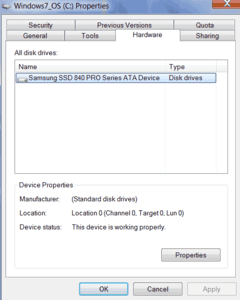
I recently upgraded my Lenovo X1 laptop from a Samsung 830 256GB Solid State Device (SSD) drive to a new Samsung 840 512GB SSD. The following are some perspectives, comments on my experience in using the Samsung SSD over the past year, along with what was involved in the upgrade.

Background

A little over a year ago I upgraded my then new Lenovo X1 replacing upon its arrival the factory supplied Hard Disk Drive (HDD) with a Solid State Device (SSD) drive. After setup and data migration the 2.5” 7,200 RPM 320GB Toshiba HDD was cloned to a SATA 256GB Samsung model 830 SSD. By first setting up and configuring, copying files, applications, going through Windows and other updates, when it came time to clone to the SSD, the HDD effectively became a backup.

Note that prior to using the Samsung SSD in my Lenovo X1, I was using Hybrid HDD (HHDD’s) as my primary storage to boost read performance and space capacity. These were in addition to other external SSD and HDD that I used along with NAS devices. Read more about my HHDD experiences in a series of post here.

Fast forward to the present and it is time to do yet another upgrade, not because there is anything wrong with the Samsung SSD other than I was running low on space capacity. Sure 256GB was a lot of space, however I also had become used to having a 500GB and 750GB HHDD before downsizing to the SSD. Granted some of the data I have on the SSD is more for convenience, as a cache or buffer when not connected to the network. Not to mention if you have VMware Workstation for running various Virtual Machines (VMs) you know how those VMs can add up quickly, not to mention videos and other items.

Stack of HDD, HHDD and SSDs

Over the past year, my return on investment (ROI) and return on innovation (the new ROI) was as low as three months, or worse case about six months. That was based on the amount of time I was able to not have to wait while saving data. Sure, I had some read and boot performance improvements, as well as being able to do more IOPs and other things. However those were not as significant due to having been using HHDDs vs. if had gone from HDD to SSD.

My productivity was saving 3 to 5 minutes per day when storing large files, documents, videos or other items as part of generating or working on content. Not to mention seeing faster snapshots and other copy functions for HA, BC, DR take less time enabling more productivity to occur vs. waiting.

Thus the ROI timeframe varies depends on what I value my time on or for a particular project among other things.

Sure IOPS are important, so to is simple wall clock or stop watch based timing to measure work being done or time spent waiting.

Upgrade Time

While this was replacing one SSD with another, the same things and steps would apply if going from an HDD to SSD.

Before upgrade
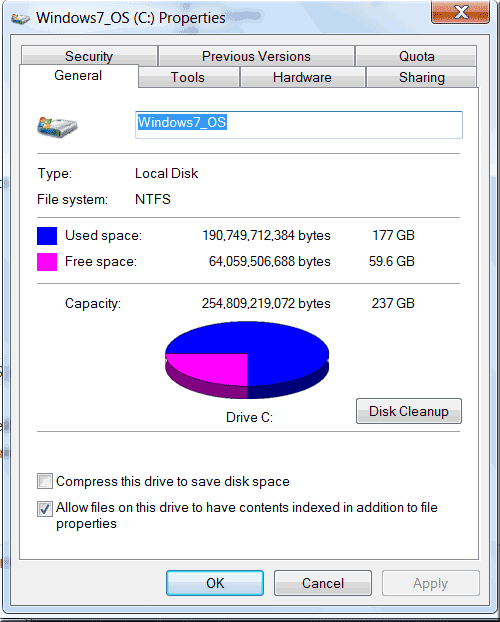
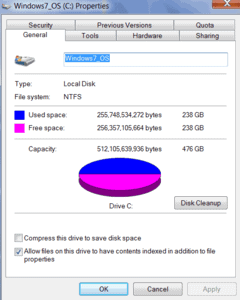
Free space and storage utilization before the upgrade

Make sure that you have a good full and consistent backup copy of your data.

If it is enabled, disable bit locker or other items that might interfere with the clone. Here is a post if you are interested in enabling Windows bitlocker on Windows 7 64 bit.

Run a quick cleanup, registry repair or other maintenance to make sure you have a good and consistent copy before cloning it.

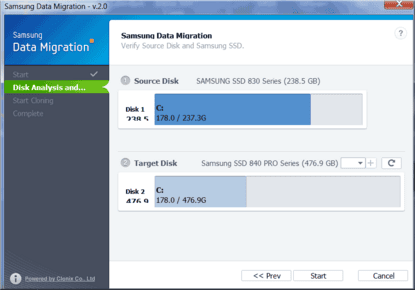
Install any migration or clone software, in the past I have used Seagate Discwizard (Acronis) along with full Acronis in the past. This time I used the Samsung Data Migration powered by Clonix, which is an improvement IMHO vs. what they used to supply which was Norton Ghost.

Shutdown Time

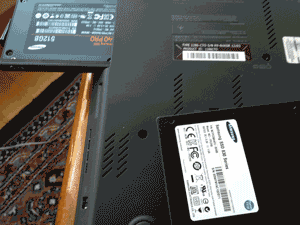
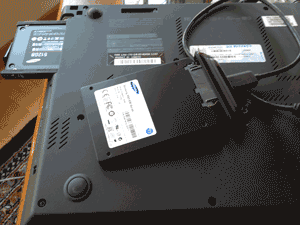
Attach the new drive, for this upgrade I removed the existing Samsung 830 SSD from its internal bay and replaced it with the new Samsung 840. The Samsung 830 was then attached to Lenovo X1 laptop using a USB to SATA cable. Note that you could also do the opposite which is attach the new drive using the USB to SATA cable for the clone operation, then install that into the internal drive bay which would drop need for changing boot sequence.


Samsung 830, Samsung 840 and Lenovo X1


Old Samsung 830 removed, new 840 being installed


Samsung 840 goes in Lenovo X1, Samsung 830 with SATA to USB cable

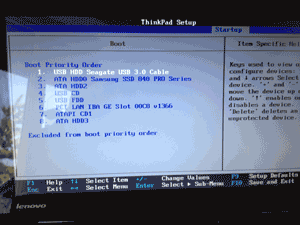
Since I removed the old drive and attached that to the Lenovo X1 via a SATA to USB cable, and the new drive internal, I also had to change the boot sequence. Remember to change this boot sequence back after the upgrade is complete. On the other hand, if you leave the original drive internally and attach the new drive via a USB to SATA, or eSATA to SATA cable for the clone, you do not need to change the boot sequence.


Changing boot sequence , note one SSDs appears as USB cable being used

Before running the data migration software, I disabled my network connection to make sure the system was isolated during the upgraded and then run the data migration software tool.


Samsung Data Migration tool (powered by Clonix Ltd.) during clone operation

Unlike tools such as Seagate DiscWizard based on Acronis, the Samsung tool based on Clonix does not shutdown or performs upgrade off-line. There is a tradeoff here that I observed, the Acronis shutdown approach while being offline, seemed quicker, however that is subjective. The Samsung tool seemed longer, about 2.5 hours to clone 256G to 512G however, I was still able to do things on the PC (making screen shots).

Even though the Clonix powered Samsung data migration tool works on-line enabling things to be done, best to leave all applications shutdown.

Once the data migration tool is done and it says 100 percent complete DO NOT DO ANYTHING until you see a prompt telling you to do something.

WAIT, as there is some background things that occur after you get the 100 percent complete. When you see prompt screen, only then it will be ok to move forward.

At that point, shutdown window, remove old drive, change any setup boot sequence and reboot to verify all is ok.

Also, remember to turn bit locker back on if needed.

Post Mortem

How is the new SSD drive is running?

So far so good, as fast if not better than the old one.


About a month after the upgrade and the space is being put to use.

How about the Samsung 830?

That is now being used for various things in my test lab environment joining other SSD, HHDD and HDDs supporting various physical and virtual server activities including in some testing as part of this series (watch for more in this series soon).

Ok, nuff said.

Cheers gs

Greg Schulz – Author Cloud and Virtual Data Storage Networking (CRC Press), The Green and Virtual Data Center (CRC Press) and Resilient Storage Networks (Elsevier)
twitter @storageio

All Comments, (C) and (TM) belong to their owners/posters, Other content (C) Copyright 2006-2026 Server StorageIO and UnlimitedIO LLC All Rights Reserved

IBM buys Softlayer, for software defined infrastructures and clouds?

Storage I/O trends

IBM today announced that they are acquiring privately held Dallas Texas-based Softlayer and Infrastructure as a Service (IaaS) provider.

IBM is referring to this as Cloud without Compromise (read more about clouds, conversations and confidence here).

It’s about the management, flexibly, scale up, out and down, agility and valueware.

Is this IBM’s new software defined data center (SDDC) or software defined infrastructure (SDI) or software defined management (SDM), software defined cloud (SDC) or software defined storage (SDS) play?

This is more than a software defined marketing or software defined buzzword announcement.
buzzword bingo

If your view of software define ties into the theme of leveraging, unleashing resources, enablement, flexibility, agility of hardware, software or services, then you may see Softlayer as part of a software defined infrastructure.

On the other hand, if your views or opinions of what is or is not software defined align with a specific vendor, product, protocol, model or punditry then you may not agree, particular if it is in opposition to anything IBM.

Cloud building blocks

During today’s announcement briefing call with analysts there was a noticeable absence of software defined buzz talk which given its hype and usage lately, was a refreshing welcome relief. So with that, lets set the software defined conversation aside (for now).

Cloud image

Who is Softlayer, why is IBM interested in them?

Softlayer provide software and services to support both SMB, SME and other environments with bare metal (think traditional hosted servers), along with multi-tenant (shared) cloud virtual public and private cloud service offerings.

Softlayer supports various applications, environments from little data processing to big data analytics to little data processing, from social to mobile to legacy. This includes those app’s or environments that were born in the cloud, or legacy environments looking to leverage cloud in a complimentary way.

Some more information about Softlayer includes:

  • Privately held IaaS firm founded in 2005
  • Estimated revenue run rate of around $400 million with 21,000 customers
  • Mix of SMB, SME and Web-based or born in the cloud customers
  • Over 100,000 devices under management
  • Provides a common modularized management framework set of tools
  • Mix of customers from Web startups to global enterprise
  • Presence in 13 data centers across the US, Asia and Europe
  • Automation, interoperability, large number of API access and supported
  • Flexibility, control and agility for physical (bare metal) and cloud or virtual
  • Public, private and data center to data center
  • Designed for scale, durability and resiliency without complexity
  • Part of OpenStack ecosystem both leveraging and supporting it
  • Ability for customers to use OpenStack, Cloudstack, Citrix, VMware, Microsoft and others
  • Can be white or private labeled for use as a service by VARs

Storage I/O trends

What IBM is planning for Softlayer

Softlayer will report into IBM Global Technology Services (GTS) complimenting existing capabilities which includes ten cloud computing centers on five continents. IBM has created a new Cloud Services Division and expects cloud revenues could be $7 billion annually by the end of 2015. Amazon Web Services (AWS) is estimated to hit about $3.8 Billion by end of 2013. Note that in 2012 AWS target available market was estimated to be about $11 Billion which should become larger moving forward. Rackspace by comparison had recent earning announcements on May 8 2013 of $362 Million with most that being hosting vs. cloud services. That works out to an annualized estimated run rate of $1.448 Billion (or better depending on growth).

I mention AWS and Rackspace to illustrate the growth potential for IBM and Softlayer to discuss the needs of both cloud services customers such as those who use AWS (among other providers), as well as bare metal or hosting or dedicated servers such as with Rackspace among others.

Storage I/O trends

What is not clear at this time is if IBM is combing traditional hosting, managed services, new offerings, products and services in that $7 billion number. In other words if the $7 billion represents what the revenues of the new Cloud Services Division independent of other GTS or legacy offerings as well as excluding hardware, software products from STG (Systems Technology Group) among others, that would be impressive and a challenge to the likes of AWS.

IBM has indicated that it will leverage its existing Systems Technology Group (STG) portfolio of servers and storage extending the capabilities of Softlayer. While currently x86 based, one could expect IBM to leverage and add support for their Power systems line of processors and servers, Puresystems, as well as storage such as XIV or V7000 among others for tier 1 needs.

Some more notes:

  • Ties into IBM Smart Cloud initiatives, model and paradigm
  • This deal is expected to close 3Q 2013, terms or price were not disclosed.
  • Will enable Softlayer to be leveraged on a larger, broader basis by IBM
  • Gives IBM increased access to SMB, SME and web customers than in the past
  • Software and development to stay part of Softlayer
  • Provides IBM an extra jumpstart play for supporting and leveraging OpenStack
  • Compatible and supports Cloustack and Citrix who are also IBM partners
  • Also compatible and supports VMware who is also an IBM partner

Storage I/O trends

Some other thoughts and perspectives

This is a good and big move for IBM to add value and leverage their current portfolios of both services, as well as products and technologies. However it is more than just adding value or finding new routes to markets for those goods and services, it’s also about enablement IBM has long been in the services including managed services, out or in sourcing and hosting business. This can be seen as another incremental evolution of those offerings to both existing IBM enterprise customers, as well to reach new, emerging along with SMB or SME’s that tend to grow up and become larger consumers of information and data infrastructure services.

Further this helps to add some product and meaning around the IBM Smart Cloud initiatives and programs (not that there was not before) giving customers, partners and resellers something tangible to see, feel, look at, touch and gain experience not to mention confidence with clouds.

On the other hand, is IBM signaling that they want more of the growing business that AWS has been realizing, not to mention Microsoft Azure, Rackspace, Centurylink/Savvis, Verizon/Terremark, CSC, HP Cloud, Cloudsigma, Bluehost among many others (if I missed you or your favorite provider, feel free to add it to the comments section). This also gets IBM added Devops exposure something that Softlayer practices, as well as a Openstack play, not to mention cloud, software defined, virtual, big data, little data, analytics and many other buzzword bingo terms.

Congratulations to both IBM and the Softlayer folks, now lets see some execution to watch how this unfolds.

Ok, nuff said.

Cheers gs

Greg Schulz – Author Cloud and Virtual Data Storage Networking (CRC Press), The Green and Virtual Data Center (CRC Press) and Resilient Storage Networks (Elsevier)
twitter @storageio

All Comments, (C) and (TM) belong to their owners/posters, Other content (C) Copyright 2006-2026 Server StorageIO and UnlimitedIO LLC All Rights Reserved

May 2013 Server and StorageIO Update Newsletter

StorageIO News Letter Image
May 2013 News letter

Welcome to the May 2013 edition of the StorageIO Update. This edition has announcement analysis of EMC ViPR, Software Defined Storage (including a video here), server, storage and I/O metrics that matter for example how many IOPS can a HDD do (it depends). SSD including nand flash remains a popular topic, both in terms of industry adoption and customer deployment. Also included are my perspectives on the SSD vendor FusionIO CEO leaving in a flash. Speaking of nand flash, have you thought about how some RAID implementations and configurations can extend the life along with durability of SSD’s? More on this soon, however check out this video to give you some perspectives.

Click on the following links to view the May 2013 edition as (HTML sent via Email) version, or PDF versions.

Visit the news letter page to view previous editions of the StorageIO Update.

You can subscribe to the news letter by clicking here.

Enjoy this edition of the StorageIO Update news letter, let me know your comments and feedback.

Ok Nuff said, for now

Cheers
Gs

Greg Schulz – Author Cloud and Virtual Data Storage Networking (CRC Press), The Green and Virtual Data Center (CRC Press) and Resilient Storage Networks (Elsevier)
twitter @storageio

All Comments, (C) and (TM) belong to their owners/posters, Other content (C) Copyright 2006-2026 Server StorageIO and UnlimitedIO LLC All Rights Reserved

FusionIO (FIO) SSD vendor CEO out in a flash, whats up with that?

Storage I/O trends

FusionIO (FIO) who recently bought Nexgen to expand their reach from just a server centric to a more broad flash focus has seen their CEO and founder David Flynn race out the door. Not surprisingly, wall street who does not like to be surprised were surprised just a week or two after the most recent earning announcements reacted with a sell off of the FIO stock.

Here is the conundrum, those who were or are fans of Flynn, FIO and their approach along with server centric in your face approach may not be happy with this move.

On the other hand, those were not fans of Flynn, FIO and their approach of getting in your face of having others do so if you did not fall into their ranks may be happy with this move.

One question is was Flynn shown the door and left before it could hit his backside on the way out, or, did he see something and pulled the rip cord on his golden parachute, or some other or combination?

With the recent Nexgen acquisition which could be seen as a move by FIO (and their board of directors) to make more attractive either for an acquisition. Or, to transition from a server-side centric approach to a broader focus.

If the former, perhaps Flynn sees or saw the writing on the wall on who those suitors might or would be and decided to take his money now and run joining the serial entrepreneur ranks now.

Otoh, perhaps Flynn was just too focused with a singular focus and passion on the server space thus not able or interested in transitioning to a broader focus, which might also have involved eating a bit of crow. By eating a bit of crow, I mean given some of the in your face and it’s the FIO way or the highway approach of server only flash.

With Nexgen to be successful that would involve aligning more with the larger vendors and other startups who offer broader portfolios, something that was targeted and mud or fud thrown at by FIO, something that some CEOs or others can have challenges with. It should also be noted that FIO has brought in new employees with experience in broader marketers, not to mention industry veterans like John Spiers of Nexgen.

Candidly, I am not sure which of the above is the scenario, however, for those involved with FIO as employees, partners, customers and shareholders I hope some clarity arrives soon for them. Whether that clarity is via an acquisition (who is one of many questions), or a launching as FIO 2.0 or something similar with a focus on bring more capabilities to customers, increasing their touch points selling more products, hardware, software as opposed to leaving those for others (e.g. their competitors).

Ok, nuff said (for now)

Cheers gs

Greg Schulz – Author Cloud and Virtual Data Storage Networking (CRC Press), The Green and Virtual Data Center (CRC Press) and Resilient Storage Networks (Elsevier)
twitter @storageio

All Comments, (C) and (TM) belong to their owners/posters, Other content (C) Copyright 2006-2026 Server StorageIO and UnlimitedIO LLC All Rights Reserved

EMC ViPR software defined object storage part III

Storage I/O trends

This is part III in a series of posts pertaining to EMC ViPR software defined storage and object storage. You can read part I here and part II here.

EMCworld

More on the object opportunity

Other object access includes OpenStack storage part Swift, AWS S3 HTTP and REST API access. This also includes ViPR supporting EMC Atmos, VNX and Isilon arrays as southbound persistent storage in addition.

object storage
Object (and cloud) storage access example

EMC is claiming that over 250 VNX systems can be abstracted to support scaling with stability (performance, availability, capacity, economics) using ViPR. Third party storage will be supported along with software such as OpenStack Swift, Ceph and others running on commodity hardware. Note that EMC has some history with object storage and access including Centera and Atmos. Visit the micro site I have setup called www.objectstoragecenter.com and watch for more content to be updated and added there.

More on the ViPR control plane and controller

ViPR differs from some others in that it does not sit in the data path all the time (e.g. between application servers and storage systems or cloud services) to cut potential for bottlenecks.

ViPR architecture

Organizations that can use ViPR include enterprise, SMB, CSP or MSP and hosting sites. ViPR can be used in a control mode to leverage underlying storage systems, appliances and services intelligence and functionality. This means ViPR can be used to complement as oppose to treat southbound or target storage systems and services as dumb disks or JBOD.

On the other hand, ViPR will also have a suite of data services such as snapshot, replication, data migration, movement, tiering to add value for when those do not exist. Customers will be free to choose how they want to use and deploy ViPR. For example leveraging underlying storage functionality (e.g. lightweight model), or in a more familiar storage virtualization model heavy lifting model. In the heavy lifting model more work is done by the virtualization or abstraction software to create an added value, however can be a concern for bottlenecks depending how deployed.

Service categories

Software defined, storage hypervisor, virtual storage or storage virtualization?

Most storage virtualization, storage hypervisors and virtual storage solutions that are hardware or software based (e.g. software defined) implemented what is referred to as in band. With in band the storage virtualization software or hardware sits between the applications (northbound) and storage systems or services (southbound).

While this approach can be easier to carry out along with add value add services, it can also introduce scaling bottlenecks depending on implementations. Examples of in band storage virtualization includes Actifio, DataCore, EMC VMAX with third-party storage, HDS with third-party storage, IBM SVC (and their V7000 Storwize storage system based on it) and NetApp Vseries among others. An advantage of in band approaches is that there should not need to be any host or server-side software requirements and SAN transparency.

There is another approach called out-of-band that has been tried. However pure out-of-band requires a management system along with agents, drivers, shims, plugins or other software resident on host application servers.

fast path control path
Example of generic fast path control path model

ViPR takes a different approach, one that was seen a few years ago with EMC Invista called fast path, control path that for the most part stays out of the data path. While this is like out-of-band, there should not be a need for any host server-side (e.g. northbound) software. By being a fast path control path, the virtualization or abstraction and management functions stay out of the way for data being moved or work being done.

Hmm, kind of like how management should be, there to help when needed, out-of-the-way not causing overhead other times ;).

Is EMC the first (even with Invista) to leverage fast path control path?

Actually up until about a year or so ago, or shortly after HP acquired 3PAR they had a solution called Storage Virtualization Services Platform (SVPS) that was OEMd from LSI (e.g. StorAge). Unfortunately, HP decided to retire that as opposed to extend its capabilities for file and object access (northbound) as well as different southbound targets or destination services.

Whats this northbound and southbound stuff?

Simply put, think in terms of a vertical stack with host servers (PMs or VMs) on the top with applications (and hypervisors or other tools such as databases) on top of them (e.g. north).

software defined storage
Northbound servers, southbound storage systems and cloud services

Think of storage systems, appliances, cloud services or other target destinations on the bottom (or south). ViPR sits in between providing storage services and management to the northbound servers leveraging the southbound storage.

What host servers can VIPR support for serving storage?

VIPR is being designed to be server agnostic (e.g. virtual or physical), along with operating system agnostic. In addition VIPR is being positioned as capable of serving northbound (e.g. up to application servers) block, file or object as well as accessing southbound (e.g. targets) block, file and object storage systems, file systems or services.

Note that a difference between earlier similar solutions from EMC have been either block based (e.g. Invista, VPLEX, VMAX with third-party storage), or file based. Also note that this means VIPR is not just for VMware or virtual server environments and that it can exist in legacy, virtual or cloud environments.

ViPR image

Likewise VIPR is intended to be application agnostic supporting little data, big data, very big data ( VBD) along with Hadoop or other specialized processing. Note that while VIPR will support HDFS in addition to NFS and CIFS file based access, Hadoop will not be running on or in the VIPR controllers as that would live or run elsewhere.

How will VIPR be deployed and licensed?

EMC has indicated that the VIPR controller will be delivered as software that installs into a virtual appliance (e.g. VMware) running as a virtual machine (VM) guest. It is not clear when support will exist for other hypervisors (e.g. Microsoft Hyper-V, Citrix/XEN, KVM or if VMware vSphere with vCenter or simply on ESXi free version). As of the announcement pre briefing, EMC had not yet finalized pricing and licensing details. General availability is expected in the second half of calendar 2013.

Keep in mind that the VIPR controller (software) runs as a VM that can be hosted on a clustered hypervisor for HA. In addition, multiple VIPR controllers can exist in a cluster to further enhance HA.

Some questions to be addressed among others include:

  • How and where are IOs intercepted?
  • Who can have access to the APIs, what is the process, is there a developers program, SDK along with resources?
  • What network topologies are supported local and remote?
  • What happens when JBOD is used and no advanced data services exist?
  • What are the characteristics of the object access functionality?
  • What if any specific switches or data path devices and tools are needed?
  • How does a host server know to talk with its target and ViPR controller know when to intercept for handling?
  • Will SNIA CDMI be added and when as part of the object access and data services capabilities?
  • Are programmatic bindings available for the object access along with support for other APIs including IOS?
  • What are the performance characteristics including latency under load as well as during a failure or fault scenario?
  • How will EMC place Vplex and its caching model on a local and wide area basis vs. ViPR or will we see those two create some work together, if so, what will that be?

Bottom line (for now):

Good move for EMC, now let us see how they execute including driving adoption of their open APIs, something they have had success in the past with Centera and other solutions. Likewise, let us see what other storage vendors become supported or add support along with how pricing and licensing are rolled out. EMC will also have to articulate when and where to use ViPR vs. VPLEX along with other storage systems or management tools.

Additional related material:
Are you using or considering implementation of a storage hypervisor?
Cloud and Virtual Data Storage Networking (CRC)
Cloud conversations: Public, Private, Hybrid what about Community Clouds?
Cloud, virtualization, storage and networking in an election year
Does software cut or move place of vendor lock-in?
Don’t Use New Technologies in Old Ways
EMC VPLEX: Virtual Storage Redefined or Respun?
How many degrees separate you and your information?
Industry adoption vs. industry deployment, is there a difference?
Many faces of storage hypervisor, virtual storage or storage virtualization
People, Not Tech, Prevent IT Convergence
Resilient Storage Networks (Elsevier)
Server and Storage Virtualization Life beyond Consolidation
Should Everything Be Virtualized?
The Green and Virtual Data Center (CRC)
Two companies on parallel tracks moving like trains offset by time: EMC and NetApp
Unified storage systems showdown: NetApp FAS vs. EMC VNX
backup, restore, BC, DR and archiving
VMware buys virsto, what about storage hypervisor’s?
Who is responsible for vendor lockin?

Ok, nuff said (for now)

Cheers gs

Greg Schulz – Author Cloud and Virtual Data Storage Networking (CRC Press), The Green and Virtual Data Center (CRC Press) and Resilient Storage Networks (Elsevier)
twitter @storageio

All Comments, (C) and (TM) belong to their owners/posters, Other content (C) Copyright 2006-2026 Server StorageIO and UnlimitedIO LLC All Rights Reserved

EMC ViPR virtual physical object and software defined storage (SDS)

Storage I/O trends

Introducing EMC ViPR

This is the first in a three part series, read part II here, and part III here.

During the recent EMCworld event in Las Vegas among other things, EMC announced ViPR (read announcement here) . Note that this ViPR is not the same EMC Viper project from a few years ago that was focused on data footprint reduction (DFR) including dedupe. ViPR has been in the works for a couple of years taking a step back rethinking how storage is can be used going forward.

EMCworld

ViPR is not a technology creation developed in a vacuum instead includes customer feedback, wants and needs. Its core themes are extensible, open and scalable.

EMCworld

On the other hand, ViPR addresses plenty of buzzword bingo themes including:

  • Agility, flexibility, multi-tenancy, orchestration
  • Virtual appliance and control plane
  • Data services and storage management
  • IT as a Service (ITaaS) and Infrastructure as a Service (IaaS)
  • Scaling with stability without compromise
  • Software defined storage
  • Public, private, hybrid cloud
  • Big data and little data
  • Block, file and object storage
  • Control plane and data plane
  • Storage hypervisor, virtualization and virtual storage
  • Heterogeneous (third-party) storage support
  • Open API and automation
  • Self-service portals, service catalogs

Buzzword bingo

Note that this is essentially announcing the ViPR product and program initiative with general availability slated for second half of 2013.

What is ViPR addressing?

IT and data infrastructure (server, storage, IO and networking hardware, software) challenges for traditional, virtual and cloud environments.

  • Data growth, after all, there is no such thing as an information recession with more data being generated, moved, processed, stored and retained for longer periods of time. Then again, people and data are both getting larger and living longer, for both little data and big data along with very big data.
  • Overhead and complexities associated with managing and using an expanding, homogenous (same vendor, perhaps different products) or heterogeneous (different vendors and products) data infrastructure across cloud, virtual and physical, legacy and emerging. This includes add, changes or moves, updates and upgrades, retirement and replacement along with disposition, not to mention protecting data in an expanding footprint.
  • road to cloud

  • Operations and service management, fault and alarm notification, resolution and remediation, rapid provisioning, removing complexity and cost of doing things vs. simply cutting cost and compromising service.

EMC ViPR

What is this software defined storage stuff?

There is the buzzword aspect, and then there is the solution and business opportunity.

First the buzzword aspect and bandwagon:

  • Software defined marketing (SDM) Leveraging software defined buzzwords.
  • Software defined data centers (SDDC) Leveraging software to derive more value from hardware while enabling agility, flexibility, and scalability and removing complexity. Think the Cloud and Virtual Data Center models including those from VMware among others.
  • Software defined networking (SDN) Rather than explain, simply look at Nicira that VMware bought in 2012.
  • Software defined storage (SDS) Storage software that is independent of any specific hardware, which might be a bit broad, however it is also narrower than saying anything involving software.
  • Software defined BS (SDBS) Something that usually happens as a result when marketers and others jump on a bandwagon, in this case software defined marketing.

Note that not everything involved with software defined is BS, only some of the marketing spins and overuse. The downside to the software defined marketing and SDBS is the usual reaction of skepticism, cynicism and dismissal, so let us leave the software defined discussion here for now.

software defined storage

An example of software defined storage can be storage virtualization, virtual storage and storage hypervisors that are hardware independent. Note that when I say hardware independent, that also means being able to support different vendors systems. Now if you want to have some fun with the software defined storage diehards or purist, tell them that all hardware needs software and all software needs hardware, even if virtual. Further hardware is defined by its software, however lets leave sleeping dogs lay where they rest (at least for now ;)).

Storage hypervisors were a 2012 popular buzzword bingo topic with plenty of industry adoption and some customer deployment. While 2012 saw plenty of SDM buzz including SDC, SDN 2013 is already seeing an increase including software defined servers, and software defined storage.

Regardless of what you view of software defined storage, storage hypervisor, storage virtualization and virtual storage is, the primary focus and goal should be addressing business and application needs. Unfortunately, some of the discussions or debates about what is or is not software defined and related themes lose focus of what should be the core goal of enabling business and applications.

Continue reading in part II of this series here including how ViPR works, who it is for and more analysis.

Ok, nuff said (for now)

Cheers gs

Greg Schulz – Author Cloud and Virtual Data Storage Networking (CRC Press), The Green and Virtual Data Center (CRC Press) and Resilient Storage Networks (Elsevier)
twitter @storageio

All Comments, (C) and (TM) belong to their owners/posters, Other content (C) Copyright 2006-2026 Server StorageIO and UnlimitedIO LLC All Rights Reserved

Spring SNW 2013, Storage Networking World Recap

Storage I/O trends

A couple of weeks ago I attended the spring 2013 Storage Networking World (SNW) in Orlando Florida. Talking with SNIA Chairman Wayne Adams and SNIA Director Leo Legar this was the 28th edition of the US SNW (two shows a year), plus the international ones. While I have not been to all 28 of the US SNWs, I have been to a couple of dozen SNWs in the US, Europe and Brazil going back to around 2001 as an attendee, main stage as well as breakout, and tutorial presenter (see here and here).

SNW image

For the spring 2013 SNW I was there for a mix of meetings, analyst briefings, attending the expo, doing some podcasts (see below), meeting with IT professionals (e.g. customers), VARs, vendors along with presenting three sessions (you can download them and others backup, restore, BC, DR and archiving).

Some of the buzz and themes heard included big data was a little topic at the event, while cloud was in the conversations, dedupe and data footprint reduction (DFR) do matter for some people and applications. However also a common theme with customers including Media and Entertainment (M&E) is that not everything can be duped thus other DFR approaches are needed.

There was some hype in and around hybrid storage along with storage hypervisors, which was also an entertaining panel discussion with HDS (Claus Mikkelsen aka @YoClaus), Datacore, IBM and Virstro.

The theme of that discussion seemed for the most part to gravitate towards realities of storage virtualization and less about the hypervisor hype. Some software defined marketing hype I heard is that it is impossible to spend more than a million dollars on a server today. I guess with the applicable caveats, qualifiers and context that could be true, however I also know some vendors and customers that would say otherwise.

Lunch
Lunchtime at SNW Spring 2013

Not surprisingly, there was an increase in vendors wanting to jump on the software defined and object storage bandwagons; however, customers tended to be curious at best, confused or concerned otherwise. Speaking of object storage, check out this podcast discussion with Cleversafe customer Justin Stottlemyer of Shutterfly and his 80PB environment.

In addition to Cleversafe, heard from Astute (if you need fast iSCSI storage check them out), Avere has a new NAS for dummies book out, Exablox a storage system startup with emphasis on scalability, ease of use and NAS access and hybrid storage Tegile. Also, check out SwifTest for generating application workloads and measurement that had their customer Go Daddy presenting at the event. A couple of others to keep an eye on include Raxco with their thin provision storage reclamation tool, and Infinio with their NAS acceleration for VMware software tools among others.

backup, restore, BC, DR and archiving

Here are the three presentations that I did while at the event:

Analyst Perspective: Increase Your Return on Innovation (The New ROI) With Data Management and Dedupe
There is no such thing as an information recession with more data to move, process and store, however there are economic challenges. Likewise, people and data are living longer and getting larger which requires leveraging data footprint reduction (DFR) techniques on a broader focus. It is time to move upstream finding and fixing things at the source to reduce the downstream impact of expanding data footprints, enabling more to be done with what you have.

Analyst Perspective: Metrics that Matter – Meritage of Data Management and Data Protection
Not everything in the data center or information factory is the same. This session recaps and builds off the morning increase your ROI with data footprint and data management session while setting the stage for the rethinking data protection (backup, BC and DR). Are you maximizing the return on innovation in how using new tools and technology in new ways, vs. using new tools in old ways? Also discussed performance capacity planning, forecasting analysis in cloud, virtual and physical environments. Without metrics that matter, you are flying blind, or perhaps missing opportunities to further drive your return on innovation and return on investment.

Analyst Perspective: Time to Rethink Data Protection Including BC and DR
When it comes to today’s data centers and information factories including physical, virtual and cloud, everything is not the same, so why treat business continuance (BC), disaster recovery (DR) and data protection in general the same? Simply using new tools, technologies and techniques in the same old ways is no longer a viable option. Since there is no such thing as a data or information recession, yet there are economic and budget challenges, along with new or changing threat risks, now is the time to review data protection including BC and DR including using new technologies in new ways.

You can view the complete SNW USA spring 2013 agenda here.

audio
Podcasts are also available on

Here are links to some podcasts from spring 2013 SNW:
Stottlemyer of Shutterfly and object storage discussion
Dave Demming talking tech education from SNW Spring 2013
Farley Flies into SNW Spring 2013
Talking with Tony DiCenzo at SNW Spring 2013
SNIA Spring 2013 update with Wayne Adams
SNIA’s new SPDEcon conference

Also, check out these podcasts from fall 2012 US and Europe SNWs:
Ben Woo on Big Data Buzzword Bingo and Business Benefits
Networking with Bruce Ravid and Bruce Rave
Industry trends and perspectives: Ray Lucchesi on Storage and SNW
Learning with Leo Leger of SNIA
Meeting up with Marty Foltyn of SNIA
Catching up with Quantum CTE David Chapa (Now with Evault)
Chatting with Karl Chen at SNW 2012
SNW 2012 Wayne’s World
SNW Podcast on Cloud Computing
HDS Claus Mikkelsen talking storage from SNW Fall 2012

Storage I/O trends

What this all means?

While busy, I liked this edition of SNW USA in that it had a great agenda with diversity and balance of speaker sessions (some tutorials, some vendors, some IT customers, and some analysts) vs. too many of one specific area.

In addition to the agenda and session length, the venue was good, big enough, however not spread out so much to cause loss of the buzz and energy of the event.

This SNW had some similar buzz or energy as early versions granted without the hype and fanfare of a startup industry or focus area (that would be some of the other events today)

Should SNW go to a once a year event?

While it would be nice to have a twice a year venue for convenience, practicality and budgets say once would be enough given all the other conferences and venues on the agenda (or that could be).

The next SNW USA will be October 15 to 17 2013 in Long Beach California, and Europe in Frankfurt Germany October 29-30 2013.

Thanks again to all the attendees, participants, vendor exhibitors, event organizers and SNIA, SNW/Computerworld staffs for another great event.

Ok, nuff said

Cheers
Gs

Greg Schulz – Author Cloud and Virtual Data Storage Networking (CRC Press), The Green and Virtual Data Center (CRC Press) and Resilient Storage Networks (Elsevier)
twitter @storageio

All Comments, (C) and (TM) belong to their owners/posters, Other content (C) Copyright 2006-2026 Server StorageIO and UnlimitedIO LLC All Rights Reserved

How a pressure cooker should be used for good things

How a pressure cooker should be used for good things

Storage I/O cloud virtual and big data perspectives

First, let me say condolences to those and their families that were killed and/or injured in the tragic terrorist act at the Boston marathon bombings this past week.

Second, let me say thank you and congratulations to all of those involved in capturing one of the suspects and terminating another. This also goes to all of those who helped with tips and sending in large amounts of photos, video and other big data that was and is being used by investigators.
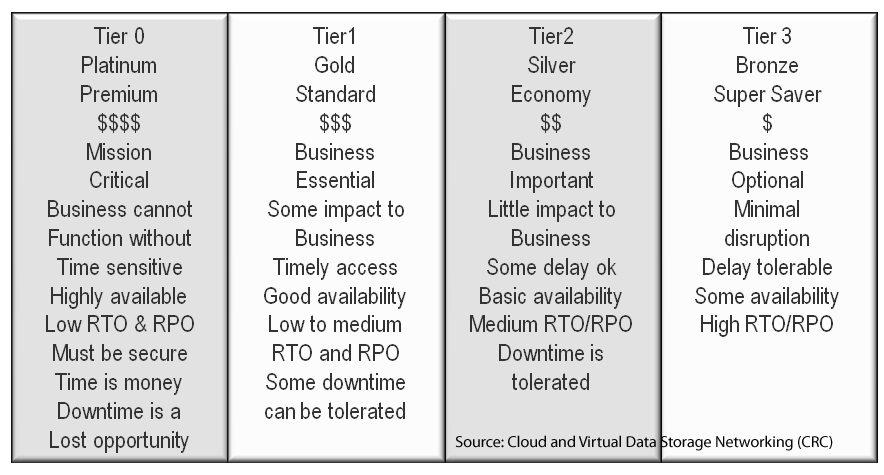
Also best wishes to the prosecutors and their forensic investigators to tie the pieces together bringing the captured suspect to justice including determining a motive.

Of course, also speedy recovery to those maimed or injured by the pressure cooker bombs.

Let us talk about pressure cookers, and not in how they were used in a bad way last week in Boston.

Pressure cookers when used properly for what they are designed for can be used for making good things.

Cold snowy day
Cold April Saturday, good day to make ham soup.

I used my pressure cooker the other day to make ham, barley vegetable soup with kale.

The reason I use pressure cookers is to make soups, stocks, sauces or other things in a shorter amount of time while boosting flavors. For example with a soup or stock, instead of simmering for hours, I can get the results needed in 10-20 minutes, granted, the longer simmer is better if time allows. Instead of taking all day to make lunch, or getting up really early, simple solution, use the pressure cooker.

As their name implies, pressure cookers transfer heat and liquid into steam pressure which combine for more concentrated cooking in a shorter amount of time while keeping moisture and flavors in.

cooking wusthoff knive
I use a 26cm Wusthof chef knife kept sharp to safely speed up prep

So after doing my prep (cutting, dicing, chopping) of onions, celery, carrots, potato, parsnips (these are so underrated, under appreciated), apple, ginger and garlic, time to brown the Ham in the pressure cooker (I realized this should have been done with video, ok, next time).

After browning the Ham bone and pieces (not burning) with a bit of grape seed oil (olive oil will burn if too hot) remove and set aside. Then add chopped onions, celery, parsnip, carrot and ginger to brown, then de glaze with some white wine (I used a pinot grigio). While waiting for the vegetables to lightly brown or caramelized, cut up the ham into smaller pieces (e.g. bite sized) before putting them back in the pressure cooker.

pressure coolking
Cooking with my Boston Bruins shirt (Go Bs)

Season with some black pepper (hold off on the salt for now as you are working with Ham), add in the apple, garlic, can of diced tomatoes (or fresh), some bay leaves, oregano, cup of uncooked barley, the ham pieces and about a quart or so of good low sodium liquid chicken stock. Pay attention to how full the pressure cooker is (there should be a full fill line to serve as a guide), bring to simmer and cover per your manufactures directions.

Pressure cooker details

I gave the cooker about 20 minute once it pressurized cooking on medium heat, just enough to keep up the pressure. Too high of temperature and the pressure builds too much and will be a problem, too low and you will lose pressure, follow your manufactures instructions.

DO NOT ATTEMPT TO REMOVE COVER WHILE UNDER PRESSURE BAD THINGS WILL HAPPEN!

Do not be scared, be prepared and informed along with safe.

Here is the result of how something good can be accomplished with pressure cookers.

pressure cooker ham soup

At this point in the process I add some chopped up kale and let sit and get happy in the food hut tub of fun (see photo), then plate, top with some cheese and enjoy.

Do not be scared of pressure cookers.

Like electricity, or other tools for cooking or technology including clouds, have respect for them, understand what to do and not do, best practices, safety which can result in good experiences.

Any tool or technology used in the wrong way can result in bad things.

Learn more about pressure cooker cooking by Googling or using your favorite search tool.

pressure cooker ham soup

This is how pressure cookers should be used, that is for good things.

Ok, nuff said (for now).

Cheers gs

Greg Schulz – Author Cloud and Virtual Data Storage Networking (CRC Press), The Green and Virtual Data Center (CRC Press) and Resilient Storage Networks (Elsevier)
twitter @storageio

All Comments, (C) and (TM) belong to their owners/posters, Other content (C) Copyright 2006-2026 Server StorageIO and UnlimitedIO LLC All Rights Reserved