Its Time for NVMeoF to let iSCSI begin its slow retirement journey

Why Its Time for NVMeoF

Its Time for NVMeoF to let iSCSI begin its slow retirement journey for networked shared block storage. Dating back to the late 1990s and early 2000s, iSCSI encapsulates the SCSI command set over a TCP/IP (IP)- based fabric network, or as an alternative to SCSI on Fibre Channel (SCSI_FCP aka FCP aka FC). The SCSI command set dates back to the 1980s, having been deployed on physical parallel cabling and later on other transports, including Fibre Channel, Serial Attached SCSI (SAS), and iSCSI.

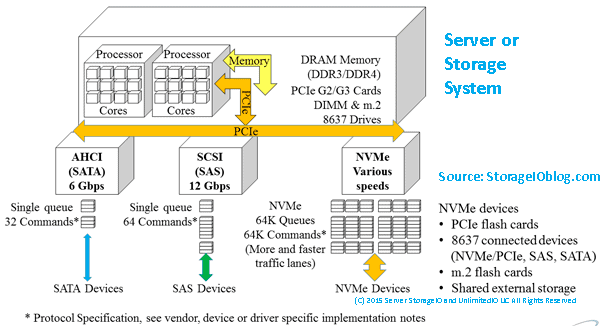
The reason it’s time for NVMe over Fabric (NVMeoF), and specifically NVMeoF using TCP and RDMA, to let iSCSI begin its slow retirement journey, is the evolution of the NVMe protocol command set and the expansion of its ecosystem as a modern, ground-up, streamlined server storage I/O protocol command set.

Keep in mind that there are two aspects in play with NVMeoF, which are similar to iSCSI and Fibre Channel-based FCP: the upper layer or protocol command set (e.g., NVMe and SCSI), and media through which these command sets are implemented via various interfaces such as TCP or RDMA on Ethernet, via InfiniBand, Fibre Channel, or physical PCIe, among others.

Ethernet has established itself as the dominant network interface, supporting various upper layers, such as TCP, and increasing its speed. Likewise, InfiniBand and Fibre Channel continue to increase their speeds and maintain their deployment roles in some environments.

Besides supporting faster networks, the NVMe command set was architected and has been deployed to support the current and evolving generations of processors with multiple cores, enabling more concurrent I/O operations and compute threads with less CPU overhead due to a modern, streamlined I/O stack and associated native drivers.

Why NVMeoF (over TCP or RDMA)

Leverage the combined improved benefits of NVMe as a server storage I/O communications protocol, along with TCP networking and industry-standard Ethernet as a communications fabric. With the NVMe command protocol server storage, I/O processing is streamlined and optimized for modern high-speed, low-latency network fabrics, such as Ethernet, as the transport.

The NVMe command set, compared to the SCSI command set, enables faster I/O processing with lower latency, higher IOPs, greater bandwidth, and more transactions, while increasing concurrency and the number of threads and reducing CPU usage per I/O operation. Similar to the SCSI command set, which has been deployed on various industry-standard transport interfaces, the NVMe command set is also deployed across various transports. For example, SCSI has been supported on IP (iSCSI), Fibre Channel (SCSI_FCP, e.g., FCP), Serial Attached SCSI (SAS), and Parallel SCSI, among others.

Likewise, the NVMe command set has been implemented via PCIe, including U.2, as well as over fabrics (e.g., NVMe over Fabric, aka NVMeoF), most notably with TCP and RDMA, along with some NVMe over Fibre Channel. In addition to being a modern, streamlined command set, NVMe also supports more devices, queues, and sessions, and is optimized with host-server initiator and target-side stacks.
An example of how NVMe is being embraced from a software support standpoint is Microsoft’s production release of a new, re-architected, optimized I/O stack as part of Windows Server 2025 in December 2025. Recently, Microsoft released, as part of the latest vnext insiders preview build, an all-new NVMeoF (TCP & RDMA) initiator for testing and evaluation.

NVMe has proven itself as a command set using various transports for use as a target for various SSD and flash storage devices (e.g., back-end) in servers, clients, and storage systems, as well as a front-end alternative to SCSI_FCP (e.g., FCP or FC) and iSCSI among others on storage systems, and software-defined storage solutions. Also, keep in mind that while the SCSI command set dates back to at least the early 1990s for general-purpose access of Magnetic Tape, CD/DVD, HDD, and later SSD, NVMe developed in the last decade was created from the ground up for solid-state devices (SSDs), including flash, among other persistent storage mediums.

Why NVMeoF (TCP) vs iSCSI

It would be, and is, too easy to say the 2000s called and want iSCSI back; however, tongue-in-cheek, there is some reality to that. However, looking closer, iSCSI evolved in the early 2000s as a low-cost SCSI command set alternative to Fibre Channel (SCSI_FCP, e.g., FCP or FC), as well as the survivor of the block IP storage wars (e.g., iFCP, FCIP, iSCSI, etc.) for general-purpose IP-based SCSI storage access.

Fibre Channel-based SCSI (FCP) went on to dominate higher-performance fabric- or networked-storage, aka storage area networks (SANs), with iSCSI having some success in other areas alongside file-based IP storage access via NFS & SMB, among others.

Now that we are in the mid-2020s, the ecosystem around NVMe has matured and continues to do so, with full-stack NVMe solutions, hardware- and software-based initiators, native NVMe drivers, target-based storage systems, and storage devices using various transports. NVMe has evolved from direct-attached PCIe card slots to PCIe U.2 & U.3, M.2 and EDSFF slots, as well as NVMe over Fabrics including TCP and RDMA, among others.

The benefit of using NVMeoF vs iSCSI is lower latency, due to native NVMe commands over TCP being streamlined, vs older SCSI encapsulation and associated cumbersome driver stacks. Besides the streamlined drivers and transports, NVMeoF also provides massive parallelism and multi-threading to boost server storage I/O while leveraging today’s multi-core processors and offload capabilities.

The net result is more I/O operations supporting higher IOPs, bandwidth, and transactions per second, with lower latency and lower CPU usage, resulting in greater productivity and better economics for databases, virtualization, AI/ML, and other block-based workloads.

Who supports NVMe and NVMeoF?

Most host and client operating systems support NVMe or NVMeoF initiators (e.g., Linux, VMware, Microsoft Windows [in the current Insider build], among others). There are also hardware adapter-based NVMe initiators, such as those from Broadcom, Chelsio, and NVIDIA. There are software NVMe and NVMe target packages for many platforms, such as Linux-based NVMe, nvme-tcp, nvme-rdma, nvme-fc, nvmet, nvmet-tcp, and SPDK (Storage Performance Development Kit), among others.

Besides server- or client-side support, there are storage and server hardware chassis building blocks that support NVMe, as well as storage system solutions from Dell, HPE, Hitachi, NetApp, Pure, among others. Within large cloud service providers such as AWS, Microsoft Azure, and Google Cloud Platform (GCP), NVMe is also widely used across their platform ecosystems.

Why it’s time for NVMeoF to let iSCSI begin its slow retirement journey
This is not to say that iSCSI is dead or that it has no future; rather, NVMeoF and its ecosystem have evolved and are ready to do more. Likewise, the SCSI command set is not dead; it’s still used with SAS, Fibre Channel (FCP), iSCSI, etc. However, NVMe has evolved and is seeing broad adoption from server and client attachment to storage devices and storage systems over various transport interfaces and media (PCIe, U.2/U.3, M.2, EDSFF, Ethernet, and fabrics).

Storage systems have also evolved, adding front-end support for NVMeoF and back-end attachment of NVMe flash and SSDs. With the combination of server, client and other software platforms having or in public release review, new streamlined native NVMe drivers and I/O stacks along with NVMeoF initiators (or targets), now is the time to look at NVMeoF as a replacement or alternative to iSCSI, and perhaps even Fibre Channel in the future to support existing and legacy workloads as well as new and emerging application landscapes and their demanding server storage I/O and compute needs (e.g. AI among others).

Additional Resources Where to learn more

Microsoft Windows Server Insider Build NVMeoF Initiator (Blog post)
Installing new Insider’s build Windows Server vnext NVMeoF, host initiator (blog post)
NVMe Linux Driver and related info
Announcing Native NVMe in Windows Server 2025 (Microsoft Post)
Introducing the Windows NVMe-oF Initiator Preview in Windows Server Insiders Builds (Microsoft Post)
Windows Server Insider Builds (Microsoft Downloads)
ToE NVMeoF TCP Performance Line Boost Performance Reduce Costs (blog post)
TheNVMeplace.com (Various NVMe resources)
Azure Cloud Storage here (Microsoft Post)
Microsoft Azure Data Box (Blog Post)
Azure Elastic SAN from Cloud to On-Prem here (Blog Post)
Cloud and Software Defined Data Infrastructure topics here

Additional learning experiences along with common questions (and answers) pertaining to SCSI, Fibre Channel, NVMe, Cloud, Hardware, Software, Services, techniques, server, storage, I/O networking, data protection among other topics are found in my Software Defined Data Infrastructure Essentials book.
Software Defined Data Infrastructure Essentials (CRC Press) by Greg Schulz

What this all means

Now is a good time to look into NVMe and, specifically, NVMe over Fabric (NVMeoF) if you have not recently done so, to refresh or learn what it can do. Likewise, if you are using iSCSI or Fibre Channel-based SCSI_FCP (e.g., not FICON), now is a good time to review or refresh your understanding of NVMeoF and where it fits into future plans for block storage. For those who say block storage is dead and everything is object storage, file storage, or even table storage, that’s fine, as those are all companions to block storage in a balanced ecosystem, each with its own uses, roles, and fits.

Ok, nuff said.

Cheers Gs

Greg Schulz – Ten time Microsoft MVP Cloud and Data Center Management and Azure Storage, along with previous ten-time VMware vExpert. Author of Software Defined Data Infrastructure Essentials (CRC Press), as well as Cloud and Virtual Data Storage Networking (CRC Press), The Green and Virtual Data Center (CRC Press), Resilient Storage Networks (Elsevier) and twitter @storageio. Courteous comments are welcome for consideration. First published on https://storageioblog.com any reproduction in whole, in part, with changes to content, without source attribution under title or without permission is forbidden.

All Comments, (C) and (TM) belong to their owners/posters, Other content (C) Copyright 2006-2026 Server StorageIO and UnlimitedIO. All Rights Reserved. StorageIO is a registered Trade Mark (TM) of UnlimitedIO LLC.

Microsoft Windows Server Insider Build NVMeoF Initiator

Microsoft Windows Server Insider Build NVMeoF Initiator

In case you haven’t heard, in addition to recently announcing a new NVMe native driver for Windows Server 2025 back in December 2025, Microsoft has now introduced a new Windows NVMe over Fabrics (NVMeoF, aka NVMe-oF) Initiator Preview in the latest Windows Server Insiders Builds.

With the preview of this new NVMeoF initiator, Microsoft is moving closer to delivering enhanced server storage I/O performance by embracing NVMe as both a native storage target and a native NVMe host server initiator. While the new NVMe native storage stack driver was released for production back in December 2025, this new host initiator capability is available as a preview in the latest Windows Server insider build.

By adding a native NVMeoF initiator, Microsoft is enabling organizations to use shared networked block software-defined and SAN storage using the faster NVMe protocol, rather than traditional SCSI/iSCSI/SCSI_FCP(FC) protocol-based interfaces. In addition to supporting native direct-attached NVMe storage, Microsoft Windows servers (insider build) now support the streamlined NVMe server storage I/O stack over networks, including Ethernet and RDMA fabrics.

Additional Resources Where to learn more

ToE NVMeoF TCP Performance Line Boost Performance Reduce Costs (blog post)
NVMe Linux Driver and related info
Its Time for NVMeoF to let iSCSI begin its slow retirement journey (blog post)
Announcing Native NVMe in Windows Server 2025 (Microsoft Post)
Installing new Insider’s build Windows Server vnext NVMeoF, host initiator (blog post)
Introducing the Windows NVMe-oF Initiator Preview in Windows Server Insiders Builds (Microsoft Post)
Windows Server Insider Builds (Microsoft Downloads)
TheNVMeplace.com (Various NVMe resources)
Azure Cloud Storage here (Microsoft Post)
Microsoft Azure Data Box (Blog Post)
Azure Elastic SAN from Cloud to On-Prem here (Blog Post)
Cloud and Software Defined Data Infrastructure topics here

Additional learning experiences along with common questions (and answers) pertaining to Cloud, Hardware, Software, Services, techniques, server, storage, I/O networking, data protection among other topics are found in my Software Defined Data Infrastructure Essentials book.

Software Defined Data Infrastructure Essentials (CRC Press) by Greg Schulz

What this all means

While this new Windows Server host NVMe over Fabric (NVMeoF aka NVMe-oF) initiator for block storage is currently available as part of a Windows Server insiders build, it provides a means for organizations to begin testing native NVMe connectivity via Windows Servers to their existing SAN and other networked software defined storage servers via fabrics including Ethernet along with RDMA based. Learn more about this new initiator, along with how to try it out for yourself via this Microsoft blog post that includes instructions on how to setup your own NVMeoF storage target if you dont have one.

Ok, nuff said.

Cheers Gs

Greg Schulz – Ten time Microsoft MVP Cloud and Data Center Management and Azure Storage, along with previous ten-time VMware vExpert. Author of Software Defined Data Infrastructure Essentials (CRC Press), as well as Cloud and Virtual Data Storage Networking (CRC Press), The Green and Virtual Data Center (CRC Press), Resilient Storage Networks (Elsevier) and twitter @storageio. Courteous comments are welcome for consideration. First published on https://storageioblog.com any reproduction in whole, in part, with changes to content, without source attribution under title or without permission is forbidden.

All Comments, (C) and (TM) belong to their owners/posters, Other content (C) Copyright 2006-2026 Server StorageIO and UnlimitedIO. All Rights Reserved. StorageIO is a registered Trade Mark (TM) of UnlimitedIO LLC.
Use Intel Optane NVMe U.2 SFF 8639 SSD drive in PCIe slot

Use NVMe U.2 SFF 8639 disk drive form factor SSD in PCIe slot

server storage I/O data infrastructure trends

Need to install or use an Intel Optane NVMe 900P or other Nonvolatile Memory (NVM) Express NVMe based U.2 SFF 8639 disk drive form factor Solid State Device (SSD) into PCIe a slot?

For example, I needed to connect an Intel Optane NVMe 900P U.2 SFF 8639 drive form factor SSD into one of my servers using an available PCIe slot.

The solution I used was an carrier adapter card such as those from Ableconn (PEXU2-132 NVMe 2.5-inch U.2 [SFF-8639] via Amazon.com among other global venues.

xxxx
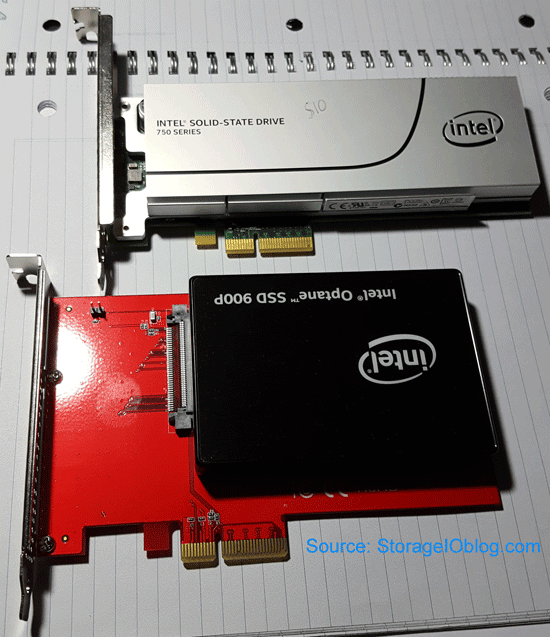
Top Intel 750 NVMe PCIe AiC SSD, bottom Intel Optane NVMe 900P U.2 SSD with Ableconn carrier

The above image shows top an Intel 750 NVMe PCIe Add in Card (AiC) SSD and on the bottom an Intel Optane NVMe 900P 280GB U.2 (SFF 8639) drive form factor SSD mounted on an Ableconn carrier adapter.

NVMe server storage I/O sddc

NVMe Tradecraft Refresher

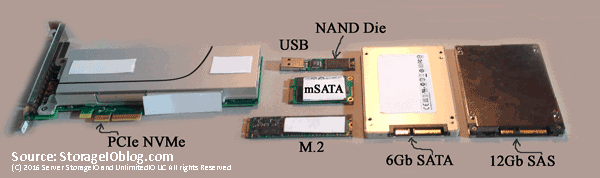
NVMe is the protocol that is implemented with different topologies including local via PCIe using U.2 aka SFF-8639 (aka disk drive form factor), M.2 aka Next Generation Form Factor (NGFF) also known as "gum stick", along with PCIe Add in Card (AiC). NVMe accessed devices can be installed in laptops, ultra books, workstations, servers and storage systems using the various form factors. U.2 drives are also refereed to by some as PCIe drives in that the NVMe command set protocol is implemented using PCIe x4 physical connection to the devices. Jump ahead if you want to skip over the NVMe primer refresh material to learn more about U.2 8639 devices.

data infrastructure nvme u.2 8639 ssd
Various SSD device form factors and interfaces

In addition to form factor, NVMe devices can be direct attached and dedicated, rack and shared, as well as accessed via networks also known as fabrics such as NVMe over Fabrics.

NVMeoF FC-NVMe NVMe fabric SDDC
The many facets of NVMe as a front-end, back-end, direct attach and fabric

Context is important with NVMe in that fabric can mean NVMe over Fibre Channel (FC-NVMe) where the NVMe command set protocol is used in place of SCSI Fibre Channel Protocol (e.g. SCSI_FCP) aka FCP or what many simply know and refer to as Fibre Channel. NVMe over Fabric can also mean NVMe command set implemented over an RDMA over Converged Ethernet (RoCE) based network.

NVM and NVMe accessed flash SCM SSD storage

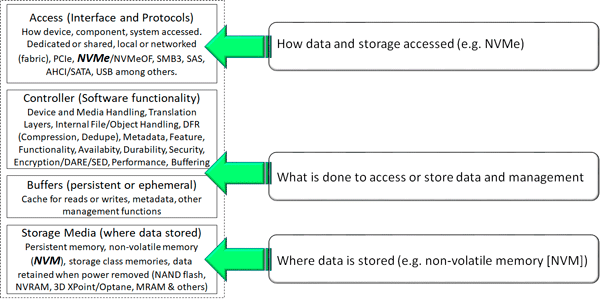
Another point of context is not to confuse Nonvolatile Memory (NVM) which are the storage or memory media and NVMe which is the interface for accessing storage (e.g. similar to SAS, SATA and others). As a refresher, NVM or the media are the various persistent memories (PM) including NVRAM, NAND Flash, 3D XPoint along with other storage class memories (SCM) used in SSD (in various packaging).

Learn more about 3D XPoint with the following resources:

Learn more (or refresh) your NVMe server storage I/O knowledge, experience tradecraft skill set with this post here. View this piece here looking at NVM vs. NVMe and how one is the media where data is stored, while the other is an access protocol (e.g. NVMe). Also visit www.thenvmeplace.com to view additional NVMe tips, tools, technologies, and related resources.

NVMe U.2 SFF-8639 aka 8639 SSD

On quick glance, an NVMe U.2 SFF-8639 SSD may look like a SAS small form factor (SFF) 2.5" HDD or SSD. Also, keep in mind that HDD and SSD with SAS interface have a small tab to prevent inserting them into a SATA port. As a reminder, SATA devices can plug into SAS ports, however not the other way around which is what the key tab function does (prevents accidental insertion of SAS into SATA). Looking at the left-hand side of the following image you will see an NVMe SFF 8639 aka U.2 backplane connector which looks similar to a SAS port.

Note that depending on how implemented including its internal controller, flash translation layer (FTL), firmware and other considerations, an NVMe U.2 or 8639 x4 SSD should have similar performance to a comparable NVMe x4 PCIe AiC (e.g. card) device. By comparable device, I mean the same type of NVM media (e.g. flash or 3D XPoint), FTL and controller. Likewise generally an PCIe x8 should be faster than an x4, however more PCIe lanes does not mean more performance, its what’s inside and how those lanes are actually used that matter.

NVMe U.2 8639 2.5" 1.8" SSD driveNVMe U.2 8639 2.5 1.8 SSD drive slot pin
NVMe U.2 SFF 8639 Drive (Software Defined Data Infrastructure Essentials CRC Press)

With U.2 devices the key tab that prevents SAS drives from inserting into a SATA port is where four pins that support PCIe x4 are located. What this all means is that a U.2 8639 port or socket can accept an NVMe, SAS or SATA device depending on how the port is configured. Note that the U.2 8639 port is either connected to a SAS controller for SAS and SATA devices or a PCIe port, riser or adapter.

On the left of the above figure is a view towards the backplane of a storage enclosure in a server that supports SAS, SATA, and NVMe (e.g. 8639). On the right of the above figure is the connector end of an 8639 NVM SSD showing addition pin connectors compared to a SAS or SATA device. Those extra pins give PCIe x4 connectivity to the NVMe devices. The 8639 drive connectors enable a device such as an NVM, or NAND flash SSD to share a common physical storage enclosure with SAS and SATA devices, including optional dual-pathing.

More PCIe lanes may not mean faster performance, verify if those lanes (e.g. x4 x8 x16 etc) are present just for mechanical (e.g. physical) as well as electrical (they are also usable) and actually being used. Also, note that some PCIe storage devices or adapters might be for example an x8 for supporting two channels or devices each at x4. Likewise, some devices might be x16 yet only support four x4 devices.

NVMe U.2 SFF 8639 PCIe Drive SSD FAQ

Some common questions pertaining NVMe U.2 aka SFF 8639 interface and form factor based SSD include:

Why use U.2 type devices?

Compatibility with what’s available for server storage I/O slots in a server, appliance, storage enclosure. Ability to mix and match SAS, SATA and NVMe with some caveats in the same enclosure. Support higher density storage configurations maximizing available PCIe slots and enclosure density.

Is PCIe x4 with NVMe U.2 devices fast enough?

While not as fast as a PCIe AiC that fully supports x8 or x16 or higher, an x4 U.2 NVMe accessed SSD should be plenty fast for many applications. If you need more performance, then go with a faster AiC card.

Why not go with all PCIe AiC?

If you need the speed, simplicity, have available PCIe card slots, then put as many of those in your systems or appliances as possible. Otoh, some servers or appliances are PCIe slot constrained so U.2 devices can be used to increase the number of devices attached to a PCIe backplane while also supporting SAS, SATA based SSD or HDDs.

Why not use M.2 devices?

If your system or appliances supports NVMe M.2 those are good options. Some systems even support a combination of M.2 for local boot, staging, logs, work and other storage space while PCIe AiC are for performance along with U.2 devices.

Why not use NVMeoF?

Good question, why not, that is, if your shared storage system supports NVMeoF or FC-NVMe go ahead and use that, however, you might also need some local NVMe devices. Likewise, if yours is a software-defined storage platform that needs local storage, then NVMe U.2, M.2 and AiC or custom cards are an option. On the other hand, a shared fabric NVMe based solution may support a mixed pool of SAS, SATA along with NVMe U.2, M.2, AiC or custom cards as its back-end storage resources.

When not to use U.2?

If your system, appliance or enclosure does not support U.2 and you do not have a need for it. Or, if you need more performance such as from an x8 or x16 based AiC, or you need shared storage. Granted a shared storage system may have U.2 based SSD drives as back-end storage among other options.

How does the U.2 backplane connector attach to PCIe?

Via enclosures backplane, there is either a direct hardwire connection to the PCIe backplane, or, via a connector cable to a riser card or similar mechanism.

Does NVMe replace SAS, SATA or Fibre Channel as an interface?

The NVMe command set is an alternative to the traditional SCSI command set used in SAS and Fibre Channel. That means it can replace, or co-exist depending on your needs and preferences for access various storage devices.

Who supports U.2 devices?

Dell has supported U.2 aka PCIe drives in some of their servers for many years, as has Intel and many others. Likewise, U.2 8639 SSD drives including 3D Xpoint and NAND flash-based are available from Intel among others.

Can you have AiC, U.2 and M.2 devices in the same system?

If your server or appliance or storage system support them then yes. Likewise, there are M.2 to PCIe AiC, M.2 to SATA along with other adapters available for your servers, workstations or software-defined storage system platform.

NVMe U.2 carrier to PCIe adapter

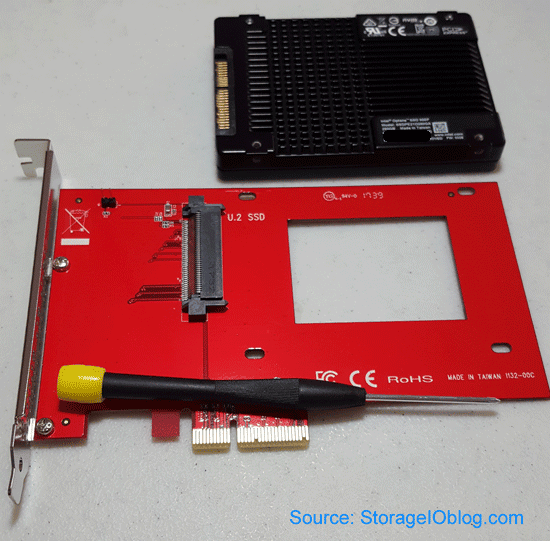
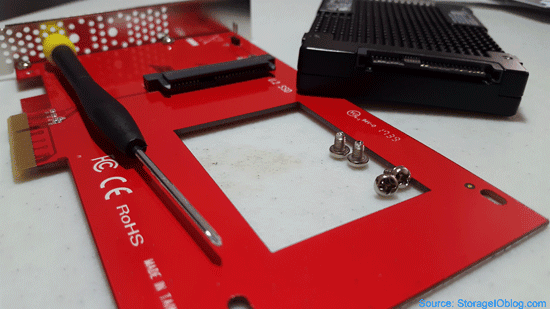
The following images show examples of mounting an Intel Optane NVMe 900P accessed U.2 8639 SSD on an Ableconn PCIe AiC carrier. Once U.2 SSD is mounted, the Ableconn adapter inserts into an available PCIe slot similar to other AiC devices. From a server or storage appliances software perspective, the Ableconn is a pass-through device so your normal device drivers are used, for example VMware vSphere ESXi 6.5 recognizes the Intel Optane device, similar with Windows and other operating systems.

intel optane 900p u.2 8639 nvme drive bottom view
Intel Optane NVMe 900P U.2 SSD and Ableconn PCIe AiC carrier

The above image shows the Ableconn adapter carrier card along with NVMe U.2 8639 pins on the Intel Optane NVMe 900P.

intel optane 900p u.2 8639 nvme drive end view
Views of Intel Optane NVMe 900P U.2 8639 and Ableconn carrier connectors

The above image shows an edge view of the NVMe U.2 SFF 8639 Intel Optane NVMe 900P SSD along with those on the Ableconn adapter carrier. The following images show an Intel Optane NVMe 900P SSD installed in a PCIe AiC slot using an Ableconn carrier, along with how VMware vSphere ESXi 6.5 sees the device using plug and play NVMe device drivers.

NVMe U.2 8639 installed in PCIe AiC Slot
Intel Optane NVMe 900P U.2 SSD installed in PCIe AiC Slot

NVMe U.2 8639 and VMware vSphere ESXi
How VMware vSphere ESXi 6.5 sees NVMe U.2 device

Intel NVMe Optane NVMe 3D XPoint based and other SSDs

Here are some Amazon.com links to various Intel Optane NVMe 3D XPoint based SSDs in different packaging form factors:

Here are some Amazon.com links to various Intel and other vendor NAND flash based NVMe accessed SSDs including U.2, M.2 and AiC form factors:

Note in addition to carriers to adapt U.2 8639 devices to PCIe AiC form factor and interfaces, there are also M.2 NGFF to PCIe AiC among others. An example is the Ableconn M.2 NGFF PCIe SSD to PCI Express 3.0 x4 Host Adapter Card.

In addition to Amazon.com, Newegg.com, Ebay and many other venues carry NVMe related technologies.
The Intel Optane NVMe 900P are newer, however the Intel 750 Series along with other Intel NAND Flash based SSDs are still good price performers and as well as provide value. I have accumulated several Intel 750 NVMe devices over past few years as they are great price performers. Check out this related post Get in the NVMe SSD game (if you are not already).

Where To Learn More

View additional NVMe, SSD, NVM, SCM, Data Infrastructure and related topics via the following links.

Additional learning experiences along with common questions (and answers), as well as tips can be found in Software Defined Data Infrastructure Essentials book.

Software Defined Data Infrastructure Essentials Book SDDC

What This All Means

NVMe accessed storage is in your future, however there are various questions to address including exploring your options for type of devices, form factors, configurations among other topics. Some NVMe accessed storage is direct attached and dedicated in laptops, ultrabooks, workstations and servers including PCIe AiC, M.2 and U.2 SSDs, while others are shared networked aka fabric based. NVMe over fabric (e.g. NVMeoF) includes RDMA over converged Ethernet (RoCE) as well as NVMe over Fibre Channel (e.g. FC-NVMe). Networked fabric accessed NVMe access of pooled shared storage systems and appliances can also include internal NVMe attached devices (e.g. as part of back-end storage) as well as other SSDs (e.g. SAS, SATA).

General wrap-up (for now) NVMe U.2 8639 and related tips include:

  • Verify the performance of the device vs. how many PCIe lanes exist
  • Update any applicable BIOS/UEFI, device drivers and other software
  • Check the form factor and interface needed (e.g. U.2, M.2 / NGFF, AiC) for a given scenario
  • Look carefully at the NVMe devices being ordered for proper form factor and interface
  • With M.2 verify that it is an NVMe enabled device vs. SATA

Learn more about NVMe at www.thenvmeplace.com including how to use Intel Optane NVMe 900P U.2 SFF 8639 disk drive form factor SSDs in PCIe slots as well as for fabric among other scenarios.

Ok, nuff said, for now.

Gs

Greg Schulz – Microsoft MVP Cloud and Data Center Management, VMware vExpert 2010-2017 (vSAN and vCloud). Author of Software Defined Data Infrastructure Essentials (CRC Press), as well as Cloud and Virtual Data Storage Networking (CRC Press), The Green and Virtual Data Center (CRC Press), Resilient Storage Networks (Elsevier) and twitter @storageio. Courteous comments are welcome for consideration. First published on https://storageioblog.com any reproduction in whole, in part, with changes to content, without source attribution under title or without permission is forbidden.

All Comments, (C) and (TM) belong to their owners/posters, Other content (C) Copyright 2006-2026 Server StorageIO and UnlimitedIO. All Rights Reserved. StorageIO is a registered Trade Mark (TM) of Server StorageIO.