Amazon cloud storage options enhanced with Glacier

StorageIO industry trend for storage IO

In case you missed it, Amazon Web Services (AWS) has enhanced their cloud services (Elastic Cloud Compute or EC2) along with storage offerings. These include Relational Database Service (RDS), DynamoDB, Elastic Block Store (EBS), and Simple Storage Service (S3). Enhancements include new functionality along with availability or reliability in the wake of recent events (outages or service disruptions). Earlier this year AWS announced their Cloud Storage Gateway solution that you can read an analysis here. More recently AWS announced provisioned IOPS among other enhancements (see AWS whats new page here).

Amazon Web Services logo

Before announcing Glacier, options for Amazon storage services relied on general purpose S3, or EBS with other Amazon services. S3 has provided users the ability to select different availability zones (e.g. geographical regions where data is stored) along with level of reliability for different price points for their applications or services being offered.

Note that AWS S3 flexibility lends itself to individuals or organizations using it for various purposes. This ranges from storing backup or file sharing data to being used as a target for other cloud services. S3 pricing options vary depending on which availability zones you select as well as if standard or reduced redundancy. As its name implies, reduced redundancy trades lower availability recovery time objective (RTO) in exchange for lower cost per given amount of space capacity.

AWS has now announced a new class or tier of storage service called Glacier, which as its name implies moves very slow and capable of supporting large amounts of data. In other words, targeting inactive or seldom accessed data where emphasis is on ultra-low cost in exchange for a longer RTO. In exchange for an RTO that AWS is stating that it can be measured in hours, your monthly storage cost can be as low as 1 cent per GByte or about 12 cents per year per GByte plus any extra fees (See here).

Here is a note that I received from the Amazon Web Services (AWS) team:

Dear Amazon Web Services Customer,
We are excited to announce the immediate availability of Amazon Glacier – a secure, reliable and extremely low cost storage service designed for data archiving and backup. Amazon Glacier is designed for data that is infrequently accessed, yet still important to keep for future reference. Examples include digital media archives, financial and healthcare records, raw genomic sequence data, long-term database backups, and data that must be retained for regulatory compliance. With Amazon Glacier, customers can reliably and durably store large or small amounts of data for as little as $0.01/GB/month. As with all Amazon Web Services, you pay only for what you use, and there are no up-front expenses or long-term commitments.

Amazon Glacier is:

  • Low cost– Amazon Glacier is an extremely low-cost, pay-as-you-go storage service that can cost as little as $0.01 per gigabyte per month, irrespective of how much data you store.
  • Secure – Amazon Glacier supports secure transfer of your data over Secure Sockets Layer (SSL) and automatically stores data encrypted at rest using Advanced Encryption Standard (AES) 256, a secure symmetrix-key encryption standard using 256-bit encryption keys.
  • Durable– Amazon Glacier is designed to give average annual durability of 99.999999999% for each item stored.
  • Flexible -Amazon Glacier scales to meet your growing and often unpredictable storage requirements. There is no limit to the amount of data you can store in the service.
  • Simple– Amazon Glacier allows you to offload the administrative burdens of operating and scaling archival storage to AWS, and makes long term data archiving especially simple. You no longer need to worry about capacity planning, hardware provisioning, data replication, hardware failure detection and repair, or time-consuming hardware migrations.
  • Designed for use with other Amazon Web Services – You can use AWS Import/Export to accelerate moving large amounts of data into Amazon Glacier using portable storage devices for transport. In the coming months, Amazon Simple Storage Service (Amazon S3) plans to introduce an option that will allow you to seamlessly move data between Amazon S3 and Amazon Glacier using data lifecycle policies.

Amazon Glacier is currently available in the US-East (N. Virginia), US-West (N. California), US-West (Oregon), EU-West (Ireland), and Asia Pacific (Japan) Regions.

A few clicks in the AWS Management Console are all it takes to setup Amazon Glacier. You can learn more by visiting the Amazon Glacier detail page, reading Jeff Barrs blog post, or joining our September 19th webinar.
Sincerely,
The Amazon Web Services Team

StorageIO industry trend for storage IO

What is AWS Glacier?

Glacier is low-cost for lower performance (e.g. access time) storage suited to data applications including archiving, inactive or idle data that you are not in a hurry to retrieve. Pay as you go pricing that can be as low as $0.01 USD per GByte per month (and other optional fees may apply, see here) depending on availability zone. Availability zone or regions include US West coast (Oregon or Northern California), US East Coast (Northern Virginia), Europe (Ireland) and Asia (Tokyo).

Amazon Web Services logo

Now what is understood should have to be discussed, however just to be safe, pity the fool who complains about signing up for AWS Glacier due to its penny per month per GByte cost and it being too slow for their iTunes or videos as you know its going to happen. Likewise, you know that some creative vendor or their surrogate is going to try to show a miss-match of AWS Glacier vs. their faster service that caters to a different usage model; it is just a matter of time.

StorageIO industry trend for storage IO

Lets be clear, Glacier is designed for low-cost, high-capacity, slow access of infrequently accessed data such as an archive or other items. This means that you will be more than disappointed if you try to stream a video, or access a document or photo from Glacier as you would from S3 or EBS or any other cloud service. The reason being is that Glacier is designed with the premise of low-cost, high-capacity, high availability at the cost of slow access time or performance. How slow? AWS states that you may have to wait several hours to reach your data when needed, however that is the tradeoff. If you need faster access, pay more or find a different class and tier of storage service to meet that need, perhaps for those with the real need for speed, AWS SSD capabilities ;).

Here is a link to a good post over at Planforcloud.com comparing Glacier vs. S3, which is like comparing apples and oranges; however, it helps to put things into context.

Amazon Web Services logo

In terms of functionality, Glacier security includes secure socket layer (SSL), advanced encryption standard (AES) 256 (256-bit encryption keys) data at rest encryption along with AWS identify and access management (IAM) policies.

Persistent storage designed for 99.999999999% durability with data automatically placed in different facilities on multiple devices for redundancy when data is ingested or uploaded. Self-healing is accomplished with automatic background data integrity checks and repair.

Scale and flexibility are bound by the size of your budget or credit card spending limit along with what availability zones and other options you choose. Integration with other AWS services including Import/Export where you can ship large amounts of data to Amazon using different media and mediums. Note that AWS has also made a statement of direction (SOD) that S3 will be enhanced to seamless move data in and out of Glacier using data policies.

Part of stretching budgets for organizations of all size is to avoid treating all data and applications the same (key theme of data protection modernization). This means classifying and addressing how and where different applications and data are placed on various types of servers, storage along with revisiting modernizing data protection.

While the low-cost of Amazon Glacier is an attention getter, I am looking for more than just the lowest cost, which means I am also looking for reliability, security among other things to gain and keep confidence in my cloud storage services providers. As an example, a few years ago I switched from one cloud backup provider to another not based on cost, rather functionality and ability to leverage the service more extensively. In fact, I could switch back to the other provider and save money on the monthly bills; however I would end up paying more in lost time, productivity and other costs.

StorageIO industry trend for storage IO

What do I see as the barrier to AWS Glacier adoption?

Simple, getting vendors and other service providers to enhance their products or services to leverage the new AWS Glacier storage category. This means backup/restore, BC and DR vendors ranging from Amazon (e.g. releasing S3 to Glacier automated policy based migration), Commvault, Dell (via their acquisitions of Appassure and Quest), EMC (Avamar, Networker and other tools), HP, IBM/Tivoli, Jungledisk/Rackspace, NetApp, Symantec and others, not to mention cloud gateway providers will need to add support for this new capabilities, along with those from other providers.

As an Amazon EC2 and S3 customer, it is great to see Amazon continue to expand their cloud compute, storage, networking and application service offerings. I look forward to actually trying out Amazon Glacier for storing encrypted archive or inactive data to compliment what I am doing. Since I am not using the Amazon Cloud Storage Gateway, I am looking into how I can use Rackspace Jungledisk to manage an Amazon Glacier repository similar to how it manages my S3 stores.

Some more related reading:
Only you can prevent cloud data loss
Data protection modernization, more than swapping out media
Amazon Web Services (AWS) and the NetFlix Fix?
AWS (Amazon) storage gateway, first, second and third impressions

As of now, it looks like I will have to wait for either Jungledisk adds native support as they do today for managing my S3 storage pool today, or, the automated policy based movement between S3 and Glacier is transparently enabled.

Ok, nuff said for now

Cheers Gs

Greg Schulz – Author Cloud and Virtual Data Storage Networking (CRC Press, 2011), The Green and Virtual Data Center (CRC Press, 2009), and Resilient Storage Networks (Elsevier, 2004)

twitter @storageio

All Comments, (C) and (TM) belong to their owners/posters, Other content (C) Copyright 2006-2012 StorageIO and UnlimitedIO All Rights Reserved

IBM buys flash solid state device (SSD) industry veteran TMS

How much flash (or DRAM) based Solid State Device (SSD) do you want or need?

IBM recently took a flash step announcing it wants and needs more SSD capabilities in different packaging and functionality capabilities to meet the demands and opportunities of customers, business partners and prospects by acquiring Texas Memory Systems (TMS).

IBM buys SSD flash vendor TMS

Unlike most of the current generation of SSD vendors besides those actually making the dies (chips or semiconductors) or SSD drives that are startups or relatively new, TMS is the industry veteran. Where most of the current SSD vendors experiences (as companies) is measured in months or at best years, TMS has seen several generations and SSD adoption cycles during its multi-decade existence.

IBM buys SSD vendor Texas Memory Systems TMS

What this means is that TMS has been around during past dynamic random access memory (DRAM) based SSD cycles or eras, as well as being an early adopter and player in the current nand flash SSD era or cycle.

Granted, some in the industry do not consider the previous DRAM based generation of products as being SSD, and vice versa, some DRAM era SSD aficionados do not consider nand flash as being real SSD. Needless to say that there are many faces or facets to SSD ranging in media (DRAM, and nand flash among others) along with packaging for different use cases and functionality.

IBM along with some other vendors recognize that the best type of IO is the one that you do not have to do. However reality is that some type of Input Output (IO) operations need to be done with computer systems. Hence the second best type of IO is the one that can be done with the least impact to applications in a cost-effective way to meet specific service level objectives (SLO) requirements. This includes leveraging main memory or DRAM as cache or buffers along with server-based PCIe SSD flash cards as cache or target devices, along with internal SSD drives, as well as external SSD drives and SSD drives and flash cards in traditional storage systems or appliances as well as purpose-built SSD storage systems.

While TMS does not build the real nand flash single level cell (SLC) or multi-level cell (MLC) SSD drives (like those built by Intel, Micron, Samsung, SANdisk, Seagate, STEC and Western Digital (WD) among others), TMS does incorporate nand flash chips or components that are also used by others who also make nand flash PCIe cards and storage systems.

StorageIO industry trend for storage IO

IMHO this is a good move for both TMS and IBM, both of whom have been StorageIO clients in the past (here, here and here) that was a disclosure btw ;) as it gives TMS, their partners and customers a clear path and large organization able to invest in the technologies and solutions on a go forward basis. In other words, TMS who had looked to be bought gets certainty about their future as do they clients.

IBM who has used SSD based components such as PCIe flash SSD cards and SSD based drives from various suppliers gets a PCIe SSD card of their own, along with purpose-built mature SSD storage systems that have lineages to both DRAM and nand flash-based experiences. Thus IBM controls some of their own SSD intellectual property (e.g. IP) for PCIe cards that can go in theory into their servers, as well as storage systems and appliances that use Intel based (e.g. xSeries from IBM) and IBM Power processor based servers as a platform such. For example DS8000 (Power processor), and Intel based XIV, SONAS, V7000, SVC, ProtecTier and Pursystems (some are Power based).

In addition IBM also gets a field proven purpose-built all SSD storage system to compete with those from startups (Kaminario, Purestorage, Solidfire, Violin and Whiptail among others), as well as those being announced from competitors such as EMC (e.g. project X and project thunder) in addition to SSD drives that can go into servers and storage systems.

The question should not be if SSD is in your future, rather where will you be using it, in the server or a storage system, as a cache or a target, as a PCIe target or cache card or as a drive or as a storage system. This also means the question of how much SSD do you need along with what type (flash or DRAM), for what applications and how configured among other topics.

Storage and Memory Hirearchy diagram where SSD fits

What this means is that there are many locations and places where SSD fits, one type of product or model does not fit or meet all requirements and thus IBM with their acquisition of TMS, along with presumed partnership with other SSD based components will be able to offer a diverse SSD portfolio.

StorageIO industry trend for storage IO

The industry trend is for vendors such as Cisco, Dell, EMC, IBM, HP, NetApp, Oracle and others all of whom are either physical server and storage vendors, or in the case of EMC, virtual servers partnered with Cisco (vBlock and VCE) and Lenovo for physical servers.

Different types and locations for SSD

Thus it only makes sense for those vendors to offer diverse SSD product and solution offerings to meet different customer and application needs vs. having a single solution that users adapt to. In other words, if all you have is a hammer, everything needs to look like a nail, however if you have a tool box of various technologies, then it comes down to being able to leverage including articulating what to use when, where, why and how for different situations.

I think this is a good move for both IBM and TMS. Now lets watch how IBM and TMS can go beyond the press release, slide decks and webex briefings covering why it is a good move to justify their acquisition and plans, moving forward and to see the results of what is actually accomplished near and long-term.

Read added industry trends and perspective commentary about IBM buying TMS here and here, as well as check out these related posts and content:

How much SSD do you need vs. want?
What is the best kind of IO? The one you do not have to do
Is SSD dead? No, however some vendors might be
Has SSD put Hard Disk Drives (HDDs) On Endangered Species List?
Why SSD based arrays and storage appliances can be a good idea (Part I)
EMC VFCache respinning SSD and intelligent caching (Part I)
SSD options for Virtual (and Physical) Environments: Part I Spinning up to speed on SSD
Speaking of speeding up business with SSD storage
Is SSD dead? No, however some vendors might be
Part I: PureSystems, something old, something new, something from big blue
The Many Faces of Solid State Devices/Disks (SSD)
SSD and Green IT moving beyond green washing

Meanwhile, congratulations to both IBM and TMS, ok, nuff said (for now).

Cheers Gs

Greg Schulz – Author Cloud and Virtual Data Storage Networking (CRC Press, 2011), The Green and Virtual Data Center (CRC Press, 2009), and Resilient Storage Networks (Elsevier, 2004)

twitter @storageio

All Comments, (C) and (TM) belong to their owners/posters, Other content (C) Copyright 2006-2012 StorageIO and UnlimitedIO All Rights Reserved

Over 1,000 entries now on the StorageIO industry links page

Industry trends and perspective data protection modernization

Is your company, organization or one that you are a fan of, or represent listed on the StorageIO industry links page (click here to learn more about it).

The StorageIO industry links page has been updated with over thousand different industry related companies, vendors, vars, trade groups, part and solution suppliers along with cloud and managed service providers. The common theme with these industry links is information and data infrastructures which means severs, storage, IO and networking, hardware, software, applications and tools, services, products and related items for traditional, virtual and cloud environments.

StorageIO server storage IO networking cloud and virtualization links

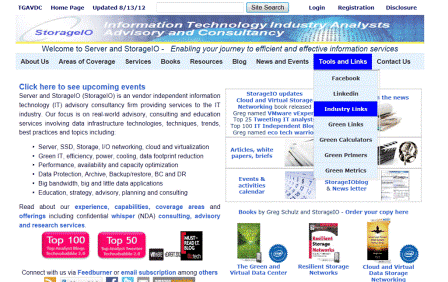
The industry links page is accessed from the StorageIO main web page via the Tools and Links menu tab, or via the URL https://storageio.com/links. An example of the StorageIO industry links page is shown below with six different menu tabs in alphabetical order.

StorageIO server storage IO networking cloud and virtualization links

Know of a company, service or organization that is not listed on the links page, if so, send an email note to info at storageio.com. If your company or organization is listed, contact StorageIO to discuss how to expand your presence on the links page and other related options.

Visit the updated StorageIO industry links page and watch for more updates, and click here to learn more about the links page.

Ok, nuff said for now.

Cheers Gs

Greg Schulz – Author Cloud and Virtual Data Storage Networking (CRC Press, 2011), The Green and Virtual Data Center (CRC Press, 2009), and Resilient Storage Networks (Elsevier, 2004)

twitter @storageio

All Comments, (C) and (TM) belong to their owners/posters, Other content (C) Copyright 2006-2012 StorageIO and UnlimitedIO All Rights Reserved

What does new EMC and Lenovo partnership mean?

EMC and EMCworld

The past several weeks have been busy with various merger, acquisitions and collaborating activity in the IT and data storage world. Summer time often brings new relationships and even summer marriages. The most recent is EMC and Lenovo announcing a new partnership that includes OEM sourcing of technology, market expansion and other initiatives. Hmm, does anybody remember who EMCs former desktop and server partner was, or who put Lenovo out for adoption several years ago?

Here is the press release from EMC and Lenovo that you can read yourself vs. me simply paraphrasing it:

Lenovo and EMC Team Up In Strategic Worldwide Partnership
A Solid Step in Lenovo’s Aspiration to Be a Player in Industry Standard Servers and Networked Storage with EMC’s Leading Technology; EMC Further Strengthens Ability to Serve Customers’ Storage Solutions Needs in China and Other Emerging Markets; Companies Agree to Form SMB-Focused Storage Joint Venture
BEIJING, China – August 1, 2012
Lenovo (HKSE: 992) (ADR: LNVGY) and EMC Corporation (NYSE: EMC) today announced a broad partnership that enhances Lenovo’s position in industry standard servers and networked storage solutions, while significantly expanding EMC’s reach in China and other key, high-growth markets. The new partnership is expected to spark innovation and additional R&D in the server and storage markets by maximizing the product development talents and resources at both companies, while driving scale and efficiency in the partners’ respective supply chains.
The partnership is a strong strategic fit, leveraging the two leading companies’ respective strengths, across three main areas:

  • First, Lenovo and EMC have formed a server technology development program that will accelerate and extend Lenovo’s capabilities in the x86 industry-standard server segment. These servers will be brought to market by Lenovo and embedded into selected EMC storage systems over time.
  • Second, the companies have forged an OEM and reseller relationship in which Lenovo will provide EMC’s industry-leading networked storage solutions to its customers, initially in China and expanding into other global markets in step with the ongoing development of its server business.
  • Finally, EMC and Lenovo plan to bring certain assets and resources from EMC’s Iomega business into a new joint venture which will provide Network Attached Storage (NAS) systems to small/medium businesses (SMB) and distributed enterprise sites.

“Today’s announcement with industry leader EMC is another solid step in our journey to build on our foundation in PCs and become a leader in the new PC-plus era,” said Yuanqing Yang, Lenovo chairman and CEO. “This partnership will help us fully deliver on our PC-plus strategy by giving us strong back-end capabilities and business foundation in servers and storage, in addition to our already strong position in devices. EMC is the perfect partner to help us fully realize the PC-plus opportunity in the long term.”
Joe Tucci, chairman and CEO of EMC, said, “The relationship with Lenovo represents a powerful opportunity for EMC to significantly expand our presence in China, a vibrant and very important market, and extend it to other parts of the world over time. Lenovo has clearly demonstrated its ability to apply its considerable resources and expertise not only to enter, but to lead major market segments. We’re excited to partner with Lenovo as we focus our combined energies serving a broader range of customers with industry-leading storage and server solutions.”
In the joint venture, Lenovo will contribute cash, while EMC will contribute certain assets and resources of Iomega. Upon closing, Lenovo will hold a majority interest in the new joint venture. During and after the transition from independent operations to the joint venture, customers will experience continuity of service, product delivery and warranty fulfillment. The joint venture is subject to customary closing procedures including regulatory approvals and is expected to close by the end of 2012.
The partnership described here is not considered material to either company’s current fiscal year earnings.
About Lenovo
Lenovo (HKSE: 992) (ADR: LNVGY) is a $US30 billion personal technology company and the world’s second largest PC company, serving customers in more than 160 countries. Dedicated to building exceptionally engineered PCs and mobile internet devices, Lenovo’s business is built on product innovation, a highly efficient global supply chain and strong strategic execution. Formed by Lenovo Group’s acquisition of the former IBM Personal Computing Division, the Company develops, manufactures and markets reliable, high-quality, secure and easy-to-use technology products and services. Its product lines include legendary Think-branded commercial PCs and Idea-branded consumer PCs, as well as servers, workstations, and a family of mobile internet devices, including tablets and smart phones. Lenovo has major research centers in Yamato, Japan; Beijing, Shanghai and Shenzhen, China; and Raleigh, North Carolina. For more information, see www.lenovo.com.
About EMC
EMC Corporation is a global leader in enabling businesses and service providers to transform their operations and deliver IT as a service. Fundamental to this transformation is cloud computing. Through innovative products and services, EMC accelerates the journey to cloud computing, helping IT departments to store, manage, protect and analyze their most valuable asset — information — in a more agile, trusted and cost-efficient way. Additional information about EMC can be found at www.EMC.com.

StorageIO industry trends and perspectives

What is my take?

Disclosures
I have been buying and using Lenovo desktop and laptop products for over a decade and currently typing this post from my X1 ThinkPad equipped with a Samsung SSD. Likewise I bought an Iomega IX4 NAS a couple of years ago (so I am a customer), am a Retrospect customer (EMC bought and then sold them off), used to be a Mozy user (now a former customer) and EMC has been a client of StorageIO in the past.

Lenovo Thinkpad
Some of my Lenovo(s) and EMC Iomega IX4

Let us take a step back for a moment, Lenovo was the spinout and sale from IBM who has a US base in Raleigh North Carolina. While IBM still partners with Lenovo for desktops, IBM over the past years or decade(s) has been more strategically focused on big enterprise environments, software and services. Note that IBM has continued enhancing its own Intel based servers (e.g. xSeries), propriety Power processor series, storage and technology solutions (here, here, here and here among others). However, for the most part, IBM has moved away from catering to the Consumer, SOHO and SMB server, storage, desktop and related technology environments.

EMC on the other hand started out in the data center growing up to challenge IBMs dominance of data storage in big environments to now being the industry maker storage player for big and little data, from enterprise to cloud to desktop to server, consumer to data center. EMC also was partnered with Dell who competes directly with Lenovo until that relationship ended a few years ago. EMC for its part has been on a growth and expansion strategy adding technologies, companies, DNA and ability along with staff in the desktop, server and other spaces from a data, information and storage perspective not to mention VMware (virtualization and cloud), RSA (security) among others such as Mozy for cloud backup. EMC is also using more servers in its solutions ranging from Iomega based NAS to VNX unified storage systems, Greenplum big data to Centera archiving, ATMOS and various data protection solutions among other products.

StorageIO industry trends and perspectives

Note that this is an industry wide trend of leveraging Intel Architecture (IA) along with AMD, Broadcom, and IBM Power among other general-purpose processors and servers as platforms for running storage and data applications or appliances.

Overall, I think that this is a good move for both EMC and Lenovo to expand their reach into different adjacent markets leveraging and complimenting each other strengths.

Ok, lets see who is involved in the next IT summer relationship, nuff said for now.

Cheers Gs

Greg Schulz – Author Cloud and Virtual Data Storage Networking (CRC Press, 2011), The Green and Virtual Data Center (CRC Press, 2009), and Resilient Storage Networks (Elsevier, 2004)

twitter @storageio

All Comments, (C) and (TM) belong to their owners/posters, Other content (C) Copyright 2006-2012 StorageIO and UnlimitedIO All Rights Reserved

Modernizing data protection with certainty

Speaking of and about modernizing data protection, back in June I was invited to be a keynote presenter on industry trends and perspectives at a series of five dinner events (Boston, Chicago, Palo Alto, Houston and New York City) sponsored by Quantum (that is a disclosure btw).

backup, restore, BC, DR and archiving

The theme of the dinner events was an engaging discussion around modernizing data protection with certainty along with clouds, virtualization and related topics. Quantum and one of their business partner resellers started the event with introductions followed by an interactive discussion by myself, followed by David Chappa (@davidchapa ) who ties the various themes with what Quantum is doing along with some of their customer success stories.

Themes and examples for these events build on my book Cloud and Virtual Data Storage Networking including:

  • Rethinking how, when, where and why data is being protected
  • Big data, little data and big backup issues and techniques
  • Archive, backup modernization, compression, dedupe and storage tiering
  • Service level agreements (SLA) and service level objectives (SLO)
  • Recovery time objective (RTO) and recovery point objective (RPO)
  • Service alignment and balancing needs vs. wants, cost vs. risk
  • Protecting virtual, cloud and physical environments
  • Stretching your available budget to do more without compromise
  • People, processes, products and procedures

Quantum is among other industry leaders with multiple technology and solution offerings for addressing different aspects of data footprint reduction and data protection modernization. These include for physical, virtual and cloud environments along with traditional tape, disk based, compression, dedupe, archive, big data, hardware, software and management tools. A diverse group of attendees have been at the different events including enterprise and SMB, public, private and government across different sectors.

Following are links to some blog posts that covered first series of events along with some of the specific themes and discussion points from different cities:

Via ITKE: The New Realities of Data Protection
Via ITKE: Looking For Certainty In The Cloud
Via ITKE: Success Stories in Data Protection: Cloud virtualization
Via ITKE: Practical Solutions for Data Protection Challenges
Via David Chappas blog

If you missed attending any of the above events, more dates are being added in August and September including stops in Cleveland, Raleigh, Atlanta, Washington DC, San Diego, Connecticut and Philadelphia with more details here.

Ok, nuff said for now, hope to see you at one of the upcoming events.

Cheers
Gs

Greg Schulz – Author Cloud and Virtual Data Storage Networking (CRC Press, 2011), The Green and Virtual Data Center (CRC Press, 2009), and Resilient Storage Networks (Elsevier, 2004)

twitter @storageio

All Comments, (C) and (TM) belong to their owners/posters, Other content (C) Copyright 2006-2012 StorageIO and UnlimitedIO All Rights Reserved
SSD and Green IT moving beyond green washing

SSD and Green IT moving beyond green washing

Keeping in mind that there is no such thing as a data or information recession, not to mention that people and data are living longer, there is the need to discuss expanding data footprints. When researching his new article over on SearchSolidstateStorage.com John Hilliard reached out to ask about SSD, Green IT, energy efficiency and effectiveness trends and perspectives (you can read the article and my comments here).

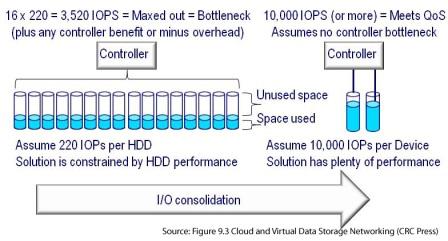
In the past when Green IT and Green storage was mentioned, discussions focused around energy avoidance along with space capacity reduction. While storage efficiency and optimization in the context of space-saving and capacity consolidation are part of Green storage, so too are storage IO consolidation with SSD. For inactive or less frequently accessed data, storage optimization and efficiency can focus on using various data footprint reduction techniques including archive, backup and data protection modernization, compression, dedupe, data management and deletion, along with storage tiering and thin provisioning among others.

SSD and IO consolidation for Green IT and productivity

On the other hand, for active data where performance is important, the focus expands to how to be more effective and boosting productivity with IO consolidation using SSD and other technologies.

Note that if your data center infrastructure is not efficient, then it is possible that for every watt of energy consumed, a watt (or more) of energy is needed to cool. However if your data center cooling is effective with a resulting low or good PUE, you may not be seeing a 1:1 watt or energy used for storage to cooling ratio as was more common a few years ago.

IMHO while reducing carbon footprints is a noble and good thing, however if that is your own focus or value proposition for a solution such as SSD or other Green technologies and techniques including data footprint reduction, you are missing many opportunities.

Have a read of John’s article that includes some of my comments on energy efficiency and effectiveness to support enhanced productivity, or the other aspect of Green IT being economic enabling to avoid missed opportunities.

Where to learn more

Various IT industry vendor and service provider links
Green and Virtual Data Center Primer
Green and Virtual Data Center links
Green IT Confusion Continues, Opportunities Missed!
Green IT deferral blamed on economic recession might be result of green gap
Supporting IT growth demand during economic uncertain times
Industry trend: People plus data are aging and living longer
Are large storage arrays dead at the hands of SSD?
EPA Energy Star for data center storage draft 3 specification
How much SSD do you need vs. want?
More storage and IO metrics that matter
What is the best kind of IO? The one you do not have to do

Speaking of speeding up business with SSD storage

Ok, nuff said for now

Cheers Gs

Greg Schulz – Author Cloud and Virtual Data Storage Networking (CRC Press, 2011), The Green and Virtual Data Center (CRC Press, 2009), and Resilient Storage Networks (Elsevier, 2004)

twitter @storageio

All Comments, (C) and (TM) belong to their owners/posters, Other content (C) Copyright 2006-2012 StorageIO and UnlimitedIO All Rights Reserved

Give HP storage some love and short strokin

Server and StorageIO industry trends and perspective DAS

Following up from my last post over at InfoStor about metrics that matter, here is a link to a new piece that I did on storage vendors benchmarking and related topics. This new post looked at an storage performance council (SPC1) benchmark that HP did with their P10000 (e.g. 3PAR) storage system under assertions by some in the industry that they were short stroking to meet better performance.

I’m surprised some creative technical marketer, blogger or prankster has yet to rework Clarence Carters (e.g. Dr. CC) iconic song into something about storage performance and capacity short strokin.


Ok, nuff said before I get a visit from the HP truth squads, in the meantime, give HP a hug and some love if so inclined.

Cheers Gs

Greg Schulz – Author Cloud and Virtual Data Storage Networking (CRC Press, 2011), The Green and Virtual Data Center (CRC Press, 2009), and Resilient Storage Networks (Elsevier, 2004)

twitter @storageio

All Comments, (C) and (TM) belong to their owners/posters, Other content (C) Copyright 2006-2012 StorageIO and UnlimitedIO All Rights Reserved
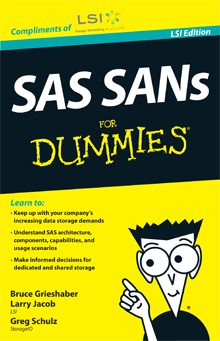
Announcing SAS SANs for Dummies book, LSI edition

There is a new (free) book that I’m a co-author of along Bruce Grieshaber and Larry Jacob (both of LSI) along with foreword by Harry Mason of LSI and President of the SCSI Trade Association titled SAS SANs for Dummies compliments of LSI.

SAS SANs for Dummies, LSI Edition

This new book (ebook and print hard copy) looks at Serial Attached SCSI (SAS) and how it can be used beyond traditional direct attached storage (DAS) configurations for support various types of storage mediums including SSD, HDD and tape. These configuration options include as entry-level SAN with SAS switches for small clusters or server virtualization, or as shared DAS as well as being a scale out back-end solution for NAS, object, cloud and big data storage solutions.

Here is the table of contents (TOC) of SAS SANs for Dummies

Chapter 1: Data storage challenges

  • Storage Growth Demand Drivers
  • Recognizing Challenges
  • Solutions and Opportunities
  • Chapter 2: Storage Area Networks

  • Introducing Storage Area Networks
  • Moving from Dedicated Internal to Shared Storage
  • Chapter 3: SAS Basics

  • Introducing the Basics of SAS
  • How SAS Functions
  • Components of SAS
  • SAS Target Devices
  • SAS for SANs
  • Chapter 4: SAS Usage Scenarios

  • Understanding SAS SANs Usage
  • Shared SAS SANs Scenarios including:
    • SAS in HPC environments
    • Big data and big bandwidth
    • Database, e-mail, back-office
    • NAS and object storage servers
    • Cloud, wen and high-density
    • Server virtualization

    Chapter 5: Advanced SAS Topics

  • The SAS Physical Layer
  • Choosing SAS Cabling
  • Using SAS Switch Zoning
  • SAS HBA Target Mode
  • Chapter 6: Nine Common Questions

  • Can You Interconnect Switches?
  • What Is SAS Cable Distance?
  • How Many Servers Can Be In a SAS SAN?
  • How Do You Manage SAS Zones?
  • How Do You Configure SAS for HA?
  • How Does SAS Zoning Compare to LUN Mapping?
  • Who Has SAS Solutions?
  • How Do SAS SANs Compare?
  • Where Can You Learn More?
  • Chapter 7: Next Steps

  • SAS Going Forward
  • Next Steps
  • Great Take Away’s
  • Regardless of if you are looking to use SAS as a primary SAN interface, or leverage it for DAS or implementing back-end storage for big-data, NAS, object, cloud or other types of scalable storage solutions, check out and get your free copy of SAS SANs for Dummies here compliments of LSI.

    SAS SANs for Dummies, LSI Edition

    Click here to ask your free copy of SAS SANs for Dummies compliments of LSI, tell them Greg from StorageIO sent you and enjoy the book.

    Ok, nuff said.

    Cheers Gs

    Greg Schulz – Author Cloud and Virtual Data Storage Networking (CRC Press, 2011), The Green and Virtual Data Center (CRC Press, 2009), and Resilient Storage Networks (Elsevier, 2004)

    twitter @storageio

    All Comments, (C) and (TM) belong to their owners/posters, Other content (C) Copyright 2006-2012 StorageIO and UnlimitedIO All Rights Reserved

    How can direct attached storage (DAS) make a comeback if it never left?

    Server and StorageIO industry trend and perspective DAS

    Have you seen or heard the theme that Direct Attached Storage (DAS), either dedicated or shared, internal or external is making a comeback?

    Wait, if something did not go away, how can it make a comeback?

    IMHO it is as simple as for the past decade or so, DAS has been overshadowed by shared networked storage including switched SAS, iSCSI, Fibre Channel (FC) and FC over Ethernet (FCoE) based block storage area networks (SAN) and file based (NFS and Windows SMB/CIFS) network attached storage (NAS) using IP and Ethernet networks. This has been particularly true by most of the independent storage vendors who have become focused on networked storage (SAN or NAS) solutions.

    However some of the server vendors have also jumped into the deep end of the storage pool with their enthusiasm for networked storage, even though they still sell a lot of DAS including internal dedicated, along with external dedicated and shared storage.

    Server and StorageIO industry trend and perspective DAS

    The trend for DAS storage has evolved with the interfaces and storage mediums including from parallel SCSI and IDE to SATA and more recently 3Gbs and 6Gbs SAS (with 12Gbs in first lab trials). Similarly the storage mediums include a mix of fast 10K and 15K hard disk drives (HDD) along with high-capacity HDDs and ultra-high performance solid state devices (SSD) moving from 3.5 to 2.5 inch form factors.

    While there has been a lot of industry and vendor marketing efforts around networked storage (e.g. SAN and NAS), DAS based storage was over shadowed so it should not be a surprise that those focused on SAN and NAS are surprised to hear DAS is alive and well. Not only is DAS alive and well, it’s also becoming an important scaling and convergence topic for adding extra storage to appliances as well as servers including those for scale out, big data, cloud and high density not to mention high performance and high productivity computing.

    Server and StorageIO industry trend and perspective DAS

    Consequently its becoming ok to talk about DAS again. Granted you might get some peer pressure from your trend setting or trend following friends to get back on the networked storage bandwagon. Keep this in mind, take a look at some of the cool trend setting big data and little data (database) appliances, backup, dedupe and archive appliances, cloud and scale out NAS and object storage systems among others and will likely find DAS on the back-end. On a smaller scale, or in high-density rack deployments in large cloud or similar environments you may also find DAS including switched shared SAS.

    Does that mean SANs are dead?
    No, not IMHO despite what some vendors marketers and their followers will claim which is ironic given how some of them were leading the DAS is dead campaign in favor of iSCSI or FC or NAS a few years ago. However simply comparing DAS to SAN or NAS in a competing way is like comparing apples to oranges, instead, look at how and where they can complement and enable each other. In other words, different tools for various tasks, various storage and interfaces for different needs.

    Thus IMHO DAS never left or went anywhere per say, it just was not fashionable or cool to talk about until now as it is cool and trend to discuss it again.

    Ok, nuff said for now.

    Cheers Gs

    Greg Schulz – Author Cloud and Virtual Data Storage Networking (CRC Press, 2011), The Green and Virtual Data Center (CRC Press, 2009), and Resilient Storage Networks (Elsevier, 2004)

    twitter @storageio

    All Comments, (C) and (TM) belong to their owners/posters, Other content (C) Copyright 2006-2012 StorageIO and UnlimitedIO All Rights Reserved

    Enabling Bitlocker on Microsoft Windows 7 Professional 64 bit

    Enabling Bitlocker on Microsoft Windows 7 Professional 64 bit
    Updated 6/24/18

    A while back, I added a new laptop that required Enabling Bitlocker on Microsoft Windows 7 Professional 64 bit. At that time some of my other devices run Windows 7 Ultimate 32 bit with Bitlocker security encryption enabled (since upgraded to various Windows 10 editions). However back then, I ran into a problem getting Bitlocker to work on the 64 bit version of Windows 7 Professional.

    Yes I know I should not be using Windows and I also have plenty of iDevices and other Apple products lying around. Likewise to the security pros and security arm-chair quarterbacks I know I should not be using Bitlocker, instead using Truecrypt of which I have done some testing and may migrate too in the future along with self-encrypting device (SED).

    However lets stay on track here ;).

    Image courtesy of Lenovo.com

    The problem that I ran into with my then new Lenovo X1 was that it came with Windows 7 Professional 64 bit, which has a few surprises when trying to turn on Bitlocker drive encryption. Initializing and turning on the Trusted Platform Module (TPM) management was not a problem, however for those needing to figure out how to do that, check out this Microsoft TechNet piece.

    The problem was as simple as not having a tab and easy way to enable Bitlocker Drive Encryption with Windows 7 Professional 64 bit. After spending some time searching around various Microsoft and other sites to figure out how to hack, patch, script and do other things that would take time (and time is money), it dawned on me. Could the solution to the problem be as simple as upgrading from the Professional version of Windows 7 bit to Windows 7 Ultimate?

    Update: 6/25/18

    While this post is about Windows 7, there are some new challenges with Windows 10 bit locker and removable devices including USB. These new issues are tied to Windows 10 running in BIOS instead of UEFI boot mode.

    Here are some additional Windows 10 Bitlocker related resources:

  • Via Microsoft: Bitlocker Frequently Asked Questions
  • Via Microsoft: Bitlocker Overview and Requirements
  • Via Intel: Converting Windows Installation from BIOS to UEFI
  • Microsoft Windows 7 via amazon
    Windows 7 image courtesy of Amazon.com

    The answer was going to the Microsoft store (or Amazon among other venues) and for $139.21 USD (with tax) purchase the upgrade.

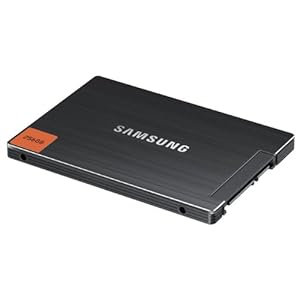
    Once the transaction was complete, the update was automatically and within minutes I had Bitlocker activated on the Lenovo X1 (TPM was previously initiated and turned on), a new key was protected and saved elsewhere, and the internal Samsung 830 256GB Solid State Device (SSD) initializing and encrypting. Oh, fwiw, yes the encryption of the 256GB SSD took much less time than on a comparable Hard Disk Drive (HDD) or even an HHDD (Hybrid HDD).

    Could I have saved the $139.21 and spent some time on work around? Probably, however as I did not have the time or interest to go that route, however IMHO for my situation it was a bargain.

    Sometimes spending a little money particular if you are short on or value, your time can be a bargain as opposed to if you are short on money however long on time.

    I found the same to be true when I replaced the internal HDD that came with the Lenovo X1 with a Samsung 256GB SSD in that it improved my productivity for writing and saving data. For example in the first month of use I estimate easily 2 to three minutes of time saved per day waiting on things to be written to HDDs. In other words 2 to three minutes times five days (10 to 15 minutes) times four weeks (40 to 60 minutes) starts to add up (e.g. small amounts or percentages spread over a large interval add up), more on using and justifying SSD in a different post.

    Microsoft Windows 7 Ultimate

    Samsung SSD image courtesy of Amazon.com

    If your time is not of value or you have a lot of it, then the savings may not be as valuable. On the other hand, if you are short on time or have a value on your time, you can figure out what the benefits are quite quickly (e.g. return on investment or traditional ROI).

    Where To Learn More

    Learn more about Windows, Bitlocker and related topics

    Additional learning experiences along with common questions (and answers), as well as tips can be found in Software Defined Data Infrastructure Essentials book.

    Software Defined Data Infrastructure Essentials Book SDDC

    What This All Means

    The reason I bring the topic of time and money into this discussion about Bitlocker is to make a point that there are situations where spending some time has value such as for learning, the experience, fun or simple entertainment aspect, not to mention a shortage of money. On the other hand, sometimes it is actually cheaper to spend some money to get to the solution or result as part of being productive or effective. For example, other than spending some time browsing various sites to figure out that there was an issue with Windows 7 Professional and Bitlocker, time that was educational and interesting, the money spent on the simple upgrade was worth it in my situations. While many if not most of you have since upgraded to Windows 8 or Windows 10, some may still have the need for Enabling Bitlocker on Microsoft Windows 7 Professional 64 bit.

    Ok, nuff said, for now.

    Gs

    Greg Schulz – Microsoft MVP Cloud Data Center Management, VMware vExpert 2010-2018. Author of Software Defined Data Infrastructure Essentials (CRC Press), as well as Cloud and Virtual Data Storage Networking (CRC Press), The Green and Virtual Data Center (CRC Press), Resilient Storage Networks (Elsevier) and twitter @storageio. Courteous comments are welcome for consideration. First published on https://storageioblog.com any reproduction in whole, in part, with changes to content, without source attribution under title or without permission is forbidden.

    All Comments, (C) and (TM) belong to their owners/posters, Other content (C) Copyright 2006-2026 Server StorageIO and UnlimitedIO. All Rights Reserved. StorageIO is a registered Trade Mark (TM) of Server StorageIO.

    NetApp on rough ground, or a diamond in the rough?

    Storage I/O Industry Trends and Perspectives

    In case you missed it, NetApp announced their most recent quarterly earnings a few weeks ago which in themselves were not bad. However what some of their competition jumping up and down for joy while others are scratching their heads is the forward-looking guidance given by NetApp.

    NetApp can be seen as being on rough ground given their forward-looking guidance over the next year which could be seen as either very conservative, or an admission that they are not growing as fast as some of their competitors are challenging them.

    Reading between the lines, looking at various financial and other resources in addition to factoring in technology items, there is more to NetApp then meets the eye and current stock price or product portfolio.

    For example, NetApp is sitting on over $4 Billion USD cash that they could use for an acquisition, buying back stock, launching a major sales and marketing initiative to expand into new or adjacent markets or other activities. Speaking of acquisitions, NetApp has done some in the past including Spinnaker, which is now integrated with Ontap (e.g. clustering), Topio, Decru (security encryption) and Onaro (DCIM and IRM management software tools). More recently, NetApp has acquired Bycast (archiving and policy storage management software), Akorri (capacity management and DCIM and IRM software) and Engenio. NetApp is also maintaining good margins via both direct, channel and OEM activities while launching new products such as the channel and SMB focused FAS 2220.

    Its arguable depending upon your point of view (or who you for or are a fan of) if NetApp has all the right product pieces now, in the works, or on their radar for acquisitions. Assuming that NetApp has the pieces, they also need to move beyond selling simply what is on the truck or what is safe and comfortable or perhaps easy to sell. This is not to say that NetApp is not being effective in selling what they have and pushing the envelope, however keeping in mind who their main competitor is, the old sales saying of being able to sell ice to an Eskimo comes to mind.

    Two companies on parralel tracks offset by time: EMC and NetApp

    In the case of NetApp, when the competition makes an issue about scalibility or performance of their flagship storage systems FAS and Ontap storage software, change the playing field leveraging all the tools in their portfolio. NetApp like EMC before them is figuring out how to sell via different channels or venues their complete portfolio with a mix of direct, channel and OEM. After all, it seems like only yesterday that EMC was trying to figure out where and when to sell CLARiiON (e.g. now VNX) as opposed to avoiding competing with the Symmetrix (aka now the VMAX) not to mention expanding from a direct to channel and OEM model. Perhaps NetApp can continue to figure out how to leverage more effectively the Engenio E series for big bandwidth beyond their current OEMs. NetApp can also leverage their existing partners who have embraced Bycast (aka StorageGrid) while finding new ones.

    The reality is that NetApp is being challenged by EMC who is moving down market into some of NetApp’s traditional accounts along with in the scale-out NAS and big data sectors. This is where NetApp can leverage their technical capabilities including people combined with some effective sales and marketing execution to change the playing field vs. responding to EMC and others.

    NetApp has many of the pieces, parts, products, people, programs and partners so now how can they leverage those to expand both their revenues, as well as support margin to grow the business, unless they are looking to be acquired.

    I still subscribe that NetApp and EMC are two similar companies on parallel tracks offset by time, by about a decade or decade and a half.

    Storage I/O Industry Trends and Perspectives

    Thus, IMHO NetApp is a diamond in the rough, granted I am guessing EMC and some others do not see it that way. However, there was a time when EMC was seen as a diamond in the rough while others discounted that notion, particularly an Itty Bitty Manufacturing company from New York who is now focusing on services among other things.

    Keep in mind however, diamonds can also be lost or taken as well as there can be fake gems.

    Here are some related links:
    Unified storage systems showdown: NetApp FAS vs. EMC VNX
    Two companies on parallel tracks moving like trains offset by time: EMC and NetApp
    NetApp buying LSI’s Engenio Storage Business Unit

    Ok, nuff said for now

    Cheers Gs

    Greg Schulz – Author Cloud and Virtual Data Storage Networking (CRC Press, 2011), The Green and Virtual Data Center (CRC Press, 2009), and Resilient Storage Networks (Elsevier, 2004)

    twitter @storageio

    All Comments, (C) and (TM) belong to their owners/posters, Other content (C) Copyright 2006-2012 StorageIO and UnlimitedIO All Rights Reserved

    Green IT deferral blamed on economic recession might be result of green gap

    Storage I/O Industry Trends and Perspectives

    I recently saw a comment somewhere that talked about Green IT being deferred or set aside due to lack of funding because of ongoing global economic turmoil. For those who see Green IT in the context of the green washing efforts that requiring spending to gain some benefits that I can understand. After all, if your goal is to simply go and be or be seen as being green, there is a cost to doing that.

    With tight or shrinking IT budgets, there are other realities and while organizations may want to do the right thing helping the environment, however that is often seen as overhead to financial conscious management.

    On the other hand, turn the green washing messaging off or at least dial-it back a bit as has been the case the past couple of years.

    Expand the Green IT discussion or change it around a bit from that of being seen or perceived as being green by energy efficiency or avoidance to that of effectiveness, enhanced productivity, doing more with what you have or with less and there is a different opportunity.

    That opportunity is to meet the financial and business goals or requirements that as a by-product help the environment. In other words, expand the focus of Green IT to that of economics and improving on resource effectiveness and the environment gets a free ride, or, Green gets self-funded.

    The Green and Virtual Data Center Book addressing optimization, effectivness, productivity and economics

    The challenge is what I refer to as the Green Gap, which is the disconnect between what is talked about (e.g. messaging) and thus perceived to be Green IT and where common IT opportunities exist (or missed opportunities have occurred).

    Green IT or at least the tenants of driving efficiency and effectiveness to use energy more effectively, address recycling and waste, removable of hazardous substance and other items continues to thrive. However, the green washing is subsiding and overtime organizations will not be as dismissive of Green IT in the context of improving productivity, reducing complexity and costs, optimization and related themes tied to economics where the environment gets a free ride.

    Here are some related links:
    Closing the Green Gap
    Energy efficient technology sales depend on the pitch
    EPA Energy Star for Data Center Storage Update
    Green IT Confusion Continues, Opportunities Missed!
    How to reduce your Data Footprint impact (Podcast)
    Optimizing storage capacity and performance to reduce your data footprint
    Performance metrics: Evaluating your data storage efficiency
    PUE, Are you Managing Power, Energy or Productivity?
    Saving Money with Green Data Storage Technology
    Saving Money with Green IT: Time To Invest In Information Factories
    Shifting from energy avoidance to energy efficiency
    Storage Efficiency and Optimization: The Other Green
    Supporting IT growth demand during economic uncertain times
    The new Green IT: Efficient, Effective, Smart and Productive
    The other Green Storage: Efficiency and Optimization
    The Green and Virtual Data Center Book (CRC Press, Intel Recommended Reading)

    Ok, nuff said for now

    Cheers Gs

    Greg Schulz – Author Cloud and Virtual Data Storage Networking (CRC Press, 2011), The Green and Virtual Data Center (CRC Press, 2009), and Resilient Storage Networks (Elsevier, 2004)

    twitter @storageio

    All Comments, (C) and (TM) belong to their owners/posters, Other content (C) Copyright 2006-2012 StorageIO and UnlimitedIO All Rights Reserved
    Why FC and FCoE vendors get beat up over bandwidth?

    Storage I/O Industry Trends and Perspectives

    Have you noticed how Fibre Channel (FC) and FC over Ethernet (FCoE) switch and adapter vendors and their followers focus around bandwidth vs. response time, latency or other performance activity? For example, 8Gb FC (e.g. 8GFC), or 10Gb as opposed to latency and response time, or IOPS and other activity indicators.

    When you look at your own environment, or that of a customers or prospects or hear of a conversation involving storage networks, is the focus on bandwidth, or lack of it, or perhaps throughput being a non-issue? For example, a customer says why go to 16GFC when they are barely using 8Gb with their current FC environment.

    This is not a new phenomenon and is something I saw when working for a storage-networking vendor who had SAN, MAN and WAN solutions (E.g. INRANGE). Those with networking backgrounds tended to focus on bandwidth when discussing storage networks while those with storage, server or applications background also look at latency or IO completion time (response time), queuing, message size, IOPs or frames and packets per second. Thus there are different storage and networking metrics that matter that are also discussed further in my first book Resilient Storage Networks: Designing Flexible Scalable Data Infrastructures.

    When I hear a storage networking vendor talk about their latest 16GFC based product I like to ask them what is the biggest benefit vs. 8GFC and not surprisingly, the usual response is like twice the bandwidth. When I ask them about what that means in terms of more IOPS in a given amount of time, or reduced IO completion time, lower latency, sometimes I often get the response along the lines of Yeah, that too, however it has twice the bandwidth.

    Ok, I get it, yes, bandwidth is important for some applications, however so too are activity measured in IOPS, transactions, packets, frames, pages, sequences and exchanges among other units of measure along with response time and latency (e.g. different storage and networking metrics that matter).

    What many storage networking vendors actually get, however they don’t talk about it for various reasons, perhaps because they are not be asked about it, or engaged in the conversation is that there is an improvement in response time in going from such as 8GFC to 16GFC. Likewise, there can be improvements in response time in addition to the more commonly discussed bandwidth.

    If you are a storage networking switch, adapter or other component vendor, var or channel partner expand your conversation to include activity and response time as part of your value proposition. Likewise, if you are a customer, ask your technology providers to expand on the conversation of how new technologies help in areas other than bandwidth.

    Ok, nuff said for now

    Cheers Gs

    Greg Schulz – Author Cloud and Virtual Data Storage Networking (CRC Press, 2011), The Green and Virtual Data Center (CRC Press, 2009), and Resilient Storage Networks (Elsevier, 2004)

    twitter @storageio

    All Comments, (C) and (TM) belong to their owners/posters, Other content (C) Copyright 2006-2012 StorageIO and UnlimitedIO All Rights Reserved

    How much SSD do you need vs. want?

    Storage I/O Industry Trends and Perspectives

    I have been getting asked by IT customers, VAR’s and even vendors how much solid state device (SSD) storage is needed or should be installed to address IO performance needs to which my standard answer is it depends.

    I also am also being asked if there is rule of thumb (RUT) of how much SSD you should have either in terms of the number of devices or a percentage; IMHO, the answer is it depends. Sure, there are different RUTs floating around based on different environments, applications, workloads however are they applicable to your needs.

    What I would recommend is instead of focusing on percentages, RUTs, or other SWAG estimate’s or PIROMA calculations, look at your current environment and decide where the activity or issues are. If you know how many fast hard disk drives (HDD) are needed to get to a certain performance level and amount of used capacity that is a good starting point.

    If you do not have that information, use tools from your server, storage or third-party provider to gain insight into your activity to help size SSD. Also if you have a database environment and are not familiar with the tools, talk with your DBA’s to have them run some reports that show performance information the two of you can discuss to zero in hot spots or opportunity for SSD.

    Keep in mind when looking at SSD what is that you are trying to address by installing SSD. For example, is there a specific or known performance bottleneck resulting in poor response time or latency or is there a general problem or perceived opportunity?

    Storage I/O Industry Trends and Perspectives

    Is there a lack of bandwidth for large data transfers or is there a constraint on how many IO operations per second (e.g. IOPS) or transaction or activity that can be done in a given amount of time. In other words the more you know where or what the bottleneck is including if you can trace it back to a single file, object, database, database table or other item the closer you are to answering how much SSD you will need.

    As an example if using third-party tools or those provided by SSD vendors or via other sources you decide that your IO bottleneck are database transaction logs and system paging files, then having enough SSD space capacity to fit those in part of the solution. However, what happens when you remove the first set of bottlenecks, what new ones will appear and will you have enough space capacity on your SSD to accommodate the next in line hot spot?

    Keep in mind that you may want more SSD however what can you get budget approval to buy now without having more proof and a business case. Get some extra SSD space capacity to use for what you are confident can address other bottlenecks, or, enable new capabilities.

    On other hand if you can only afford enough SSD to get started, make sure you also protect it. If you decide that two SSD devices (PCIe cache or target cards, drives or appliances) will take care of your performance and capacity needs, make sure to keep availability in mind. This means having extra SSD devices for RAID 1 mirroring, replication or other form of data protection and availability. Keep in mind that while traditional hard disk drive (HDD) storage is often gauged on cost per capacity, or dollar per GByte or dollar per TByte, with SSD measure its value on cost to performance. For example, how many IOPS, or response time improvement or bandwidth are obtained to meet your specific needs per dollar spent.

    Related links
    What is the best kind of IO? The one you do not have to do
    Is SSD dead? No, however some vendors might be
    Speaking of speeding up business with SSD storage
    Has SSD put Hard Disk Drives (HDD’s) On Endangered Species List?
    Why SSD based arrays and storage appliances can be a good idea (Part I)
    EMC VFCache respinning SSD and intelligent caching (Part I)
    SSD options for Virtual (and Physical) Environments Part I: Spinning up to speed on SSD

    Ok, nuff said for now

    Cheers Gs

    Greg Schulz – Author Cloud and Virtual Data Storage Networking (CRC Press, 2011), The Green and Virtual Data Center (CRC Press, 2009), and Resilient Storage Networks (Elsevier, 2004)

    twitter @storageio

    All Comments, (C) and (TM) belong to their owners/posters, Other content (C) Copyright 2006-2012 StorageIO and UnlimitedIO All Rights Reserved