This is a new episode in the continuing StorageIO industry trends and perspectives pod cast series (you can view more episodes or shows along with other audio and video content here) as well as listening via iTunes or via your preferred means using this RSS feed )
All Comments, (C) and (TM) belong to their owners/posters, Other content (C) Copyright 2006-2026 Server StorageIO and UnlimitedIO LLC All Rights Reserved
This is a new episode in the continuing StorageIO industry trends and perspectives pod cast series (you can view more episodes or shows along with other audio and video content here) as well as listening via iTunes or via your preferred means using this RSS feed )
In this episode from SNW Spring 2013 in Orlando Florida, Bruce Ravid (@BruceRave) and me visit with Justin Stottlemyer (@JHStott) who is a Fellow and Storage Architect at Shutterfly.
Our conversation centers on how Justin and Shutterfly maximize their return on innovation (the new ROI) by using object storage along with other technology and techniques to create a resilient, scalable flexible data infrastructure.
Justin was at SNW presenting on overcoming object integration at Shutterfly where their data infrastructure consists of 80PB of storage to house over 30PB of user content data that continues to grow.
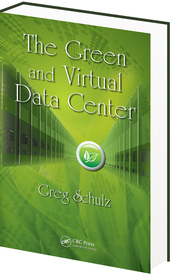
For those not familiar, Shutterfly providers customers with free unlimited storage of their photos which can then be printed in coffee table type books such as the one shown in the above figure. My wife has used Shutterfly a few times to create photo books such as the one shown above in the image.
As you will hear Justin explain in the pod cast, photos get uploaded and ingested into their environment and then available for printing.
In addition to talking about object storage, private clouds, business continuance (BC) and disaster recovery, other topics include performance and capacity planning, maximizing return on innovation in addition to return on investment among other items. Varies and managed by user interface
Listen in to hear how Justin and Shutterfly are currently managing 80PB of storage with over 30PB of user data that continues to grow.
All Comments, (C) and (TM) belong to their owners/posters, Other content (C) Copyright 2006-2026 Server StorageIO and UnlimitedIO LLC All Rights Reserved
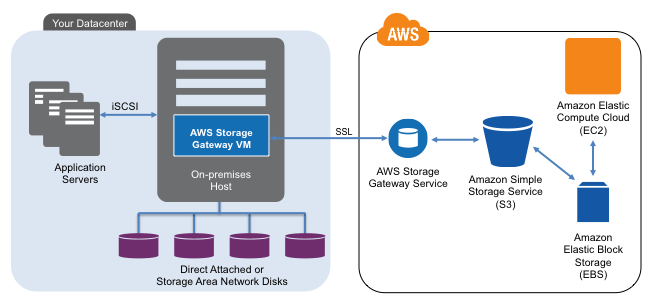
In 2012 AWS released their Storage Gateway that you can use and try for free here using either an EC2 Amazon Machine Instance (AMI), or deployed locally on a hypervisor such as VMware vSphere/ESXi. About a year ago I did a storage gateway post (First, second and third impressions) when it was first released. I will do a new post soon following up with my later impressions and experiences of having used it recently. For now, my quick (fourth impressions can be found here in this AWS Marketplace review). In general, the gateway is an AWS alternative to using third product gateway, appliances of software tools for accessing AWS storage.
When deployed locally on a VM, the storage gateway communicates using the AWS API’s back to the S3 and EBS (depending on how configured) storage services. Locally, the storage gateway presents an iSCSI block access method for Windows or other servers to use.
There are two modes with one being Gateway-Stored and the other Gateway-Cached. Gateway-Stored uses your primary storage mapped to the storage gateway as primary storage and asynchronous (time delayed) snapshots (user defined) to S3 via EBS volumes. This is a handy way to have local storage for low latency access, yet use AWS for HA, BC and DR, along with a means for doing migration into or out of AWS. Gateway-cache mode places primary storage in AWS S3 with a local cached copy to reduce network overhead.
When I tried the gateway a month or so ago, using both modes, I was not able to view any of my data using standard S3 tools. For example if I looked in my S3 buckets the objects do not appear, something that AWS said had to do with where and how those buckets and objects are managed. Otoh, I was able to see EBS snapshots for the gateway-stored mode including using that as a means of moving data between local and AWS EC2 instances. Note that regardless of the AWS storage gateway mode, some local cache storage is needed, and likewise some EBS volumes will be needed depending on what mode is used.
When I used the gateway, a Windows Server mounted the iSCSI volume presented by the storage gateway and in turn served that to other systems as a shared folder. Thus while having block such as iSCSI is nice, a NAS (NFS or CIFS) presentation and access mode would also be useful. However more on the storage gateway in a future post. Also note that beyond the free trial period (you may have to pay for storage being used) for using the gateway, there are also fees for S3 and EBS storage volumes use.
What about Glacier?
Shortly after its release last year, I did this piece about Glacier and have since been doing some testing proof of concepts with it.
I like Glacier and its prospects for doing some various things, particular for inactive data including deep archives that will seldom if every be accessed, yet need to be retained. The business value proposition of Glacier is that it has a very high durability and low-cost assuming that you do not need to frequently access your data, and when you do, that you can wait 3 to 5 hours before retrieving it from your S3 buckets.
Access to Glacier is via API or AWS console so getting things into and out of it can be a challenge. For example I wanted to see if I could use AWS storage gateway to more easily bulk move things into Glacier via S3, however no luck, or at least today. Speaking of S3, by setting your policies you determine when objects get moved into Glacier as well as how long they will stay there, you can read more about Glacier here and via AWS here.
Note that there is a myth that cloud vendors have hidden fees which may be the case for some, however so far I have not seen that to be the case with AWS. However, as a consumer, designer or architect, doing your homework and looking at the above links among others you can be ready and understand the various fees and options. Hence like procuring traditional hardware, software or services, do your due diligence and be an informed shopper.
Some more service cost notes include:
Note that with S3 Standard and RRS objects there is not a charge for deletion of objects, however there is a pro-rated charge per GByte of Glacier objects removed prior to 90 days. Glacier also allows up to 5% of your average monthly storage usage (pro-rated daily) to be restored with no charge, other fees apply for restoring larger amounts in a given period. Thus if you are planning on accessing and using data, analyze what your activity and usage will be as part of calculating your costs with Glacier. Read more about Glacier here.
Standard EBS volumes are changed by the amount of storage space capacity you provision in GB until released. For EBS snapshot copies there are fees for transferring data across regions, once moved, the rates of the new region apply for the snapshot.
As with Standard volumes, volume storage for Provisioned IOPS volumes is charged by the amount you provision in GB per month. With Provisioned IOPS volumes, you are also charged by the amount you provision in IOPS pro-rated as a percentage of days you have it in use for the month.
Thus important for cloud storage planning to know not only your space requirements, also IOP’s, bandwidth, and level of availability as well as durability. so for Standard volumes, you will likely see a lower number of I/O requests on your bill than is seen by your application unless you sync all of your I/Os to disk. Thus pay attention to what your needs are in terms of availability (accessibility), durability (resiliency or survivability), space capacity, and performance.
Leverage AWS CloudWatch tools and API’s to monitoring that matter for timely insight and situational awareness into how EBS, EC2, S3, Glacier, Storage Gateway and other services are being used (or costing you). Also visit the AWS service health status dashboard to gain insight into how things are running to help gain confidence with cloud services and solutions.
Hopefully this helps to fill in some gaps giving more information addressing questions, along with generating new ones to prepare for your journey with clouds. After all, don’t be scared of clouds. Be prepared, do your homework, identify your concerns and then address those to gain cloud confidence.
All Comments, (C) and (TM) belong to their owners/posters, Other content (C) Copyright 2006-2026 Server StorageIO and UnlimitedIO LLC All Rights Reserved
For those not familiar, Simple Storage Services (S3), Glacier and Elastic Block Storage (EBS) are part of the AWS cloud storage portfolio of services. With S3, you specify a region where a bucket is created that will contain objects that can be written, read, listed and deleted. You can create multiple buckets in a region with unlimited number of objects ranging from 1 byte to 5 Tbytes in size per bucket. Each object has a unique, user or developer assigned access key. In addition to indicating which AWS region, S3 buckets and objects are provisioned using different levels of availability, durability, SLA’s and costs (view S3 SLA’s here).
Cost will vary depending on the AWS region being used, along if Standard or Reduced Redundancy Storage (RSS) selected. Standard S3 storage is designed with 99.999999999% durability (how many copies exists) and 99.99% availability (how often can it be accessed) on an annual basis capable of two data centers becoming un-available.
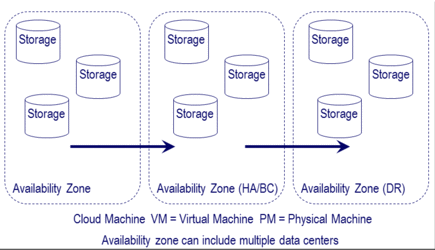
As its name implies, for a lower fee and level of durability, S3 RRS has an annual durability of 99.999% and availability of 99.99% capable of a single data center loss. In the following figure durability is how many copies of data exist spread across different servers and storage systems in various data centers and availability zones.
What would you put in RRS vs. Standard S3 storage?
Items that need some level of persistence that can be refreshed, recreated or restored from some other place or pool of storage such as thumbnails or static content or read caches. Other items would be those that you could tolerant some downtime while waiting for data to be restored, recovered or rebuilt from elsewhere in exchange for a lower cost.
Different AWS regions can be chosen for regulatory compliance requirements, performance, SLA’s, cost and redundancy with authentication mechanisms including encryption (SSL and HTTPS) to make sure data is kept secure. Various rights and access can be assigned to objects including making them public or private. In addition to logical data protection (security, identity and access management (IAM), encryption, access control) policies also apply to determine level of durability and availability or accessibility of buckets and objects. Other attributes of buckets and objects include life-cycle management polices and logging of activity to the items. Also part of the objects are meta data containing information about the data being stored shown in a generic example below.
Access to objects is via standard REST and SOAP interfaces with an Application Programming Interface (API). For example default access is via HTTP along with a Bit Torrent interface with optional support via various gateways, appliances and software tools.
Example cloud and object storage access
The above figure via Cloud and Virtual Data Storage Networking (CRC Press) shows a generic example applicable to AWS services including S3 being accessed in different ways. For example I access my S3 buckets and objects via Jungle Disk (one of the tools I use for data protection) that can also access my Rackspace Cloudfiles data. In the following figure there are examples of some of my S3 buckets and objects used by different applications and tools that I have in various AWS regions.
AWS S3 buckets and objects in different regions
Note that I sometimes use other AWS regions outside the US for testing purposes, for compliance purpose my production, business or personal data is only in the US regions.
The following figure is a generic example of how cloud and object storage are accessed using different tools, hardware, software and API’s along with gateways. AWS is an example of what is shown in the following figure as a Cloud Service and S3, EBS or Glacier as cloud storage. Common example API commands are also shown which will vary by different vendors, products or solution definitions or implementations. While Amazon S3 API which is REST HTTP based has become an industry de facto standard, there are other API’s including CDMI (Cloud Data Management Interface) developed by SNIA which has gained ISO accreditation.
In addition to using Jungle Disk which manages my AWS keys and objects that it creates, I can also access my S3 objects via the AWS management console and web tools, also via third-party tools including Cyberduck.
All Comments, (C) and (TM) belong to their owners/posters, Other content (C) Copyright 2006-2026 Server StorageIO and UnlimitedIO LLC All Rights Reserved
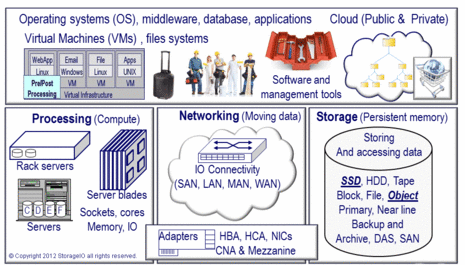
For those not familiar, Simple Storage Services (S3), Glacier and Elastic Block Storage (EBS) are part of the AWS cloud storage portfolio of services. There are several other storage and data related service for little data database (SQL and NoSql based) other offerings include compute, data management, application and networking for different needs shown in the following image.
S3 is well suited for both big and little data repositories of objects ranging from backup to archive to active video images and much more. In fact if you are using some of the different AaaS or SaaS services including backup or file and video sharing, those may be using S3 as its back-end storage repository. For example NetFlix leverages various AWS capabilities as part of its data and applications infrastructure (read more here).
AWS basics
AWS consists of multiple regions that contain multiple availability zones where data and applications are supported from.
Note that objects stored in a region never leave that region, such as data stored in the EU west never leave Ireland, or data in the US East never leaves Virginia.
AWS does support the ability for user controlled movement of data between regions for business continuance (BC), high availability (HA) and disaster recovery (DR). Read more here at the AWS Security and Compliance site and in this AWS white paper.
What about EBS?
That brings us to Elastic Block Storage (EBS) that is used by EC2 (read more about EC2 and instances here) as storage for cloud and virtual machines or compute instances. In addition to using S3 as a persistent backing store or target for holding snapshots EBS can be thought of as primary storage. You can provision and allocate EBS volumes in the different data centers of the various AWS availability zones. As part of allocating your EBS volume you indicate the type (standard) or provisioned IOP’s or the new EBS Optimized volumes. EBS Optimized volumes enables instances that support the feature to have better IO performance to storage.
The following image shows an EC2 instance with EBS volumes (standard and provisioned IOPS’s) along with S3 volumes and snapshots. In the following example the instance and volumes are being served via the AWS US East region (Northern Virginia) using availability zone US East 1a. In addition, EBS optimized volumes are shown being used in the example to increase bandwidth or throughput performance between storage and the compute instance.
Using the above as a basis, you can build on that to leverage multiple availability zones or regions for HA, BC and DR combined with application, network load balancing and other capabilities. Note that EBS volumes are protected for durability by being spread across different servers and storage in an availability zone. Additional protection is provided by using snapshots combined with S3. Additional BC and DR or HA protection can be accomplished by replicating data across availability zones.
The above is an example of tying various components and services together. For example using different AWS availability zones, instances, EBS, S3 and other tools including those from third parties. Here is a link to a free chapter download from Cloud and Virtual Data Storage Networking (CRC Press) pertaining to data protection, BC and DR (available at Amazon here and Kindle here). In addition here is an AWS white paper on using their services for BC, HA and DR.
EBS volumes are created ranging in size from 1GByte to 1Tbyte in space capacity with multiple volumes being mapped or attached to an EC2 instances. EBS volumes appear as a virtual disk drive for block storage. From the EC2 instance and guest operating system you can mount, format and use the EBS volumes as any other block disk drive with your favorite tools and file systems. In addition to space capacity, EBS volumes are also provisioned with standard IO (e.g. disk based) performance or high performance Provisioned IOPS (e.g. SSD) for thousands of IOPS per instance. AWS states that a standard EBS volume should support about 100 IOP’s on average, with about 2,000 IOPS for a provisioned IOP volume. Need more than 2,000 IOPS, then the AWS recommendation is to use multiple IOP provisioned volumes with data spread across those. Following is an example of AWS EBS volumes seen via the EC2 management interface.
AWS EC2 and EBS configuration status
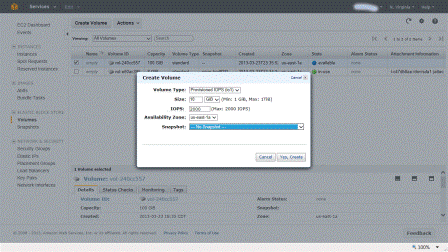
Note that there is a 10 to 1 ratio of space capacity to IOP’s being provisioned. If you try to play a game of 1,000 IOPS provisioned on a 10GByte EBS volume to keep your costs down you are out of luck. Thus to get 1,000 IOPS’s you would need to allocate at least a 100GByte EBS volume of which you will be billed for the actual space used on a monthly pro-rated basis. The following is an example of provisioning an AWS EBS volume using provisioned IOPS in the US East region in the 1a availability zone.
Provisioning IOPS with EBS volume
Standard and Provisioned IOPS EBS volumes
Standard EBS volumes are good for boot images or other application usage that are not IO performance intensive. For database or other active applications where more performance is needed, then EBS Provisioned IOPS volumes are your option. Note that the provisioned IOP rate is persistent for the specific volume during its life. Thus if you set it and forget it including not using it without turning it off, you will be billed for provisioning it.
All Comments, (C) and (TM) belong to their owners/posters, Other content (C) Copyright 2006-2026 Server StorageIO and UnlimitedIO LLC All Rights Reserved
The four EBS optimized instance types are m3.xlarge, m3.2xlarge, m2.2xlarge and c1.xlarge for dedicated bandwidth or throughput between the EC2 instances and EBS volumes. The performance or bandwidth ranges from 500 Mbits (500 / 8 = 62.5 MBytes) per second, to 1,000 Mbits (1,000 / 8 = 125MBytes) per second depending on the type of instance. As a refresher, EC2 instances (why by time you read this could change) vary in size and functionality with different amounts of EC2 Unit of Compute (ECU), number of virtual cores, amount of storage space included, 32 or 64 bit, storage and networking IO performance, and EBS Optimized or not. In addition to instances, different operating system images can be installed using those licensed from AWS such as various Windows and Unix or supply your own.
There are also different generations of instances such as M1 (first generation where one ECU = 1.0 to 1.2 Ghz of a 2007 era Opteron or Xeon processor), M3 (second generation with faster processors) along with Micro low-cost options. There are also other optimized instances including high or large amounts of memory, high CPU or compute processing, clustered compute, high memory clustered, clustered GPU (e.g. using Nivida Tesla GPUs), high IO and high storage space capacity needs.
Here is the announcement from AWS:
Dear Amazon Web Services Customer,
We are delighted to announce the global availability of EBS-optimized support for four additional instance types: m3.xlarge, m3.2xlarge, m2.2xlarge, and c1.xlarge. EBS-optimized instances deliver dedicated throughput between Amazon EC2 and Amazon EBS, with options between 500 Megabits per second and 1,000 Megabits per second depending on the instance type used. The dedicated throughput minimizes contention between EBS I/O and other traffic from your Amazon EC2 instance, providing the best performance for your EBS volumes.
EBS-optimized instances are designed for use with both Standard and Provisioned IOPS EBS volumes. Standard volumes deliver 100 IOPS on average with a best effort ability to burst to hundreds of IOPS, making them well-suited for workloads with moderate and bursty I/O needs. When attached to an EBS-optimized instance, Provisioned IOPS volumes are designed to consistently deliver up to 2000 IOPS from a single volume, making them ideal for I/O intensive workloads such as databases. You can attach multiple Amazon EBS volumes to a single instance and stripe your data across them for increased I/O and throughput performance.
Amazon EBS-optimized support is now available for m3.xlarge, m3.2xlarge, m2.2xlarge, m2.4xlarge, m1.large, m1.xlarge, and c1.xlarge instance types, and is currently supported in the US-East (N. Virginia), US-West (N. California), US-West (Oregon), EU-West (Ireland), Asia Pacific (Singapore), Asia Pacific (Japan), Asia Pacific (Sydney), and South America (São Paulo) Regions.
What this means is that AWS is enabling customers to size their compute instances and storage volumes with more flexibility to meet different needs. For example, EC2 instances with various compute processing capabilities, amount of memory, network and storage I/O performance to volumes. In addition, storage volumes based on different space capacity size, standard or provisioned IOP’s, bandwidth or throughput performance between the instance and volume, along with data protection such as snapshots.
This means that the cost per space capacity of an EBS volume varies based on which AWS availability zone it is in, standard (lower IOP performance) or provisioned IOP’s (faster), along with instance type. In other words, cloud storage is not just about the cost per GByte, it’s also about the cost for IOPS, bandwidth to use it, where it is located (e.g. with AWS which Availability Zone), type of service, level of availability and durability among other attributes.
Additional reading and related items:
Cloud conversations: AWS EBS, Glacier and S3 overview (Part I)
Cloud conversations: AWS EBS, Glacier and S3 overview (Part II)
Cloud conversations: AWS EBS, Glacier and S3 overview (Part III)
All Comments, (C) and (TM) belong to their owners/posters, Other content (C) Copyright 2006-2026 Server StorageIO and UnlimitedIO LLC All Rights Reserved
Cloud Bulk Big Data Software Defined Object Storage Resources
Welcome to the Cloud, Big Data, Software Defined, Bulk and Object Storage Resources Center Page objectstoragecenter.com.
This object storage resources, along with software defined, cloud, bulk, and scale-out storage page is part of the server StorageIOblog microsite collection of resources. Software-defined, Bulk, Cloud and Object Storage exist to support expanding and diverse application data demands.
Bulk, Cloud, Object Storage Solutions and Services
There are various types of cloud, bulk, and object storage including public services such as Amazon Web Services (AWS) Simple Storage Service (S3), Backblaze, Google, Microsoft Azure, IBM Softlayer, Rackspace among many others. There are also solutions for hybrid and private deployment from Cisco, Cloudian, CTERA, Cray, DDN, Dell EMC, Elastifile, Fujitsu, Vantera/HDS, HPE, Hedvig, Huawei, IBM, NetApp, Noobaa, OpenIO, OpenStack, Quantum, Rackspace, Rozo, Scality, Spectra, Storpool, StorageCraft, Suse, Swift, Virtuozzo, WekaIO, WD, among many others.
Cloud products and services among others, along with associated data infrastructures including object storage, file systems, repositories and access methods are at the center of bulk, big data, big bandwidth and little data initiatives on a public, private, hybrid and community basis. After all, not everything is the same in cloud, virtual and traditional data centers or information factories from active data to in-active deep digital archiving.
Object Context Matters
Before discussing Object Storage lets take a step back and look at some context that can clarify some confusion around the term object. The word object has many different meanings and context, both inside of the IT world as well as outside. Context matters with the term object such as a verb being a thing that can be seen or touched as well as a person or thing of action or feeling directed towards.
Besides a person, place or physical thing, an object can be a software-defined data structure that describes something. For example, a database record describing somebody’s contact or banking information, or a file descriptor with name, index ID, date and time stamps, permissions and access control lists along with other attributes or metadata. Another example is an object or blob stored in a cloud or object storage system repository, as well as an item in a hypervisor, operating system, container image or other application.
Besides being a verb, an object can also be a noun such as disapproval or disagreement with something or someone. From an IT context perspective, an object can also refer to a programming method (e.g. object-oriented programming [oop], or Java [among other environments] objects and classes) and systems development in addition to describing entities with data structures.
In other words, a data structure describes an object that can be a simple variable, constant, complex descriptor of something being processed by a program, as well as a function or unit of work. There are also objects unique or with context to specific environments besides Java or databases, operating systems, hypervisors, file systems, cloud and other things.
The Need For Bulk, Cloud and Object Storage
There is no such thing as an information recession with more data being generated, moved, processed, stored, preserved and served, granted there are economic realities. Likewise as a society our dependence on information being available for work or entertainment, from medical healthcare to social media and all points in between continues to increase (check out the Human Face of Big Data).
Object and cloud storage are in your future, the questions are when, where, with what and how among others.
Watch for more content and links to be added here soon to this object storage center page including posts, presentations, pod casts, polls, perspectives along with services and product solutions profiles.
All Comments, (C) and (TM) belong to their owners/posters, Other content (C) Copyright 2006-2026 Server StorageIO and UnlimitedIO. All Rights Reserved. StorageIO is a registered Trade Mark (TM) of Server StorageIO.
If your organization like StorageIO is a member of the Open Data Center Alliance (ODCA) you may be aware of the resources they make available about cloud, virtualization, security and more. Unlike so many other industry associates or trade groups dominated by vendors, the ODCA has an IT or customer focus including member developed best practices, strategies and templates.
A good example is the recently released ODCA member BMW group private cloud strategy document.
This 24 page document covers BMW groups private cloud strategy that sets stage for phased future hybrid. By being a phased approach, it seems that BMW is leveraging and transitioning for the future while maintaining support for their current environment (including Windows-based) as part of a paradigm shift. This is refreshing and good to see how organizations are looking to use cloud as part of a paradigm or IT service deliver model and not just as a new technology or platform focus.
Topics covered include IaaS along with PaaS for DB, Web, SAP and CSaaS or Corporate Software as a Service based on the NIST cloud model. Also included are roles and integration of CMDB, ITSM, ITIL, orchestration in a business vs. technology driven model. Being business driven, that means there is a mission statement for the BMW cloud strategy, with objectives aligned to support organization enablement vs. using different tools, technologies or trends along with design criteria.
What I like about the BMW strategy is that it is aligned to support the business as opposed to finding ways to use technology to support the business, or justify why a cloud is needed. In other words, something different from those needing for a technology, tool, product, standard or service to be adopted.
Thus while having been a vendor, the ODCA customer focused angle appeals to me from when I was on that side of the table working in IT organizations. Otoh, for some of you reading through the BMW document might result in DejaVu from experiences of web-based, client-server, information utilities and other IT service delivery models or paradigms.
Learn more at the ODCA newsroom
If you have not done, check out and join the ODCA.
All Comments, (C) and (TM) belong to their owners/posters, Other content (C) Copyright 2006-2026 Server StorageIO and UnlimitedIO LLC All Rights Reserved
Common community cloud conversation questions include among others:
Who defines the standards for community clouds? The members or participants, or whoever they hire or get to volunteer to do it.
Who pays for the community cloud? The members or participants do, think about a co-op or other resource sharing consortium with multi-tenant (shared) capabilities to isolate and keep members along with what they are doing separate.
Who are community clouds for, when to use them? If you cannot justify a private cloud for yourself, or, if you need more resiliency than what can be provided by your site and you know of a peer, partner, member or other with common needs, those could be a fit. Another variation is you are in an industry or agency or district where pooling of resources, yet operating separate has advantages or already being done. These range from medical and healthcare to education along with various small medium businesses (SMBs) that do not want to or cannot use a public facility for various reasons.
What technology is needed for building a community cloud? Similar to deploying a public or private cloud, you will need various hard products including servers, storage, networking, management software tools for provisioning, orchestration, show back or charge back, multi-tenancy, security and authentication, data protection (backup, bc, dr, ha) along with various middleware and applications.
What are community clouds used for? Almost anything, granted there are limits and boundaries based tools, technologies, security and access controls among other constraints. Applications can range from big-data to little-data on all if not most points in between. On the other hand, if they are not safe or secure enough for your needs, then use a private cloud or whatever it is that you are currently using.
What about community cloud security, privacy and compliance regulations? Those are topics and reasons why like-minded or affected groups might be able to leverage a community cloud. By being like-minded or affected groups, labs, schools, business, entities, agencies, districts, or other organizations that are under common mandates for security, compliance, privacy or other regulations can work together, yet keep their interests separate. What tools or techniques for achieving those goals and objectives would be dependent on those who offer services to those entities now?
Where can you get a community cloud? Look around using Google or your favorite search tool; also watch the comments section to see how long it takes someone to jump in to say how he or she can help. Also talk with solution providers, business partners and VARs. Note that they may not know the term or phrases per say, so here is what to tell them. Tell them that you would like to deploy a private cloud at some place that will then be used in a multi-tenant way to safely and securely support different members of your consortium.
For those who have been around long enough, you can also just tell them that you want to do something like the co-op or consortium time-sharing type systems from past generations and they may know what you are looking for. If although they look at you with a blank deer in the head-light stare eyes glazed over, just tell them it’s a new lead-edge, software defined new and revolutionary (add some superlatives if you feel inclined) and then they might get excited. If they still don’t know what to do or help you with, have them get in touch with me and I will explain it to them, or, I’ll put you in touch with those can help.
Where do you put a community cloud? You could deploy them in your own facility, other member’s locations or both for resiliency. You could also use a safe secure co-lo facility already being used for other purposes.
Do community clouds have organizers? Perhaps, however they are probably more along the lines of a coordinator, administrator, manager, controller as opposed to a community organizer per say. In other words, do not confuse a community cloud with a cloud community organized, aligned and activated for some particular cause. On the other hand, maybe there is value prop for some cloud activist to be organized and take up the cause for community clouds in your area of interest ;).
Are community clouds more of a concept vs. a product? If you have figured out that a community or peer cloud is nothing more than a different way of deploying, using and managing a combination of private, public and hybrid and putting a marketing name on them, congratulations, you are now thinking outside of the box, or outside of the usual cloud conversations.
What about public cloud services for selected audiences such as Amazons GovCloud? On one hand, I guess you could call or think of that as a semi-private public cloud, or a semi-public private cloud, or if you like superlatives an uber gallistic hybrid community cloud.
How you go about building, deploying and managing your community, coop, consortium, and agency, district or peer cloud will be how you leverage various hard and software products. The results of which will be your return on innovation (the new ROI) to address various needs and concerns or also known as valueware. Those results should be able to address or help close gaps and leverage clouds in general as a resource vs. simply as a tool, technology or technique.
All Comments, (C) and (TM) belong to their owners/posters, Other content (C) Copyright 2006-2026 Server StorageIO and UnlimitedIO LLC All Rights Reserved
Cloud computing including cloud storage and services as products, solutions and services offer different functionality and enable benefits for various types of organizations, entities or individuals.
Public clouds, private clouds and hybrids leveraging public and private continue to evolve in technology, reliability, security and functionality along with the awareness around them.
IT professionals tell me they are interested in clouds however they have concerns.
Cloud concerns range from security, compliance, industry or government regulations, privacy and budgets among others with private, public or hybrid clouds. Peer, cooperative (co-op), consortium or community clouds can be a solution for those that traditional public, private, hybrid, AaaS, SaaS, PaaS or IaaS do not meet their needs.
From a technology standpoint, there should have to be much if any difference between a community cloud and a public, private or hybrid. Instead, they community clouds are more about thinking outside of the box, or outside of common cloud thinking per say. This means thinking beyond what others are talking about or doing and looking at how cloud products, services and practices can be used in different ways to meet your concerns or requirements.
What’s your take on clouds, click here to cast your vote and see results
All Comments, (C) and (TM) belong to their owners/posters, Other content (C) Copyright 2006-2026 Server StorageIO and UnlimitedIO LLC All Rights Reserved
Now lets look at using a tip from Dave Warburton to make an internal SATA HDD into an RDM for one of my Windows-based VMs.
My challenge was that I have a VM with a guest that I wanted to have a Raw Device Mapping (RDM) internal SATA HDD accessible to it, expect the device was an internal SATA device. Given that using the standard tools and reading some of the material available, it would have been easy to give up and quit since the SATA device was not attached to an FC or iSCSI SAN (such as my Iomega IX4 I bought from Amazon.com).
Image of internal SATA drive being added as a RDM with vClient
Thanks to Dave’s great post that I found, I was able to create a RDM of an internal SATA drive, present it to the existing VM running Windows 7 ultimate and it is now happy, as am I.
Pay close attention to make sure that you get the correct device name for the steps in Dave’s post (link is here).
For the device that I wanted to use, the device name was:
From the ESX command line I found the device I wanted to use which is:
t10.ATA_____ST1500LM0032D9YH148_____Z110S6M5
Then I used the following ESX shell command per Dave’s tip to create an RDM of an internal SATA HDD:
Then the next steps were to update an existing VM using vSphere client to use the newly created RDM.
Hint, Pay very close attention to your device naming, along with what you name the RDM and where you find it. Also, recommend trying or practicing on a spare or scratch device first, if something is messed up. I practiced on a HDD used for moving files around and after doing the steps in Dave’s post, added the RDM to an existing VM, started the VM and accessed the HDD to verify all was fine (it was). After shutting down the VM, I removed the RDM from it as well as from ESX, and then created the real RDM.
As per Dave’s tip, vSphere Client did not recognize the RDM per say, however telling it to look at existing virtual disks, select browse the data stores, and low and behold, the RDM I was looking for was there. The following shows an example of using vSphere to add the new RDM to one of my existing VMs.
In case you are wondering, why I want to make a non SAN HDD as a RDM vs. doing something else? Simple, the HDD in question is a 1.5TB HDD that has backups on that I want to use as is. The HDD is also bit locker protected and I want the flexibility to remove the device if I have to being accessible via a non-VM based Windows system.
Image of my VMware server with internal RDM and other items
Could I have had accomplished the same thing using a USB attached device accessible to the VM?
Yes, and in fact that is how I do periodic updates to removable media (HDD using Seagate Goflex drives) where I am not as concerned about performance.
While I back up off-site to Rackspace and AWS clouds, I also have a local disk based backup, along with creating periodic full Gold or master off-site copies. The off-site copies are made to removable Seagate Goflex SATA drives using a USB to SATA Goflex cable. I also have the Goflex eSATA to SATA cable that comes in handy to quickly attach a SATA device to anything with an eSATA port including my Lenovo X1.
As a precaution, I used a different HDD that contained data I was not concerned about if something went wrong to test to the process before doing it with the drive containing backup data. Also as a precaution, the data on the backup drive is also backed up to removable media and to my cloud provider.
Thanks again to both Dave and Duncan for their great tips; I hope that you find these and other material on their sites as useful as I do.
Meanwhile, time to get some other things done, as well as continue looking for and finding good work a rounds and tricks to use in my various projects, drop me a note if you see something interesting.
All Comments, (C) and (TM) belong to their owners/posters, Other content (C) Copyright 2006-2026 Server StorageIO and UnlimitedIO LLC All Rights Reserved
Recently I had these and some other questions and spent some time looking around, thus this post highlights some great information I have found for addressing the above VMware challenges and some others.
The SSD solution is via a post I found on fellow VMware vExpert Duncan Epping’s yellow-brick site which if you are into VMware or server virtualization in general, and particular a fan of high-availability in general or virtual specific, add Duncan’s site to your reading list. Duncan also has some great books to add to your bookshelves including VMware vSphere 5.1 Clustering Deepdive (Volume 1) and VMware vSphere 5 Clustering Technical Deepdive that you can find at Amazon.com.
Duncan’s post shows how to fake into thinking that a HDD was a SSD for testing or other purposes. Since I have some Seagate Momentus XT HHDDs that combine the capacity of a traditional HDD (and cost) with the read performance closer to a SSD (without the cost or capacity penalty), I was interested in trying Duncan’s tip (here is a link to his tip). Essential Duncan’s tip shows how to use esxcli storage nmp satp and esxcli storage core commands to make a non-SSD look like a SSD.
The commands that were used from the VMware shell per Duncan’s tip:
After all, if the HHDD is actually doing some of the work to boost and thus fool the OS or hypervisor that it is faster than a HDD, why not tell the OS or hypervisor in this case VMware ESX that it is a SSD. So far have not seen nor do I expect to notice anything different in terms of performance as that already occurred going from a 7,200RPM (7.2K) HDD to the HHDD.
If you know how to decide what type of a HDD or SSD a device is by reading its sense code and model number information, you will recognize the circled device as a Seagate Momentus XT HHDD. This particular model is Seagate Momentus XT II 750GB with 8GB SLC nand flash SSD memory integrated inside the 2.5-inch drive device.
Normally the Seagate HHDDs appear to the host operating system or whatever it is attached to as a Momentus 7200 RPM SATA type disk drive. Since there are not special device drivers, controllers, adapters or anything else, essentially the Momentus XT type HHDD are plug and play. After a bit of time they start learning and caching things to boost read performance (read more about boosting read performance including Windows boot testing here).
Screen shot showing Seagate Momentus XT appearing as a SSD
Note that the HHDD (a Seagate Momentus XT II) is a 750GB 2.5” SATA drive that boost read performance with the current firmware. Seagate has hinted that there could be a future firmware version to enable write caching or optimization however, I have waited for a year.
Disclosure: Seagate gave me an evaluation copy of my first HHDD a couple of years ago and I then went on to buy several more from Amazon.com. I have not had a chance to try any Western Digital (WD) HHDDs yet, however I do have some of their HDDs. Perhaps I will hear something from them sometime in the future.
For those who are SSD fans or that actually have them, yes, I know SSD’s are faster all around and that is why I have some including in my Lenovo X1. Thus for write intensive go with a full SSD today if you can afford them as I have with my Lenovo X1 which enables me to save large files faster (less time waiting). However if you want the best of both worlds for lab or other system that is doing more reads vs. writes as well as need as much capacity as possible without breaking the budget, check out the HHDDs.
All Comments, (C) and (TM) belong to their owners/posters, Other content (C) Copyright 2006-2026 Server StorageIO and UnlimitedIO LLC All Rights Reserved
Excluding traditional media venues, columns, articles, web casts and web site visits (StorageIO.com and StorageIO.TV), StorageIO generated content including posts and pod casts have reached over 50,000 views per month (and growing) across StorageIOblog.com and our partner or syndicated sites. Including both public and private, there were about four dozen in-person events and activities not counting attending conferences or vendor briefing sessions, along with plenty of industry commentary. On the twitter front, plenty of activity there as well closing in on 7,000 followers.
Thank you to everyone who have visited the sites where you will find StorageIO generated content, along with industry trends and perspective comments, articles, tips, webinars, live in person events and other activities.
In terms of what was popular on the StorageIOblog.com site, here are the top 20 viewed posts in alphabetical order.
Moving beyond the top twenty read posts on StorageIOblog.com site, the list quickly expands to include more popular posts around clouds, virtualization and data protection modernization (backup/restore, HA, BC, DR, archiving), general IT/ICT industry trends and related themes.
I would like to thank the current StorageIOblog.com site sponsors Solarwinds (management tools including response time monitoring for physical and virtual servers) and Veeam (VMware and Hyper-V virtual server backup and data protection management tools) for their support.
Thanks again to everyone for reading and following these and other posts as well as for your continued support, watch for more content on the above and other related and new topics or themes throughout 2013.
All Comments, (C) and (TM) belong to their owners/posters, Other content (C) Copyright 2006-2026 Server StorageIO and UnlimitedIO LLC All Rights Reserved
Storage virtualization along with virtual storage and storage hypervisors have a theme of abstracting underlying physical hardware resources like server virtualization. The abstraction can be for consolidation and aggregation, or for enabling agility, flexibility, emulation and other functionality.
Storage virtualization can be implemented in different locations, in many ways with various functionality and focus. For example the abstraction can occur on a server, in an virtual or physical appliance (e.g. tin wrapped software), in a network switch or router, as well as in a storage system. The focus can be for aggregation, or data protection (HA, BC, DR, backup, replication, snapshot) on a homogeneous (all one vendor) or mixed vendor basis (heterogeneous).
Here is a link to a guest post that I recently did over at The Virtualization Practice looking at storage hypervisors, virtual storage and storage virtualization. As is the case with virtual storage, storage virtualization, storage for virtual environments, depending on your views, spheres of influence, preferences among other factors what you call a storage hypervisor will probably vary.
Additional related material:
Are you using or considering implementation of a storage hypervisor?
All Comments, (C) and (TM) belong to their owners/posters, Other content (C) Copyright 2006-2026 Server StorageIO and UnlimitedIO LLC All Rights Reserved