Recent tips, videos, articles and more update V2010.1

Realizing that some prefer blogs to webs to twitter to other venues, here are some recent links to articles, tips, videos, webcasts and other content that have appeared in different venues since August 2009.

  • i365 Guest Interview: Experts Corner: Q&A with Greg Schulz December 2009
  • SearchCIO Midmarket: Remote-location disaster recovery risks and solutions December 2009
  • BizTech Magazine: High Availability: A Delicate Balancing Act November 2009
  • ESJ: What Comprises a Green, Efficient and Effective Virtual Data Center? November 2009
  • SearchSMBStorage: Determining what server to use for SMB November 2009
  • SearchStorage: Performance metrics: Evaluating your data storage efficiency October 2009
  • SearchStorage: Optimizing capacity and performance to reduce data footprint October 2009
  • SearchSMBStorage: How often should I conduct a disaster recovery (DR) test? October 2009
  • SearchStorage: Addressing storage performance bottlenecks in storage September 2009
  • SearchStorage AU: Is tape the right backup medium for smaller businesses? August 2009
  • ITworld: The new green data center: From energy avoidance to energy efficiency August 2009
  • Video and podcasts include:
    December 2009 Video: Green Storage: Metrics and measurement for management insight
    Discussion between Greg Schulz and Mark Lewis of TechTarget the importance of metrics and measurement to gauge productivity and efficiency for Green IT and enabling virtual information factories. Click here to watch the Video.

    December 2009 Podcast: iSCSI SANs can be a good fit for SMB storage
    Discussion between Greg Schulz and Andrew Burton of TechTarget about iSCSI and other related technologies for SMB storage. Click here to listen to the podcast.

    December 2009 Podcast: RAID Data Protection Discussion
    Discussion between Greg Schulz and Andrew Burton of TechTarget about RAID data proteciton, techniques and technologies. Click here to listen to the podcast.

    December 2009 Podcast: Green IT, Effiency and Productivity Discussion
    Discussion between Greg Schulz and Jon Flower of Adaptec about data Green IT, energy effiency, inteligent power management (IPM) also known as MAID 2.0 and other forms of optimization techniques including SSD. Click here to listen to the podcast sponsored by Adaptec.

    November 2009 Podcast: Reducing your data footprint impact
    Even though many enterprise data storage environments are coping with tightened budgets and reduced spending, overall net storage capacity is increasing. In this interview, Greg Schulz, founder and senior analyst at StorageIO Group, discusses how storage managers can reduce their data footprint. Schulz touches on the importance of managing your data footprint on both online and offline storage, as well as the various tools for doing so, including data archiving, thin provisioning and data deduplication. Click here to listen to the podcast.

    October 2009 Podcast: Enterprise data storage technologies rise from the dead
    In this interview, Greg Schulz, founder and senior analyst of the Storage I/O group, classifies popular technologies such as solid-state drives (SSDs), RAID and Fibre Channel (FC) as “zombie” technologies. Why? These are already set to become part of standard storage infrastructures, says Schulz, and are too old to be considered fresh. But while some consider these technologies to be stale, users should expect to see them in their everyday lives. Click here to listen to the podcast.

    Check out the Tips, Tools and White Papers, and News pages for additional commentary, coverage and related content or events.

    Ok, nuff said.

    Cheers gs

    Greg Schulz – Author Cloud and Virtual Data Storage Networking (CRC Press, 2011), The Green and Virtual Data Center (CRC Press, 2009), and Resilient Storage Networks (Elsevier, 2004)

    twitter @storageio

    All Comments, (C) and (TM) belong to their owners/posters, Other content (C) Copyright 2006-2012 StorageIO and UnlimitedIO All Rights Reserved

    Is MAID Storage Dead? I Dont Think So!

    Some vendors are doing better than others and first generation MAID (Massive or monolithic Array of Idle Disks) might be dead or about to be deceased, spun down or put into a long term sleep mode, it is safe to say that second generation MAID (e.g. MAID 2.0) also known as intelligent power management (IPM) is alive and doing well.

    In fact, IPM is not unique to disk storage or disk drives as it is also a technique found in current generation of processors such as those from Intel (e.g. Nehalem) and others.

    Other names for IPM include adaptive voltage scaling (AVS), adaptive voltage scaling optimized (AVSO) and adaptive power management (APM) among others.

    The basic concept is to vary the amount of power being used to the amount of work and service level needed at a point in time and on a granular basis.

    For example, first generation MAID or drive spin down as deployed by vendors such as Copan, which is rumored to be in the process of being spun down as a company (see blog post by a former Copan employee) were binary. That is, a disk drive was either on or off, and, that the granularity was the entire storage system. In the case of Copan, the granularly was that a maximum of 25% of the disks could ever be spun up at any point in time. As a point of reference, when I ask IT customers why they dont use MAID or IPM enabled technology they commonly site concerns about performance, or more importantly, the perception of bad performance.

    CPU chips have been taking the lead with the ability to vary the voltage and clock speed, enabling or disabling electronic circuitry to align with amount of work needing to be done at a point in time. This more granular approach allows the CPU to run at faster rates when needed, slower rates when possible to conserve energy (here, here and here).

    A common example is a laptop with technology such as speed step, or battery stretch saving modes. Disk drives have been following this approach by being able to vary their power usage by adjusting to different spin speeds along with enabling or disabling electronic circuitry.

    On a granular basis, second generation MAID with IPM enabled technology can be done on a LUN or volume group basis across different RAID levels and types of disk drives depending on specific vendor implementation. Some examples of vendors implementing various forms of IPM for second generation MAID to name a few include Adaptec, EMC, Fujitsu Eternus, HDS (AMS), HGST (disk drives), Nexsan and Xyratex among many others.

    Something else that is taking place in the industry seems to be vendors shying away from using the term MAID as there is some stigma associated with performance issues of some first generation products.

    This is not all that different than what took place about 15 years ago or so when the first purpose built monolithic RAID arrays appeared on the market. Products such as the SF2 aka South San Francisco Forklift company product called Failsafe (here and here) which was bought by MTI with patents later sold to EMC.

    Failsafe, or what many at DEC referred to as Fail Some was a large refrigerator sized device with 5.25” disk drives configured as RAID5 with dedicated hot spare disk drives. Thus its performance was ok for the time doing random reads, however writes in the pre write back cache RAID5 days was less than spectacular.

    Failsafe and other early RAID (and here) implementations received a black eye from some due to performance, availability and other issues until best practices and additional enhancements such as multiple RAID levels appeared along with cache in follow on products.

    What that trip down memory (or nightmare) lane has to do with MAID and particularly first generation products that did their part to help establish new technology is that they also gave way to second, third, fourth, fifth, sixth and beyond generations of RAID products.

    The same can be expected as we are seeing with more vendors jumping in on the second generation of MAID also known as drive spin down with more in the wings.

    Consequently, dont judge MAID based solely on the first generation products which could be thought of as advanced technology production proof of concept solutions that will have paved the way for follow up future solutions.

    Just like RAID has become so ubiquitous it has been declared dead making it another zombie technology (dead however still being developed, produced, bought and put to use), follow on IPM enabled generations of technology will be more transparent. That is, similar to finding multiple RAID levels in most storage, look for IPM features including variable drive speeds, power setting and performance options on a go forward basis. These newer solutions may not carry the MAID name, however the sprit and function of intelligent power management without performance compromise does live on.

    Ok, nuff said.

    Cheers gs

    Greg Schulz – Author Cloud and Virtual Data Storage Networking (CRC Press), The Green and Virtual Data Center (CRC Press) and Resilient Storage Networks (Elsevier)
    twitter @storageio

    All Comments, (C) and (TM) belong to their owners/posters, Other content (C) Copyright 2006-2026 Server StorageIO and UnlimitedIO LLC All Rights Reserved

    EMC Storage and Management Software Getting FAST

    EMC has announced the availability of the first phase of FAST (Fully Automated Storage Tiering) functionality for their Symmetrix VMAX, CLARiiON and Celerra storage systems.

    FAST was first previewed earlier this year (see here and here).

    Key themes of FAST are to leverage policies for enabling automation to support large scale environments, doing more with what you have along with enabling virtual data centers for traditional, private and public clouds as well as enhancing IT economics.

    This means enabling performance and capacity planning analysis along with facilitating load balancing or other infrastructure optimization activities to boost productivity, efficiency and resource usage effectiveness not to mention enabling Green IT.

    Is FAST revolutionary? That will depend on who you talk or listen to.

    Some vendors will jump up and down similar to donkey in shrek wanting to be picked or noticed claiming to have been the first to implement LUN or file movement inside of storage systems, or, as operating system or file system or volume manager built in. Others will claim to have done it via third party information lifecycle management (ILM) software including hierarchal storage management (HSM) tools among others. Ok, fair enough, than let their games begin (or continue) and I will leave it up to the variou vendors and their followings to debate whos got what or not.

    BTW, anyone remember system manage storage on IBM mainframes or array based movement in HP AutoRAID among others?

    Vendors have also in the past provided built in or third party add on tools for providing insight and awareness ranging from capacity or space usage and allocation storage resource management (SRM) tools, performance advisory activity monitors or charge back among others. For example, hot files analysis and reporting tool have been popular in the past, often operating system specific for identifying candidate files for placement on SSD or other fast storage. Granted the tools provided insight and awareness, there was still the time and error prone task of decision making and subsequently data movement, not to mention associated down time.

    What is new here with FAST is the integrated approach, tools that are operating system independent, functionality in the array, available for different product family and price bands as well as that are optimized for improving user and IT productivity in medium to high-end enterprise scale environments.

    One of the knocks on previous technology is either the performance impact to an application when data was moved, or, impact to other applications when data is being moved in the background. Another issue has been avoiding excessive thrashing due to data being moved at the expense of taking performance cycles from production applications. This would also be similar to having too many snapshots or raid rebuild that are not optimized running in the background on a storage system lacking sufficient performance capability. Another knock has been that historically, either 3rd party host or appliance based software was needed, or, solutions were designed and targeted for workgroup, departmental or small environments.

    What is FAST and how is it implemented
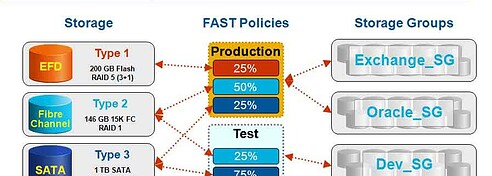
    FAST is technology for moving data within storage systems (and external for Celerra) for load balancing, capacity and performance optimization to meet quality of service (QoS) performance, availability, capacity along with energy and economic initiatives (figure1) across different tiers or types of storage devices. For example, moving data from slower SATA disks where a performance bottleneck exists to faster Fibre Channel or SSD devices. Similarly, cold or infrequently data on faster more expensive storage devices can be marked as candidates for migration to lower cost SATA devices based on customer policies.

    EMC FAST
    Figure 1 FAST big picture Source EMC

    The premise is that policies are defined based on activity along with capacity to determine when data becomes a candidate for movement. All movement is performed in the background concurrently while applications are accessing data without disruptions. This means that there are no stub files or application pause or timeouts that occur or erratic I/O activity while data is being migrated. Another aspect of FAST data movement which is performed in the actual storage systems by their respective controllers is the ability for EMC management tools to identify hot or active LUNs or volumes (files in the case of Celerra) as candidates for moving (figure 2).

    EMC FAST
    Figure 2 FAST what it does Source EMC

    However, users specify if they want data moved on its own or under supervision enabling a deterministic environment where the storage system and associated management tools makes recommendations and suggestions for administrators to approve before migration occurs. This capacity can be a safeguard as well as a learn mode enabling organizations to become comfortable with the technology along with its recommendations while applying knowledge of current business dynamics (figure 3).

    EMC FAST
    Figure 3 The Value proposition of FAST Source EMC

    FAST is implemented as technology resident or embedded in the EMC VMAX (aka Symmetrix), CLARiiON and Cellera along with external management software tools. In the case of the block (figure 4) storage systems including DMX/VMAX and CLARiiON family of products that support FAST, data movement is on a LUN or volume basis and within a single storage system. For NAS or file based Cellera storage systems, FAST is implanted using FMA technology enabling either in the box or externally to other storage systems on a file basis.

    EMC FAST
    Figure 4 Example of FAST activity Source EMC

    What this means is that data at the LUN or volume level can be moved across different tiers of storage or disk drives within a CLARiiON instance, or, within a VMAX instance (e.g. amongst the nodes). For example, Virtual LUNs are a building block that is leveraged for data movement and migration combined with external management tools including Navisphere for the CLARiiON and Symmetrix management console along with Ionix all of which has been enhanced.

    Note however that initially data is not moved externally between different CLARiiONs or VMAX systems. For external data movement, other existing EMC tools would be deployed. In the case of Celerra, files can be moved within a specific CLARiiON as well as externally across other storage systems. External storage systems that files can be moved across using EMC FMA technology includes other Celleras, Centera and ATMOS solutions based upon defined policies.

    What do I like most and why?

    Integration of management tools providing insight with ability for user to setup polices as well as approve or intercede with data movement and placement as their specific philosophies dictate. This is key, for those who want to, let the system manage it self with your supervision of course. For those who prefer to take their time, then take simple steps by using the solution for initially providing insight into hot or cold spots and then helping to make decisions on what changes to make. Use the solution and adapt it to your specific environment and philosophy approach, what a concept, a tool that works for you, vs you working for it.

    What dont I like and why?

    There is and will remain some confusion about intra and inter box or system data movement and migration, operations that can be done by other EMC technology today for those who need it. For example I have had questions asking if FAST is nothing more than EMC Invista or some other data mover appliance sitting in front of Symmetrix or CLARiiONs and the answer is NO. Thus EMC will need to articulate that FAST is both an umbrella term as well as a product feature set combining the storage system along with associated management tools unique to each of the different storage systems. In addition, there will be confusion at least with GA of lack of support for Symmetrix DMX vs supported VMAX. Of course with EMC pricing is always a question so lets see how this plays out in the market with customer acceptance.

    What about the others?

    Certainly some will jump up and down claiming ratification of their visions welcoming EMC to the game while forgetting that there were others before them. However, it can also be said that EMC like others who have had LUN and volume movement or cloning capabilities for large scale solutions are taking the next step. Thus I would expect other vendors to continue movement in the same direction with their own unique spin and approach. For others who have in the past made automated tiering their marketing differentiation, I would suggest they come up with some new spins and stories as those functions are about to become table stakes or common feature functionality on a go forward basis.

    When and where to use?

    In theory, anyone with a Symmetrix/VMAX, CLARiiON or Celerra that supports the new functionality should be a candidate for the capabilities, that is, at least the insight, analysis, monitoring and situation awareness capabilities Note that does not mean actually enabling the automated movement initially.

    While the concept is to enable automated system managed storage (Hmmm, Mainframe DejaVu anyone), for those who want to walk before they run, enabling the insight and awareness capabilities can provide valuable information about how resources are being used. The next step would then to look at the recommendations of the tools, and if you concur with the recommendations, then take remedial action by telling the system when the movement can occur at your desired time.

    For those ready to run, then let it rip and take off as FAST as you want. In either situation, look at FAST for providing insight and situational awareness of hot and cold storage, where opportunities exist for optimizing and gaining efficiency in how resources are used, all important aspects for enabling a Green and Virtual Data Center not to mention as well as supporting public and private clouds.

    FYI, FTC Disclosure and FWIW

    I have done content related projects for EMC in the past (see here), they are not currently a client nor have they sponsored, underwritten, influenced, renumerated, utilize third party off shore swiss, cayman or south american unnumbered bank accounts, or provided any other reimbursement for this post, however I did personally sign and hand to Joe Tucci a copy of my book The Green and Virtual Data Center (CRC) ;).

    Bottom line

    Do I like what EMC is doing with FAST and this approach? Yes.

    Do I think there is room for improvement and additional enhancements? Absolutely!

    Whats my recommendation? Have a look, do your homework, due diligence and see if its applicable to your environment while asking others vendors what they will be doing (under NDA if needed).

    Ok, nuff said.

    Cheers gs

    Greg Schulz – Author Cloud and Virtual Data Storage Networking (CRC Press), The Green and Virtual Data Center (CRC Press) and Resilient Storage Networks (Elsevier)
    twitter @storageio

    All Comments, (C) and (TM) belong to their owners/posters, Other content (C) Copyright 2006-2026 Server StorageIO and UnlimitedIO LLC All Rights Reserved

    SSD and Storage System Performance

    Jacob Gsoedl has a new article over at SearchStorage titled How to add solidstate storage to your enterprise data storage systems.

    In his article which includes some commentary by me, Jacob lays out various options on where and how to deploy solid state devices (SSD) in and with enterprise storage systems.

    While many vendors have jumped on the latest SSD bandwagon adding flash based devices to storage systems, where and how they implement the technologies varies.

    Some vendors take a simplistic approach of qualify flash SSD devices for attachment to their storage controllers similar to how any other Fibre Channel, SAS or SATA hard disk drive (HDD) would be.

    Yet others take a more in depth approach including optimizing controller software, firmware or micro code to leverage flash SSD devices along with addressing wear leveling, read and write performance among other capabilities.

    Performance is another area where on paper a flash SSD device might appear to be fast and enable a storage system to be faster.

    However, systems that are not optimized for higher throughput and or increased IOPs needing lower latency may end up placing restrictions on the number of flash SSD devices or other configuration constraints. Even worse is when expected performance improvements are not realized as after all, fast controllers need fast devices, and fast devices need fast controllers.

    RAM and flash based SSD are great enabling technologies for boosting performance, productivity and enabling a green efficient environment however do your homework.

    Look at how various vendors implement and support SSD particularly flash based products with enhancements to storage controllers for optimal performance.

    Likewise check out the activity of  the SNIA Solid State Storage Initiative (SSSI) among other industry trade group or vendor initiatives around enhancing along with best practices for SSD.

    Ok, nuff said.

    Cheers gs

    Greg Schulz – Author Cloud and Virtual Data Storage Networking (CRC Press), The Green and Virtual Data Center (CRC Press) and Resilient Storage Networks (Elsevier)
    twitter @storageio

    All Comments, (C) and (TM) belong to their owners/posters, Other content (C) Copyright 2006-2026 Server StorageIO and UnlimitedIO LLC All Rights Reserved

    The other Green Storage: Efficiency and Optimization

    Some believe that green storage is specifically designed to reduce power and cooling costs.

    The reality is that there are many ways to reduce environmental impact while enhancing the economics of data storage besides simply booting utilizing.

    These include optimizing data storage capacity as well as boosting performance to increase productivity per watt of energy used when work needs to be done.

    Some approaches require new hardware or software while others can be accomplished with changes to management including reconfiguration leveraging insight and awareness of resource needs.

    Here are some related links:

    The Other Green: Storage Efficiency and Optimization (Videocast)

    Energy efficient technology sales depend on the pitch

    Performance metrics: Evaluating your data storage efficiency

    How to reduce your Data Footprint impact (Podcast)

    Optimizing enterprise data storage capacity and performance to reduce your data footprint

    Ok, nuff said.

    Cheers gs

    Greg Schulz – Author Cloud and Virtual Data Storage Networking (CRC Press), The Green and Virtual Data Center (CRC Press) and Resilient Storage Networks (Elsevier)
    twitter @storageio

    All Comments, (C) and (TM) belong to their owners/posters, Other content (C) Copyright 2006-2026 Server StorageIO and UnlimitedIO LLC All Rights Reserved

    How to win approval for upgrades: Link them to business benefits

    Drew Rob has another good article over at Processor.com about various tips and strategies on how to gain approval for hardware (or software) purchases with some comments by yours truly.

    My tips and advice that are quoted in the story include to link technology resources to business needs impact which may be common sense, however still a time tested effective technique.

    Instead of speaking tech talk such as Performance, capacity, availability, IOPS, bandwidth, GHz, frames or packets per second, VMs to PM or dedupe ratio, map them to business speak, that is things that finance, accountants, MBAs or other management personal understand.

    For example, how many transactions at a given response time can be supported by a given type of server, storage or networking device.

    Or, put a different way, with a given device, how much work can be done and what is the associated monetary or business benefit.

    Likewise, if you do not have a capacity plan for servers, storage, I/O and networking along with software and facilities covering performance, availability, capacity and energy demands now is the time to put one in place.

    More on capacity and performance planning later, however for now, if you want to learn more, check Chapter 10 (Performance and Capacity Planning) in my book Resilient Storage Networks: Designing Flexible and Scalable Data Infrastructure: Elsevier).

    Ok, nuff said.

    Cheers gs

    Greg Schulz – Author Cloud and Virtual Data Storage Networking (CRC Press), The Green and Virtual Data Center (CRC Press) and Resilient Storage Networks (Elsevier)
    twitter @storageio

    All Comments, (C) and (TM) belong to their owners/posters, Other content (C) Copyright 2006-2026 Server StorageIO and UnlimitedIO LLC All Rights Reserved

    Optimize Data Storage for Performance and Capacity Efficiency

    This post builds on a recent article I did that can be read here.

    Even with tough economic times, there is no such thing as a data recession! Thus the importance of optimizing data storage efficiency addressing both performance and capacity without impacting availability in a cost effective way to do more with what you have.

    What this means is that even though budgets are tight or have been cut resulting in reduced spending, overall net storage capacity is up year over year by double digits if not higher in some environments.

    Consequently, there is continued focus on stretching available IT and storage related resources or footprints further while eliminating barriers or constraints. IT footprint constraints can be physical in a cabinet or rack as well as floorspace, power or cooling thresholds and budget among others.

    Constraints can be due to lack of performance (bandwidth, IOPS or transactions), poor response time or lack of availability for some environments. Yet for other environments, constraints can be lack of capacity, limited primary or standby power or cooling constraints. Other constraints include budget, staffing or lack of infrastructure resource management (IRM) tools and time for routine tasks.

    Look before you leap
    Before jumping into an optimization effort, gain insight if you do not already have it as to where the bottlenecks exist, along with the cause and effect of moving or reconfiguring storage resources. For example, boosting capacity use to more fully use storage resources can result in a performance issue or data center bottlenecks for other environments.

    An alternative scenario is that in the quest to boost performance, storage is seen as being under-utilized, yet when capacity use is increased, low and behold, response time deteriorates. The result can be a vicious cycle hence the need to address the issue as opposed to moving problems by using tools to gain insight on resource usage, both space and activity or performance.

    Gaining insight means looking at capacity use along with performance and availability activity and how they use power, cooling and floor-space. Consequently an important tool is to gain insight and knowledge of how your resources are being used to deliver various levels of service.

    Tools include storage or system resource management (SRM) tools that report on storage space capacity usage, performance and availability with some tools now adding energy usage metrics along with storage or system resource analysis (SRA) tools.

    Cooling Off
    Power and cooling are commonly talked about as constraints, either from a cost standpoint, or availability of primary or secondary (e.g. standby) energy and cooling capacity to support growth. Electricity is essential for powering IT equipment including storage enabling devices to do their specific tasks of storing data, moving data, processing data or a combination of these attributes.

    Thus, power gets consumed, some work or effort to move and store data takes place and the by product is heat that needs to be removed. In a typical IT data center, cooling on average can account for about 50% of energy used with some sites using less.

    With cooling being a large consumer of electricity, a small percentage change to how cooling consumes energy can yield large results. Addressing cooling energy consumption can be to discuss budget or cost issues, or to enable cooling capacity to be freed up to support installation of extra storage or other IT equipment.

    Keep in mind that effective cooling relies on removing heat from as close to the source as possible to avoid over cooling which requires more energy. If you have not done so, have a facilities review or assessment performed that can range from a quick walk around, to a more in-depth review and thermal airflow analysis. A means of removing heat close to the sort are techniques such as intelligent, precision or smart cooling also known by other marketing names.

    Powering Up, or, Powering Down
    Speaking of energy or power, in addition to addressing cooling, there are a couple of ways of addressing power consumption by storage equipment (Figure 1). The most popular discussed approach towards efficiency is energy avoidance involving powering down storage when not used such as first generation MAID at the cost of performance.

    For off-line storage, tape and other removable media give low-cost capacity per watt with low to no energy needed when not in use. Second generation (e.g. MAID 2.0) solutions with intelligent power management (IPM) capabilities have become more prevalent enabling performance or energy savings on a more granular or selective basis often as a standard feature in common storage systems.

    GreenOptionsBalance
    Figure 1:  How various RAID levels and configuration impact or benefit footprint constraints

    Another approach to energy efficiency is seen in figure 1 which is doing more work for active applications per watt of energy to boost productivity. This can be done by using same amount of energy however doing more work, or, same amount of work with less energy.

    For example instead of using larger capacity disks to improve capacity per watt metrics, active or performance sensitive storage should be looked at on an activity basis such as IOP, transactions, videos, emails or throughput per watt. Hence, a fast disk drive doing work can be more energy-efficient in terms of productivity than a higher capacity slower disk drive for active workloads, where for idle or inactive, the inverse should hold true.

    On a go forward basis the trend already being seen with some servers and storage systems is to do both more work, while using less energy. Thus a larger gap between useful work (for active or non idle storage) and amount of energy consumed yields a better efficiency rating, or, take the inverse if that is your preference for smaller numbers.

    Reducing Data Footprint Impact
    Data footprint impact reduction tools or techniques for both on-line as well as off-line storage include archiving, data management, compression, deduplication, space-saving snapshots, thin provisioning along with different RAID levels among other approaches. From a storage access standpoint, you can also include bandwidth optimization, data replication optimization, protocol optimizers along with other network technologies including WAFS/WAAS/WADM to help improve efficiency of data movement or access.

    Thin provisioning for capacity centric environments can be used to achieving a higher effective storage use level by essentially over booking storage similar to how airlines oversell seats on a flight. If you have good historical information and insight into how storage capacity is used and over allocated, thin provisioning enables improved effective storage use to occur for some applications.

    However, with thin provisioning, avoid introducing performance bottlenecks by leveraging solutions that work closely with tools that providing historical trending information (capacity and performance).

    For a technology that some have tried to declare as being dead to prop other new or emerging solutions, RAID remains relevant given its widespread deployment and transparent reliance in organizations of all size. RAID also plays a role in storage performance, availability, capacity and energy constraints as well as a relief tool.

    The trick is to align the applicable RAID configuration to the task at hand meeting specific performance, availability, capacity or energy along with economic requirements. For some environments a one size fits all approach may be used while others may configure storage using different RAID levels along with number of drives in RAID sets to meet specific requirements.
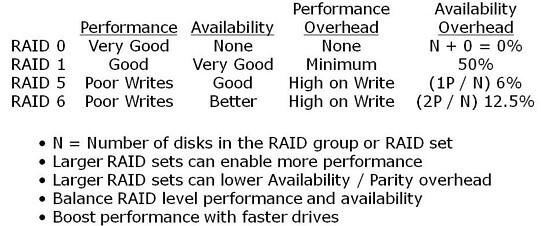

    Figure 2:  How various RAID levels and configuration impact or benefit footprint constraints

    Figure 2 shows a summary and tradeoffs of various RAID levels. In addition to the RAID levels, how many disks can also have an impact on performance or capacity, such as, by creating a larger RAID 5 or RAID 6 group, the parity overhead can be spread out, however there is a tradeoff. Tradeoffs can be performance bottlenecks on writes or during drive rebuilds along with potential exposure to drive failures.

    All of this comes back to a balancing act to align to your specific needs as some will go with a RAID 10 stripe and mirror to avoid risks, even going so far as to do triple mirroring along with replication. On the other hand, some will go with RAID 5 or RAID 6 to meet cost or availability requirements, or, some I have talked with even run RAID 0 for data and applications that need the raw speed, yet can be restored rapidly from some other medium.

    Lets bring it all together with an example
    Figure 3 shows a generic example of a before and after optimization for a mixed workload environment, granted you can increase or decrease the applicable capacity and performance to meet your specific needs. In figure 3, the storage configuration consists of one storage system setup for high performance (left) and another for high-capacity secondary (right), disk to disk backup and other near-line needs, again, you can scale the approach up or down to your specific need.

    For the performance side (left), 192 x 146GB 15K RPM (28TB raw) disks provide good performance, however with low capacity use. This translates into a low capacity per watt value however with reasonable IOPs per watt and some performance hot spots.

    On the capacity centric side (right), there are 192 x 1TB disks (192TB raw) with good space utilization, however some performance hot spots or bottlenecks, constrained growth not to mention low IOPS per watt with reasonable capacity per watt. In the before scenario, the joint energy use (both arrays) is about 15 kWh or 15,000 watts which translates to about $16,000 annual energy costs (cooling excluded) assuming energy cost of 12 cents per kWh.

    Note, your specific performance, availability, capacity and energy mileage will vary based on particular vendor solution, configuration along with your application characteristics.


    Figure 3: Baseline before and after storage optimization (raw hardware) example

    Building on the example in figure 3, a combination of techniques along with technologies yields a net performance, capacity and perhaps feature functionality (depends on specific solution) increase. In addition, floor-space, power, cooling and associated footprints are also reduced. For example, the resulting solution shown (middle) comprises 4 x 250GB flash SSD devices, along with 32 x 450GB 15.5K RPM and 124 x 2TB 7200RPM enabling an 53TB (raw) capacity increase along with performance boost.

    The previous example are based on raw or baseline capacity metrics meaning that further optimization techniques should yield improved benefits. These examples should also help to discuss the question or myth that it costs more to power storage than to buy it which the answer should be it depends.

    If you can buy the above solution for say under $50,000 (cost to power), or, let alone, $100,000 (power and cool) for three years which would also be a good acquisition, then the myth of buying is more expensive than powering holds true. However, if a solution as described above costs more, than the story changes along with other variables include energy costs for your particular location re-enforcing the notion that your mileage will vary.

    Another tip is that more is not always better.

    That is, more disks, ports, processors, controllers or cache do not always equate into better performance. Performance is the sum of how those and other pieces working together in a demonstrable way, ideally your specific application workload compared to what is on a product data sheet.

    Additional general tips include:

    • Align the applicable tool, technique or technology to task at hand
    • Look to optimize for both performance and capacity, active and idle storage
    • Consolidated applications and servers need fast servers
    • Fast servers need fast I/O and storage devices to avoid bottlenecks
    • For active storage use an activity per watt metric such as IOP or transaction per watt
    • For in-active or idle storage, a capacity per watt per footprint metric would apply
    • Gain insight and control of how storage resources are used to meet service requirements

    It should go without saying, however sometimes what is understood needs to be restated.

    In the quest to become more efficient and optimized, avoid introducing performance, quality of service or availability issues by moving problems.

    Likewise, look beyond storage space capacity also considering performance as applicable to become efficient.

    Finally, it is all relative in that what might be applicable to one environment or application need may not apply to another.

    Ok, nuff said.

    Cheers gs

    Greg Schulz – Author Cloud and Virtual Data Storage Networking (CRC Press), The Green and Virtual Data Center (CRC Press) and Resilient Storage Networks (Elsevier)
    twitter @storageio

    All Comments, (C) and (TM) belong to their owners/posters, Other content (C) Copyright 2006-2026 Server StorageIO and UnlimitedIO LLC All Rights Reserved

    Performance = Availability StorageIOblog featured ITKE guest blog

    ITKE - IT Knowledge Exchange

    Recently IT Knowledge Exchange named me and StorageIOblog as their weekly featured IT blog too which Im flattered and honored. Consequently, I did a guest blog for them titled Performance = Availability, Availability = Performance that you can read about here.

    For those not familiar with ITKE, take a few minutes and go over and check it out, there is a wealth of information there on a diversity of topics that you can read about, or, you can also get involved and participate in the questions and answers discussions.

    Speaking of ITKE, interested in “The Green and Virtual Data Center” (CRC), check out this link where you can download a free chapter of my book, along with information on how to order your own copy along with a special discount code from CRC press.

    Thank you very much to Sean Brooks of ITKE and his social media team of Michael Morisy and Jenny Mackintosh for being named featured IT blogger, as well as for being able to do a guest post for them. It has been fantastic working them and particularly Jenny who helped with all of the logistics in putting together the various pieces including getting the post up on the web as well as in their news letter.

    Ok, nuff said.

    Cheers gs

    Greg Schulz – Author Cloud and Virtual Data Storage Networking (CRC Press), The Green and Virtual Data Center (CRC Press) and Resilient Storage Networks (Elsevier)
    twitter @storageio

    All Comments, (C) and (TM) belong to their owners/posters, Other content (C) Copyright 2006-2026 Server StorageIO and UnlimitedIO LLC All Rights Reserved
    Data Center I/O Bottlenecks Performance Issues and Impacts

    This is an excerpt blog version of the popular Server and StorageIO Group white paper "IT Data Center and Data Storage Bottlenecks" originally published August of 2006 that is as much if not more relevant today than it was in the past.

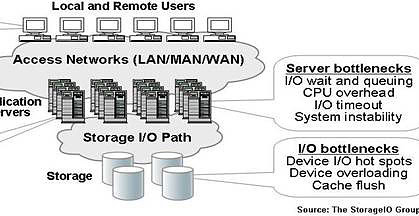
    Most Information Technology (IT) data centers have bottleneck areas that impact application performance and service delivery to IT customers and users. Possible bottleneck locations shown in Figure-1 include servers (application, web, file, email and database), networks, application software, and storage systems. For example users of IT services can encounter delays and lost productivity due to seasonal workload surges or Internet and other network bottlenecks. Network congestion or dropped packets resulting in wasteful and delayed retransmission of data can be the results of network component failure, poor configuration or lack of available low latency bandwidth.

    Server bottlenecks due to lack of CPU processing power, memory or under sized I/O interfaces can result in poor performance or in worse case scenarios application instability. Application including database systems bottlenecks due to excessive locking, poor query design, data contention and deadlock conditions result in poor user response time. Storage and I/O performance bottlenecks can occur at the host server due to lack of I/O interconnect bandwidth such as an overloaded PCI interconnect, storage device contention, and lack of available storage system I/O capacity.

    These performance bottlenecks, impact most applications and are not unique to the large enterprise or scientific high compute (HPC) environments. The direct impact of data center I/O performance issues include general slowing of the systems and applications, causing lost productivity time for users of IT services. Indirect impacts of data center I/O performance bottlenecks include additional management by IT staff to trouble shoot, analyze, re-configure and react to application delays and service disruptions.


    Figure-1: Data center performance bottleneck locations

    Data center performance bottleneck impacts (see Figure-1) include:

    • Under utilization of disk storage capacity to compensate for lack of I/O performance capability
    • Poor Quality of Service (QoS) causing Service Level Agreements (SLA) objectives to be missed
    • Premature infrastructure upgrades combined with increased management and operating costs
    • Inability to meet peak and seasonal workload demands resulting in lost business opportunity

    I/O bottleneck impacts
    It should come as no surprise that businesses continue to consume and rely upon larger amounts of disk storage. Disk storage and I/O performance fuel the hungry needs of applications in order to meet SLAs and QoS objectives. The Server and StorageIO Group sees that, even with efforts to reduce storage capacity or improve capacity utilization with information lifecycle management (ILM) and Infrastructure Resource Management (IRM) enabled infrastructures, applications leveraging rich content will continue to consume more storage capacity and require additional I/O performance. Similarly, at least for the next few of years, the current trend of making and keeping additional copies of data for regulatory compliance and business continue is expected to continue. These demands all add up to a need for more I/O performance capabilities to keep up with server processor performance improvements.


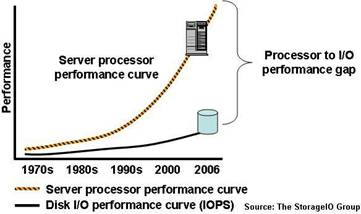
    Figure-2: Processing and I/O performance gap

    Server and I/O performance gap
    The continued need for accessing more storage capacity results in an alarming trend: the expanding gap between server processing power and available I/O performance of disk storage (Figure-2). This server to I/O performance gap has existed for several decades and continues to widen instead of improving. The net impact is that bottlenecks associated with the server to I/O performance lapse result in lost productivity for IT personal and customers who must wait for transactions, queries, and data access requests to be resolved.

    Application symptoms of I/O bottlenecks
    There are many applications across different industries that are sensitive to timely data access and impacted by common I/O performance bottlenecks. For example, as more users access a popular file, database table, or other stored data item, resource contention will increase. One way resource contention manifests itself is in the form of database “deadlock” which translates into slower response time and lost productivity. 

    Given the rise and popularity of internet search engines, search engine optimization (SEO) and on-line price shopping, some businesses have been forced to create expensive read-only copies of databases. These read-only copies are used to support more queries to address bottlenecks from impacting time sensitive transaction databases.

    In addition to increased application workload, IT operational procedures to manage and protect data help to contribute to performance bottlenecks. Data center operational procedures result in additional file I/O scans for virus checking, database purge and maintenance, data backup, classification, replication, data migration for maintenance and upgrades as well as data archiving. The net result is that essential data center management procedures contribute to performance challenges and impacting business productivity.

    Poor response time and increased latency
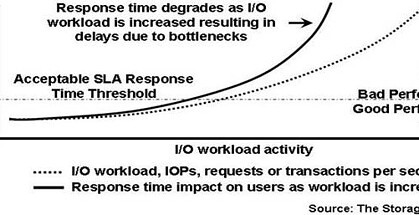
    Generally speaking, as additional activity or application workload including transactions or file accesses are performed, I/O bottlenecks result in increased response time or latency (shown in Figure-3). With most performance metrics more is better; however, in the case of response time or latency, less is better.  Figure-3 shows the impact as more work is performed (dotted curve) and resulting I/O bottlenecks have a negative impact by increasing response time (solid curve) above acceptable levels. The specific acceptable response time threshold will vary by applications and SLA requirements. The acceptable threshold level based on performance plans, testing, SLAs and other factors including experience serves as a guide line between acceptable and poor application performance.

    As more workload is added to a system with existing I/O issues, response time will correspondingly decrease as was seen in Figure-3. The more severe the bottleneck, the faster response time will deteriorate (e.g. increase) from acceptable levels. The elimination of bottlenecks enables more work to be performed while maintaining response time below acceptable service level threshold limits.


    Figure-3: I/O response time performance impact

    Seasonal and peak workload I/O bottlenecks
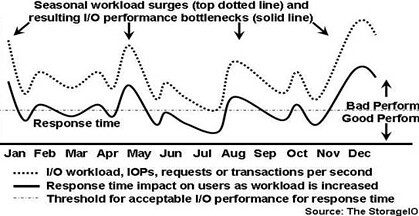
    Another common challenge and cause of I/O bottlenecks is seasonal and/or unplanned workload increases that result in application delays and frustrated customers. In Figure-4 a workload representing an eCommerce transaction based system is shown with seasonal spikes in activity (dotted curve). The resulting impact to response time (solid curve) is shown in relation to a threshold line of acceptable response time performance. For example, peaks due holiday shopping exchanges appear in January then dropping off increasing near mother’s day in May, then back to school shopping in August results in increased activity as does holiday shopping starting in late November.


    Figure-4: I/O bottleneck impact from surge workload activity

    Compensating for lack of performance
    Besides impacting user productivity due to poor performance, I/O bottlenecks can result in system instability or unplanned application downtime. One only needs to recall recent electric power grid outages that were due to instability, insufficient capacity bottlenecks as a result of increased peak user demand.

    I/O performance improvement approaches to address I/O bottlenecks have been to do nothing (incur and deal with the service disruptions) or over configure by throwing more hardware and software at the problem. To compensate for lack of I/O performance and counter the resulting negative impact to IT users, a common approach is to add more hardware to mask or move the problem.

    However, this often leads to extra storage capacity being added to make up for a short fall in I/O performance. By over configuring to support peak workloads and prevent loss of business revenue, excess storage capacity must be managed throughout the non-peak periods, adding to data center and management costs. The resulting ripple affect is that now more storage needs to be managed, including allocating storage network ports, configuring, tuning, and backing up of data. This can and does result in environments that have storage utilization well below 50% of their useful storage capacity. The solution is to address the problem rather than moving and hiding the bottleneck elsewhere (rather like sweeping dust under the rug).

    Business value of improved performance
    Putting a value on the performance of applications and their importance to your business is a necessary step in the process of deciding where and what to focus on for improvement. For example, what is the value of reducing application response time and the associated business benefit of allowing more transactions, reservations or sales to be made? Likewise, what is the value of improving the productivity of a designer or animator to meet tight deadlines and market schedules? What is business benefit of enabling a customer to search faster for and item, place an order, access media rich content, or in general improve their productivity?

    Server and I/O performance gap as a data center bottleneck
    I/O performance bottlenecks are a wide spread issue across most data centers, affecting many applications and industries. Applications impacted by data center I/O bottlenecks to be looked at in more depth are electronic design automation (EDA), entertainment and media, database online transaction processing (OLTP) and business intelligence. These application categories represent transactional processing, shared file access for collaborative work, and processing of shared, time sensitive data.

    Electronic design
    Computer aided design (CAD), computer assisted engineering (CAE), electronic design automaton (EDA) and other design tools are used for a wide variety of engineering and design functions. These design tools require fast access to shared, secured and protected data. The objective of using EDA and other tools is to enable faster product development with better quality and improved worker productivity. Electronic components manufactured for the commercial, consumer and specialized markets rely on design tools to speed the time-to-market of new products as well as to improve engineer productivity.

    EDA tools, including those from Cadence, Synopsis, Mentor Graphics and others, are used to develop expensive and time sensitive electronic chips, along with circuit boards and other components to meet market windows and suppler deadlines. An example of this is a chip vendor being able to simulate, develop, test, produce and deliver a new chip in time for manufacturers to release their new products based on those chips. Another example is aerospace and automotive engineering firms leveraging design tools, including CATIA and UGS, on a global basis relying on their suppler networks to do the same in a real-time, collaborative manner to improve productivity and time-to-market. These results in contention of shared file and data access and, as a work-around, more copies of data kept as local buffers.

    I/O performance impacts and challenges for EDA, CAE and CAD systems include:

    • Delays in drawing and file access resulting in lost productivity and project delays
    • Complex configurations to support computer farms (server grids) for I/O and storage performance
    • Proliferation of dedicated storage on individual servers and workstations to improve performance

    Entertainment and media
    While some applications are characterized by high bandwidth or throughput, such as streaming video and digital intermediate (DI) processing of 2K (2048 pixels per line) and 4K (4096 pixels per line) video and film, there are many other applications that are also impacted by I/O performance time delays. Even bandwidth intensive applications for video production and other applications are time sensitive and vulnerable to I/O bottleneck delays. For example, cell phone ring tone, instant messaging, small MP3 audio, and voice- and e-mail are impacted by congestion and resource contention.

    Prepress production and publishing requiring assimilation of many small documents, files and images while undergoing revisions can also suffer. News and information websites need to look up breaking stories, entertainment sites need to view and download popular music, along with still images and other rich content; all of this can be negatively impacted by even small bottlenecks.  Even with streaming video and audio, access to those objects requires accessing some form of a high speed index to locate where the data files are stored for retrieval. These indexes or databases can become bottlenecks preventing high performance storage and I/O systems from being fully leveraged.

    Index files and databases must be searched to determine the location where images and objects, including streaming media, are stored. Consequently, these indices can become points of contention resulting in bottlenecks that delay processing of streaming media objects. When cell phone picture is taken phone and sent to someone, chances are that the resulting image will be stored on network attached storage (NAS) as a file with a corresponding index entry in a database at some service provider location. Think about what happens to those servers and storage systems when several people all send photos at the same time.

    I/O performance impacts and challenges for entertainment and media systems include:

    • Delays in image and file access resulting in lost productivity
    • Redundant files and storage local servers to improve performance
    • Contention for resources causing further bottlenecks during peak workload surges

    OLTP and business intelligence
    Surges in peak workloads result in performance bottlenecks on database and file servers, impacting time sensitive OLTP systems unless they are over configured for peak demand. For example, workload spikes due to holiday and back-to-school shopping, spring break and summer vacation travel reservations, Valentines or Mothers Day gift shopping, and clearance and settlement on peak stock market trading days strain fragile systems. For database systems maintaining performance for key objects, including transaction logs and journals, it is important to eliminate performance issues as well as maintain transaction and data integrity.

    An example tied to eCommerce is business intelligence systems (not to be confused with back office marketing and analytics systems for research). Online business intelligence systems are popular with online shopping and services vendors who track customer interests and previous purchases to tailor search results, views and make suggestions to influence shopping habits.

    Business intelligence systems need to be fast and support rapid lookup of history and other information to provide purchase histories and offer timely suggestions. The relative performance improvements of processors shift the application bottlenecks from the server to the storage access network. These applications have, in some cases, resulted in an exponential increase in query or read operations beyond the capabilities of single database and storage instances, resulting in database deadlock and performance problems or the proliferation of multiple data copies and dedicated storage on application servers.

    A more recent contribution to performance challenges, caused by the increased availability of on-line shopping and price shopping search tools, is low cost craze (LCC) or price shopping. LCC has created a dramatic increase in the number of read or search queries taking place, further impacting database and file systems performance. For example, an airline reservation system that supports price shopping while preventing impact to time sensitive transactional reservation systems would create multiple read-only copies of reservations databases for searches. The result is that more copies of data must be maintained across more servers and storage systems thus increasing costs and complexity. While expensive, the alternative of doing nothing results in lost business and market share.

    I/O performance impacts and challenges for OLTP and business intelligence systems include:

    • Application and database contention, including deadlock conditions, due to slow transactions
    • Disruption to application servers to install special monitoring, load balance or I/O driver software
    • Increased management time required to support additional storage needed as a I/O workaround

    Summary/Conclusion
    It is vital to understand the value of performance, including response time or latency, and numbers of I/O operations for each environment and particular application. While the cost per raw TByte may seem relatively in-expensive, the cost for I/O response time performance also needs to be effectively addressed and put into the proper context as part of the data center QoS cost structure.

    There are many approaches to address data center I/O performance bottlenecks with most centered on adding more hardware or addressing bandwidth or throughput issues. Time sensitive applications depend on low response time as workload including throughput increase and thus latency can not be ignored. The key to removing data center I/O bottlenecks is to find and address the problem instead of simply moving or hiding it with more hardware and/or software. Simply adding fast devices such as SSD may provide relief, however if the SSDs are attached to high latency storage controllers, the full benefit may not be realized. Thus, identify and gain insight into data center and I/O bottleneck paths eliminating issues and problems to boost productivity and efficiency.

    Where to Learn More
    Additional information about IT data center, server, storage as well as I/O networking bottlenecks along with solutions can be found at the Server and StorageIO website in the tips, tools and white papers, as well as news, books, and activity on the events pages. If you are in the New York area on September 23, 2009, check out my presentation on The Other Green – Storage Optimization and Efficiency that will touch on the above and other related topics. Download your copy of "IT Data Center and Storage Bottlenecks" by clicking here.

    Ok, nuff said.

    Cheers gs

    Greg Schulz – Author Cloud and Virtual Data Storage Networking (CRC Press), The Green and Virtual Data Center (CRC Press) and Resilient Storage Networks (Elsevier)
    twitter @storageio

    All Comments, (C) and (TM) belong to their owners/posters, Other content (C) Copyright 2006-2026 Server StorageIO and UnlimitedIO LLC All Rights Reserved

    Upcoming Out and About Events

    Following up on previous Out and About updates ( here and here ) of where I have been, heres where I’m going to be over the next couple of weeks.

    On September 15th and 16th 2009, I will be the keynote speaker along with doing a deep dive discussion around data deduplication in Minneapolis, MN and Toronto ON. Free Seminar, register and learn more here.

    The Infrastructure Optimization and Planning Best Practices (V2.009) – Doing more with less without sacrificing storage, system or network capabilities Seminar series continues September 22, 2009 with a stop in Chicago. Free Seminar, register and learn more here.

    On September 23, 2009 I will be in New York City at Storage Decisions conference participating in the Ask the Experts during the expo session as well as presenting The Other Green — Storage Efficiency and Optimization.

    Throw out the "green“: buzzword, and you’re still left with the task of saving or maximizing use of space, power, and cooling while stretching available IT dollars to support growth and business sustainability. For some environments the solution may be consolation while others need to maintain quality of service response time, performance and availability necessitating faster, energy efficient technologies to achieve optimization objectives. To accomplish these and other related issues, you can turn to the cloud, virtualization, intelligent power management, data footprint reduction and data management not to mention various types of tiered storage and performance optimization techniques. The session will look at various techniques and strategies to optimize either on-line active or primary as well as near-line or secondary storage environment during tough economic times, as well as to position for future growth, after all, there is no such thing as a data recession!

    Topics, technologies and techniques that will be discussed include among others:

    • Energy efficiency (strategic) vs. energy avoidance (tactical)
    • Optimization and the need for speed vs. the need for capacity
    • Metrics and measurements for management insight
    • Tiered storage and tiered access including SSD, FC, SAS and clouds
    • Data footprint reduction (archive, compress, dedupe) and thin provision
    • Best practices, financial incentives and what you can do today

    Free event, learn more and register here.

    Check out the events page for other upcoming events and hope to see you this fall while Im out and about.

    Cheers – gs

    Greg Schulz – StorageIOblog, twitter @storageio Author “The Green and Virtual Data Center” (CRC)

    Catch of the day or post of the day!

    Ok, I know, its been a couple of weeks since my last post. Sure I have been tweeting now and then, attending several briefings with new emerging as well as existing vendors for up-coming announcements, not to mention getting some other content out from webcasts, to podcasts, or videos, interviews, articles, tips and presentations at various events, pertaining to Green IT, virtualization, cloud storage and computing, backup, data protection, performance, capacity planning among other topics.

    Anyway, for now a quick post as I have many others that I have been wanting to do and will be doing soon, however wanted to get a few things out sooner vs. later, and after all, all work and no play makes for a dull day right?

    Well, last week after spending a couple of days in Chicago at Storage Decisions where I presented a couple of sessions and recorded several videos, I had a chance to get out and do some fishing and catching. Fishing is always great, however catching (and release) is even more fun, especially when you can catch some, toss some, and keep some for dinner which is what occurred last week when my friend Rob and me ventured out for a couple of hours and found where the fish were (see picture) on the St. Croix river.

    Catch of the Day

    Rob on left (Bruins warm up jacket for Bass fishing), Greg on the right (Mustang PFD Jacket)

    Catch of the day line-up
    From right to left, bottle bass (caught at the dock ;) ), stripped bass, northern pike (swamp shark), more stripped bass, and another bottle bass (also caught at the dock).

    Ok, nuff fish talk for now, back to work, get a few things done, and then maybe this weekend, get another blog post done, maybe some fishing, and enjoying the summer weather before heading off to Toronto on Monday for Storage Decisions on Tuesday, then a couple of webcasts and web radio events on Wednesday among other activities.

    Cheers gs

    Greg Schulz – Author Cloud and Virtual Data Storage Networking (CRC Press), The Green and Virtual Data Center (CRC Press) and Resilient Storage Networks (Elsevier)
    twitter @storageio

    All Comments, (C) and (TM) belong to their owners/posters, Other content (C) Copyright 2006-2026 Server StorageIO and UnlimitedIO LLC All Rights Reserved

    Storage Effiency and Optimizaiton – Balancing Time and Space

    Storage I/O trends

    Here’s a link to the presentation I recently delivered at the Spring 2009 Minneapolis/St. Paul area CMG (Computer Measurement Group – CMG) March 20th, 2009 hosted by Nexus Information Systems and organized by Tom Becchetti. The theme of the event was "Is your storage efficient? There are many ways to rate your storage, how does yours stack up?". Tom organized a great event as usual with a diverse set of speakers for the well attended event graciously hosted by Keith Norbie of Nexus at their Minnetonka facility. The title of my presentation was "Storage Efficiency: Mirror Mirror On The Wall, Who or What is The Most Efficient of Them All? Finding the Correct Balance" that looked at balancing the need to reduce (or maximize) space (utilization) with time (performance) to meet different requirements including maintaining quality of service, response time and availability.

    Keeping in mind that there is no such thing as a data or I/O performance recession, there is a common myth that storage optimization or efficiency is all about driving up storage space capacity utilization which can be true for some environments, applications, data or storage types. However there is also the need to maintain or boost performance, reduce response time and latency, doing more work in a more productive and efficieny manner. Not all data or storage can be consolidated to boost utilization without concern for degrading or in any other way penalizing performance, response time or availability.

    Thus it is about time and space, that is, balancing data movement and processing rates with storage space capacity utilization and that sometimes, more is not better for performance when it comes to ratios or the number of components in a solution.

    Likewise there is the need to balance energy avoidance with energy efficient, balancing the need to store more data in a smaller footprint using less energy and the need to process more data in less time efficiently for productivity.

    These and other related themes are expanded on in more detail in my book "The Green and Virtual Data Center" (CRC). These and other related themes will covered in one of my upcoming presentations (The Other Green — Storage Efficiency and Optimization) at StorageDecisions in Chicago the week of June 1st, 2009, as well as in various seminars and events that I will be involved in the coming weeks and months.

    Thanks to all those who helped organize, support, sponsored, presented and attended the recent CMG event, look forward to seeing or hearing from you all again soon.

    Ok, nuff said.

    Ok, nuff said.

    Cheers gs

    Greg Schulz – Author Cloud and Virtual Data Storage Networking (CRC Press), The Green and Virtual Data Center (CRC Press) and Resilient Storage Networks (Elsevier)
    twitter @storageio

    All Comments, (C) and (TM) belong to their owners/posters, Other content (C) Copyright 2006-2026 Server StorageIO and UnlimitedIO LLC All Rights Reserved

    March and Mileage Mania Wrap-up

    Today’s flight to Santa Ana (SNA) Orange County California for an 18 hour visit marks my 3rd trip to the left coast in the past four weeks that started out with a trip to Los Angeles. The purpose of today’s trip is to deliver a talk around Business Continuance (BC) and Disaster recovery (DR) topics for virtual server and storage environments along with related data transformation topics themes, part of a series of on-going events.

    Planned flight path from MSP to SNA, note upper midwest snow storms. Thanks to Northwest Airlines, now part of Delta!
    Planned flight path from MSP to SNA courtesy of Northwest Airlines, now part of Delta

    This is a short trip to southern California in that I have to be back in Minneapolis for a Wednesday afternoon meeting followed by keynoting at an IT Infrastructure Optimization Seminar downtown Minneapolis Thursday morning. Right after Thursday morning session, its off to the other coast for some Friday morning and early afternoon sessions in the Boston area, the results of which I hope to be able to share with you in a not so distant future posting.

    Where has March gone? Its been a busy and fun month out on the road with in-person seminars, vendor and user group events in Minneapolis, Los Angles, Las Vegas, Milwaukee, Atlanta, St. Louis, Birmingham, Minneapolis for CMG user group, Cincinnati and Orange County not to mention some other meetings and consulting engagements elsewhere including participating in a couple of webcast and virtual conference/seminars while on the road. Coverage and discussion around my new book "The Green and Virtual Data Center" (CRC) continues expand, read here to see what’s being said.

    What has made the month fun in addition to traveling around the country is the interaction with the hundreds of IT professionals from organizations of all size hearing what they are encountering, what their challenges are, what they are thinking, and in general what’s on their mind.

    Some of the common themes include:

  • There’s no such thing as a data recession, however the result is doing more with less, or, with what you have
  • Confusion abounds around green hype including carbon footprints vs. core IT and business issues
  • There is life beyond consolidation for server and storage virtualization to enable business agility
  • Security and encryption remain popular topic as does heterogeneous and affordable key management
  • End to end IT resource management for virtual environments is needed that is scalable and affordable
  • Performance and quality of service can not be sacrificed in the quest to drive up storage utilization
  • Clouds, SSD (FLASH), Dedupe, FCoE and Thin Provisioning among others are on the watch list
  • Tape continues to be used complimenting disks in tiered storage environments along with VTLs
  • Dedupe continues to be deployed and we are just seeing the very tip of the ice-berg of opportunity
  • Software licensing cost savings or reallocation should be a next step focus for virtual environments
  • Now, for a bit of irony and humor, overheard was a server sales person talking to a storage sales person comparing notes on how they are missing their forecasts as their customers are buying fewer servers and storage now that they are consolidating with virtualization, or using disk dedupe to eliminate disk drives. Doh!!!

    Now if those sales people can get their marketing folks to get them the play book for virtualization for business agility, improving performance and enabling business growth in an optimized, transformed environment, they might be able to talk a different story with their customers for new opportunities…

    What’s on deck for April? More of the same, however also watch and listen for some additional web based content including interviews quotes and perspectives on industry happenings, articles, tips and columns, reports, blogs, videos, podcasts, webcasts and twitter activity as well as appearances at events in Boston, Chicago, New Jersey and Providence among other venues.

    To all of those who came out to the various events in March, thank you very much and look forward to future follow-up conversations as well as seeing you at some of the upcoming future events.

    Cheers gs

    Greg Schulz – Author Cloud and Virtual Data Storage Networking (CRC Press, 2011), The Green and Virtual Data Center (CRC Press, 2009), and Resilient Storage Networks (Elsevier, 2004)

    twitter @storageio

    All Comments, (C) and (TM) belong to their owners/posters, Other content (C) Copyright 2006-2012 StorageIO and UnlimitedIO All Rights Reserved

    Out and About Update

    As part of the continuing on the road theme and series, this post is being done while traveling for this weeks adventures and events including stops in Atlanta, St. Louis and wrapping up the week in Minneapolis at the local CMG quarterly meeting event. At both last weeks events in Las Vegas and Milwaukee as well as this weeks events talking with IT professionals from various organizations, a consistent theme is that there is no data or I/O recession, however there is the need to do more with less while enabling business sustainability.

    While VMware remains the dominant server virtualization platform, I’m hearing of more organizations using Citrix or other Xensource based technologies along with some Microsoft HyperV adopters in part to leverage lower cost of ownership compared to VMware in instances where not all of the feature functionality of the robust VMware technology is needed. This will be an interesting scenario to keep an eye on in the weeks and months to come to see if there are any shifting patterns on the server virtualization front while trying to stretch IT dollars further to do more.

    On the Merger & Acquisition (M&A) scene, coverage of on again, off-again and recently rekindled rumored of IBM buying Sun is rampant from the Wall Street Journal to twitter and most points in between. There have been many storm clouds around Sun the past several years from a business and technology perspective, and perhaps the best thing is for Sun and IBM to combine forces and resources, bridging the gap between old physical worlds and new virtual cloud enabled worlds so to speak. Personally, I like the idea for many different reasons and think that some shape or form of an IBM and Sun deal either in entirety, or pieces is far more likely to occur and sooner, than seeing funds returned from either AIG or Bernard Madoff, the other top news items this week, nuf said for now about IBM and Sun.

    Also this week, other activity included Cisco announcing that they are testing the waters to enter into the server market space to help jumpstart the converged networking space with some of my initial comments here and here. Check out StorageIO in the news page here for other comments on various IT industry trends, technologies and related activities including a recent piece by Drew Robb about The State of the Data Storage Job Market.

    Lets see how this plays out with more to say later, thanks again for everyone who came out for last weeks as well as this weeks events, look forward to seeing and talking with you again soon I hope.

    Cheers – gs

    Technorati tags: Recession, Sustainability, Wall Street Journal, Data Center Bottlenecks, Performance, Capacity, Networking, Telephone, Data Center, Consolidation, Virtualization, VMware, Server, Storage, Software, Sun, IBM, Las Vegas, Milwaukee, St. Louis, Atlanta, CMG, AIG, Bernard Madoff, Cisco