Cloud conversations: AWS EBS, Glacier and S3 overview (Part III)

Storage I/O industry trends image

Amazon Web Services (AWS) recently added EBS Optimized support for enhanced bandwidth EC2 instances (read more here). This industry trends and perspective cloud conversation is the third (tying the posts together) in a three-part series companion to the AWS EBS optimized post found here. Part I is here (closer look at EBS) and part II is here (closer look at S3).

AWS image via Amazon.com

Cloud storage and object storage I/O figure
Cloud and object storage access example via Cloud and Virtual Data Storage Networking

AWS cloud storage gateway

In 2012 AWS released their Storage Gateway that you can use and try for free here using either an EC2 Amazon Machine Instance (AMI), or deployed locally on a hypervisor such as VMware vSphere/ESXi. About a year ago I did a storage gateway post (First, second and third impressions) when it was first released. I will do a new post soon following up with my later impressions and experiences of having used it recently. For now, my quick (fourth impressions can be found here in this AWS Marketplace review). In general, the gateway is an AWS alternative to using third product gateway, appliances of software tools for accessing AWS storage.
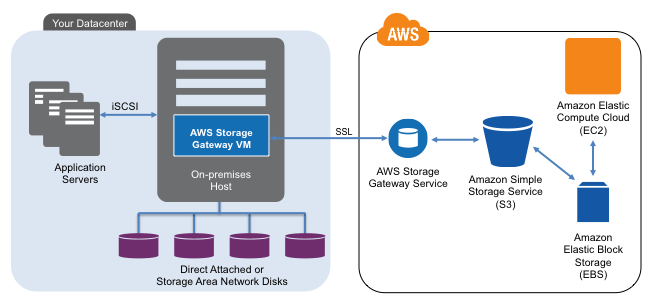
AWS Storage Gateway
Image courtesy of www.amazon.com

When deployed locally on a VM, the storage gateway communicates using the AWS API’s back to the S3 and EBS (depending on how configured) storage services. Locally, the storage gateway presents an iSCSI block access method for Windows or other servers to use.

There are two modes with one being Gateway-Stored and the other Gateway-Cached. Gateway-Stored uses your primary storage mapped to the storage gateway as primary storage and asynchronous (time delayed) snapshots (user defined) to S3 via EBS volumes. This is a handy way to have local storage for low latency access, yet use AWS for HA, BC and DR, along with a means for doing migration into or out of AWS. Gateway-cache mode places primary storage in AWS S3 with a local cached copy to reduce network overhead.

Storage I/O industry trends image

When I tried the gateway a month or so ago, using both modes, I was not able to view any of my data using standard S3 tools. For example if I looked in my S3 buckets the objects do not appear, something that AWS said had to do with where and how those buckets and objects are managed. Otoh, I was able to see EBS snapshots for the gateway-stored mode including using that as a means of moving data between local and AWS EC2 instances. Note that regardless of the AWS storage gateway mode, some local cache storage is needed, and likewise some EBS volumes will be needed depending on what mode is used.

When I used the gateway, a Windows Server mounted the iSCSI volume presented by the storage gateway and in turn served that to other systems as a shared folder. Thus while having block such as iSCSI is nice, a NAS (NFS or CIFS) presentation and access mode would also be useful. However more on the storage gateway in a future post. Also note that beyond the free trial period (you may have to pay for storage being used) for using the gateway, there are also fees for S3 and EBS storage volumes use.

AWS image via Amazon.com

What about Glacier?

Shortly after its release last year, I did this piece about Glacier and have since been doing some testing proof of concepts with it.

I like Glacier and its prospects for doing some various things, particular for inactive data including deep archives that will seldom if every be accessed, yet need to be retained. The business value proposition of Glacier is that it has a very high durability and low-cost assuming that you do not need to frequently access your data, and when you do, that you can wait 3 to 5 hours before retrieving it from your S3 buckets.

Access to Glacier is via API or AWS console so getting things into and out of it can be a challenge. For example I wanted to see if I could use AWS storage gateway to more easily bulk move things into Glacier via S3, however no luck, or at least today. Speaking of S3, by setting your policies you determine when objects get moved into Glacier as well as how long they will stay there, you can read more about Glacier here and via AWS here.

Storage I/O industry trends image

How much do these AWS services cost?

Fees vary depending on which region is selected, amount of space capacity, level or durability and availability, performance along with type of service. S3 pricing can be found here including a free trial tier along with optional fees. Other AWS fees for EC2 can be found here, EBS pricing here, Glacier here, and storage gateway costs are located here.

Note that there is a myth that cloud vendors have hidden fees which may be the case for some, however so far I have not seen that to be the case with AWS. However, as a consumer, designer or architect, doing your homework and looking at the above links among others you can be ready and understand the various fees and options. Hence like procuring traditional hardware, software or services, do your due diligence and be an informed shopper.

Amazon Web Services (AWS) image

Some more service cost notes include:

Note that with S3 Standard and RRS objects there is not a charge for deletion of objects, however there is a pro-rated charge per GByte of Glacier objects removed prior to 90 days. Glacier also allows up to 5% of your average monthly storage usage (pro-rated daily) to be restored with no charge, other fees apply for restoring larger amounts in a given period. Thus if you are planning on accessing and using data, analyze what your activity and usage will be as part of calculating your costs with Glacier. Read more about Glacier here.

Standard EBS volumes are changed by the amount of storage space capacity you provision in GB until released. For EBS snapshot copies there are fees for transferring data across regions, once moved, the rates of the new region apply for the snapshot.

Amazon Web Services (AWS) image

As with Standard volumes, volume storage for Provisioned IOPS volumes is charged by the amount you provision in GB per month. With Provisioned IOPS volumes, you are also charged by the amount you provision in IOPS pro-rated as a percentage of days you have it in use for the month.

Thus important for cloud storage planning to know not only your space requirements, also IOP’s, bandwidth, and level of availability as well as durability. so for Standard volumes, you will likely see a lower number of I/O requests on your bill than is seen by your application unless you sync all of your I/Os to disk. Thus pay attention to what your needs are in terms of availability (accessibility), durability (resiliency or survivability), space capacity, and performance.

Leverage AWS CloudWatch tools and API’s to monitoring that matter for timely insight and situational awareness into how EBS, EC2, S3, Glacier, Storage Gateway and other services are being used (or costing you). Also visit the AWS service health status dashboard to gain insight into how things are running to help gain confidence with cloud services and solutions.

Storage I/O industry trends image

When it comes to Cloud, Virtualization, Data and Storage Networking along with AWS among other services, tools and technologies including object storage, we are just scratching the surface here.

Hopefully this helps to fill in some gaps giving more information addressing questions, along with generating new ones to prepare for your journey with clouds. After all, don’t be scared of clouds. Be prepared, do your homework, identify your concerns and then address those to gain cloud confidence.

Additional reading and related items:

  • Cloud conversations: AWS EBS optimized instances
  • Cloud conversations: AWS EBS, Glacier and S3 overview (Part I)
  • Cloud conversations: AWS EBS, Glacier and S3 overview (Part II)
  • Cloud conversations: AWS Government Cloud (GovCloud)
  • Cloud conversations: Gaining cloud confidence from insights into AWS outages
  • AWS (Amazon) storage gateway, first, second and third impressions
  • Cloud conversations: Public, Private, Hybrid what about Community Clouds?
  • Amazon cloud storage options enhanced with Glacier
  • Amazon Web Services (AWS) and the NetFlix Fix?
  • Cloud conversation, Thanks Gartner for saying what has been said
  • Cloud and Virtual Data Storage Networking via Amazon.com
  • Seven Databases in Seven Weeks
  • www.objectstoragecenter.com
  • Ok, nuff said (for now).

    Cheers
    Gs

    Greg Schulz – Author Cloud and Virtual Data Storage Networking (CRC Press), The Green and Virtual Data Center (CRC Press) and Resilient Storage Networks (Elsevier)
    twitter @storageio

    All Comments, (C) and (TM) belong to their owners/posters, Other content (C) Copyright 2006-2026 Server StorageIO and UnlimitedIO LLC All Rights Reserved

    Cloud conversations: AWS EBS, Glacier and S3 overview (Part II S3)

    Storage I/O industry trends image

    Amazon Web Services (AWS) recently added EBS Optimized support for enhanced bandwidth EC2 instances (read more here). This industry trends and perspective cloud conversation is the second (looking at S3 object storage) in a three-part series companion to the AWS EBS optimized post found here. Part I is here (closer look at EBS) and part III is here (tying it all together).

    AWS image via Amazon.com

    For those not familiar, Simple Storage Services (S3), Glacier and Elastic Block Storage (EBS) are part of the AWS cloud storage portfolio of services. With S3, you specify a region where a bucket is created that will contain objects that can be written, read, listed and deleted. You can create multiple buckets in a region with unlimited number of objects ranging from 1 byte to 5 Tbytes in size per bucket. Each object has a unique, user or developer assigned access key. In addition to indicating which AWS region, S3 buckets and objects are provisioned using different levels of availability, durability, SLA’s and costs (view S3 SLA’s here).

    AWS S3 example image

    Cost will vary depending on the AWS region being used, along if Standard or Reduced Redundancy Storage (RSS) selected. Standard S3 storage is designed with 99.999999999% durability (how many copies exists) and 99.99% availability (how often can it be accessed) on an annual basis capable of two data centers becoming un-available.

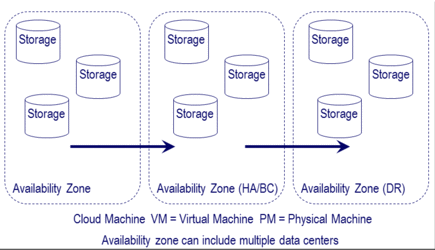
    As its name implies, for a lower fee and level of durability, S3 RRS has an annual durability of 99.999% and availability of 99.99% capable of a single data center loss. In the following figure durability is how many copies of data exist spread across different servers and storage systems in various data centers and availability zones.

    cloud storage and object storage across availability zone image

    What would you put in RRS vs. Standard S3 storage?

    Items that need some level of persistence that can be refreshed, recreated or restored from some other place or pool of storage such as thumbnails or static content or read caches. Other items would be those that you could tolerant some downtime while waiting for data to be restored, recovered or rebuilt from elsewhere in exchange for a lower cost.

    Different AWS regions can be chosen for regulatory compliance requirements, performance, SLA’s, cost and redundancy with authentication mechanisms including encryption (SSL and HTTPS) to make sure data is kept secure. Various rights and access can be assigned to objects including making them public or private. In addition to logical data protection (security, identity and access management (IAM), encryption, access control) policies also apply to determine level of durability and availability or accessibility of buckets and objects. Other attributes of buckets and objects include life-cycle management polices and logging of activity to the items. Also part of the objects are meta data containing information about the data being stored shown in a generic example below.

    Cloud storage and object storage spread across availability zones figure

    Access to objects is via standard REST and SOAP interfaces with an Application Programming Interface (API). For example default access is via HTTP along with a Bit Torrent interface with optional support via various gateways, appliances and software tools.

    Cloud storage and object storage IO figure
    Example cloud and object storage access

    The above figure via Cloud and Virtual Data Storage Networking (CRC Press) shows a generic example applicable to AWS services including S3 being accessed in different ways. For example I access my S3 buckets and objects via Jungle Disk (one of the tools I use for data protection) that can also access my Rackspace Cloudfiles data. In the following figure there are examples of some of my S3 buckets and objects used by different applications and tools that I have in various AWS regions.

    Image of AWS S3 usage
    AWS S3 buckets and objects in different regions

    Note that I sometimes use other AWS regions outside the US for testing purposes, for compliance purpose my production, business or personal data is only in the US regions.

    The following figure is a generic example of how cloud and object storage are accessed using different tools, hardware, software and API’s along with gateways. AWS is an example of what is shown in the following figure as a Cloud Service and S3, EBS or Glacier as cloud storage. Common example API commands are also shown which will vary by different vendors, products or solution definitions or implementations. While Amazon S3 API which is REST HTTP based has become an industry de facto standard, there are other API’s including CDMI (Cloud Data Management Interface) developed by SNIA which has gained ISO accreditation.

    Cloud storage and object storage I/O figure
    Cloud and object storage access example via Cloud and Virtual Data Storage Networking

    In addition to using Jungle Disk which manages my AWS keys and objects that it creates, I can also access my S3 objects via the AWS management console and web tools, also via third-party tools including Cyberduck.

    Cyberduck tool.

    Additional reading and related items:

    Cloud conversations: AWS EBS, Glacier and S3 overview (Part I)

    Storage I/O industry trends image

    Amazon Web Services (AWS) recently added EBS Optimized support for enhanced bandwidth EC2 instances (read more here). This industry trends and perspective cloud conversation is the first (looking at EBS) in a three-part series companion to the AWS EBS optimized post found here. Part II is here (closer look at S3) and part III is here (tying it all together).

    AWS image via Amazon.com

    For those not familiar, Simple Storage Services (S3), Glacier and Elastic Block Storage (EBS) are part of the AWS cloud storage portfolio of services. There are several other storage and data related service for little data database (SQL and NoSql based) other offerings include compute, data management, application and networking for different needs shown in the following image.

    AWS services console image
    AWS Services Console via www.amazon.com

    Simple Storage Service (S3) is commonly used in the context of cloud storage and object storage accessed via its S3 API. S3 can be used externally from outside AWS as well as within or via other AWS services. For example with Elastic Cloud Compute (EC2) including via the Amazon Storage Gateway (read more here and about EC2 here). Glacier is the AWS cold or deep storage service for inactive data and is a companion to S3 that you can read more about here.

    S3 is well suited for both big and little data repositories of objects ranging from backup to archive to active video images and much more. In fact if you are using some of the different AaaS or SaaS services including backup or file and video sharing, those may be using S3 as its back-end storage repository. For example NetFlix leverages various AWS capabilities as part of its data and applications infrastructure (read more here).

    AWS basics

    AWS consists of multiple regions that contain multiple availability zones where data and applications are supported from.

    yyyy

    Note that objects stored in a region never leave that region, such as data stored in the EU west never leave Ireland, or data in the US East never leaves Virginia.

    AWS does support the ability for user controlled movement of data between regions for business continuance (BC), high availability (HA) and disaster recovery (DR). Read more here at the AWS Security and Compliance site and in this AWS white paper.

    What about EBS?

    That brings us to Elastic Block Storage (EBS) that is used by EC2 (read more about EC2 and instances here) as storage for cloud and virtual machines or compute instances. In addition to using S3 as a persistent backing store or target for holding snapshots EBS can be thought of as primary storage. You can provision and allocate EBS volumes in the different data centers of the various AWS availability zones. As part of allocating your EBS volume you indicate the type (standard) or provisioned IOP’s or the new EBS Optimized volumes. EBS Optimized volumes enables instances that support the feature to have better IO performance to storage.

    The following image shows an EC2 instance with EBS volumes (standard and provisioned IOPS’s) along with S3 volumes and snapshots. In the following example the instance and volumes are being served via the AWS US East region (Northern Virginia) using availability zone US East 1a. In addition, EBS optimized volumes are shown being used in the example to increase bandwidth or throughput performance between storage and the compute instance.

    xxxxxxx

    Using the above as a basis, you can build on that to leverage multiple availability zones or regions for HA, BC and DR combined with application, network load balancing and other capabilities. Note that EBS volumes are protected for durability by being spread across different servers and storage in an availability zone. Additional protection is provided by using snapshots combined with S3. Additional BC and DR or HA protection can be accomplished by replicating data across availability zones.

    SQL applications using cloud and object storage services

    The above is an example of tying various components and services together. For example using different AWS availability zones, instances, EBS, S3 and other tools including those from third parties. Here is a link to a free chapter download from Cloud and Virtual Data Storage Networking (CRC Press) pertaining to data protection, BC and DR (available at Amazon here and Kindle here). In addition here is an AWS white paper on using their services for BC, HA and DR.

    EBS volumes are created ranging in size from 1GByte to 1Tbyte in space capacity with multiple volumes being mapped or attached to an EC2 instances. EBS volumes appear as a virtual disk drive for block storage. From the EC2 instance and guest operating system you can mount, format and use the EBS volumes as any other block disk drive with your favorite tools and file systems. In addition to space capacity, EBS volumes are also provisioned with standard IO (e.g. disk based) performance or high performance Provisioned IOPS (e.g. SSD) for thousands of IOPS per instance. AWS states that a standard EBS volume should support about 100 IOP’s on average, with about 2,000 IOPS for a provisioned IOP volume. Need more than 2,000 IOPS, then the AWS recommendation is to use multiple IOP provisioned volumes with data spread across those. Following is an example of AWS EBS volumes seen via the EC2 management interface.

    Image of mapping AWS EBS to ECS instance
    AWS EC2 and EBS configuration status

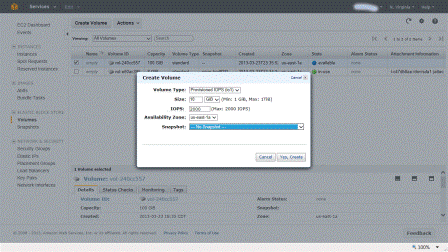
    Note that there is a 10 to 1 ratio of space capacity to IOP’s being provisioned. If you try to play a game of 1,000 IOPS provisioned on a 10GByte EBS volume to keep your costs down you are out of luck. Thus to get 1,000 IOPS’s you would need to allocate at least a 100GByte EBS volume of which you will be billed for the actual space used on a monthly pro-rated basis. The following is an example of provisioning an AWS EBS volume using provisioned IOPS in the US East region in the 1a availability zone.

    Image of AWS EBS provisioned IOPs
    Provisioning IOPS with EBS volume

    Standard and Provisioned IOPS EBS volumes

    Standard EBS volumes are good for boot images or other application usage that are not IO performance intensive. For database or other active applications where more performance is needed, then EBS Provisioned IOPS volumes are your option. Note that the provisioned IOP rate is persistent for the specific volume during its life. Thus if you set it and forget it including not using it without turning it off, you will be billed for provisioning it.

    Additional reading and related items:

  • Cloud conversations: AWS EBS optimized instances
  • Cloud conversations: AWS EBS, Glacier and S3 overview (Part II S3)
  • Cloud conversations: AWS EBS, Glacier and S3 overview (Part III)
  • Cloud conversations: AWS Government Cloud (GovCloud)
  • Cloud conversations: Gaining cloud confidence from insights into AWS outages
  • AWS (Amazon) storage gateway, first, second and third impressions
  • Cloud conversations: Public, Private, Hybrid what about Community Clouds?
  • Amazon cloud storage options enhanced with Glacier
  • Amazon Web Services (AWS) and the NetFlix Fix?
  • Cloud conversation, Thanks Gartner for saying what has been said
  • Cloud and Virtual Data Storage Networking via Amazon.com
  • Seven Databases in Seven Weeks
  • www.objectstoragecenter.com
  • Continue reading part II (closer look at S3) here and part III (tying it all together) here.

    Ok, nuff said (for now)

    Cheers
    Gs

    Greg Schulz – Author Cloud and Virtual Data Storage Networking (CRC Press), The Green and Virtual Data Center (CRC Press) and Resilient Storage Networks (Elsevier)
    twitter @storageio

    All Comments, (C) and (TM) belong to their owners/posters, Other content (C) Copyright 2006-2026 Server StorageIO and UnlimitedIO LLC All Rights Reserved

    Cloud conversations: AWS EBS Optimized Instances

    Storage I/O industry trends image

    Amazon Web Services (AWS) recently announced global availability of Elastic Block Storage (EBS) optimized support for four extra Elastic Cloud Computing (EC2) instance types. The support enables optimized performance between standard and provisioned IOP EBS volumes and EC2 instances to meet different bandwidth or throughput needs (learn more about AWS EBS, EC2, S3 and Glacier here).

    AWS image via Amazon.com

    The four EBS optimized instance types are m3.xlarge, m3.2xlarge, m2.2xlarge and c1.xlarge for dedicated bandwidth or throughput between the EC2 instances and EBS volumes. The performance or bandwidth ranges from 500 Mbits (500 / 8 = 62.5 MBytes) per second, to 1,000 Mbits (1,000 / 8 = 125MBytes) per second depending on the type of instance. As a refresher, EC2 instances (why by time you read this could change) vary in size and functionality with different amounts of EC2 Unit of Compute (ECU), number of virtual cores, amount of storage space included, 32 or 64 bit, storage and networking IO performance, and EBS Optimized or not. In addition to instances, different operating system images can be installed using those licensed from AWS such as various Windows and Unix or supply your own.

    Image of EC2 instance

    There are also different generations of instances such as M1 (first generation where one ECU = 1.0 to 1.2 Ghz of a 2007 era Opteron or Xeon processor), M3 (second generation with faster processors) along with Micro low-cost options. There are also other optimized instances including high or large amounts of memory, high CPU or compute processing, clustered compute, high memory clustered, clustered GPU (e.g. using Nivida Tesla GPUs), high IO and high storage space capacity needs.

    Here is the announcement from AWS:

    Dear Amazon Web Services Customer,

    We are delighted to announce the global availability of EBS-optimized support for four additional instance types: m3.xlarge, m3.2xlarge, m2.2xlarge, and c1.xlarge. EBS-optimized instances deliver dedicated throughput between Amazon EC2 and Amazon EBS, with options between 500 Megabits per second and 1,000 Megabits per second depending on the instance type used. The dedicated throughput minimizes contention between EBS I/O and other traffic from your Amazon EC2 instance, providing the best performance for your EBS volumes.

    EBS-optimized instances are designed for use with both Standard and Provisioned IOPS EBS volumes. Standard volumes deliver 100 IOPS on average with a best effort ability to burst to hundreds of IOPS, making them well-suited for workloads with moderate and bursty I/O needs. When attached to an EBS-optimized instance, Provisioned IOPS volumes are designed to consistently deliver up to 2000 IOPS from a single volume, making them ideal for I/O intensive workloads such as databases. You can attach multiple Amazon EBS volumes to a single instance and stripe your data across them for increased I/O and throughput performance.

    Amazon EBS-optimized support is now available for m3.xlarge, m3.2xlarge, m2.2xlarge, m2.4xlarge, m1.large, m1.xlarge, and c1.xlarge instance types, and is currently supported in the US-East (N. Virginia), US-West (N. California), US-West (Oregon), EU-West (Ireland), Asia Pacific (Singapore), Asia Pacific (Japan), Asia Pacific (Sydney), and South America (São Paulo) Regions.

    You can learn more by visiting the Amazon EC2 detail page.

    Sincerely,

    The Amazon EC2 Team

    What this means is that AWS is enabling customers to size their compute instances and storage volumes with more flexibility to meet different needs. For example, EC2 instances with various compute processing capabilities, amount of memory, network and storage I/O performance to volumes. In addition, storage volumes based on different space capacity size, standard or provisioned IOP’s, bandwidth or throughput performance between the instance and volume, along with data protection such as snapshots.

    This means that the cost per space capacity of an EBS volume varies based on which AWS availability zone it is in, standard (lower IOP performance) or provisioned IOP’s (faster), along with instance type. In other words, cloud storage is not just about the cost per GByte, it’s also about the cost for IOPS, bandwidth to use it, where it is located (e.g. with AWS which Availability Zone), type of service, level of availability and durability among other attributes.

    Additional reading and related items:

    Continue reading part I (closer look at EBS) here, part II (closer look at S3) here and part III (tying it all together) here.

    Ok, nuff said (for now)

    Cheers
    Gs

    Greg Schulz – Author Cloud and Virtual Data Storage Networking (CRC Press), The Green and Virtual Data Center (CRC Press) and Resilient Storage Networks (Elsevier)
    twitter @storageio

    All Comments, (C) and (TM) belong to their owners/posters, Other content (C) Copyright 2006-2026 Server StorageIO and UnlimitedIO LLC All Rights Reserved

    Open Data Center Alliance (ODCA) BMW Private Cloud Strategy

    Storage I/O cloud virtual and big data perspectives

    If your organization like StorageIO is a member of the Open Data Center Alliance (ODCA) you may be aware of the resources they make available about cloud, virtualization, security and more. Unlike so many other industry associates or trade groups dominated by vendors, the ODCA has an IT or customer focus including member developed best practices, strategies and templates.

    A good example is the recently released ODCA member BMW group private cloud strategy document.

    This 24 page document covers BMW groups private cloud strategy that sets stage for phased future hybrid. By being a phased approach, it seems that BMW is leveraging and transitioning for the future while maintaining support for their current environment (including Windows-based) as part of a paradigm shift. This is refreshing and good to see how organizations are looking to use cloud as part of a paradigm or IT service deliver model and not just as a new technology or platform focus.

    Topics covered include IaaS along with PaaS for DB, Web, SAP and CSaaS or Corporate Software as a Service based on the NIST cloud model. Also included are roles and integration of CMDB, ITSM, ITIL, orchestration in a business vs. technology driven model. Being business driven, that means there is a mission statement for the BMW cloud strategy, with objectives aligned to support organization enablement vs. using different tools, technologies or trends along with design criteria.

    What I like about the BMW strategy is that it is aligned to support the business as opposed to finding ways to use technology to support the business, or justify why a cloud is needed. In other words, something different from those needing for a technology, tool, product, standard or service to be adopted.

    Thus while having been a vendor, the ODCA customer focused angle appeals to me from when I was on that side of the table working in IT organizations. Otoh, for some of you reading through the BMW document might result in DejaVu from experiences of web-based, client-server, information utilities and other IT service delivery models or paradigms.

    Learn more at the ODCA newsroom

    If you have not done, check out and join the ODCA.

    Ok nuff said

    Cheers gs

    Greg Schulz – Author Cloud and Virtual Data Storage Networking (CRC Press), The Green and Virtual Data Center (CRC Press) and Resilient Storage Networks (Elsevier)
    twitter @storageio

    All Comments, (C) and (TM) belong to their owners/posters, Other content (C) Copyright 2006-2026 Server StorageIO and UnlimitedIO LLC All Rights Reserved

    Where has the FCoE hype and FUD gone? (with poll)

    Storage I/O cloud virtual and big data perspectives

    A couple of years ago I did this post about if Is FCoE Struggling to Gain Traction, or on a normal adoption course?

    Fast forward to today, has anybody else noticed that there seems to be less hype and fud on Fibre Channel (FC) over Ethernet (FCoE) than a year or two or three ago?

    Does this mean that FCoE as the fud or detractors were predicting is in fact stillborn with no adoption, no deployment and dead on arrival?

    Does this mean that FCoE as its proponents have said is still maturing, quietly finding adoption and deployment where it fits?

    Does this mean that FCoE like its predecessors Fibre Channel and Ethernet are still evolving, expanding from early adopter to a mature technology?

    Does this mean that FCoE is simply forgotten with software defined networking (SDN) having over-shadowed it?

    Does this mean that FCoE has finally lost out and that iSCSI has finally stepped up and living up to what it was hyped to do ten years ago?

    Does this mean that FC itself at either 8GFC or 16GFC is holding its own for now?

    Does this mean that InfiniBand is on the rebound?

    Does this mean that FCoE is simply not fun or interesting, or a shiny new technology with vendors not spending marketing money so thus people not talking, tweeting or blogging?

    Does this mean that those who were either proponents pitching it or detractors despising it have found other things to talk about from SDN to OpenFlow to IOV to Software Defined Storage (what ever, or who ever definition your subscribe to) to cloud, big or little data and the list goes on?

    I continue hear of or talk with customers organizations deploying FCoE in addition to iSCSI, FC, NAS and other means of accessing storage for cloud, virtual and physical environments.

    Likewise I see some vendor discussions occurring not to mention what gets picked up via google alerts.

    However in general, the rhetoric both pro and against, hype and FUD seems to have subsided, or at least for now.

    So what gives, what’s your take on FCoE hype and FUD?

    Cast your vote and see results here.


    Ok, nuff said

    Cheers gs

    Greg Schulz – Author Cloud and Virtual Data Storage Networking (CRC Press), The Green and Virtual Data Center (CRC Press) and Resilient Storage Networks (Elsevier)
    twitter @storageio

    All Comments, (C) and (TM) belong to their owners/posters, Other content (C) Copyright 2006-2026 Server StorageIO and UnlimitedIO LLC All Rights Reserved

    A Pivotal or cloudy moment for EMC and VMware?

    Storage I/O cloud virtual and big data perspectives

    EMC and VMware (who is majority owned by EMC) have announced a new joint initiative called Pivotal (read more here and here) as part of their software defined data center strategies and architecture.

    Image of EMC and VMware Pivotal PaaS cloud

    Is this a pivotal moment for both EMC and VMware signaling that they will be going head to head (via their new initiative based company) with Amazon Web Services (AWS), Microsoft Azure, HP Cloud services, Rackspace and a long list of others?

    Part of the answer to that question would be based on what is meant by going head to head, and which aspects of those services. For Cloud Platform as a Service (PaaS) along with big data analytics related I would say yes. In terms of other Cloud AaaS or SaaS or IaaS probably not as much so at this time.

    On the surface Pivotal appears to at least initially be more of a Platform as a Service (PaaS) play vs. Software as a Service (SaaS) or Application as a Service (AaaS) or Infrastructure as a Service (IaaS) play. Thus it will be interesting to see how Pivotal pivots and evolves into other directions beyond first cloud and big data applications development assistance.

    This will not be the first initiative or company jointly formed with VMware following on the heals of VCE that also includes Cisco and Intel as partners.

    Pivotal will be headed up by Paul Maritz who has been EMC Chief Strategist and formerly CEO of VMware as well as having spent time at Microsoft. EMC will have 69% ownership with VMware having the balance, it is estimated that about $400 Million US dollars will need to be invested.

    The new company or initiative is slated to launch on or about April 1, 2013 (April Fools day) with target 2013 revenues of about $300 Million. Projections are for an annual revenue of around $1 Billion in five years. That revenue will come from the existing assets and business being brought together along with probably some net new business. Doing some quick back of the napkin based math shows an average straight line growth of about 36% over five years.

    VMware intellectual property and assets contributed:
    Cloudfoundry
    Spring source
    Cetas

    EMC intellectual property and assets continued:
    Pivotal labs
    Greenplum big data solutions

    Thus is this a Pivotal move signaling the entry into new areas that could further disrupt and cloud that status of VMware and EMC as technology suppliers?

    Or this clear the clouds a bit to bring clarity to what EMC and VMware are doing along with leveraging various acquisitions?

    By clarity, this in theory should help place both EMC and VMware with their customer, partners and prospects as technology (along with associated services) supplier (what some refer to as arms merchants) vs. competing with those entities.

    Storage I/O cloud virtual and big data perspectives

    IMHO this is pivotal in that it helps to bring clarity for some of the different technologies and business that EMC and VMware has acquired. That clarity will help its own sales teams along with partners avoid creation of revenue prevention teams impacting sales of other solutions.

    Likewise there should be good synergy around the various tools, technology and offerings around big data, little data and application development with pivotal. That synergy is a combination of tools, technologies, development techniques. The combination of the tools and new techniques should enable customers to leverage new technologies in new ways, vs. trying to use and deploy in old ways.

    Btw, anybody notice Mozy or the lack of that mention keeping in mind that technology was brought back into the EMC backup group fold, while still being operated as a service. Also keep in mind that Mozy was bought by EMC and then transferred to VMware a couple of years ago.

    Ok, nuff said (for now).

    Cheers gs

    Greg Schulz – Author Cloud and Virtual Data Storage Networking (CRC Press), The Green and Virtual Data Center (CRC Press) and Resilient Storage Networks (Elsevier)
    twitter @storageio

    All Comments, (C) and (TM) belong to their owners/posters, Other content (C) Copyright 2006-2026 Server StorageIO and UnlimitedIO LLC All Rights Reserved

    Part II: XtremIO, XtremSW and XtremSF EMC flash ssd portfolio redefined

    Part one of this two-part post provided a summary of today’s EMC (@EMCflash) announcement around XtremIO and renaming VFCache to XtremSF and associated software as XtremSW.

    Storage I/O industry trends and perspectives

    Synopsis of announcement

    • Product rollout and selective availability of the new all flash SSD array XtremIO
    • Rename server-side PCIe ssd flash cards from VFCache to XtremSF
    • New XtremSF models including enhanced multi-level cell (eMLC) with larger capacities
    • Rename VFCache caching software to XtremSW (enables cache mode vs. target mode)

    Now lets take a closer look at what was announced along with what it means in terms of Industry Trends and Perspectives.

    XtremIO  has been in customer beta for some time and now those along with some other early customers are able to acquire the product. In addition, EMC is opening up XtremIO to more prospective customers (Directed Availability) who have requirements or needs that line up with the products target market capabilities.

    Storage I/O industry trends and perspectives

    What this means is that XtremIO is not being simply put out into the general product population for broad distribution. Instead, it is being put into a controlled release (Directed Availability) to help customers, partners and EMC sales decide where best to use it and thus risk revenue prevention in other areas. The criteria or target opportunity (at least initially) are little-data applications including OLTP, server virtualization (where aggregation can cause aggravation) along with virtual desktop or VDI. In other words, many of the traditional or legacy IOP focused SSD opportunities.

    In addition to XtremIO EMC has renamed their VFCache PCIe flash SSD cards (Launched February 2012) to XtremSF along with new models with both SLC and MLC nand flash. Also as part of today’s announcement EMC is renaming the cache software for XtremSF (e.g. VFCache) to be known as XtremSW. Now if that did not prompt the question of if you can now buy XtremSF as a target mode only card without the cache software the answer is yes.

    What is XtremIO?

    It is a new all flash SSD storage array. XtremIO is a Cluster, grid or collection of nodes called bricks with linear performance scaling providing block based all flash SSD storage. Data services consists of data footprint reduction (DFR) including inline global (across all nodes or bricks) dedupe on 4Kbyte chunks along with thin provisioning. Global dedupe is done on ingest using a combination of flash buffered meta-data (tables, index or dictionary) of what has been seen before along with multi-threaded software to leverage multi-core processors. Using the global dedupe at ingest; only new unique data is saved based on 4 Kbyte chunks.

    Performance per EMC scales from one single node to more second node or a fourth node. Note: architecturally more nodes can be added with EMC indicating added models will be available in the future.

    In addition to DFR, other data services including writable snapshots, and auto-load balancing when new bricks are added. Note that in a normal running XtremIO, data is automatically spread across the nodes for both performance and resiliency. Data only needs to be moved or load-balanced in the background when new bricks are added. Instant copy snapshots are supported along with writable snapshots. Currently replication is done via external EMC products such as VPLEX or RecoverPoint with statement of directions (SOD) for future enhancements.

    Additional attributes of XtremIO include:

    • Each node or brick (X-Brick) has up to 16 (16 was Gen 1 hardware platform, it is now 25 SSD drives)
    • All bricks are involved in IO and storage processing
    • Positioned by EMC as Software Defined (no proprietary hardware)
    • Four x 8Gb Fibre Channel (8GFC) and four x 10Gb Ethernet (iSCSI) per brick
    • Bricks communicate with each other via a separate interconnect network or fabric
    • Bricks have redundant processors (think of as controllers) with multiple sockets and cores
    • 4KB random read IOP’s scale from 250K (one brick), 500K (two bricks) and 1 Million (four bricks). For 4K random write IOPS, the numbers are 100K, 200K and 400K across one, two and four brick configurations with low latency and all data services running (EMC supplied numbers)

    In addition to 4K being a commonly used or referred to IO size, it is also the same size as the new industry standard Advanced Format (AF). Today the standard storage block, page or sector size is 512 bytes however AF moves that to a larger 4,096 bytes (e.g. 4KB) to closer align with larger IO sizes. Note that many HDD’s and some SSD’s today support AF and provide 512 byte emulation modes for compatibility.

    What is XtremSF?

    VFCache is renamed XtremSF with new models using eMLC as companion to existing SLC PCIe  cards and blade server mezzanine cards. EMC is emphasizing performance metrics that matter including IOPs that are relative to customer workloads such as 4K, 8K or larger with mix of reads and writes with low latency. In addition to IOPs with latency, size along with reads or writes for little data, EMC is also showing bandwidth or throughput numbers for big-data and big-bandwidth.

    Model
    Capacity
    Read Transfer GB/sec
    Write Transfer GB/sec
    Random 4K Read (IOPS)
    Random 4K Write (IOPS)

    Random 4K Mixed ( IOPS)

    Read latency (usec)
    Write latency (usec)
    2200 (eMLC)
    2.2 TB
    2.47
    1.1
    343K
    105K
    206K
    87us
    30us
    700 (SLC)
    700 GB
    2.9
    1.8
    712K
    197K
    411K
    50us
    13us
    550 (eMLC)
    550 GB
    1.36
    512 MB/s
    174K
    49K
    96K
    87us
    37us
    350 (SLC)
    350 GB
    2.9
    756 MB/s
    715K
    95K
    267K
    50us
    13us

    Sampling of SLC and eMLC XtremSF PCIe SSD cards performance characteristics (via EMC) including latency measured in microseconds). Note performance differences due to some cards being based on SLC and others on eMLC.

    Additional attributes, some new and some previously announced include:

    • 8X  PCIe bandwidth lanes for performance
    • No IO impact to applications during garbage collection
    • Supports multi-core processor workloads with parallel design
    • Low CPU overhead by off-loading functions to PCIe card
    • Half-height, half-length PCIe form factor
    • Wear-leveling for nand flash program/erase (P/E) cycle duration
    Other storage, server and systems vendors including Cisco, Dell, HP, IBM, NetApp and Oracle offer various PCIe nand flash SSD cards either as target, cache or mixed modes. Manufactures or suppliers of PCIe nand flash SSD cache and target cards include among others FusionIO, Intel, LSI, Micron , OCZ and Virident (who is partnered with Seagate).

    What is XtremSW?

    Server side flash software (not to be confused with FAST) for using XtremSF as a tier 0 (server-side) ssd cache or target. In target mode the XtremSF functions as a high performance persistent local dedicated direct attached storage (DAS) device. Cache mode enables frequently accessed data to be kept close to the applications off-loading underlying storage systems to be more effectively used. The XtremSW complements back-end storage systems for data protection and persistence along with investment protection of those assets.

    Storage I/O industry trends and perspectives

    What this all means

    SSD is in your future, question is where, when and with what.

    Why not just use SSD (DRAM and or nand flash) everywhere?

    Keep in mind that in the data center (traditional, virtual or cloud) everything is not the same. Thus the simple answer is that there is not enough of it available at a low enough price point (think closer to Hard Disk Drives (HDD) costs) to fit into customers budget. Sure SSDs provide better performance and productivity benefits, however while there is no such thing as a data or information recession, there are budget constraints.

    Another reason why SSD cant simply be used everywhere are physical (and logical) constraints such as amount of memory a server can directly access, or current DDR3 DIMMs (this could change with DDR4 according to Micron) can only address and work with DRAM, PCIe bus physical slot space, operating and hypervisor addressing limits among others.

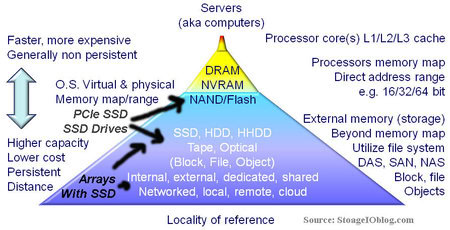
    If SSD (DRAM and or nand flash) were priced were priced low enough (e.g. much closer to HDDs) and available SSD including both DRAM and nand flash (SLC, MLC, eMLC, TLC, etc) along with emerging Phase Change Memory (PCM) are at the convergence of traditional memory and data storage. While some storage (or server) professionals may not agree, storage is an extension of memory and thus part of the traditional server and storage memory hierarchy shown below.

    Storage I/O and cache locality of reference

    This brings up the locality of reference topic also shown in the following figure where the best IO is the one that does not have to be done. The second best is the one that can be done closest to application to a given level of service. Locality of reference which is important for servers and storage systems including caching refers to how close frequently accessed data is to where it is needed. For some applications this means as much DRAM main memory in a server as possible either clustered, with battery backup or other data persistency protection including onboard HDD or SSD (e.g. towards the top of the hierarchy).

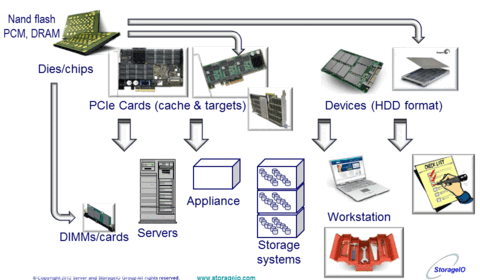
    nand flash SSD and storage I/O location options

    There are other applications where localized SSD (DRAM or nand flash) are a benefit to compliment main memory or as a persistent cache and target such as PCIe cards or SAS and SATA drives. Further down the stack and for housing larger amounts of storage with performance (reads or writes, random or sequential) along with data services is where all SSD and hybrid (mix of SSD and HDD) fit. Even further down the stack and for a broader segment is where cloud storage services based on SSD such as those from Rackspace (Cloud Block Storage with SSD) and Amazon (provisioned IOPS for EBS) have a play. Lets not forget about SSD in laptop, tablets and workstations, for example I have a Samsung model 830 in my Lenvo X1.

    Storage I/O industry trends and perspectives

    Some general industry trends include:

    • SSD is like real estate, location can matter, a little can go a long way
    • SSD media options include DRAM and nand flash (SLC, MLC, eMLC, TLC)
    • Portfolios broadening with different products for various needs
    • SSD functionality in servers, appliances, storage systems and cloud services
    • All flash SSD arrays have not killed off all traditional or hybrid storage arrays
    • Focus expanding from Just a Bunch Of SSD (JBOS) to enterprise like functionality
    • Software needs hardware, hardware needs software, the two work better together
    • Comparing meaningful metrics that matter vs. industry marketing metrics

    Related items about nand flash, SSD and metrics related themes:

    Storage I/O industry trends and perspectives

    Some additional thoughts and perspectives

    Does this mean traditional storage arrays are now dead?

    IMHO, no, there will be some cannibalization of existing storage systems by XtremIO within EMC customers or prospects if not managed, as well as via those from others. Keep in mind that recently EMC announced enhancements to their VMAX including entry-level options for service providers. Some new opportunities opened up will be where traditional all SSD (flash or dram) systems have historically had success.

    Traditional SSD and new dedicated SSD systems include Texas Memory Systems (TMS) bought by IBM in 2012, and the recently announced NetApp EF540 (and future FlashRay) along with startups Solidfire, Violin, Whiptail among others. There will be environments where XtremIO may take care of all storage needs for a customer or specific application or piece of it. Then there will be other situations where XtremIO will go-exist with EMC or other vendor’s storage solutions as part of a data infrastructure.

    Storage I/O industry trends and perspectives

    Who will EMC be competing against with XtremIO?

    Certainly the startups or smaller players such as Violin, Whiptail, Purestorage, Solidfire along with IBM/TMS and NetApp EF540 (eventually FlashRay as well) among others.

    There will also be some competition with other hybrid storage array vendors that have a mix of HDD and SSD. XtremIO will also compete in some situations on its own vs. other PCIe flash target and cache cards such as FusionIO, however for the most part those will up against XtremSF and XtremSW.

    Why the slow or “Directed Availability” rollout?

    Why not? By taking a controlled rollout selecting and qualifying customers for XtremIO, EMC gets to manage how the product goes out into production and control how it is used to increase chances of success. Unlike a startup that would be forced to try to put their new technology anywhere, EMC has the luxury of selecting where it goes, not to mention needing to avoid introducing a revenue prevention play for its other products.

    Overall, I give an Atta boy and Atta girl to the EMC crew for a Product Defined Announcement (PDA) extending their flash portfolio to complement their different customers and prospects various environment needs. Now watch EMC, NetApp and others step up their flash dance moves to see who will out flash the others in the eXtreme flash games, not to mention emerging software defined marketing moves (SDMM) ;) .

    Ok, nuff said.

    Cheers Gs

    Greg Schulz – Author Cloud and Virtual Data Storage Networking (CRC Press), The Green and Virtual Data Center (CRC Press) and Resilient Storage Networks (Elsevier)
    twitter @storageio

    All Comments, (C) and (TM) belong to their owners/posters, Other content (C) Copyright 2006-2026 Server StorageIO and UnlimitedIO LLC All Rights Reserved

    XtremIO, XtremSW and XtremSF EMC flash ssd portfolio redefined

    EMC (@EMCflash) today announced some new, enhanced, renamed and a rebrand flash solid-state device (SSD) storage portfolio around theme of XtremIO. XtremIO was the startup company with a new all flash SSD storage array that EMC announced they were buying in May 2012. Since that announcement, Project “X” has been used when referring to the product now known as XtremIO (e.g. all flash new storage array).

    Synopsis of announcement

    • Product rollout and selective availability of the new all flash SSD array XtremIO
    • Rename server-side PCIe ssd flash cards from VFCache to XtremSF
    • New XtremSF models including enhanced multi-level cell (eMLC) with larger capacities
    • Rename VFCache caching software to XtremSW (enables cache mode vs. target mode)

    What was previously announced:

    • Buying the company XtremeIO
    • Productizing  the new all flash array as part of Project “X”
    • It would formally announce the new product in 2013 (which is now)
    • VFCache and later enhancements during 2012.

    Storage I/O industry trends and perspectives

    Overall, I give an Atta boy and Atta girl to the EMC crew for a Product Defined Announcement (PDA) extending their flash portfolio to complement their different customers and prospects various environment needs. Now let us sit back and watch EMC, NetApp and others step up their flash dance moves to see who will out flash the others in the eXtreme flash games, including software defined storage, software defined data centers, software defined flash, and software defined cache.

    Related items about nand flash and metrics related themes:

    Read more about XtremIO, XtremSF, XtremSW and flash related items here in part II of this post.

    Ok, nuff said (for now).

    Cheers gs

    Greg Schulz – Author Cloud and Virtual Data Storage Networking (CRC Press), The Green and Virtual Data Center (CRC Press) and Resilient Storage Networks (Elsevier)
    twitter @storageio

    All Comments, (C) and (TM) belong to their owners/posters, Other content (C) Copyright 2006-2026 Server StorageIO and UnlimitedIO LLC All Rights Reserved

    February 2013 Server and StorageIO Update Newsletter

    StorageIO News Letter Image
    February 2013 News letter

    Welcome to the February 2013 edition of the StorageIO Update news letter including a new format and added content.

    You can get access to this news letter via various social media venues (some are shown below) in addition to StorageIO web sites and subscriptions.

    Click on the following links to view the February 2013 edition as (HTML sent via Email) version, or PDF versions.

    Visit the news letter page to view previous editions of the StorageIO Update.

    You can subscribe to the news letter by clicking here.

    Enjoy this edition of the StorageIO Update news letter, let me know your comments and feedback.

    Nuff said for now

    Cheers
    Gs

    Greg Schulz – Author Cloud and Virtual Data Storage Networking (CRC Press), The Green and Virtual Data Center (CRC Press) and Resilient Storage Networks (Elsevier)
    twitter @storageio

    All Comments, (C) and (TM) belong to their owners/posters, Other content (C) Copyright 2006-2026 Server StorageIO and UnlimitedIO LLC All Rights Reserved

    VMware buys virsto, is it about storage hypervisors?

    StorageIO Industry trends and perspectives image

    Yesterday VMware announced that it is acquiring the IO performance optimization and acceleration software vendor Virsto for an undisclosed amount.

    Some may know Virsto due to their latching and jumping onto the Storage Hypervisor bandwagon as part of storage virtualization and virtual storage. On the other hand, some may know Virsto for their software that plugs into server virtualization Hypervisor  such as VMware and Microsoft Hyper-V. Then there are all of those who either did not or still don’t know of Virsto or their solutions yet they need to learn about it.

    Unlike virtual storage arrays (VSAa), or virtual storage appliances, or storage virtualization software that aggregates storage, the Virsto software address the IO performance aggravation caused by aggregation.

    Keep in mind that the best IO is the IO that you do not have to do. The second best IO is the one that has the least impact and that is cost effective. A common approach, or preached best practice by some vendors server virtualization and virtual desktop infrastructures (VDI) that result in IO bottlenecks is to throw more SSD or HDD hardware at the problem.

    server virtualization aggregation causing aggravation

    Turns out that the problem with virtual machines (VMs) is not just aggregation (consolidation) causing aggravation, it’s also the mess of mixed applications and IO profiles. That is where IO optimization and acceleration tools come into play that are plugged into applications, file systems, operating systems, hypervisor’s or storage appliances.

    In the case of Virsto (read more about their solution here), their technology plugs into the hypervisor  (e.g. VMware vSphere/ESX or Hyper-V) to group and optimize IO operations.

    By using SSD as a persistent cache, tools such as Virsto can help make better use of underlying storage systems including HDD and SSD, while also removing the aggravation as a result of aggregation.

    What will be interesting to watch is to see if VMware continues to support other hypervisor’s such as Microsoft Hyper-V or close the technology to VMware only.

    It will also be interesting to see how VMware and their parent EMC can leverage Virsto technology to complement virtual SANs as well as VSAs and underlying hardware from VFcache to storage arrays with SSD and SSD appliances as opposed to compete with them.

    With the Virsto technology now part of VMware, hopefully there will be less time on talking about storage hypervisor’s and more around server IO optimization and enablement to create broader awareness for the technology.

    Congratulations to VMware (and EMC) along with Virsto.

    Ok, nuff said.

    Cheers gs

    Greg Schulz – Author Cloud and Virtual Data Storage Networking (CRC Press, 2011), The Green and Virtual Data Center (CRC Press, 2009), and Resilient Storage Networks (Elsevier, 2004)

    twitter @storageio

    All Comments, (C) and (TM) belong to their owners/posters, Other content (C) Copyright 2006-2026 Server StorageIO and UnlimitedIO LLC All Rights Reserved
    Cloud, virtualization, Storage I/O trends for 2013 and beyond

    StorageIO Industry trends and perspectives image

    It is still early in 2013, so I can make some cloud, virtualization, storage and IO related predictions, or more aptly, talk about some trends, in addition to those that I made in late 2012, looking forward and back. Common over-riding themes will continue to include convergence (people and technology), valueware, clouds (public, private, hybrid and community) among others.

    cloud virtualization storage I/O data center image

    Certainly, solid state drives (SSDs) will remain popular, both in terms of industry adoption, and industry deployment. Big-data (and little data) management tools and purpose-build storage systems or solutions continue to be popular, as are those for supporting little data applications. On the cloud storage front, there are many options for various use cases available. Watch for more emphasis on service-level agreements (SLA), service-level objectives (SLO), security, pricing transparency, and tiers of service.

    storage I/O rto rpo dcim image

    Cloud and object storage will continue to gain in awareness, functionality, and options from various providers in terms of products, solutions, and services. There will be a mix of large-scale solutions and smaller ones, with a mix of open-source and proprietary pieces. Some of these will be for archiving, some for backup or data protection. Others will be for big-data, high-performance computing, or cloud on a local or wide area basis, while others for general file sharing.

    Ceph object storage architecture example

    Along with cloud and object storage, watch for more options about how those products or services can be accessed using traditional NAS (NFS, CIFS, HDFS and others) along with block, such as iSCSI object API’s, including Amazon S3, REST, HTTP, JSON, XML, iOS and CDMI along with programmatic bindings.

    Data protection modernization, including backup/restore, high-availability, business continuity, disaster recovery, archiving, and related technologies for cloud, virtual, and traditional environments will remain popular themes.

    cloud and virtual data center image

    Expect more Fibre Channel over Ethernet for networking with your servers and storage, PCIe Gen 3 to move data in and out of servers, and Serial-attached SCSI (SAS) as a means of attaching storage to servers or as the back-end storage for larger storage systems and appliances. For those who like to look out over the horizon, keep an eye and ear open for more discussion around PCI gen 3 deployment and gen 4 definitions, not to mention DDR4 and nand flash moving close to the processors.

    With VMware buying Virsto, that should keep software defined marketing (SDM) and Storage hypervisors, storage virtualization, virtual storage, virtual storage arrays (VSA’s) active topic themes. Lets also keep in mind for storage space capacity optimization Data footprint reduction (DFR) including archiving, backup and data protection modernization, compression, consolidation, dedupe and data management.

    Ok, nuff said.

    Cheers gs

    Greg Schulz – Author Cloud and Virtual Data Storage Networking (CRC Press, 2011), The Green and Virtual Data Center (CRC Press, 2009), and Resilient Storage Networks (Elsevier, 2004)

    twitter @storageio

    All Comments, (C) and (TM) belong to their owners/posters, Other content (C) Copyright 2006-2026 Server StorageIO and UnlimitedIO LLC All Rights Reserved

    Cloud conversations: Public, Private, Hybrid and Community Clouds? (Part II)

    StorageIO Industry trends and perspectives image

    This is the second of a two part series, read part I here.

    Common community cloud conversation questions include among others:

    Who defines the standards for community clouds?
    The members or participants, or whoever they hire or get to volunteer to do it.

    Who pays for the community cloud?
    The members or participants do, think about a co-op or other resource sharing consortium with multi-tenant (shared) capabilities to isolate and keep members along with what they are doing separate.

    cloud image

    Who are community clouds for, when to use them?
    If you cannot justify a private cloud for yourself, or, if you need more resiliency than what can be provided by your site and you know of a peer, partner, member or other with common needs, those could be a fit. Another variation is you are in an industry or agency or district where pooling of resources, yet operating separate has advantages or already being done. These range from medical and healthcare to education along with various small medium businesses (SMBs) that do not want to or cannot use a public facility for various reasons.

    What technology is needed for building a community cloud?
    Similar to deploying a public or private cloud, you will need various hard products including servers, storage, networking, management software tools for provisioning, orchestration, show back or charge back, multi-tenancy, security and authentication, data protection (backup, bc, dr, ha) along with various middleware and applications.

    Storage I/O cloud building block image

    What are community clouds used for?
    Almost anything, granted there are limits and boundaries based tools, technologies, security and access controls among other constraints. Applications can range from big-data to little-data on all if not most points in between. On the other hand, if they are not safe or secure enough for your needs, then use a private cloud or whatever it is that you are currently using.

    What about community cloud security, privacy and compliance regulations?
    Those are topics and reasons why like-minded or affected groups might be able to leverage a community cloud. By being like-minded or affected groups, labs, schools, business, entities, agencies, districts, or other organizations that are under common mandates for security, compliance, privacy or other regulations can work together, yet keep their interests separate. What tools or techniques for achieving those goals and objectives would be dependent on those who offer services to those entities now?

    data centers, information factories and clouds

    Where can you get a community cloud?
    Look around using Google or your favorite search tool; also watch the comments section to see how long it takes someone to jump in to say how he or she can help. Also talk with solution providers, business partners and VARs. Note that they may not know the term or phrases per say, so here is what to tell them. Tell them that you would like to deploy a private cloud at some place that will then be used in a multi-tenant way to safely and securely support different members of your consortium.

    For those who have been around long enough, you can also just tell them that you want to do something like the co-op or consortium time-sharing type systems from past generations and they may know what you are looking for. If although they look at you with a blank deer in the head-light stare eyes glazed over, just tell them it’s a new lead-edge, software defined new and revolutionary (add some superlatives if you feel inclined) and then they might get excited.  If they still don’t know what to do or help you with, have them get in touch with me and I will explain it to them, or, I’ll put you in touch with those can help.

    data centers, information factories and clouds

    Where do you put a community cloud?
    You could deploy them in your own facility, other member’s locations or both for resiliency. You could also use a safe secure co-lo facility already being used for other purposes.

    Do community clouds have organizers?
    Perhaps, however they are probably more along the lines of a coordinator, administrator, manager, controller as opposed to a community organizer per say. In other words, do not confuse a community cloud with a cloud community organized, aligned and activated for some particular cause. On the other hand, maybe there is value prop for some cloud activist to be  organized and take up the cause for community clouds in your area of interest ;).

    data centers, information factories and clouds

    Are community clouds more of a concept vs. a product?
    If you have figured out that a community or peer cloud is nothing more than a different way of deploying, using and managing a combination of private, public and hybrid and putting a marketing name on them, congratulations, you are now thinking outside of the box, or outside of the usual cloud conversations.

    What about public cloud services for selected audiences such as Amazons GovCloud? On one hand, I guess you could call or think of that as a semi-private public cloud, or a semi-public private cloud, or if you like superlatives an uber gallistic hybrid community cloud.

    How you go about building, deploying and managing your community, coop, consortium, and agency, district or peer cloud will be how you leverage various hard and software products. The results of which will be your return on innovation (the new ROI) to address various needs and concerns or also known as valueware. Those results should be able to address or help close gaps and leverage clouds in general as a resource vs. simply as a tool, technology or technique.

    Ok, nuff said…

    Cheers gs

    Greg Schulz – Author Cloud and Virtual Data Storage Networking (CRC Press, 2011), The Green and Virtual Data Center (CRC Press, 2009), and Resilient Storage Networks (Elsevier, 2004)

    twitter @storageio

    All Comments, (C) and (TM) belong to their owners/posters, Other content (C) Copyright 2006-2026 Server StorageIO and UnlimitedIO LLC All Rights Reserved

    In the data center or information factory, not everything is the same

    StorageIO Industry trends and perspectives image

    Sometimes what should be understood, or that is common sense or that you think everybody should know needs to be stated. After all, there could be somebody who does not know what some assume as common sense or what others know for various reasons. At times, there is simply the need to restate or have a reminder of what should be known.
    Storage I/O data center image

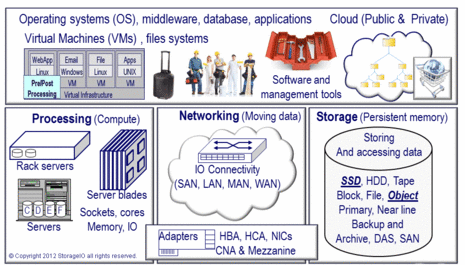
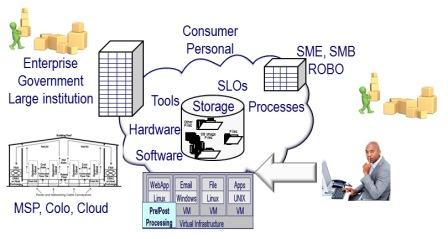
    Consequently, in the data center or information factory, either traditional, virtual, converged, private, hybrid or public cloud, everything is not the same. When I say not everything is the same, is that different applications with various service level objectives (SLO’s) and service level agreements (SLA’s). These are based on different characteristics from performance, availability, reliability, responsiveness, cost, security, privacy among others. Likewise, there are different size and types of organizations with various requirements from enterprise to SMB, ROBO and SOHO, business or government, education or research.

    Various levels of HA, BC and DR

    There are also different threat risks for various applications or information services within in an organization, or across different industry sectors. Thus various needs for meeting availability SLA’s, recovery time objectives (RTO’s) and recovery point objectives (RPO’s) for data protection ranging from backup/restore, to high-availability (HA), business continuance (BC), disaster recovery (DR) and archiving. Let us not forget about logical and physical security of information, assets and people, processes and intellectual property.

    Storage IO RTO and RPO image

    Some data centers or information factories are compute intensive while others are data centric, some are IO or activity intensive with a mix of compute and storage. On the other hand, some data centers such as a communications hub may be network centric with very little data sticking or being stored.

    SLA and SLO image

    Even within in a data center or information factory, various applications will have different profiles, protection requirements for big data and little data. There can also be a mix of old legacy applications and new systems developed in-house, purchased, open-source based or accessed as a service. The servers and storage may be software defined (a new buzzword that has already jumped the shark), virtualized or operated in a private, hybrid or community cloud if not using a public service.

    Here are some related posts tied to everything is not the same:
    Optimize Data Storage for Performance and Capacity
    Is SSD only for performance?
    Cloud conversations: Gaining cloud confidence from insights into AWS outages
    Data Center Infrastructure Management (DCIM) and IRM
    Saving Money with Green IT: Time To Invest In Information Factories
    Everything Is Not Equal in the Datacenter, Part 1
    Everything Is Not Equal in the Datacenter, Part 2
    Everything Is Not Equal in the Datacenter, Part 3

    Storage I/O data center image

    Thus, not all things are the same in the data center, or information factories, both those under traditional management paradigms, as well as those supporting public, private, hybrid or community clouds.

    Ok, nuff said.

    Cheers gs

    Greg Schulz – Author Cloud and Virtual Data Storage Networking (CRC Press, 2011), The Green and Virtual Data Center (CRC Press, 2009), and Resilient Storage Networks (Elsevier, 2004)

    twitter @storageio

    All Comments, (C) and (TM) belong to their owners/posters, Other content (C) Copyright 2006-2026 Server StorageIO and UnlimitedIO LLC All Rights Reserved